Educational Fusion: An Instructional,
Web-based, Software Development Platform
by
Brandon W. Porter
Submitted to the Department of Electrical Engineering and
Computer Science in Partial Fulfillment of the Requirements for
the Degrees of
BACHELOR OF SCIENCE IN COMPUTER SCIENCE AND ENGINEERING AND
MASTER OF ENGINEERING IN ELECTRICAL ENGINEERING AND COMPUTER SCIENCE
AT THE
MASSACHUSETTS INSTITUTE OF TECHNOLOGY
February 4, 1998
Copyright 1998. Brandon W. Porter. All rights reserved.
The author hereby grants to M.I.T. permission to reproduce and
distribute publicly paper and electronic copies of this thesis and to
grant others the right to do so.
Author
Department of Electrical Engineering and Computer Science
February 4, 1998
Certified bySeth Teller
Associate Professor of Colmputer Science and Engineering
S
TJ si tiperyisor
Ac
ltd
by
MASSACHU'U " F C "" '
jIJL 141998
Arthur C. rmth
Chairman, Department Committee on Graduate Theses
% - I
.c, .-. ,,
Educational Fusion: An Instructional, Web-based,
Software Development Platformby
Brandon W. Porter
Submitted to theDepartment of Electrical Engineering and Computer Science on February 4, 1998
In partial fulfillment of the requirements for the degrees of Bachelor of Science in Computer Science and Engineering and Master of
Engineering in Electrical Engineering and Computer Science
Abstract
Educational Fusion (eFuse) is an instructional, collaborative, Web-based, platform for
learning and teaching algorithmic concepts through implementation and verification. This
platform is designed to be available to anyone with a Java-enabled Web browser, to
encourage students and staff interaction and collaboration, to minimize the overhead
required for a student to address the essence of the learning experience, and to allow
students to implement, evaluate, and explore algorithmic concepts. Each algorithmic
concept is represented as a module. Students implement modules in Java, while the system
compares their implementation to a reference implementation. Modules can be
interconnected in a dynamic data-flow architecture to create larger systems.
eFuse is best viewed from three perspectives: that of the students, the teaching staff, and the
system developers.
From the students' perspective, eFuse is a rich collaborative
development environment that allows them to explore classic textbook algorithms and their
interaction as components of a larger system. Students can work within the bounds of an
algorithm, or they can extend existing modules within a dynamic data-flow system. The
system allows visual comparisons of a student's implementation with an internal reference
implementation, providing rapid feedback. From the teaching staffs perspective, eFuse is an
integrated environment in which they can: select and organize dynamic course content that
challenges students to solve problems, remotely and cooperatively assist students, manage
student accounts, and efficiently evaluate student work From the system developers'
perspective, eFuse is a client-server system which maintains user state, supports real-time
communications, and deliberately abstracts the system complexity from the students and the
teaching staff. At the same time, Educational Fusion is a run-time platform for creating
dynamic data-flow applications from simple modules written in Java.
Thesis Supervisor: Seth Teller
Title: Assistant Professor of Computer Science and Engineering, MIT Electrical Engineering
and Computer Science Department
Acknowledgements
First, I would like to gratefully acknowledge Professor Seth Teller's contributions to this work. His vision and guidance have inspired me to keep working at it, and pushed us to bring it to the students. His tremendous help in editing this document was invaluable. I also need to acknowledge Nate Boyd and Nick Tornow's contributions to this system. The foundation Nate developed for this system was terrific, and Nick's review of my plans for the data-flow architecture was extremely helpful.
MIT will always conjure fond memories of the special people I have met here. To my friends from MIT: thank you for keeping me sane during the long hours; for helping me fully exploring some of my strange ideas and letting me help explore yours. Virtual Toy Bricks, Distributed Java Virtual Machines, and numerous plans to conquer the Web are among my best memories at MIT.
Last, but certainly not least, I want to thank my family: my brother for reminding me that there are worthy intellectual aspirations outside the realm of science and engineering; and my parents for always being there and always encouraging me that MIT was all well worth it. It was.
Contents
1 Breaking Barriers in Traditional Educational Settings 7
1.1 Overview ... .. ... ... 8
1.2 M otivation ... ... 10
1.3 O b jectiv es ... ... 12
1.4 O utline ... ... 16
2 Related Work 17 2.1 Web-based Educational Tools... 17
2.2 Instructional Software Development Environments...19
2.3 Algorithm Visualization.. ... ... 19
2.4 D ata-flow System s... 22
2.5 Sum m ary ... 23
3 The Student Perspective 24 3.1 Computer Graphics...25
3.2 Seeing the Big Picture ... 27
3.3 Beauty in the Details: Learning by Doing ... ... 29
3.4 Collaboration Between Students ... ... 35
3.5 Interactions Between Students and Teaching Staff... ... 36
4 Teaching Staff Perspective 38 4.1 Administering the Course ... ... 39
5 The Developer's Perspective: System Implementation 42 5.1 Overall System Architecture ... 43
5.2 Im plem entation of User A ctions ... ... 45
5.3 Client-Side Data-Flow Implementation ... 48
5.4 Data-Flow in Practice: A Classical Polygon Rasterization Pipeline ... 55
6 Results: eFuse Trial in a Large Course 62 6.1 Selecting and Designing the Trial Assignments ... ... 62
6.2 Evaluating the Effectiveness of the Trail Run ... ... 63
7 Future Work 68 7.1 Student Environment ... ... 68
7.3 Development Directions ... 72
7.4 Module Development
...
...
... 75
8 Conclusion
76
Appendix A
78
Appendix B
82
Appendix C
87
Glossary
93
Bibliography
96
Chapter 1
Breaking Barriers in Traditional
Educational Settings
Traditionally, instructional software development environments incur an up-front time
penalty before a student can begin solving the problem. These time penalties include getting
the assignment loaded into the environment, and learning the sometimes arcane build,
execute, debug cycle for the environment. Often these traditional environments require
special computing resources that may be scarce and do not take advantage of the
collaborative possibilities of a networked environment. Today, Web-based educational tools
offer rich visualization environments, collaborative tools, and the opportunity for distributed
learning, yet lack the functionality to meaningfully challenge students to solve complicated
problems.
We set out to design a system that improves upon traditional software development
environments while extending Web-based educational systems to support true problem
solving. The Educational Fusion system for creative, collaborative pedagogy, or eFuse, is
the result. eFuse combines a rich, extensible set of course material and the collaborative
capabilities of a networked environment with a user-customizable, persistent,
location-independent instructional algorithm development environment. This environment allows
students to begin solving algorithmic problems quickly and easily build larger solutions based
on these algorithmic components while collaborating with classmates and interacting with teaching staff.
This chapter provides an overview of the system, describes our motivation, and lists the specific objectives we set out to achieve.
1.1
Overview
eFuse is a Web-based environment for collaborative pedagogy that excels as an instrument for teaching algorithmic concepts. The teaching staff maps concepts from the course into algorithmic modules. Students are challenged to solve the implicit problem presented by the algorithm. For instance, one problem might be how to efficiently select the discrete pixels that comprise a line between two endpoints on a two-dimensional grid. Students or teaching staff members can connect algorithmic modules to create larger systems by linking modules in a data-flow architecture.
1.1.1 The Student Perspective
The eFuse system incorporates a number of concepts designed to help students learn the material with less overhead and more engaged learning. The course material is graphically represented by a collection of modules which can be interconnected or organized hierarchically in the overall concept graph, helping students to "see the big picture". Students "learn by doing", either by being asked to interactively solve the problem visually by hand, or by implementing the algorithm in code. Implementing algorithms involves traditional textbook rigor, but the ability to combine modules, extend them, and create new ones allows for creative expression. Collaboration is encouraged and facilitated. Each student and staff member using eFuse is represented with a graphical icon, or avatar, displayed in the concept graph space. Archived text-based instant messaging facilitates discussion and retrieval of discussion history.
1.1.2 The Teaching Staff Perspective
eFuse includes features useful to the teaching staff. These include simple Web-based student account creation capability, and semi-automated Web-based grading. Test modules can easily be developed which link to the student's module to validate the outputs. The system provides staff with the same messaging functionality that is available to students, but also allows the staff to open a stared view with a student. The teaching staff can open up any current or past instance of a student's work and view the content, allowing the staff to help a student understand the concepts in real-time. The teaching staff can also design input
suites to automatically test a student's implementation on a full range of possible inputs.
1.1.3 The Developer Perspective
From a system developer's standpoint eFuse is technically sophisticated system that differs in many ways from traditional instructional software and development environments. First, eFuse encourages a template for instructional modules. This template includes four recommended modes for each module:
* Manualmode asks students to interactively implement a module.
* Reference mode provides a visualization of the algorithm, while hiding the implementation. * Implementation mode allows a student to implement the algorithm and view its execution. * Dfference mode compares the trace of execution of the reference mode with that of the
implementation mode and visually portrays any inconsistencies.
Second, eFuse automates many of the traditional processes in software development by abstracting the process of editing, compilation, revision control, and execution to a single action. In addition, eFuse maintains a complete state of the users session on the server, which can be retrieved by that student from any Java-enabled Web-browser.
Third, the system supports dynamically linking modules into a data-flow system. Each module is an individual data-flow component with defined inputs and outputs. Each module
inherently handles the multithreaded, asynchronous nature of the data-flow actions arriving from input ports and leaving from output ports.
1.1.4 Results
eFuse was first used in the Fall 1997 Introductory Computer Graphics course at MIT. Initial results were very encouraging. Administration was relatively simple, and students expressed
a high rate of learning in relatively short time.
1.2 Motivation
This work was motivated by a number of observations about the methods of teaching today and the most effective means of learning. Professor Teller stated this clearly in his NSF Career Development Plan:
This proposal addresses the potential for collaborative interactive techniques to improve pedagogy at the undergraduate, graduate, and professional levels, and performance evaluation at the undergraduate level. As increasing amount of technical data and simulations come 'on-line,' and university courses begin to follow suit, we must fulfill the educators' roles of selecting, organizing, and presenting this material to the student. [Tel94]
In developing eFuse we noted the following specific changes in the instructional environment: more powerful computers and high-bandwidth networks are increasingly available to students often in their own rooms, remote education is increasing, and student/staff ratios are decreasing. We also noted the following limitations of existing systems: distributed content generally offers only limited passive interaction; current software learning environments are often highly customized to a particular environment, and difficult to translate; and current software development platforms require high initialization overhead for students.
An increase in the power of standard personal computers and the availability of high-bandwidth networking in the classroom, faculty offices, and student rooms reduces the need
for special-purpose hardware. For instance, MIT's introductory computer science class (6.001) has used HP 9000 terminals for assignments in Scheme. When originally deployed, these were the some of the fastest workstations available. Today many students have computers in their dorm rooms which are able to perform at the same level or better than these machines. Students and faculty also have access to high-bandwidth networks. These networks offer the opportunity for decentralized, location-independent access to courseware, course material, and user-specific data. At the same time, a single special-purpose machine can be used as a server for computationally expensive tasks such as compilation.
MIT has led the way in using this technology for location independent access to data with the development of Project Athena [Sa188] and the use of the Andrew File System (AFS) [Mor86] for the computers on campus. The Java runtime environment [Gos+95] allows anyone with a Web browser to access and run applications which are transparently distributed from a server. New revisions can be centrally posted to the server and are automatically received by the students the next time they request the application. At present, many students are not able to access this data effectively with personal computers which do not run the UNIX operating system. Java-enabled Web browsers are, however, available on almost all platforms.
Writing an interactive visualization which allows students to interact with a concept is difficult. Extending that visualization to allow greater interactivity, or even challenge the student to implement or extend the concept requires much more effort. Often a completely new visualization must be written for each concept. To the best of our knowledge, no standard template for creating Web-based visualizations existed before eFuse.
Finally, challenging a student to implement a concept often requires that the student learn the development environment. Determining how to compile, execute, and submit the result for grading often requires "debugging the environment". Students express a great deal of
frustration at this overhead, which usually relates little to the concept at hand. Thus assignments are generally large so that the percentage of "mindless grunge" is low compared to the percentage of "challenging work".
These observations motivated our design for eFuse.
1.3
Objectives
In designing eFuse we set out to create the ideal platform for collaborative interactive pedagogy. We were not explicitly motivated to design a system for distance learning, as many efforts recently have been. Distributed learning is only one of many features that we felt would improve the learning process. In this section, we will describe nine objectives that have guided the development of the system.
1.3.1 A Programming Laboratory with Intuitive Visualization of Course Material
Intuitive visualizations help students better understand material by providing a visual representation to complement text- or lecture-style descriptions. Creating a system that easily permits and encourages developers to create these visualizations for each module was a primary objective. The overall idea is that each concept is represented by a module which contains a visualization of that concept.
The environment should feel like a programming laboratory. All the tools to complete the assignment should be readily available and intuitive to the students. The components that the students are examining and implementing should be readily apparent. eFuse accomplishes this by creating a visual representation of the components the students are implementing and, in most cases, seamlessly providing all the tools necessary to build, execute, and evaluate that component.
1.3.2
Location-independent Access
Especially in today's residential educational communities, students often split their time between classes, research pursuits, and residential living. Increasingly, all of these environments are networked. Students and teaching staff should be able to access the resources of eFuse from anywhere. As distance learning becomes more common, location independent access to course material and assignments will permit greater flexibility. Students will be able to travel abroad for part of the semester and still keep up with assignments. Professors with busy travel schedules will still be able to help students and resolve issues in the class remotely. Guest experts from other educational institutions or industry will able to access the system and provide feedback.
1.3.3 Transparent Compilation, Execution, Visualization, and Validation
The objective of most courses is to teach the concepts of the course, not the arcana of a development environment. eFuse was designed with the explicit objective to make compilation, execution, visualization, and validation of a student's implementation simple. A single click of a button is all that is needed to compile, execute, and visually validate an algorithm implementation.
1.3.4 Effective Collaboration
Collaboration occurs throughout society. With increasing lecture sizes, but a continued emphasis on individual performance, developing the skills to learn effectively from others is difficult. Collaborating in a moderated forum helps students to resolve confusion while still learning the material. Fellow students have a unique perspective on the material at hand and are often able to quickly help peers resolve confusion. MIT's Zephyr system [Coh94] allows for collaborative messaging and is effectively used by students in a diversity of courses to help each other. To enable effective collaboration, eFuse provides a graphical representation
of all the students and staff currently using the system and allows text-based real-time communication along with a shared virtual white-board.
1.3.5 Easy Access to Student Work
Because development environments are relatively complicated to set up, quickly viewing, testing, and evaluating a student's implementation is generally difficult with current systems. The best solution is often for a member of the teaching staff to look over a student's shoulder, suggest possible changes and wait as the student implements and tests those changes. This is horribly inefficient, often leading to long queues of students requesting help. In a distributed context, this becomes even more difficult. Loading in the current instance of a student's implementation requires transferring a large number of files and configuring the environment to display those changes, presuming the teaching staff has the same resources that the student has. eFuse allows teaching staff to very easily load, view, change, debug, and comment on a student's implementation from any Java-enabled Web browser.
1.3.6 Students Both Work within the Bounds of the Course and Creatively Explore
Students learn best when they are actively engaged in the material. The advantage of asking students to implement algorithms is that there is a close and relatively fine-grain mapping between algorithms and concepts in a course. At the same time, if students are merely asked to implement what can be found directly in the book, the task will quickly become rote. eFuse attempts to balance the implementation of algorithms that helps students gain solid understanding of the material, with the opportunity for creative expression. Students can take their modules and link them into a larger system. Modules can be extended or added to the system easily and dynamically. This allows the course staff to challenge students who find the algorithm straight-forward to creatively extend the assignment.
1.3.7 Centralized Administration of Mutable Persistent System Resources
Student lists, assignment notes, and assignment implementations are examples of mutable system resources. Email and the Web have made it much easier for the teaching staff to centrally administer and update student lists and assignment notes. Assignment implementations are much more difficult to change. Often, due to unforeseen bugs in an assignment, the teaching staff must distribute new files to the students, who must incorporate those changed files into the system. Again, eFuse is designed to make it easy to change those elements of the assignment that the student need not modify, while combining these with simple administration of assignment notes.
1.3.8 Instructors Can Select the Appropriate Course Material
We noted in Section 1.2 that, especially as access to information becomes easier, the educators' role in selecting, organizing, and presenting material becomes even more critical. For instance, the instructor of an introductory computer graphics course may decide to emphasize techniques for geometry culling over how lighting and shading occurs. At the same time, the instructor would like to have a completely instantiated rendering pipeline so that students can see how all the components fit together. With eFuse, the instructor can use an entire pipeline, perhaps one already implemented by a previous instructor, and select those algorithms that students should implement as course assignments. The other algorithms could be left as exercises to the students, or could remain as purely functional reference components in the system.
1.3.9 Platform Independent on Both the Server- and Client-side
Students and teaching staff should not need to access special or particular computing resources to run either the client or the server system. While implementing eFuse, we chose technologies that were available on many platforms. On the client side, Java and HTML are
uniquely suited to this task. Any platform which has a Java-enabled Web browser can run
the eFuse client.
Similarly on the server side, eFuse works with many Web servers and all added capabilities
have been coded either in Perl or Java. This allows educators to run the system on whatever
hardware is available. Data files are generally stored in ASCII format and thus will work
regardless of machine byte ordering. For that data which is best stored in binary format, we
created our own standardized byte serialization libraries[Boy97].
1.4 Outline
The remaining chapters of this thesis will first focus on related work in the field. Next, we will discuss the system from three perspectives. The first is that of the students, where we will give an example of how the system would be used in an introductory computer graphics course. The second perspective is that of the teaching staff, where we will discuss administration of the system. The third perspective is that of the system developers, where we will discuss the implementation details of the system components, paying particular attention to the architecture of the data-flow environment. We will then discuss the results from our first experience using the system in a larger course. Finally, we will discuss future work and our conclusions.
Many of the eFuse system functions are the designed to be the same for students, teaching staff, and developers. Throughout this document, we generically refer to anyone working in eFuse as a "user". For those cases where the system behaves in a manner specific to the type of user, we explicitly state whether the user is a student, teaching staff member, or system developer.
Chapter 2
Related Work
eFuse is a Web-based educational tool, an instructional software development environment,
an algorithm visualization environment, and an architecture for authoring data-flow systems.
Researchers have developed Web-based educational tools, such as WebCT, that are, at one
level, related to eFuse [Gol+96]. Instructional software development environments are less
common, though the Jscheme environment shares our vision by allowing students to
implement assignments in a subset of the Scheme language from any Java-enabled Web
browser [Hic97].
Algorithm visualization environments and toolkits, such as the Zeus
system [Bro91] and Brown University's Interactive Illustrations [Do197][Try97], have been an
active area of research. Finally, data-flow systems such as SGI's ConMan [Hae88] and IBM's
Data Explorer [IBM98], have been developed to simplify complex system design. eFuse is
unique because it combines elements of all of these diverse systems into a single system for
collaborative pedagogy.
2.1 Web-based Educational Tools
For an in-depth discussion of related tools, please refer to Chapter 2 of Nathan Boyd's thesis
entitled A Plaform for Distributed Learning and Algorithmic Concepts [Boy97].
We will discuss
the important features of these systems, and their limitations.
2.1.1
WebCT
WebCT is a system that allows teaching staff to easily design and administer course content
on the Web [Gol+96]. WebCT provides extensive tools for both the teaching staff and
students. These tools include chat spaces, course content that is easy to create and modify,
and databases of multiple-choice questions for students which can be automatically
evaluated. WebCT also has the capability to track students through the system. WebCT has
gone further toward simplifying administration of course material than eFuse; however, the
system does not include the ability for students to perform true problem-solving. The
multiple-choice question format for student evaluation has limitations.
2.1.2
Hamlet
The Hamlet project seems to provide tutorial-style courseware for introductory computer
science courses while researching new ways to deliver content [Zac+97]. This work is
similar to eFuse in its focus on engineering and computer science topics.
The Hamlet
project, however, relies greatly on the external Hamlet viewer. For some content, the
Hamlet client must be installed on the local computer so that tutorials can be installed and
maintained on the student's local computing platform. One important advantage of this is
that the Hamlet system can easily link to commercially available software packages such as
Maple or Matlab for instructional work. eFuse takes a different approach by maintaining the
current student's state information on the server. eFuse also does not require any special
client software beyond a Java-enabled Web browser. eFuse, however, does not have the
ability to easily interact with existing commercial software on the client-side due to the
limitations of the Java security model, which does not allow Java applets to access to
client-side resources such as files and custom applications. Files must be read from the Web server
that served the applet.. Custom applications, such as compilers, must reside on the server
and are executed by network calls from the client.
2.2 Instructional Software Development Environments
The area of instructional and collaborative software development environments is largely an
open field. Software development environments used for instruction are often standard
software development environments occasionally modified to support added features. We
are not aware of software development environments which display information about
which assignments students are solving in real time. No software development environment
of which we are aware allows teaching staff to easily and remotely load, view, execute,
debug, and comment on students' code. This is a major limitation which makes it especially
difficult to help students understand implementation intricacies.
The Jscheme project [Hic97] has created a simple interface for executing programs written in
a subset of the Scheme programming language. Jscheme code can be executed by typing
code in a Java applet and pressing "Evaluate". This simple environment has the advantage
that students can work on Scheme code from any location with a Java-enabled Web
browser.
Much of the Scheme functionality has been incorporated, and additional
functionality for creating windows and drawing in them is available to students. The
Jscheme
applet is especially applicable to teaching introductory computer science courses in
which the Scheme language is commonly used. However, Jscheme does little to create a
collaborative, persistent environment, nor does it appear to include the administrative
capabilities and system-building opportunities included in eFuse.
2.3 Algorithm Visualization
Algorithm visualization has been and continues to be an active area of research. Some of
the earliest and most influential work originated with Marc Brown's work on the Brown
ALgorithmic Simulator and Animator (BALSA) system[Bro+84] at Brown University and
later the Zeus system at Digital's Systems Research Center [Bro91].
2.3.1 Brown Algorithmic Simulator and Animator
BALSA was developed in 1984 to animate algorithms interactively on special-purpose,
networked, graphical workstations. In order to animate an algorithm, the algorithm designer
augments an implementation of an algorithm with event signals which provide information
to the animation routine, causing a display update. This work was especially compelling
because students could step through an algorithm and watch the animation change as each
line of an algorithm was executed, instead of merely playing back an pre-recorded animation.
This work also illustrated that these animations were successful in helping students
understand the material.
2.3.2
Zeus
Zeus continued the ideas set forth in the BALSA project, but extended them to take
advantage of strong-typing and parallelism. Again, algorithms were augmented with event
signals. Libraries were developed to allow for more advanced animations including color,
sound, and later 3D graphics.
2.3.3
Interactive Illustrations in the Exploratory Project
Recently, Brown University has been working on the Exploratory project [BGG98]. One
component of this project is to develop a toolkit for creating Interactive Illustrations [Try97] in
Java which might, for example, augment the text and illustrations in an electronic book.
None of these systems, however, attempts to automatically animate an algorithm created by
a student; instead student are allowed only to view the results of a "reference" algorithm
implemented and augmented with event signals by an expert.
2.3.4
Student-Generated Animations with SAMBA
At the University of Georgia, students have animated their own algorithms by adding simple
annotations to their own algorithms and then piping them through the SAMBA [Sta96]
front-end to the POLKA [Sta92] algorithm animation system. Students expressed a high degree of learning and enjoyment in being able to animate their algorithm at work.
2.3.5 eFuse Improvements
eFuse incorporates two new ideas to the topic of algorithmic animation and visualization for instruction.
First, eFuse includes a manual mode in which students attempt to manually solve the implicit problem that the algorithm attempts to solve - for instance, how to sort objects from smallest to largest. This manual interaction helps students understand the problem that the algorithm solves through a quick hands-on, highly interactive experience.
Second, none of these systems considers the case of automatically animating the difference between a correct and incorrect implementation of the same algorithm. We believe the benefits of animating an algorithm have been proven. Allowing students to be able to easily visualize their own implementation is especially important, but should not require students to learn an annotation language. Fundamentally, algorithms reduce to primitive actions (i.e. "SetPixel" in Bresenham's algorithm, and "Swap" in a sort routine). In eFuse, the module
designer abstracts those base calls into methods which the student must call. Those methods
perform the algorithm operation, while also signaling the animation and storing a trace of the algorithm for difference comparisons.
The manual mode and difference mode are particularly unique to the eFuse system. Developing effective manual interactions with the algorithm, and visual comparison's between correct and incorrect implementations is difficult. The effort on the part of the module designer is justified because the difference comparison can greatly aid a students in understanding tricky aspects of an algorithm, such as boundary cases, while helping verify the results of the student's implementation.
2.4 Data-flow Systems
ConMan was one of the first systems to support the creation of dynamic data-flow systems graphically [Hae88]. Components could be dynamically interconnected by graphically linking the output of one component with the input of another component. This system allowed users to develop complex graphics applications easily from interactive components, but the paper describing the system does not describe how difficult it is to build these components. Data flow components have the natural advantage of being highly modular. The limitation is that global state information does not exist. Consequently, any information needed by more that one component must be either passed along the entire chain of components or fed into each and every module that requires it.
IBM's commercial Data Explorer also implements a visual data-flow system [IBM98]. Modules have been developed to make complex data analysis easier by graphically linking elements in a data flow. Modules are developed by creating a module description file which describes the inputs and outputs of the module. The user then creates an associated C function which accepts a pointer to an array of inputs and a pointer to an array of outputs. Data Explorer inputs and outputs are not statically typed. Instead, the modules must cast all inputs to an internally meaningful type. Modules are not allowed to maintain state information, as results are cached. Modules also can not return results as they are generated [IBM97]. Instead, there is a one-to-one mapping between a set of inputs and a set of outputs.
eFuse is specifically designed to make module creation extremely simple, while also providing the intuitive interface that a data-flow application builder allows. Modules are created by simply specifying the input types and output types in a dialog box. Explicit use of design
patterns allows automatic code generation of eFuse modules. Module inputs and outputs are
typed, allowing run-time type checking before a link is instantiated without relying on "meta-data".
An eFuse module can send output to the next module throughout the course of its execution. For instance, the Bresenham line-draw algorithm can send the first pixel object as an output while the next is being calculated. This allows the system to support different levels of data granularity without blocking. eFuse relies on the Java threading model to keep modules running in parallel. Thus, if the Java threading implementation supports multiple processors, then modules can automatically take advantage of them.
2.5 Summary
All of these systems share properties with eFuse. In certain aspects, these systems offer more than eFuse, and in other ways eFuse is an improvement. The fundamental difference, however, is that eFuse combines the best of each of these. eFuse is a Web-based educational tool, an instructional software development platform, an algorithm visualization workspace, and a data-flow system combined to create a complete platform for collaborative pedagogy.
Chapter 3
The Student Perspective
This section introduces the system by describing how students might use eFuse in a
Computer Graphics course.
At the same time, it will introduce the reader to the
components of eFuse, and illustrate how each maps into our overall vision. This section will
largely avoid implementation details.
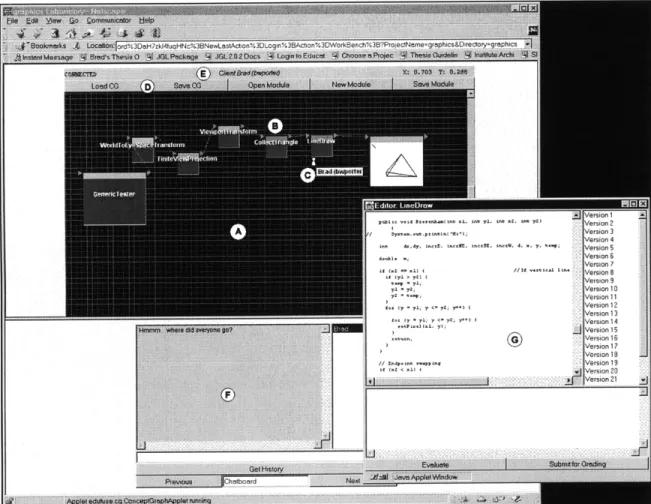
A screen-captured image of the student workbench is shown in Figure 1. The large open
grid is the "concept graph" (A). This area contains the visual representation of the modules
available in a system and the interconnections that exist between these modules (B). The
concept graph also displays which aspects of the system individual students are currently
exploring with small graphical avatars (C). The toolbar provides quick access to common
functions such as the ability to load a concept graph, open a module, or create a new module
(D). The status bar at the top provides information about the current state of the system (E).
Below all of this is the communications center in which students can type messages or draw
their ideas for others to see (F). The editor for individual modules appears as a floating
window on top of the workbench (G).
SVersion 1 Pu i p. -14 XL, 1- 71, 1- Xz, in v :Version 2 S r ... < . - Version 3 Version 4 i, a . i ,. .ersion 5 Version 6 Version ? Version 9 i 0 1 ,Version 9 -71 = s Version 10 ar at -< ' , : Version 11 Version 12 Version 13 9- 4r - l = y- ; y-+ ( iVersion ]C, 14 j Version 15 ( ]Version 16 Version 17 Version 18 // . ... . Version 19 :: ,r . ..r ilVersion 20 version 21
Figure 1: eFuse Student Workbench
First, we describe a canonical example, the classic polygon rasterization pipeline. We will use this example to show how students can get a sense for the "big picture" in a course. We will illustrate how the system encourages students to learn by doing, and how eFuse incorporates textbook rigor while allowing creative expression. Finally we will describe how students collaborate with fellow students, and seek guidance from teaching staff.
3.1 Computer Graphics
In order to best illustrate the eFuse system from the student perspective, we will use an introductory computer graphics course as our primary example, focusing the concepts of
three-dimensional graphics. Computer graphics is a field that is particularly rich in concepts
that can be presented algorithmically and visually. However, we note that eFuse can be used
as a vehicle for courses in algorithms, introductory programming, and other courses in which
concepts can be expressed and understood algorithmically.
Fundamentally, computer graphics is concerned with efficiently translating a representation
of a graphical structure into a corresponding visual representation of that structure suitable
for display on an output device. This occurs at many levels. In two-dimensional graphics, a
structure with a center and a radius representing a circle must be converted into a discrete
set of pixels in order to be displayed on a device with a 2-dimensional grid of display
elements. In three-dimensional graphics, a structure representing an entire scene must first
be oriented relative to a virtual camera and mapped into a two-dimensional space, then
rendered into a discrete set of pixels of display elements. Computer graphics is especially
interesting because there are many methods to accomplish these goals. These methods each
allow different trade-offs between computation time, memory usage, simplicity, generality,
and image accuracy.
Students need to understand the fundamental concepts involved in generating
three-dimensional imagery before they can begin to fully understand the advantages and
disadvantages of different techniques, and before they can begin to formulate their own
techniques.
Learning these concepts is largely an exercise in rigorous textbook
understanding. Once students have grasped these concepts, they should be encouraged to
explore the trade-offs between different techniques and create their own techniques. eFuse
accomplishes both.
3.2 Seeing the Big Picture
Students need to see the "big picture" in a course in order to best understand how the details
fit. eFuse is uniquely designed for this task in courses where the big picture is the functional
composition of a set of smaller components.
These components are all visible within the concept graph area of eFuse. The concept
graph is a free-form grid which contains the current modules in a system or topic. Each
module is visually represented as a box with triangles denoting the input and output ports.
Concept graphs can be saved and restored at a later time. For instance, different concept
graphs might represent different courses, or different systems built with the modules
available in a course.
The classical polygon rasterization pipeline can be considered the "big picture" that students
must understand in an introductory computer graphics course. The pipeline is a functional
system comprised of smaller algorithmic building blocks.
Model Modeling Clpp Lhg Viewing Transformation to Scan Visibhilty
Traversal Transformations Transformations Screen Space Conversion Resolution
Figure 2: Classical Polygon Rasterization Pipeline (Naive View)
Generally, the rasterization pipeline works as follows: a model is traversed to generate geometric primitives which are then transformed into the world-space of the scene. These primitives are clipped against the view volume, then lit based on the lighting description for the scene. Next, the geometric primitives are transformed from world-space to eye-space relative to the synthetic camera. The primitives are then projected into screen space, rasterized into device coordinates (pixels) and visibility conflicts are resolved. The final output is an image displayed on the physical device.
Different techniques, occasionally applied in a different order, may fulfill these steps. For instance, some or all visibility resolution could be done at an earlier stage in the pipeline depending upon the constraints of the model. Transformations to screen space are commonly either parallel or perspective projections. Different lighting models exist, some of which might be calculated after viewing transformations have taken place. The eFuse system is capable of representing and effecting all of these different techniques for rasterizing polygons.
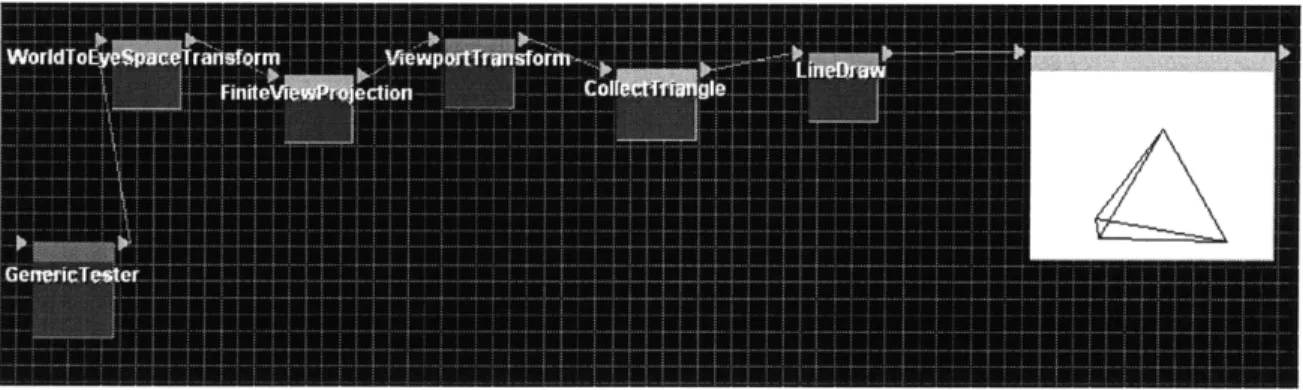
Figure 3: Simple Classical Polygon Rasterization Pipeline Implementation in eFuse
Figure 3 is a screen capture from the eFuse system which displays a fully instantiated graphics pipeline for rasterizing a wire-frame view of a three-dimensional model. This is perhaps the simplest version of a graphics pipeline containing a synthetic camera. As an instructional tool this pipeline can be implemented quickly by students based on a text-book understanding of the material. This pipeline also serves as the basis for further exploration of the pipeline, and can easily be extended with new modules created by students.
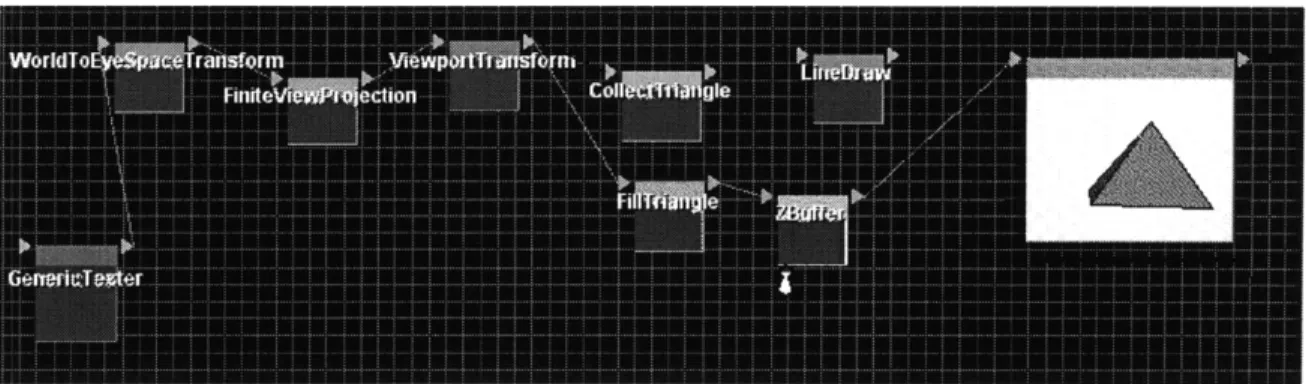
Figure 4: Extended Classical Polygon Rasterization Pipeline in eFuse
Figure 4 illustrates how adding two new modules can change the pipeline from the
wire-frame render shown in Figure 3 to a filled polygon implementation. Students can see this
difference by simply re-linking the modules.
3.3 Beauty in the Details: Learning by Doing
Clearly understanding the big picture is important. However, the interesting and challenging
work is often in understanding the subtle details. Why is clipping a line against a rectangle
non-trivial? What is the quickest way to test if a polygon is inside a given volume? What
parameters are necessary to completely specify a synthetic camera? What are the differences
between Gouraud and Phong shading? One of the best ways to learn and remember these
details is to implement them.
Implementing components in eFuse is designed to be as easy and as instructive as possible.
Students interact with individual modules in one of four modes:
manual mode,
implementation mode, reference mode, and difference mode. We will discuss each of these
in turn.
3.3.1
Manual Mode
Manual mode allows a student to directly interact with a visualization of the algorithm and
challenges the student to use simple mouse interaction
-
"manual interaction"
--
to effect
the operations that the algorithm would perform. For instance, the manual mode for Bubble
Sort might request that the student shift graphical bars representing data of various values in
the same manner that Bubble Sort would shift them. For other algorithms, the student may
attempt to solve the implicit problem of the algorithm through simple visual approximation,
without attempting to perform the operations specifically as the algorithm would. Given
that certain algorithms grow quickly, manual mode generally contains small inputs so that
the student can quickly perform the operations by hand.
In the realm of graphics, the interactive mode of Bresenham's algorithm challenges the
student to click on the pixels that Bresenham's algorithm would illuminate. An applet which
implements the interactive mode of Bresenham's algorithm is shown in Figure 5.
Figure 5: Bresenham's Algorithm in Interactive Mode
3.3.2
Reference Mode
Manual mode allows a student to student understand the basic algorithm behavior. Once
that behavior is understood, a student can then enter reference mode and interact with the
algorithm by changing the inputs and viewing the new outputs. This mode is very similar to
traditional algorithm animation and visualization systems. This mode also helps a student
understand how the algorithm behaves in special boundary cases that the student may not
have learned from the interactive mode.
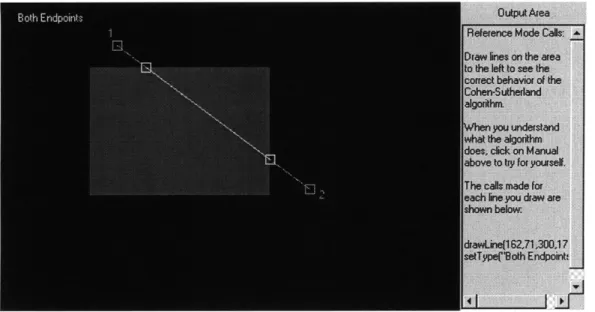
Figure 6 is a screen-capture of the
Cohen-Sutherland line-clipping algorithm in reference mode. The entire gray line is the original
student-specified line. The gray filled box is the clipping region. Finally, the white line and
endpoints denote the new clipped vertices.
Figure 6: Cohen-Sutherland Line Clipping in Reference Mode
3.3.3 Implementation Mode
Research has shown that students who actively engage in implementing an algorithm understand and retain the concepts better than those who just view a visualization. Specifically, Georgia Institute of Technology published a report stating:
Allowing students to create their own examples [of algorithm animations] in a laboratory session led to higher accuracy on the post-term examination of understanding of the algorithm as compared to students who viewed prepared examples or no laboratory examples. [Law+94]
In the implementation mode, the student is challenged to implement the algorithm in the
Java language. In order to implement the algorithm, the student brings up the code edit
window for the algorithm. The module designer is responsible for abstracting any necessary
details about the interaction with the eFuse input/output port, the visual algorithm display,
and event handling, allowing the student to focus on the algorithm implementation. In the
edit window, the student sees an empty method declaration. Necessary information about
input and output data types should be provided by the module designer to the student, along
with information about the special methods available to the student. For instance, a module
for Gupta-Sproull's anti-aliased line-draw algorithm might provide a setPixelIntensityroutine which the student invokes to set the illumination intensity of a pixel.
One of the objectives of eFuse is to simplify the process of compilation, execution,
visualization, and validation of an algorithm. A student implementing the Bresenham
Algorithm begins by implementing at least part of the algorithm in the edit area. In order to
test out the current implementation, the student clicks the "Evaluate" button. eFuse then
compiles the implementation, stores the latest code as a new version, reports any
compilation errors, and attempts to load and execute the compiled code.
Figures
7
and 8
illustrate this process. Figure
7
is the empty implementation. No pixels are highlighted in
the visualization area. Figure 8 illustrates the results of a student clicking "Evaluate".
Clearly, the two endpoints of the line are now illuminated
-
the student's code is now
running. A new revision is listed on the right of the edit area so that the student can return
to a previous implementation if necessary.
I r ei uu m me trunorl uolaumm
//Call setPixel(xlyl) to set a pixel at public void setPixel(t xl, int yl, int x //Press the Evaluate button at the ba //ready to compile your code.
EvaFigurate
Figure 7:
e(int xi, int y1, int x2, int y2) below aldyssal ±
2, int y2)
se of this text area when you are
Initial Empty Implementation View
3.3.4 Difference Mode
The difference mode is a particularly useful and unique feature of eFuse. In difference
mode, a student can visually compare his or her own implementation with the reference
implementation. The module designer must implement a visual difference engine which
uses a trace of the key execution events in the reference implementation and the trace of the
student's implementation to display inconsistencies visually.
Designing an effective
difference mode can be a challenging task for the module designer. The effort spent by the
teaching staff in implementing the difference mode of an algorithm proves worthwhile. The
ability to visually inspect and debug differences in execution greatly improves the learning
experience for students. At the same time, the difference mode allows the system to check
the correctness of the implementation's mapping of inputs to outputs, aiding the teaching
staff in evaluating the student's work.
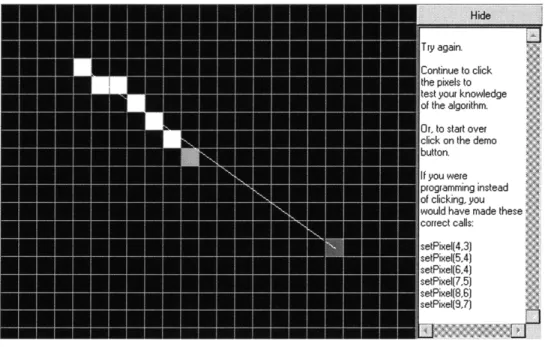
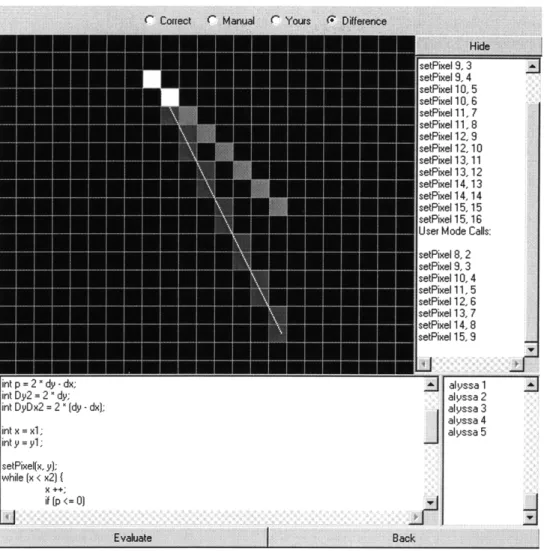
Figure 9 illustrates the difference mode visualization of an incorrect implementation of the
Bresenham algorithm. White pixels are those which the student's implementation correctly
illuminated.
Dark gray denotes pixels which the student's implementation did not
illuminate, but should have.
Finally, light gray pixels are those which the student's
implementation incorrectly illuminated.
in p = L - ay - ax;
int Dy2 = 2 " dy; int DyDx2 = 2 " (dy - dx); int x = xl; int y = yl; setPixel(x, y]; while (x < x2) { X ++; alyssa 1 alyssa 2 alyssa 3 alyssa 4 alyssa 5 if [p <= 0) Evauate Back
Figure 9: Difference Mode for Bresenham's Algorithm
3.4 Collaboration Between Students
First we looked at how eFuse helps students to see the "big picture" by viewing the
components and interconnections between them within the concept graph. Next we looked
at how a student can dig into the details of the algorithm's behavior on different inputs and
outputs, and how a student can then implement the algorithm. These features help studentsto understand the material individually. Often, however, just interacting with an algorithm
and seeing how it fits into the big picture of the material is not enough to answer all of a
student's questions or resolve subtleties. In these cases, collaboration between students is
invaluable.
Identifying students who can are working at a similar pace is the first step in effective collaboration. eFuse automatically places small graphical avatars next to the module that each student is exploring (Figure 10). A student can click on an avatar to find out the username of a fellow student who is working on the same module. A student can then send a text message to that fellow student working on the same module. The student can also send a message to all students on that module using the text messaging area. The fact that all messages are logged helps students look back at areas where others had questions, but also discourages students from sending full module implementations to each other in order to finish an individual assignment without doing the work.
Figure 10: Graphical Avatar Representing a Student Working on the LineDraw Module
The collaboration space allows students to send messages to a single student, a select group of students, or everyone using the eFuse system. Students can also draw on a shared whiteboard. Readers interested in a detailed explanation of the functions and implementation of the collaboration space should see [Boy97] .
3.5 Interactions Between Students and Teaching Staff
Both the students' and the teaching staffs time resources are intrinsically valuable. Currently, in the university environment, teaching staff members give assistance in one of two ways. First, and most commonly, a student requiring assistance must seek out a member of the teaching staff at special times when that staff member is available. Often the teaching staff does not have the time or resources available to pull up the student's current implementation and help resolve questions about the finer details. As an example, it is
difficult for teaching staff to help a student resolve subtle problems in a student's
implementation of a ray tracer. Once the large issues have been solved, the student is often
left hoping the details are correct because staff feedback is nearly impossible. The second
way the teaching staff can help is by interacting with students in an electronic laboratory by
looking over the student's shoulder and working with the student to resolve subtleties. This
is an expensive proposition because it requires centralized computing resources and a high
degree of staff availability.
eFuse addresses these issues by creating a virtual, distributed laboratory. The teaching staff
can easily load a student's current module implementation, test it, recommend changes, and
view the student's next attempt. The teaching staff can also load the student's current
complete concept graph to see the entire system. The staff member may also load a number
of students' implementations simultaneously to look for common problems. The students
may be across campus, or across the ocean. Currently student-staff interaction is limited to
text-based communication, but as increasing network bandwidth becomes available, audio
and video may be available. The virtual laboratory allows the staff ultimate flexibility in
when they can be available to help students, reducing the need to negotiate specific
Chapter 4
Teaching Staff Perspective
eFuse is not only designed to be beneficial to students and architecturally interesting to
developers, but also to maximize the teaching staffs time, availability, and effectiveness.
The role of the teaching staff is to select the material that students need to learn, help
students learn that material, and evaluate how well the students learned the material. eFuse
facilitates each of these objectives.
eFuse is designed to be an ideal platform for creating, distributing, and tracking student
course assignments. As described in the chapter on future work, the complete feature set for
teaching staff is an active area of research and development. The system currently provides
support for administrative facilities such as maintaining student lists, updating assignment
descriptions, and logging messages. Instructors are encouraged to proactively select or
design modules which students are asked to implement, and to arrange these modules into
systems where appropriate, or visual hierarchies representing the "big picture" for the
course. eFuse also attempts to simplify the process of evaluating student implementations,
often making it feasible to look at a student's implementation in more detail than is usually
possible with traditional systems.
4.1 Administering the Course
The teaching staff has a high degree of control over the system Most of these functions are controlled through a simple Web interface. The staff is able to perform such tasks as maintaining user lists, and controlling which eFuse users have administrative access. The system also provides support for the teaching staff to maintain a "Message of the Day" (MOTD) posting to give students the latest information pertinent to the course. Descriptions of the assignments can be posted directly within the system. In order to track possible bugs in assignments, the staff can review the history of public messages posted by students to look for common problems. These features greatly aid in administering the course.
4.1.1 Helping Students
Beyond general administration, eFuse gives the teaching staff the ability to better help students. The staff can also use the same communications facilities to provide individual feedback to students. eFuse also allows the teaching staff to maintain flexible hours of access that better meet student demand, rather than just during "office hours". The teaching staff is able to see avatars representing all the students who are online at one time, while also monitoring questions. Because this can be done with just one window on a Java-enabled Web browser, the staff can be working on other tasks, while monitoring the class in the
background. This, combined with the ability to rapidly load a student's implementation and view the implementation details and results, enables "targeted just-in-time instruction". For instance, if a student asks a question about an algorithm, the staff member can quickly pull up the student's code, check for the error, then quickly check if other students appear to have the same error. The staff member can then specifically select those students and provide real-time instruction about areas of confusion in the algorithm. This ability to identify problem areas and address them specifically to those students who are having problems in a matter of moments is nearly impossible with current systems.
4.1.2 Selecting, Designing, and Organizing the Material