Build Your Own Deep Learner
by
David Wong
Submitted to the Department of Electrical Engineering and Computer
Science
in partial fulfillment of the requirements for the degree of
Masters of Engineering in Electrical Engineering and Computer Science
at the
MASSACHUSETTS INSTITUTE OF TECHNOLOGY
June 2017
c
○ Massachusetts Institute of Technology 2017. All rights reserved.
Author . . . .
Department of Electrical Engineering and Computer Science
May 26, 2017
Certified by . . . .
Kalyan Veeramachaneni
Principal Research Scientist
Thesis Supervisor
Accepted by . . . .
Christopher J. Terman
Chairman, Department Committee on Graduate Theses
Build Your Own Deep Learner
by
David Wong
Submitted to the Department of Electrical Engineering and Computer Science on May 26, 2017, in partial fulfillment of the
requirements for the degree of
Masters of Engineering in Electrical Engineering and Computer Science
Abstract
BYODL is a framework for building deep learning-based mobile apps to solve domain-specific image recognition problems. Domain-domain-specific image recognition problems are challenging due to lack of labeled data - few have the expertise to assign labels to the images. By using the mobile app to collect data, our framework speeds up the process of improving the model’s performance and makes the updated version readily available to app users. By handling the details of setting up the infrastructure and the mobile app boilerplate, BYODL helps users produce a functional image recognition app in a matter of hours instead of months.
We designed BYODL with an eye towards customizability, simplicity, and effi-ciency, which led to interesting implementation challenges and design trade-offs. In this thesis, we present the motivations for BYODL, discuss aspects of its design and implementation, and report on its use cases in the real world.
Thesis Supervisor: Kalyan Veeramachaneni Title: Principal Research Scientist
Acknowledgments
This thesis would not have been possible without the help of many people.
First, I would like to thank my advisor Kalyan Veeramachaneni. His guidance and support helped me get through difficult situations and I deeply appreciated his insight while going through what seems like a whole tree’s worth of revisions. I truly feel grateful for being welcomed into his lab.
I would also like to thank my family for helping me get through not only this thesis but also MIT. It’s been a long journey but I’m almost at the end!
Last, but not least of course, I would like to thank my friends for listening to me and reassuring me when I was stressed. I’m sure this thesis doesn’t make the captivating listening material so I’m grateful that they took time out of their busy lives for me.
Through this thesis, I have had many enriching encounters and experiences that I might not have had otherwise, and I sincerely hope to carry these with me for the rest of my life.
Contents
1 Introduction 15
1.1 The Image Recognition Problem . . . 16
1.1.1 Image Collection . . . 16
1.1.2 Label Acquisition . . . 17
1.1.3 Model Development . . . 17
1.1.4 Model Use . . . 18
1.1.5 Shortcomings . . . 18
1.2 Cassava Disease Detection . . . 18
1.3 Contributions . . . 21 1.4 Thesis Outline . . . 22 2 Related Work 25 2.1 Image Recognition . . . 25 2.1.1 LabelMe . . . 26 2.1.2 ImageNet . . . 26 2.1.3 Visipedia . . . 26
2.2 Machine Learning as a Service . . . 27
2.2.1 Google Cloud Machine Learning Engine . . . 27
2.2.2 Amazon Machine Learning . . . 28
2.2.3 Microsoft Azure Machine Learning Studio . . . 28
3 Build Your Own Deep Learner Overview 31
3.1 User Classes . . . 31
3.1.1 App Creators . . . 32
3.1.2 App Users . . . 33
3.2 The BYODL Workflow . . . 35
4 Towards Automating App Development 37 4.1 App Interfaces . . . 37
4.1.1 Predict . . . 38
4.1.2 Label . . . 38
4.1.3 Update . . . 39
4.2 Automating App Deployment . . . 40
4.2.1 Design Goals . . . 40 4.2.2 Deployment Workflow . . . 42 4.3 System Architecture . . . 43 4.3.1 Client Infrastructure . . . 44 4.3.2 Server Infrastructure . . . 44 4.3.3 Mobile App . . . 45 4.4 Implementation Details . . . 45
5 Deep Learning Service 47 5.1 Training Deep Learners . . . 47
5.1.1 Training Workflow . . . 47 5.1.2 Results . . . 50 5.2 System Architecture . . . 50 5.2.1 Client Infrastructure . . . 50 5.2.2 Server Infrastructure . . . 53 5.3 Implementation Details . . . 54 6 Future Work 55 6.1 iOS App . . . 55
6.2 User-Defined Architectures . . . 55
6.3 Usage Data Collection . . . 56
6.4 Confidence Metrics . . . 56
6.5 Active Learning Integration . . . 56
6.6 Security Features . . . 57
7 Conclusion 59
List of Figures
1-1 The model building lifecycle for an image recognition problem. Images must first be collected and labeled. Then deep learning is used to learn a model for the data. Finally, the model is used to predict labels for new images. . . 16
1-2 Comparison of cassava leaves. Left to right: healthy, CMD and CBSD. 19
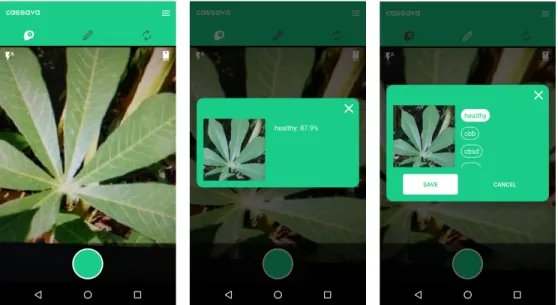
1-3 Mobile app built using the framework. Left to right: taking a picture, predicting labels for an image, and labeling an image. . . 22
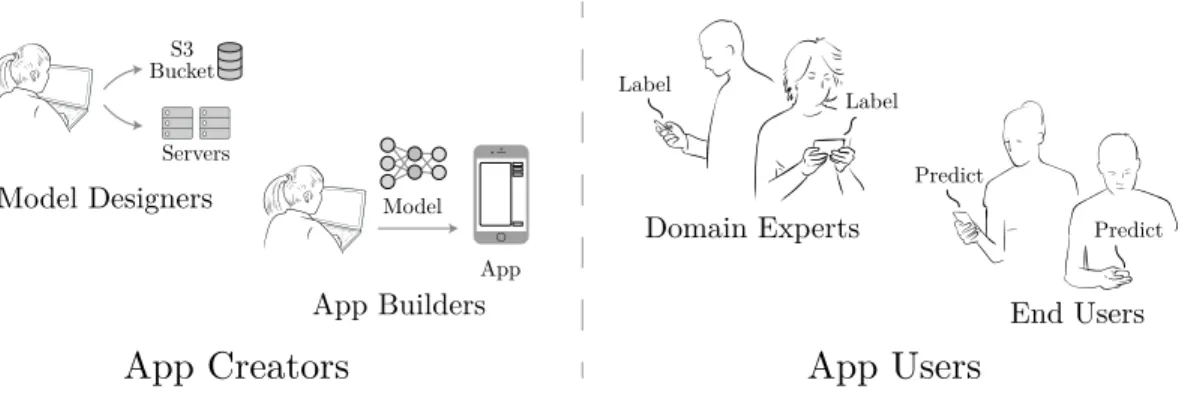
3-1 Diagram of user classes in the BYODL framework. App creators can be split into model designers and app builders while app users can be split into domain experts and end users. . . 32
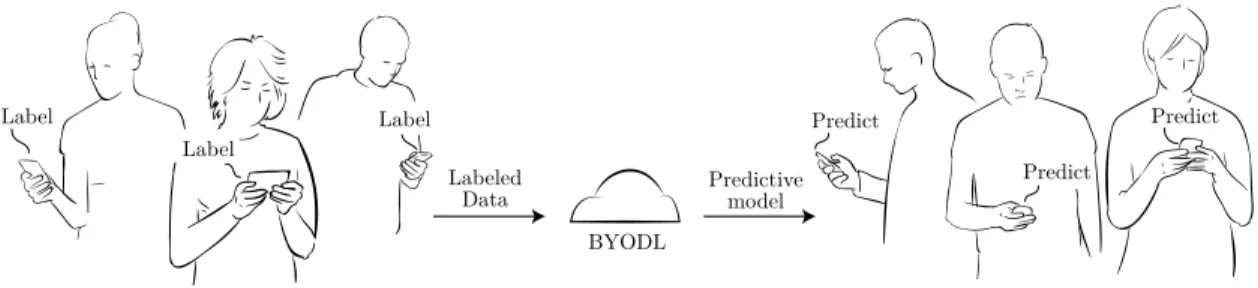
3-2 Relationship between domain experts and end users. Domain experts provided labeled data to the BYODL framework while end users down-load a predictive model based on the labeled data. . . 34
4-1 Predicting the label for an image using the onboard model. The left shows the camera taking a picture of a healthy cassava leaf. The right shows the onboard model predicting the label of the image to be healthy with probability of about 87.9%. . . 38
4-2 Annotating an image with a label. The left shows the camera taking a picture of a healthy cassava leaf. The right shows the user assigning the healthy label to the image. . . 39
4-3 Updating the app’s onboard model. The left shows when the model was last updated while the right shows the app downloading an updated model from the server. . . 40 4-4 Two apps built using BYODL. The left applies to cassava disease
de-tection while the right applies to handwritten digit recognition. . . . 41 4-5 System diagram for automated app deployment. The client interacts
with the server to build and update the app while the smartphones interact with the server to upload data and synchronize their models. 44
5-1 System diagram for the deep learning service. The client can create multiple deep learners, each with their own server instance and data store. . . 51 5-2 Client-server interaction for training a model. The client repeatedly
polls the server for updates until the tasks finishes. . . 53
List of Tables
3.1 Summary of user classes and their roles in the BYODL framework. . 35
Chapter 1
Introduction
In recent years, we have enjoyed an unsurpassed ability to collect and store high-resolution images. Smartphone cameras are becoming more ubiquitous and more powerful. As the world’s largest photo-sharing site, Facebook stores over 350 million new photos every day [9]. Many applications for these images have emerged, including facial detection, optical character recognition, and augmented reality. In most cases, a model is built to enable computers to recognize images.
At the same time, advances in machine learning hardware and software have made them more prevalent in tackling a wide range of problems. Novel techniques have improved the performance of machine learning approaches and made them more viable for practical application like image recognition. Deep learning in particular has considerably improved state-of-the-art performance in machine learning competitions [13]. As a result, deep learning has become the leading way to solve image recognition problems.
Underpinning the success of these two spaces is the rise of cloud computing ser-vices. It has never been easier or cheaper to use cloud computing resources from an array of vendors for any kind of application imaginable. Users are no longer ham-strung by high upfront costs like purchasing and configuring servers; they can simply visit a vendor’s website and starting using a resource instantly for little to no cost. Thanks to these services, applications that may have been out of reach for smaller organizations have now become feasible.
Given the growth of these three areas, a natural question arises: how can we enable ordinary users to develop deep learning-based image recognition systems backed by the cloud? That is the goal of this thesis - to proliferate the development of these systems.
1.1
The Image Recognition Problem
Any attempts to develop an image recognition system must involve not only training a model, but going through the model building lifecycle. As we show in Figure 1-1, this lifecycle involves: 1) collecting images, 2) labeling images, 3) learning a model, and 4) using the model.
Collect images Label images
Labeled images
Learn model Use model Deep Learning
Label
Figure 1-1: The model building lifecycle for an image recognition problem. Images must first be collected and labeled. Then deep learning is used to learn a model for the data. Finally, the model is used to predict labels for new images.
1.1.1
Image Collection
The first step of the lifecycle is to collect images. Depending on the problem, this may involve physically going out and taking pictures. If an image database already exists, this may involve requesting access from the owner. Datasets should contain thousands of images to achieve an acceptable model performance, though more images can markedly improve how well the model captures the data. For image recognition
problems that do not have readily available datasets, the process of collecting enough images can be time-consuming to the point of impracticability.
1.1.2
Label Acquisition
The next step is to label the images. Generally, image recognition problems fall into one of two categories: search or detect. Depending on the category, labels can either be provided by anybody or only domain experts respectively.
In search, we train the model to go through a large set of images and identify those that contain a certain object or person. For example, we could ask it to find the images with chairs or find the photos that have Sandra Bullock. When these results are presented to humans, the model’s success or failure can be easily verified. Thus, any human can perform the label step for a search problem.
In detect, however, we use the model to detect whether an image shows a certain condition or phenomenon. Examples include whether a picture of a skin lesion implies a cancerous condition, or whether a certain plant is infected. These conditions and phenomena can only be verified by experts or by further testing in a laboratory. Thus, label acquisition for detect problems is comparatively harder. For the purpose of this thesis, we are primarily interested in detect applications.
Label acquisition is a major bottleneck of the workflow for detect problems. By the nature of their field and the amount of expertise required, finding domain experts is hard. Having them label hundreds or thousands of images is even harder.
1.1.3
Model Development
Once the images have been labeled, the data scientist uses machine learning to learn a model for the data. This involves writing code to parse the dataset, run it through a machine learning algorithm, and evaluate the trained model’s accuracy. Fortunately, there are many machine learning libraries that can help with these tasks, including Theano [22], Caffe [5], and Tensorflow [1], but the data scientist must put it all together. In addition, learning a model in the context of deep learning can take
several days on regular computer hardware. Although specialized hardware can cut the time down to hours instead of days, costs can still be prohibitively high. Only after the model has been trained and tested can it be used to make predictions for new data.
1.1.4
Model Use
Finally, after a model has been learned for the data, it can be used to make predictions for new data. The data scientist writes code to load the model into the program and run an image through the model. The model returns a set of labels that it believes the image could correspond to along with their respective probabilities. This code can then be used in any application that requires the image recognition functionality.
1.1.5
Shortcomings
As described above, these steps outline a generalized workflow that can be applied to a wide range of image recognition problems. However, most machine learning-based computer vision systems assume that they have already labeled images and thus, concentrate on building better models. But real-world problems, especially newer ones, almost never have a set of neatly curated images and labels. The key steps in the lifecycle of collecting and labeling images are neglected by these systems. When machine learning is used for novel applications, data scientists must invest as much or more effort into image collection and label acquisition as model development.
In this thesis, we ask how we can: 1) provide a framework that automates key steps of the lifecycle and 2) enable even people without computer science expertise to develop image recognition apps.
1.2
Cassava Disease Detection
Let us consider an example image recognition problem: cassava disease detection.
viral diseases that negatively affect the growth of the plant, especially its tuberous root. These diseases include cassava mosaic disease (CMD), cassava brown streak disease (CBSD), cassava bacterial blight (CBB), and cassava green mite (CGM). Figure 1-2 compares cassava leaves under different conditions. The spread of these diseases harms the many populations that depend on the cassava plant for nutrients. To identify whether crops are diseased, experts travel around to cassava plantations and manually check them. Since cassava is cultivated widely, these experts are unable to examine every plantation.
Figure 1-2: Comparison of cassava leaves. Left to right: healthy, CMD and CBSD.
To address this problem, a group in the Data-to-AI lab at MIT decided to build a mobile app to classify the conditions of cassava leaves. Farmers would be able to take pictures of cassava leaves and the app would diagnose whether the plant was healthy or diseased using a deep learning-based model. A prototype was built using a model trained on image data from the Uganda National Crop Resources Research Institute and the Namulonge Crop Resources Research Institute. However, the work necessary to develop and deploy it spanned several months despite using a curated labeled dataset and the TensorFlow deep learning library. This work included the following:
1. Requesting access to the cassava datasets 2. Acquiring a GPU machine
3. Installing and configuring TensorFlow on the GPU machine 4. Learning to use TensorFlow
5. Writing scripts to train and evaluate a model on the datasets 6. Training the model
7. Tweaking hyperparameters to optimize performance 8. Acquiring an Android phone
9. Adapting an example Android app for the cassava problem 10. Testing the Android app in the field
Step 3 involves systems administration, steps 6 and 7 involve machine learning, and step 9 involves mobile app development.
Without an automated framework, it would be exceedingly difficult for individuals without a computer science background, let alone expertise in these disparate fields, to replicate these steps and build such an app. Furthermore, the success of the model, and by extension the app, is bottlenecked by image collection and label acquisition. The burden is all on the app developer to collect more data, retrain the model, and update everyone’s apps accordingly. In this case, the developers were at MIT while the data collection happened in Uganda, leading to significant delays in communication. These challenges encouraged us to develop a framework that allows anyone to launch an app, gather images, and acquire labels. These labeled images are then used to train a neural network to automatically predict the labels for new images. Our framework crowdsources the data collection and labeling necessary to train models, effectively rendering domain experts’ knowledge as a black box service for others who may be less qualified or lack access to them altogether. We call this framework Build Your Own Deep Learner or BYODL.
The main challenges addressed by our framework are as follows: 1) insufficient human capital - our framework thus crowdsources label acquisition to domain experts and image collection to non-experts, 2) length of time to deployment - we provide tools that automate key bottlenecks in the lifecycle, and 3) democratizing technology - we lower the barrier to using sophisticated deep learning libraries for image recognition problems.
Our framework opens the door to solving a wide array of intriguing problem spaces. Deep learning has already been applied to serious applications like skin cancer detec-tion, with researchers at Stanford training a deep learning model that could diagnose it as well as a human dermatologist [10]. However, they had to build a database
of 130,000 skin disease images before they could train their model. Our framework enables ordinary people to build complex image recognition apps and, through the process of data collection, improve the accuracy of their predictive models.
1.3
Contributions
This thesis presents the BYODL framework, which achieves the following contribu-tions:
∙ Scaling data collection: The framework enables users to build a mobile app that can collect data and upload it to the cloud. This removes the major bottlenecks involved with the first two steps of the model building lifecycle.
∙ Providing predict functionality: The mobile app also enables users to pre-dict labels for new images. This adds to its value and gives users a stake in the data collection process.
∙ Developing and deploying models through a cloud-based framework: The framework enables users to set up infrastructure on cloud computing re-sources and use them to develop and deploy deep learning-based models. This lowers the barrier to entry for users who may not have the necessary hardware for deep learning.
∙ Scaling the building of this framework: Due to the extensibility of this framework, its components can be improved to support new functionalities and achieve better performance.
To realize these contributions, we provide the following as part of the framework:
∙ Streamlined interfaces: The framework provides a set of Jupyter notebooks. These notebooks contain code snippets to train the deep learner using cloud computing resources and to build, launch, and update the mobile app.
Figure 1-3: Mobile app built using the framework. Left to right: taking a picture, predicting labels for an image, and labeling an image.
∙ Customizable Android app: The framework provides a customizable An-droid app that can be configured and deployed through a Jupyter notebook interface. The app facilitates data collection and enables users to predict labels for images.
∙ Deep Learning Service: The framework provides code for setting up servers and data stores for deep learning on Amazon Web Services (AWS) and provides an API for interacting with these entities which is described in Chapter 5. It also provides a ready-to-use Amazon Machine Image (AMI) with the code and all required libraries pre-installed. Servers can be launched from the AMI to allow users to quickly ramp up and focus on training the deep learner. The AMI will be updated from time to time to ensure libraries are configured with the latest updates.
1.4
Thesis Outline
This thesis is organized as follows.
that this thesis addresses.
Chapter 2 reviews related work in the field and previous work upon which this thesis is built.
Chapter 3 examines the different user classes and their roles within the framework that this thesis presents and explores its high-level user workflows.
Chapter 4 explains how users deploy a deep learning-based mobile app through the framework and describes how it facilitates image collection, label acquisition, and model synchronization.
Chapter 5 explains how users interact with the framework’s deep learning service and describes the design of its system architecture.
Chapter 6 discusses possible improvements to the app, the deep learning service, and the framework as a whole.
Finally, Chapter 7 concludes with a summary of the previous chapters and the contributions made by this thesis.
Chapter 2
Related Work
Recent advances in machine learning like deep neural networks have encouraged their use in a wide variety of fields, including computer vision. To take advantage of the growing demand, tech companies have built products and platforms that provide machine learning as a service. These services have helped to make machine learning more accessible than ever.
BYODL occupies a niche in the deep learning environment because it is an end-to-end framework for creating image recognition apps. Its purpose and use case differ from those of similar tools and products that are presented later in this chapter.
First, we explore related work done on data collection for image recognition, then survey a variety of commercial products and services for conducting machine learning on cloud computing resources. Finally, we conclude by discussing work that used deep learning to tackle the cassava disease detection problem presented in Section 1.2.
2.1
Image Recognition
This section focuses on related work for data collection in the field of image recogni-tion. Attempts to speed up the development cycle for automatic image recognition algorithms have involved multiple efforts to crowdsource labeling tasks, release anno-tated image databases, and organize competitions focused on improving accuracy of recognition tasks, some of which are described below.
2.1.1
LabelMe
One of the early efforts to crowdsource image labelling, called LabelMe [19], was developed at the Computer Science and Artificial Intelligence Laboratory at MIT. LabelMe is a mobile app that allowed users to take pictures, assign labels to parts of the pictures, and upload this data to their LabelMe accounts. Though it does provide a detect function in the app, its performance in many image recognition problems is limited because it uses the histogram of gradients feature to train the detector instead of deep learning.
2.1.2
ImageNet
The ImageNet project [7] aims to create a large database to promote visual object recognition software. As of 2016, over ten million image URLs have been annotated through the project. For the “ImageNet Large Scale Visual Recognition Challenge (ILSVRC)," which ImageNet has put on every year since 2010, groups compete to develop better image recognition software. In 2011, contest participants used deep convolutional networks to reduce the error rate by almost 10%, compared to the state-of-art which stood at 25%. Since then, even better approaches have been developed, leading to near-human levels of accuracy.
The labels collected by the ImageNet project typically fall into the search category described in Section 1.1. ImageNet focuses on labels for general image recognition rather than those for domain-specific problems like cassava disease detection.
2.1.3
Visipedia
Visipedia [4] is a project undertaken by researchers at Caltech and Cornell to collect, organize, and share image datasets for specific problem spaces. For example, the datasets that have already been collected include Caltech-UCSD Birds 200 (CUB-200), a dataset that contains 11,788 images of roughly 200 categories of birds, and Pasadena Urban Trees, a dataset of 30,000 trees in Pasadena labeled by geolocation and tree species.
Notably, these datasets are much smaller than ImageNet’s - ImageNet contains 10 million images while the tree dataset only contains 30,000. This is primarily due to the time required for data collection and the expertise required to annotate these images with information about the tree species. Although Visipedia takes a step in the right direction for collecting domain-specific images and labels, there is no easy way to contribute to their datasets or employ them in useful applications.
2.2
Machine Learning as a Service
As machine learning becomes more prevalent in tackling data science problems, more and more cloud services for machine learning have appeared. Below, we survey a few of the more popular services.
2.2.1
Google Cloud Machine Learning Engine
Though it started in search, Google has since branched out and now offers a di-verse selection of products and services that let developers use Google hardware and software for their own applications. Machine learning is one of these services.
Google Cloud Machine Learning Engine [12] is a part of the Google Cloud Platform and allows developers to build machine learning models using Google services. For a nominal fee, developers can store their data on Google Cloud Storage, pre-process it using Google Cloud Dataflow, and train a TensorFlow model using Google Cloud Machine Learning Engine.
Although Google provides a powerful platform for machine learning, it does not provide a way of deploying the trained model on a mobile device. It does allow users to send prediction requests to the model for a small fee. However, this may not be possible in situations where users have limited connectivity. For example, users who are in the middle of a cassava field should still have access to the predict function.
2.2.2
Amazon Machine Learning
Amazon is another vendor that offers machine learning. Called Amazon Machine Learning [2], it allows developers to build machine learning models using AWS re-sources.
Unlike Google, Amazon does provide a means of deploying a trained model to mobile devices through the AWS Mobile SDK. However, Amazon Machine Learning does not seem to support image datasets or deep learning. Furthermore, the AWS Mobile SDK only provides low-level methods for using the trained model but data scientists who want to deploy their models likely do not have mobile app development experience. These factors significantly increase the difficulty and time needed to build an image recognition app.
2.2.3
Microsoft Azure Machine Learning Studio
Microsoft also offers machine learning services through Azure, its cloud services plat-form. Using the Azure Machine Learning Studio [3], developers can explore different data science pipelines and custom machine learning algorithms to build models. The interface is particularly user-friendly because it allows developers to build machine learning pipelines by dragging and dropping components in a graphical environment. Like Google however, there does not seem to be support for deploying models on mobile devices.
2.3
Cassava Disease Detection
The work accomplished by this thesis mainly builds on top of the work in cassava dis-ease detection done by the mCrops research group at Makerere University in Uganda under the guidance of Ernest Mwebaze and John Quinn. They approached the plant disease detection problem by using traditional computer vision techniques to ex-tract features but encountered problems when trying to classify on-site images [15]. Nataniel Ruiz theorized that they ran into a problem with image clutter. Their model
was trained on images taken in a laboratory setting but had been tested on images in the field which contained soil and other leaves. He built a program to train a convolutional neural network to tackle this problem, achieving an accuracy of 87% on the test set [18]. That program was extended to handle any image recognition problem and became a central component of the BYODL framework.
Chapter 3
Build Your Own Deep Learner
Overview
At its core, the BYODL framework enables users to build and deploy image recogni-tion apps from scratch. In this chapter, we discuss the different user classes and their roles within the framework and walk through the steps they take to build an app and learn a model.
3.1
User Classes
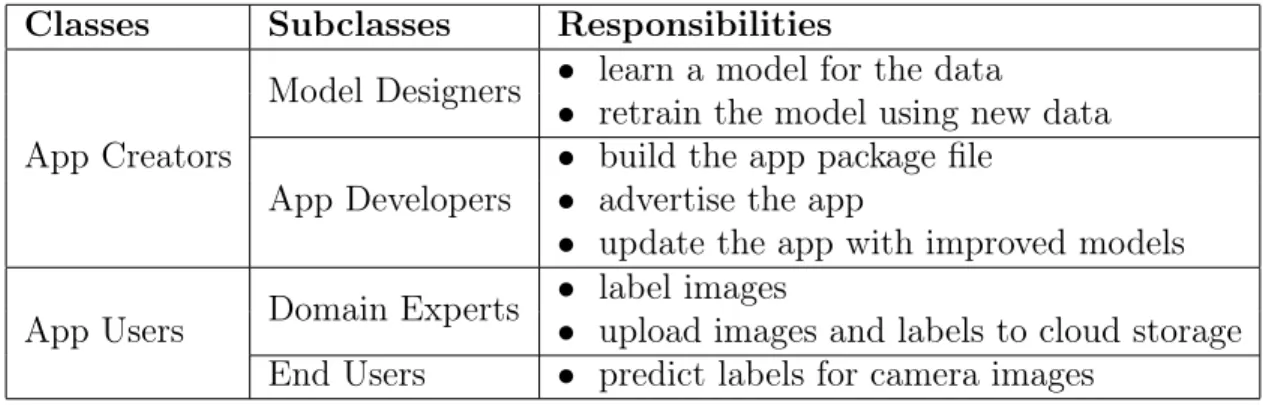
The use of this framework can best be understood by defining multiple user classes and their roles. These roles are divided based on their responsibilities, some of which may be adopted by the same person. The app creators build, maintain, and advertise the app and can be divided into model designers and app builders. Model designers learn a model based on image data while app builders incorporate the model into the app. The app users can be divided into domain experts who assign labels to images and end users who predict labels for images using the app. Table 3.1 summarizes the user classes and their responsibilities.
We will use the cassava disease detection problem described in Section 1.2 as an example to illustrate the different user classes.
Label Predict Predict Label App Domain Experts End Users Servers Model Designers
App Creators
App BuildersApp Users
S3 Bucket ModelFigure 3-1: Diagram of user classes in the BYODL framework. App creators can be split into model designers and app builders while app users can be split into domain experts and end users.
3.1.1
App Creators
App creators are charged with building the entirety of the app, advertising it to prospective users, and updating it when new data arrives. We further divide these responsibilities among two subclasses: model designers and app builders. Model designers focus on learning a model for the data while app builders compile the source code and set up server infrastructure for the app. Together, they produce a functioning image recognition app.
Model Designers
Model designers are typically, though not necessarily, data scientists. They train the model on an image dataset using the BYODL framework. They can also refine the model to achieve better performance using newly collected images and labels.
For the most part, these users do not have experience configuring servers or soft-ware packages so the framework handles that on their behalf. We describe this in Chapter 5. As a result, they can focus on model-related activities, such as hyperpa-rameter tuning, training, and evaluation. For users who may not have a data science background or are unfamiliar with specifics like how to select hyperparameters, the framework chooses default values that generally result in reasonably accurate models.
dis-eases at a university. The user may have access to a small dataset containing labeled images that can be used to train a deep learner. They would also be responsible for updating the model when new labeled cassava images arrive.
App Builders
App builders use the framework to develop an image recognition app. We assume that they are given a model by the model designer or build one themselves. They generate their own custom app from a template by supplying app-specific values like the app name and the label names. Once the app has been created, they are responsible for advertising, maintaining, and updating the app through interfaces provided by the framework. We cover these interfaces in Chapter 4.
In the cassava disease problem, this user could be the same scientist that trains the model. The user takes the trained model and uses the provided app template to build an app to detect cassava diseases. They also provide information like the names of the diseases to use as labels to customize the app.
3.1.2
App Users
Users install the app on their smartphones and use it for three different functions: label, predict, and update. All users take pictures for the recognition task, for which the app is designed.
In addition to being data collectors, app users will most likely use the label and predict functions, sometimes in a mutually exclusive fashion. Thus, we further divide users into two subclasses: domain experts and end users.
The app mediates the relationship between the two: domain experts label images and upload them to the cloud, the model is learned and updated, and the model is then deployed on the app, making it available to end users. This continuous process enables rapid development of an image recognition model and eliminates a key bottleneck for these kinds of systems.
Labeled Data Label Predictive model BYODL Predict Predict Predict Label Label
Figure 3-2: Relationship between domain experts and end users. Domain experts provided labeled data to the BYODL framework while end users download a predictive model based on the labeled data.
Domain Experts
Domain experts are app users capable of identifying a label for an image just by looking at it. For image recognition apps, they are the primary cohort from whom we seek labels. Once they collect images and label them, they upload the image-label pair to cloud storage through the app.
In the cassava disease problem, these users could be other agricultural scientists or cassava farmers who have experience identifying these diseases. Their main re-sponsibility is to take pictures of cassava plants and give them labels using the app. Then, they upload them to the server so the model designer can update the model.
End Users
End users are app users who are simply interested in predicting the label for images that they collect. They may have no technical expertise beyond using a smartphone but are able to make use of the information provided by the image recognition app.
In the cassava disease problem, these users could be cassava farmers who cannot visually recognize these diseases but are interested in using the information to monitor the health of their crops. They take pictures of their cassava crops and use the app’s predict function to determine whether or not their crops have any diseases. They can also check if the model has been updated and download the newer version if necessary. These interfaces are shown in Chapter 4.
Table 3.1: Summary of user classes and their roles in the BYODL framework.
Classes Subclasses Responsibilities
App Creators
Model Designers ∙ learn a model for the data
∙ retrain the model using new data App Developers
∙ build the app package file ∙ advertise the app
∙ update the app with improved models App Users Domain Experts
∙ label images
∙ upload images and labels to cloud storage End Users ∙ predict labels for camera images
3.2
The BYODL Workflow
Normally, developing an Android app can take weeks, but the BYODL framework simplifies this task by providing helpful and streamlined interfaces. We step through the high-level app building process below and examine technical details, including the API methods used, in Chapter 4.
Likewise, learning a model for image data can also take days or even weeks. The user must procure the necessary hardware and configure it with the necessary soft-ware. Even then, the process of learning a model is time-consuming. If the user chooses to use the framework’s deep learning service, which is described in Chap-ter 5, it can abstract away the setup details so that the bulk of the time spent is on the training process. Alternatively, they can use any of the services described in Section 2.2 to learn a model.
Below, we present an example workflow for app creators as a series of steps.
1. Define the Problem
Before building the app, the app creator must first define the image recognition problem they wish to tackle. Are labels able to be assigned using the image alone? What labels will the app support? Who will be targeted as potential users?
Once the nature of the problem has been settled, the app creator downloads the source code to their local machine from the BYODL Github repository at https://github.com/DAI-Lab/BYODL and installs a few required software packages.
3. Set up Infrastructure
Through the BYODL client interface, the app creator sets up a server instance and data store on AWS. This infrastructure functions as the backend for the framework.
4. Build the App
After providing app-specific parameters, the app creator builds the Android Package Kit (APK) file for the app. This is described in Chapter 4.
5. Advertise the App
The app creator gathers app users by advertising the app on relevant forums and websites and distributes the APK file to them.
6. Learn a Model
Once image data labeled by the domain experts arrives, the app creator learns a model for the data. This can be done either through the deep learning service provided the framework described in Chapter 5 or other machine learning ser-vices. If the app creator already has a trained model, this step can be skipped.
7. Update the App
After the model has been trained, the app creator makes it available to all the apps through the framework’s interface, which is described in Chapter 4. Apps periodically check for updates to the model and download them to the mobile device as necessary.
Steps 6 and 7 can be repeated continuously as more images and labels are collected by the domain experts, thus improving the model’s predictive capabilities.
Chapter 4
Towards Automating App
Development
In this chapter, we discuss the mobile app component of the BYODL framework. First, through an example, we show the end result of using the framework to create an image recognition app and present its user interfaces. Next, we describe how the framework automates the process of building the app. Finally, we close by discussing the system architecture and the implementation details.
4.1
App Interfaces
Although each app can be customized for specific image recognition problems, there are three main activities that they are all expected to perform. These are:
∙ predict - predicting the label for an image
∙ label - annotating an image with a label
4.1.1
Predict
The primary goal of the app is to give users the ability to predict the label for an image. This gives them a stake in the performance of the model and encourages them to participate in its development. Since the availability of the predict function is a priority, the model is stored locally on the mobile device, which allows it to be used even in environments with no connectivity.
To use the predict function, the user selects the predict icon from the icon bar. Once the camera has finished loading, the user can take a picture using the camera. The app runs the image through the model and displays a set of likely labels along with their respective probabilities. These probabilities demonstrate how confident the model is that the image falls under a given label.
predict icon
camera preview
camera button
most likely labels
captured image
Figure 4-1: Predicting the label for an image using the onboard model. The left shows the camera taking a picture of a healthy cassava leaf. The right shows the onboard model predicting the label of the image to be healthy with probability of about 87.9%.
4.1.2
Label
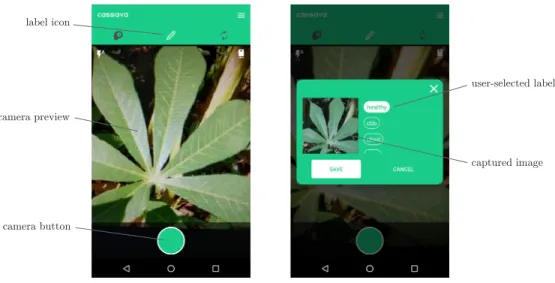
Collecting labels for images from domain experts is another important activity since it directly impacts the model’s performance. We aim to make the workflow as simple as possible for the domain experts to encourage them to submit data, as demonstrated in Figure 4-2.
First, the user selects the label icon from the icon bar. After taking a picture with the camera, the user assigns a label to the picture by tapping the appropriate button. The app then sends this data to the server, where it is eventually used by the model designer. If the app does not have connectivity, it waits until it does to send the data.
label icon
camera preview
camera button
user-selected label
captured image
Figure 4-2: Annotating an image with a label. The left shows the camera taking a picture of a healthy cassava leaf. The right shows the user assigning the healthy label to the image.
4.1.3
Update
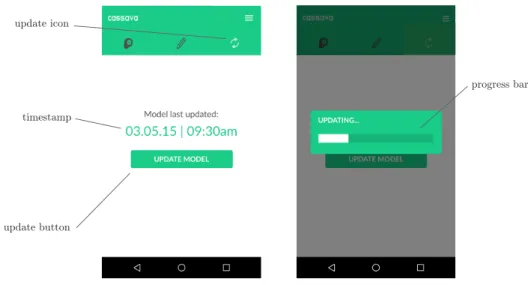
To update the app’s onboard model, the user first selects the update icon from the icon bar. After tapping the update button, the user waits for the app to check with the server for new versions of the model. Each app keeps track of the version of its current model, which is represented by a timestamp. If the server responds with a later version than the local version, the app requests the updated model from the server. The screen on the right side of Figure 4-3 shows the model being downloaded to the mobile device.
Once the download is complete, the updated model can be used for the predict function.
update icon
timestamp
update button
progress bar
Figure 4-3: Updating the app’s onboard model. The left shows when the model was last updated while the right shows the app downloading an updated model from the server.
4.2
Automating App Deployment
In this section, we describe design goals for automating app deployment and explore the API methods for this process.
4.2.1
Design Goals
In designing the process of deploying an app, we focused on three main goals: ex-tensibility, flexibility, and simplicity. The framework must be extensible so users can adapt it to a variety of image recognition applications. It also must be flexible enough to fit into existing workflows and systems and simple enough so users do not have install many dependencies to produce a functioning app. Below, we describe how the framework achieves these goals.
Extensibility
The framework allows users to specify parameters like the app name and label names. By supplying different values for these parameters, users can build customized apps for their particular image recognition problems. In Figure 4-4, we demonstrate two
different apps built using the framework. Although the core functionality is the same, the apps address different use cases.
Figure 4-4: Two apps built using BYODL. The left applies to cassava disease detection while the right applies to handwritten digit recognition.
Flexibility
The framework provides its own deep learning service to train models but also sup-ports models that have already been trained or those trained through any of the machine learning services described in Section 2.2, as long as the model file is appro-priately formatted.
The framework expects the model file to contain a GraphDef object that repre-sents the model as a graph. The graph holds a network of nodes that represent one operation each and are connected via their inputs and outputs. The numerical values of the weights are also stored in the file. It must be in the Protocol Buffer format used by the TensorFlow library, which defines data structures in a text file format that can be loaded, saved, and accessed by TensorFlow.
Simplicity
In designing for simplicity, we aimed to minimize the amount of software users would have to install. As a result, we decided that the server would build the APK. Building
the APK locally would require installing either the Gradle wrapper command-line tool or Android Studio, both of which would increase the friction of using the framework. We also designed the API methods to be as clear and concise as possible, with the framework handling the low-level details. These API methods are presented in below.
4.2.2
Deployment Workflow
To launch an app, the user must follow these steps:
1. Download the Code
The user clones the code from the Github repository.
git clone https://github.com/DAI-Lab/BYODL
2. Set up AWS Credentials
The user creates an access key ID and secret access key for AWS and adds them to the dlaas/client/settings.py file.
3. Set up Infrastructure
After running Jupyter notebook, the user sets up the web server and data store on AWS.
from client import BYODLClient c = BYODLClient()
server = c.launch_server_instance(’cassava’) bucket = c.setup_bucket(’cassava’)
4. Instantiate the App
Once the infrastructure is ready, the user instantiates the app.
labels = [’healthy’, ’cbb’, ’cbsd’, ’cgm’, ’cmd’] app = c.create_app(’cassava’, labels, server, bucket)
5. Build the App
Next, the user builds the APK file for the app on the server and downloads it to their local machine. This APK can then be distributed to app users.
app.build()
app.download_apk()
6. Update the App
The user specifies a new model file that the app should download. The model file is uploaded to the server. The next time that an app checks its version with the server, it will discover and download the new model.
app.update_model(’model.pb’)
Step 6 can be run repeatedly to update the app each time the model is retrained on new data.
Until the user first updates the app with a model, the predict functionality of the app will be disabled. Once the user updates the model, the predict functionality will be enabled so that app users have access to it.
4.3
System Architecture
The system architecture for the mobile app component consists of the client interface, the server instance, and the mobile app.
The client interacts with the server to build the APK file for the mobile app and update it with new models. The mobile app sends new data to the server, where it is logged and stored, and periodically checks the server for updates to the model. If a new model is available, it is downloaded by the app. The system diagram is shown in Figure 4-5.
Web Server Server Machine Android App Smartphone Android App Smartphone Android App Smartphone ... Jupyter Notebook Client Machine
Database Data Store Database
Figure 4-5: System diagram for automated app deployment. The client interacts with the server to build and update the app while the smartphones interact with the server to upload data and synchronize their models.
4.3.1
Client Infrastructure
Since the client can create multiple apps, the client database stores information about the apps so that the user can load an app by name and interact with it. The wrapper for client methods, BYODLClient, creates many App objects. The schema of App contains the following fields:
∙ name: Unique identifier for App
∙ bucket_name: Name of the associated data store
∙ address: IP address of the server, used to communicate with the server through a Web API
∙ instance_id: ID of the server instance
4.3.2
Server Infrastructure
Data uploaded by the apps is sent to the server which uploads the image data to the data store. The server also extracts useful metadata like a unique phone ID and a timestamp from the submission and stores it in the database using the DataPoint object. The schema of DataPoint contains the following fields:
∙ phone_id: Unique identifier for the phone that submitted the image ∙ timestamp: Timestamp of when the image was taken
∙ key: data store key of the image
Tracking who submits data and when that data is collected helps users who want to perform further analysis plot out these interactions over time.
4.3.3
Mobile App
After new data has been collected by domain experts and an updated model has been trained by the model designer, the user can update the app through the framework by uploading the new model file to the server. The model is tagged with a version number, which is represented by the timestamp of when it was uploaded. Each app keeps track of the version of its local model. The next time an app checks for updates, the server will advertise the new model and send it to the app. Eventually, all apps download the latest model version from the server.
4.4
Implementation Details
For the mobile app, we chose to support the Android platform first for two main reasons. Firstly, Android is by far the most popular smartphone operating system. By selecting Android, we ensure that the image recognition apps produced by BYODL have the widest audience possible. Secondly, the TensorFlow developers have released sample code for using TensorFlow on Android devices. By adapting their code for our specific use case, we were able to produce a functional app for the cassava disease detection problem in a relatively short period of time. From there, we extracted the boilerplate components into a template that we could use to build any deep learning-based image recognition app.
We decided to use AWS for the infrastructure because it was a leading provider of cloud computing resources.
We opted to use Python to build client wrapper methods for compiling the An-droid package file. This would present a consistent and familiar interface for users of the deep learning service presented in Chapter 5. We also provide sample Jupyter notebook pages for interactively stepping through the process of launching an app.
Chapter 5
Deep Learning Service
In this chapter, we introduce the deep learning service provided by the BYODL framework. The goal of this service is to enable users to build deep learning models within an hour of receiving labeled image data. We start by describing how users interact with the framework to train a deep learner. Then we present the system architecture and consider its design in depth. Finally, we discuss the implementation details of the service.
5.1
Training Deep Learners
In this section, we present API methods for the deep learning service and demonstrate that we are able to achieve satisfactory accuracies in a short amount of time and with minimal effort.
5.1.1
Training Workflow
To train a deep learner, the user must follow these steps:
1. Download the Code
The user clones the code from the Github repository.
2. Set up AWS Credentials
The user creates an access key ID and secret access key for AWS and adds them to the dlaas/client/settings.py file.
3. Set up Infrastructure
After running Jupyter notebook, the user sets up the web server and data store on AWS.
from client import BYODLClient c = BYODLClient()
server = c.launch_server_instance(’cassava’) bucket = c.setup_bucket(’cassava’)
4. Instantiate the Deep Learner
Once the infrastructure is ready, the user instantiates the deep learner and sets the labels. labels = [’healthy’, ’cbb’, ’cbsd’, ’cgm’, ’cmd’] deep_learner = c.create_deep_learner(’cassava’, labels, server, bucket) 5. Add Datasets
Next, the user adds the training and test datasets respectively. These datasets are stored as images in a directory on the user’s machine. The client expects all the images for a particular label to be inside a directory named after the label. For example, if image.jpg depicts a healthy cassava leaf, then it should be under the healthy directory.
deep_learner.add_train_dataset(’/path/to/training/dataset’) deep_learner.add_test_dataset(’/path/to/test/dataset’)
6. Train the Model
After the datasets have been added, the user starts the training process. The user can also choose to specify various hyperparameters as well.
deep_learner.train_model(max_steps=10000,
initial_learning_rate=0.001, learning_rate_decay_factor=0.16)
7. Evaluate the Model
Once the training process finishes, the user evaluates the model’s accuracy on the test dataset.
deep_learner.evaluate_model()
8. Test the Model
The user can provide a sample image to test the model. The model returns the top label and its probability.
deep_learner.label_image(’image.jpg’)
9. Download the Model
Once the user is satisfied with the model, they can download it to their local machine. The downloaded model file can then be used in the mobile app.
deep_learner.download_model()
If the user has already completed steps 1 through 3 for deploying the mobile app, these can be skipped. Steps 6 through 9 can be repeated as new data arrives and step 8 is optional.
We also provide a Jupyter notebook interface for the service. The notebook in-cludes the same commands described above but can be run in an interactive environ-ment. A sample notebook page is shown Appendix A-1.
Table 5.1: Summary of deep learner accuracies on two problems.
Problem Steps Training Time Accuracy Cassava Disease Detection 5,000 2.5 hours 76.6% MNIST Handwritten Digits 1,000 30 minutes 97.0%
5.1.2
Results
We followed the workflow described above to train a deep learner for the cassava disease detection problem discussed in Section 1.2. Using image data from the Uganda National Crop Resources Research Institute, we trained the deep learner for 5,000 steps, or about 2.5 hours, achieving an accuracy of 76.6%.
As a reference, we trained another deep learner to recognize handwritten digits using the MNIST dataset. For the training dataset, we took a random sample of 10,000 examples out of the 60,000 provided by MNIST. Similarly, for the test dataset, we took a random sample of 2,000 examples out of the 10,000 provided by MNIST. After training for 1,000 steps, or about 30 minutes, we achieved an accuracy of 97.0% even without hyperparameter tuning. Although the state-of-the-art is under a 1% error rate, 97.0% on the MNIST dataset is satisfactory for our use case. Furthermore, the model accuracy would rise as more image data is collected.
5.2
System Architecture
In this section, we describe the system architecture for the deep learning service. It consists of two main parts: the client and the server. The client includes a Jupyter notebook interface and a database to hold metadata for the deep learners. The server includes a web server and a data store to hold the image data.
5.2.1
Client Infrastructure
The client is the entry point for users of the deep learning service. From it, users can run Python commands to create and train deep learners. Below, we discuss how
Jupyter Notebook Client Machine
Web Server
Server Machine Data Store
....
Database
Web Server
Server Machine Data Store
Figure 5-1: System diagram for the deep learning service. The client can create multiple deep learners, each with their own server instance and data store.
the client allows users to tackle multiple image recognition problems from the same interface and handles long-running machine learning tasks.
Database Schema
The client can create many deep learners, each with their own server instance and data store. The database stores information about the deep learners in the DeepLearner table. The schema of DeepLearner contains the following fields:
∙ name: Unique identifier for DeepLearner
∙ bucket_name: Name of the associated AWS bucket, used to store the data ∙ address: IP address of the server, used to communicate with the server through
a Web API
∙ instance_id: ID of the server instance, used to start, stop, or terminate server instances
From the client, the user can create a new deep learner or select a deep learner that had already been created in a prior session by name. The name of each DeepLearner is uniquely identifying. Trying to create a deep learner with a name that has already been used throws an error. Similarly, trying to load a deep learner using a name that has not been used also throws an error.
Long-running Tasks
Machine learning traditionally involves procedures that can run for many hours at a time. While they are being run, they should periodically update users on their progress. However, the client should not maintain a persistent connection with the server. In environments with unstable network connections, the client may disconnect from the server at any time. Even under these conditions, the server should continue running the task lest valuable work be lost. Additionally, the server should remain responsive to other requests while the task is running. To solve these problems, we implement the following:
∙ Asynchronous task execution: Machine learning tasks such as model train-ing and evaluation are executed asynchronously. When the server receives a request to train the model, it extracts the parameters from the request and assigns the worker to execute the task. In the meantime, it responds to the client with the task ID.
∙ Task status endpoints: The server also exposes an endpoint that can be polled for update messages for a task by task ID. This endpoint responds with information about the task state so the client can know whether the task has started, finished, or is still in progress.
For the sake of simplicity, we restrict the number of active machine learning tasks to one. This ensures that server resources are not exhausted by the machine learning library and simplifies the client-server interface.
If the client becomes disconnected from the server, it can query the server for the ID of the currently running task once it reconnects. Then it can repeatedly poll the endpoint corresponding to that task ID for updates until the task finishes. Alternatively, the client can issue a stop request to kill the server’s current task process. This frees the server to run other machine learning tasks.
In designing this interaction, we opted to use a polling mechanism to receive updates on the client over a WebSockets [24] implementation. Polling simplified the
Client ... ... train model poll response Server Worker train model update update poll response poll result result
Figure 5-2: Client-server interaction for training a model. The client repeatedly polls the server for updates until the tasks finishes.
client-server interaction and made the server API as independent from the client implementation as possible. Using WebSockets would have significantly increased their complexity as well as their codependence.
5.2.2
Server Infrastructure
The server handles all machine learning tasks for the service. To ensure that it is always available, we assign one server instance and one data store per DeepLearner object. Having dedicated resources for an image recognition problem also simplifies the server API.
We use the AWS Elastic Compute Cloud (EC2) and Simple Storage Service (S3) resources for the web server and data store respectively.
Web Server
We provide an Amazon Machine Image (AMI) which has all the required software pre-installed and configured. Users are able to use this AMI to launch a web server and bypass the lengthy process needed to set up a machine learning library like
TensorFlow. Thus, users do not need to install TensorFlow on their local computers, which streamlines the setup process.
At launch time, the client sends AWS credentials to the web server so that it can access the S3 bucket containing the image datasets.
Data Store
The uploaded datasets are stored in the S3 bucket. Since S3 is a scalable storage system, users do not have to worry about running out of storage space for particularly large datasets, though they may have to incur the cost of storage. Like the web server, we assign one S3 bucket per DeepLearner object so that datasets for different image recognition problems can be properly compartmentalized. This also facilitates the sharing of datasets by simply granting access to the appropriate S3 bucket.
5.3
Implementation Details
We decided to implement the deep learning service primarily in Python for a variety of reasons.
In recent years, Python has become a leading scientific programming languages, along with R [17] and Matlab [14]. There are many Python data science packages, including NumPy [16] and SciPy [20], and it also supports a large number of machine learning libraries including TensorFlow, which we use in BYODL.
In addition to data science support, Python also includes mature server-side frame-works such as Django [8], Tornado [23], and Flask [11]. To keep the server code rela-tively small, we opted to use Flask, with Celery [6] to handle the asynchronous tasks. We used Sphinx [21] to generate documentation for the source code.
Python also comes with the Jupyter notebook software, which is an appropriate interface to use because most data scientists have experience with it.
We selected AWS to host the infrastructure for BYODL because it was a leading provider of cloud compute resources and had extensive offerings for GPU-optimized machines to maximize performance for machine learning.
Chapter 6
Future Work
This thesis outlines a framework that helps users develop solutions for image recog-nition problems. Additional work may focus on extending the functionality of the framework and improving the performance of deep learners. Some of these improve-ments are discussed below.
6.1
iOS App
Currently, users can only build image recognition apps for Android. Although An-droid is the most popular mobile platform, app creators should be able to build and deploy an analog of the Android app for iOS. An iOS app would help to improve user adoption and, by extension, data collection.
6.2
User-Defined Architectures
Although the hard-coded deep learning architectures offered by the framework can be reasonably applied to a wide variety of image recognition problems, some domains may benefit from custom user-specified architectures. Supporting this feature would require the following:
∙ Interface for users to construct architectures: Constructing an archi-tecture programmatically may be impractical for complex deep learners so the
interface should be able to represent architectures graphically. Click-and-drag functionality would also greatly improve usability.
∙ Protocol for sending architectures to the server: Since the framework should not require users to install machine learning libraries locally, the client must be able to communicate the architecture of the deep learner to the server.
6.3
Usage Data Collection
The framework should collect usage data and log it to a central server so that the framework developers can analyze how it is being used and make improvements. For example, it could track how often data is uploaded, how often apps check for model updates, and other general usage statistics. Users would be allowed opt out of the service but the framework could provide this data to users to encourage them to share their usage data.
6.4
Confidence Metrics
When a first-time user brings up a new use case, one of the primary questions will be whether or not the data collected so far, and the model trained on that data, are good enough. While cross-validation accuracy provides a reasonable measure of the overall quality of the model, the goal is to deploy it as quickly as possible. Although it may be inaccurate at first, making it available for use in the real world is vital for collecting more images and labels. A score that is a function of the amount of data collected and how well the model captures the data would be helpful for app users to determine how much confidence they can put in the model’s predictive capabilities.
6.5
Active Learning Integration
Integrating active learning into the system would increase the speed at which the model improves. If the dataset is particularly sparse or inaccurate for a subset of
labels, the system can request that users provide more data for those labels.
Additionally, the task of assigning labels can be decoupled from the task of col-lecting images. While colcol-lecting images can be done by any app user, only domain experts can assign labels. The system can serve images collected by app users to the domain experts directly and request labels. This would increase the size of the dataset and help improve the model’s accuracy.
6.6
Security Features
As is always the case with crowdsourced data, security features must be built into the framework to ensure that data does not become corrupted. Examples of these security features include the following:
∙ Client authentication: When the server for DLaaS is spun up on Amazon EC2, it should only accept requests from a valid client. The client should authenticate itself to access some server endpoints to prevent attackers from interfering with the system.
∙ Flagging suspicious data points: Expert labels for images that the model believes to have low probabilities may indicate a malicious attacker at work. These data points can be flagged by the system so it can ask other experts to verify the given label. Once the group reaches a consensus, either through voting or some other procedure, the label can be updated accordingly.
Chapter 7
Conclusion
In this thesis, we presented the BYODL framework end-to-end.
We discussed the model building lifecycle for image recognition problems and its inherent bottlenecks. Then, we showed how BYODL alleviates these bottlenecks while streamlining the process of deploying an image recognition mobile app. BYODL significantly improves the workflow of data scientists and handles details related to system infrastructure and mobile app development that they may not have experience with otherwise.
To summarize, the main contributions made by this thesis are:
∙ Scaling data collection through a mobile app ∙ Providing predict functionality through an app
∙ Building and deploying models through a cloud-based framework ∙ Scaling the building of the framework
We hope that the BYODL framework will be useful for tackling the growing number and breadth of data science problems in the years to come.
Appendix A
Bibliography
[1] Martín Abadi, Ashish Agarwal, Paul Barham, Eugene Brevdo, Zhifeng Chen, Craig Citro, Greg S. Corrado, Andy Davis, Jeffrey Dean, Matthieu Devin, San-jay Ghemawat, Ian Goodfellow, Andrew Harp, Geoffrey Irving, Michael Isard, Yangqing Jia, Rafal Jozefowicz, Lukasz Kaiser, Manjunath Kudlur, Josh Leven-berg, Dan Mané, Rajat Monga, Sherry Moore, Derek Murray, Chris Olah, Mike Schuster, Jonathon Shlens, Benoit Steiner, Ilya Sutskever, Kunal Talwar, Paul Tucker, Vincent Vanhoucke, Vijay Vasudevan, Fernanda Viégas, Oriol Vinyals, Pete Warden, Martin Wattenberg, Martin Wicke, Yuan Yu, and Xiaoqiang Zheng. TensorFlow: Large-scale machine learning on heterogeneous systems, 2015. Software available from tensorflow.org.
[2] Amazon machine learning. https://aws.amazon.com/machine-learning/. Ac-cessed: 2017-05-21.
[3] Azure machine learning studio. https://studio.azureml.net/. Accessed: 2017-05-21.
[4] Serge Belongie and Pietro Perona. Visipedia circa 2015. Pattern Recognition Letters, 72:15–24, 2016.
[5] Caffe. http://caffe.berkeleyvision.org/. Accessed: 2017-05-21.
[6] Celery. http://www.celeryproject.org/. Accessed: 2017-05-21.
[7] Jia Deng, Wei Dong, Richard Socher, Li-Jia Li, Kai Li, and Li Fei-Fei. Imagenet: A large-scale hierarchical image database. In Computer Vision and Pattern Recognition, 2009. CVPR 2009. IEEE Conference on, pages 248–255. IEEE, 2009.
[8] Django. https://www.djangoproject.com/. Accessed: 2017-05-21.
[9] Ericsson, Facebook, and XL Axiata. Measuring and improving network perfor-mance, 2015.
[10] Andre Esteva, Brett Kuprel, Roberto A. Novoa, Justin Ko, Susan M. Swetter, Helen M. Blau, and Sebastian Thrun. Dermatologist-level classification of skin cancer with deep neural networks. Nature, 542:115–118, 2017.
[12] Google cloud machine learning engine. https://cloud.google.com/ ml-engine/. Accessed: 2017-05-21.
[13] Alex Krizhevsky, Ilya Sutskever, and Geoffrey E Hinton. Imagenet classifica-tion with deep convoluclassifica-tional neural networks. Advances in Neural Informaclassifica-tion Processing Systems, pages 1097–1105, 2012.
[14] Matlab. https://www.mathworks.com/products/matlab.html?s_tid=hp_ products_matlab. Accessed: 2017-05-21.
[15] Ernest Mwebaze and Michael Biehl. Prototype-based classification for image analysis and its application to crop disease diagnosis. Unpublished manuscript.
[16] Numpy. http://www.numpy.org/. Accessed: 2017-05-21.
[17] R. https://www.r-project.org/about.html. Accessed: 2017-05-21.
[18] Nataniel Ruiz. A mobile app for real-time disease detection in cassava plants. Unpublished manuscript, 2016.
[19] Bryan C Russell, Antonio Torralba, Kevin P Murphy, and William T Freeman. Labelme: a database and web-based tool for image annotation. International Journal of Computer Vision, 77(1-3):157–173, 2008.
[20] Scipy. https://www.scipy.org/. Accessed: 2017-05-21.
[21] Sphinx. http://www.sphinx-doc.org/en/stable/. Accessed: 2017-05-21.
[22] Theano. http://deeplearning.net/software/theano/. Accessed: 2017-05-21.
[23] Tornado web server. http://www.tornadoweb.org/en/stable/. Accessed: 2017-05-21.
[24] Websockets. https://developer.mozilla.org/en-US/docs/Web/API/ WebSockets_API. Accessed: 2017-05-21.