HAL Id: hal-00975968
https://hal.inria.fr/hal-00975968
Submitted on 9 Apr 2014
HAL is a multi-disciplinary open access
archive for the deposit and dissemination of
sci-entific research documents, whether they are
pub-lished or not. The documents may come from
teaching and research institutions in France or
abroad, or from public or private research centers.
L’archive ouverte pluridisciplinaire HAL, est
destinée au dépôt et à la diffusion de documents
scientifiques de niveau recherche, publiés ou non,
émanant des établissements d’enseignement et de
recherche français ou étrangers, des laboratoires
publics ou privés.
Feedback on the use of robots in project-base learning:
How to involve students in interdisciplinary projects in
order to increase their interest in computer science
David Janiszek, Damien Pellier, Julie Mauclair, Y. Parchemal, Georges-Louis
Baron
To cite this version:
David Janiszek, Damien Pellier, Julie Mauclair, Y. Parchemal, Georges-Louis Baron. Feedback on the
use of robots in project-base learning: How to involve students in interdisciplinary projects in order
to increase their interest in computer science. International Technology, Education and Development
Conference, Mar 2011, Valence, Spain. �hal-00975968�
FEEDBACK ON THE USE OF ROBOTS IN PROJECT-BASED
LEARNING: HOW TO INVOLVE STUDENTS IN INTERDISCIPLINARY
PROJECTS IN ORDER TO INCREASE THEIR INTEREST IN
COMPUTER SCIENCE
David Janiszek
1, Damien Pellier
1, Julie Mauclair
1, Yannick Parchemal
1,
Georges-Louis Baron
2,
1
LIPADE, Université Paris Descartes (France)
2
EDA, Université Paris Descartes (France)
{david.janiszek,damien.pellier,julie.mauclair,yannick.parchemal,georges-louis.baron}
@parisdescartes.fr
Abstract
Inspired by prestigious institutions (including MIT), this pedagogical project aims to provide an attractive medium for teaching artificial intelligence through interdisciplinary projects and to improve the success of undergraduate and master students. Indeed, by involving students in projects that let them discover the different subjects taught in their future courses, we want to awake undergraduate students’ interest and assist them in building their training scheme.
Keywords: Artificial intelligence, robots, interdisciplinary, project-based learning, pedagogy.
1
INTRODUCTION
This paper presents a pedagogical project lead within the Paris Descartes University. This project aims to provide an attractive medium for teaching artificial intelligence through interdisciplinary projects and to improve the success of undergraduate and master students. Indeed, by involving students in projects that let them discover the different subjects taught in their future courses (which are not for most of them in the undergraduate courses), we want to awake undergraduate students’ interest and assist them in building their training scheme. Initially, the context of the implementation will be described, and then, the progress will be presented. Finally, the results will be analysed. It should be noted that we describe, observe and analyse a project in which we are stakeholders. Therefore, it seems that our analysis cannot be generalized for the moment. However, we hope that by sharing our results, others will be able to discuss them or better, to reproduce and validate them.
2
ANALYSIS OF THE CONTEXT
Project and problem-based learning [5] are unavoidable in an educational scheme. The last approach consists in the resolution of a problem by a group of students. It comes from the training of medicine students [10] but it is also applicable to other domains like mathematics or physics [2][4]. By resolving a problem within a group, each student can benefit from the collective work, concerning the resolution in itself as well as controlling the process that lead to this resolution. With the project-based approach [6], students have to produce a result following a book of specifications. It is often realised collectively and puts into practice collaborative work, project management and summed up experience. Unlike problem-based learning, the project solution is not unique and the progress takes place on a longer period.
2.1 Learning artificial intelligence
Computer science, like most other scientific domains, suffers from the lack of motivation of young people to study science. As a consequence, it is important to find and elaborate pedagogical schemes that will be more attractive and adapted to them. Artificial intelligence [1][14], area of computer science also suffers from this estrangement. In addition, teaching scientific subjects in specialized and innovative areas must evolve consistently with its subject and therefore demands frequent questioning in its content and its form. Moreover, classroom courses are not anymore the only form of courses that
are suited to a modern and high quality teaching. To that purpose, constituting spaces where students can be creative is very interesting. Nevertheless, the constant actualisation of the contents can be very demanding in terms of money and infrastructures. Furthermore, lecturing artificial intelligence to undergraduate students can lead to difficulties; due to the huge diversity of areas it can be difficult with the introduction course not to become a list of techniques. By lecturing problematics in artificial intelligence, most of the students will not see the connections among the various techniques. Then, a project-based approach can appear more challenging to those who are already interested by this domain. It is also quite common that during the process of an educative project, students and teachers are confronted to small problems that are time consuming and that take away the student from the purpose of the study. To avoid those problems, using the Lego Mindstorms help teachers by having a simple and cheap learning tool. It helps holding interest in robotic and offers modulating components that let students to go further in their understanding of artificial intelligence. Indeed, if the result of their project is not working, it is probably not because of the material which is robust and reliable. Also, dealing with a product that is familiar to the students let them apprehend it more easily. Thus, their ingenuity can be involved much earlier than with other types of projects; which facilitate their outcome and therefore place students in a process of success.
2.2 Robotics as a learning environment
The Lego Mindstorms have already been employed in a learning process of artificial intelligence. In 1989, Martin [9] created the MIT Robot Design Project that lead to the publication of a book [11]. Students approached robotic basis through the construction of their own robot and they had to compete with each other robots at the end. In 2001, Yanco [15] took the same approach and applied it to robots that had to pickup balls. In 1998, Mataric [12] developed a microprocessor which was able to work with the Lego Mindstorms. His course deals with the principal areas of artificial intelligence. Another introduction to artificial intelligence that has the Lego Mindstorms as a support is the one named ”Building Intelligent Robot” which is given by Dean [3]. Other types of robots that are based on an articulated arm and that are using Fisher-Technik material were also used to teach programming to adults in [7] by Leroux and Vivet with good results. Other courses on specific areas of artificial intelligence were taught. The course given by Littman [8] deals with programming under uncertainty and is based on techniques including partially or totally observable Markov decision process and genetic algorithms. In this course, Lego Mindstorms give an application medium to those algorithms. At the end, there is a project that consists in the realisation of a robot that is able to do a breakfast. Finally, it is important to note that in France, various colleges use this tool; for example, those robots are used in the ”Ecole Nationale Supérieure de Physique” of Strasbourg, the ”Institut Universitaire Technologique” of Bourges, in the ”Institut National des Sciences Appliquées” of Toulouse, etc. The innovative aspect of our project is based essentially on its application context. Indeed, the Department of Mathematics and Computer Science and its computer science laboratory (LIPADE) of the Paris Descartes University (which has artificial intelligence as a research domain) give a perfect basis to link the projects to areas like image processing, planification, reinforcement learning, programming, etc. With the various projects that cover different areas of the artificial intelligence and which are based on a new and attractive medium, we want to awake students interest so they will be able to better handle their educational scheme as they will see their courses as fitting together and not as a collection of heterogeneous courses. In addition, students seem to better accept an evaluation based on the achievement of a project, especially when they helped to specify their objectives.
3
IMPLEMENTATION OF THE COMPUTER SCIENCE PROJECTS
3.1 Organization
During their educational scheme within the bachelor MIA (Mathematics, Informatics and Applications), students in their second and third year can achieve a computer science project. For the two years, the process is the same; projects are carried out on the second semester (12 weeks) and are to be done by a group of four students. Each group is supervised by a member of the pedagogical team. Every week, the students meet their supervisor in order to have a regular following. The individual recommended amount of work is about 6 hours a week for a second year student and at least 12 hours a week for a third year student. Time slots were attributed in their planning so the students can work together. At the end of the semester, the total amount of work achieved by each student is around 72 hours for a second year student and 144 hours for a third year student. Furthermore, the
credits (European Credits Transfer System) that are attributed to this project are 5 and 10. The project ends with a presentation and with the writing of a report.
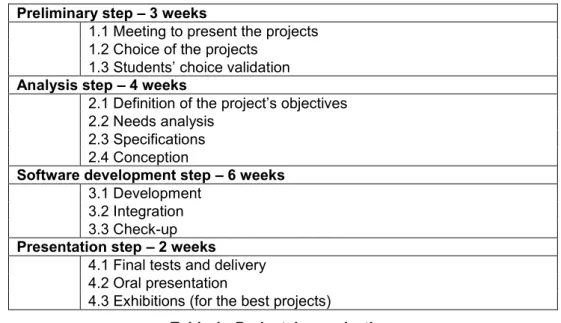
One of the objective of this project is to let the students overcome the simple practical work and to give them the opportunity to experiment developing applications within a team. This experience let them be aware of the different steps of the achievement of a project: from the need specification to the demonstration by using a methodological approach often used in their future professional environment. Therefore, during the whole semester, the students reproduce a real project life cycle.
Preliminary step – 3 weeks
1.1 Meeting to present the projects 1.2 Choice of the projects
1.3 Students’ choice validation
Analysis step – 4 weeks
2.1 Definition of the project’s objectives 2.2 Needs analysis
2.3 Specifications 2.4 Conception
Software development step – 6 weeks
3.1 Development 3.2 Integration 3.3 Check-up
Presentation step – 2 weeks
4.1 Final tests and delivery 4.2 Oral presentation
4.3 Exhibitions (for the best projects)
Table 1 : Projects’ organization.
3.2 Implementation of the projects
The implementation of the projects can be split in 4 steps (see Tab. 1):
1. A preliminary step where the projects and their organization is introduced to the students. 2. An analysis step where the students analyze the problem they have to solve and start
proposing and evaluating different solutions.
3. A software development step where the students implement the solution kept as the best one during the analysis step.
4. A presentation step where the students present their work.
3.2.1 Preliminary step
The preliminary step begins by an informative meeting with the students registered to the training unit. This meeting happens 3 weeks before the end of the first semester. During this meeting, the supervisor of the training unit presents in depth its organisation and the different projects proposed. From that moment on, the students have 2 weeks to form teams of 4 students that want to work together. Then, each team have to fill in a wish list where all the projects proposed are ordered according to the preferences of the team members. When all the wish lists are collected, the projects are assigned to the teams in order to be as close as possible to the wishes expressed by each team. In practice, it is unusual for a team to be assigned to a project that is located over its third wish. This procedure that involves the students in the choice of their projects is important because it allows to be sure of the student interest about the project. At the end of the semester, each team can start thinking about its project and can contact its project’s supervisor.
3.2.2 Analysis step
The projects’ supervision really begins during the first week of the second semester. Nevertheless, about the half of the teams starts the analysis step as soon as the projects are assigned by searching in books or on the web.
In a project, the analysis step is very critical because it is a determinant factor in order to ensure everything goes as smoothly as planned and to guarantee its success. The analysis step is a previous step to every software development. The purpose of the analysis step is to define, analyse and specify
the problem to solve to ensure the quality of the development phase. This step is essential to guarantee that the students will propose an adapted solution to their problem. In order to reach this objective, the students start their reflection from an informal subject that outlines their project and round out it during the first meeting with their supervisor. Students can also carry out an analysis (internal or external) of the current situation and complete it with some piece of information obtained from experts of the domain, e.g., future users of the software to develop. Based on this approach, students have to list the expected results. These are expressed in terms of functionalities, and ordered by priority and quality, i.e., performance, robustness, maintainability, security and scalability. According to their supervisor’s opinion, they write the specifications and the business plan of their project. From an educational point of view, writing these documents is very important because it is the first time that students have to do so, as they will do in an actual professional context. This process might allow students to better understand and define what the supervisor expects from them, and allow them to negotiate the set of functionalities of their application. For instance, they can propose additional functionalities, organize the set of functionalities into a priority hierarchy and estimate the implementation difficulties. The objective of the negotiation is to let the students decide the outline of their project in such a way that they maximize their probability of success at the end, whatever their skills were at the beginning of the project.
Finally at the end of the process, each team can begin to plan and design its project. The analysis step might seem to be long for students but it is essential, because it takes their opposite habits. Indeed, the exercises that are evaluated in restricted time require that the students answer quickly, and that is done to the detriment of their reflection. Moreover, the students must practice as much as possible to acquire a quality approach that is essential in a professional context.
3.2.3 Software development step
The software development step includes all the processes that allow to progress from the conception step to a functional and reliable application. During this step, the students face the programming difficulties and the concrete accomplishment of all software deliverables of their project. The students have to use their knowledge and their skills to fulfil and succeed their training unit. If the project is more technical, they will have to acquire new skills. In this case, their supervisor can guide them. Finally, this step ends by the checking of the different functionalities of the developed application.
3.2.4 Presentation step
The presentation step consists in emphasising the work done by the students during the whole project. The emphasising of their work has different aspects. First of all, with their supervisor, the students carry out the delivery of their application. This task consists in verifying together that the application meets the needs or the problem that was initially given to the students. Then, the students must prepare their oral presentation and promote their work. Note that the orals are public.
In the same time, they must complete a wiki page devoted to their project. In particular, they must upload all the deliverables of their project (code, documentation, runnable programs, etc.). All the students pages have a public access. Furthermore, the students must produce videos presenting their project in order to enhance their wiki page.
Finally, they must write a report about their project. The expectation is that they stand back from their accomplishment and the way to reach their objectives. The advice to the students was to analyse the positive and negative points of their work to learn from their experience and to avoid redoing the same mistakes.
Furthermore, we ask the robotic teams to present their work to the other students and other manifestations, e.g., students or universitary internal exhibitions (see section 4.5 for more details).
3.3 The role of the supervisor
Throughout the semester, the supervisor plays the role of a customer. He gets involved in the follow-up and the evolution of the project. In particular, he must pay attention to tasks’ allocation between the students of the team. Indeed, the students are individually assessed, thus it is crucial to be able to characterize the contribution of each one. Of course, the supervisor, as a member of the educational team also plays the role of advisor and assistant. His expertise allows him to guide the students to the appropriate resources and to correct their propositions when they are unsuitable and when they might lead to the failure of the project. Nevertheless, the supervisor lets the students free to follow his guidelines or not because we also learn from our mistakes.
In this context, the teacher as a supervisor is not in his usual role. Throughout the project, he must deal with the uncertainty, because he does not control the choices of the students. In order to take into account the needs of the learners, he must give up his teacher position. He acts more as a mediator and not as a dispenser of knowledge. He can negotiate with the students the objectives and the means. He must also spark off and sometimes manage the divergent ideas of the students.
3.4 The tools
In order to improve the quality of the projects and the quality of the trainings, the students use several tools.
3.4.1 Dokuwiki
The first tool that is available to students is a wiki. In our case we use DokuWiki [16]. This wiki allows students and supervisors to bring together all the information on the projects and the teaching module organization. The wiki [17] is made up of 7 sections:
1. A home page which summarizes the context of the projects and the organization of the teaching module in the student training.
2. A specific section is dedicated to the computer science projects of the third year students. This section sums up the objectives, the functioning of the training unit (the expected students’ devotion, the important dates, the schedule, etc.), the proposed subjects and the list of the teams with their assigned project.
3. A specific section is dedicated to the computer science projects of the second year students which content is quite similar to the previous described section.
4. A section devoted to other projects of the third year students which tackles more specific software engineering aspects. This type of project is out of range for this article.
5. A section that brings together the useful resources: the patterns of the documents used during the project, e.g., reports, minutes, specifications, etc., and the evaluation form of the training unit. The students must fill in it during the last weekly meeting with their supervisor or later in order to keep the confidentiality of their evaluation. A link is also available to access to versioning tool (SVN) and to access a FAQ (Frequently Asked Questions).
6. A section is dedicated to the Lego Mindstorms. It introduces many examples of robots already implemented and proposes links to their idea-man.
7. The last section is a short summary for the supervisors. The important dates and a FAQ can be found there.
The specific sections for the second and the third year students allows them to access the wiki page devoted to their group. On this page, the students have to present and upload all the documents of their project. The pattern of this page is organized as follow:
The pictures of each team member.
An abstract of the project in French and in English.
All the documents written during the project in public access.
The project: the source code of their application and the runnable programs. A video of their oral presentation.
Possibly, some demonstration videos.
3.4.2 Subversion
Subversion (SVN) is a revision control system used in software development. SVN allows to upload and to store source code in a reliable and centralized manner [18]. All the files are stored in a data base accessible by the network. Thus, the students can work remotely with each other. This tool is widely used in a professional context and it is often considered as essential, because it allows many computer programmers to develop together the source code of an application. This tool has a lot of advantages: it records a history of the modifications done in the different files stored in the data base; it can manage several versions of same file or also manage the conflicts of a file when it is concurrently access by more than one user. Finally, through this tool, we can tackle with the students
the concept of no-regression for an application. This concept is central in software engineering. For each (major or minor) modifications of the source code of the application, the students must ensure that the application does not loose previous implemented functionalities. In the opposite case, the students can use the SVN to go back to a previous version of the application.
3.4.3 Plenadis
Plenadis is a specific tool that has been designed and written in JAVA [13]. This platform, which aims at offering users synchronic communications, has been implemented in the department of mathematics and informatics. It has been used for several years on a local basis to supervise projects, download courses and practical work subjects. It let supervisors various possibilities to reach students on line. For our project, a working space is available for every project teams. In each space, students can use synchronous communication tools like a chat room, a white board, or a shared editor and asynchronous tools to post messages on forums, upload documents or send messages.
Each project team uses Plenadis to store the minutes of the weekly meeting with their supervisor and to store the final report and the intermediate documents needed to carry out their project. Moreover, they use the tool to share working documents, to debate and work on-line when they cannot be attending at the university.
3.4.4 Lego Mindstorms
In the context of this feedback, 5 Lego Mindstorms robots were made available to the students. The robots have a NXT Intelligent Brick set up with a 32-bit processor ARM7. They can communicate with blue-tooth wireless or USB technology. Most of the main programming languages (C, Java, Prolog, etc.) can be used to develop applications on the Lego robots. Several sensors are available on this robotics tool:
The touch sensor reacts to touch and release, enabling robots to detect single or multiple button presses, and reports back to the NXT Intelligent Brick.
The light sensor assists in helping the robot to ”see” Using the NXT Brick, it enables the robots to distinguish between light and dark, as well as to determine the light intensity in a room or the light intensity of different colors.
The sound sensor allows the robots to hear. The sound sensor is able to measure noise levels in both dB (decibels) and dBA (frequencies around 36 kHz where the human ear is most sensitive), as well as recognize sound patterns and identify tone differences.
The ultrasonic sensor helps the robots to judge distances and to ”see” where objects are. Using the NXT Brick, the ultrasonic sensor is able to detect an object and measure its proximity in inches or centimeters.
The compass sensor is able to measure the earth’s magnetic field and calculates a magnetic heading to tell which direction the robots are facing. The compass has a built-in calibration to help reduce magnetic interference from other sources.
The accelerometer sensor lets the robots know which way is up and when the robots tilt left or right, up or down, or side to side. This three-axis accelerometer sensor also measures acceleration so you can measure g forces just like jet fighter pilots and astronauts.
Finally, on top of these sensors, the robots can use servo motors. The servo motor has a built-in rotation sensor that measures speed and distance, and reports back to the NXT Intelligent Brick. This allows precise steps and a complete motor control within one degree of accuracy. Several motors can be aligned to drive at the same speed.
4
PROGRESS REPORT
4.1 The proposed projects
Within the context of implementation exposed in this paper, the students were asked to choose their project in a given list. Although all the students are undergraduate, we had two different populations where the differentiation criterion is the year of study. The L2 group is in the second year of the cycle whereas the L3 group is in the third year. The list given to the L2 group was containing 11 different
projects whereas the list given to the L3 group was containing 10 different projects. To facilitate the management of the corresponding teaching units, and to homogenize the students’ grades, at least two different student groups were concerned by the same project.
For the 2009-2010 academic year, among all the projects proposed, three projects were concerned by using robots as a support:
A gyropod robot (L2). It’s a two-wheeled, self-balancing robot inspired by the Segway Personnal Transporter. The main objective of this project is to ensure that the robot stay balanced in order to move safely in its environment.
A Rubik’s Cube solver (L3). This project is to ensure that the robot can perceive and solve any Rubik’s cube.
A library to develop graphical user interface (GUI) for controlling any robot (L3). This project aims to develop a set of graphical components to quickly design a GUI for any robot. This GUI should be able to evolve dynamically according to the sensors or engines that had been connected.
Projects involving robots were the most asked by the students. More than 80% of the students groups have classified this kind of project in their top three when they have expressed their wishes.
4.2 The theoretical difficulties
Each proposed project induces some theoretical difficulties at different steps of the project: from conception to implementation.
4.2.1 Modelling the problem
Modeling the problem is a crucial step that aims to identify the problem data and then to determine how it will be processed. Indeed, data organization determines the algorithms that will be used, and therefore it has an influence on processing time. Thus, the representation of the Rubik’s Cube has to be thoughtful for the resolution to be done in a reasonable time. And with the gyropod robot, it is necessary to understand that it’s an inverted pendulum problem.
4.2.2 Software design
This step consists in defining the application’s major functionalities. Sometimes, it is useful to consider the use of reusable software components as they may allow a significant time savings during the development step. However, if one wants to seamlessly integrate reusable components into a project, it is necessary to handle their specificities early on the conception step. On the other hand, when developing reusable software components, creating a framework as general as possible is a complex task because it is impossible to anticipate every situation.
Therefore, a good ability to pre-empt design and integration issues that may occur in this context is required to carry out components aiming at a rapid design of a GUI that could be used with different kinds of robot.
4.2.3 Algorithms
From the algorithmic point of view, the proposed projects handle with some of the classical problems in robotics and artificial intelligence. For example, the gyropod robot requires a good understanding of the mechanism of retro-control loop without which the robot could not keep its balance. This mechanism is a kind of interaction between a sensor and a control system aimed at obtaining an optimal behaviour. In the case of the Rubik’s Cube, a resolution algorithm must find an unique solution among more than 43x10^18 possible combinations. Therefore, the complexity of the algorithm has to be carefully studied to obtain a solution within a reasonable time.
4.2.4 Implementation
The implementation is the final step of building an application. It consists in translating previously designed (or chosen) algorithms into a programming language One key point that has been addressed by the proposed projects is the influence of the critical loop over the program time execution. The critical loop is the set of instructions which is the most repeated during the program execution. Thus, a poor implementation of the critical loop generally leads to a dramatically slow program execution (in fact, it also depends on the complexity of the algorithm). For example, with the gyropod robot, a too
long processing time may cause it to fall. And with Rubik’s Cube solver, the resolution would take several hours (instead of few seconds).
4.3 Practical difficulties
In addition to theoretical difficulties, several practical difficulties were encountered. The first of them was the occupancy rate of the robotics room which was about 100%. Each group had two half-day time slots a week to access the robotics room and therefore it was nearly impossible for them to perform any tests on robots outside these slots. Consequently, it was necessary to use a numerical modelling of the problem in order to carry out some virtual tests before proceeding with the robot. The stamina batteries have also been a problem. Indeed, one can observe that the voltage supplied by the batteries decrease significantly after 15 minutes of use. This decrease affects engines performance, which consequently makes the gyropod robot’s balance harder to remain. To overcome this effect, it became necessary to take into account the voltage decrease while processing the retro-control loop. One solution implemented by the students consists in to estimate the batteries’ discharge and to alter the commands sent to the engines according to this estimation.
The accuracy and sensitivity of the sensors were also taken into account. For example, capturing the sides of a Rubik’s cube is a task that depends on lighting conditions. Thus to avoid confusion between different colours, a solution combining automatic learning and assisted manual correction has been implemented. Most of these solutions were proposed by students themselves, showing their ingenuity and their ability to integrate related knowledge.
4.4 Achievements
Four undergraduate groups were involved in a project based on a Lego Mindstorms robot. It is interesting to notice that the two groups who worked on the gyropod robot have had very different approaches of the same problem. However, both groups have shown great ingenuity in finding solutions to ensure the robot’s integrity in case the programs they made would not allow it to remain properly balanced.
4.5 Promotion
The promotion of the students’ realizations has taken several forms. First, students were invited to perform demonstrations in different contexts in front of different audiences:
They have presented their work at Digital Days 2010 of the University of Paris Descartes Some of them were present during the open days of our university and they have aroused keen interest among visitors. The visibility of studies in computer science has thus been increased.
A demonstration was also organized for students and teachers of our Mathematics and Computer Science Department.
The promotion of their work during all these demonstrations helped them to increase their self-confidence and their presentation skill.
Another kind of promotion has been initiated by the students themselves on social networks; many pictures and videos made by students were posted on websites such as YouTube and Facebook. It’s difficult to assess the impact of this type of promotion. However, the videos have had some success as some of them have been viewed more than 600 times to date (about a month after they have been published).
In a more classical way, the digital library of the University of Paris Descartes stores some video demonstrations and makes them available for all via internet.
4.6 Observations
A questionnaire was distributed to students who have completed the semester. It focuses on their feelings about many aspects of their project: achievements, encountered difficulties, teamwork efficiency, ... We didn’t found any significant differences between L2 and L3 student populations. So we have decided to observe two different populations: those who participated in a robotics project and the others. The respective sizes of these two populations are 15 students and 75 students. These two
populations are equivalent in terms of prior experience in achieving an academic project; approximately half of the students surveyed have already participated in this kind of project.
Most of the students of both populations considered they have fairly well conducted their project in terms of planning. However, students involved in robotics projects have the feeling that they better held their planning compared to the other students as a quarter of them think they rather mismanaged their planning.
When answering to the question:”Did your group achieved its objectives ?”, 15% of the students involved in non-robotics projects thought that they haven’t achieved all their objectives whereas all the students involved in robotics projects thought they have achieved theirs. This appears to be consistent with the free comments left by students on the questionnaires and confirms our observations that students of robotics projects have spent more time to achieve their objectives.
When answering to the question:”Has your group worked efficiently ?”, a third of the students involved in non-robotics projects thought that they have not worked efficiently whereas most of the students involved in robotics projects thought they have. This may be explained by the fact that students of robotics projects had a strong interest in their subject. Indeed, students who felt that they didn’t have worked efficiently are often among the groups in which the interest in the subject was not equal between all members. This hypothesis seems to be confirmed by the answers obtained to the questions:”Do you think there was a good atmosphere in your group ?” and ”Are you satisfied with the work done by your group ?” All students of robotics projects have felt they had worked in a good atmosphere and are satisfied whereas this is the case for only 80% of the others students.
These observations corroborate those previously obtained in similar experiments of project-based learning. There is however a greater investment of students when they are involved in robotics projects. It should be noticed that the only student involved in a robotics project and finding its investment unsatisfactory explained that he have understood too late that he made a mistake when choosing his courses. Thus, using robots in project-based learning seems worthwhile within this kind of academic context.
5
DISCUSSION AND PERSPECTIVES
Our initial objective was to demonstrate the feasibility of robotic projects within our university. This experiment was very encouraging. We were surprised to see the emotional implication of students who named their robots and even personalized them. We observed that a lot of undergraduate students came to the demonstrations of the robotic projects. We may have to consider demonstrating as well the other project that did not include robots. At this stage, it is not possible to rigorously evaluate the results of those projects. Indeed, it seems difficult to know who learnt what, when and how. Nevertheless, we can observe the progress achieved in various domains like the employed methodology. Furthermore, many years would be needed if we really want to check the results of a student who took a robotic project on his (her) whole educational formation or if he (she) wants to pursue his (her) studies in a domain connected to his (her) project. Nevertheless, we estimate that we have achieved various objectives:
Awake students interest to the area of artificial intelligence,
Make computer science courses more attractive within the Paris Descartes University. This can be seen as outside the pedagogic boundaries but it seems correlated to the students’ motivation,
Gather scientific collaborations within the Mathematics and Computer Science department. Now, we are considering the possibility of offering to every student to work with robots. It seems there is two ways to achieve that; by increasing the number of robotic projects; or by having practical works involving more than one area of artificial intelligence. By increasing the number of robots, we could be able to affect a whole class of students. The conclusion of the practical works could be a competition between various implementations of various groups on the same type of robot. We are also considering getting more sophisticated robots that will be dedicated to master students and that will need a good understanding of the state of the art.
ACKNOWLEDGEMENTS
We would like to thank the Paris Descartes University which, through innovative educational projects, made the acquisition of robotic equipments possible. We would also like to thank the Mathematics and Computer Science department which has provided us a dedicated room. And our gratitude also goes to our colleagues who supervised these various projects.
REFERENCES
[1] R.A. Brooks. Intelligence without representation. In Artificial Intelligence, volume 47, pages 139 – 159, 1991.
[2] CPBL. Center for problem-based learning. http://www.imsa.edu/team/cpbl/cpbl.html. [3] T. Dean. CS148: Building intelligent robots.
http://www.cs.brown.edu/˜tld/courses/cs148/01/syllabus.htm, 2001.
[4] B.J. Duch. Problem-based learning in physics: The power of students teaching students. In About Teaching:A Newsletter of Center for Teaching Effectiveness, 1995.
[5] S. George. Apprentissage collectif distance. SPLACH: un environnement informatique support d’une pédagogie de projet. PhD thesis, 2001.
[6] W.H. Kilpatrick. The project method. In Teachers College Record, volume 19, pages 319–335, 1918.
[7] P. Leroux. ROBOTEACH: un assistant pédagogique logiciel dédié à l’alphabétisation en technologie. In 5ème Colloque International sur la Robotique Pédagogique, pages 45–58, Montréal, August 1997.
[8] M. Littman. CPS196: Programming under uncertainty. http://www.cs.duke.edu/˜mlittman/, 1999. [9] F. Martin. The MIT LEGO robot design project competition.
http://fredm.www.media.mit.edu/people/fredm/projects/6270/, 1989.
[10] K. Martin. Issues of Teaching and Learning, volume 2. University of Western Australia, 1996. [11] F. Martin. Robotic Explorations: A Hands-On Introduction to Engineering. Prentice Hall, 2000. [12] M. Mataric. CS445 introduction to robotics, a lego-kit-based hands-on lab course.
http://wwwscf.usc.edu/˜csci445, 1998.
[13] Y. Parchemal and G-L. Baron. Plenadis : a collective work plateform for higher education. In International Conference on Education and New Learning Technologies, 2010.
[14] S. J. Russel and P. Norvig. Artificial Intelligence: a Modern Approach. Prentice Hall, 2nd edition, 2003.
[15] H. Yanco. 91.450:Robotics I. http://www.cs.uml.edu/˜holly/91.450/, 2001. [16] http://www.dokuwiki.org/
[17] http://www.ens.math-info.univ-paris5.fr/projets-informatiques/ [18] http://subversion.apache.org/