HAL Id: tel-01744136
https://tel.archives-ouvertes.fr/tel-01744136
Submitted on 27 Mar 2018
HAL is a multi-disciplinary open access
archive for the deposit and dissemination of sci-entific research documents, whether they are
pub-L’archive ouverte pluridisciplinaire HAL, est destinée au dépôt et à la diffusion de documents scientifiques de niveau recherche, publiés ou non,
Increasing the expressive power of gesture-based
interaction on mobile devices
Jessalyn Alvina
To cite this version:
Jessalyn Alvina. Increasing the expressive power of gesture-based interaction on mobile de-vices. Human-Computer Interaction [cs.HC]. Université Paris-Saclay, 2017. English. �NNT : 2017SACLS526�. �tel-01744136�
Increasing The Expressive Power
of Gesture-based Interaction
on Mobile Devices
Thèse de doctorat de l'Université Paris-Saclaypréparée à l’Université Paris-Sud
École doctorale n°580 Sciences et technologies de l’information et de la communication (STIC) Spécialité de doctorat : informatique
Thèse présentée et soutenue à Gif-sur-Yvette, le 13/12/2017, par
Jessalyn ALVINA
Composition du Jury : Géry Casiez
Professeur des universités, Université de Lille 1 Président Shumin Zhai
Ingénieur de Recherche, Google Rapporteur
Andy Cockburn
Professeur des universités, University of Canterbury Rapporteur Eric Lecolinet
Maître de Conférences, Télécom Paris-Tech Examinateur Wendy Mackay
Directrice de Recherche, INRIA Saclay Directeur de thèse
NNT : 2 0 1 7 S A CL S 5 2 6
Increasing The Expressive Power of
Gesture-based Interaction on Mobile Devices
a dissertation presented by
Jessalyn Alvina to
The Department of Computer Science Université Paris-Saclay
in partial fulfillment of the requirements for the degree of
Doctor of Philosophy in the subject of Human-Computer Interaction Université Paris-Saclay Saclay, France December 2017
©2017 – Jessalyn Alvina all rights reserved.
Thesis advisor: Professor Wendy E. Mackay Jessalyn Alvina
Increasing The Expressive Power of
Gesture-based Interaction on Mobile Devices
Abstract
Current mobile interfaces let users directly manipulate the objects displayed on the screen with simple stroke gestures, e.g. tap on soft buttons or menus, pan to scroll a document, or pinch to zoom. These simple gestures on buttons, icons, or menus were a solid foun-dation to support the transition from WIMP to touch-based interfaces. However, today’s smartphones offer a wide variety of functionalities, from communication, games, informa-tion consumpinforma-tion, office support, even art and creativity support [12]. To access a larger command space, the users are often forced to go through long steps, making the interaction cumbersome and inefficient. More complex gestures offer a powerful way to access informa-tion quickly as well as to perform a command more efficiently [5]. However, they are more difficult to learn and control. Gesture typing [78] is an interesting alternative to input text: it lets users to draw a gesture on soft keyboards to enter text, from the first until the final letter in a word. Since the gesture is drawn on top of a soft keyboard, each key acts as a “steering target” of how to draw the gesture.
I am interested in rethinking the access to a variety of functions, by building mobile in-teractions that are both easy to learn and control yet more powerful. I envision users just interact as they usually do with the existing systems, yet they can easily access more power-ful functionalities. I am specifically interested in text entry, since most of mobile interaction involves command invocation and text entry.
I believe we can increase the expressive power of mobile interaction by leveraging the ges-ture’s shape and dynamics and the screen space to produce rich output, to invoke commands, and to facilitate appropriation in different contexts of use. I argue that humans are capable to perform various movements with different level of precision, especially after a certain amount of practice. It is very difficult, if not impossible, to perform exactly the same movement twice. Each person also performs differently from one to another. Hence, if we can distinguish the variations in the gesture, I believe we can exploit the variability to express different concepts.
Thesis advisor: Professor Wendy E. Mackay Jessalyn Alvina Once users gain more control over their variability, we can also introduce slightly more com-plex interactions that enable way more powerful functionalities.
In this thesis, I show that users’ gesture performance vary substantially across users (due to e.g. biomechanics or personality) and context (e.g. activity or environment). I present three features that form a low-dimensional representation of gesture variation and users can significantly vary under different conditions. I design a new interaction technique, Expres-sive Keyboard, that transforms the gesture variations into rich output, and demonstrate several applications in the context of text-based communication. Users can gesture type as they usually do, but get more power to express different concepts. I then introduce a se-ries of controlled experiments that investigate the learning and appropriability aspects of the proposed technique. The result shows that users can deliberately control these additional features of their gestures as they gesture type, in addition to their natural gesture variations. Users quickly appropriated Expressive Keyboard as soon as they used it and took the gen-erated rich output as a feedback of their gesture-typing performance, which then improved their performance. I propose CommandBoard, a gesture keyboard that lets users efficiently select commands from a large command space while supporting the transition from novices to experts. I demonstrate different applications of CommandBoard, each offers users a choice, based on their cognitive and motor skills, as well as the size and organization of the current command set. Altogether, these techniques give users more expressive power by lever-aging human’s motor control and cognitive ability to learn, to control, and to appropriate.
Thesis advisor: Professor Wendy E. Mackay Jessalyn Alvina
Increasing The Expressive Power of
Gesture-based Interaction on Mobile Devices
Abstract
Les interfaces mobiles actuelles permettent aux utilisateurs de manipuler directement les objects affichés à l’écran avec de simples gestes, par exemple cliquer sur des boutons ou des menus, naviguer dans des documents ou pincer pour zoomer. Ces gestes simples sur des boutons, des icônes ou des menus étaient de solides bases pour passer des interfaces WIMP au interfaces mobiles. Cependant, les smartphones offrent aujourd’hui des fonctionnalités variées, depuis la communication, les jeux, la consommation d’information, la bureautique ou bien même l’art et les outils supports de créativité [12]. Pour accéder à un espace de com-mande plus large, les utilisateurs sont souvent forcés de passer par de nombreuses étapes, ren-dant l’interaction inefficace et laborieuse. Des gestes plus complexes sont un moyen puissant d’accéder rapidement à l’information ainsi que d’exécuter des commandes plus efficacement [5]. Ils sont en revanche plus difficiles à apprendre et à contrôler. Le “Gesture Typing” (saisie de texte par geste) est une alternative intéressante au texte tapé: il permet aux utilisateurs de dessiner un geste sur leur clavier virtuel pour entrer du texte, depuis la première jusqu’à la dernière lettre d’un mot. Puisque le geste est dessiné sur un clavier virtuel, chaque touche devient une “cible directionnelle” qui dirige le tracé du geste.
Je m’intéresse à repenser l’accessibilité à de nombreuses fonctionnalité en créant des inter-actions mobiles qui soient à la fois facile à apprendre et contrôler tout en étant plus puis-sante. J’envisage que les utilisateurs puissent continuer à interagir de la même manière que ce qu’il font aujourd’hui tout en leur permettant d’accéder à des fonctionnalités plus avancées. Je m’intéresse en particulier à la saisie de texte car c’est, avec l’invocation de commande, le moyen le plus répandu d’interagir avec un mobile.
Je pense qu’il est possible d’augmenter le pouvoir d’expression de l’interaction mobile en tirant profit de la forme et la dynamique du geste et de l’espace de l’écran, pour invoquer des commandes ainsi que pour faciliter l’appropriation dans différents contextes d’usage. Je soutiens que les humains sont capables d’executer divers mouvements avec différents niveaux
Thesis advisor: Professor Wendy E. Mackay Jessalyn Alvina de précision, en particulier après un certain temps d’entraînement. Il est très difficile, sinon impossible, d’exécuter deux fois le même mouvement. Chaque personne exécute le même geste différemment des autres personnes. Ainsi, si l’on peut distinguer les variations des gestes, j’affirme que l’on peut exploiter la variabilité pour exprimer différents concepts. Lorsque les utilisateurs acquièrent plus de contrôle sur leur variabilité, on peut également introduire des interactions un peu plus complexes qui rendent possibles des fonctionnalités plus puissantes.
Dans cette thèse, je montre que l’exécution d’un geste par les utilisateurs varie grandement entre les utilisateurs (selon la personnalité ou pour des raisons bioméchaniques par exem-ple) et entre les contextes (selon l’activité ou l’environnement, par exemexem-ple). Je présente trois caractéristiques qui quantifient la variabilité d’un geste. Je conçois une nouvelle technique d’interaction, Expressive Keyboard, qui transforme la variation du geste en un résultat riche et je démontre plusieurs applications dans le contexte de la communication textuelle. Les utilisateurs peuvent écrire gestuellement (gesture type) comme ils en ont l’habitude, mais ils ont maintenant le pouvoir d’exprimer différents concepts. J’introduis ensuite une série d’expériences qui explorent l’apprentissage et l’appropriabilité de la technique proposée. Le résultat montre que les utilisateurs peuvent délibérément contrôler ces paramètres supplé-mentaires de leurs geste lorsqu’ils écrivent gestuellement, en plus de la variation naturelle de leurs gestes. Les utilisateurs se sont rapidement approprié Expressive Keyboard dès qu’ils s’y sont habitués et ont utilisé le résultat comme un retour sur leur performance d’écriture gestuelle, ce qui leur a permis d’améliorer encore leur performance. Je propose Command-Board, un clavier gestuel qui permet aux utilisateurs de sélectionner efficacement des com-mandes parmi un vaste choix tout en supportant la transition entre les novices et les experts. Je démontre plusieurs applications de CommandBoard, dont chacune offre aux utilisa-teurs un choix basé sur leurs compétences cognitives et moteur, ainsi que différentes tailles et organisations de l’ensemble des commandes. Ensemble, ces techniques donnent un plus grand pouvoir expressif aux utilisateurs en tirant profit de leur contrôle moteur et de leur capacité à apprendre, à contrôler et à s’approprier.
Contents
1 Introduction 1 1.1 Thesis Statement . . . 4 1.2 Research Approach . . . 4 1.3 Contributions . . . 5 1.3.1 Collaborators . . . 6 1.4 Thesis Overview . . . 6 2 Related Work 9 2.1 Gestures on Touchscreen Devices . . . 92.2 Zero-order Gestures . . . 10
2.2.1 Increasing Recognizability . . . 11
2.2.2 Augmenting Zero-order Gestures . . . 11
2.3 Unistroke Gestures . . . 12
2.3.1 Challenges . . . 13
2.3.2 Designing Gesture-based Interactions . . . 14
2.4 Gesture Keyboards . . . 15
2.4.1 Gesture Recognition Process . . . 15
2.4.2 Learnability Aspects . . . 17
2.5 Augmenting Soft Keyboards . . . 18
2.5.1 Generating Expressive Output . . . 19
2.5.2 Invoking Commands from Keyboards . . . 19
2.6 Position of My Work . . . 20
2.7 Generative Design Principals . . . 21
2.7.1 Substrate . . . 22
2.7.2 Co-Adaptation . . . 22
2.8 To Leverage Gesture’s Shape and Dynamics . . . 24
2.8.1 Spatial Features . . . 25
2.8.2 Temporal Features . . . 26
2.8.3 Technical Features . . . 27
2.9 Summary . . . 27
3 Gesture Variability 28 3.1 Preliminary Observation on Gesture Variatiability . . . 29
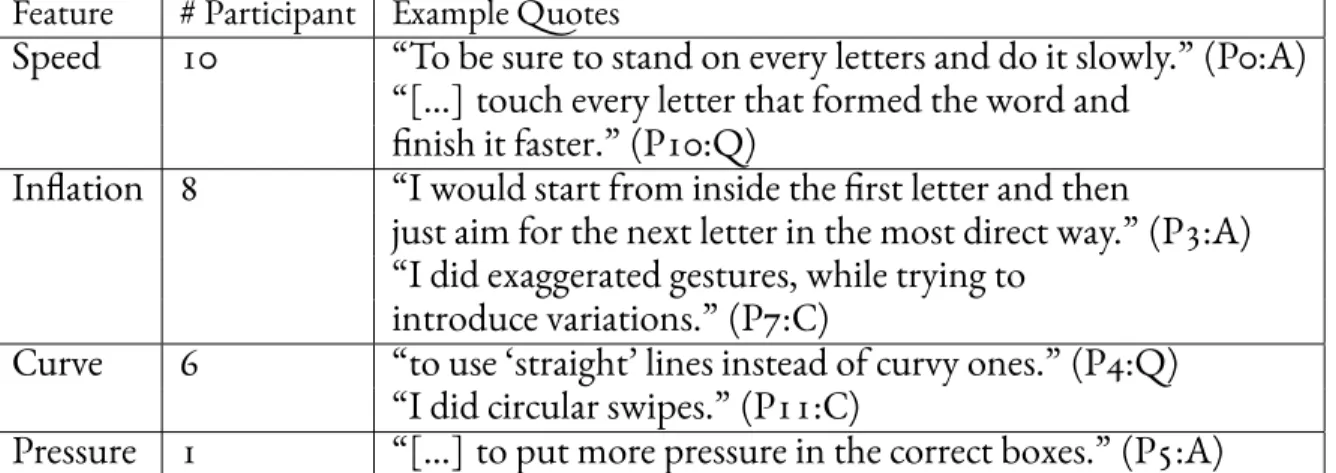
3.1.2 Observations . . . 30
3.2 Experiment 1: Deliberate Gesture Variation . . . 31
3.2.1 Participants . . . 32
3.2.2 Apparatus . . . 32
3.2.3 Procedure . . . 33
3.2.4 Data Collection . . . 34
3.2.5 Results and Discussion . . . 35
3.3 Quantifying Variation in Gesture-Typing . . . 38
3.3.1 Speed . . . 40
3.3.2 Inflation . . . 41
3.3.3 Curviness . . . 42
3.4 Summary . . . 44
4 Transforming Gesture Variation into Rich Output 45 4.1 Expressive Keyboard . . . 45 4.2 Applications . . . 47 4.2.1 Colorful Text . . . 47 4.2.2 Dynamic Font . . . 49 4.2.3 Parametric Emoticon . . . 50 4.2.4 Animated Emoticon . . . 50 4.3 Technical Implementation . . . 52 4.3.1 Initial Implementation . . . 52 4.3.2 Revisited Implementation . . . 53 4.4 Summary . . . 54
5 Learnability and Appropriability 55 5.1 Experiment 2: Learning to Control Gesture Variations . . . 55
5.1.1 Description . . . 56 5.1.2 Participants . . . 57 5.1.3 Apparatus . . . 57 5.1.4 Procedure . . . 59 5.1.5 Data Collection . . . 59 5.1.6 Results . . . 60 5.1.7 Discussion . . . 63 5.2 Learning Strategies . . . 65
5.3 Experiment 3: Ecological Validity . . . 68
5.3.1 Description . . . 68
5.3.2 Participants . . . 69
5.3.3 Hardware and Software . . . 69
5.3.4 Procedure . . . 69
5.3.6 Results and Discussion . . . 70
5.4 Implication For Designs . . . 74
5.5 Summary . . . 75
6 Invoking Complex Commands from Gesture Keyboards 78 6.1 Revisiting Mobile Device’s Screen Real Estate . . . 79
6.2 CommandBoard . . . 80
6.2.1 Type-and-Execute Commands . . . 82
6.2.2 Inline Gesture Shortcut . . . 86
6.3 Gesture Chunking with CommandBoard . . . 88
6.4 Learnability Aspects . . . 88
6.5 Cognitive and Motor Efficiency . . . 89
6.5.1 Experiment Description . . . 90
6.5.2 Method . . . 91
6.5.3 Participants . . . 91
6.5.4 Hardware and Software . . . 91
6.5.5 Procedure . . . 92
6.5.6 Measures . . . 95
6.5.7 Data Collection . . . 96
6.5.8 Result: Experiment . . . 96
6.5.9 Result: Preferences Study . . . 99
6.6 Discussion . . . 102
6.7 Summary . . . 102
7 Conclusion 105 7.1 Transforming Mobile Devices into Powerful, Personalized Tools . . . 105
7.2 Contributions . . . 107
7.3 Perspective . . . 108
7.3.1 Building Human-Computer Partnership . . . 109
7.3.2 Screen Spaces as Different Substrates . . . 111 8 Appendix A: Accessing Hierarchical Commands from
Command-Board 112
Listing of figures
1.1 Gesture-typing [42, 82] is an efficient, easy-to-learn, and error toleranttech-nique for entering text on software keyboards. All four gestures in this fig-ure are correctly recognized as “great”. . . 3 1.2 Overview of the thesis and the used design methods. It includes controlled
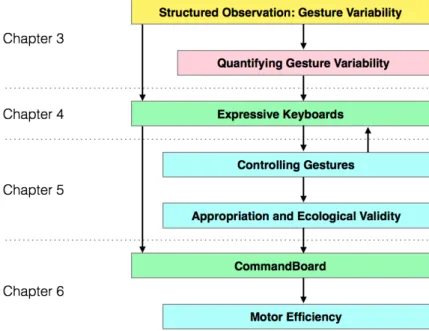
experiments and informal observations. The understanding and theory from the studies served as the fundamentals to design and redesign new interaction techniques. . . 7 2.1 Different type of gestures based on the stroke length and the number of
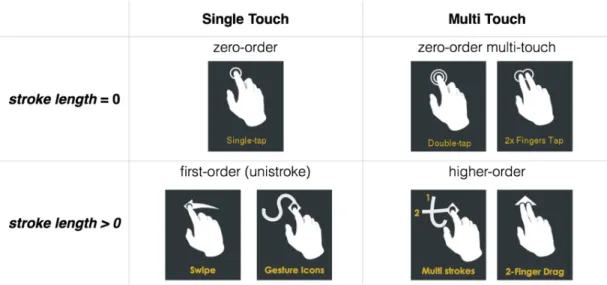
contact points. . . 10 2.2 The multi-channel recognition engine of gesture keyboards, taken from [42]. 16 2.3 The difference between a novice and an expert when using gesture keyboards. 18 3.1 Gesture variations: a)accuratelyis straight, b)quicklyis smooth, and c)
cre-ativelyis inflated and highly varied. . . 34
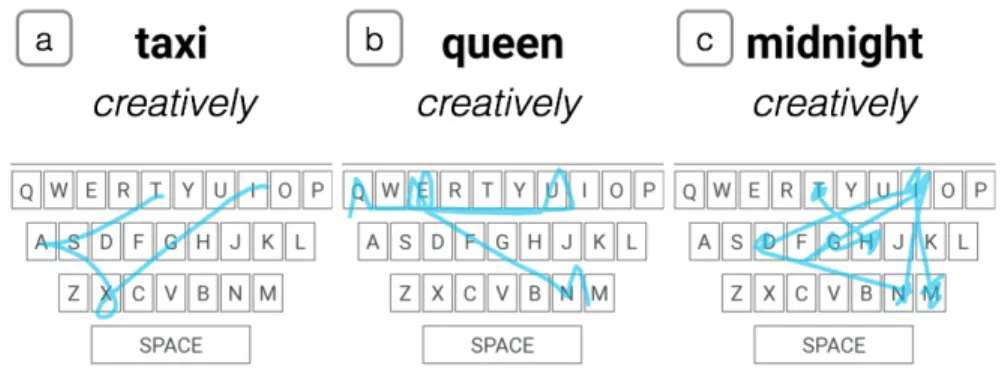
3.2 Recognized creative gestures included: a) loop and cusp for taxi, b) visual-ization of crown for queen and c) scribbling on keys to create the stars or a constellation for midnight. . . . 36 3.3 Accuracy of all participants for KB-1 and KB-2 (range from 0 to 1) in the
Experiment 1. . . 37 3.4 Speed ratio vs. angle by length. Participants slowed down when drawing
short and zero-angle (straight-line) words, but maintained constant speed when drawing long words. . . 41 3.5 Recognized gestures from different participants in the Experiment 1. . . 43 4.1 The process of transforming gesture input into rich output with Expressive
Keyboard. 1) The gesture keyboard recognizes the gesture into a word just
as before, as if it is a “blackbox”. Expressive Keyboard adds additional steps (in grey): 2) quantifies the variations in the captured gesture input and 3) maps them to output properties. Finally, Expressive Keyboard renders the recognized word along with the output properties as a rich output. . . 46
4.2 The font engine lets users to draw their own typeface by adding control points that are connected to a cardinal spline. Users can include several strokes by detaching the splines. On the right are two examples of static typefaces defined using the font engine: the baseline (top-right) and the variation (bottom-right). . . 50 4.3 Manipulating the curviness and inflation in gestures with Expressive
Key-board will generate emoticons with subtle different of expression. a) A gesture with straight stroke segments generates a little smile; b) a curvy ges-ture generates a big smile; and c) a curvy, inflated gesges-ture with wobbles at the end generates a laughing face. . . 51 5.1 Participants are significantly more likely to control gestures based on
out-put than on inout-put. . . 60 5.2 Participants can intentionally control gesture size when asked (inflation
ra-tio), but do not vary it otherwise. . . 62 5.3 Successful control of color through gesture: a) [instruction: Different-Output]
bright-green indicates curviness, dark green indicates straight lines; b)
struction: Varied-Input] inflating the gesture increased red values; c) [in-struction: recipients] P8 changed the color deliberately for different
recipi-ents; d) [instruction: express emotion] P4 made curvier gestures with more detours for ‘happy’, and slow and less curvy gestures for ‘sad’. . . 63 5.4 Using Expressive Keyboard in Experiment 3: a) P2 naturally made curvy
gesture (green) but made straight gestures (dark green) to emphasize some words, b) P6 deliberately made two words (“burger shop”) the same shape and color, c) P3 emphasized the first word, but then deliberately made his gesture more precise (dark color) instead of curvy. . . 72 5.5 Participants successfully varied or kept constant the inflation and speed
consistency when instructed. They naturally made curvy gestures, but could make them more curvy when instructed. . . 73 6.1 The screen real estate in the current mobile interfaces. . . 80 6.2 CommandBoard specifies multiple command entry spaces. New
meth-ods (in green) include typing a command name followed by an execute gesture; crossing a suggested command in the command bar; or executing a unique gesture in the upper command gesture input space. An in-context dynamic guide shows gesture-command mappings. . . 82 6.3 A diagram describingTYPE-AND-EXECUTEtechnique of CommandBoard.
6.4 CommandBoard creates a new command gesture input space above a soft keyboard. Users can: a) type ‘happy’ and use a dynamic guide to style it as bold; b) type ‘brightn’, draw anexecutegesture and adjust the bright-ness slider; c) type ‘sans’, choose ‘sans mono’ and draw anexecutegesture to change the font; d) type ‘color’, select yellowin the marking menu to change the brush color. . . 84 6.5 After typing an existing command name, a) a preview appears. Since “Line
Spacing” is a sub-menu, its menu items appear in the command bar. Af-ter sliding across the command bar, b) performing a | gesture will cancel writing, whereas c) performing a /\ gesture will execute the command. . . . 85 6.6 Gesture set: Grey circles indicate where to begin drawing. . . 92 6.7 Part A (Experiment): Each condition (Practice, Experiment, Pre-test, and
Post-test) includes two blocks of six trials, one per technique, with three replications in the experimental condition. Part B (Study): Participants recompose 12 of their own messages, with free choice of technique. . . 93 6.8 Each trial presents instructions above the line, and the result below the line.
Practice and Experimental conditions present a)INLINE GESTURE SHORTCUTS to draw, or b)MARKDOWN SYMBOLSto type, to issue the specified styling command. P and Post-Test conditions present c) the styled text to re-produce with the specified technique, with no feedback. . . 93 6.9 Average time spent entering each word. WO2 is the styled word. Using
INLINE GESTURE SHORTCUTSis significantly faster: almost double. . . 97 6.10 Average time spent gesture-typing (typing time) and issuing the command
(command time). Participants drew quickly withINLINE GESTURE SHORT-CUTS, but took significantly longer insertingMARKDOWN SYMBOLS. . . 98 7.1 Reciprocal co-adaptation focuses on the human-computer partnership in
which both the user and the system learn from and adapt each other in order to give more power to the users. . . 109 8.1 CommandBoard enables users to display and parameterize command
from widgets: a) type ‘color’ draw anexecutegesture and pick a color from the color palette; b) type ‘table’, draw anexecutegesture and specify how many rows and columns in the inserted table. . . 113
Listing of tables
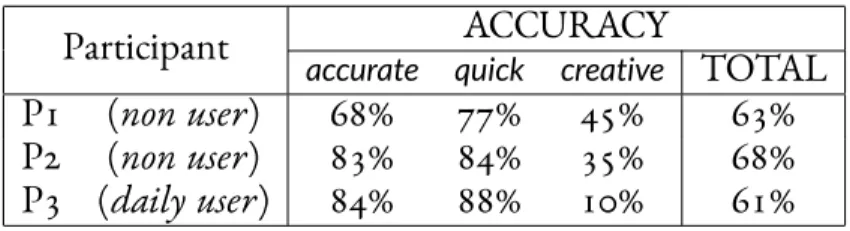
3.1 Gesture-typing accuracy in the Preliminary Observation with threepartic-ipants. . . 30 3.2 Three word sets used in the Experiment 1. Each word set contains of twelve
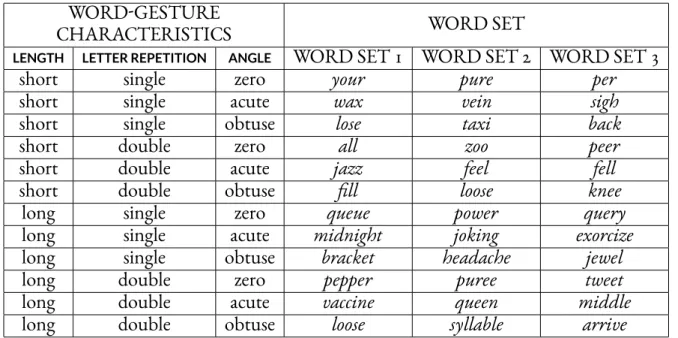
words of different length, letter repetition, and angle between stroke seg-ments. . . 32 3.3 Subjective features the participants in Experiment 1 used to vary the
ges-tures extracted from the questionnaire. A=accurately, Q=quickly, C=creatively. 39 4.1 Summary of mappings to generate colors and dynamic font with
Expres-sive Keyboard. . . 48 5.1 Experiment 2, Block 1: All instructions that vary according toFOCUS(output
orinput) andLEVEL OF RELIABILITY(consistent,different, orvaried). Each con-dition has two goals, representing two categpries of proficiency. The goal is measured through the value of the RGB component. . . 58 5.2 Experiment 2, Block 2: All instructions based on message recipient or sender
emotion, replicated three times. . . 58 5.3 Accuracy in Experiment 3. Participants changed the way they gesture-type
with different keyboards, and are more likely to explore with Expressive Keyboard. Although using Expressive Keyboard does not necessarily decrease word-accuracy, participants erased correct words to modify the output properties leading to low values for feature-accuracy. . . 71 6.1 Step comparison for CommandBoard and pulldown on touch screen
de-vices from when the users switch from typing to command selection until switching back to typing. . . 81 6.2 Participant ratings of how each technique helped them to style text
(me-dian values; * indicates a significant difference). Participants significantly preferred gestures in all categories except ‘confidently’. . . 101
To Jesus Christ and Mother Mary,
Acknowledgments
A three-year period is a short Ph.D period yet a long journey of life. My life as a Ph.D student is full of adventure: a thorough learning process, an exciting experience, emotional rollercoasters, people come and go – all so generously contributed to the work I presented in this thesis, as well as to my personal development.First and foremost, I offer my sincerest gratitude to my supervisor, Wendy Mackay, who has been supporting me throughout my research life. She was the one who convinced me that there is so much fun in research when I was still a master student, through her passions and teachings, and that I should pursue research. She is an amazing researcher who never runs out of exiting ideas and enthusiasm, which kept me positive during tough times in the Ph.D pursuit. It has been an honor to have the chance to work with her.
I would like to thank Shumin Zhai and Andy Cockburn for being my thesis reviewers, as well as Eric Lecolinet and Géry Casiez who served as parts of my defense committee. Shumin Zhai has given me valuable feedbacks on my work since the beginning of my Ph.D period, introduced me to Xiaojun Bi who was a great collaborator in one of my paper, and finally given me a very encouraging thesis review. I learned a lot from the detailed review and sug-gestions written by Andy Cockburn. All in all, thank you for taking your valuable time to read and examine my thesis in details, which inspired me to pursue my work in the future. I very much hope we can have the chance to work together in the future.
I could not be happier being a part of the ex)situ team in INRIA. All the members are exceptional researchers and students, from whom I learned a lot. I would like to thank Michel Beaudouin-Lafon who is always helpful especially during the paper submission process; and Joseph Malloch, a postdoctoral fellow in ex)situ, for being a great project collaborator.
Along my Ph.D journey, I have met valuable friends, with whom I shared so much joys, happiness, silly moments, frustrations, and hugs. Can Liu and Monireh Sanaei have been like sisters to me, with whom I can share anything – not only my research fiasco but also my life stories. Simon Perrault has been always been a great friend, always helpful in answering my questions from research to career. I delight in conversing with Daniel Strazzulla, for they always make me think about what I want in my life. Carla Griggio is not only an amazing supportive collaborator, but also a sweet friend who listened to my complains or noticed
how stress I was and gave me random hugs. I am really glad that Nolwenn Maudet, Ignacio Avellino, and I defended at the same period – thank you for the encouragement all along the thesis writing process. I had silly and fun moments sharing an office with German Leiva. As well, Michael Wessely, Arnaud Prouzeau, Stacy Yuan, Midas Nouwens, Abby Liu, Mai Ciolfi, Oleksandr Zinenko, Thibaut Jacob, Chengcheng Qu, and other students I met during my Ph.D – my life would be so grey without you guys. Our paths may separate now but I will always hope they intersect again someday, sometime.
I am grateful to have Indonesian friends in Paris, with whom I can feel like I have families even when I am so far away from home. The meals I had with Felicia Yusuf, Elita Hard-jadinata, Stefani Angela, Tante Marietta, Tante Andriani, and Romo Bala tasted way better. Thank you for always praying for me. I really appreciate Johanes Narasetu and Tante Mari-etta for helping me with the pot de thèse, and for the amazing tiramisu. We did not see it ‘til the end, Martinus Putra Widjaja, but thank you for supporting me during my Ph.D period. Finally, to my mother, father, and brother, who never give up on me, support me endlessly, send me all the love – you are the ones who kept me going through the hardest part of my Ph.D period.
This thesis was supported by ERC grant number: 321135, CREATIV: Creating Co-Adaptive Human-Computer Partnerships.
1
Introduction
The mass adoption of smartphones has transformed the everyday experience of users, as well as the design of mobile interactions. Thanks to the interactive high-resolution touchscreen, today’s mobile interfaces are completely touch-based. The simplest form of touch-based in-teraction is tapping on menus or icons, that borrows the point-and-click metaphor in graph-ical user interface (GUI). The users can also swipe, pinch, or other complex gestures that involve several strokes or multi touch.A gesture-based interaction is in fact a communication channel between the users and the system. It starts with the user transmitting a message by drawing a gesture on the touchscreen device. Hence, the gesture encodes the information that the user wants to communicate. The device then decodes the gesture into the intended message that can express different concepts, such as commands or text. For example, a user is looking at a collection of photos in her phone, and she wants to see the next photo. She performs a flick gesture that the gesture recognizer recognizes as a ‘flick’ to the left. The system interprets it as a command to display the next photo in the list.
One of the grand challenges of research in Human-Computer Interaction (HCI) is op-timizing the bandwidth of the communication channel between users and the system. The capacity of the communication channel in gesture-based interactions, i.e. its expressive power, depends on the number of different gestures and how they can express varying concepts [4]. In the field of knowledge representation, expressive power (expressive adequacy) is related to
Chapter 1
what a representation can say [77]: “Two components of expressive adequacy are the
distinc-tions a representation can make and the distincdistinc-tions it can leave unspecified”. In other words,
expressive power can be measured through its power of distinction – by the situations it con-siders distinguishable. In programming languages, expressive power refers to a measure of the range of ideas expressible in a given programming language [23]. Increasing the capacity of the channel means more recognizable gestures to express more functionalities.
Today’s smartphones offer a wide variety of functions, from communication, games, infor-mation consumption, office support, even art and creativity support [12]. As a consequence, the command space becomes larger as well. To access a larger command space, the users are often forced to go through multiple steps e.g. searching the item in a menu, making the in-teraction cumbersome and inefficient. For example, users have to tap on a button to display a menu, then scroll through the menu to find the command they would like to invoke. Al-ternatively, users can perform a stroke gesture to invoke a command, i.e. gesture shortcuts. The challenge in using gesture shortcuts is recognizability and learnability. A gesture should be unique so that it is easy for the system to recognize the gesture. Nevertheless, the more ges-tures in the gesture set, the harder it is for each gesture to be both unique and simple. More complex gestures (e.g. different shapes, multi-touch, etc.) offer a powerful way to access in-formation quickly as well as to invoke a command more efficiently [5]. However, they are more difficult to learn and control.
I am interested in rethinking the access to a variety of functions, by building mobile inter-actions that are both easy to learn and control yet more powerful. Given that gesture-based interactions have been supported and widely adopted in mobile devices, we can assume that there is a set of gestures that the users can already control. Hence, instead of adding more gestures in the gesture set, can we interpret the same gesture differently, for example depend-ing on where (a part of) the gesture is drawn or how it is drawn? If so, users will potentially be able to interact as they usually do with existing systems, while obtaining easy access to powerful functionalities.
I am specifically interested in mobile text-input techniques, since text entry comprises about 40% of mobile activity [12]. Aside from communication, users also type search key-words, take notes, and compose documents with their mobile phones. While typing, users also often invoke commands, for example to change the text formatting. Switching from typ-ing to command invocation back and forth is cumbersome and may interrupt the cognitive process [67,61,43]. Thus, in this thesis, I focus on augmenting the access to functionalities through soft keyboards.
Chapter 1
Figure 1.1:Gesture-typing [42,82] is an efficient, easy-to-learn, and error tolerant technique for entering text on software keyboards. All four gestures in this figure are correctly recognized as “great”.
On most mobile devices, users tap on buttons on “soft” keyboards displayed on high-resolution 2D touchscreens to enter text. Gesture typing [42,82] is a more interesting alterna-tive, for it stands in between point-based and gesture-based paradigms: it lets users to draw a gesture on soft keyboards to enter text, from the first until the final letter in a word. Since the gesture is drawn on top of a soft keyboard, each key acts as a “steering target” users must go through. The recognition engine compares each word gesture to a pre-designed “template” representing the ideal word-gesture shape. Word-gestures are not unique for each word, but can be robustly matched using a combination of kinematic models, multidimensional dis-tance metrics, and language models to resolve ambiguities. Gestures that vary significantly may thus still register as correct, as illustrated in Figure1.1.
As with other soft keyboards, the goal of gesture-typing keyboards is to produce the single, “correct” typed word intended by the user; it is either correct or incorrect, and input variation is of interest only for the purpose of designing tolerant recognition systems. Gesture varia-tion is treated essentially as a deformavaria-tion of the correct shape and discarded as unwanted noise. To be sure, a small part of the variation is motor-system or digitizer noise, and
can-Chapter 1 1.1. Thesis Statement not be considered meaningful. However human experience with handwriting clearly shows the potential for personal and stylistically-communicative variation of output media through performed human gestures. How can we take advantage of such systems that already allow gesture variability while maintaining an extremely good recognition accuracy? Can users de-liberately manipulate the shape and dynamics of their gesture as they write? Can we extend the keyboard’s functionality to invoke commands seamlessly as they write?
1.1 Thesis Statement
I believe we can increase the expressive power of gesture-based interaction by leveraging the screen space and gesture variation, to enrich communication, invoke commands, and facili-tate appropriation in different context of use. Users naturally vary their gesture input due to biomechanics, personality, current activity, and environments. The existing gesture varia-tions potentially carry additional information about the writers, the context, and the mood. Users can potentially control aspects of their gestures deliberately, for example to commu-nicate intentions. Most advanced machine learning-based recognition algorithms often an-ticipate the variations, but remove them, since the goal is to produce a single “correct” text output. Capturing continuous features of the variation and mapping it to properties of the rendered text could re-enable some of the benefits of handwriting, such as recognizable per-sonal styles, implicit communication of mood, activity, or context; and explicit communi-cation of emphasis, sarcasm, humor, and excitement. Chunking the gesture into segments could enable a gesture be interpreted as commands and text at the same time.
1.2 Research Approach
After reviewing the related research literature, I decided to start with gesture typing as the means-to-an-end. Gesture keyboards have been widely adopted by the general public, with over 150 million copies installed. As shown in Figure1.2, my work includes the following general approach:
• I used the structured observation technique [27] to explore how smartphone users ges-ture type, to gain insights about human variability that users make and the device can capture. A structured observation combines elements of controlled experiments to allow comparisons and a realistic task to enhance external validity. In contrast to a controlled experiment, the goal is not to assess a clearly defined hypothesis with the
Chapter 1 1.3. Contributions data collection, but to create comparable conditions for observing common patterns and processes. This helped me to identify three gesture features that users significantly vary as they gesture type in different condition.
• I designed novel interaction techniques with the main goal of increasing the expres-sive power while assisting the learning process and facilitating appropriation. I used
co-adaptation [51] and substrate [26,41,56] as the generative design principals. I will discuss both principals further inChapter 2. I analyzed the structure of a soft keyboard and how the data is captured and interpreted based on the structure. My approach fo-cused on two concepts: increasing the granularity of the data interpretation based on the same structure, and linking different structures. The proposed interaction tech-niques support discoverability, learnability, and appropriability.
• I conducted three controlled experiments to evaluate the efficacy of the proposed tech-niques as well as to gain deeper understanding on how users learn to control and ap-propriate the proposed techniques.
1.3 Contributions
Through structured observations, I increase our understanding of the variability in users’ gesture-typing input, that is significantly different across and within users. I demonstrate how we can quantify and then transform the otherwise unused gesture variations into rich output, to increase the expressive power of gesture-based interactions. I propose two inter-action techniques:
1. Expressive Keyboard, a gesture keyboard that lets users generate rich, expressive output by manipulating the variations in their gestures;
2. CommandBoard, that lets users invoke a complex command e.g. hierarchical com-mands as they gesture type from soft keyboards.
I show that users can control their gesture and appropriate the system just by using it, while retaining the typing accuracy. I also show that users can draw gesture segments as a whole to
Chapter 1 1.3.1 Collaborators seamlessly switch between command invocation and gesture typing when using Command-Board. Selecting commands with CommandBoard is almost twice as faster than mark-down language, and preferable by all of our participants. Finally, I discuss the concepts in terms of reciprocal co-adaptation and substrates to broaden the design space to other envi-ronments.
1.3.1 Collaborators
I worked closely with my supervisor, Wendy Mackay, especially in all the design process (i.e. interaction techniques and evaluations), data analysis, as well as writing and publishing the papers. Additionally, I collaborated with Joseph Malloch, a post-doctoral fellow in ExSitu, who was actively involved in designing the Expressive Keyboard’s concept and evalua-tions, as well as writing the published paper [2]. He also contributed to the early brainstorm-ing of CommandBoard’s concept.
I also collaborated with Carla Griggio, a Ph.D candidate under the supervision of Wendy Mackay in ExSitu, and Xiao Jun Bi, an Assistant Professor in Stony Brook University, USA. Carla Griggio was involved in the later design iteration process of CommandBoard and reimplemented a dynamic guide technique, OctoPocus [8], that we used in Command-Board. She was also actively involved in designing and running the CommandBoard’s evaluation, as well as analyzing and reporting the qualitative data. Xiao Jun Bi provided us with a gesture keyboard prototype that implements the gesture keyboard algorithm, and con-tributed in writing the Related Work section of CommandBoard’s published paper [1].
1.4 Thesis Overview
The chapters are outlined as follows (see Figure1.2).
Chapter 2 first summarizes related work on gesture-based interaction, emphasizing the advantages and th challenges in mobile environment. I then discuss existing research that focuses on increasing the expressive power of gesture-based interactions and the properties of gestures that we can take advantage of.
Chapter 3 investigates gesture characteristics that users vary when they gesture-type. I present a structured observation that focuses on intentional gesture variations, that a user deliberately produces to reach a certain goal, such as being fast. Based on the results, I define
Chapter 1 1.4. Thesis Overview
Figure 1.2:Overview of the thesis and the used design methods. It includes controlled experiments and in-formal observations. The understanding and theory from the studies served as the fundamentals to design and redesign new interaction techniques.
a set of gesture features to quantify the variations that the users manipulate differently across users or context.
Chapter 4introduces Expressive Keyboard, an approach that transforms the rich vari-ation in gesture-typed input into expressive output. It enables users to express themselves through personal style and through intentional control. I present several output types and properties that users can manipulate with their gestures, such as text color, parametric font, dynamic emoticons, and animated content.
Chapter 5focuses on the learnability and appropriability aspect of Expressive Keyboard. I present two controlled experiments. The first one evaluates how users deliberately control their gesture variation to generate rich output with Expressive Keyboard during the ini-tial learning phase i.e. novice behavior. I also did an informal observational study to explore the effect of progressive feedback in user’s strategy to learn how to use Expressive Key-board. The second one presents a controlled experiment that focuses more on the appro-priation aspect of Expressive Keyboard in a more ecologically-valid setting. The results show that when provided the tools, users quickly appropriate the system even when they are still learning how to use the system.
Chapter 1 1.4. Thesis Overview
Chapter 6 introduces CommandBoard, which lets users issue commands as they type through a gesture keyboard. CommandBoard transforms the area above the keyboard into a command-gesture input space where users can draw gestures to select a command. I present two technique variations,TYPE-AND-EXECUTEandINLINE GESTURE SHORTCUTSalong with demo applications.
Chapter 7first presents an overall discussion focusing on how the work increases the ex-pressive power of gesture-based interactions from different angles. I summarize the contri-butions in terms of scientific understanding and design, and gives directions for future work.
2
Related Work
This chapter begins with summarizing existing works for understanding the properties and the benefits of different types of gesture-based interaction. I review past research that focuses on increasing the expressive power of gesture-based interactions on mobile devices. This chapter also identifies missing points in the literature and positions my work in it.2.1 Gestures on Touchscreen Devices
On touchscreen devices, a gesture is a 2-dimensional movement trajectory of a user’s finger or stylus contact points with a touch sensitive surface [78]. Each sample point contains the information about the touch coordinate relative to the display dimension and a timestamp. Furthermore, a gesture can have pressure, making it a 3D gesture.
The expressive power of gestures is related to the gestures’ design dimension – including more design dimension potentially enables us to generate more distinct gestures. The most common design dimensions are the gesture length and the number of contact points on the screen. A gesture without a movement trace, i.e. a tap, is often called zero-order gesture. Users can perform more than taps sequentially (e.g. double tap) or with multi fingers at the same time (e.g. multi touch). A gesture with single stroke, i.e. unistroke gesture, is called first-order gesture. Users can also draw two or more strokes sequentially or use different fingers at the same time to perform higher-order gestures. Another design dimension is visual-spatial
Chapter 2 2.2. Zero-order Gestures
Figure 2.1:Different type of gestures based on the stroke length and the number of contact points.
dependency, in which the same gesture can be interpreted depending on where on the screen the gesture is drawn.
In the next two sections, I will describe both advantages and disadvantages of zero-order gestures and unistroke gestures, as well as previous research on how to increase the expressive power in different context.
2.2 Zero-order Gestures
Like point-based interactions, a zero-order gesture (referred as a tap in the rest of the thesis) often highly depends on the graphical representation. In fact, a single tap is only power-ful because it can be interpreted differently depending on which graphical object it points. Users point to different objects e.g. menus, toolbars, and icons to enter, retrieve, and select commands or text. Since the graphical objects are presented on the screen, non-expert users can quickly learn which commands are available. Small menus and toolbars allow users to quickly access common items, but do not help with large command sets, which may require extensive search and multiple physical operations to find the desired item [61]. Accessing a multi-level hierarchical menu forces the user to move through a multi-step process of select-ing the appropriate category, and before findselect-ing the desired leaf.
The expressive power of tap gestures is related to how many objects can be included in the screen and how easy it is to point to them. However, no matter how good the optimization
Chapter 2 2.2.1 Increasing Recognizability strategy for screen real-estate use is, the display screen is limited [4]. The problem becomes worse in mobile environments where the screen size is very limited.
Having said that, in touchscreen devices, a tap input is highly oversampled in both space and time, from which we can derive various properties, such as duration (i.e. long tap), pres-sure, orientation, offset, etc. As such, we have the opportunity to explore more continuous forms of control to express different concepts with a tap input.
2.2.1 Increasing Recognizability
In their study, Lee and Zhai [46] found that users can still tap on buttons even though their size is smaller than the average finger width. Nevertheless, as in any pointing task, tapping a small object requires more effort and precision. Bi et al. proposed FFitts’ Law [11], that extends Fitts’ Law [24] for predicting a finger touch input. They argued that pointing on touchscreen is less precise than in a desktop computer with a pointing device, and variability in a tap input exists even though the participants were asked not to worry about the speed [36]. Bi et al. took into account this variability in predicting the index of difficulty of finger touch, which can be affected by the speed-and-accuracy trade off and “the absolute preci-sion” of human motor control. The latter may vary due to “fat finger” problems or motor impairment.
Most research in this topic mainly focuses on improving the touch accuracy, for example by taking into account the offset between the target and the touch input [35]. Azenkot & Zhai [7] investigated how users type on soft keyboards and found that touch offsets vary according to how they hold the device. Dynamic key-target resizing based on models of likely words or letter sequences increases the apparent accuracy of soft keyboards and partially resolves the fat-finger problem [34].
2.2.2 Augmenting Zero-order Gestures
Another interesting direction on using the touch variability is to increase the expressivity as-pect, for example to support subtle expression in text-based communication. Researchers also explored this topic in the context of physical keyboards. For example, Iwasaki et al. [38] added sensors to a physical keyboard to capture typing pressure and speed. KeyStrokes [59] uses shapes and colors to visualize typing style and text content. With soft keyboards, Buschek et al. [14] combined touch offset, key-hold time, and device orientation to dynami-cally personalize the font.
Chapter 2 2.3. Unistroke Gestures In September 2015, Apple launched iPhone 6s that includes built-in pressure sensor that enables capturing 3D touch*, i.e. from light to normal to deep press. The pressure can be used to select different commands, e.g. a long normal-press on an app icon will allow users to delete or move the app, a deep-press to see all quick access shortcuts of the app; or to parameterize a command, e.g. vary line thickness [68].
Nevertheless, since the input is very simple, there is not much opportunity to increase its expressive power, relative to unistroke gestures.
2.3 Unistroke Gestures
A unistroke gesture involves the spatial description of the trajectory (i.e. shape) and the time evolution of the motion (i.e. dynamics) [75], that lets users express varying things and con-cepts. A unistroke gesture can be drawn anywhere on the screen, thus it does not take the valuable screen space [5]. From unistroke gestures alone, we can already have a sufficiently large gesture set. In contrast to performing a sequence of discrete actions i.e. tapping on different objects, drawing a gesture is a kind of perceptual-motor skill involving continuous response, with little forgetting over long periods of time [76]. Users can also remember spa-tial patterns better than sequenspa-tial patterns [21]. Appert & Zhai [5] suggested that using gestures to invoke command (gesture shortcuts) is more effective than using keyboard short-cuts. They found that gesture shortcuts are easier to learn and recall thanks to their spatial and iconic properties. Performing gesture-based interactions is related to human memory, which is categorized into declarative memory and procedural memory [73]. Declarative (cog-nitive) memory involves conscious, explicit thinking, such as perceiving and managing in-formation and making sense. Procedural memory is related to behaviour or habits, thus it is done unconsciously and implicit. An expert in gesture-based interactions can potentially draw a gesture shortcut without much visual attention, in which case involves procedural memory.
Researchers have explored leveraging continuous unistroke gestures to select commands. A classic example is a Marking Menu [44], a contextual circular menu that supports execut-ing commands via directional strokes. A Markexecut-ing Menu can be extended in order to give access to a larger command space, for example by making it hierarchical [83] or combining it with drawn letters [66]. FlowMenu [33] extends a hierarchical marking menu to include pa-rameter adjustment of an item. For example, a user can select a zoom command and specify
Chapter 2 2.3.1 Challenges the zoom value in the sub-menu, or even type the value (when the desired number does not exist) without lifting the pen. Li [48] studied a world-deployment of a gesture-search system for smartphones, and demonstrated that gestures successfully supported users accessing data for their day-to-day mobile activities.
2.3.1 Challenges Discoverability
With tap-based interaction, all the existing command items are usually included in the menu, thus novice users can easily discover all commands in the command space. In contrast, it is difficult to discover all available gesture shortcuts. Since the gesture shortcut can be drawn anywhere on the screen, distinguishing a gesture shortcut from a direct manipulation gesture is also challenging [48].
Learnability & Recognizability
Tapping on graphical objects e.g. menu only requires the system to recognize which object users point. Users can invoke a command by tapping on a menu item or an icon after finding where it is located in the menu. On the other hand, gesture-based interfaces require the users to recall the shape of the gesture shortcut and the system to correctly recognize the gesture and its corresponding command. Thus, the gesture should be unique so that it is easy for the system to recognize the gesture. However, the more gestures in the gesture set, the harder it is for each gesture to be both unique and simple. More complex gestures (e.g. different shapes, multi-touch, etc.) offer a powerful way to access information quickly as well as to invoke a command more efficiently [5]. The more gesture shortcuts are available, the more difficult it is for the system to recognize the gesture input and for users to remember [79].
Speed-Accuracy Trade Off
Performing a gesture shortcut is relatively more complex process that involves planning, mem-ory, and motor control [79]. Users need to remember the shape and then execute the “pre-cise” gesture, thus they need to practice in order to perform the gesture quickly and perhaps eyes free.
Chapter 2 2.3.2 Designing Gesture-based Interactions 2.3.2 Designing Gesture-based Interactions
Ideally, gesture-based interactions should support discoverability, memorability, and learn-ability in order to offer more efficient alternative. Many attempts have been conducted to solve these problems from different perspective.
Supporting Transition from Novices to Experts
To support transition from novices to experts, a gesture-based interaction should be self-revealing. With Marking Menu [44], novices who are not familiar with the menu yet can pause, then the menu appears and they can discover all possible commands and just follow the direction to invoke the command. Experts can just draw to a certain direction without having to pause, in which case the menu is not displayed on the screen. OctoPocus [8] offers better support for learning gesture shortcuts, acting as a dynamic guide to help users follow the correct gesture template: If the user hesitates, OctoPocus appears, showing the remain-ing possible ways to finish the gesture. This highlights the need for progressive feedforward and feedback to support incremental learning, to help novices transition to expert users. An-dersson and Zhai found that providing visual feedback affects how users perform the gesture: they draw a gesture bigger and faster yet take more time in order to complete drawing [3].
Easy-to-remember Gestures
Gestures are easier to remember if they are analogous to the physical effect or to well-known conventions. For example, a scrolling gesture mimics how we scroll a physical paper, or draw-ing a cross gesture to delete an item. However, analogous gestures can be complicated or ambiguous since they depend on users’ prior experience. Alternatively, we can let users to define their own gestures. In their study, Nacenta et al. found that self-defined gestures are easier to remember [57].
To summerize, designing efficient and powerful gesture-based interaction on mobile devices has several issues. First, mobile devices have a limited screen space. Second, the larger the gesture set is, the more difficult it is to accurately recognise each gesture. If we make the shape of the gesture complex enough so that they are more likely to be recognised, then it is more difficult for users to learn and memorise the gesture. And last, there is also the issue of
Chapter 2 2.4. Gesture Keyboards efficiency, i.e. how we support the transition from novices to experts, and how the gestures can be used to express different concepts in different context and goals.
2.4 Gesture Keyboards
Gestures can also be used to enter text, for example by recognizing gestures as handwriting. Using handwriting as a text input means on mobile device is easy to learn, however it is con-siderably slow. Furthermore, handwriting recognition is not an easy task, because there are too many variability in the input. A letter may also consists of several strokes, making it more challenging to recognize. A single-stroke gesture design such as Graffiti or Unistroke [31] can simplify the recognition complexity, however they often require novice users to learn new symbols.
Gesture keyboards [80,42,82] offer an efficient, easy-to-learn, and error-tolerant alter-native for entering text. Instead of tapping keys, users draw the shape of each word, i.e. a
word gesture, beginning with the first letter and continuing through the remaining letters.
The word-gesture recognition requires a multi-channel recognition engine [42], where the drawn shape is first compared to an “ideal” shape, i.e. from middle-point to middle-point of each key. The ideal shape of a word gesture is called “gesture template”.
2.4.1 Gesture Recognition Process
Capturing the input The gesture keyboard captures all touch data from the first until the last letter. Users can see a visualization of the trajectory of their gesture as a feedback. The gesture trace feedback has a limited length, to avoid visual overload and occlusion. The touch data i.e. user’s word gesture is then sent to the recognition engine progressively.
Recognizing the word The input is compared to all gesture templates in the list of word candidates. At this point, we should assume that the user can write any word, and thus, all words in the language corpus are candidates. The recognition engine uses a multi-channel architecture to enable efficient, fast, and error-tolerant text input. The process of recognizing user’s input goes as follows (also see Figure2.2).
1. Template prunning
The biggest challenge in recognizing user’s word-gesture input is that the gesture tem-plates are not unique, i.e. there can be two or more words that have identical gesture
Chapter 2 2.4.1 Gesture Recognition Process
Figure 2.2:The multi-channel recognition engine of gesture keyboards, taken from [42].
templates. For example, “all” and “weep” have identical gesture templates. Thus, the gesture templates are first filtered based on the start (e.g. letter ‘a’) and the end (e.g. letter ‘l’) position of the gestures. If the start-to-start and/or end-to-end distances be-tween a gesture template and the input is bigger than the predefined threshold, then the gesture template is removed from the list of word candidates.
2. Shape recognition channel
The input is then compared to the remaining gesture templates in the list one by one, by measuring the spatial similarity of the two. User’s input is first being normalized so that it has the same bounding box as the gesture template. The recognition engine then samplesn-number of points in both the input and the gesture template – each
Chapter 2 2.4.2 Learnability Aspects point in the input is proportional to a point on the gesture template. Next, the recogni-tion engine measures the spatial similarity of the two, by calculating the point-to-point distances in sequence. As of now, each gesture template has a score of how similar it is to the user’s input, which is the average point-to-point distance.
3. Location recognition channel
The recognition engine also considers the position of the gesture input relative to the keyboard layout (geometric center), in order to reduce the number of word candidates in the list. As of now, only completely identical gesture templates are left in the list, e.g. “lose” and “loose”. A gesture template that starts and/or ends at almost the exact same
location with the input has a higher score to be the actual final word output. The recognition engine also considers temporal features: If the user slows down at a letter, the recognizer weights the word candidate higher.
4. Language component
The recognition engine uses the context, language model, and a learning corpus to re-arrange the word candidates in the list. Finally, the recognition engine produces an N-best list of word candidates, sort by relevancy to the contexts.
Displaying the final word output The recognition process is conducted progressively as the user moves her finger: at each touch, the gesture keyboard generates the N-best list of word candidates. The first is treated as the final result, the next three are displayed in the suggestion bar above the keyboard. The gesture keyboard may also auto-complete the current word-gesture, even before the user reaches the last letter of the intended word.
If a word-gesture is drawn outside the keyboard space, the gesture keyboard captures the touch event but stops recognizing the word.
2.4.2 Learnability Aspects
Since gesture keyboard is basically also a standard keyboard, users can alternate between typ-ing and gesture typtyp-ing without switchtyp-ing mode. Thus, it helps the new users to transition from tapping to gesturing.
Gesture keyboards also support a gradual transition from novices to experts in terms of drawing the word gesture. The transition takes advantage from the fact that the gesture of a particular word is always consistent, similar idea with Marking Menu [44], allowing users to
Chapter 2 2.5. Augmenting Soft Keyboards
Figure 2.3:The difference between a novice and an expert when using gesture keyboards.
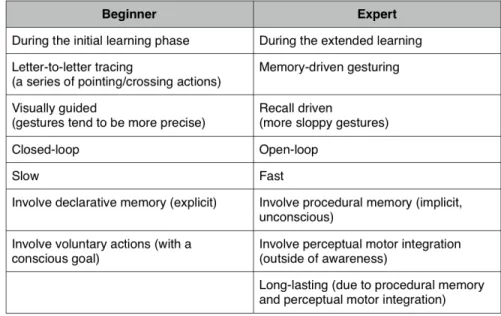
build and memorize their own mental word shape representation. Expertise is reached when users transform from using declarative memory and voluntary actions, i.e. tracing from one key to another, to using procedural memory and perceptual motor integration, i.e. draw a shape (see Figure2.3). The fundamental difference lies on the degree of visual guidance reliance. From the psychology perspective, the key to developing expertise, i.e. skilled, low attention, automatic behavior, lies in consistent mapping from stimuli to response.
2.5 Augmenting Soft Keyboards
In response to the high level of text entry on mobile phones, phone manufacturers are devel-oping keyboard extensions that offer new capabilities, from suggesting emoticons to general search. The latest version of Google Keyboard (now called Gboard)†includes an in-context search engine. Users tap a button on the top-left of the keyboard to access the search engine, where they can directly type the search keyword, see the results, and share it.
†https://play.google.com/store/apps/details?id=com.google.android.
Chapter 2 2.5.1 Generating Expressive Output 2.5.1 Generating Expressive Output
Researchers who study movement for music or dance often take a completely different per-spective in interpreting gestures. They often emphasize the continuous qualities of human gestures over recognition: individual variation is valued rather than ignored or rejected. These researchers characterize gesture variation in terms of qualities of movement: spatial features [14,17]); temporal features; continuity; power; pressure; activation; and repetitions [19]. In the artistic domain, the richness of gesture can be transformed into continuous output, e.g., [30], or to invoke a command [43] in a more integrated interaction.
Appert et al. designed several novel gesture vocabularies that rely on additional input chan-nels such as tilt [71], pressure [70] and proximity [69]. These vocabularies of gestures remain simple to perform while offering at least as much expressivity as the whole set of existing graphical widgets, and without consuming any screen space. To increase the expressivity of text-based communication, Buschek et al [14] proposed TapScript that leverages the varia-tion in typing input (i.e. tap) to increase the expressive power of mobile communicavaria-tion. Nevertheless, TapScript is based on typing discrete virtual buttons. Another alternative is to recognize handwriting, a continuous activity that not only communicates content but also provides additional information about the writer, e.g., rough letters from a writer in a hurry; and the context, e.g., shaky letters from writing on a moving bus. However, handwriting on a mobile touch screen device, particularly with a finger, is slow and tedious.
2.5.2 Invoking Commands from Keyboards
Switching between typing and issuing commands comes with interruption costs, as in any multitasking environment [67]. As more and more mobile activities involve text entry, re-searchers have explored augmenting a keyboard with gestural commands, to reduce switch-ing costs between the text entry and selectswitch-ing commands. For example, Fuccella et al. [25] propose a technique in which using a two-finger touch gesture directly on top of a soft key-board lets the user move the caret to select text. Command Strokes [43] employ additional buttons, e.g. Command to enable keyboard shortcuts on gesture keyboards. Users can sim-ulate using control keys on a physical keyboard, e.g. drawing a gesture that passes through Command then C to perform Command+C. However, users need to remember the short-cut in order to exeshort-cute the command.
Chapter 2 2.6. Position of My Work 2.6 Position of My Work
Users can also draw higher-order gestures, either sequentially or in parallel (multi-touch), to gain more physical and cognitive advantage [78]. For example, TapBoard 2 [40] enables pointing through a soft keyboard, adding support to bimanual interaction. Arpege [28] provides multi-finger chord interaction, with dynamic guides to show novice users where to place their fingers. In this thesis, I limit my investigation to unistroke gestures, since a unistroke gesture is often a component of multi-stroke or multi-touch gestures. In the rest of the thesis, the term “gesture” refers to a unistroke gesture.
In today’s mobile devices, gesture-based interaction is mainly used to invoke a command (i.e. gesture shortcut) and to enter text (i.e. gesture typing). I see the gesture keyboard as an interesting system to start my investigation with due to several reasons. First, gesture key-boards offer a faster and easy-to-learn alternative to text-input technique. Gestures that vary significantly may thus still register as correct, thanks to the algorithm’s kinematic models, multidimensional distance metrics, and language models. Second, more 40% of mobile ac-tivities involves typing, e.g. text messaging, text editor, browsing, etc [12]. Often the case, users must go back and forth between typing and command selection. Third, millions of people already use gesture keyboards in different mobile platforms. Augmenting gesture keyboards will potentially minimize users’ learning effort and the cost to switch view from keyboards to menu, while preserving typing accuracy and speed. Thus, in my thesis, I focus on increasing the expressive power of gesture-based interactions in text-based communications and command selections by augmenting gesture keyboards.
In this thesis, I propose different approaches to interpret gestures differently. The under-lying idea of my approach is to interpret each gesture in the gesture set to express different concepts, by leveraging gesture variations and leveraging the screen spaces in order to increase the information transfer.
My first approach is based on the fact that people make movement variations. Due to their extremely fine motor control, people can perform various movements with different level of precision, especially after a certain amount of practice. For example, a professional violin-ist can control her fingers more precisely when playing a violin, generating a richer sound, than a beginner who is still learning. Nevertheless, it does not take a professional violinist to produce a rich sound. It is very difficult, if not impossible, to perform exactly the same movement twice. People also perform differently from one another. A violinist may play the same piece in a very different way depending on what she wants to express, or to which
Chapter 2 2.7. Generative Design Principals audience she plays for. Another violinist, even with a similar level of skill, will also perform the same piece differently.
Movement variability also occurs in 2D environments, for example when writing on a piece of paper. It is almost impossible to draw identical letter ‘a’s twice [14]. We also vary our handwriting depending on the context, such as the intention, the condition, or the mood. We can easily identify our own handwriting, and our close friends or relatives are usually able to distinguish our handwriting from others’. In other words, the trajectory of a move-ment, such handwriting, potentially carries rich information about the author, the context, etc. Thus, we can leverage the additional information that naturally already exists to enrich communication, aside from the content itself. For example, in the past, the style of hand-writing was used to determine one’s place in society [29]. Handwriting identification is also a universally engaged practice in a lot of different fields. Thus, for the first approach, I in-vestigate whether movement variations also exist in gesture-typed input and whether we can quantify them, to see if we can interpret “the same word gesture” differently.
My second approach is based on visual-spatial dependency properties of the drawn ges-tures on the mobile screen space. In mobile interface, objects are represented virtually: an object is a drawn shape place on a specific location in the a specific view. For example, the “q” key is a labeled momentary box (i.e. a soft button) drawn on the top-left position in a QWERTY keyboard view. The boundaries between objects and/or views are also virtual. Hence, we can draw a gesture on top of the soft keyboard (i.e. gesture typing) and even to the upper space of the keyboard view. My idea is to leverage the spatial location in order to segment the gesture and to interpret each gesture segments differently. This is related to the notion of gesture chunking: grouping task elements into a larger, inseparable whole [78]. A gesture may involve several segments, that over time may be viewed as inseparable. In other words, a gesture can potentially be chunked into several segments, and each segment can be interpreted differently.
To systematically investigate both approach, I used two generative design principals that I describe in the following section.
2.7 Generative Design Principals
Gesture keyboards are merely a means to an end towards the goal of building easy-to-learn but powerful interaction techniques, nevertheless we can take advantage of its sophisticated recognition algorithm and properties. In this thesis, I use two approaches, substrate and
co-Chapter 2 2.7.1 Substrate
adaptation, as generative design principals to help me re-frame design problems to reveal
in-sights on how human beings interact with technology in the world. 2.7.1 Substrate
Substrates are software artefacts that handle specialized data, which are interpreted depend-ing on the structure [26]. “Substrates embody content, computation and interaction, effectively
blurring the distinction between documents and applications” [41]. Substrates can evolve over time and shift roles, depending on the perspective or the goal of defining the substrate. For example, a dot means completely different if put on top of a blank paper or musical bar lines. Here, the musical bar lines are the structure in the substrate that provides rules on how to interpret the data. Specialized substrates can be linked together to support more complex data operations and communicate each data and state to each other.
Klokmose et al. proposed Webstrate [41], that turns a webpage into interactive, shareable substrate. Each webstrate is a collaborative object: it has the same persistent data yet it may provide different representations for each user. For example, two users can edit the same doc-ument, one uses a WYSIWIG editor while the other uses a LaTeX-like editor. Each user can create their own tool, for example to insert a citation, and share it with other collaborators.
In this thesis, I analyze a soft keyboard from the perspective of substrates, to better under-stand the structure, the data, and how to interpret it based on the structure. A soft keyboard’s layout is the structure of the substrate. A tap on the same location can insert a different letter depending on the layout, e.g. QWERTY, ATOMIK [81], or an emoji keyboard. A gesture can be interpreted as a scroll if done on a web view, but it is interpreted as a word if done on a gesture keyboard. To augment soft keyboards with expressive and powerful interactions, my approach is to add more rules to the same structure in order to enrich the interpretation, and to link together different substrates in order to support more complex functionality. 2.7.2 Co-Adaptation
As described in Section2.3, an ideal gesture-based interaction should support discoverability and learnability. Additionally, I want to also consider appropriability when designing inter-action techniques. Wendy Mackay introduced the concept of co-adaptation [51], in which users adapt to the system to learn to control the system, as they adapt the system i.e. cus-tomize and appropriate it in ways unintended by the system designers, to meet their imme-diate needs in the current context of use. Co-adaptation also serves as a generative (re)design
![Figure 1.1: Gesture-typing [42, 82] is an efficient, easy-to-learn, and error tolerant technique for entering text on software keyboards](https://thumb-eu.123doks.com/thumbv2/123doknet/14589386.729965/21.918.172.743.142.545/figure-gesture-efficient-tolerant-technique-entering-software-keyboards.webp)
![Figure 2.2: The multi-channel recognition engine of gesture keyboards, taken from [42].](https://thumb-eu.123doks.com/thumbv2/123doknet/14589386.729965/34.918.271.667.151.671/figure-multi-channel-recognition-engine-gesture-keyboards-taken.webp)