HAL Id: hal-02911555
https://hal.archives-ouvertes.fr/hal-02911555
Submitted on 3 Aug 2020
HAL is a multi-disciplinary open access archive for the deposit and dissemination of sci-entific research documents, whether they are pub-lished or not. The documents may come from teaching and research institutions in France or abroad, or from public or private research centers.
L’archive ouverte pluridisciplinaire HAL, est destinée au dépôt et à la diffusion de documents scientifiques de niveau recherche, publiés ou non, émanant des établissements d’enseignement et de recherche français ou étrangers, des laboratoires publics ou privés.
Models as Representations for Supporting the
Development of e-Procedures.
Marco Winckler, Philippe Palanque
To cite this version:
Marco Winckler, Philippe Palanque. Models as Representations for Supporting the Development of e-Procedures.. Usability in Government Systems: User Experience Design for Citizens and Public Servants., 2012. �hal-02911555�
Chapter 19 Models as Abstract Representations for supporting the development of
e-Procedures
[NON PRINT ITEMS]
Abstract: The development of successful electronic procedures is a complex activity
that requires diverse expertise on administrative processes and software development.
Such expertise requires a multidisciplinary team that should combine technical issues
and expectations of all users, including citizens and administrative clerks. This
chapter is aimed to help you to understand how model-based approaches can be used
to deal with development of complex e-procedures and, in particular, to communicate
design options to a multidisciplinary team. To this very purpose this chapter illustrates
two kinds of models: tasks models that describe the actions user should perform at
every step of an administrative procedure; and system models that describe how
design options can be implemented by the system to support user tasks. When used
altogether, these models provide useful information to understand the implications of individual user’s tasks and the system’s behavior along the different steps in the underling workflow of an e-procedure.
Key words: development process, model-based approach, e-procurement systems
specification, task models.
Author Contact Information:
Marco Winckler
Assistant Professor of Computer Science
ICS-IRIT, Université Paul Sabatier, Toulouse, France
Telephone: +33 5.61.55.63.59
Professor of Computer Science
ICS-IRIT, Université Paul Sabatier, Toulouse, France
Telephone: +33 (0)5.61.55.69.65
[Chapter Starts here]
[ChNum]Chapter 19
[ChTitle] Models as Abstract Representations for supporting the development of
e-Procedures
[H1]Introduction
Government agencies are increasingly moving towards providing web support for
their administrative procedures. Such web applications must do five important things:
1. ensure the security of information exchange (e.g., authentication of users, date
and time, secure transfer of data, etc. as discussed in the Chapter 14 [User
issues in security])
2. provide an efficient notification system that helps all users (citizens and
organizations) to monitor the progress of the process
3. provide flexible support to complex business rules (which might change
according to new regulations and laws)
4. support data exchange among several databases and legacy systems
5. be accessible and usable for a large and diverse public of users.
The development of successful electronic procedures is a complex activity that
requires diverse expertise in administrative processes and software development. Such
expertise can only be acquired by a multidisciplinary team that should be able to
citizens and administrative clerks (which are respectively called external and internal
users [see this book outline]). Despite the fact that e-procurement applications often
focus on citizens as target users, we should not forget the important role played by stakeholders. By “stakeholder” we mean administrative clerks and agents in charge of receiving citizens’ applications, analyzing the data provided and deciding the
outcomes. These stakeholders work on the back end of the e-procurement application
and as a consequence they have a different view of e-procedures. (See chapter 18 for a
detailed discussion of the underlying complexity of eliciting and defining
stakeholders’ requirements for e-Government applications). Indeed, some complex administrative procedures will ultimately require the processing of pieces of
information by many stakeholders, who work for different agencies and departments;
quite often, only a few stakeholders have the entire view of the underlying workflow.
In this context, it seems extremely important to provide each participant involved in
the development process with multiple views for e-procedures:
an overall view of the different steps in the underlying workflow process a detailed view of tasks that users should perform at every step of the
procedure
a detailed view of how the system supports user tasks in the execution of a procedure
This chapter shows how to employ abstract representation (called models) to
supporting these three views of e-procurement applications. Such models can be used
to communicate design options and design decisions to all participants of the
development process, including the stakeholders. Beyond that, models are the ideal
place for stimulating information exchanges, for sharing them and for recording them.
models that can additionally be used for engineering interactive systems. Our main
goal is twofold:
define in an unambiguous way the behavior of several components (mainly user tasks and e-procurement application behavior)
provide a means to ensure the cross-consistency between these two complementary views of the same socio-technical system
For this very purpose, we use two different notations for describing two types of
models: tasks models that represent the actions users should perform at every step of
an administrative procedure, and system models that describe how design options can
be implemented by the system to support user tasks. The word “system” is used here
to refer to the interactive and functional part of the e-procurement application. It does
not encompass the hardware and network parts even though they could be modeled
with adequate notations. We illustrate user task modeling by using a hierarchical
notation called HAMSTERS (which stands for Human-centered Assessment and
Modeling to Support Task Engineering for Resilient Systems). The system behavior is
described by the means of the StateWebCharts notation dedicated to the modeling of
Web-based applications. The use of these notations is illustrated on a real case study
extracted from the French Regional Administration (Région Midi-Pyrénées). When
used in an integrated and complementary way, these models can provide the various
stakeholders with detailed and structured information to understand the interrelations
between individual user’s tasks and the system’s behavior.
[H1]Development process for e-procurement applications
Models are valuable tools for reducing ambiguities of specifications, making large
and complex projects more manageable, documenting the design, and supporting the
specific phase of development as well as throughout the application life cycle. The
main goal of this chapter is to show how model-based approaches can contribute to
the development process of e-procurement applications. To understand this, Figure
19.1 depicts a life cycle that illustrates the use of models along the development
process of Web applications as proposed by Scapin, Vanderdonckt, Farenc, Bastide,
Bastien, Leulier, Mariage & Palanque (2000). Currently, there is no consensus on
which phases of development are required or which life cycle better describes the
development process of e-procurement applications. Nonetheless, the lifecycle for
Web development can be helpful in understanding how e-procurement applications
are developed to be deployed on the Web platform. As we shall see, the lifecycle
presented in Figure 19.1 is an iterative process made up of six steps:
1. Requirements engineering: Identify the main goals of the stakeholders,
context of use, and requirements (see Chapter 18).
2. Specification: Produce models for describing the context of use and
requirements gathered in the previous phase. Detailed models formalize
requirements including user tasks and e-procurement application behavior, for
instance.
3. Design: Refine the specifications according to their content. At the end of this
phase a navigation map and page templates are prepared. This phase produces
detailed specification to guide the implementation of the Web application.
4. Development: Construct the Web application, produce the Web pages, and
integrate tools for visualizing media (e.g., sound, video). At the end of this
phase, all the pages have content, links and graphic elements incorporated: the
5. Site usage and evaluation: Evaluate advanced prototypes with end users. The
product of previous phases is checked with respect to the requirements and the
context identified in the first phase. For further information about usability
evaluation along the development process the interested reader should refer to
chapter 17.
6. Maintenance: Gather new information, and plan modifications that have been
requested from the use and evaluation phase.
*** INSERT Figure 19.1 ***
[Caption]Figure 19.1 Life Cycle for Web application development
The process of Figure 19.1 is cyclical going sequentially through the 6 phases
presented above. However, it is widely known that interactive applications
development requires faster and sometimes incomplete iterations especially when
prototyping activities have to be performed. Fast iterations are represented in the
model by the two arrows (in dotted lines) in the middle of the loop. In Figure 19.1, the
arrow on the left-hand side indicates possible shortcuts of the specification phase.
Indeed, at the beginning of design, the information architects and web designers may
start immediately to design the site, to have precise information to exchange and
discuss with the stakeholders. The arrow on the right-hand side (implementation
changes) represents a possible shortcut for increasing development speed and taking
into account in a more central manner the usage and the evaluations.
In the next section we will focus on models used during the specification phase of
administrative e-procurement.
[H1]Modeling of e-procurement applications
An e-procurement application should coordinate seamlessly the relationships between
database (see Pontico, Farenc & Winckler, 2006). Figure 19.2 presents a graphical
representation of such information exchange between these three components in the
case of an e-procurement application dealing with the submission and evaluation of students’ requests for scholarships. This example is similar to many of currently available e-procurements in terms of coordination of activities, responsibilities and
resources. This example does not exhibit the critical aspects of the administrative
procedures and of the data handled in such contexts, but it has the advantage of both
simplicity and of conveying most of the concepts we want to address in this chapter.
*** INSERT Figure19.2 ***
[Caption] Figure19.2 Information flow between the organization, the process, and the
database
As we can see in Figure 19.2, a user can evaluate a submission only if the
corresponding document is available in the database and if the organization grants
him or her the rights associated to the role of reviewer. Notice that the task “Evaluate a submission” is represented only through the relationships between actors. This way of representing user tasks can be easily justified from an information systems point of
view, but it raises a big problem for understanding user activity on the system,
especially when actors must cooperate to perform a single activity (e.g., support the
discussion of a student application among administrative clerk and possibly a school
principal). Such graphical representation is usually perceived by the developers of
data intensive web application as sufficient (Ceri, Fraternali, Bongio, Brambilla,
Comai & Matera 2003) as it supports quite efficiently the identification of information
that has to be stored in the database. However, when it comes to the design of the
interactive part of the e-procurement application, there is a need to provide more
have to be described: all the tasks a user can perform with the system (this
representation is called tasks model), and a specification of all function- and
scheduling-centered behaviors that should be embedded into administrative
e-procurement applications (this description is called the system model). These two
models including the information they embed and how they are built are described in
the following sections.
[H2] Modeling user tasks
Task modeling has been proposed as a mean of recording information gathered in the
task analysis phase and is widely recognized as one fundamental way to focus on the
specific user needs and improve the general understanding of how users may interact
with a user interface to accomplish a given interactive goal (Diaper & Stanton, 2004).
Task models do not imply any specific implementation, so that one can focus on
dependencies between activities, availability of resources required to perform tasks
and steps users should follow to achieve a task.
Most notations for describing tasks feature a hierarchical organization of goals that
are connected by logical and temporal operators for expressing dependencies between
them. A task model should describe what users must do to accomplish a given goal
without including how the system processes information even though this might
determine the outcomes of a task execution. This is usually represented by alternative
paths in the task model making explicit the possible outcomes. For this reason, many
scenarios (which describe a unique sequence of task execution) can be produced from
a single task model. As we shall see in the case study below, one of the advantages of
modeling user tasks and scenarios is they help to analyze conflicts between users and
administrative goals long before system constraints are considered.
Several user interface (UI) description languages (UIDLs) exist for describing the user
interface and the expected system behavior (see Shaer, Jacob, Green & Luyten 2009).
A UIDL might cover one or more of three different aspects of the UI: the static
structure of the user interfaces (including the description of user interface elements —
i.e., widgets — and their composition), the dynamic behavior (the dialog part,
describing the dynamic relationships between components, including event, actions,
and behavioral constraints), and the presentation attributes. For the sake of simplicity,
we will focus only on the behavioral aspects of the systems and, in particular, how we
can represent all the user navigation available on a Web portal featuring
e-procurement applications. This exhaustive set of navigations is called the system
model and should provide a clear description of system behavior, including how the
system processes user inputs and generates appropriate output. This system model
must then be exploited for prototyping the UI and in the implementation phases of the
development process.
[H1]Case study: modeling e-procurement applications
To illustrate the complementary use of task and system models, this section presents a
case study1 of an e-procurement application provided by the Regional French
Administration Midi-Pyrénées (RMP, www.midipyrenees.fr). We introduce all actors
involved and their interactions along the administrative procedures; however, due to
space constraints the models only embed citizens’ interactions.
[H2] Informal description of the case study
Our case study concerns an e-procedure developed as part of the BRPE program (the French acronym for “Regional Scholarship for First Equipment”) whose aim is to provide students with scholarships for buying the required equipment (e.g., for
hospitality students the purchase of knives, aprons, and suits) for attending classes in
vocational high schools. Like many other governmental programs, BRPE is a complex
program that integrates actors with diverse juridical status such as citizens
(students/parents), units of the regional governmental (RMP) units, state
governmental units (the accounting department), and educational units (high schools).
Educational units are controlled by Education Offices, which negotiate once a year
BRPE scholarships entire budget with RMP. For the sake of simplicity, Education
Offices, accounting departments and national banks will be considered as “state units”.
A student can apply for a BRPE scholarship only once, and only while attending a
specific technical program in a vocational high school. High-school principals are in
charge of advising students about the calendar and procedures and helping them
prepare applications. BRPE applicants obtain forms from high-school principals. For
students under the age of majority, their parents or legal guardian must sign the form.
They send the forms and required documents (e.g., a bank account statement) to the
high-school principals, who verify the completeness of the forms and send the
complete ones to RMP. On receipt, RMP agents analyze BRPE applications. If the
application is accepted by RMP, the accounting department (a state institution distinct
from RMP) pays the BRPE scholarship through bank transfer to the account of the
student (or his or her parents). Figure 19.3 shows the general procedure and depicts
how the BRPE processes (gray boxes) are connected to outside processes (black
boxes).
*** insert Figure 19.3 ***
From an administrative point of view, the procedure starts with the annual definition
of the amount of money allocated per scholarship which varies according to the
technical program (Figure 19.3, step 1). Scholarships are subject to annual budget
approval from the RMP’s council (step 2) which determines the number of
scholarships that can be founded. Students do not send applications directly to RMP:
the process is mediated by the principals, who notifies students (step 4) and explains
how they should fill in the form (step 5). Principals are also responsible for checking
that all required documents are present and that student regularly attend a vocational
high school (step 6). RMP receives student applications and verifies again their
correctness and eligibility (step 8). Problems (e.g., fraud, missing information) are
reported to the principals (step 7), who can also monitor (step 6) the status of
applications of students attending a program at their schools. Eligible applications are
duly recorded, and letters of credit are sent to recipients (step 9). Finally, RMP
addresses a payment request (step 10) to the accounting department (step 11). Table
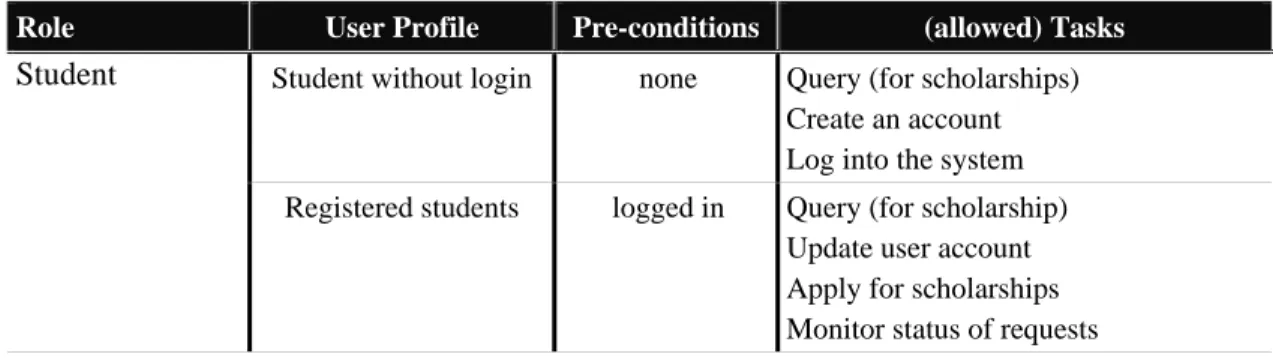
19.1 shows the roles that have been identified for the application — “student” and “Administrative clerks” — and their corresponding (allowed) tasks. The role “student” includes profiles “students without login” and “registered students”. The task “Query (for scholarships)” is available to everyone, but a user can apply for scholarship only if s/he is logged in the system. The user role “Administrative clerks”
refers to someone who is responsible for supervising the submissions.
Table 19.1. Tasks associated with BRPE scholarship applications
Role User Profile Pre-conditions (allowed) Tasks Student Student without login none Query (for scholarships)
Create an account Log into the system Registered students logged in Query (for scholarship)
Update user account Apply for scholarships Monitor status of requests
Administrative clerks
Full control over scholarship applications
logged in Process scholarship request Notify students
[H2] Modeling user tasks for BRPE
User tasks for the BRPE have been modeled using HAMSTERS which is a graphical
notation for describing task models hierarchically. The notation is supported by a
software tool for the editing and simulation of the models and is publicly available2.
The elements of task models described by HAMSTERS include various tasks types
(e.g. abstract, system, user, and interactive tasks) aimed at expressing who performs
the task. Similar to other task model notations such as the Concur Task Tree (CTT)
notation (Paternò, Mancini & Meniconi, 1997), temporal and logical operators (e.g. “[]” for choice, “>>” for sequence, “|||” order independency) are used to define the relationships between tasks. Figure 19.4 presents a task model describing the set of
actions and their temporal ordering in order for a user to log into the system (user goal
represented at the top level of the task model). In order to reach this goal the user has to perform the abstract task “Provide identification” which, in sequence (operator >>) will be processed by the system “Validate user id”. In order to perform the
identification task the user can perform in any order (operator |||) “provide email” and “provide password” tasks.
*** Insert Figure 19.4 ***
[Caption] Figure 19.4 Task model in HAMSTERS, describing a simple user login.
Figure 19.5 shows the task model of the students represented using HAMSTERS
notation corresponding to the goal “Submit BRPE”. The level immediately below
describes the tasks that users can perform without having a user account, such as “Query (for scholarships)”, “Create account” and “Select scholarship” in any order
(operator |||). Connected to that operator, the sequence operator “>>” indicates the fact
that the user must perform in sequence, first the task “Log into the system” and then
the task “Manage account”. The decision to start this sequence is performed in any
order with the tasks of the same level. The task “Select scholarship” is a cognitive
task which refers to user’s inner decision process. The process of refinement of tasks
proceeds until all the details for understanding the user goals and activities have been reached. For example, the task “Query (for scholarships)” is decomposed into
“provide keyword” and “show results” (which have to be performed in sequence (“>>”)), representing respectively the expected user input and the outcome provided by the system.
The task ‘Apply for scholarship’ encompasses a set of subtasks that are required to
accomplishing the procedure that follows Figure 19.5 (Administrative constraints
cause the administration to request paper-based certificates, so the subtask “provide certificates” is not supported by the system). Similarly, the task model describes how a student can “submit forms” either online on its printed version (represented by the choice operator “[]”).
*** insert figure 19.5 ***
[Caption] Figure19.5 HAMSTERS task model for the application BRPE
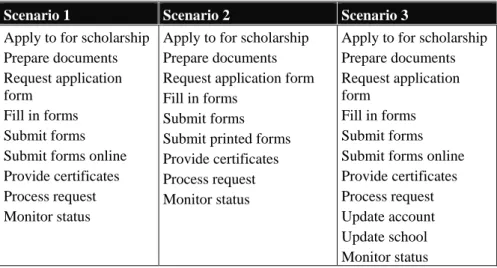
Exploiting the task model presented in Figure 19.5 can yield many scenarios. Table
19.2 shows three possible scenarios for the task “Apply for scholarship”. Scenario 1
considers the situation of a student that connects to the system and ultimately submits
forms online. In scenario 2 the user also connects to the system but finally decides to
submit printed forms. Scenario 3 describes the situation where a user updates account
information after the application is submitted. This might violate the constraint of
vocational high school. Notice that these scenarios do not impose any particular
implementation; user tasks can be better understood without having information about
how the system will support them. This kind of analysis is possible because it considers user tasks from the perspective of the users’ needs from the application, rather than how to represent the user activity using a particular system.
Table 19.2. Three scenarios related to “manage account” subtask
Scenario 1 Scenario 2 Scenario 3
Apply to for scholarship Prepare documents Request application form
Fill in forms Submit forms Submit forms online Provide certificates Process request Monitor status
Apply to for scholarship Prepare documents Request application form Fill in forms
Submit forms Submit printed forms Provide certificates Process request Monitor status
Apply to for scholarship Prepare documents Request application form
Fill in forms Submit forms Submit forms online Provide certificates Process request Update account Update school Monitor status
[H2] Modeling the navigation in the BRPE systems
To describe the navigation of the BPRE application, we employ the StateWebCharts
notation (SWC) (Winckler, Barboni, Farenc, & Palanque, 2004). SWC is a formal description technique based on Harel’s (1987) StateCharts and developed to specify the dynamic behavior of Web applications. StateCharts can be defined as a set of
states, transitions, events, conditions, variables, and their interrelationships. The
behavior described in SWC is directly related to the user interface. Sates in SWC, are
depicted on the user interface by means of containers for objects (graphic or
executable objects) e.g. HTML pages. During the execution of the model the current
state (and its content) is made visible to the users. SWC transitions explicitly
represent how user events trigger state changes in a model (user actions are
represented as dashed arrows. When a user selects a transition the system leaves the
current state, which becomes inactive, letting the target state be the next active state in
the configuration. Figure 19.6 presents an excerpt of a system model using SWC
supporting user login.
*** Insert Figure 19.6***
[Caption] Figure 19.6 Simple login described using SWC
In Figure 19.6 the state “login” contains three static states “fill in email and pwd”, “logged in”, “error: try again” that describe the three possible pages the user can see whilst navigating the application. The state “check password” is a transient state that represents the information processing performed at the server side without any visual
representation to the user. The round-shaped state is an “end state” used to describe
the end of the execution of the application. Notice the SWC model presented in Figure
19.5 is just one of many alternatives for defining the system behavior for performing
the task login depicted in Figure 19.4; nonetheless, it describes one agreed upon
design for the navigation of the login part of the BRPE application.
Figure 19.7 shows the complete navigation model for BRPE system including the support for the tasks “Log into the system” and “Query (for scholarships)”. In
addition to the functions required to support the tasks represented in the task model, it
features some transitions supporting content-based navigation such as “home”, “connected”. Simply by connecting states by means of transitions we can create all the navigation required by the users, whether it concerns content-based navigation or
is navigation required to follow a specific procedure.
*** insert Figure19.7 ***
[Caption]Figure 19.7 SWC modeling for BRPE e-procurement application
SWC notation is supported by a computer tool suite making it possible to edit and
execute models. This specificity support iterative prototyping as described in the
development process of Figure 19.1. After we have created and verified that the
navigation model embed our requirements, we can create the Web pages for the
e-procurement application that corresponds to the SWC model. When the navigation is
described, the graphical part of the user interface can be connected to the states of the
model while user events can be connected to transitions. Executing the models thus
allow for simulation of the user interface according to the high fidelity prototyping
philosophy. The SWCEditor supports the simultaneous simulation of SWC models
and the execution of the corresponding Web pages. Figure 19.8 provides a
view-at-a-glance of this process. The navigation modeling for the digital library of BRPE is
presented on the left-hand side of Figure 19.8, highlighting the current state in the simulation (i.e., the state “home”). Its right-hand side presents the corresponding implementation of the home page. We also can observe in the center of Figure 19.8 a
dialog window showing a list of transitions going out from the current state “home”.
This list represents the set of links currently available for the user navigation.
*** insert figure 19.8***
[Caption]Figure 19.8 Prototyping BRPE using SWC models connected to a web page
[H1] Discussion
This chapter has illustrated the use of task models and system models for dealing with
the development of e-procurement applications. The case study presented might look
small but it exhibits the huge importance that models will play in the development of
even more complex applications. Without appropriate support from models, the
development team will get lost and the chance of unexpected and undesired behaviors
socio-technical system so that when working in multidisciplinary teams all stakeholders can
use the most suitable model to make explicit their concerns and requirements to be
embedded in the final application.
Most of existing development methods for web applications bases their conceptual
modeling on the objects (or data) and their related methods, functions, or services, and
they derive tasks from the traditional CRUD (Create, Read, Update, Delete) pattern:
tasks are limited to basic operations on objects and their relationships (Ceri et al,
2003). These data-centric development methods only integrate the graphical and
interaction designers' point of view by means of stereotypes preventing any creativity
about the user interface presentation and navigation.
The use of task models reinforces the focus on users during the development process
of application. Indeed, we must pay attention to the users’ tasks to help users navigate
the application effectively and efficiently. Several other approach for designing
e-procedures exist, many of which do not include explicit representation of user tasks.
Even though task modeling is widely considered as helpful activity that lets design
analyze the user activity without the influence of technological constraints, the actual
use of task models for the design of e-procurement applications is often
misunderstood, mainly because current approaches for the design do not provide any
guidance on how to integrate task models into the design process. This chapter
focused on tasks models and system models rather than on the underlying workflow
process of e-procedure applications. Nonetheless, the workflow can be derived from
the co-execution of task models and navigation models.
One of the key contributions of the models presented in this chapter is that task
models (HAMSTERS) and system models (SWC) can be integrated and that their
features 4 interactive tasks then the system model should embed the same set of
transitions between states. Beyond that lexical compatibility, syntactic compatibility
has to be insured too. For instance, if there is a sequence of actions in the task model
(describing a constraint in user activity that can be administrative, physical or
cognitive) this constraint must be reflected in the system model. This is precisely
where the power of models is exacerbated. While checking-by-testing such
compatibility is impossible due to the potentially very large number of states and state
changes, models bissimulation and model-checking techniques can provide efficient
solutions. Bissimulation of task models and system models is detailed by Barboni,
Ladry, Navarre, Palanque & Winckler (2010).
One of the key assumptions of the approach presented here is that user activity should
be represented in tasks models only and that system behavior should only be
represented in the system models. Keeping the content of task models different from
(but compatible with) the system models allows provide methodological guidelines
about the construction of these models. A task model should not inform how many
pages a user must visit to accomplish a task because this is often a system constraint.
A scholarship application form such as BRPE might feature a single page in a Web
browser on a desktop but designers can decide to slice the form in several pages
accordingly to groups of information requested. Moreover, accessing the same
application through a mobile Web browser will request that form will be sliced into
many pages. Notwithstanding the number of pages used to present the BRPE form,
the user task remains the same.
It is important to note that several other models have been proposed over the last
only presented SWC and HAMSTERS to illustrate the applicability of the concepts
and the benefits that can be gained following such an approach.
[H1] Success factors for modeling users and systems behaviors for e-procurement
applications
The following check list is supposed to help the reader with key information while
using a model-based approach and a model-based development process as presented
in this chapter.
- Keep clear the distinction between the information included in the task model
and the system model
- The system model should exhibit infinite sequences supporting the same tasks
to be executed by several users one after the other. The execution of one task
should not impact the future execution.
- The tasks model should terminate. An iterative tasks model would represent
the fact that infinite sequences of action are required for reaching a goal.
- Do not start using models if there is no tool support for editing the models
- A simulation engine allowing to “see” how the model behaves is required
- Make sure to reflect in the models all the changes that are made on the
application otherwise there would lose their interest as a tool for analysis and
information sharing
- Make sure that your models are readable and understandable by the various
stakeholders so that they can validate and modify them
- Reading and building a model requires different skills (don’t expect
- If you use a multiple models approach make sure that there is a support to
assess cross-models compatibility as performing it by hand is usually
unmanageable
- Do not try to use models everywhere. Models should be kept for the complex
part of the system and for the complex user tasks. The rest of the system can
be built using prototyping approaches. There are different ways to identify
these complexities (looking at user and/or system failures are a good
indicator).
[H2]References
Barboni, E., Ladry, J.-F., Navarre, D., Palanque, P., & Winckler, M. (2010). Beyond
Modelling: An Integrated Environment Supporting Co-Execution of Tasks and
Systems Models. In proceedings of ACM Symposium on Engineering Interactive
Systems (EICS'2010), New York, United States : Sheridan.
Ceri, S., Fraternali, P., Bongio, A., Brambilla, M., Comai, S. & Matera, M. (2003).
Designing Data-Intensive Web Applications. San Franscico, United States:
Morgan-Kaufmann Publishers.
Diaper, D., & Stanton, N. A. (2004). The Handbook of Task Analysis for
Human-Computer Interaction. Mahwah, New Jersey: Lawrence Erlbaum Associates.
Harel, D. (1987). StateCharts: A Visual Formalism for Complex Systems. Science of
Computer Programming, 8(3), pp. 231-274, Amsterdam: Elsevier.
Martinie, C., Palanque, P., & Winckler, M. (2011). Structuring and Composition
Mechanism to Address Scalability Issues in Task Models. In Proceedings of IFIP
TC13 Conference on Human-Computer Interaction (INTERACT 2011), 593-611,
Paterno, F., Mancini, C., & Meniconi, S. (1997). ConcurTaskTrees: A Diagrammatic
Notation for Specifying Task Models. In Proceedings of the IFIP TC13 Conference on
Human-Computer Interaction (INTERACT’97), 362-369, London: Chapman & Hall.
Pontico, F., Farenc, & C., Winckler, M. (2006). Model-based support for specifying
eService eGovernment Applications. In Proceedings of the 5th International
Workshop on TAsk MOdels and DIAgrams (TAMODIA’2006), 54-67, LNCS 4385.
Berlin: Springer.
Scapin, D., Vanderdonckt, J., Farenc, C., Bastide, R., Bastien, C., Leulier, C.,
Mariage, C., & Palanque, P. (2000). Transferring Knowledge of User Interfaces
Guidelines to the Web. In Proceedings of TWWG 2000: International Conference on
Tools for Working With Guidelines, 293-304, London, UK: Springer.
Shaer, O., Jacob, R. J. K;, Green, M., & Luyten, K. (special editors). (2009). User
Interface Description Languages for Next Generation User Interfaces. Special Issue of
ACM Transactions on Computer-Human Interaction (ACM TOCHI), 16(4), New
York: ACM.
Winckler, M., Barboni, E., Farenc, C., & Palanque, P. (2004). SWCEditor: a
Model-Based Tool for Interactive Modelling of Web Navigation. In Proceedings of
International Conference on Computer-Aided Design of User Interface (CADUI'2004), Kluwer Academic Publisher.