An Application Service Provider
Infrastructure for Shared Workspaces
in Internet-Based Collaborative,
D e sign
By
Jaime Solari
Submitted to the Department of Civil and Environmental Engineering and the Department of Architecture in Partial Fulfillment of the Requirements for the Degrees of
Master of Science in Civil and Environmental Engineering and
Master of Science
at the MASSACHUSETTS INSTITUTE
Massachusetts Institute of Technology OF TECHNOLOGY
June 2000
JUN 1 2 2000
Copyright @ Massachusetts Institute of Technology 2000.
All Rights Reserved. LIBRARIES
Author
epartment of Civil and Environmental Engineering/Department of Architecture
18, 2000 Certified by William L. Porter Professor of Architecture Thesis Supervisor Certified by . . -1 F, niky Peia-Mora Associate Professor of Civil and Enviro ental Engineering esis Supervisor
Accepted by o
Toy Strickland
Chairman, Department Committee on Graduate Students Department of Architecture
Accepted by
Daniele Veneziano
Chairman, Department Committee on Graduate Studies Department of Civil and Environmental Engineering
Thesis Supervisor: Feniosky Pefia-Mora
Title: Associate Professor of Civil and Environmental Engineering Thesis Supervisor: William L. Porter
Title: Professor of Architecture Thesis Reader: Jerome J. Connor
Title: Professor of Civil and Environmental Engineering Thesis Reader Daniel J. Greenwood
An Application Service Provider
Infrastructure for Shared Workspaces
in Internet-Based Collaborative
Design
By
Jaime Solari
Submitted to the Department of Civil and Environmental Engineering and the Department of Architecture
June 2000
In Partial Fulfillment of the Requirements for the Degrees of
Master of Science and Master of Science in Civil and Environmental Engineering
Abstract
For architectural, engineering and construction projects involving transient 'virtual organizations' composed of non-collocated team-members, the adoption of concurrent design principles is seen as vital. An important aspect of concurrent design is the need for an effective communications infrastructure between team members. Traditionally, such communication has been handled through person-to-person meetings, however the complexity of modern projects has grown and as a result, reliance on new information and communications technologies is becoming increasingly necessary. Hence, within a concurrent design setting, there is the need for an integrated information and collaboration environment that will create a persistent shared workspace to support interaction between project personnel throughout all phases of the project. This research explores computer-supported mechanisms for enhancing distributed design collaboration. The goal of this thesis is to develop a set of requirements, system architecture and an early system prototype to facilitate computer-supported collaboration among distributed teams. The prototype will consist of a persistent shared workspace system built from the integration of complementary collaborative applications. These applications are the CAIRO system, developed at the Massachusetts Institute of Technology and the VNC system developed at the Olivetti Research Laboratory.
Thesis Supervisor: Feniosky Pefia-Mora
Title: Associate Professor of Civil and Environmental Engineering Thesis Supervisor: William L. Porter
ACKNOWLEDGMENT
May 24, 2000
I would like to thank Nancy Jones, who has made it possible for me to be here and to Feniosky Pefia-Mora, who has made it possible for me to stay. Thanks to the faculty members involved in this thesis: William Porter, Jerome Connor and Daniel Greenwood. Special thanks to all the members of the team in its various incarnations from DISEL to
888 and beyond: Kiran Choudary, Gyanesh Dwivedi, Chang Kuang, Justin Mills, Sen
Sugata, Sanjeev Vadhavkar and Padmanabha Vedam without whom this project would not have been half as much fun. Acknowledgements for the people that have provided open source code and helped avoid 're-inventing the wheel'; John Wilson and the VNC project deserve special mention. Finally, I would like to thank my friends and family for their non-collocated support over the past years.
Contents
1 Introduction ... 9
1.1 M otivation ... 11
1.2 Objectives... 12
1.3 H ypothesis ... 12
1.4 Benefits of This Research ... 13
2 Application Service Provider ... 14
2.1 The ASP Model: A Brief History of Outsourcing... 15
2.2 W hat Is an A SP9... ... ... ... .. . .
16
2.3 ASP Outsourcing Benefits and Drawbacks .... ... ... 16
2.4 A SP Technology Requirem ents ... 17
2.5 A SP A pplications ... 18
2.6 Sum m ary ... 21
3 Requirem ents...22
3.1 Scenario... 22
3.2 Requirem ents... 27
3.2.1 Com m unication Support ... 29
3.2.2 Cooperation Support ... 30
3.2.3 Coordination Support ... 30
3.2.4 A rchitecture and IT-platform ... 31
3.2.5 G roup D ynam ics-A w are Conferencing... 32
3.3 Sum m ary ... 34
4 Shared W orkspaces for CSCW ... 35
4.1 Shared A pplications ... 36
4.1.1 Shared W hiteboard... 37
5 M ethodology ... 39
5.1 "H igh Level" Solution... 40
5.1.1 M ulti-user Extension ... 40 5.2 "G eneral" Solution ... 43 5.2.1 Shared X ... 44 5.2. 1.1 SharedX Switch: XMX...45 5.2.1.2 SCO Tarantella... 48 5.2.1.3 JCraft W iredX ... 49 5.2 Conclusion... 50 6 Integration Perspectives ... 51 6.1 The CA IR O System ... 52 6.1.1 The Architecture... 53 6.1.1.1 Collaboration M anager... 53
-5-6.1.1.1.1 M edia Drivers...54 6.1.1.1.2 M essage Server ... 54 6.1.1.2 Forum Server...55 6.1.1.2.1 Chairman M eeting... 56 6.1.1.2.2 Freestyle M eeting ... 56 6.1.1.2.3 Lecture M eeting ... 56 6.1.1.3 Nam e Server ... 56 6.1.2 The Features ... 57 6.1.2.1 The Interface ... 57
6.1.2.2 The Agenda Tool... 60
6.1.2.4 Side-Talk ... 61
6.1.2.3 The Agent... 61
6.1.2.4 The Social Agent ... 62
6.1.2.4.1 Expressions... 63
6.1.2.4.2 Casual Contact... 63
6.1.2.4.3 Awareness Driver ... 64
6.1.2.4.3.1 Affective Bar ... 65
6.1.2.4.3.2 Affective Icons ... 65
6.1.2.4.4 Three Dimensional Virtual Environment...66
6.1.3 Conclusions ... 67
6.3 Virtual Network Computing... 68
6.3.1 The VNC Protocol... 70
6.3.2 The VNC Viewer ... 72
6.3.3 The VNC Server... 73
6.3.4 Conclusion... 74
6.3.5 Sum m ary ... 75
7 Broadband Collaborative ASP ... 76
7.1 Design Considerations... 77 7.1.1 M eeting Protocols ... 78 7.1.2 Cross-Platform Compatibility ... 80 7.2.2 Database Integration... 81 7.2.3 Annotation... 82 7.2.4 Standard Compliance ... 84 7.2.5 Security... 85
7.2.5.1 Application Security: Too Much Remote Control ... 86
7.2.5.2 Virtual Private N etworks... 86
7.2.5.3 Encryption ... 87
7.2.5.4 Corporate Networks and Firewalls... 88
7.2.6 Concurrency Control... 89 7.2.6.1 Locking... 90 7.2.6.1.1 Shared Locking ... 90 7.2.6.1.2 Fine-Grained Locking ... 90 7.2.6.1.3 Persistent Locking ... 90 7.2.6.2 Notification Control ... 91
7.2.6.2.1 Fine Grained Notification... 91
7.2.6.3 Transactions ... 92 7.2.6.3.1 Short Transactions... 92 7.2.6.3.2 Long Transactions ... 92 7.2.6.4 Version Control... 93 7.3 Sum m ary ... 93 8 Results ... 95 8.1 Pilot Study ... 96 8.2 Perform ance ... 97 8.2.1 Desktop Clients ... 97
8.2.1 Personal D igital A ssistants... 97
8.2.1.1 Resource Lim itations... 98
8.2.1.1.1 Display Limitations ... 98
8.2.1.1.2 Memory and Computational Power Limitations 99 8.2.1.1.3 Network Connectivity ... 99
8.3 Sum m ary ... 100
9 Conclusion... 101
Bibliography...103
-7-List of Figures
Figure 2-1. Which class of applications an ASP will most frequently deliver?... ... . . 19
Figure 2-2. Heterogeneous Computing Environments [Citrix Systems Inc. 1999]...20
Figure 3-1. Query Results Page [Anumba and Duke 1999]...23
Figure 3-2. Personal Details and Availability Page [Anumba and Duke 1999]...24
Figure 3-3. Graphical Representation of Users clustered by disciplines, activities and interests [A num ba and Duke 1999]... 25
Figure 3-4. The Conferencing Room [Anumba and Duke 1999] ... 26
Figure 4-2. Bipartite Use of Shared Application Tools [Fluckiger 1995] ... 36
Figure 4-3. Shared Application [Schefstr6m 1999] ... 37
Figure 4-1. Bipartite Use of Shared Whiteboards [Fluckiger 1995]...37
Figure 5-1. Multi-User Extension Architecture [Schefstr6m 1999] ... 41
Figure 5-2. Synchronized Presentation Using Microsoft PowerPoint ... 42
Figure 5-3. Application-access Module [Linar Ltd 1999] ... 43
Figure 5-4. X Window System [Schefstr6m 1999]... 44
Figure 5-5. Shared X Architecture [Schefstram 1999] ... 45
Figure 5-6. XMX Virtual Root Window, a root-window-in-a-window...46
Figure 5-7. X Multiplexor Control (XMC) User Interface [Bazik 1999] ... 47
Figure 5-8. SCO's Tarantella X Emulator Applet Running XMX ... 49
Figure 5-9. JCraft WiredX X Emulator Applet Running XMX...50
Figure 6-1. Current CAIRO Architecture [Hussein 1995]...53
Figure 6-2. Forum Server Interface... 55
Figure 6-3. N am e Server Interface ... 57
Figure 6-4. C A IR O Interface... 59
Figure 6-5. H allw ay of M eetings ... 60
Figure 6-6. The A genda Tool... 61
Figure 6-7. The C A IR O A gent... 62
Figure 6-8. Snapshot of Expressions Tool ... 63
Figure 6-9. C asual C ontact... 64
Figure 6-10. A ffective B ar ... 65
Figure 6-11. A ffective Icons ... 66
Figure 6-12. 3D V irtual M eeting Room ... 67
Figure 6-13. Thin Client System [Richardson, Stafford-Fraser, Wood and Hopper 1998] ... 7 1 Figure 6-14. Unix Desktop Within Internet Explorer and Windows Desktop Within N etscape on U nix... . 73
Figure 7-1. Seven Dimensions of Design Consideration ... 78
Figure 7-2. Implementation of Meeting Control Structure for Lecture Style ... 79
Figure 7-3. Multiple Client Devices: Windows, Unix, Windows CE and Palm...80
Figure 7-4. D atabase Query Interface ... 82
Figure 7-5. A nnotation Interface ... 84
Figure 7-6. SSH Authentication Panel ... 88
Chapter 1
1 Introduction
Construction projects usually involve transient 'virtual organizations' made up of members of a project team working together on the design and construction of a facility. Team members are often non-co-located, particularly at the early stages of the design process, and tend to work independently while making decisions that affect others. For these cases, the adoption of concurrent engineering principles by the construction industry is increasingly being seen as vital for reducing the problems posed by the industry's fragmentation, and enhancing its competitiveness. An important aspect of concurrent engineering in construction is the need for an effective communications infrastructure able to transmit project information between members of the project team and across all stages in the constructed facility's lifecycle [Anumba and Duke, 1999]. Traditionally, such communication has been handled through person-to-person meetings, however an increase on the reliance upon information and communications technologies has shifted this project information online. Hence, within a concurrent engineering
-9-setting, there is the need for an integrated information and collaboration environment that will create a persistent workspace to support interaction between project personnel throughout all phases of construction projects.
As these information and communication technologies move rapidly into the world of networks and distributed environments, architecture engineering and construction companies are looking forward to the wealth of opportunities that are being uncovered with this new form of collaboration. By combining the computing power of today's processors with real-time data transmission, virtual collaboration forums over distributed networks will become a powerful tool in tomorrow's workplace.
This research focuses on creating those persistent workspaces using new models of computing delivery in conjunction with an understanding of group meetings and collaboration processes to facilitate computer-supported collaboration among distributed team members. This initiative explores computer-supported mechanisms for enhancing distributed engineering collaboration by using the Application Service Provider (ASP) model to create a shared workspace for computer supported collaborative work.
This thesis starts by outlining in Chapter 2 the most important features of the ASP model. In Chapter 3 a requirements analysis for a collaborative system is provided. Following the requirements, Chapter 4 discusses the concepts behind shared workspaces for CSCW. Chapter 5 explains the methodology behind this research and the two strategies pursued. Chapter 6 outlines the most important features of the CAIRO system developed at MIT and the Virtual Network Computing applications developed by the Olivetti and Oracle Research Laboratory. Chapter 7 describes the design considerations for a Collaborative ASP. Chapter 8 provides an overview of the benefits of an integrated collaboration and shared workspace environment. Finally, Chapter 9 is the summary and conclusions for this project.
1.1 Motivation
Significant research efforts have been devoted to the area of sharing information through computers and the Internet. However, limited attention has been devoted to the basic communication mechanisms and the encoding of these mechanisms [Pefia-Mora et
al., 1997].
Therefore the objectives for the integrated system described in this thesis are three fold. First, it aims to remove the same-place constraints that are characteristic of face-to-face meetings. Elimination of same-place requirements allows for true global collaboration without collocation, minimizing the overhead associated with collaboration as well as reducing project expenses.
Second, in addition to the removal of the physical limitations of in-person meetings, the integrated system also seeks to remove the temporal or same-time constraints. Without same-time constraints, participants could contribute to the collaboration process asynchronously, adding convenience to the entire collaboration
process.
Finally, the system seeks to model meeting control structures. Since limited attention has been devoted to encoding these basic communication mechanisms, the system described below implements many forms of meeting control structures, in order to facilitate the flow of information.
Keeping in mind the motivations outlined above, the goal of this research is to develop a set of requirements, a system design or architecture and an early system prototype that will meet the requirements. The prototype will consist of a comprehensive working collaborative system built from the integration of collaborative applications. These applications are the CAIRO system, developed at the Massachusetts Institute of
-Technology and the VNC application developed at the Olivetti and Oracle Research Laboratory.
1.2 Objectives
A working prototype is intended to demonstrate the collaboration enabling
capabilities of a meeting environment in combination with a persistent shared workspace within the context of an architecture, engineering and construction (AEC) project. This prototype will employ the meeting control structures, which is central to the original CAIRO system in combination with a new model of application sharing deployment. A sample scenario will be created to simulate the types of situations that may occur during a design meeting. These sample scenarios are intended to provide insight to the various kinds of interaction that need to be managed during collaborations. From this example, an architecture that incorporates the new application sharing model and the underlying database design is developed.
From the work described above, a robust collaboration system is shaped, allowing for more effective shared workspaces to occur, both among distributed team members and within independent isolated members. In other words, participants may choose to work as part of a collaborative group or alone in their own private workspace. The collaborative ASP model incorporates additional CAIRO features such as full hierarchical group structuring, agenda building, and a detailed information policy to facilitate this interaction process.
1.3 Hypothesis
The architecture for the new application collaboration system will incorporate important concepts of the current CAIRO system. In particular, CAIRO possesses concepts that relate interaction norms in a meeting to a virtual environment, such as the
control structures. However, the ability to share information beyond a whiteboard needs to be incorporated to allow for comprehensive application and data collaboration.
By developing and using a application sharing prototype designed and deployed
with the ASP delivery model, experience can be obtained for generating a roadmap for next generation systems. Based on the advantages and disadvantages of the prototype, a new set of requirements can be developed that define needed changes.
1.4 Benefits of This Research
The successful development of this collaboration system will greatly enhance the effectiveness of concurrent engineering teams where members of the design team, suppliers and consultants cannot all physically meet at the same location. First of all, this new system will enable team members to collaborate through a shared workspace from multiple platforms and operating systems, which is currently not possible with most collaborative tools. Second, through its thin-client architecture, the system will enable designers to work on applications even when the application is not installed on the local computer or belongs to another platform. Third, through its database connection, the system will enable to designers to query the sessions for design process information or conflict resolution. Fourth, by taking advantage of current developments in mobile computing, the system enables team members to collaborate without the need of desktop computers. Designers and other team members can work on common documents through Palm Pilot and Windows CE devices. Team members will be able to collaborate with each other from locations wherever their physical presence is most valuable (i.e. on-site or at the design offices). Thus, dealing with unexpected issues from the construction site or the design office will become easier. In addition, it will be feasible for associates to participate in multiple meeting sessions simultaneously. This way, consultants and experts can contribute their value to more organizations than they have in the past. Time, monetary resources, and lack of involvement do not have to be compromised.
13-Chapter 2
2 Application Service Provider
Multi disciplinary teams working in a distributed environment are very often working in a heterogeneous network, with different computing platforms, namely Unix and Windows. Also, as wireless technology comes of age and mobile devices become commonplace, the platform compatibility issue will be combined with the hardware/interface compatibility issue. For example, as well as having a network with Unix and Intel platforms, there will be handheld devices coexisting with mobile phones and the software will need to take this into account. This compatibility problem is inherent to traditional client/server architecture, which emphasizes client-side computational power [Citrix, 1999]. One solution to this problem is server-side
2.1 The ASP Model: A Brief History of Outsourcing
In the early years of business computing, outsourcing was known as "time-sharing." Expensive and complex mainframe computers were beyond the reach of all but the largest corporations. Consequently, many businesses shared the processor time of an off-site mainframe that was managed by a third party. This time-sharing, or "bureau," service typically rented the mainframe for relatively easy-to-manage tasks, such as payroll processing or receivables billing. Mainframes were used mostly for number intensive data processing rather than managing complete applications. When affordable minicomputers and personal computers arrived on the scene, demand for time-sharing dropped, and many processing tasks were brought in-house.
Time-sharing was not scaled back because it was a bad idea, but because PC technology reduced the costs of processing tasks internally. The practice of outsourcing tasks that are not part of an organization's core competency remains a sound one. However, today's business environment calls for timely, interactive access to applications and management information, something time-sharing lacked. Until the Internet came along, there was no cheap, nonproprietary means for a desktop computer to communicate with an off-site application host system and no standard client environment that could interact with the remote application.
The Internet provides a publicly accessible infrastructure that connects users to off-site application servers. Desktop Web-browser software provides a standard way to interact with an application hosted on a Web server. And neither the Internet nor browser software adds much cost to the outsourcing equation. Using this technology, software vendors and Internet Service Providers (ISPs) are reviving outsourcing for information management. Software vendors are providing "rent-an-application" services, and ISPs are expanding their business models to differentiate themselves in what has become a highly competitive environment.
-2.2 What Is an ASP?
Conventional ISPs manage Web servers and e-mail servers that are connected to the Internet. These servers host Web pages for businesses and individuals and route e-mail messages. An ASP simply extends this model to include software programs, from a payroll or human resources module up to a full enterprise resource planning (ERP) suite. In addition to hosting Web pages and e-mail, ASPs use servers connected to the Internet to host applications. ASP customers can interact with a remotely managed application module or suite of modules via Web-browser software on an anytime, anywhere basis.
Simply hosting the application software remotely is only part of the job of a full-service ASP. The ASP has to perform a role that combines the responsibilities of an ISP, a traditional outsource service provider and a value added reseller (VAR) from which you might have purchased a non-customized software application. In the near future, more ISPs will become ASPs; ISPs will partner with software vendors and VARs to offer ASP-like services; and vendors and VARs will simply become ASPs. Buying prepackaged applications for in-house use, rather than renting them over the Internet, may become a thing of the past [McKie, 1999].
2.3
ASP Outsourcing Benefits and Drawbacks
Outsourcing something like an ERP application to an ASP has many benefits that apply to any type and size of business. The ASP maintains the hardware server "farms" (large facilities of servers) required to efficiently host complex applications and removes the need for companies to buy, maintain and upgrade in-house hardware. The ASP can make sure that the latest versions of applications are available to enterprise-wide users without the need for costly site-by-site in-house upgrades. Using an ASP-based ERP system also means that the only client software required on the user's desktop is a Web browser, which eliminates the need to manage client software on a desk-by-desk basis.
IS cost reductions are not the only reason why ASP outsourcing is attractive: ASP
customers can sign up new users or workgroups for an application at almost a moment's notice without the need for complex infrastructure and implementation-resource planning. New users can access the application without expensive upgrades to the local
technology environment. This means businesses can get new applications, such as sales force automation or customer relationship management software, up and running faster; can bring on more users or users from remote offices more quickly; and can adapt more easily to merger and acquisition activity. Small businesses and geographically dispersed multinationals alike can capitalize on the benefits of application service providers.
However, there are some clear drawbacks to the ASP outsourcing model. Switching from an internally managed and accessed local- or wide-area network (LAN or WAN) to the publicly managed and accessible Internet means that access to outsourced applications may be subject to influences beyond your control. For example, heavy Internet traffic may slow application response times, and malicious hackers could get hold of accounting, employee or customer data. Furthermore, not every application available today has a complete or thoroughly field-tested Web interface, something that could restrict its availability to users. Also, a complex system such as an ERP suite requires considerable time to configure to a company's specific business needs, and integrating an ASP-managed ERP system with complementary in-house systems, such as a customer relationship management system, could prove challenging.
2.4 ASP Technology Requirements
While the technology requirements for running an outsourced application over the Internet are daunting for the ASP, they are relatively straightforward for the application user. Depending on the design of the application being outsourced, your company should need no in-house application servers or database servers to support the application. Similarly, if the ASP is hosting a properly designed browser/server application, it should demand nothing more than a Web browser on each device (PC, laptop, handheld, mobile phone, etc.) that needs access to the application. Clearly, every user of the outsourced
-application requires secure access (via a firewall) to the Internet and, ideally, should have a full-time, high-speed connection using a virtual private network (VPN) managed by the
ASP. Users also must have e-mail since this is how the outsourced application delivers
reports, documents and business alerts, facilitates workflow participation and maintains a support dialogue with individual users. Given the fact that most businesses already have access to the Internet and e-mail, they won't require much new or even upgraded technology to take advantage of an outsourced application [McKie, 1999].
2.5
ASP Applications
A recent survey of the ASP industry showed that communication and
collaboration applications would be most frequently deployed using this model:
Question. In the year 2000, which class of applications an ASP will most frequently deliver?
33% -E-commerce
25% -Communications/Collaboration
15% -Customer Relationship Management
14% -Finance/Accounting
7% -Human Resources
6% -Education/Training
Figure 2-1. Which class of applications an ASP will most frequently deliver?
As it will be explained in the requirements, distributed design teams often use different software components on heterogeneous platforms and networks [Figure 2-1], therefore it is important that they are interoperable to allow collaboration and data sharing. With server-based computing, applications are deployed, managed, supported, and executed completely on the server.
Due to the inherent advantages of server-based computing and the distributed nature of the virtual design teams, the deployment through an Application Service Provider model would be of great benefit to enable collaborative applications. These benefits can be summarized in the following three critical components:
A. A multi-user operating system that allows multiple concurrent users to log on and
run applications in joint as well as separate, protected sessions on a single server.
B. A remote presentation services architecture capable of separating the application's logic from its user interface, so that only keystrokes, mouse clicks, and screen updates travel the network.
- 19 -M E-commerce N Communication/Collaboration O Customer Relationship Management O3Finance/Accounting N Human Resources M Education/Training
C. Server-based computing does not require applications to be downloaded to client
devices. As a result, application performance is neither bandwidth- nor device-dependent.
1 10
__ x L > ___ __
IM J
D
CDO_
1711 Ir 11
Figure 2-2. Heterogeneous Computing Environments [Citrix Systems Inc. 1999]
In summary this Application Service Provider model can be used for the application sharing implementation within a shared workspace. Shared applications can be easily deployed from a server instead of running on the local client machine and this way avoiding a number of problems. This new model of deployment solves a diverse set of challenges that will enable- to fulfill the requirements explained in the following chapter:
A. LAN-Locked Applications. Applications based on two-tier client/server
architectures are designed for the LAN and are not optimized to run over high-latency phone or WAN connections that run 100 to 1000 times slower than a local segment.
B. Heterogeneous Clients. Networks usually involve PCs as well as non-Windows systems such as Linux, OS/2, UNIX, or Macintosh. Other networks could include low-cost, fixed function devices, such as terminals or wireless devices such as wireless tablets and personal digital assistants (PDAs).
C. Management. Managing access (security), version control (maintenance),
system configuration (moves, adds, deletes), and support (help desk) can be very costly particularly for distant users.
D. Heterogeneous Software Packages. Each subgroup within a virtual team
typically uses a set of software packages that is specific to the group's discipline. Therefore compatibility becomes an issue for situations such as visualization.
2.6 Summary
The first part of this chapter described the typical components of the traditional ASP deployment model that is currently being used in industry. The second part of this section described the attributes of an ASP deployment that would be of benefit for a shared workspace. The reasons why a shared workspace would benefit from an ASP model are formalized in the following chapter under the requirements.
-Chapter 3
3 Requirements
Before reviewing the requirements of the new shared workspace it is important to outline a scenario of how this shared workspace would be used. This scenario describes the behavior of a generic collaboration tool and within its features the shared workspace
is highlighted.
3.1 Scenario
The following description is a user session of an integrated collaborative system that involves a building design problem [Pefia-Mora, Anumba, Solari, Duke 2000]. The parties involved in the design are a project manager, an architect, a structural engineer, an environmental engineer, a contractor and a geotechnical engineer. A member of the design team wishes to alter the dimensions of a particular area of the building. They see
that this impacts upon the available corridor space and feel they should check that no safety regulations covering the size of corridors are contravened. They wish to contact an individual in the virtual organization who will be able to help them with the issue. Not knowing the name of such a person, they can look up in a project repository the person that would be responsible for those aspects of the project. The project repository contains all relevant information relating to the facility being developed including details of which disciplines are interested in specific aspects of the facility.
Figure 3-1. Query Results Page [Anumba and Duke 1999]
Once the people affected by the decision have been determined, the system will determine the current availability of each member involved. People in the result set might have a colored dot next to their name to indicate the result of the availability look-up (For example green means they are probably available, red means they are unavailable and gray means that the system has no record of that person). The user can then see, at a glance, which of the people are available and select them from the list. This selection returns more detailed information from the database, such as images from a 'Web cam'. The image from a camera pointing at the desk area of the individual is periodically
-written to a file. This is then added to the web page. If the required person is available, communication can be launched automatically from within the system, with the project model providing the context for the design discussions.
i Peo ple <and rtormation idtN scp
PlFi images of the person's desk area using a static camera 'screen glance' of current display on queried computer screen
Figure 3-2. Personal Details and Availability Page [Anumba and Duke 1999]
At the same time that communication links have been established, a graphical representation of users clustered by disciplines, activities, interests and projects in a multi-layered environment can be provided. Close to the user's avatar are other members of the virtual team. However the user can navigate freely about the world, and communicate with other people if desired. The user starts up a text chat conversation with a member familiar with safety regulations but moves on to more important issues and decides to upgrade the conversation to a voice chat. The two avatars are selected and automatically entered into a phone call together. The other people in the space have a visual indication that you are in an audio-chat, and can overhear some of the conversation as it is 'streamed' into the world. Another colleague moves into the 'audio zone' and is automatically phoned-up to enter the conference. He has overheard talking about the
particular project in which he is involved and would like to discuss a certain aspect of it [Anumba and Duke 1999].
Figure 3-3. Graphical Representation of Users clustered by disciplines, activities and interests [Anumba and Duke 1999]
All three members decide to continue the discussion in private and perhaps take
some notes, so they choose to enter a more formal meeting space. While they continue chatting, their avatars are moved up to the formal meeting plane and a meeting room appears around the avatars. Various conferencing tools appear such as a table and whiteboard and the avatars start to 'act out' the interactions between the team members. The project manager initially selects a 'freestyle' forum style from the available choices. The forum moderator then requests additional information regarding the meeting, these include: media drivers used (text, audio, video and whiteboard); maximum number of active speakers (2); and membership criterion (predetermined list). Additional invitations to join the meeting can be sent by the members currently attending the session. The members of the design meeting can setup a meeting agenda helped by a wizard and discuss the issues related to project as they each formulate their evaluation of the problem. Eventually, this meeting could become confusing as members continually interrupt each other's work. At this stage, the structural engineer may wish to revise the meeting moderation scheme to a 'chairman' scheme. The structural engineer can do so by entering the control parameters he/she wishes to enforce on the members and the meeting
-would be reestablished with a chairman control scheme. The architect raises his/her hand to present a design proposal to the other members and receive a critique from each, so the architect is given the floor. Eventually through multiple cycles of discussion and explanation the design would be formulated with acceptance from all participants of the meeting. The negotiation would be facilitated by the social feedback provided by the awareness driver as well as the expressions tool.
Figure 3-4. The Conferencing Room [Anumba and Duke 1999]
Next, the safety expert decides to present an overview documentation for the task he/she wants to discuss. The safety expert enters the details of the CAD document on the local desktop, and the document, which had been private until this point is shown as a paper on the table in front of the other avatars, to represent its public accessibility, with the CAD icon on top. Any meeting participant can now select the paper and the document appears in a 2D window on the local screen, even if they don't have the CAD package installed on their computer and even if they don't have the same operating system or platform as the safety expert. As the discussion evolves the architect starts to draft some corrections on the safety expert's drawing. Once both authors are finished working on the document in parallel mode, they are given the option of merging their modifications. This will be possible by replaying the events stored in the database on the other author's modified file. Upon conflicts among data modifications between author (person who started the application session) and users, the system will validate the author's
modifications only. If the conflict is among equal peers (neither author nor chairman) the modifications are prioritized according to their chronological order. The discussion continues and the contractor decides to jot down some of the ideas that are being generated. His avatar is then shown writing on the whiteboard in the 3-D environment. When the whiteboard is selected on the local desktop a 2D window appears to show more clearly what is being noted down. Once the session is over, the notes from the whiteboard are saved in XML format and the conference environment is again replaced by the social space.
3.2
Requirements
Much of the development of tools to support computer-mediated collaboration focus on the general needs of people while they are holding group meetings, for purposes such as: designing, taking a strategic decision, discussing a topic, finalizing a decision. Therefore it is not surprising that computer supported collaborative work tools are characterized according to two types of communication: synchronous and asynchronous.
Synchronous communication occurs when the participants are available at the same time, information is exchanged and extended in real time and feedback is available immediately. Examples of synchronous communication are groupware, audio and video conferencing.
Asynchronous communication occurs when the participants are available at different times, e.g., email, hyper mail, shared documents and World Wide Web browsing. Asynchronous communication has the disadvantage of delayed feedback and possible noise amplification. On the other hand, it has the advantage of leaving to the participants the time management of the information sharing.
Keeping in mind the synchronous and asynchronous modes of communication, the following set of requirements aim at enabling both types of communication as well as the following three models of behavior in collaboration as proposed by Sharples [1993]:
-Parallel: all collaborators work simultaneously and send their work to each other or to an editor;
Sequential: the collaborators divide up the task into stages such that the output from one stage is handed on to the next collaborator in line;
Reciprocal: the group members work together to create the material, mutually adjusting their activities to fit the evolving output.
Based on the two types of communication (synchronous and asynchronous) and the three models of behavior in collaboration (parallel, sequential and reciprocal), the requirements can be divided into three main categories: communication media, information sharing and process management. This classification is related to previous work done in describing the requirements needed for CSCW systems. Saad and Maher
[1995] proposed that CSCW tools must fulfill four high-level requirements:
Information sharing in which the representation of the design objects are shared using a language that can be understood by all the participants,
Communication media in which the collaborative design participants can communicate their intentions, planning and actions.
Process management where the participants can determine the stage of the process and what is to be done next,
Exploration space in which alternatives can be proposed, tested and changed.
Regarding the third group of requirements, the process management, previous work has determined that meetings require a control structure to facilitate interaction, which must be taken into account as part of the requirements of a collaborative system.
Fascist: one chairperson is always in control, having the right to decide who can use the keyboard at any one time.
Communist: the system is in control. Although it can only reflect the activities of other users, the system becomes the ultimate authority.
Anarchist: is a "free-for-all". Each user has the capacity of controlling and modifying the system.
Condon argues that the third model, anarchist, is "the only viable model for the design of CSCW systems." He also argues that "the main problem of groupware from the point of view of the system designer [is] the lack of a clear owner." However, the control structure model described in this thesis supports a different view in which, depending on the context, different controls are required.
Similar to Saad and Maher's division of the requirements into four parts (information sharing, communication media, process management and exploration space), Johannsen et al. (1996) argue that CSCW requires support in four areas: communication support, cooperation support, coordination support, and IT architectures.
3.2.1 Communication Support
Ubiquitous communications: It should be possible for distributed teams to communicate as efficiently as in co-located situations. To this end, a range of communication tools should be available for different work situations and locations (synchronous and asynchronous).
Audio/video Communications: collaborative work requires communication channels that are as "natural" as possible. For example, additional channels of non-verbal communication, such as facial expressions, gestures and body movements, complement spoken language. These aspects serve as additional cues in the communication process
-and play a special role in a decision-making situation. Thus, high quality audio/video is needed.
Privacy and facilitating trust: Since people depend to a large extent on face-to-face interaction to develop trust among each other, in a physically distributed environment, information technology inherits the additional role of assisting the users in the building of trust.
3.2.2 Cooperation Support
Support of heterogeneous cooperation styles: collaboration may range from a very asynchronous style of remote cooperation to a highly interactive, meeting oriented style of synchronous cooperation. Therefore, it must be possible to tailor the interface to the actual needs of the distributed workgroup and to support the interaction between distributed workgroups using different cooperation styles. The cooperation style should not be fixed, as it should allow to be changed during a cooperation session.
Support of shared workspaces: cooperation requires the ability to share material or even more general, to have persistent shared workspaces. For shared applications, the protocols should allow to switch modes during a meeting. For example, cooperation may require a tightly coupled mode including "what you see is what I see" (WYSIWIS) when authors want to edit or discuss the same section of a CAD drawing or a loosely coupled mode when two authors work on different sections of a model but want to be informed of changes the other makes.
3.2.3 Coordination Support
Process coordination: An important function for the coordination of dispersed groups is the integration of synchronous and asynchronous group-work phases and to ensure continuous workflows though meeting control structures, provision of awareness of other people's activities and notification of important events. Regarding synchronous and asynchronous group work, most of the current collaboration solutions are primarily
designed for either "same time" support scenario or the "different time" scenario. This generally stands in contrast with the process orientation and the notion of continuous workflow in the office.
3.2.4 Architecture and IT-platform
Open systems architecture: Since members of a distributed team typically employ large, heterogeneous information technology infrastructure, the different software components of the member organizations must be interoperable. Due to rapid changes in these environments, it must be possible to extend and reconfigure the IS infrastructure on demand.
Application sharing: It is not sufficient for a distributed team "to be connected to each other on a common IT platform". Rather, different applications should be usable by all team members, where needed under a shared, cooperative interface.
After reviewing previous work done in the requirements for CSCW systems and looking at existing tools for collaboration, we found that there isn't a comprehensive tool that could address most of the requirements simultaneously. Current tools implemented for CSCW environments, either support communication (i.e. audio, video and voice over IP and limited data sharing), or support the work of a single-user, [Cicognani and Maher
1997]. A third group of existing tools are those solutions for organizations that work with
smaller or less complicated projects such as FTP sites or project-specific Web sites. Drawing from the review of the current solutions, the confluence of tools for communication, multi user application session and project repository combined with meeting control structures will begin to provide an environment in which CSCW can be enabled and studied.
-3.2.5 Group Dynamics-Aware Conferencing
Previous work in design team interaction and group dynamics provide a greater understanding of group interaction modes. It is obvious that certain elements of physical interaction cannot be replicated with simple audio and video communication. To facilitate the flow of conversation in group discussions, the elements of engagement and attention are critical. This section discusses the mechanisms implemented in CAIRO to support the Process Management requirement in an engineering problem-solving setting. They are
A Sense Of Place: The notion of place where members meet and share persistent
objects is of overbearing importance when we talk about a discussion. Therefore, it is critical to include mechanisms in the system and its user interface that clearly portray entrance and egress of individuals as well as their relative stance with respect to others in the meeting.
Spatial Interaction: A groupware conferencing tool must support deictic referencing in both gaze and pointing. Hence, the tool must have a pointing feature that clearly distinguishes between hearers of conversation and those to whom the conversation is addressed. Since groupware tools usually have large set of interaction tools it can be distracting and so it is necessary that the focal tool should be distinctly identifiable.
Degrees of Engagement: The tool should have flexibility in the design so that the participant can have greater control in deciding his/her intent vis-a-vis degree of engagement, addressed in the requirements summary as item (i) Parallel, Sequential or Reciprocal collaboration behavior. Also, pending speaker queue should be prioritized in order to allow for urgent commentary in an online meeting and the queue should allow simple disengagement from the conversation. Finally, the status of every participant
Floor Control Strategy: The notion of floor control strategy (e.g., chairman controlled, brainstorming, and lecture) is an important requirement listed as Process Management. In regular meetings a floor strategy is usually adopted either explicitly or implicitly. These strategies govern floor control and define a particular meeting style. Effective choice of floor control strategy can improve the quality of the collaboration effort. Also, a more complex floor control strategy is an option that can be exercised from review of the interaction inputs provided [Sen 1999].
Drawing from this revision of previous work in requirements, an outline of the functionality of the system has been made. The different types of communication (synchronous and asynchronous), the models of behavior (parallel, sequential and reciprocal), and the main categories of requirements (data sharing, communication and process management) determine that the integrated system should posses the following functionality:
(i) Parallel, Sequential or Reciprocal collaboration behavior: Ability to support synchronous (parallel collaboration behavior) and asynchronous modes of collaboration (sequential or reciprocal collaboration behavior) as well as the transition between the two.
(ii) Hierarchically structured groups: ability to support groups in the various stages of formation, i.e. the ability to have hierarchically structured groups that are easily expandable.
(iii) Information Sharing: synchronous visualization and underlying object manipulation as well as the transition to asynchronous shared workspaces. For example: users working on the same file in parallel mode should be given the option of merging their modifications.
(iv) Process Management: activity awareness, event notification and conference control mechanism is required to provide efficient group interaction. The system must be adaptable to different conference styles, from informal, unstructured
-conversation (brainstorming) to a stringent and formal -conversation control mechanism (chaired meeting).
(v) Communication Media: multiple media channels are required for group communication, generally audio, textual, and visual data.
(vi) Social Feedback and Trust Facilitating: to provide nonverbal behavior information and privacy in order to foster trust and effective communications.
(vii) Open Architecture: since design teams often use different software components on heterogeneous platforms and operating systems, it is important that they are interoperable to allow collaboration and data sharing.
(viii) Group memory: ability to retain group memory to build corporate experience as specified by the adjourning phase in the group life cycle.
(ix) Sense Of Place: The notion of place where members meet and share persistent objects.
(x) Spatial Interaction: A groupware conferencing tool must support deictic referencing in both gaze and pointing.
3.3 Summary
Different subsets of the requirements described in this section have already been addressed by applications developed at MIT. These applications will be described in more detail in Chapter 6. These requirements and an overview of the existing applications will then lead to a design of a broad band Collaborative ASP shared workspace described in Chapter 7. The following chapter will introduce the concepts behind generic shared workspaces for CSCW and their applications.
Chapter 4
4 Shared Workspaces for CSCW
A shared workspace for CSCW can be defined as the remote sharing of computer
display surfaces between people involved in common tasks and who collaborate without leaving their regular workplace [Fluckiger 1995]. However a more general definition could be: the computer mediated ability to allow distributed people to jointly refer, display, and manipulate objects of common concern [Schefstram 1999]. The purpose of a Shared Workspace is the remote sharing of the "work entities" of concern to the task at hand, such as programs, drawings and documents. For professional applications, such as distributed architectural design projects, the ability to share work objects is more important than audio and video [Maher, 2000].
-35-4.1 Shared Applications
A shared application, sometimes called "Tele-operation", is the ability to not only
share an application, but to be able to manipulate the underlying objects. A shared application must allow two or more users to view and manipulate the same document or data in what is usually called "What I See Is What You See" (WISIWYS).
two
shared " 1
TEXT 2 -WindoWS ' a TET,
belonging**, .TEXT to the
LII
same
-{J application shared application tool software.-apcation ~.Server CIen,
.. .. ...
tohre be.hard.
Figure 4-2. Bipartite Use of Shared Application Tools [Fluckiger 1995]
In the case of shared applications, it is not only the sharing of the screen pixels, but the underlying program and operations. The two implementation methods used in this research were (a) the remote duplication of the input and output behavior of a tool as well as (b) display remotely the presentation layer (GUI) of a tool. In this way, multiple users can synchronously discuss while referring to the same executing program or stored document. Input requires rather tight "floor control" to avoid chaos, as shown by an experiment during this research when seven participants tried to work on a CAD drawing
Atlanta
Boston
Owl'
Seattle
Figure 4-3. Shared Application [Schefstrom 1999]
4.1.1 Shared Whiteboard
The classic example of a shared workspace for CSCW would be the shared whiteboard. A shared whiteboard allows distributed users to communicate by drawing graphics on a shared canvas, either a white background or an "imported" document. The joint viewing is obtained by the distribution of pixels to all the collaborators. Therefore
there is little involvement with the underlying "semantics".
shared e whiteboard t. taxt teV shared whiteboard program NetworkV
i
Figure 4-1. Bipartite Use of Shared Whiteboards [Fluckiger 1995]
These shared whiteboards have been purposely built for collaboration, which in principle allows for high quality collaboration support, as they can be made "Collaboration aware".
-The way these whiteboards work is by creating one instance of the shared whiteboard program at each participant's computer, distributing commands to the other instances. Usually these applications have no Floor Control policy, so each participant can input to the whiteboard without restrictions creating certain confusion, especially when there are more than two people logged in. This input mode is called "implicit locking", since locking takes place automatically as a user takes action. In these cases granularity (ownership over parts of a shared artifact) is an issue.
Chapter 5
5 Methodology
The development of different strategies for the integration of a shared workspace into the framework of a generic collaboration application consisted of two phases. The first phase was the "High Level" Solution or Multi-User Extension. The second step was to take the knowledge gained from the previous phase and apply it to the actual integration of a shared workspace with a meeting environment using a "General" Solution or Shared X. Both of these procedures are detailed in the following sections.
-5.1 "High Level" Solution
A good alternative to building applications that directly support distributed and
shared usage is to add a multi-user extension to existing applications. The principle on which this is strategy is based is: "If all involved applications receive the same input and data in the same order, they will present the same behavior to all users". Therefore in order to convert applications from single-use to support multi-user shared usage, an extension is added to the original application that can access the functionality of the original application, so by catching input from each user and sending the information to the other users, the output is recreated on the other users computers. One of the advantages of this solution is that it can be less complex, and allow for tuning to the circumstances, both with respect to user interface and communication characteristics. It has a great potential, since it also allows for collaboration awareness.
5.1.1 Multi-user Extension
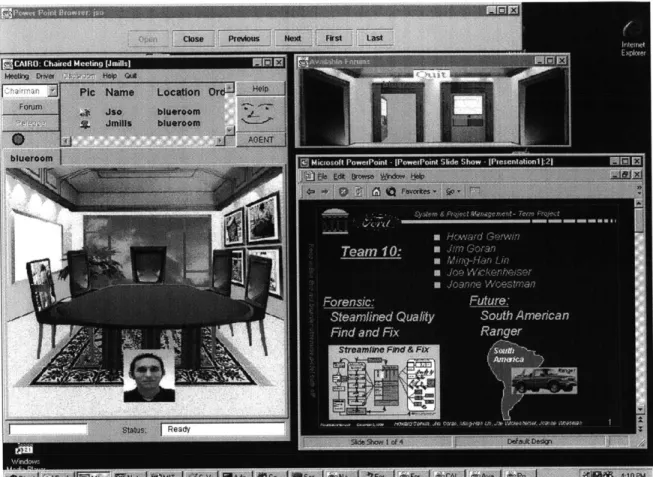
The objective of the multi-user extensions that were developed was to add distributed and shared usage to existing application that had been designed for single users. As explained previously, the principle on which the extensions are based is very simple, by giving all the participants the same input; the output for all will be equal. Each distributed application is listening for a specific set of events and once these events are triggered, they are sent over the network to the other distributed applications, thus obtaining synchronization. In other words, by catching input from each user and sending the information to the others, the output on the other users computer is recreated (Figure
5-1). The following figure shows basic components of the multi-user extension with a
Shared
Application
Shared
User 2
Application
Shared
Application
User 1
User 3
Figure 5-1. Multi-User Extension Architecture [Schefstrom 1999]
For the prototype developed, simple proprietary message passing was used as the Sharing Protocol. So each application for which the extension was built had a set of messages that were mapped to the each event that was generated by the application. A possibility is that future applications might include a Sharing Protocol as a standard component. This protocol could be based on the T. 120 standard defined by the International Telecommunications Union [ITU 2000].
The applications that were targeted for the prototype developed of this research were the office applications (Word, PowerPoint and Excel in Figure 5-2), a web browser and a CAD tool. The extensions were developed using Java and consisted of two main modules: the networking module and the application access module.
-Figure 5-2. Synchronized Presentation Using Microsoft PowerPoint
The networking module's main responsibility is to listen to events that are being sent from the other distributed applications as well as sending events that occur on the local application. The application-access module is in charge of accessing the functionality provided by the application. Each targeted application had an associated COM object that provided an interface to the functionality of the application. By using a bi-directional pure Java-COM bridge [Jintegra 2000] it is possible to make calls on the internal functions of each application. J-Integra's pure Java runtime talks to COM components using Distributed COM (DCOM) layered over Remote Procedure Calls (RPC), which are themselves layered on TCP/IP. So at the lowest level J-Integra uses the totally standard Java networking classes. Figure 5-3 explains the components of the application-access module.
Pure Java proxies generated by Jintegra
No native code
Jintegra pure Java runtime
DCOM (over TCPIIP)
COM Enterprise Business Objecets running under Windows.
(No special software to install, since Integra talks standard DCOM
to the COM components.)
Figure 5-3. Application-access Module [Linar Ltd 1999]
One of the advantages of this solution is that it can be less complex to implement, and because a multi-user extension must be developed for each application, it allows for some customizing according to the circumstances. For example the user interface as well as communication characteristics can be designed for each specific application. In this sense it has a great potential, since the application is in a certain way is 'aware' that it is used in a distributed fashion. And new collaboration-specific functionality can be added to match the needs of the distributed team that is using the application. This is an important difference with the Shared X solution explained in the next few sections, where the application is deployed 'as is' with no possibility of modifying its functionality.
5.2 "General" Solution
At the other end of the spectrum of possible implementation techniques we find a "general" solution, based on the X Window System. This is because X Window has an
-43

![Figure 2-2. Heterogeneous Computing Environments [Citrix Systems Inc. 1999]](https://thumb-eu.123doks.com/thumbv2/123doknet/14047713.459815/20.918.132.746.192.708/figure-heterogeneous-computing-environments-citrix-systems-inc.webp)
![Figure 3-1. Query Results Page [Anumba and Duke 1999]](https://thumb-eu.123doks.com/thumbv2/123doknet/14047713.459815/23.918.174.703.348.744/figure-query-results-page-anumba-duke.webp)
![Figure 3-2. Personal Details and Availability Page [Anumba and Duke 1999]](https://thumb-eu.123doks.com/thumbv2/123doknet/14047713.459815/24.918.113.766.215.629/figure-personal-details-and-availability-page-anumba-duke.webp)
![Figure 3-3. Graphical Representation of Users clustered by disciplines, activities and interests [Anumba and Duke 1999]](https://thumb-eu.123doks.com/thumbv2/123doknet/14047713.459815/25.918.263.645.212.497/figure-graphical-representation-clustered-disciplines-activities-interests-anumba.webp)
![Figure 3-4. The Conferencing Room [Anumba and Duke 1999]](https://thumb-eu.123doks.com/thumbv2/123doknet/14047713.459815/26.918.226.677.334.595/figure-conferencing-room-anumba-duke.webp)
![Figure 4-2. Bipartite Use of Shared Application Tools [Fluckiger 1995]](https://thumb-eu.123doks.com/thumbv2/123doknet/14047713.459815/36.918.101.741.317.659/figure-bipartite-use-shared-application-tools-fluckiger.webp)
![Figure 4-3. Shared Application [Schefstrom 1999]](https://thumb-eu.123doks.com/thumbv2/123doknet/14047713.459815/37.918.141.723.115.322/figure-shared-application-schefstrom.webp)
![Figure 5-1. Multi-User Extension Architecture [Schefstrom 1999]](https://thumb-eu.123doks.com/thumbv2/123doknet/14047713.459815/41.918.127.745.121.439/figure-multi-user-extension-architecture-schefstrom.webp)