HAL Id: inria-00433590
https://hal.inria.fr/inria-00433590v2
Submitted on 20 Nov 2009
HAL is a multi-disciplinary open access
archive for the deposit and dissemination of
sci-entific research documents, whether they are
pub-lished or not. The documents may come from
teaching and research institutions in France or
abroad, or from public or private research centers.
L’archive ouverte pluridisciplinaire HAL, est
destinée au dépôt et à la diffusion de documents
scientifiques de niveau recherche, publiés ou non,
émanant des établissements d’enseignement et de
recherche français ou étrangers, des laboratoires
publics ou privés.
Real-Parameter Black-Box Optimization Benchmarking
2009 Software: User Documentation
Steffen Finck, Raymond Ros
To cite this version:
Steffen Finck, Raymond Ros. Real-Parameter Black-Box Optimization Benchmarking 2009 Software:
User Documentation. [Research Report] RT-0372, INRIA. 2009. �inria-00433590v2�
a p p o r t
t e c h n i q u e
ISSN 0249-0803 ISRN INRIA/R T --0372--FR+ENG Thème COGINSTITUT NATIONAL DE RECHERCHE EN INFORMATIQUE ET EN AUTOMATIQUE
Real-Parameter Black-Box Optimization
Benchmarking 2009 Software: User Documentation
Steffen Finck — Raymond Ros
N° 0372 — version 2
Centre de recherche INRIA Saclay – Île-de-France Parc Orsay Université
4, rue Jacques Monod, 91893 ORSAY Cedex
Téléphone : +33 1 72 92 59 00
Real-Parameter Black-Box Optimization
Benchmarking 2009 Software: User
Documentation
Steffen Finck
∗, Raymond Ros
†Th`eme COG — Syst`emes cognitifs ´
Equipes-Projets Adaptive Combinatorial Search et TAO
Rapport technique n° 0372 — version 2 — initial version November 2009 — revised version November 2009 —9 pages
Abstract: This document provides the user documentation for the Black-Box Optimization Benchmarking (BBOB) tools provided for the GECCO 2009 workshop of the same name.
Key-words: optimization, benchmarking, black-box, software
∗SF is with the Research Center PPE, University of Applied Sciene Vorarlberg,
Hochschul-strasse 1, 6850 Dornbirn, Austria
†RR is with the Univ. Paris-Sud, LRI, UMR 8623 / INRIA Saclay, projet TAO, F-91405
No French Title
R´esum´e : Pas de r´esum´e Mots-cl´es : Pas de motclef
BBOB 2009 Software: User Documentation 3
Contents
1 Purpose 4
2 Description of the Software 4
3 Running Experiments 4
3.1 Running Experiments in C . . . 4
3.2 Collected Data . . . 6
4 Generate the Workshop Paper 6 4.1 Installing the Software . . . 6
4.1.1 Linux . . . 7
4.1.2 Windows . . . 7
4.1.3 Mac OS . . . 7
4.2 Using the bbob pproc Package . . . 7
4.2.1 Help for the bbob pproc Package . . . 8
4.3 Using the LATEX Templates . . . . 8
4 Steffen Finck2, Raymond Ros3
1
Purpose
This document provides the user documentation for the Black-Box Optimization Benchmarking (BBOB) tools provided for the GECCO 2009 workshop of the same name.
2
Description of the Software
The software can be downloaded at:
http://coco.gforge.inria.fr/doku.php?id=bbob-2009
It provides:
1. benchmark functions, coded in MATLAB/Octave and C,
2. a single generic function interface to the benchmark functions, coded in MATLAB/Octave and C,
3. the Python post-processing tool, 4. LATEX files templates, and
5. the corresponding documentations.
The first two items are used to run black-box optimization experiments and generate data. The second two are used to obtain a workshop paper collecting the results from the experiments.
3
Running Experiments
A general description of the goals of the workshop, how to perform the exper-iments using MATLAB/Octave and the output data format can be found in [1].
To run an experiment, an interface function, fgeneric, is provided which takes care of writing the output data and which can be used to gather further information on the current experiment (e.g., the current number of function evaluations).
3.1
Running Experiments in C
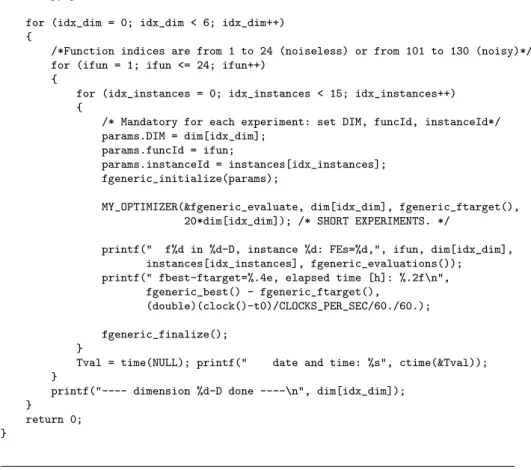
The interface to fgeneric differs from the MATLAB example given in [1], we pro-vide in Figure1the equivalent example script in C. A specific folder structure, described in Annex in [1], is needed for running an experiment. This folder struc-ture can be obtained by untarring the archive createfolders.tar.gz and renaming the output folder or alternatively by executing the Python1module createfolders before executing any experiment program. Make sure createfolders.py is in your experiment working directory and from the command-line simply do:
python createfolders.py PUT_MY_BBOB_DATA_PATH
1To install Python, please refer to4.1.
BBOB 2009 Software: User Documentation 5
Figure 1: exampleexperiment.c: example for benchmarking MY OPTIMIZER on the noise-free function testbed in C.
/*runs an entire experiment benchmarking MY_OPTIMIZER on the noise-free testbed*/ #include <stdio.h>
#include <string.h> #include <time.h> #include <stdlib.h>
#include "bbobStructures.h" /* Include all declarations for BBOB calls */ /* include all declarations for your own optimizer here */
void MY_OPTIMIZER(double(*fitnessfunction)(double*), unsigned int dim, double ftarget, unsigned int maxfunevals);
int main() {
unsigned int dim[6] = {2, 3, 5, 10, 20, 40};
unsigned int instances[15] = {1, 2, 3, 4, 5, 1, 2, 3, 4, 5, 1, 2, 3, 4, 5}; unsigned int idx_dim, ifun, idx_instances;
clock_t t0 = clock(); time_t Tval;
ParamStruct params = fgeneric_getDefaultPARAMS(); srand(time(NULL)); /* used by MY_OPTIMIZER */ strcpy(params.dataPath, "PUT_MY_BBOB_DATA_PATH");
/* please run ’python createfolders.py PUT_MY_BBOB_DATA_PATH’ beforehand */ strcpy(params.algName, "PUT ALGORITHM NAME");
strcpy(params.comments, "PUT MORE DETAILED INFORMATION, SETTINGS ETC"); for (idx_dim = 0; idx_dim < 6; idx_dim++)
{
/*Function indices are from 1 to 24 (noiseless) or from 101 to 130 (noisy)*/ for (ifun = 1; ifun <= 24; ifun++)
{
for (idx_instances = 0; idx_instances < 15; idx_instances++) {
/* Mandatory for each experiment: set DIM, funcId, instanceId*/ params.DIM = dim[idx_dim];
params.funcId = ifun;
params.instanceId = instances[idx_instances]; fgeneric_initialize(params);
MY_OPTIMIZER(&fgeneric_evaluate, dim[idx_dim], fgeneric_ftarget(), 20*dim[idx_dim]); /* SHORT EXPERIMENTS. */
printf(" f%d in %d-D, instance %d: FEs=%d,", ifun, dim[idx_dim], instances[idx_instances], fgeneric_evaluations()); printf(" fbest-ftarget=%.4e, elapsed time [h]: %.2f\n",
fgeneric_best() - fgeneric_ftarget(),
(double)(clock()-t0)/CLOCKS_PER_SEC/60./60.); fgeneric_finalize();
}
Tval = time(NULL); printf(" date and time: %s", ctime(&Tval)); }
printf("---- dimension %d-D done ----\n", dim[idx_dim]); }
return 0; }
6 Steffen Finck4, Raymond Ros5
To list other differences between the MATLAB and C code, calls to fgeneric spec-ified by a string first argument in MATLAB, are replaced by fgeneric string in C, e.g. fgeneric(’ftarget’) is replaced with fgeneric ftarget. Also, the generic call to fgeneric(X) to evaluate candidate vectors is replaced by fgeneric evaluate(double * X) for a single vector and fgeneric evaluate vector(double * XX, unsigned int n, double * result) for an array of vectors where XX is the concatenation of the n candidate vectors and result is an array of size n which contains the resulting function values.
3.2
Collected Data
If run correctly, the data for an experiment will be located in a folder that we will call DATAPATH in the following. The post-processing tool described in Section4
takes DATAPATH as input argument and will recursively look for ’.info’ files which contain the necessary information about the experiments, see Appendix E in [1].
4
Generate the Workshop Paper
The post-processing tool bbob pproc generates image files and LATEX tables
from the raw experimental data obtained as described previously in3. These files and tables will be a part of your workshop paper. The workshop paper itself is composed of the description of your algorithm, any additional information you feel necessary to describe your experiments, and the aforementioned results from the post-processing procedure. To ease the procedure of writing the paper we include a LATEX template for each testbed within the provided software.
The entire post-processing tool is written in Python and requires Python to be installed on your machine. The minimal software requirements for using the post-processing tool are Python (2.5.2), Matplotlib (0.91.2) and Numpy (1.0.4). In the following, we explain how to obtain and install the required software for different systems (Linux, Windows, Mac OS) and which steps you have to perform to run the post-processing on your data.
4.1
Installing the Software
While the bbob pproc source files are provided, you need to install Python and its libraries Matplotlib and Numpy. We recommend using Python 2.5 and not a higher version (2.6 or 3.0) since the necessary libraries are not (yet) available and the code is not verified. For all operating systems the packages can be found at the following locations:
Python: http://www.python.org/download/releases/2.5.4/, Numpy: http://sourceforge.net/projects/numpy/,
Matplotlib: http://sourceforge.net/projects/matplotlib/.
We recommend the use of the latest versions of Matplotlib (0.98.5.2) and Numpy (1.2.1).
BBOB 2009 Software: User Documentation 7
4.1.1 Linux
In most common Linux distributions Python (but not Numpy or Matplotlib) is already part of the installation. If not, use your favorite package manager to in-stall Python (python), Numpy (package name: python-numpy) and Matplotlib (package name: python-matplotlib) and their dependencies. If your distribution and repositories are up-to-date, you should have Python 2.5.2, Matplotlib 0.91.2 and Numpy 1.0.4. Though those are not the most recent versions of each pack-age, they meet the minimal software requirements to make the BBOB software work. If needed, you can alternatively download sources and compile binaries. Python and the latest versions of Matplotlib and Numpy can be downloaded from the links in Sect4.1. A dependency for the Linux version of Matplotlib is libpng, which can be obtained athttp://www.libpng.org/. You will then need to properly install the downloaded packages before you can use them. Please refer to the corresponding package installation pages.
4.1.2 Windows
For installing Python under Windows, please go to the Python link in Sect 4.1
and download python-2.5.4.msi . This file requires the Microsoft Installer, which is a part of Windows XP and later releases. If you don’t have the Microsoft Installer, there is a link for the download provided at the same page. After installing Python, it is recommended to first install Numpy and then Mat-plotlib. Both can be installed with the standard .exe files (respectively numpy-1.2.1-win32-superpack-python2.5.exe and matplotlib-0.98.5.2.win32-py2.5.exe). These files can be obtained from the provided SourceForge links in Sect4.1. 4.1.3 Mac OS
Mac OS X comes with Python pre-installed, the version might be older than 2.5 though. It is recommended to upgrade Python by downloading and installing a newer version. To do this, if you have Mac OS X 10.3 and later you can download the disk image file python-2.5.4-macosx.dmg containing universal binaries from the Python download page, see Sect 4.1. More information on the update of Python on Mac OS can be found at this location: http://www.python.org/ download/mac/6. Open the disk image and use the installer7You will then need to download and install Numpy and Matplotlib from the SourceForge links listed in Sect4.1.
4.2
Using the bbob pproc Package
When you have obtained experimental data and want to perform the post-processing you will need to download and un-archive the bbob pproc package on your system. The package can be obtained from
http://coco.gforge.inria.fr/doku.php?id=bbob-2009. Then, to post-process
6The discussion over IDLE for Leopard user (http://wiki.python.org/moin/MacPython/
Leopard) is not relevant for the use of bbob pproc package.
7Following this step will leave the pre-installed Python on the system and install the
MacPython 2.5.4 distribution. MacPython contains a Python installation as well as some Mac-specific extras.
8 Steffen Finck10, Raymond Ros11
the data, make sure the data folder DATAPATH generated by your experiments is in the current working directory and execute:
python path_to_postproc_code/bbob_pproc/run.py DATAPATH
from a shell or the command window (Windows). Note that in Windows the path separator ’\’ must be used instead of ’/’. The folder path to postproc code is the one where the provided post-processing software was un-archived. The above command will create the folder ppdata in the current working directory, which will contain the post-processed data in the form of figures and LATEXfiles
for the tables. This process might take a few minutes. If the verbosity is off (default), you will only get the following message to indicate that the post-processing is finished:
Output data written to folder ppdata.
If you are familiar with Python and want to run the post-processing directly from a Python shell you have to execute:
>>> import bbob_pproc
>>> bbob_pproc.main(’DATAPATH’)
This first command requires that the path to bbob pproc is in the Python search path. The resulting ppdata folder now contains a number of TEX, eps, png files. 4.2.1 Help for the bbob pproc Package
Additional help for the bbob pproc package can be obtained by executing the following command in a shell:
python path_to_postproc_code/bbob_pproc/run.py -h
This will give a short summary of the package and additional options for exe-cuting the post-processing. The code documentation can be found in the folder path to postproc code/pydoc within the provided software package. It gives a detailed explanation of the Python code.
4.3
Using the L
ATEX Templates
The files templateBBOBarticle.tex and templateBBOBnoisyarticle.tex are provided. If compiled correctly using LATEX, they will generate documents
col-lecting and organizing the output from the BBOB post-processing tool. Each of the templates has a given page organization optimized for the presentation of the results for a each testbed. In the case that you have results on both testbeds, we recommend that you generate and submit two separate documents.
To compile a document, you need to make sure that:
1. you have a working LATEX distribution on your computer8,
2. you are in the working directory (containing the folder ppdata containing all the output from the BBOB post-processing tool),
8
http://www.latex-project.org/
BBOB 2009 Software: User Documentation 9
3. templateBBOBarticle.tex9, bbob.bib and sig-alternate.cls are in
the working directory (all files are provided with the software), Then, simply execute:
latex templateBBOBarticle bibtex templateBBOBarticle latex templateBBOBarticle latex templateBBOBarticle
in a shell or open the chosen template file in your favorite LATEX editor and
compile it with the LATEX option. The document templateBBOBarticle.dvi
will be generated in the format required for a GECCO workshop paper. Now you need to complete this document by filling and adding in the template file all the meta-information that is needed, your own information as author, a complete description of your algorithm and a description of how you chose your algorithm parameters (see also [1]). As for your bibliographical refer-ences you can either add your referrefer-ences to bbob.bib or include your bib-file in the bibliography-statement at the end of the template file. Please refer to
http://www.sheridanprinting.com/typedept/gecco3.htmand
http://www.acm.org/sigs/publications/sigguide-v2.2spfor more details on the formatting of your LATEX document.
Acknowledgments
Steffen Finck was supported by the Austrian Science Fund (FWF) under grant P19069-N18. The BBOBies would like to acknowledge Miguel Nicolau for his insights and the help he has provided on the implementation of the C-code.
References
[1] N. Hansen, A. Auger, S. Finck, and R. Ros. Real-parameter black-box optimization benchmarking 2009: Experimental setup. Technical Report RR-6828, INRIA, 2009.
9If you used the noisy benchmark functions, use templateBBOBnoisyarticle.tex instead.
Centre de recherche INRIA Saclay – Île-de-France Parc Orsay Université - ZAC des Vignes 4, rue Jacques Monod - 91893 Orsay Cedex (France)
Centre de recherche INRIA Bordeaux – Sud Ouest : Domaine Universitaire - 351, cours de la Libération - 33405 Talence Cedex Centre de recherche INRIA Grenoble – Rhône-Alpes : 655, avenue de l’Europe - 38334 Montbonnot Saint-Ismier Centre de recherche INRIA Lille – Nord Europe : Parc Scientifique de la Haute Borne - 40, avenue Halley - 59650 Villeneuve d’Ascq
Centre de recherche INRIA Nancy – Grand Est : LORIA, Technopôle de Nancy-Brabois - Campus scientifique 615, rue du Jardin Botanique - BP 101 - 54602 Villers-lès-Nancy Cedex
Centre de recherche INRIA Paris – Rocquencourt : Domaine de Voluceau - Rocquencourt - BP 105 - 78153 Le Chesnay Cedex Centre de recherche INRIA Rennes – Bretagne Atlantique : IRISA, Campus universitaire de Beaulieu - 35042 Rennes Cedex Centre de recherche INRIA Sophia Antipolis – Méditerranée : 2004, route des Lucioles - BP 93 - 06902 Sophia Antipolis Cedex
Éditeur
INRIA - Domaine de Voluceau - Rocquencourt, BP 105 - 78153 Le Chesnay Cedex (France)
http://www.inria.fr ISSN 0249-0803