Design of dynamic soundscape:
mapping time to space for audio browsing
with simultaneous listening
by
Minoru Kobayashi
B.E., Keio University, Japan
1988
M.S., Keio University, Japan 1990
SUBMITTED TO THE PROGRAM IN MEDIA ARTS AND SCIENCES,
SCHOOL OF ARCHITECTURE AND PLANNING, IN PARTIAL FULFILLMENT OF THE REQUIREMENTS FOR THE DEGREE OF
MASTER OF SCIENCE
AT THE
MASSACHUSETTS INSTITUTE OF TECHNOLOGY
September 1996
© Massachusetts Institute of Technology 1996
All Rights Reserved
Signature of Author
Program in Media Arts ca ciences June 26, 1996 Certified by
Christopher Schmandt Principal Research Scientist
, *~Sedia Laboraory /1 A Th4 Superkisor Accepted by
'0
1u99
Stephen A. Benton Chairperson Departmental Committee on Graduate Studies Program in Media Arts and SciencesDesign of dynamic soundscape:
mapping time to space for audio browsing
with simultaneous listening
by
Minoru Kobayashi
SUBMITTED TO THE PROGRAM IN MEDIA ARTS AND SCIENCES.
SCHOOL OF ARCHITECTURE AND PLANNING ON JUNE 26, 1996, IN PARTIAL FULFILLMENT OF THE REQUIREMENTS FOR THE DEGREE OF
MASTER OF SCIENCE
AT THE
MASSACHUSETTS INSTITUTE OF TECHNOLOGY
September 1996
Abstract
Browsing audio data is not as easy as browsing printed documents because of the temporal nature of sound. This thesis presents a browsing environment that provides a spatial interface for temporal navigation of audio data, taking advantage of human abilities of simultaneous listening and memory of spatial location. In the virtual acoustic space of the system, users hear multiple moving sound sources playing different portions of one audio recording simultaneously. Instead of fast-forwarding or rewinding, users browse the audio data by switching their attention between the sound sources. The motion of the sound sources maps temporal position within the audio data onto spatial location around the users' head, so that the same portion of the audio recording always appears at the same location. Thus, listeners can use their memory of spatial location to find a specific topic. Users can also browse by pointing to a spatial location where his/her desired data may appear. Upon the user's request, the system creates a new sound source that begins playing the audio data from the point that corresponds to the spatial location. This thesis describes the evolutionary design approach toward the audio browsing system, including the use of the natural head motion for enhancing the human ability of selective listening, the audio cursor that enables precise interaction with the object in the virtual acoustic space, and the "point-by-hand" interface with which users can control the Speakers by directly pointing to the location where users hear the sound.
Thesis Supervisor: Christopher Schmandt Title: Principal Research Scientist
Thesis Committee
Thesis Supervisor:
Christopher Schmandt Principal Research Scientist MIT Media Laboratory
Reader:
Ronald Lee MacNeil Principal Research Associate MIT Media Laboratory
Reader:
Associate Professor of Media Program in Media
Hiroshi Ishii Arts and Sciences Arts and Sciences
Acknowledgments
I would like to thank the following people:
My advisor Chris Schmandt for his insightful suggestions and generous help throughout my
study at MIT.
My readers, Ron MacNeil and Hiroshi Ishii for their time and comments.
Atty Mullins, his work on AudioStreamer gave me the motivation and the foundation of 3D audio systems.
Jordan Slott, for his contribution to the development of Network Audio Service, and assisting in software development.
Brenden Maher, for his collaboration in exploring 3D audio interface.
James Clemens, Lisa Stifelman, Tomoko Koda for their time spent testing the system, and their helpful comments.
My spouse Naomi for her devotion and encouragement, as well as her helpful suggestions on
this work.
My thanks are also due to people in Nippon Telegraph and Telephone Corporation who gave me
Contents
Abstract 3 Thesis Committee 5 Acknowledgment 7 Contents 8 Chapter 1: Introduction 10 1.1 Problems 101.2 Audio-only browsing environment 11
1.3 Simultaneous listening and Spatial mapping of audio data 11
Chapter 2: Overview and Related Work 13
2.1 Approach: the basic idea of the browsing system 13
2.2 Related work 15
2.2.1 Development of audio spatializing system 15
2.2.2 Applications of spatialized audio 16
2.2.3 Research on simultaneous listening 16
2.3 Related work at the Media Lab 17
2.4 Overview of this thesis 19
Chapter 3: Initial Design 20
3.1 Spatial presentation of audio data 20
3.1.1 Three types of Speaker motion 20
3.1.2 Design decision on Speaker motion 24
3.2 Spatial interaction with the system 25
3.3 Design of interface device 26
3.3.1 Keyboard interface 26
3.3.2 Knob/touchpad interface 27
3.4 Overall system architecture 29
3.5 Problems of initial system 30
3.5.1 Speaker's motion and memory 30
3.5.2 The resolution and errors of locating, memorizing and pointing 31
3.5.3 Simultaneously listening to multiple Speakers 32
Chapter 4: Iterative design: presentation of audio 34 4.1 Spatial presentation of audio: Mapping time to space 34
4.1.1 Experiments on Speaker motion 34 4.1.2 Result of experiments & Design decision about Speaker motion 35
4.2 Enhancement of selective listening 36
4.2.1 Observation of human behavior in simultaneous listening 36
4.2.2 Design of interface to enhance selective listening 39
Chapter 5: Iterative design: methods of interaction 41
5.1 "Grab and move" interaction 41
5.2 Audio cursor 43
5.3 Design of interface device 43
5.3.1 Keyboard interface 43
5.3.2 Touchpad interface 44
5.3.3 Rotating knob interface 45
5.3.4 Point-by-hand interface 45 Chapter 6. Conclusion and Future Work 50
6.1 Summary 50
6.1.1 Basic idea of the browsing system 50
6.1.2 Problems in the initial implementations 51
6.1.3 Method of audio presentation 51
6.1.4 Method of interaction 52
6.2 User feedback 52
6.2.1 Mapping time to space: memory of location of audio 52
6.2.2 Head interface: enhancement of selective listening 53
6.2.3 Interface design: knob interface vs. touchpad interface 54 6.2.4 Interface design: large interface vs. small interface 54
6.2.5 Audio cursor 55
6.3 Future work 56
6.3.1 Mapping time to space: adaptive mapping 56
6.2.2 Enhancement of selective attention 56
6.4 Contributions of this thesis 57
Chapter 1
Introduction
1.1 Problems
Scenario 1:
Imagine, that you wish to
find
a specific topic from a 30 minute recording of a radio news program. You use the fastforward button to skip the portion that might not be relevant.You repeat the process of listening to it for 5 seconds and pressing fastforwardfor 3 seconds, though you do not know how much you are skipping. After a while, you reach to the end of the recording before finding the topic. At that time, you are not sure whether the topic is not in the recording or you skipped it. You go backward, and finally find the topic at the very beginning of the recording which you skipped.
Scenario 2:
Imagine, that you are working at your workstation and hearing a news program on radio. You are concentrating on the work on your computer, and paying less attention to the radio, but you are certainly hearing it, though not listening to it. At some time, you heard two words "Boston" and "Olympic." You could stop working and switch your attention to the radio, but you did not, because you were so careful to save your data first. Now you are sure that some news about "Boston" and "Olympic" was presented, butyou do not remember what it was about or how long ago the news was presented.
When browsing documents printed on paper, we move our focus around on the documents to quickly skim their contents. Browsing audio information is not as easy as browsing printed documents. The two scenarios above suggest two problems to be addressed in this thesis. (1) Browsing audio data is difficult because of the temporal nature of audio; we have to trace all of the audio stream to reliably capture all topics in it. (2) We are not good at indicating or
remembering quantities of time, in contrast to spatial distance which we can indicate physically and remember visually.
1 0 Introduction
1.2 Audio-only browsing environment
Hearing is always "on," and is omni-directional. Even when we are working, we can hear radio, TV or someone's conversation. Upon occurrence of events such as someone hitting a home run on the radio or hearing someone speaking our name, we can switch our attention to the event
[Handel 1989]. Hearing is omni-directional, and we can tell the direction of the sound source and perceive multiple simultaneous sounds separately. So, we can follow more than one event or conversation to some extent, focus on one of them, and listen to it selectively.
The creation of an audio-only browsing environment is the theme of this thesis. Taking
advantage of omni-present and omni-directional nature of our hearing, this thesis implements a system that utilizes hearing as another channel of input which is available for listening even when you are busy writing or driving.
1.3 Simultaneous listening and spatial mapping of
audio data
Simultaneous presentation of multiple portions of a single audio recording is one of the key
ideas of this thesis. Instead of fast-forwarding or rewinding, the user can browse the audio data
by switching attention between multiple sound sources, each of which plays different portions of
the same single audio recording. It is analogous to visual browsing in that we move our focus around the document. Even when the user is listening to a portion being played from one sound source, he/she can hear other portions of audio data from other sound sources in the background, and he/she can switch to another sound source upon finding more interesting topics in it. The audio browsing system in this thesis realizes navigation through audio data by creating another sound source upon user's request to go forward or backward, instead of fast-forwarding or rewinding, and letting the original sound source keep playing, so users can hear the skipped portion in the background. Users can freely jump around within the audio data without worry of missing a topic which would appear in the skipped portion.
Spatial presentation of audio data is the other key idea of this thesis. Since the system plays
one audio recording from multiple sound sources from different temporal positions in the audio data, users may recognize them as sounds coming from different recordings. It is necessary to
1 1 Introduction
provide the clues that make users realize that the sounds are the partial presentation of the same recording. The spatial presentation developed in this thesis maps time of the audio data onto spatial location in virtual acoustic space, and lets the sound sources move as it plays the audio data, so that the same topic in the recording appears at the same position from any sound sources.
Moreover, the spatial presentation of this system contributes to build the spatial interface to browse audio data based on our spatial memory. This will solve problem (2), recalling position of part of the recording.
Our memories tend to lack temporal information of events. After a conversation, we can remember topics we talked about, but often find it hard to remember how long ago we talked about them. In the simultaneous listening environment, the specific topic can be remembered but its temporal attribute is often lost. This is supported by the result of experiments by Gluckberg and Cowen; human memories for nonattended events often lack temporal information
[Gluckberg, Cowen 1970]. If one does not remember when he/she heard the topic, he/she has to re-play all of the audio data and listen to it to find the topic. Speeding up the playback may help to reduce playback time. However, finding a specific topic from sped-up audio is not as easy as from fast-forwarding video because of limits to intelligibility as time compression increases [Arons 1992a].
In contrast to the lack of temporal attributes, the visual attribute of spatial location is commonly and automatically encoded to the memory of events. Whether it has a real or imagined context of space, it is frequently recalled and intimately associated with the recognition of the event, and enhances the memory of the event [Schulman 1973] [Mandler, Seegmiller, Day 1977].
The spatial presentation proposed in this thesis allows the use of spatial attributes of our memory to compensate for the weakness of temporal recall. By associating the temporal axis of audio data onto the spatial location in virtual acoustic space, the browsing environment will enable users to navigate through the audio data based on their spatial memory, and by means of spatial
expression of amounts such as distance or angle. Instead of using temporal expressions such as "20 seconds ago" or "20 seconds later," users can access audio data spatially as "the news I heard when the speaker was my back-left" or "supposed to appear around here."
Introduction 12
Chapter 2
Overview and Related Work
2.1 The basic idea of the browsing system
Figure 1 illustrates the conceptual image of the auditory space created by the system in this thesis. The objects in the figure are invisible audio objects.
topic 2 topic 3 topic 1
KtODic
4
(b) User
(a) Speaker
Figure 1 The conceptual image of the auditory space created by the system. A Speaker (a) in the virtual acoustic space speaks audio data as it goes around the user (b) along the round orbit.
When starting the browsing system, there is only one Speaker. Upon user's requests, other Speakers are created, and the user hear multiple portions of audio recording simultaneously (see figure 2).
** "%W* oftft
1 3
The motion of the sound source plays the primary role for mapping the time axis of audio to the spatial location. "Speaker" is the audio object which plays the audio data through its "mouth." There can be multiple Speakers which simultaneously play different portions of an audio data stream, though there is one Speaker when the system starts playing. When the system starts, a
Speaker is created at some point on an orbit around the user. The Speaker goes around user's
head along the round orbit as it plays the audio data. As the result of listening to the audio data from the moving Speaker, a map between time and space is generated in user's memory, thus he can access audio data as "the topic that I heard around here." In the same fashion, the user can jump ahead to listen to what is happening later by means of spatial expression.
When the user wants to re-play a topic that he/she heard, he/she indicates the position where the topic was presented by pointing to that direction. Another Speaker is created around the point and begins playing from the point of audio data presented there (Figure 2). The original Speaker continues playing after the new Speaker begins playing, so the user hears multiple portions of the recording simultaneously from the Speakers. The original Speaker decreases its loudness until the user returns his/her attention to it by indicating the position of the original Speaker.
The user can jump ahead by indicating the position ahead of the original Speaker according to the amount he/she wants to jump. A new Speaker is created there and begins playing audio data from the point ahead in proportion where the user indicated. The original Speaker continues to playing after the new Speaker begins playing, so the user hears multiple portions of the recording simultaneously from the Speakers. The original Speaker decreases its loudness until the user returns his/her attention to it by indicating the position of the original Speaker. Though the user jumps ahead, he/she can hear the skipped audio data from the original Speaker which is running after the new one, and when he/she finds something interesting from the original Speaker he can switch back to the original one by indicating it. As users do not have to worry about missing the skipped portion, it should make users feel comfortable jumping around.
Overview and Related Work
14
(c) New Speaker
(a) Original Speaker
Figure 2 A new moving Speaker (c) is created where the user points. The original Speaker keeps going. Users hear multiple portions of an audio data simultaneously.
2.2 Related work
2.2.1
Development of audio spatializing system
Much work has been done in this area [Mills 1972] [Wenzel, Wightman, Foster 1988] [Makous, Middlebrooks 1990]. Beachtron cards used for building the system synthesize the spatialized audio based on three cues of (1) Interaural Time Difference, (2) Interaural Intensity Difference and (3) listener's peculiar parameter (Head Related Transfer Function) that represents the physical shape such as listener's shoulders, face, and outer ear, which affects on the path of sound waves to the ear drums [Crystal River 1995]. It is also reported that the sense of space is enhanced by actively changing the synthesized sound according to the head motion of the listener [Loomis, Hebert, Chcinelli, 1990].
Overview and Related Work
15
1i5 Overview and Related Work
2.2.2 Applications of spatialized audio
Spatialized audio has been utilized mainly in virtual reality environments. By being correlated with 3D images, spatialized audio provides more reality [Wenzel, Wightman, Foster 1988]. In operational cockpits, three-dimensional audio accompanied by visual cues was reported effective to draw the attention of the operator [Calhoun Janson Valancia 1988]. A Groupware system built by Cohen and his colleagues used spatialized audio to create a virtual acoustic environment for conferencing, correlating audio to the location of the attendees in the virtual conference room [Cohen 1991]. In the virtual meeting room developed at AT&T Bell laboratories [Seligmann, Mercuri, Edmark 1995], the spatialized audio is used to provide the information about the
connectivity, presence, focus and activity of the participants. Sampled sounds such as key board clicks to provide the cues about the person's activity are located near by the person who is typing in the virtual acoustic space, as well as speech located near by the graphic image of the speaker or ambient sounds coming out to the virtual hallway from a meeting room.
2.2.3
Research on simultaneous listening
Simultaneous presentation of multiple portion of an audio recording relies on the human ability of selective listening: the ability to attend one sound source in the presence of other sound sources and of background noise. Cherry suggests several factors that contribute to this ability: spatial separation, correlation with visual events, different voice, different accents, and contextual information [Cherry 1953] [Cherry 1954].
Simultaneous presentation also relies on the human ability of listening to a non-attended channel. Many experiments have been done to unveil the mechanism of cognition [Moray 1959]
[Treisman 1967] [Moray 1970] [Norman 1976]. Norman suggests that verbal material presented on nonattended channels gets into short-term memory, but is not transferred to long-term
memory [Norman 1969].
Broadbent reported that the selective listening to simultaneously presented audio sources was easier when the audio sources were spatialized than they were mixed together[Broadbent 1958]. This report agrees with the suggestion by Cherry. Experiments on human memory for
nonattended auditory material were done by Gluckberg and Cowen [Gluckberg, Cowen 1970]. They reported, (1) failure to retrieve categorical information and (2) absence of temporal
information for nonattended auditory events. In their experiments, subjects could remember the events, but were not sure when it occurred.
2.3 Related work at the Media Lab
AudioStreamer
AudioStreamer [Mullins 1996] [Schmandt, Mullins 1995] creates an audio-only browsing environment, taking the advantage of the "cocktail party effect" in order to enhance the listener's ability to browse audio data. It presents three audio data streams at three distinct locations in the virtual audio space. The spatial arrangement of the three sound sources makes the separation of simultaneously presented multiple audio data easy, and allows users to attend to one of them selectively. It enhances our ability to selectively attend to the source of greatest interest by making it acoustically prominent. It also augments our ability to perceive events in the nonattended audio channels by auditorially alerting users to salient events on those channels. Users of AudioStreamer can use their spatial memory for audio navigation, such as a topic which was heard on the "left channel."
AudioStreamer showed the possibility of the use of simultaneous listening for audio browsing. Motivated by the AudioStreamer, this thesis implements an alternative form of spatialized simultaneous listening for more efficient temporal navigation of single audio recording. The major differences between AudioStreamer and the system of this thesis are (1) the number of audio data streams, and (2) the location of sound source. By playing single audio stream through moving sound sources, the system of this thesis maps time to space, while AudioStreamer maps three audio streams to three locations by playing three audio streams through three fixed location sound sources.
The issues considered in the development of AudioStreamer are also the issues of this thesis: enhancing the ability of selective listening, and augmenting our ability to perceive events in the nonattended channels. Furthermore, this thesis positively explore the use of spatial memory for audio navigation.
Audio Notebook
Audio Notebook [Stifelman 1996] is an enhanced paper notebook, which allows a user to
capture and access an audio recording of a lecture or meeting in conjunction with notes written on paper. Users can access the recorded audio by flipping pages or by pointing to a location in the notes. With the Audio Notebook, users often remember a mapping of physical location in their notes to the desired audio information. This thesis is relevant to Audio Notebook since both utilize the memories of spatial location to access an audio recording. While Audio Notebook has visual marks on notes to help remember the location, this thesis takes on the more challenging task of using spatial memory in an audio only environment.
SPAM
SPAM (SPatial Audio noteMaker) provided a 3D audio space in which a user could store short
audio notes using hand gestures [Vershel 1981]. SPAM included a visual user interface showing audio notes in a 2 1/2 dimensional world. SPAM used spatial organization of information as a memory aid, but was never evaluated after implementation.
SpeechSkimmer
SpeechSkimmer [Arons 1993] provides user interface for skimming or browsing speech recording, by automatically selecting and presenting salient audio segments as well as reducing playback time by time-compression and pause removal.
Network Audio Service
This thesis is built on the Network Audio Service (NAS) developed by the Speech group at the Media Lab. NAS provides the environment on Sparc stations to play multiple audio files simultaneously.
Overview and Related Work 18
Fish sensor
"Fish", which is a sensor based on the interaction of a person with electric field, is one of the sensors used in this thesis. It is used for sensing the position of the user's hands. It is
advantageous because Fish sensor realizes non-contact sensing [Zimmerman 1995].
2.4 Overview of this thesis
This thesis describes the iterative design of the browsing system based on the idea of Chapter 1. The idea of the browsing system stands on two hypotheses: (1) memory of spatial location of audio events can be used for audio navigation, and (2) simultaneous presentation is useful because it enable users to have multiple "views."
This thesis first built a preliminary implementation of the browsing system to confirm the feasibility of the idea. Based on the evaluation of the initial system, the browsing system evolved with introduction of several ideas concerning the spatial presentation of audio and the method of interaction between the system and the user. Through iterative design, this thesis verifies the hypotheses.
Chapter 3 describes the initial design of the browsing system. This design is a rough
implementation of the idea of the browsing system described in Chapter 2. The purpose of this implementation is to confirm the feasibility of the idea, and initiate iterative design of the system. Chapter 4 and Chapter 5 describe the evolved design of the browsing system that resolves the problems of the initial implementation. Chapter 4 focuses on the solution by refining the presentation of audio. Chapter 5 focuses on the solution by the new method of interaction. Chapter 6 reviews this thesis, discusses the user feedback and shows the directions of further research.
Overview and Related Work
19
1 9
Chapter 3
Initial Design
Chapter 3 describes the initial design of the browsing system. This design is a rough
implementation of the idea of the browsing system described in Chapter 2. The purpose of this implementation is to confirm the feasibility of the idea, and initiate iterative design of the system. This chapter first describes two design decisions of the browsing system: the motion of Speaker and the way of interaction. Then it describes the interface devices and the overall system
architecture that realizes the interactive browsing. Finally, the problems of the initial system, which have to be solved to improve the usability, are summarized.
3.1 Spatial presentation of audio data
One of the major design decisions of the browsing system is the motion of a Speaker, which determines mapping of time in audio recording to the space around the user. Although the model described in chapter 2.1 uses a round orbit as the path on which Speakers travel, there can be various types of motion of Speakers. In this section, three types of Speaker motion were implemented and tested in order to decide the Speaker motion of the browsing system.
3.1.1 Three types of Speaker motion
The three types of Speaker motion tested in this section were (a) mono-directional horizontal straight motion in front of the user, (b) bi-directional horizontal straight motion in front of the user, and (c) round shape path, clockwise motion.
Initial Design 202 0
(a) mono-directional straight path
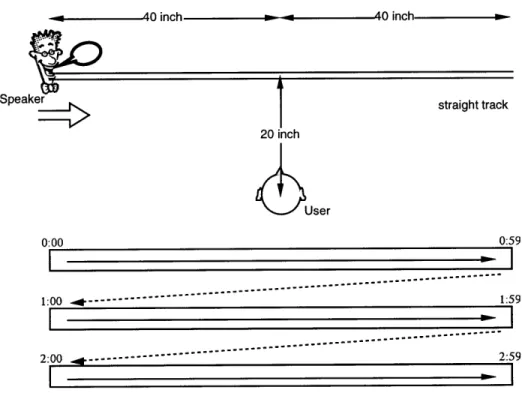
The Speaker moves along a horizontal straight path which is located 20 inches away in front of the user (see figure 3). The path starts 40 inches left from the center and ends 40 inches right. Every 20 milliseconds, the system checks the timecodes of all Speakers, and updates those locations according to the timecode. The position of Speaker is given as a linear function of the timecode. Since the location of Speakers is the function of the timecode, the same portion of
audio recording is always appears at the same location. In the mono-directional straight motion, the Speakers always move rightwards and jump back to the left end of the path when it reaches to the right end.
-m 40 inch. 40 inch straight track
±OUser
0:00 1:00 - - - 1 0:59 :59 41-2: 00 .*--- 2:5 9Figure 3 Straight path, mono-directional motion
Initial Design 21 -- --I I 2 1 Initial Design
(b) bi-directional straight path
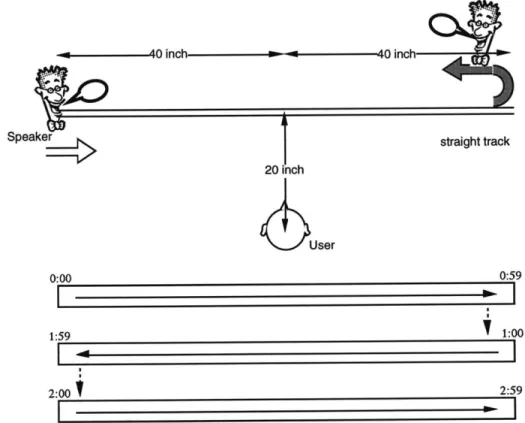
The Speakers moves along the same horizontal straight path as (a) mono-directional straight path. Unlike (a) mono-directional motion, Speakers changes its direction at both ends of the path (see figure 4). When a Speaker travels rightwards and reaches the right end, it changes its direction to leftwards and travels until it reaches the left end.
1 1inch straight track User 0:00 0:59 1:59 1:00 2:00
t
2:59Figure 4 Straight path, bi-directional motion
(c) round path
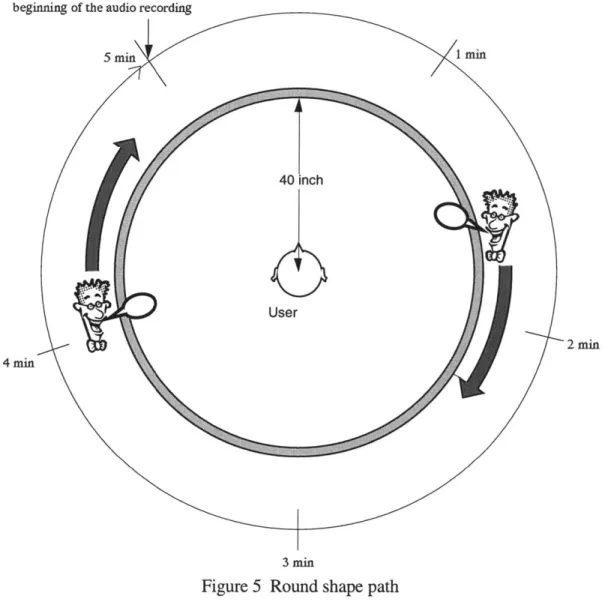
The Speakers move along the horizontal round path whose center is at the user's head and whose radius is 40 inches (see figure 5). The angle from the front is used to express the location of the
Speaker on the path. Every 20 milliseconds, the system checks the timecodes of all active Speakers, that is where within the audio file the Speaker is playing, and updates the Speakers' positions according to the timecodes. In the round path motion of the initial implementation of the system, Speakers move 6 degrees per second clockwise.
beginning of the audio recording
5 min 1 min
40 inch
2 min
4 min
3 min
Figure 5 Round shape path
Initial Design 232 3
3.1.2 Design decision on Speaker motion
The straight motions (a) and (b), which depend only on the left-right location, have an advantage over the round path motion (c), which requires users to perceive the sound location
two-dimensionally. Users for whom the audio spatialization does not work well could not experience a good sense of the location of the virtually spatialized audio. This occurs when the HRTF (head related transfer function) of the system does not match the user's listening characteristics. Most of the users who tried the system reported that the sound sources are not well externalized and seemed to be moving just around their heads, even though the system positioned the Speakers 20 to 40 inches away. However, even though it was difficult to tell whether the Speaker is in front or back for many users, most users could tell the position about the left-right axis of the space. Bi-directional straight motion (b) and the round-path motion have an advantage over mono-directional straight motion (a). Mono-mono-directional motion was distracting since it presents the continuous stream of audio recording in a disjointed manner when the Speakers jump from the right end to the left end.
Change of loudness is a disadvantage of both the straight motions (a) and (b). Since the sound source moves along the straight path, the loudness increases as a Speaker comes closer to the user and decreases as it goes away. In the browsing system of this thesis, users listen to multiple Speakers simultaneously. The system may change the loudness of the Speakers, so users can better hear the Speaker in which they are interested. However the loudness should not be a function of Speaker's location, which is meant to be a function of time in audio recording. For example, if the speed of Speakers is set to travel the whole length from left to right in 1 minute, the Speakers come closest to the user at 30 seconds, when the loudness becomes largest.
If the user is listening to a Speaker playing at 50 seconds, and another Speaker comes to the
center, the closer Speaker becomes an obstacle to hear the Speaker which the user wants to hear. The round-path motion, with which the distance between the user and the Speakers is constant, has an advantage over straight motions.
The two-dimensionality of the round-path motion (c) can be an advantage, but it is also at a disadvantage when used by users who cannot differentiate front from back. The round-path motion (c) and the bi-directional straight motion are similar reciprocating motions, except for the change of loudness. However, they are different because one is two dimensional, and the other is one dimensional. A two dimensional path is advantageous when the user interacts with the
2 4 Initial Design
system. With the two dimensional round-path motion, two Speakers at 60 degrees and 120 degrees are at different locations (figure 5); if the user can hear the front/back difference he/she can access these two Speakers separately. However, with the straight motion, the Speaker at 20 inches from the left that is moving rightwards, and the Speaker at the same place but moving leftwards are at the same place (figure 4), making it difficult to access a specific one spatially. In the system of multiple Speakers, the larger dimension of space is beneficial for interaction with the system.
In the round-path motion of this system, the difficulty of telling front from back can be reduced.
If users are given the idea that all Speakers are moving clockwise around their heads, users can
tell a Speaker is in front when it is moving right, and behind when it is moving left. Suggestion is very powerful for enhancing the reduced localization cues of an audio only interface.
I decided to use the round path motion as the motion of Speakers of the browsing system of this
thesis because,
(1) it can present a long audio recording continuously,
(2) it provides a two dimensional space for accessing Speakers, and
(3) the disadvantage for users who cannot tell front from back can be reduced by giving the idea
that the Speakers are moving clockwise.
3.2 Spatial interaction with the system
Another design decision is the way of interaction. In the initial implementation, the simple action of "pointing" is the only way to interact with the system. Users can "point" to a location on the round path by using interface devices described in the succeeding sections. When the user points to a location where an active Speaker exists, the input is interpreted as "switch focus" command resulting the change of focused Speaker which is presented most loudly. When the user pointed to a location where no Speakers exist, the user's input is interpreted as "create new Speaker" command which creates a new Speaker to play the audio recording from the point that
corresponds to the location. There can be at most four Speakers at the same time on the path. When the user requests a new Speaker where there have already been four Speakers on the path, the least focused Speaker is terminated, and used to create the new Speaker. By creating
Speakers, users can play the desired audio based on their spatial memory, and by switching focus between multiple Speakers, users can browse the audio recording having multiple view windows provided by the simultaneous presentation of single audio recording.
3.3 Design of interface device
In order to realize the interaction by "pointing" to a location on the round path, three types of interface devices were implemented.
3.3.1
Keyboard interface
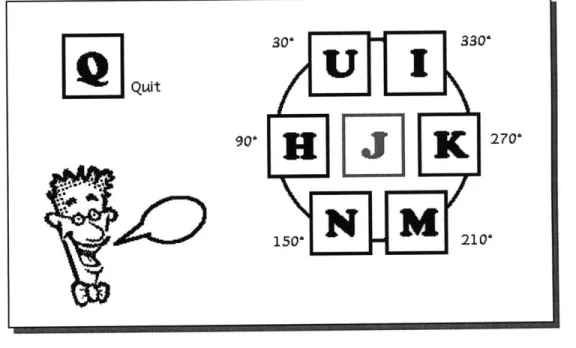
The basic interface for the initial system is the keyboard interface, which provides a simple testbed of the system. The keys around 'J' are used for pointing to locations on the round path. Figure 6 is the instruction card for the keyboard interface of the system. As shown in the figure, hitting keys of U, H, N, M,. K, and I correspond to pointing to directions of 30, 90, 150, 210,
270 and 330 degrees, respectively. 'Q' is used to terminate the program.
Quit O. 90' 330' P 270' 210'
Figure 6 Keyboard interface
Initial Design 2626
3.3.2
Knob/touchpad interface
In order to enable fine grain control of the system, which cannot be done with the keyboard interface, two devices were built.
(a) Touchpad interface
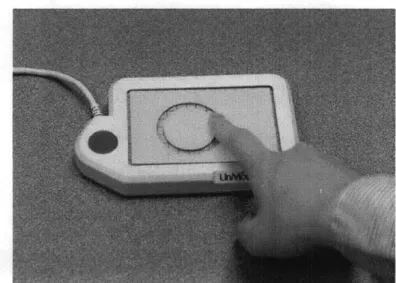
One interface uses a touchpad which detects where the user touches on its rectangular surface. A template with a round slit is attached to the surface so the user can feel where on the round-path he/she is touching, without seeing the device (see figure 7). The device is connected to the Macintosh computer, and the software running on the computer computes the angular location on the round-path from the x-y coordinates of the touch pad. The software sends the location when the user presses the surface.
Figure 7 Touchpad interface: template is attached to the surface of the touchpad, so the user can feel the shape of round path without seeing the device.
(b) Knob interface
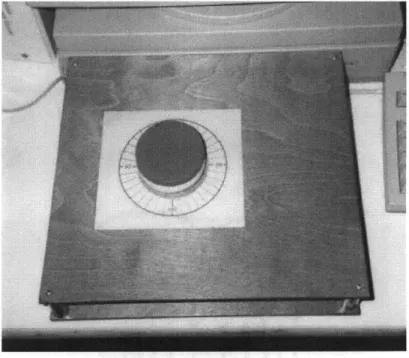
The other interface device is a rotating knob (see Figure 8). Users can point to a location on the round path by rotating the knob. The device is implemented on a graphic tablet. A round knob is attached on the puck (the input device to point on the tablet), and as the user rotates the knob, the input point of the puck rotates around the center of the knob. The graphic tablet is connected to the Macintosh computer, and the software running on the computer computes the angular location on the round path from the x-y coordinates of the graphic tablet. The software keeps tracking the location and extracts strokes (continuous motion of the knob). Locations of the end of strokes (the location where the user stops rotating the knob) are sent to the Sparc station as the location of user's input.
Figure 8 Knob interface
Both interface devices are connected to the Macintosh interface module, and the program running on the Macintosh sends out the location through the Ethernet to the Sparc station, when the user clicks on the touchpad, or the user rotates and stops the knob.
Initial Design 2828
3.4 Overall system architecture
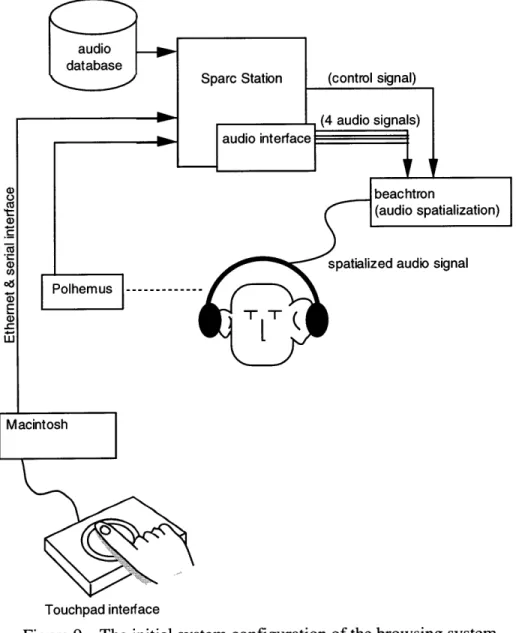
The hardware configuration of the overall system is shown in Figure 9. This hardware
configuration was used throughout the project except the interface device modules which were one of the subjects of the research.
audio signal
Touchpad interface
Figure 9 The initial system configuration of the browsing system
The Sparcstation and the storage device work as the audio server, which plays multiple digitized audio signals through the audio ports of the Sparcstation. The Sparcstation has two stereo output
2 9
ports, so we can use at most 4 monaural outputs. The audio server is a distinct process from the application program. In this system, Network Audio Service (NAS) is running in order to feed digital audio data to D/A converters according to the request from the application program. Two Crystal River Beachtron audio cards, installed in the audio spatialization server PC, receive the four audio signals sent from the Sparcstation. The Beachtron cards spatialize the audio signals, locating monaural audio signals at the specified location in virtual acoustic space. The Polhemus sensor is mounted on the headset, and measures the location and direction of the user's head. For locating sound, we are naturally using the cue of the change of audio stimuli as we move our heads. By actively changing the virtual audio environment according to the motion of listener's head, the sense of space of the virtual audio can be enhanced [Loomis, Hebert, Chcinelli, 1990]. The information taken by the Polhemus sensors is sent to the audio
spatialization server, so it can change the relative position of the sound sources to the listener accordingly.
A Macintosh computer is to receive the user's input through interface devices connected to the
ADB bus, to which various kinds of devices are available in the market. In this implementation, the knob interface and the touchpad interface are connected. The Macintosh computer is
connected to the Sparcstation via both the serial interface and the Ethernet.
3.5 Problems of the initial system
The initial system described in this chapter realizes the spatial mapping of time in the audio
recording, and the simple "pointing" interaction which enables users to request the system to play the audio recording from specific position. Using this system, users hear multiple portions of an audio recording simultaneously. This section reports the problems of the initial system and suggests the direction of the refinement of the system design.
3.5.1
Speaker's motion and memory
The use of our memory of spatial location of audio events is one of the key issues of this thesis.
By playing audio recording through moving Speakers whose location is the function of time, that
is, the position within the audio file where the Speaker is playing, a mapping between spatial location and time is formed, and users can employ spatial location to navigate through the temporal audio. I expected that users could remember the location of topics (such as a news about "election") or events (such as a sound of someone shouting) in the audio recording; such memories of location are essential to use the spatial location for audio navigation.
But, through the experimental use of the browsing system in which Speakers move at the speed of 6 degrees per second, it seemed hard for users to remember the locations of topics and events in the audio recording. The positions of events and topics seemed to become vague because it moved while they were being presented.
One cause of this vagueness of memory about the location may be the motion of the sound sources. If our listening ability itself is different when the sound sources are moving from when the sound sources stay still, as our sight of moving objects are different from the sight of still objects, the basic idea of the browsing system must be reconsidered.
Another cause may be that the speed of the Speaker was inappropriate. The speed of 6 degrees per second was chosen because at this speed the Speakers seem to move, and there is enough
spatial resolution to access multiple events within a topic. However, it seemed too fast to remember the location of events and topics.
The study of the way and the speed of Speakers' motion seemed to be essential to make the system usable.
3.5.2 The resolution and errors of locating, memorizing and pointing
It was difficult for users to point to the right location to access the desired portion of audio. There are three types of obstacles to point to the right location.(a) Error in locating the sound source
For users who do not perceive the audio spatially, it is impossible to remember the spatial location of topics in the audio. Even for users who perceive the audio spatially, but less than
3 1
perfectly, the error in locating the sound sources results in the memory of wrong location. Since it is almost impossible to provide all users with correct localization of sound sources, there always is a gap between the location of the sound sources that the users perceive and the location of the sound sources of the system. It is necessary to bridge that gap.
(b) Resolution of memory of the location of sound sources
Our memory about the location of topics in the audio recording does not have much resolution. We usually memorize the location in quadrants or 12ths of a circle, such as saying "a topic in left front", but never say "the topic at 38 degrees from the front". When pointing to a location to access the audio corresponding the location, we may be able to point to a point close to the right location, but it is almost impossible to pinpoint the right position. It is necessary to estimate the probable position that the user might desire. Also, a means to adjust the location interactively after hearing the audio which is of the wrong location is required.
(c) Error of pointing
Errors also occur when pointing to a location by using the pointing device. Even if the user has an accurate memory of location of the sound sources, an error may occur when he/she transfers the location in the space of memory, which is ideally same as the space of audio, onto the location in the space of interface device. In the case of the touchpad interface of this initial implementation, the users have to transfer the location on the 40 inch radius circle around their heads onto the location on the 1 inch radius circle. A direct way of pointing with which users can point to the location where he/she hears the audio is necessary to reduce this error.
3.5.3 Simultaneously listening to multiple Speakers
Although we have the ability to listen to a sound selectively among simultaneously presented multiple audio sources, when adding the Speakers in order to play other portions of audio, it becomes hard to hear one sound selectively. Selective listening seemed to be harder in the virtual
audio space than in the natural audio space because of the incomplete spatial separation. Also, the similarity of the voice between multiple sound sources can be another cause of the difficulty. It is more likely to hear the voice of the same talker this system plays multiple portions of single
audio recording. The difference of voice, which is one of the factors that contribute to the ability of selective listening[Cherry 1953], is small in this system.
3 2
It is necessary to help users in focusing on a sound source and eliminating others. The study on the way we focus on one sound source among multiple sounds and listen to it selectively
provides the basis to build a human interface to enhance the selective listening in the virtual audio space.
3.5.4 Summary of problems of the initial implementation
There were five problems in the initial implementation.Problem I: difficulties in remembering topic locations
The memory of location was so vague that it was difficult to browse audio depending on the spatial memory. This might be because the speed of Speakers was inadequate or the motion itself was an obstacle to forming memories. A study of motion and speed of Speakers was necessary.
Problem II: error in locating sound sources
There were a gap between the location of the sound source perceived by the user and the location that the system meant to position the sound source. It was necessary to bridge that gap.
Problem III: resolution of memory of sound location
The resolution of our memory of the location of sound sources is insufficient to pin-point the right position to access the desired information.
Problem IV: indirect pointing interface
An indirect interface which requires cross-space mapping from the large space of audio onto the space of the interface device might cause errors, and impede intuitive interaction.
Problem V: difficulties in selectively listening to virtually spatialized
audio
The selective listening seems to be harder in the virtual audio space than in the natural audio space. It was necessary to help users in focusing on a sound source and eliminating others.
3 3
Chapter 4
Iterative design:
presentation of audio
Chapter 4 and Chapter 5 describe the evolved design of the browsing system that resolves the problems of the initial implementation summarized in section 3.5. Chapter 4 focuses on the solution by refining the presentation of audio, and chapter 5 focuses on the solution by the new method of interaction.
This chapter 4 describes the solutions for the two problems: Problem I: difficulties in remembering topic locations
Problem V: difficulties of selective listening in virtually spatialized audio.
4.1 Spatial presentation of audio: Mapping time to
space
The motion of Speakers, which maps the time in an audio recording to the space around the user, is reconsidered in order to solve Problem I: difficulties in remembering topic locations, reported in section 3.5.1. Three types of Speaker motion were tested, then the Speaker motion was designed based on the result of the experiment.
4.1.1
Experiments on Speaker motion
As described in section 3.5.1, when listening to the fast moving Speakers, it seemed difficult to form an effective memory about the topics and their locations. Two factors contributed to the difficulties: the motion itself, and the inadequate speed of motion. If the motion itself is the problem, discrete motion, in which Speakers move once in a while, should work better. If the
speed is the problem, the slower speed lets users memorize better. A new experiment examines
these two approaches, discrete motion and slower motion, by comparing three types of motions:
(1) original fast continuous motion, (2) fast discrete motion and (3) slower motion.
The following three motions were compared in this experiments:
(1) fast continuous motion, in which Speakers move at 4.8 degrees per second
(2) fast discrete motion, in which Speakers move once in approximately five seconds, at the rate of 4.8 degrees per second, and
(3) slow continuous motion, in which Speakers moves at 1.2 degrees per second.
Four subjects were asked to listen to a 5 minute recording of a radio news program being played through a Speaker that moves in one of the three motions. Each subject performed three sessions
with three motions in a random order. After each session, subjects were asked to tell all the topics they remembered, and the location of the topics if they remembered.
4.1.2 Result of experiment & Design decision about Speaker motion
With the slow continuous motion, all subjects remembered more topics and their locations thanwith other motions. Even subjects who did the session with slower motion first and the session with fast motion next remembered the location of topics better in the slower motion. A subject who tried hard to remember the location of topics could tell locations of topics which sometimes span 180 degrees, but only about the topics presented at the beginning and the end of the session, reflecting the characteristics of short term memory. The slow continuous motion was also the motion that most of the preferred.
The discrete motion did not form better memory. Furthermore, the sudden motion of the discrete motion sometimes made it difficult for users to follow the Speaker, especially in multi Speaker situations.
Along with asking what they remembered, subjects were asked what kind of resolution they had about the location of audio events. Though it depends on how spatially they perceived the audio, most of the subjects answered it was between quadrants and 12th of a circle, which is much more than left and right, but much less than 10 degrees. The ordinary length of single topic in the news program used in this experiment was 30 seconds. With the slow continuous motion,
the length corresponds to 36 degrees, which is close to the resolution of the memory of location of audio events that the subjects reported.
The slow continuous motion (3) was chosen as the motion of Speakers of the browsing system based on the results of the experiment.
4.2 Enhancement of selective listening
As reported in section 3.5.3, though we have the ability to listen to a sound selectively among simultaneously presented multiple audio sources, it was hard to hear selectively with the initial system (Problem V). This section describes the design of the interface to enhance the selective listening in the virtual audio space.
4.2.1 Observation of human behavior in simultaneous listening
This section reports the observational study of human behavior in selective listening. The purpose of the observation was to find the natural behavior that could be used as a clue for the system to know the user's interest: on which sound source the user wanted to hear.Experiment:
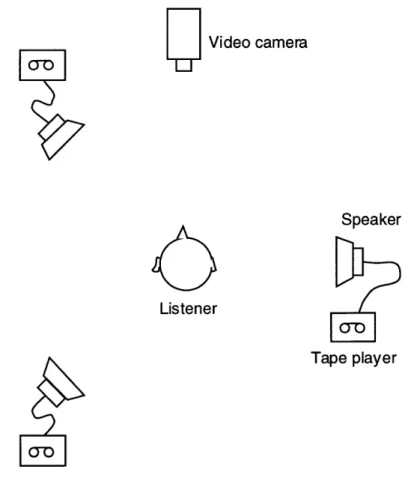
As shown in figure 10, three loud speakers were placed around the subjects. Recordings of conversation were played through the three speakers simultaneously. The subjects were told to focus on one of the loud speakers following the directions given by a recorded voice, and try to understand the contents of the conversation, so they could answer the questions which would be asked afterwards. A video camera placed in front of the subjects recorded the behavior while the subjects were listening to the audio. A Polhemus sensor mounted on the subjects' heads
measured the position and the direction of the subjects' head continuously.
Similar experiments have been done to observe the head motion when listening to a spatially located sound source [Thurlow, Mangels, Runge 1967] [King, Suzanne 1995]. Strategic motions to find the sound sources were observed in those experiments. This experiment was
motivated by those experiments. The observed head motions might be usable to estimate the location of sound to which the subject is listening. This experiment focuses on the motions for selective listening, to have better reception of the desired sound and to eliminate undesirable noise.
Video camera
Speaker
Listener
Tape player
Figure 10 Experiment on the behavior while listening to a sound selectively among multiple sound sources
Some of the subjects of the first experiment participated in an additional subsequent experiment. In the second experiment, the virtual spatialized audio which is presented through the headphone was used instead of the three speakers. Three sound sources were located in the virtual audio space at the same place as the first experiment, and the subjects were told to focus on one of the sound sources. and understand the contents of the conversation. The Polhemus sensor attached on the headphone measures the location and the direction of the subject's head, and the binaural audio presented through the headphone was changed according to the subjects head location and direction, so the locations of the sound sources were fixed.
|0-|
|k
Result:
Reviewing the video tape taken through five sessions of the first experiment, the following four kinds of motions were observed:
(a) to face the speaker
(b) to move towards the speaker so their ear gets closer to the speaker
(c) to rotate the head so one of their ears faced the speaker and
(d) to adjust the direction of head by changing the direction or location of heads slightly.
In the first experiment, some subjects moved their bodies radically, facing the speaker to focus, or even moving towards the speaker. Other subjects did not move their bodies, since they thought they should not move. Selective listening is performed by the combination of both physical movement and internal filtering within our brain. We can get better reception of the desired sound by moving our heads physically, or we are also able to focus on a sound source without moving our heads. Some subjects moved their bodies actively to get better reception,
and the others could listen selectively without moving.
The slight adjusting motion (d) was common even among the subjects who did not move much. They adjusted their head location and direction repeatedly by hearing the audio to find the best head location and direction. The leaning motion was often observed in the adjusting motion. The subjects leaned their heads toward the speaker (figure 11). Though leaning was not always directly toward the sound source, it was close to the direction of the sound source.
Iterative design: presentation of audio 38
Figure 11 Leaning head toward the speaker
In the second experiment, the subjects tended to not move their heads. The spatialized audio presented to the subjects was designed to be affected by the subjects' head location. If the audio spatialization worked properly for the subjects, adjusting their head location should be beneficial for getting the better reception of desired audio. After the experiments, subjects said that they did
not move their heads because they knew the audio was presented through the headset, and thought it was not beneficial. Whether the audio spatialization worked well or not for the subjects, the change of audio according to the subjects' head motion was not clear enough to be beneficial.
4.2.2 Design of interface to enhance selective listening
This experiment showed that people move their heads to help selectively listen to their desired sound. This cue was added to the system, which uses the head motion as the means of enhancing the human ability of selective listening.
The system measures the direction of leaning shown in figure 12 with the Polhemus sensor attached to the headphones. The system changes the loudness of each Speaker according to the angular distance between the angle of the Speaker's location and the angle of the direction of leaning. The change of the loudness is proportional to the angular distance. So the closer the user leans his/her head toward a Speaker, the louder the Speaker plays.
Direction of leaning
Figure 12 Direction of leaning
Since the change of loudness is a continuous function of the angular distance between the direction of leaning and the location of the Speaker, users can adjust their leaning direction by responding to the feedback from the system. By moving their heads to the direction where their desired sound becomes louder, they can seek the better direction of their heads to listen to the Speaker selectively. Such natural adjusting motion induced by the feedback from the system is similar to the motion we do in the natural environment.
The system makes a Speaker at most 8 dB louder than others when it is close to the direction of leaning. It is an exaggerated feedback, which never happens in the natural environment. This exaggerated feedback makes the benefit of leaning motion clear to the user, so it induces the leaning motion for selective listening. Also, it enables more efficient and easier selective listening than in the natural environment. This interface employs natural behavior in selective listening, and by exaggerating the feedback, it enhances the human ability of selective listening.
Iterative design: presentation of audio 40
Chapter 5
Iterative design:
methods of interaction
This chapter describes the evolved method of interaction that solves the problems of the initial implementation reported in section 3.5. The following problems are solved by the new method of interaction:
Problem II: error in locating sound sources
Problem III: resolution of memory of sound location Problem IV: indirect pointing interface.
5.1 "Grab and move" interaction
As pointed out in section 3.5.2, it was difficult for users to point to the right location of the desired audio because their memories of location of audio events have inadequate resolution to pinpoint the right location (Problem III). As described in section 4.1, this system chose slower speed of Speakers which is effective to form the users' memory about location of audio topics. The slower speed motion maps longer portions of the audio recording to a unit space, as the result the resolution of pointing decreases.
In order to enable fine grain control of audio, the system employs "grab and move" interface, with which users can adjust the location interactively after hearing the audio which is of the wrong location.
Like the "pointing" interface of the initial implementation, users request the system to play a portion of audio by pointing to the location on the path that corresponds to the audio. When there is a Speaker at the location the user pointed to, the system puts the Speaker under the user's control, which is the "grabbed" state. If the audio that the grabbed Speaker begins playing is different from what he/she expected, the user can move the grabbed Speaker to adjust the point to
play.
When there is no Speaker at the location the user pointed to, the system creates a new Speaker at the location, and starts playing the audio recording from the point that corresponds to the
location. The system has a table of times which are probable boundaries of topics, using acoustic cues such as the long pause, change of talker, or emphasized voice. The table is generated by a preprocessor which was developed for Newscomm [Roy 1996]. When the system decides the position in audio recording to play, it chooses a time that is closest to the pointed location from the boundary table. This is to enable more efficient navigation by guessing a more salient point from which to play.
While a Speaker is grabbed, it is played louder than others to notify the user it is grabbed. After
3 seconds without moving, or by the input from the interface devices, the grabbed Speaker is
"un-grabbed" and returns to normal.
Figure 13 Grab and move interface
Iterative design: methods of interaction 424 2 Iterative design: methods of interaction
5.2 Audio cursor
For most users testing the browsing system, the audio spatialization was less than perfect. Practically, there is always a mismatch between the locations of the sound sources that the users perceive and those at which the system intends them to be (Problem II). As mentioned in section
3.5.2, a means to bridge the gap is necessary.
The "audio cursor" is an audio object in the virtual audio space of the system, which keeps playing a distinctive noise while it is turned on by the user. It provides feedback to the users of location, so the audio cursor moves within the virtual audio space as the user operates the interface device. Before "grabbing", the user moves the audio cursor to the location where he/she hears the sound of the audio cursor from his/her desired direction. It is analogous to the mouse and mouse cursor. We can access the object on the screen precisely by controlling the mouse by seeing the mouse cursor as the feedback to the motion of mouse.
5.3 Design of interface device
In order to enable the interaction with the "grab and move" interface and the audio cursor, the interface devices used in the initial implementation were modified. Also, the new "pointing-by-hand" interface was developed in order to reduce the errors in transferring the location in the
audio space into a location in the interface space. This "point-by-hand" interface is a "direct" pointing device that resolves problem IV.
5.3.1
Keyboard interface
Minor changes were made to enhance the keyboard interface. Figure 14 shows the key assignment of the enhanced keyboard interface.
The keys around 'J' were used for directional input. With the keyboard interface, users cannot use audio cursor. By hitting one of the directional input keys, if there is a Speaker around the direction, the Speaker is grabbed, or if there is no Speaker around the direction, a new Speaker is
created and grabbed. By hitting "<" or ">", users can move the selected Speaker.
Fish Calibration
Quit make Fish sensitive
Toggle Printing Audio Cursor Volume
LDW
.Backward
Step forward
Switch
focused Spe ale r
Figure 14 Key assignment of the enhanced keyboard interface
5.3.2 Touchpad interface
The touchpad interface (figure 15) was modified to continuously send the location where the user touches, and the switch information which includes whether the user is pressing the surface and whether the user is moving his/her finger on the touchpad surface. The user can move the audio cursor by moving his/her finger on the surface, grab by pressing the surface, and move the grabbed Speaker by moving his/her finger pressing the surface down.
Figure 15 Touchpad interface
4 4 Iterative design: methods of interaction