HAL Id: halshs-00360984
https://halshs.archives-ouvertes.fr/halshs-00360984
Submitted on 17 Mar 2009
HAL is a multi-disciplinary open access
archive for the deposit and dissemination of
sci-entific research documents, whether they are
pub-lished or not. The documents may come from
teaching and research institutions in France or
abroad, or from public or private research centers.
L’archive ouverte pluridisciplinaire HAL, est
destinée au dépôt et à la diffusion de documents
scientifiques de niveau recherche, publiés ou non,
émanant des établissements d’enseignement et de
recherche français ou étrangers, des laboratoires
publics ou privés.
Stéphanie Mailles-Viard Metz, Christophe Renaut
To cite this version:
Stéphanie Mailles-Viard Metz, Christophe Renaut. Collaborative e-learning display for acquiring
professional skills. M-ICTE 2006, Nov 2006, Seville, Spain. pp.1417-1421. �halshs-00360984�
Collaborative e-learning display for acquiring professional
skills
S. Metz*2 and C. Renaut1
1 Institute of Communication, University of Lyon, France 2 PRACTICE, University of Lyon, France
This contribution states with designing collaborative tools for acquiring professional skills. A distanced e-learning display has been designed with international partners to teach computer graphics sciences in a master degree. The display is named VCIEL for On Line Visualization and Designing in Computer. Stu-dents might come and live in every country of the world. One of the goals is to allow stuStu-dents to integrate professional know-how with the aim of finding an employment after graduation. Regarding computer supported collaborative work, cognitive sciences and ergonomics researches, the pedagogical e-learning-project team chose to design an external representation with several functionalities. Two tools were thought to support student-tutors-companies collaborative activities in the whole task of managing project while being tutored and evaluated. The chosen open source platform is SPIRAL. Design has been made following ergonomical methodology testing subjects-future learners and tutors on displays relevance. Keywords e-learning; platform; collaborative tools; ergonomics.
1. Context
The professionalisation is an important objective of our university formations: it asks the student to ac-quire specific skills, know-how related to a field and transmitted by experts. For that, many teaching devices propose to the students to carry out internships in company or to work on case studies. Our study is centered on how formations may professionalize remote students. The field we focus on is a distri-buted e-learning display. It has been designed with international partners (Switzerland, France, Tunisia and Algeria) to teach computer graphics sciences in a Master degree. The display is named VCIEL for On Line Visualization and Designing in Computer Graphics (in French, Visualisation et Conception Infographiques En Ligne) [1]. One professional skill that is considered as major is managing projects. The paper aims to present how the project-team designed tools to support the pedagogical goals – acquiring skills for managing projects- in this context.
Understand project management skill asks for the integration of a great diversity of parameters. Theo-retical knowledge can be taught but there is not an ideal organization: only choices adapted to a specific context, a situation and an objective. The students must thus practice the project management to assimi-late know-how and to be effective the day when they will find an employment.
In the followings paragraphs we explain the pedagogical display we chose to enhance these skills and we expose the tools we designed to help actors in VCIEL e-learning device.
2. Pedagogical display
In the VCIEL device students might come and live in every country of the world; most of them are living in Africa. Professional and university teachers in partners’ countries provide tutoring. One of the goals is to allow students to integrate professional know-how with the aim of finding an employment after graduation. For it the students have first to realize an internship in the field and secondly work on dis-tance in team to answer real computer graphics project resulting from companies.
designed team developed several courses (Fig. 1). Some of them involve the design of a pedagogical multimedia object by an author (A), followed by students (S) with the help of specialized tutors (T) (see left part of Fig. 1). The others courses are designed to allow students managing real project in working teams. (see right part of Fig. 1).
Our study focuses on the “Managing Projects” course and the designed tools for answering the special needs this course demands.
Fig. 1 Pedagogical model in VCIEL Campus.
3. The online “Managing Project” course
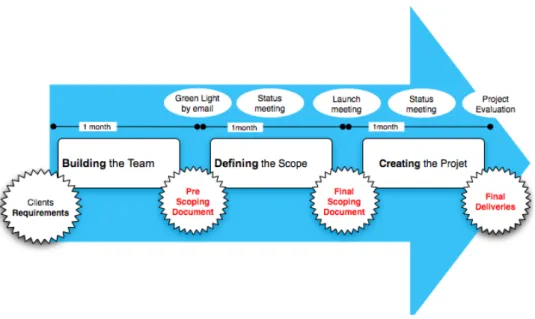
The pedagogical frame is shown in Figure 2. First, project teams may be constituted, and validated by assigned tutors. Hence, teams work on projects: they first think about the design then carry out the prod-uct they are involved in.
Currently, in our situation of study, the teams are made up of two or three students. The validation of the stage is carried out by the tutor with the electronic reception of a pre-scoping document (summarized project including/understanding the actors, partner, production line team, nature, the objective and the target of the product). The choice of the team-mate depends on a multitude of criteria: interest of the project, skills required by the project. Affinity criteria, the representation of the other’s skills are related to reciprocal confidence. These two types of criteria are taken into account in the realization of the inter-face.
Fig 2 Pedagogical frame for the “Managing Project” course in VCIEL device.
4. Designed environment
Regarding computer supported collaborative work, cognitive sciences and ergonomics researches, the pedagogical e-learning-project team chose to design an external representation with several functionali-ties. Indeed, a lot of studies have deal with the impact of the used tools (chat, forums or shared displays …) on people interactions and solving complex problems (i.e. designing tasks). The chosen open source platform – SPIRAL designed by University of Lyon [3] – provides some of those collaborative tools. In partnership with the platform design team, we added two tools: one for building students teams and the other, more basic, to support managing projects. Design has been made following ergonomical method-ology (user centered design), testing subjects-future learners and tutors on displays relevance.
5.1 Building teams
The first tool concerns the team building stage. Students can post a company proposal; propose the offer to their student colleagues, fill a form with their profile, their skills, the procedures and knowledge they want to learn … Tutors can evaluate the relevance of the propositions, the established teams (comple-mentarity in the skills members), accept or refuse the student proposals...
In optics to adapt the interface to the users, and the ergonomic criteria of design of interfaces [4], the stress was laid on the activities of the tutor and the students: choice of a project and a partner by the students and validation of the project and the team by the tutor.
A preliminary study carried out on three binomials of students working remotely on the needs related to the multimedia project control [5] made it possible to identify the important characteristics of a project, for the students and the tutor. The developed interface proposes to the students to choose a project ac-cording to these characteristics: required competences, duration, sleeping partner, remuneration... In this case, it is assigned to one or more project in the list, the tutor validates then this choice (Fig. 3). The student can also propose a project using the tool, it is then validated by the tutor.
Fig 3 Screen for Tutors and Students: project list with state (assignments and validations).
Remotely, the students do not know themselves, never had to work together. It is thus difficult to fill the criterion of mutual confidence [6]. To face this major difficulty, the students can present themselves thanks to an electronic personal page. To homogenize information, the tool requires competences of them which they consider to have, their level but also those to which they wish to be formed (Fig. 4).
Fig 4 Screen editing students personal skills.
The team can thus constitute itself: starting from the list of the projects integrating competences neces-sary to their realization, the students can determine if their competences correspond to the requirements. If a student is already assign to the project, another student can consult his profile and affect himself to supplement the team (Fig. 5).
The tutor can submit projects, judge relevance of projects suggested by learning, the teachers or an ex-ternal sleeping partner. The decision to validate a project, to refuse it or to modify it returns to him. The interface enables him to justify this choice if that is necessary. Communication tools (forum, chat) are placed at their disposal to facilitate the interaction and collaboration. The interface also makes it possible to follow the projection of the process of constitution of the teams, by presenting the list of the students with their requests (Fig. 5) and the requests by project.
5.2 Managing projet
The second tool in VCIEL device allows conducting managing project from student with tutoring and openings to companies. Students may share applications, documents with tutors, companies or only with the student team. They also can chat, interact together with specifics rights. It follows the functionalities needed by this type of activity. Moreover, analysis of persons activity might be done with recorded in-formation such as : chat interactions, shared documents, forums, time logins and out …
Fig 5 Screen for the tutor: projects assignments with global interface of the situation.
5. Perspectives
This study has presented two tools that may support a pedagogical frame with acquiring professionals skills objectives. They have been implemented in the platform SPIRAL and tested on several students in controlled contexts. VCIEL device will use them soon. The design team will then analyze students, tu-tors and client activity and provide modifications if necessary.
Acknowledgments The French Ministry of Education and the Francophone Agency have funded this study. We wish to thanks New Technology Department of University of Lyon 1 (PRACTICE) for their help in this project, especially Nicolas Jaquemet for the design and implementation of the tools in SPIRAL platform.
References
[1] Virtual Campus VCIEL : http://www.vciel.net
[2] Mailles, S., Chevassu, L. Scénarisation d'un module de psychologie pour le développement d'un objet péda-gogique multimédia. Dans Desmoulins, C., Marquet, P., Bouhineau, D. (Dir.), « Environnements Informatiques pour l'Apprentissage Humain 2003 ». Strasbourg : ATIEF ; INRP. 493-500. 2003.
[3] SPIRAL E-Learning Platform : http://spiral.univ-lyon1.fr/
[4] Bastien, C. & Scapin, D., « La conception de logiciels interactifs centrée sur l’utilisateur : étapes et méthodes », in Falzon P. (Ed.) Ergonomie, PUF, 2004, p541-462.
[5] Boukhriss I., Chevassu L., Kaplan A., Mailles S., Using a virtual desktop for learning project management, Conference Proceedings « Advances in Technology-based Education : Towards a knowedge-based society », M-ICTE, Badajoz, Spain December, 2003.
[6] Coat F, « Une nouvelle dynamique des groupes : les équipes virtuelles », in Favier M. (Ed.) Le travail en groupe à l’âge des réseaux, Paris, Economica, p. 213-231, 1998.