Development and preliminary evidence for the validity
of an instrument assessing implementation of
human-factors principles in medication-related
decision-support systemsdI-MeDeSA
Marianne Zachariah,
1Shobha Phansalkar,
1,2,3Hanna M Seidling,
4,5Pamela M Neri,
1Kathrin M Cresswell,
6Jon Duke,
7Meryl Bloomrosen,
8Lynn A Volk,
1David W Bates
1,2,3ABSTRACT
Background Medication-related decision support can
reduce the frequency of preventable adverse drug
events. However, the design of current medication alerts
often results in alert fatigue and high over-ride rates,
thus reducing any potential benefits.
Methods The authors previously reviewed
human-factors principles for relevance to medication-related
decision support alerts. In this study, instrument items
were developed for assessing the appropriate
implementation of these human-factors principles in
drugedrug interaction (DDI) alerts. User feedback
regarding nine electronic medical records was
considered during the development process. Content
validity, construct validity through correlation analysis,
and inter-rater reliability were assessed.
Results The final version of the instrument included
26 items associated with nine human-factors
principles. Content validation on three systems
resulted in the addition of one principle (Corrective
Actions) to the instrument and the elimination of
eight items. Additionally, the wording of eight items
was altered. Correlation analysis suggests
a direct relationship between system age and
performance of DDI alerts (p
¼0.0016). Inter-rater
reliability indicated substantial agreement between
raters (
k
¼0.764).
Conclusion The authors developed and gathered
preliminary evidence for the validity of an instrument that
measures the appropriate use of human-factors
principles in the design and display of DDI alerts.
Designers of DDI alerts may use the instrument to
improve usability and increase user acceptance of
medication alerts, and organizations selecting an
electronic medical record may find the instrument helpful
in meeting their clinicians’ usability needs.
INTRODUCTION
Clinical decision support (CDS) can assist providers
in effectively managing patient care. Kuperman
et al describe medication-related decision support as
a type of CDS which offers clinicians guidance
for
appropriate
prescribing
in
several
areas
including: drugeallergy checking; dosing guidance;
formulary decision support; duplicate therapy
checking; drugedrug interaction (DDI) checking;
medication-associated laboratory testing; checking
of drugedisease interactions and contraindications;
and advanced drugepregnancy alerting.
1Such
guidance can be provided to users through either
interruptive alerts or non-interruptive reminders.
When implemented appropriately and accepted
by users for prescribing guidance,
medication-related decision support can reduce
adverse-drug-event (ADE) rates.
2e5Bates et al found that the rate
of preventable ADEs decreased from 2.9/1000
patient-days in the absence of medication-related
decision support and computerized physician order
entry to 1.1/1000 patient-days in the presence of
medication-related
decision
support
used
in
conjunction with computerized physician order
entry.
6In a study by Weingart et al, an expert panel
was convened to evaluate the extent to which
patient harm was avoided through the use of
medication-related decision support and DDI alerts.
Of the 402 avoided ADEs, 12.2% were serious,
31.1% were significant, and 56.7% were minor.
5While these results support the positive effects
of medication-related decision support on patient
safety, it has yet to realize its full potential.
This is mainly due to the poor acceptance of
warnings among users, as 50% to 95% of drug
safety warnings are over-ridden.
7Several approaches have been applied to increase
alert acceptance. As preliminary steps, van der Sijs
et al suggest that the number of inappropriate alerts
should be reduced and that alerts should be
selec-tively delivered to the appropriate provider.
Subse-quent
steps
should
address
the
sensitivity,
usefulness, and usability of alerts.
7Shah et al
modified a commercial knowledge base to reflect
only the most clinically relevant and up-to-date
knowledge responsible for triggering DDI alerts,
and they decreased the number of interruptive
alerts by 71%. Excluding alerts of the highest
severity that were implemented as hard-stops, the
remaining interruptive alerts resulted in the
cancelation (19%) and modification (48%) of orders,
indicating a 67% alert acceptance rate.
8Modifying
or canceling the intended order is defined as an
acceptance of alert logic, while continuing with an
order unchanged after receiving an alert is defined
as an over-riding of the alert. In addition to
the above-mentioned methods for decreasing
alert fatigue, usability and human-factors concepts
that facilitate the appropriate use of visual and
1Partners HealthCare System,
Wellesley, Massachusetts, USA
2Division of General Internal
Medicine, Brigham and Women’s Hospital, Boston, Massachusetts, USA
3Harvard Medical School,
Boston, Massachusetts, USA
4Department of Clinical
Pharmacology and Pharmacoepidemiology, University of Heidelberg, Heidelberg, Germany
5Division of Medical Information
Sciences, University Hospitals of Geneva, Geneva, Switzerland
6
eHealth Research Group, Centre for Population Health Sciences, University of Edinburgh, Edinburgh, UK
7Regenstrief Institute,
Indianapolis, Indiana, USA
8The American Medical
Informatics Association, Bethesda, Maryland, USA Correspondence to Dr Shobha Phansalkar, Clinical Informatics Research and Development (CIRD), Partners Healthcare System, 93 Worcester Street, 2nd Floor, Wellesley, MA 02481, USA; [email protected] Received 9 May 2011 Accepted 22 August 2011 Published Online First 21 September 2011
text-based information within alerts should be utilized for
efficient cognitive processing by the user.
9While human factors have been well studied in the general
safety literature, few studies have addressed human factors and
the design of clinical information systems empirically. In
a viewpoint paper, Karsh et al stressed the importance of
drawing on human-factors engineering to improve the usability
of health information technology, calling for such research in the
domain of patient safety.
9Since information presentation
affects user behavior and decision-making, information
archi-tecture and graphic interface design demand careful
consider-ation. Design details such as navigation from one window to the
next, information placement, font size, information similarity,
and perceived credibility can significantly affect the user’s
actions. Saleem et al affirm that the user interface stands
between clinical information systems and the expected outcome
of enhanced patient safety.
10Improving the design of the
humanecomputer interface through the application of
human-factors engineering has the potential to enable users to optimally
utilize these systems.
The current literature provides little in the way of tools for
assessing the compliance of medication alert design interfaces
with commonly employed human-factors principles. In a recent
study, Phansalkar et al identified 11 key human-factors principles
that should be considered when designing medication-related
decision support alerts.
11In the current study, we combined
these to build the Instrument for Evaluating Human-Factors
Principles in Medication-Related Decision Support Alerts
(I-MeDeSA) in order to assess the extent to which a given
interface design incorporates these human-factors principles. We
then gathered preliminary evidence for the validity of the
instrument by testing it on three medication-related
decision-support systems. This paper discusses the results of the
devel-opment and preliminary validation of I-MeDeSA, an instrument
created for system developers to improve alert design and to
inform an organization’s purchase of a usable electronic medical
record (EMR) system.
BACKGROUND
Phansalkar et al identified key human-factors principles for the
design and implementation of medication-related decision
support alerts.
11Eleven principles were determined to be
important: Alarm Philosophy, False Alarms, Placement,
Visi-bility, Prioritization, Color, Learnability and ConfusaVisi-bility,
Textual
Information,
Habituation,
Mental
Models,
and
Proximity of Task Components Being Displayed (table 1).
METHODS
Literature review
A systematic review of the medical informatics literature was
conducted to identify any instruments available for
quantita-tively measuring compliance of clinical information systems
with human-factors principles. The PubMed/Medline database
was searched for articles published from July 2000 to July 2010.
The query consisted of the following criteria: terms related to
clinical information systems (medical records system, medical order
entry systems, computerized physician order entry) along with terms
related to human-factors principles (human-factors engineering,
humaneinterface interactions, usability), and terms related to
instruments (survey, survey method, questionnaire). The search was
restricted to Meta-Analyses, Practice Guidelines,
Randomized-Controlled Trials, or Reviews that were published with abstracts
and in English. The search strategy is outlined in
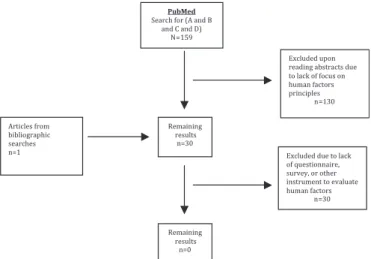
figure 1.
The query combining all three search criteria described above
returned 159 articles. All abstracts were reviewed by one
reviewer (MZ), and 29 articles were selected based on their
relevance to the employment of human-factors principles in the
design of clinical information systems. One article from
a bibliographical search of the selected 29 articles was added.
Two reviewers (MZ, SP) independently evaluated the 30 articles
to assess whether any of the studies employed an instrument for
measuring compliance with human-factors principles in clinical
information systems design. Reviewers were unable to identify
the existence of such an instrument in the existing literature.
Instrument development
In this study, we developed an instrument to measure the
implementation of human-factors principles in the design of
medication-related decision support relating to DDI alerts. DDI
alerts where chosen to be the focus, since they are one of the
most commonly triggered alerts in medication-related
decision-support systems. For this purpose, quantifiable human-factors
principles as outlined in the previous study by Phansalkar et al
were compiled, and we created several items for use in assessing
these principles. This preliminary version of the instrument was
improved and adapted iteratively. First, the instrument was
distributed for content validation to three reviewers (KC, PN,
and HS) with expertise in the use of human-factors principles
for the evaluation of clinical information systems. These experts
were asked to review the items for relevance and clarity. Items
were eliminated or modified based on feedback received from the
three reviewers.
To assess the generalizability of the items to DDI alerts of
various designs across different EMR systems, three reviewers
(JD, HS, MZ) tested the instrument on DDI alerts generated in
EMRs used at their own organizations (ie, (i) Gopher 5.25, an
ambulatory EMR used at Regenstrief Institute, Indianapolis,
Indiana; (ii) AiDKlinik 1.9.2, a prescribing platform integrated
into an ambulatory EMR used at Heidelberg University
Hospital, Heidelberg, Germany; and (iii) the Longitudinal
Medical Record (LMR) 8.2, an ambulatory EMR used at Partners
Healthcare, Boston, Massachusetts). While I-MeDeSA was
tested exclusively on outpatient EMRs, the instrument is also
applicable to inpatient EMRs, as indicated by a related study
that uses the instrument to evaluate the usability of DDI alerts
from various inpatient and outpatient EMRs used across the
USA.
16From this study, the authors have observed that the
design of inpatient versus outpatient DDI alerts for vendor or
home-grown products is similar, and the inclusion of DDI alerts
from inpatient decision-support systems would likely result in
similar
findings.
Reviewers evaluated each unique design of DDI alerts
displayed in their organizations’ systems. To facilitate the
eval-uation, reviewers were given exemplar DDIs that were expected
to trigger alerts of various levels of severity. They were selected
from the drug knowledge database at Partners Healthcare in fall,
2010. The specific DDIs that were provided to the reviewers to
examine in their respective systems are presented in table 2.
If these DDIs failed to trigger an alert, reviewers were
instructed to use alternate DDIs relevant to their systems in
order to capture all severity levels of alerts. Both AiDKlinik and
Gopher required alternate and unique DDIs to trigger alerts of
various levels available in each system. Feedback from this
assessment was used to modify the items so they would be
applicable to various DDI alert designs across EMRs.
Next, we assessed inter-rater reliability and construct validity
through correlation analysis. Inter-rater reliability was assessed
using Cohen’s
k
. Two reviewers (JD, HS) independently
evalu-ated the same DDI alerts from Gopher 5.25. A preliminary
evaluation for construct validity was performed by correlating
the performance of DDI alerts on I-MeDeSA to the age of the
medication decision-support system from which the alerts came.
Given that the usability of medication decision support alerts has
gained attention only in recent years, we hypothesized that older
systems would perform more poorly than newer systems when
DDI alerts are evaluated by I-MeDeSA. DDI alerts from LMR
(2010) and Gopher (1993) were compared in order to establish
a correlation between system age and performance on I-MeDeSA.
The scores used for this analysis were the
final scores assigned to
these systems, as agreed upon by two reviewers (HS, MZ).
The
final version of I-MeDeSA incorporated changes made as
a result of the above methods for analysis, as well as results from
a related study that collected user feedback about various EMRs
employed by multiple institutions across the USA.
17User
feedback was used to provide recommendations for the preferred
design of DDI alerts and medication-related decision-support
systems more generally.
Employing the I-MeDeSA instrument
The instrument has been created for assessment of
medication-related decision support alert design. Some medication-medication-related
decision-support systems stratify medication alerts based on the
severity of patient harm.
18If the system possesses alerts of
various severities, and the designs of these stratified alerts are
unique, each design would require evaluation, and scores within
each item would be averaged. If the design of stratified alerts is
the same, or alerts are not stratified, then the user would need to
assess only a single design. Each item scores on a binary basis,
where a score of 0 is equivalent to answering
‘No’ for the absence
of the characteristic, and a score of 1 is equivalent to answering
‘Yes’ for its presence. Pilot testing showed that the instrument
required approximately 20 min to complete per system.
RESULTS
Eight of the 11 human-factors principles outlined in the
Phan-salkar et al review were selected for incorporation into the
instrument because they were quantifiable. Three principles
(False Alarms, Habituation, and Mental Models) were excluded
Table 1
Summary of the 11 key human-factors principles for use in medication-related decision-support alerts, compiled by Phansalkar et al
11Human-factors principle Summary of principle
Alarm philosophy Defined as the logic used to classify alert priority levels. A catalog of all alert level categories should be made available to users, clearly indicating how priority levels are set (eg, based on the severity of patient harm). The goal of this philosophy should be to minimize the overall number of alerts. Additionally, the alert should seek to capture the user’s acknowledgment and response. Ideally, the user’s acceptance or rejection of the alert would also serve as an acknowledgment of having seen the alert. Less desirable would be alert designs in which these functions are separated, and users would need to first acknowledge an alert and subsequently indicate their response in a separate window. False alarms May arise when the alert logic is incorrect or out of date, or the alert is calibrated too sensitively, setting off alarms that are essentially irrelevant to clinical care. False alarms may disrupt workflow and unnecessarily increase workload. Evidence suggests that users will decrease their response to alerts in general as the false-alarm rate increases.12 13Recommendations are to move away from alarm strategies that follow
a one-size-fits-all approach and toward intelligent alarm monitoring that considers the multi-dimensional relationship between clinical interactions and patient health.
Placement Alerts and the information within should take into consideration users’ viewing habits to optimize visibility. Alerts should be located in the visual field in order of their importance. Additionally, the proximity compatibility principle of Wickens and Carswell14
should be employeddfor example, as a user orders medications, alerts should appear in close proximity to the location on the screen where a user enters medications in the ordering window.
Visibility Considers overall size of the alert on the screen (target size), luminance, background contrast, and lettering characteristics. The size of the target should be increased as viewing distance increases or contrast decreases. Additionally, letter heights should be larger when reading from a visual display; a mixture of upper and lower cases should be used for easier reading; and visibility is optimized when dark text is presented on a light background.
Prioritization Prioritization of alerts through visual characteristics is necessary and should utilize hazard matching. This is the process of matching the appearance of the warning to the level of hazard associated with the clinical implications of the alert. For example, colors such as red and orange typically imply a higher level of hazard, while green, blue, and white imply a lower hazard level. It is also important to consider the limitations of color for indicating the level of hazard for color-blind users. To address color-blind users’ needs, signal words and shapes can be used to communicate the level of hazard and priority in addition to the use of color. Signal words demonstrating high priority are: ‘lethal,’ ‘deadly,’ ‘danger;’ and words demonstrating low priority are: ‘warning,’ ‘caution,’ etc. Shapes can also be used for conveying levels of priority: angular shapes represent high priority while regular shapes such as circles represent low priority.15
Color May be utilized not only to indicate severity but also to communicate the type of alert (eg, drugedrug, drugeallergy, etc) or the response required. However, colors should be kept to a minimum (<10), since, with more colors, it may be difficult for users to remember what each color indicates.
Learnability and confusability Refers to the ability of the user to learn and distinguish between different types of visual alerts. Color, shapes, and size can be used to lend a distinct appearance to different types of alerts. The fewer features that alerts share with each other, the more distinct they appear, making it easier for users to remember and quickly recognize different types of alerts.
Textual information Demands as much consideration in the designing of medication-related decision support alerts as the alerts’ visual characteristics. The text of visual alerts should possess the following four components for effective communication of information: (1) a signal word to indicate the severity of the alert, (2) a statement of the nature of the hazard (eg, specify interacting drug names or drug classes), (3) an instruction statement providing recommended actions, and (4) a consequence statement that indicates the potential harm to the patient. Of these four components, the nature of the hazard and instruction statements carry the most importance. Additionally, textual information should be explicit, rather than non-explicit (eg, ‘smoking causes lung cancer’ rather than ‘smoking is damaging to health’).
Habituation Refers to a decrease in response to stimulus due to repeated and inconsequential exposure. Habituation predicts that repeated exposure to an alert that does not require that a meaningful response will result in a decrease, and eventual elimination, of responding to the alert. This risk highlights the importance of reducing the rate of false alarms, as well as the importance of an alarm philosophy that minimizes alerts overall. Habituation also highlights the importance of different types of alerts being visually distinct from one another, since alerts that are not visually distinct can be perceived as the same.
Mental model Represents the understanding individuals have about a particular topic. Given that mental models govern users’ behavior, alerting systems should adequately support pervading mental models. For example, since users generally perceive red to mean ‘stop’ and green to mean ‘go,’ alerting systems should follow the same model, rather than using green to signal ‘stop’ and red to signal ‘go.’
Proximity of task components being displayed
Incorporates Wickens and Carswell’s proximity compatibility principle,14as does the Placement principle. With respect to Proximity of Task Components Being Displayed, tools for decision-making should be integrated into the body of the alert or found within close temporal and spatial proximity to the alert. For example, a link to a medical reference website should be located within the alert, not in a window that is multiple clicks away.
due to their less quantifiable nature given typical sources of data
available, even though these principles may be important for
determining user acceptance. Therefore, the initial instrument
contained eight principles and 34 allocated items. During the
development of I-MeDeSA, the instrument was assessed for
content validity and inter-rater reliability, and a preliminary
evaluation of construct validity was performed. In testing
I-MeDeSA on DDI alerts from three unique EMRs, one new
human-factors principle was created (Corrective Actions), and
eight items across multiple principles were eliminated, resulting
in nine principles and 26 items. The formal instrument is
available upon request. Detailed information on validation is
described below.
Validation
Upon completing the original draft of I-MeDeSA, the
instru-ment was distributed to reviewers (KC, PN, and HS) with
expertise in the use of human factors to assess its content
validity. After receiving their feedback, changes were made to
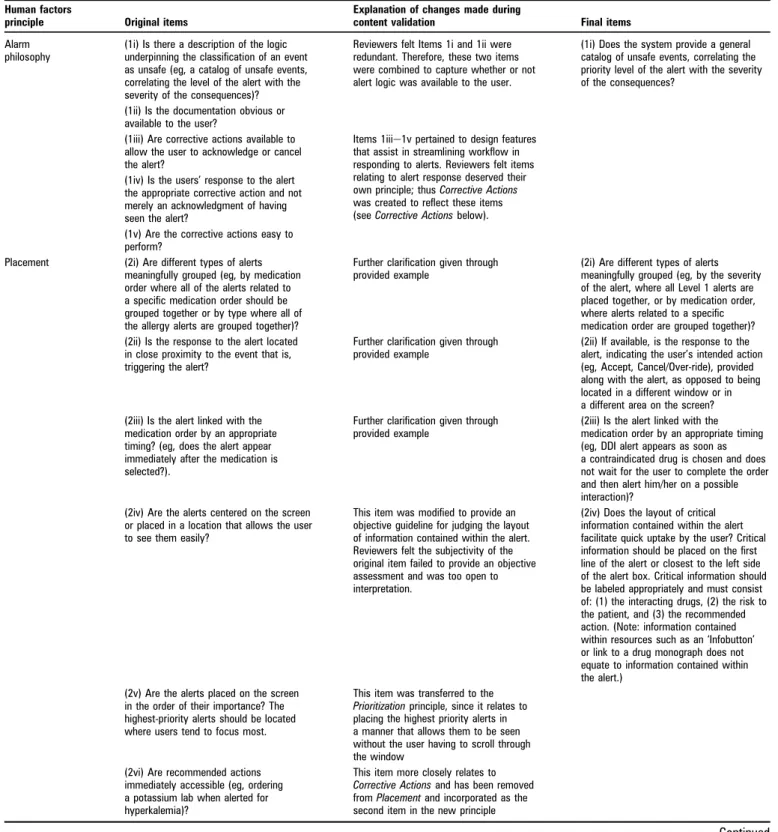
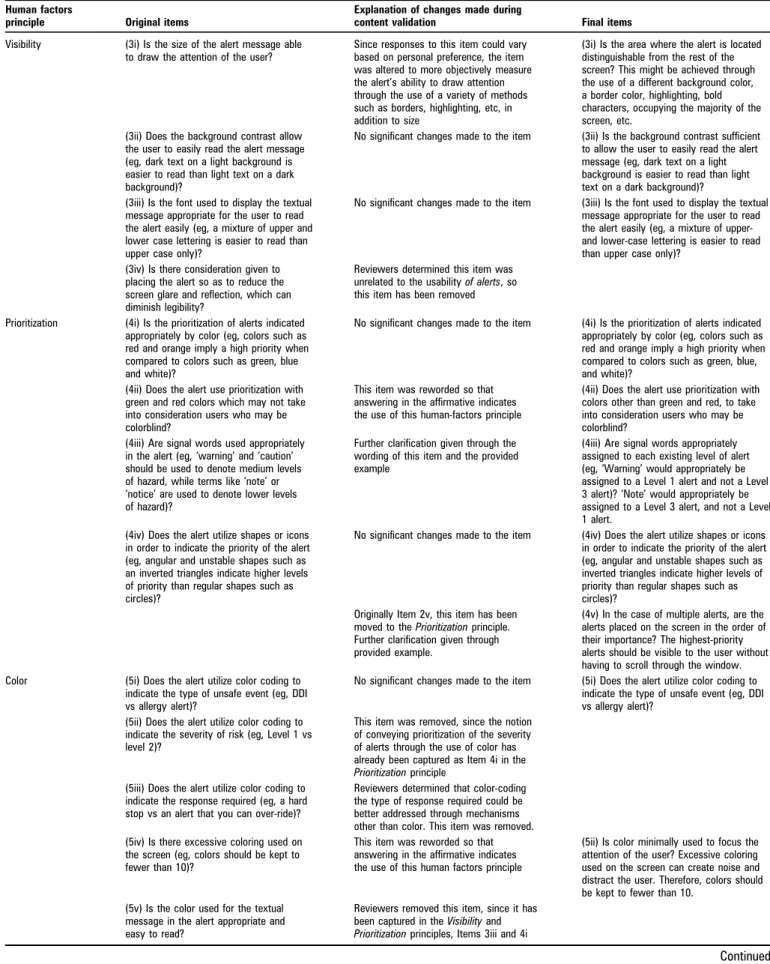
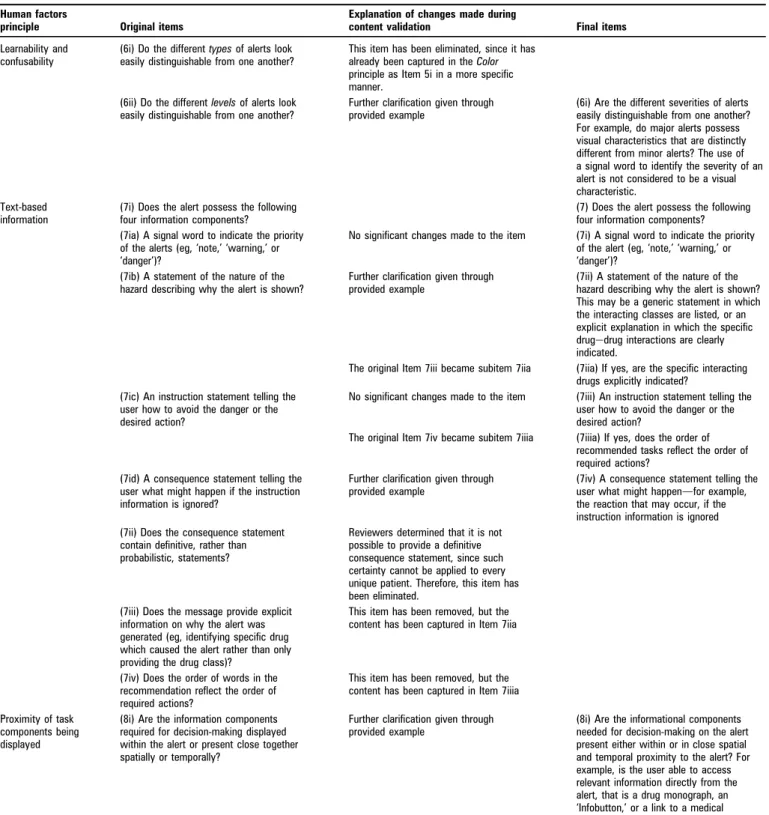
each principle. Content validation is summarized in table 3. We
have also provided a detailed explanation of the Corrective Actions
principle, since it has not been previously described in the
Phansalkar et al study.
11Corrective actions
Use of this principle serves to streamline the user’s workflow in
responding to alerts. The goal is to minimize the number of
steps the user must take in dealing with an alert, as well as to
efficiently capture the user’s response to the alert, or intended
action. Typically, a user will receive a DDI alert after attempting
to place an order for a drug that interacts with an existing drug.
As a next step, the user would process the nature of the
inter-action and weigh the risks and benefits to the patient of
continuing with the order or canceling it. At this point, the user
usually acknowledges having gone through the assessment
process, indicates an acceptance or rejection of the alert, and
proceeds with the intended action. The actions may be: to
continue with the order unadjusted, to continue with the order
but adjust the dose of one of the drugs, to continue with the
order but switch to a different drug within the same class, to
discontinue an existing drug and place the order for the new
drug, or to cancel the order for the new drug and keep the
existing drug. Systems considering human-factors principles and
usability will provide the user with an efficient means for
carrying out any of the steps described for dealing with an alert.
The items within the Corrective Actions principle capture the use
of such efficient methods. The first item assesses the use of
a simplistic corrective action. Through one click located within
the alert, the user is able to simultaneously acknowledge having
seen an alert, as well as convey an acceptance or rejection of the
alert with respect to their patient. Given the volume of alerts
received by clinicians each day and feedback received from users
in a related study,
17the employment of a simplistic method for
responding to the alert will increase the usability and efficiency
of alerts.
More sophisticated systems will provide intelligent corrective
actions within the alert. The second item within this principle
relates to the interruptive nature of alerts and the fallibility of
humans. Intelligent corrective actions address these issues by
assisting the user in efficiently accepting or rejecting an alert and
carrying out recommended actions. For example, an alert may
read,
‘Reduce the warfarin dose by 33e50% and follow patient
closely.’ An alert using intelligent corrective actions would
contain a response such as,
‘Continue with warfarin order AND
reduce dose by 33e50%.’ Selecting this option would
simulta-neously accept the alert and direct the user back to the
medi-cation ordering window where the user can adjust the dose
appropriately. In addition to automatically linking the user to
the ordering screen for adjusting a dose, the system would be
Figure 1
Search criteria and results. (A) (Ambulatory Care Information
Systems OR Computerized Order Entry OR Computerized Physician Order
Entry OR Computerized Prescriber Order Entry OR Computerized Provider
Order Entry OR Decision Support Systems, Clinical OR Drug Therapy,
Computer-Assisted OR Electronic Medical Record OR Electronic Order
Entry OR Electronic Physician Order Entry OR Electronic Prescribing OR
Electronic Prescription OR Medical Order Entry Systems OR Medical
Records Systems, Computerized). (B) (Interface, User Computer OR
Interface, UsereComputer OR Interfaces, UsereComputer OR Human
Factor OR Human Factors OR Human Factors Engineering OR Human
Factors Principles OR HumaneMachine Interaction OR HumaneMachine
Interface Usability OR Interfaces, User Computer OR Usability OR User
Computer Interface OR User Computer Interfaces OR UsereComputer
Interfaces OR User Interface Design). (C) (Instrument* OR Methodology,
Survey OR Methods, Survey OR Questionnaire* OR Survey* OR Survey
Method OR Survey Methodology). (D) (Limits: Publication Types: Clinical
Trial; Meta-Analysis; Practice Guideline; Randomized Controlled Trial;
Review; Articles with Abstracts; Language: English; Publication Date
Range: July 2000eJuly 2010).
Table 2
Suggested drug interactions provided to reviews
Alert level Drugedrug interaction Expected clinical implications
1 (most severe) Dextoamphetamine and monoamine oxidase
inhibitordfor example, isocarboxazid
Patient on amphetamine and a monoamine oxidase
inhibitordincreased risk of hypertensive crisis. Concurrent use is contraindicated. Discontinue one of these medications.
A washout period of 2 weeks is required for a monoamine oxidase inhibitor. 2 (moderately severe) Dexfenfluramine and tricyclic
antidepressantdfor example, amitriptyline
Patient on tricyclic antidepressant and dexfenfluramine. May produce serotonin syndrome. Recommend to avoid concurrent use and to consider an alternative agent.
3 (least severe) Omeprazole and H2blockerdfor example, ranitidine Patient on omeprazole and H2blocker. H2blocker will render omeprazole
Table 3
Summary of content validation and the final list of items contained within Instrument for Evaluating Human-Factors Principles in
Medication-Related Decision Support Alerts
Human factors
principle Original items
Explanation of changes made during
content validation Final items
Alarm philosophy
(1i) Is there a description of the logic underpinning the classification of an event as unsafe (eg, a catalog of unsafe events, correlating the level of the alert with the severity of the consequences)?
Reviewers felt Items 1i and 1ii were redundant. Therefore, these two items were combined to capture whether or not alert logic was available to the user.
(1i) Does the system provide a general catalog of unsafe events, correlating the priority level of the alert with the severity of the consequences?
(1ii) Is the documentation obvious or available to the user?
(1iii) Are corrective actions available to allow the user to acknowledge or cancel the alert?
Items 1iiie1v pertained to design features that assist in streamlining workflow in responding to alerts. Reviewers felt items relating to alert response deserved their own principle; thus Corrective Actions was created to reflect these items (see Corrective Actions below). (1iv) Is the users’ response to the alert
the appropriate corrective action and not merely an acknowledgment of having seen the alert?
(1v) Are the corrective actions easy to perform?
Placement (2i) Are different types of alerts meaningfully grouped (eg, by medication order where all of the alerts related to a specific medication order should be grouped together or by type where all of the allergy alerts are grouped together)?
Further clarification given through provided example
(2i) Are different types of alerts meaningfully grouped (eg, by the severity of the alert, where all Level 1 alerts are placed together, or by medication order, where alerts related to a specific medication order are grouped together)? (2ii) Is the response to the alert located
in close proximity to the event that is, triggering the alert?
Further clarification given through provided example
(2ii) If available, is the response to the alert, indicating the user’s intended action (eg, Accept, Cancel/Over-ride), provided along with the alert, as opposed to being located in a different window or in a different area on the screen? (2iii) Is the alert linked with the
medication order by an appropriate timing? (eg, does the alert appear immediately after the medication is selected?).
Further clarification given through provided example
(2iii) Is the alert linked with the medication order by an appropriate timing (eg, DDI alert appears as soon as a contraindicated drug is chosen and does not wait for the user to complete the order and then alert him/her on a possible interaction)?
(2iv) Are the alerts centered on the screen or placed in a location that allows the user to see them easily?
This item was modified to provide an objective guideline for judging the layout of information contained within the alert. Reviewers felt the subjectivity of the original item failed to provide an objective assessment and was too open to interpretation.
(2iv) Does the layout of critical information contained within the alert facilitate quick uptake by the user? Critical information should be placed on the first line of the alert or closest to the left side of the alert box. Critical information should be labeled appropriately and must consist of: (1) the interacting drugs, (2) the risk to the patient, and (3) the recommended action. (Note: information contained within resources such as an ‘Infobutton’ or link to a drug monograph does not equate to information contained within the alert.)
(2v) Are the alerts placed on the screen in the order of their importance? The highest-priority alerts should be located where users tend to focus most.
This item was transferred to the Prioritization principle, since it relates to placing the highest priority alerts in a manner that allows them to be seen without the user having to scroll through the window
(2vi) Are recommended actions immediately accessible (eg, ordering a potassium lab when alerted for hyperkalemia)?
This item more closely relates to Corrective Actions and has been removed from Placement and incorporated as the second item in the new principle
Table 3
Continued
Human factors
principle Original items
Explanation of changes made during
content validation Final items
Visibility (3i) Is the size of the alert message able to draw the attention of the user?
Since responses to this item could vary based on personal preference, the item was altered to more objectively measure the alert’s ability to draw attention through the use of a variety of methods such as borders, highlighting, etc, in addition to size
(3i) Is the area where the alert is located distinguishable from the rest of the screen? This might be achieved through the use of a different background color, a border color, highlighting, bold characters, occupying the majority of the screen, etc.
(3ii) Does the background contrast allow the user to easily read the alert message (eg, dark text on a light background is easier to read than light text on a dark background)?
No significant changes made to the item (3ii) Is the background contrast sufficient to allow the user to easily read the alert message (eg, dark text on a light background is easier to read than light text on a dark background)? (3iii) Is the font used to display the textual
message appropriate for the user to read the alert easily (eg, a mixture of upper and lower case lettering is easier to read than upper case only)?
No significant changes made to the item (3iii) Is the font used to display the textual message appropriate for the user to read the alert easily (eg, a mixture of upper-and lower-case lettering is easier to read than upper case only)?
(3iv) Is there consideration given to placing the alert so as to reduce the screen glare and reflection, which can diminish legibility?
Reviewers determined this item was unrelated to the usability of alerts, so this item has been removed Prioritization (4i) Is the prioritization of alerts indicated
appropriately by color (eg, colors such as red and orange imply a high priority when compared to colors such as green, blue and white)?
No significant changes made to the item (4i) Is the prioritization of alerts indicated appropriately by color (eg, colors such as red and orange imply a high priority when compared to colors such as green, blue, and white)?
(4ii) Does the alert use prioritization with green and red colors which may not take into consideration users who may be colorblind?
This item was reworded so that answering in the affirmative indicates the use of this human-factors principle
(4ii) Does the alert use prioritization with colors other than green and red, to take into consideration users who may be colorblind?
(4iii) Are signal words used appropriately in the alert (eg, ‘warning’ and ‘caution’ should be used to denote medium levels of hazard, while terms like ‘note’ or ‘notice’ are used to denote lower levels of hazard)?
Further clarification given through the wording of this item and the provided example
(4iii) Are signal words appropriately assigned to each existing level of alert (eg, ‘Warning’ would appropriately be assigned to a Level 1 alert and not a Level 3 alert)? ‘Note’ would appropriately be assigned to a Level 3 alert, and not a Level 1 alert.
(4iv) Does the alert utilize shapes or icons in order to indicate the priority of the alert (eg, angular and unstable shapes such as an inverted triangles indicate higher levels of priority than regular shapes such as circles)?
No significant changes made to the item (4iv) Does the alert utilize shapes or icons in order to indicate the priority of the alert (eg, angular and unstable shapes such as inverted triangles indicate higher levels of priority than regular shapes such as circles)?
Originally Item 2v, this item has been moved to the Prioritization principle. Further clarification given through provided example.
(4v) In the case of multiple alerts, are the alerts placed on the screen in the order of their importance? The highest-priority alerts should be visible to the user without having to scroll through the window. Color (5i) Does the alert utilize color coding to
indicate the type of unsafe event (eg, DDI vs allergy alert)?
No significant changes made to the item (5i) Does the alert utilize color coding to indicate the type of unsafe event (eg, DDI vs allergy alert)?
(5ii) Does the alert utilize color coding to indicate the severity of risk (eg, Level 1 vs level 2)?
This item was removed, since the notion of conveying prioritization of the severity of alerts through the use of color has already been captured as Item 4i in the Prioritization principle
(5iii) Does the alert utilize color coding to indicate the response required (eg, a hard stop vs an alert that you can over-ride)?
Reviewers determined that color-coding the type of response required could be better addressed through mechanisms other than color. This item was removed. (5iv) Is there excessive coloring used on
the screen (eg, colors should be kept to fewer than 10)?
This item was reworded so that answering in the affirmative indicates the use of this human factors principle
(5ii) Is color minimally used to focus the attention of the user? Excessive coloring used on the screen can create noise and distract the user. Therefore, colors should be kept to fewer than 10.
(5v) Is the color used for the textual message in the alert appropriate and easy to read?
Reviewers removed this item, since it has been captured in the Visibility and Prioritization principles, Items 3iii and 4i
Table 3
Continued
Human factors
principle Original items
Explanation of changes made during
content validation Final items
Learnability and confusability
(6i) Do the different types of alerts look easily distinguishable from one another?
This item has been eliminated, since it has already been captured in the Color principle as Item 5i in a more specific manner.
(6ii) Do the different levels of alerts look easily distinguishable from one another?
Further clarification given through provided example
(6i) Are the different severities of alerts easily distinguishable from one another? For example, do major alerts possess visual characteristics that are distinctly different from minor alerts? The use of a signal word to identify the severity of an alert is not considered to be a visual characteristic.
Text-based information
(7i) Does the alert possess the following four information components?
(7) Does the alert possess the following four information components? (7ia) A signal word to indicate the priority
of the alerts (eg, ‘note,’ ‘warning,’ or ‘danger’)?
No significant changes made to the item (7i) A signal word to indicate the priority of the alert (eg, ‘note,’ ‘warning,’ or ‘danger’)?
(7ib) A statement of the nature of the hazard describing why the alert is shown?
Further clarification given through provided example
(7ii) A statement of the nature of the hazard describing why the alert is shown? This may be a generic statement in which the interacting classes are listed, or an explicit explanation in which the specific drugedrug interactions are clearly indicated.
The original Item 7iii became subitem 7iia (7iia) If yes, are the specific interacting drugs explicitly indicated?
(7ic) An instruction statement telling the user how to avoid the danger or the desired action?
No significant changes made to the item (7iii) An instruction statement telling the user how to avoid the danger or the desired action?
The original Item 7iv became subitem 7iiia (7iiia) If yes, does the order of recommended tasks reflect the order of required actions?
(7id) A consequence statement telling the user what might happen if the instruction information is ignored?
Further clarification given through provided example
(7iv) A consequence statement telling the user what might happendfor example, the reaction that may occur, if the instruction information is ignored (7ii) Does the consequence statement
contain definitive, rather than probabilistic, statements?
Reviewers determined that it is not possible to provide a definitive consequence statement, since such certainty cannot be applied to every unique patient. Therefore, this item has been eliminated.
(7iii) Does the message provide explicit information on why the alert was generated (eg, identifying specific drug which caused the alert rather than only providing the drug class)?
This item has been removed, but the content has been captured in Item 7iia
(7iv) Does the order of words in the recommendation reflect the order of required actions?
This item has been removed, but the content has been captured in Item 7iiia Proximity of task
components being displayed
(8i) Are the information components required for decision-making displayed within the alert or present close together spatially or temporally?
Further clarification given through provided example
(8i) Are the informational components needed for decision-making on the alert present either within or in close spatial and temporal proximity to the alert? For example, is the user able to access relevant information directly from the alert, that is a drug monograph, an ‘Infobutton,’ or a link to a medical reference website providing additional information?
capable of automatically discontinuing an existing drug directly
from the alert, as well as replacing an order for a different drug
within the same class (and medication decision support would
re-evaluate interactions with the newly selected drug). Given
that clinicians are already juggling the care of multiple patients,
and given the nature of alerts to interrupt the user’s workflow,
such intelligent corrective actions are important. The user would
not have to remember to go back into the system, after dealing
with all alerts, to follow through with intended actions. Finally,
there would ideally exist a fail-safe mechanism in which the
system is capable of monitoring whether or not the user
followed through with the intended action, the third item in
this principle. If the user did not complete intended actions, the
system would notify the user.
Instrument applicability
To ensure the applicability of the instrument to a variety of DDI
alert designs, the modified instrument was distributed to three
reviewers (JD, HS, and MZ). One reviewer had expertise in the
field of medical informatics; another in the use of human-factors
principles; and the third with experience in the usability of CDS
systems. Reviewers tested the instrument on the DDI alerts
available in the EMRs used at their own institutions. The design
of DDI alerts was different for each system. See table 4 for
a brief description of DDI alerts from each system.
After reviewing the evaluations and associated feedback from
reviewers, the following guidelines for scoring the instrument
items were established to maximize applicability to different
systems:
Critical Information Layout (Item 2iv): The primary focus of
this item is on the layout of the information presented within
the alert. Critical information provided in a DDI alert must
include: (1) the interacting drugs, (2) the risk to the patient, and
(3) the recommended action. Each component should be labeled
appropriately and located on a few lines each, at the
first point
of alerting. The information should not be presented together in
one paragraph. If any of the critical information components
require the user to click through additional screens or to sort
through a drug monograph to access this information, this
critical information layout item will be scored as zero. Systems
will score higher if they use active alerts that force users to see
alert information, rather than passive alerts where the user must
seek out alert information through multiple clicks, effectively
allowing the user to avoid the information entirely.
Visibility (Item 3iii): Any mixture of upper and lower case shall
be scored as 1; exclusive use of either upper or lower case shall be
scored as 0.
Distinguishing Alert Features (Item 6i): To achieve a score of 1,
alerts must possess unique visual characteristics, such as color,
shapes, and font. The use of a signal word to identify the
severity of the alert is not considered to be a visual characteristic.
Text-Based Information (Items 7ie7iv): These items evaluate
the textual information presented at the
first point of alerting.
Any information contained within expanded details or a
mono-graph shall be disregarded. If the user is initially presented with
only one component of an alert, for example, only the type or
severity, and they must click through additional windows or
read through a monograph to acquire the required information,
the corresponding items shall be scored as 0.
Corrective Actions (Item 9ia): If there is at least one corrective
action presented in the alert, such as
‘discontinue existing drug,’
this item shall receive a score of 1.
The patient safety literature has indicated the importance of
providing users with information on how alert severities are
Table 3
Continued
Human factors
principle Original items
Explanation of changes made during
content validation Final items
Corrective actions
The original Items 1iii and 1iv from Alarm Philosophy were combined to form the first item in the Corrective Actions principle
(9i) Does the system possess corrective actions that serve as an acknowledgment of having seen the alert while
simultaneously capturing the user’s intended action? For example, ‘Accept’ and ‘Cancel’/‘Over-ride’ are corrective actions that convey the user’s acceptance or rejection of alert logic, while ‘OK’ is only an acknowledgment of the user having seen the alert.
The original Item 1v from Alarm Philosophy became Item 9ia. It has also been worded more clearly, and an example has been provided.
(9ia) If yes, does the alert utilize intelligent corrective actions that allow the user to complete a task? For example, if warfarin and ketoconazole are co-prescribed, the alert may ask the user to ‘Reduce the warfarin dose by 33e50% and follow the patient closely.’ An intelligent corrective action would be ‘Continue with warfarin order AND reduce dose by 33e50%.’ Selecting this option would simultaneously accept the alert AND direct the user back to the medication ordering window where the user can adjust the dose appropriately. Based on information gathered from
a related study,17reviewers created this last item
(9ii) Is the system able to monitor and alert the user to follow through with corrective actions? Referring to the previous example, if the user tells the system that he/she will reduce the warfarin dose but fails to follow through on that promise, does the system alert the user?
assessed and the general
‘alert philosophy’ of the system. The
absence of such information existed across systems, creating
a lack of transparency for users to assess severity ratings, the
number of levels of alerts, and general information. Users have
expressed the desire for such a catalog in order to increase DDI
alert usability.
17Therefore, authors felt the presence of item 1i
was an important criterion to include.
Inter-rater reliability
Two reviewers (JD, HS) independently applied I-MeDeSA to
DDI alerts of Gopher 5.25. Their ratings were compared, and
Cohen’s
k
was calculated (
k
¼0.764, 95% CI 0.519 to 0.999). The
calculated
k
value indicates substantial agreement between
raters.
Correlation analysis
Preliminary evidence for construct validity was gathered
through a correlation analysis. Given that the usability of
medication-related decision support alerts has gained attention
only in recent years, we hypothesized that older systems would
perform more poorly than newer systems when DDI alerts are
evaluated by I-MeDeSA. DDI alerts from LMR (2010) and
Gopher (1993) were compared in order to establish a correlation
between system age and performance on I-MeDeSA. Analysis
Table 4
Description of drugedrug interaction alerts from three electronic medical records
Principle AiDKlinik Gopher Longitudinal Medical Record
Alarm philosophy
Although no catalog is visible for the user that explains in detail the levels of severity, alerts are color-coded and contain a brief description to convey priority
Alerts are not stratified by levels of severity
Although no catalog exists explaining the levels of alert severity, alerts are color-coded to convey priority
Placement Alerts are placed in order of severity (from most severe to least severe top to bottom); alerts appear upon selecting the drug; the alert presents a description of the potential adverse event (including the mechanism of the interaction) and its clinical management; the user must scroll through the screen to see all alerts
Since alerts are not stratified by levels of severity, alerts are not grouped according to severity. As you place an order for drug A, alerts appear for interactions between current meds and drug A. You will not, for example, see an interaction for XeZ while you are placing an order for drug A. The response to the alert is located within the alert. The alert clearly indicates the interacting drugs and provides a link to additional information on the interaction.
Alerts are stratified by three levels of severity; responses are contained within the alerts with the highest levels of severity (the least severe alert is informational only); alerts appear as drugs are ordered; interacting drugs are specified, and clinical management and consequence statements are conveyed within a total of 4.5 lines
Visibility Each alert is outlined in the color that signifies the appropriate severity; the text is blue on a white background; the font is easily legible
The alerts appear on top of the ordering screen; the area naming the interaction displays yellow text is written on a blue background, and the area displaying the response is black text written on a gray background; font is easily legible
Levels 1 and 2 alerts appear occupying the entire screen, interrupting the user’s workflow; level 3 alert is informational and is found within the ordering screen; for level 1 alert: blue text on pale red background; for level 2 alert: black text on pale yellow background; for level 3 alert: red text on white background; font is easily legible Prioritization Alerts are color-coded by severity (black,
red, orange, yellow, green, and purple); signal words are used to convey the severity of the alert; an exclamation point is used for the highest level of severity, along with color and a signal word; highest severity alerts are located at the top of the listed alerts
Neither color, signal words, nor shapes or icons are used to signify the alert’s priority; all alerts possess the same visual characteristics and appear as drugs orders are placed
Level 1 alert is red; level 2 alert is orange; level 3 alert is red text incorporated into the ordering screen; level 1 alerts labeled ‘Critical,’ level 2 alerts labeled ‘Warning,’ level 3 alert labeled ‘Alert;’ no shapes or icons are used to convey alert priority; level 1 alerts appear first, followed by level 2 alerts; level 3 alerts appear on the ordering screen in a non-interruptive manner
Color Alerts are color-coded by severity, not by the type of alert; no more than seven colors are used for each alert
Color coding within the alert is not utilized in any way; the alert utilizes no more than four colors
Alerts are color-coded by severity, not by type; alerts utilize no more than 10 colors
Learnability and confusability
The highest severity alert possesses three visual cues to convey its importance (color, signal word, and a small icon), while lower severity alerts use two visual cues (color and signal word)
All alerts, regardless of severity, possess the same visual characteristics
Alerts are color-coded by severity level: level 1 is red, and level 2 is orange
Text-based information
The alert displays a signal word indicating its severity level; the interacting drugs are specifically indicated; the effects of the interaction and clinical management are clearly and succinctly displayed
All alerts are labeled with ‘Warning;’ the interacting drugs are specified; the user is able to continue with the order, see more information about interactions, or back out of the order; the additional information succinctly presents the user with the effect, mechanism, clinical significance, and management of the interaction
Level 1 and 2 alerts are accompanied by a signal word indicating priority level; interacting drugs are specified, along with the effect of the interaction and suggested clinical management, all within 4.5 lines
Proximity of task components being displayed
The user can access the drug monograph through a button contained within each alert
The user can link to outside sources of information from elsewhere in the system when connected to a workstation, but there is no link within the alert
On the ordering screen, current interactions are listed, along with a link to Micromedex for obtaining additional information from an outside source Corrective actions All alerts only present information, and no
alerts require action; the system is not capable of ensuring that the user follows through with the recommended clinical management
Directly from the alert, the user can choose to continue with or cancel the order of the offending drug; no other actionable options are available, and the system is not capable of ensuring that the user follows through with the recommended clinical management
Actionable options within an alert depend on the severity level; for level 1, the user is forced to eliminate one of the offending drugs; for level 2, the user may choose to discontinue the pre-existing drug or continue with an order by providing an over-ride reason; only for level 1 alerts is the system able to ensure that the user follows through with the recommended clinical management
suggests a direct correlation between system age and
perfor-mance of DDI alerts on I-MeDeSA. LMR (2010) performed
better than Gopher (1993) (p¼0.0016). However, this is only
preliminary evidence for known group difference. A larger
sample size is necessary to determine a true correlation between
system age and performance of DDI alerts on I-MeDeSA.
DISCUSSION
Although there has been discussion surrounding the importance
of human factors in medication-related decision support,
rela-tively little empirical research has been done. The human-factors
studies in this domain have largely been qualitative, and
instruments to assess how human-factors principles have been
incorporated have not been widely available. Therefore, we
developed an instrument that evaluates the usability of DDI
alerts within medication-related decision-support systems,
combining previous research on human-factors principles with
current user feedback, thus making I-MeDeSA a novel tool.
Eight of the nine human-factors principles (Alarm Philosophy,
Placement, Visibility, Prioritization, Color, Learnability and
Confus-ability, Text-Based Information, and Proximity of Task Components
Being Displayed) selected for use in I-MeDeSA were originally
reported on in a study by Phansalkar et al,
11which compiled
information on human-factors principles and alert design and
display from a wide variety of robust sources. A ninth principle
was created from a combination of other items and user
feed-back collected in a related study.
17Twenty-six items were
created from the nine selected human-factors principles, and
preliminary evidence for the validity of the instrument was
gathered.
While the assessment of content validity and inter-rater
reli-ability were relatively straightforward, construct validation
proved to be quite challenging, given the limited number of
decision-support systems we could assess. Ideally, a larger
sample size of EMRs would allow performance of analyses to
assess the construct validity (eg, factor analysis) and internal
consistency reliability. However, factor analysis requires that we
test I-MeDeSA on two to 10 times as many systems as there are
items, that is, 52e260 decision-support systems. Additionally,
Cronbach’s a should have at least 20 observations per item in
order to produce a reliable assessment of internal consistency. As
part of a larger study, we have assessed the use of human-factors
principles in 14 medication decision-support systems (both
inpatient and outpatient) used throughout the USA.
16We felt it
would be inappropriate to test I-MeDeSA on all 14 systems.
Rather, we selected approximately 20% of the 14 systems as
representative examples to test the instrument.
To offer additional support for the validity of I-MeDeSA,
Seidling et al confirmed that the display of an alert and the
textual information within are related to the user’s acceptance
of an alert.
19Again, alert acceptance is defined as the
modifica-tion or cancelamodifica-tion of an order upon receiving an alert. The alert
display had an OR of 4.23 (95% CI 1.78 to 10.08, p¼0.0011) for
canceled orders versus over-ridden alerts, and an OR of 4.78 (95%
CI 4.63 to 4.93, p<0.0001) for modified orders versus over-ridden
alerts. The content of all nine items associated with alert display
can be found within I-MeDeSA. Textual information had an OR
of 1.22 (95% CI 1.15 to 1.30, p<0.0001) for modified orders
versus over-ridden alerts.
Our hope is that designers with little or no knowledge of
human-factors principles may use this instrument during early
stages of development to help construct highly usable DDI
alerts. We believe the instrument will be especially useful to
designers with little access to users who can test the product for
usability. Additionally, I-MeDeSA may assist institutions and
individual clinical practices in selecting a suitable
medication-related decision support vendor product.
I-MeDeSA has been tested on DDI alerts only and has not
been tested on other types of medication alerts, such as
drug-allergy alerts and drug-duplicate alerts. To continue increasing
the usability of medication-related decision-support systems and
enhancing patient safety, similar work should be carried out in
other areas.
LIMITATIONS
I-MeDeSA assesses the usability of DDI alerts used by
outpa-tient EMRs with medication-related decision-support
function-ality. While only three systems were used to test the
generalizability of I-MeDeSA, these three systems presented
a variety of DDI alert designs.
The scope of the study limited our evaluation to outpatient
EMRs, but we do think these
findings are relevant to EMRs used
in inpatient care, as well as to other types of medication-related
decision support beyond DDIs. Future research will focus on
validating this instrument on EMRs used in different settings,
including inpatient and personal health records and other types
of medication decision-support alerts. Expansion of the number
of EMRs evaluated will also allow us to perform more stringent
analyses to support factor analysis or to obtain a reliable
assessment of internal consistency of the instrument.
CONCLUSIONS
We developed I-MeDeSA to assess the use of human-factors
principles in the design of DDI alerts. In the future, further
validation should be performed and I-MeDeSA’s use should be
evaluated for other types of decision support. We hope that
implementation of I-MeDeSA will assist in the
system-devel-opment process and increase the usability and effectiveness of
DDI alerts.
Acknowledgments The authors would like to thank D Seger and J Warvel, for their assistance in supporting the evaluation of selected EMRs, and S Lipsitz and EF Cook, for their invaluable advice and support on this study.
Funding This study was sponsored by the Center for Education and Research on Therapeutics on Health Information Technology grant (Principal Investigator: DWB), Grant # U18HS016970 from the Agency for Healthcare Research and Quality. Competing interests None.
Provenance and peer review Not commissioned; externally peer reviewed.
REFERENCES
1. Kuperman GJ, Bobb A, Payne TH, et al. Medication-related clinical decision support in computerized provider order entry systems: a review. J Am Med Inform Assoc 2007;14:29e40.
2. Kuperman GJ, Teich JM, Gandhi TK, et al. Patient safety and computerized medication ordering at Brigham and Women’s Hospital. Jt Comm J Qual Improv 2001;27:509e21.
3. McCoy AB, Waitman LR, Gadd CS, et al. A computerized provider order entry intervention for medication safety during acute kidney injury: a quality improvement report. Am J Kidney Dis 2010;56:832e41.
4. Rommers MK, Zegers MH, De Clercq PA, et al. Development of a computerised alert system, ADEAS, to identify patients at risk for an adverse drug event. Qual Saf Health Care 2010;19:1e6.
5. Weingart SN, Simchowitz B, Padolsky H, et al. An empirical model to estimate the potential impact of medication safety alerts on patient safety, health care utilization, and cost in ambulatory care. Arch Intern Med 2009;169:1465e73.
6. Bates DW, Teich JM, Lee J, et al. The impact of computerized physician order entry on medication error prevention. J Am Med Inform Assoc 1999;6:313e21. 7. van der Sijs H, Aarts J, Vulto A, et al. Overriding of drug safety alerts in
8. Shah NR, Seger AC, Seger DL, et al. Improving acceptance of
computerized prescribing alerts in ambulatory care. J Am Med Inform Assoc 2006;13:5e11.
9. Karsh BT, Weinger MB, Abbott PA, et al. Health information technology: fallacies and sober realities. J Am Med Inform Assoc 2010;17:617e23.
10. Saleem JJ, Russ AL, Sanderson P, et al. Current challenges and opportunities for better integration of human factors research with development of clinical information systems. Yearb Med Inform 2009:48e58.
11. Phansalkar S, Edworthy J, Hellier E, et al. A review of human factors principles for the design and implementation of medication safety alerts in clinical information systems. J Am Med Inform Assoc 2010;17:493e501.
12. Bliss JP, Gilson RD, Deaton JE. Human probability matching behaviour in response to alarms of varying reliability. Ergonomics 1995;38:2300e12.
13. Bliss JP, Dunn MC. Behavioural implications of alarm mistrust as a function of task workload. Ergonomics 2000;43:1283e300.
14. Wickens C, Carswell C. The proximity compatibility principle: its psychological foundation and relevance to display design. Hum Factors Aero Saf 1995;37:473e94. 15. Riley M, Cochran D, Ballard J. Investigation into the preferred shapes for warning
labels. Hum Factors Aero Saf 1982;24:737e42.
16. Zachariah M, Phansalkar S, Seidling HM, et al. Evaluation of medication alerts for compliance with human factors principles: a multi-center study. AMIA Annu Symp Proc 2011.
17. Phansalkar S, Zachariah M, Cresswell K, et al. A qualitative approach to assessing medication-related alerting in electronic medical records.Society of General Internal Medicine Annual Meeting, 2011.
18. Paterno MD, Maviglia SM, Gorman PN, et al. Tiering drugedrug interaction alerts by severity increases compliance rates. J Am Med Inform Assoc 2009;16:40e6. 19. Seidling HM, Phansalkar S, Seger DL, et al. Factors influencing alert acceptance:
a novel approach for predicting the success of clinical decision support. J Am Med Inform Assoc 2011;18:479e84.