Development of a Web-Based Input System for AGNI:
A Distributed Netgraph Data Collection and Analysis Tool
by
Felicia Hu
Submitted to the Department of Electrical Engineering and Computer Science in Partial Fulfillment of the Requirements for the Degrees of
Bachelor of Science in Computer Science and Engineering
and Master of Engineering in Electrical Engineering and Computer Science at the Massachusetts Institute of Technology
May 22, 2000
Copyright 2000 Felicia Hu. All rights reserved.
The author hereby grants to M.I.T. permission to reproduce and distribute publicly paper and electronic copies of this thesis
and to grant others the right to do so. MASSAC USETTS INSTITUTE
OF TECHNOLOGY
JUL 2
7 2000
LIBRARIES
Author
Department of Electrical Engineering and Computer Science May 22, 2000
Certified
by Thomas J. Allen
Howard W. Johnson Professor
Accepted
by
Arthur C. Smith Chairman, Department Committee on Graduate Theses
Development of a Web-Based Input System for AGNI:
A Distributed Netgraph Data Collection and Analysis Tool
by
Felicia Hu Submitted to the
Department of Electrical Engineering and Computer Science May 22, 2000
In Partial Fulfillment of the Requirements for the Degree of Bachelor of Science in Computer Science and Engineering
and Master of Engineering in Electrical Engineering and Computer Science
ABSTRACT
AGNI is a tool developed at the MIT Sloan School of Management for the collection and
analysis of communications networks within organizations. The abundance of data usually associated with communications networks complicates the analysis process. In particular, the data collection and input manipulation parts of the analysis process are tedious and error-prone. A web-based input system for AGNI solves this problem by automating both data collection and input manipulation.
Thesis Supervisor: Thomas J. Allen
Acknowledgements
First and foremost, a million thanks to my wonderful parents, who are responsible for all the good in my life.
Thanks to all the friends that I made over the course of five years Olooking back, the
MIT experience would not have been complete without them.
Lastly, thanks to Professor Allen for his kindness, understanding, and support of this thesis.
Introduction
This thesis paper describes the work performed on AGNI*, an analysis tool for organizational communications networks, over the past academic year. It will mainly focus on the design and implementation of a web-based input system for AGNI.
However, attempts will be made to describe the background as well as the current status of the application.
The next section covers the background of organizational studies and network
analysis. This includes a background of the study of organizational communications. It
will go into some depth the various tools that have been developed over the years to
analyze social networks. This material will justify the existence of the AGNI project by illustrating the need for the analysis tools that AGNI provides.
An introduction to the AGNI project will also be provided. This section will present a history of the AGNI project, including the various contributions made by past research assistants. It will also provide a summary of the state of AGNI as initially encountered by this author. This section will conclude by illustrating the need for a web-based input system, thus providing justification for this research.
The following chapter covers the preliminary design and implementation of the web-based input system. The design section will discuss in detail the issues involved in creating a web-based input system. Accompanying diagrams will illustrate the final design decisions. Similarly, the implementation chapter will discuss the issues involved in the actual coding before presenting the final implementation decisions.
The final chapter will provide some concluding statements regarding the project. It will also include a discussion on ideas for further research as well as a description of the current state of the AGNI project.
Background
Every organization is concerned with its own performance, since performance is correlated with profits. However, each organization has to face certain obstacles to high performance. One such obstacle is the poor communication that is often found within organizations. In fact, research from some R&D studies suggest that there is a positive relationship between performance and internal organizational communication. (George,
1990). These results provide the basis for continual research on the effect of an
organization' s communication patterns on its performance.
The formal study of organizational communications began in the 1930s with the work of some German sociologists. (Krebs, 1996) In addition, anthropologists also began to examine the problem of analyzing social network patterns within ancient
societies. Notable early researchers include Shannon and Weaver, who designed a linear model of communication based on electrical engineering concepts. (Shannon, 1948) As Figure 1 shows, this linear model of communication illustrates the path of information from the source to the destination.
INFORMATION
SOURCE TRANSMITTER RECEIVER DESTINATION
No ~ SIGNAL RECEIVED N
MESSAGE SIGNAL MESSAGE
NOISE SOURCE Figure 1: Shannon and Weaver' 's Linear
The research of Rogers and Kincaid focused on a convergence model of
communication, in which emphasis is placed on information-exchange " relationships rather than individual receivers of information. (Rogers & Kincaid, 1981) In other words, individuals, by themselves, are not as important as the network they form together
as a group. They argued that the convergence modeled communication as a process more aptly than the linear model.
Several factors affect organizational communication. The two most important are the organizational structure and the physical distance between individuals. (Allen, 1995) The more physically distant individuals are from each other, the lower the levels of communication between them, as seen in Figure 2. Figure 3 illustrates how the dampening effects of physical effects can be somewhat compensated by organization structure. That is, individuals that are held together by organizational bonds will have higher levels of communication than those who do not, even if they may be separated by large physical distances.
Q30 -Laboratories B, C, D, E, G, H B! o Q25 C 0 S 020a 15
-0 Regression line for all
data 0 255 kilometers i _ P(c) a C.522S +0.026 o a 0 0 0 00 0 ~ 00 Z 005 o 0 0 0 0 1 0 0 10 20 30 40 50 60 70 80 90 100
Separation Distance - So (meters)
Q40
-Q35 - A-inter-group communication o-intro-group communication
0.30 o
025-with organizational bond
020
0 without organizational bond
Q15 - 0 0 0 00 010-0 005 -0 Figure 3: Probabil Structure (Allen, 1 10 20 30 60 70 Distance (meters)
ity of Communication as a Function of Distance-Controlling for Organizational
995)
Relational data has been invaluable in the study of organizational communication. Some examples will illustrate its importance. An organizational chart provides basic relational data regarding the makeup of a company. Managers may also want to know the dependence relationships among different departments or company branches in different locations. The answers all come in the form of relational data. Figure 4 below
shows one such example of relational data:
0 0 0 .0 0 . a.
yasu CFFCES AUSTIN
Manufacturing Dependencies BOCATRATON
IKRCATE -'*')~KY SuJMAR CALOT - MELrAJCSGEN SANNAVE - CAROT EE - - GREENCASLE MAIP17 A LE XI TO KWJISAWA - -EMEAN ANC4&FCE MECHPICSLYR BOREAUX -A BOIGNY BGRLAH
Figure 4: IBM Manufacturing Interdependencies (George, 1993)
As the above figure illustrates, the data under study could easily become very
complex. This comes about if the sample under study is large, or if the different patterns under examination increases. This creates a dilemma for researchers, since it becomes very difficult to analyze the data once it is gathered.
An Overview of Network Analysis
Over the years, several methods have been used to represent communications networks. Developing a good representation is important because it is vital to visually detecting patterns within the data. One such representation is the sociogram, first used by Moreno. (Levi, 1990) The sociogram represents people or groups as nodes in a graph and the interaction between people or groups as arrows linking one node to another. Varying thickness or color of the arrows can be used to represent varying relationships between the corresponding entities. Allen (1967) adapted this method so represent networks as mathematically formulated graphs. Algorithms can then be used to calculate
anything from the mean distance between nodes to the centrality of nodes. Figure 5 gives an example of a sociogram.
123 S P46 P47 Sol sitso P13 Its Peii l 9 P1 i tM n M Ps Pis M e 11al i PIS NeiF 014 5~~26 Ni 2 pit90 a pi i o B 24 BBSNI 141 l Ni il E P49 "2o n 92FR r al Ns t il I i N e lei 193 IN 14 11 F 104
all EN Nl Ktve vim o
of1 ERS 1f so T3 Il T4T lo M iI P Kim toy K t 2 in m st 2 K n11 t Sl Ri Te IE n a 7 O VME 321 Sze SRSt i CS21 0 l
Figure 5: Sociogram Showing Communication in a Complex Organization (Allen, 1995)
The advantage of using sociograms is that they give a visual representation of networks. This makes it much easier to detect communications patterns. However, this benefit deteriorates when the sample under study increases in size. With large samples, it becomes difficult to graph the network in any clear and meaningful way, and the
sociogram can easily become too messy to understand. One only needs to look at figure 1 to be reminded of such a scenario.
The adjacency matrix is the answer to this problem. An adjacency matrix
represents a network of N nodes as an N x N matrix. If node
j
is linked with node k in a sociogram, the cell corresponding to (j, k) is filled with the weight of the link in the adjacency matrix.Adjacency matrices hold the advantage over sociograms in that they are
represented in such a way that is easily understood by a computer. Algorithms have been developed for data represented in such matrices. In addition, each adjacency matrix is unique. However, they do not possess the visual quality of sociograms, which is an important characteristic to have when the point is to identify patterns within the data.
Netgraphs serve as a middle ground between sociograms and adjacency matrices. The underlying schema of a netgraph is an adjacency matrix, but the cells are color-coded. In this manner, algorithms developed for adjacency matrices can still be applied to netgraphs, but the coloring of cells makes the data representation more visually
appealing and easy to interpret by eye. Different colors can be used to represent different variables, such as age, salary, etc. Colors can also be used to describe different
relationships or the existence of relationships between different kinds of people or organizational units. In addition, the use of color allows for the creation of three-dimensional netgraphs. Thus, netgraphs are a powerful and versatile way to represent data involving communications networks. The following figures are examples of
U U
U m m - m - mi ~ *~m.. - - I!! urn.. - rn u., - a,
U
Figure 6: Two-dimensional netgraph. Netgraphs sorted by group with divisions indicated by lines. Two different levels of division are shown here.
Figure 7: Three-dimensional netgraph.
Often, the enormous amounts of data gathered from studies are difficult to analyze. This difficulty necessitates the use of the computer as an analysis tool.
Computers can not only apply the right algorithms to data, but also analyze and present the results to the user in a meaningful way.
The AGNI Project
The previous section introduced the various methods that have been used to represent communication networks. It is easy to see that although these methods suffice for small networks, they become inadequate as the sample under study increases in size. With very large sociograms or adjacency matrices, it becomes increasingly difficult to analyze the data. Netgraphs are a good solution to this problem, and AGNI builds on the usefulness of netgraphs.
AGNI is an analytical tool for communication networks data. The name is an
acronym representing A Graphical Network Interpreter. It takes input in raw data format, applies various algorithms, then presents information to the user as a netgraph. In this manner, AGNI automates the otherwise tedious tasks of manipulating data by hand.
AGNI has undergone several revisions since its inception. It originally existed in
the mid-1980s as a set of programs that ran on the mainframe at the MIT Sloan School of Management. Later, it was developed as an application for X Windows on Unix systems. It has undergone some fundamental changes in the past couple of years. The most fundamental change has been the move to make AGNI a database-backed application. The following figure describes the architecture of AGNI.
Web Browser
Network Connection
]jWebserver
AGNI Server with Webserver,
tabase Database, and AGNI Kernel
erne
Network Connection
AGNI Client
Figure 8: AGNI Architecture
CGI
(Common Gateway Interface)
Da
There are four main components to AGNI: data collection, management,
manipulation, and visualization. This proposal will focus on research to be performed on the data collection and data management steps.
Data Collection
Currently, the data collection step of AGNI is not automated. The process
involves manual distribution and collection of surveys and tabulating data into the correct AGNI-readable format in the form of two files. They two files are called characteristic
and communications files. This process is tedious, error-prone, and resource-intensive. For a successful data collection to occur, someone is needed to make sure the surveys are
distributed to the right people, then he or she needs to ensure that these surveys are collected in some manner. This not only takes up too much time and resources, but also introduces many opportunities for error.
The emergence of the Internet availability and use provides a good solution to this problem. This data collection process could be automated via the World Wide Web. Web surveys could take the place of paper surveys, and data collection is performed automatically every time the - -Submit" button on the survey is clicked. This also frees up someone's valuable time as well as greatly reduces the chances of error.
Data Management
The current version of AGNI only accepts data in the correct format in
characteristic and communications files. To accomplish this, once the paper surveys are collected, they must be entered into a spreadsheet program and outputted in the form of the two files. This step can also be automated to free resources and reduce error as well.
A redesign of this step involves the use of a database. Once web surveys are
submitted, the data would be extracted and placed into a database. In addition to freeing resources and reducing error, this would also centralize the data location, as opposed to
having the same files on different clients. This change, combined with the modifications in the data collection step, would completely automate the data input process.
Data Manipulation
Algorithms commonly used in data analysis are stored in the kernel library. The data manipulation step involves applying these algorithms to the data.
Data Visualization
This step is the one that the user actually sees. That is, this step involves taking the prepared data and creating the resulting netgraphs. Depending on the data, the netgraphs can be two-dimensional or three-dimensional.
Of the four steps outlined above, only data collection and data management are
not automated. The design and implementation of this automation are outlined in the next section.
Design of the Web-Based Input System
The design of the web-based survey input system involves three main
considerations. (1) First, there must be a way to access and extract the data from the web surveys. (2) Secondly, that data must be accessible by AGNI clients. (3) Lastly, AGNI must be able to use the stored data as input. The following figure illustrates the design
and data flow of the input system:
Web AGNI AGNI AGNI AGNI
Survey Web Database Files Client
Server Server
Figure 9: Data-Flow Diagram of the Web-Based Input System
The design considerations of this system were fairly straightforward. Given that the survey is to be web-based, a server is necessary to host and maintain it. In addition, there must be a way to store the data and in some form. In the past, this was not an issue because the data was obtained and put into text files manually.
The decision to use a database server for data storage came about as a result of several factors. One obvious reason is so that the system can take advantage of the inherent benefits of a database: easy maintenance, easy data manipulation, etc. Another benefit is that all data will be centrally located, and thus easily accessible by AGNI clients in multiple locations. Currently each AGNI client needs its own copies of characteristic and communications files. This makes data hard to share and update. Using a database would resolve these problems, making data centrally stored and maintained.
User and Administrator Modes
The users of the web input system illustrated by the above data flowchart would be the participants of AGNI studies. Input provided by the users would be inserted into the database, but there must be some way for the data to be extracted from the database and stored in a meaningful format. This idea becomes the basis for the separation between user and administrator modes.
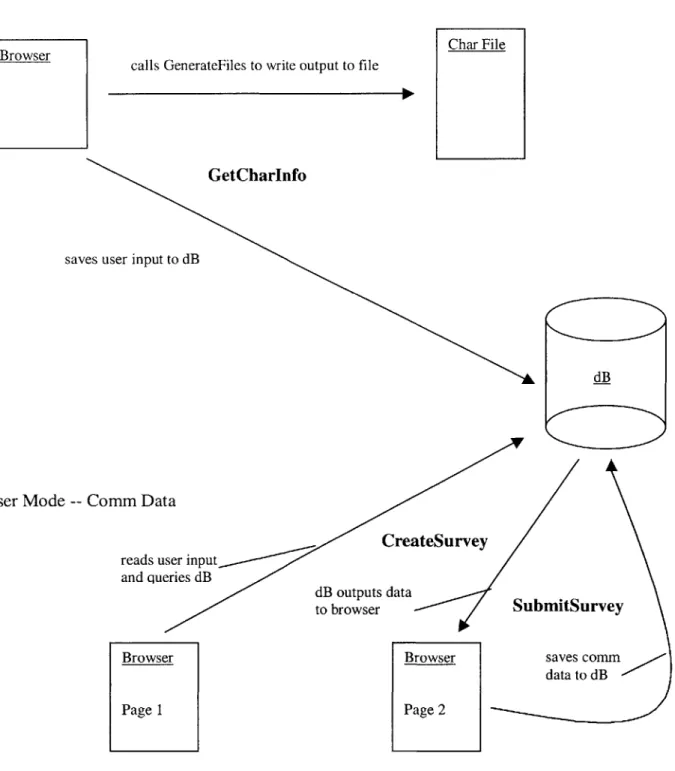
In the user mode, the data flow flows from the browser to the database server. Specifically, there are two separate paths of information, one accounting for the
characteristic data and the other account for the communications data. A new participant to a study must first register his characteristic information into the database. This only needs to be done once. Henceforth, he will only be entering updates of his
communications data. All of this information is saved and stored in the database server. Figure 10 shows a sample characteristic data page.
1. Please enter your nampe: C
2. What is your title? 3. What is your age?
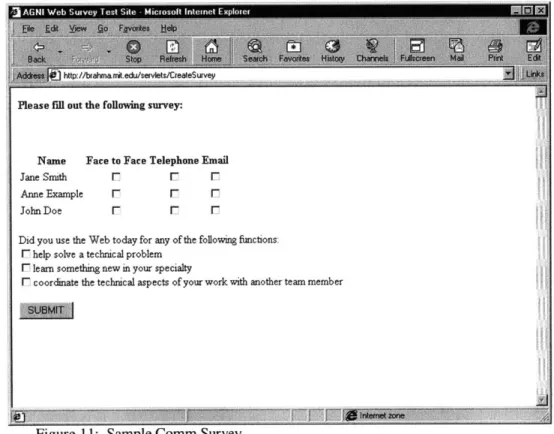
Once the characteristic information has been entered, the user can proceed to the login page, which will ask him to input the name of the study that he is a participant of. The submission of this name will lead him to the communications data page. This page will ask him questions regarding with whom he is communication, and how (face to face,
by email, or by telephone).
The communications data page also asks the user about his usage of the Web. This is a new addition to Agni -- its main goal is to study the effects of the Internet on the
workplace. The user is asked for the purpose his Web usage, whether it be to learn something new, solve a problem, or coordinate work with a colleague. Figure 11 shows a sample communications data page.
Bak - Stop 'Sdheth Homew Seavh FaVcf#te, Htory Chanrws Fuher e M w Pfin Et,
Please fill out the following survey:
Name Face to Face Telephone Email
Jane Smith F F F
Anne Example F F F
John Doe F F F
Did you use the Web today for any of the following functions:
F help solve a technical problem
F lean something new in your specialty
F coordinate the technical aspects of your work with another team member
The purpose of the administrative mode is to extract the stored information from the database in a way that is meaningful to the administrator and in a format that is recognizable by Agni. The administrator can choose to extract all the information stored
in the database server pertaining to a particular study, or just the data of interest. For example, the can choose to just extract the communications data of people who communicated with - -Jane Doe J or - -John Doe " using - -email" at least 5 times. The database server then returns with the corresponding char and comm files. At this point, everything works in the same manner as in the old system: with the char and comm files as inputs, the administrator can use Agni to analyze the data. Figure 12 shows a sample administration page.
Please choose variables:
Jane Smith
Anne Example face_to_face
John Doe telephone
elect talked to* Jack Sample Select method: email Enter threshold number (>):
Module Interactions and Dependencies
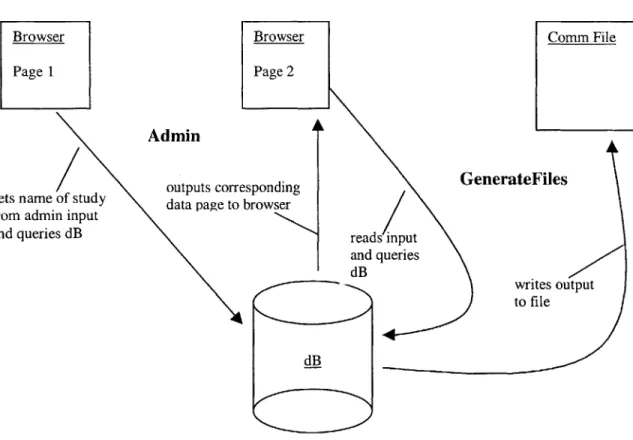
This section will illustrate how the various modules within the system interact. There are ten entities in all: Admin, GenerateFiles, GetCharInfo, CreateSurvey, SubmitSurvey, Char File, Comm File, the Browser, the Agni Client, and finally the Database Server (dB). Admin, GenerateFiles, GetCharInfo, CreateSurvey, and
SubmitSurvey are dynamic processes, while the Char File, the Comm File, the Browser, the Agni Client, and the Database Server are created or modified by these processes. In the diagrams below, the processes are bolded.
Administrator Mode
Browser Page 1
Admin
outputs corr ets name of study data page to rom admin input
nd queries dB
Browser Comm File
Page 2 esponding GenerateFiles browser reads input and queries dB writes output to file dB
Figure 13: Module Dependency Diagram for the Administrator Mode g
f
User Mode -- Char Data
Browser
sav
User Mode
--calls GenerateFiles to write output to file
Char File
GetCharInfo
es user input to dB
dB
Conim Data
reads user input and queries dB dB outputs to browser Browser Page 1 reateSurvey data SubmitSurvey
Browser saves comm data to dB Page 2
Design of Database
A clear and well-designed database server is necessary in the scalability and
extensibility of the system. This section describes the design of the database server used in this project.
A database server contains many databases. Each database is in turn composed of
tables. A table consists of columns of related data. For this project, the name of a particular database in the server corresponds to the name of the study. Thus, a server many contain data for numerous studies. A database is designed to contain three tables. In addition, there is a separate database that exists solely to keep track of all the users of the system, i.e. all participants of all the studies. It serves as a registry of all current and past users. This special database only consists of one table. Figure 15 shows the
organization of database server.
database Table 1 :dtasel Table 2 daase dB Table 3 database
The following is an enumeration of the types of tables found within the database server.
Database Name: central 1 Table Name: -main 1
Description: contains an entry for every participant in every study; one-entry limit for every name' enforced by software
email dBName name
Database Name: <name of study> Table Name: - -khar "
Description: contains the char information inputted by user via the web; one-entry limit for every name enforced by software
email age title name
Database Name: <name of study> Table Name: - -comm 11
Description: tracks comm data; contains an entry for user each time he/she submits survey via the web; timestamp' column indicates date of survey submission
name talkedto facetoface telephone email timestamp
Database Name: <name of study> Table Name: - -freq "
Description: tracks the frequency of name communicating with talkedto' in for the study; one-entry limit per name' enforced by software
Implementation
The implementation of the system was performed with a focus on extensibility. The tools and languages used were selected because of their current popularity and
because they are already well established. This was an important consideration because it would add to the life of the system in the following ways.
A language or tool already enjoying vast popularity and acceptance indicates that
this is indeed tried-and-tested. This is important in a project like this one because the goal is not to push the boundaries of technology, but to build a steady and reliable system that will behave according to specifications.
Another reason behind this implementation decision is that along with popularity comes an abundance of documentation and support. This is often lacking with new technologies. The availability of support, whether in the form of books, documentation on the Internet, or the expertise of another, would greatly facilitate any modification of the system that may occur in the future.
Finally, a language or tool that is well established today has a greater chance of being around tomorrow. This is important should any adjustments need to be made in the future, as a researcher would be able to keep the language/tool and not have to port the system to a newer technology. Although this may need to occur eventually, the goal is to limit the frequency of this type of transfer.
With this in mind, it was decided to use a combination of HTMIL, Java, and SQL. The surveys are coded in HTML, as they are webpages. Since the project is web-based, Java was the language of choice. More specifically, Java servlets were used for the majority of the programming. Java servlets are now a popular replacement for CGI
(Common Gateway Interface) scripts that allow for dynamic generation of webpages. Servlets are developed with the Java Servlet API, a standard Java extension. Finally, a database-backed system requires the use of SQL (Structured Query Language). SQL is the standard language used to express database operations for relational data.
The advantage of a web-based input system is that users from varying
geographical locations can have access to the surveys. A web survey is needed to make the surveys available on the Web. The web server used as the AGNI server is the Apache HTTP Server, a free, popular server available for download from the Internet. Apache JServ, a Java servlet engine, is also used to add servlet capabilities to the server. This
server will host the Java servlets that will be responsible for extracting and manipulating data from the web surveys.
As described previously, data extracted from the webpages is stored in a database server. The database server of choice is the MySQL database server. MySQL is a popular and cost-free database server that is easily downloadable from the Internet. Originally developed by Michael Widenius, it has grown into a huge effort by volunteer developers to expand its capabilities. It is estimated that MySQL runs about 50,000 servers worldwide. (O'Reilly)
Java programs that interface with SQL databases makes use of JDBC (Java DataBase Connectivity) API. JDBC provides a unified API for such programs, thus sparing programmers the headache of worrying about database portability issues. This system uses the MySQL JDBC driver.
The following table summarizes the key aspects of both technologies:
Version URL Source Directory Path
Apache 1.3 http://www.apache.org D:\Program Files\Apache
HTTP Group\Apache\
MySQL MySQL http://www.mysql.org C:\mysql
-Win32
JDBC driver 1.2b http://www.worldserver.
C:\mmmysql-jdbc-I com/mm.mysql/ 1_2b\mm.mysql.jdbc-1 .2b\ Figure 16: Technologies Used in Development
The Java servlets described in the previous section can be found in the Brahma
machine at - -D:\Program Files\Apache Group\Apache Jserv\servlets " . The following
documents the specifications of the servlets. Instances of <dBName> should be replaced
by the actual database name. Admin.java: called by admin.html
input: name of database/study modifies: none
effects: given database name, reads the given database for list of participants; outputs webpage (referred to here as dynamic-admin.html) that includes participants in selection list
CreateSurvey.java: called by login.html
input: email of user modifies: none
effects: given email, reads the database associated with the email for list of people user has communicated with; outputs this list as part of the comm survey webpage (referred to here as dynamic-comm.html); also responsible for asking questions regarding web usage
GenerateFiles.java: called by dynamic-admin.html
input: administrator-given values for talkedto', method , and threshold, hidden value (in dynamic-admin.html) for database name
modifies: none
effects: given inputs, reads given database and generates corresponding comm file in
S- D:\Program Files\Apache Group\Apache\htdocs\<dBName>.comm ' GetCharInfo.java: called by char.html
input: values from char survey, hidden value (in char.html) for database name modifies: dB
effects: writes input to khar' table associated with database name; calls generateCharFileO method in GenerateFiles to generate char file in - -D:\Program Files\Apache Group\Apache\htdocs\<dBName>.char 11 ; updates the main' table in the central' database
SubmitSurvey.java: called by dynamic-comm.html
input: values from comm survey (in comm.html), hidden value (in dynamic-comm.html) for database name
modifies: dB
effects: writes answers from comm survey to comm table in corresponding database; updates the freq table in corresponding database; generates web usage file in
Conclusion and Future Work
This thesis paper describes in detail the development of a web-based input system for Agni. It is currently fully functional and compatible with Agni. For documentation on how to administer this system, please refer to the Appendix.
Great care has been taken to ensure the extensibility and scalability of the system. In the future, Agni can be modified to read directly from the database, rather than read from the char and comm input files. This would require Agni to have network
capabilities, as each Agni client in any geographic location would have to connect to the database server housed at MIT. The advantage would be that the complexities of the input files would be hidden from Agni users, who only would need to be concerned with extracting data from the database. In addition, any Agni user would always have access to the most recent data available from the source.
Appendix: Administrator 's Guide
1 Starting the Apache Server
In the Brahma machine, go to the "Start " menu, then "Programs ", "Apache Web
Server ", and finally click on "Start Apache ":
Start 4 Programs 4 Apache Web Server 4 Start Apache
My Computer Outlook -, 3Con N i Ctte w M CL osa uk*
E xpress d a od o~n
-G6FTP Swv& oatwa
Network Mictosoft
Neighborhood Outlook
9N -NJSla OXA V**r
inbox w eup for Yad Meskepr
inteet Hostex32 deatserver pChmb a ed
Explorer ApfJat
Yahoo NJ\W 16 eN Ectrk
ogenenttMerst VWuA C++ ra13
This web server has to be kept running at all times in order for users to be able to access any survey pages. It must be restarted via the steps above whenever the Brahma machine is rebooted. The default server page is " http://brahma.mit.edu ".
2 Starting the MySQL Server
The MySQL server must always be kept running to allow survey results to be entered into the database. The server can only be started in Dos, so first open up a Command Prompt window:
Start 4 Programs 4 Command Prompt
My Compuer O , T C W WN l T MOmIooOukbrA
E W d Acc""oces Mvopo Po Wer4
SS FT Sere {WMoosoftWad ExrpExsk
Netwal A
Ne ohod Outlook ta C K WP
Inboxu Setup for
Internet Hose3 AOcktrhaive T oc4 fEr mn
NJX N WN 1 6d8r Ptilro
MGS ootI
Cerp Smyqpsdas \s a
Newofre~ocuwNow*d
Once the Command Prompt window is open, type:
3 Setting Up a New Survey
This section should be performed for each new survey, since each survey is unique. Each survey should have is own unique char.html and khar table, but have everyone else in common.
3.1 Creating "char.html" - The Char Survey
This will be the char survey page. It is located in "D : \Program Files\Apache Group\Apache\htdocs ". The following is a sample char.html page:
<HTML>
<HEAD>
<TITLE>Some Background Information</TITLE>
</HEAD>
<BODY BGCOLOR=WHITE> <FORM METHOD=POST
ACTION="http://brahma.mit.edu/servlets/GetCharlnfo">
1. Please enter your name: <INPUT TYPE=TEXT NAME="name"><BR>
2. What is your title? <INPUT TYPE=TEXT NAME="title"><BR>
3. What is your age? <INPUT TYPE=TEXT NAME="age"><BR>
4. Please enter a username. This will be your password to the survey pages. <INPUT TYPE=TEXT NAME="email"><BR>
<INPUT TYPE=HIDDEN NAME="dBName" VALUE="test">
<P>
<INPUT TYPE=SUBMIT NAME=SUBMIT>
</BODY> </HTML>
This page can be created using any text editor or webpage editor. However, any newly created char.html file must replace the italicized "t e st" with the new database/survey name.
3.2 Creating Database Tables
A database should be created for every new study. To do so, open a Command Prompt
window by: Start 4 Programs 4 Command Prompt
C: \mysql\bin\mysql
It should look like the following:
At the "mysql>" prompt, type:
create database <databaseName>;
The value of <databaseName> should correspond to the name of the study. Once the database is created, connect to the database by typing:
connect <databaseName>;
Now proceed to creating the tables for holding various data.
3.2.1 The Khar Table
The khar table is also unique for each survey because it stores char information. Each
column of the khar table must correspond to an input variable in char.html (excluding the hidden database name). For example, in the previous example of a char.html file, the
create table (name VARCHAR(255), title VARCHAR(255),
age INT, email VARCHAR(255));
3.2.2 The Comm Table
This table is the same for all databases/studies. At the "mysql> " prompt, type:
create table comm (name VARCHAR(255), talkedto
VARCHAR(255), facetoface INT, telephone INT, email
INT, timestamp DATE);
3.2.3 The Freq Table
The table is also the same for all databases/studies. At the "mysql> " prompt, type:
create table freq (name VARCHAR(255), talkedto VARCHAR(255), face_to_face INT, telephone INT, timestamp DATE);
4 Generating Files
4.1 The Char File
The char file for each survey is updated automatically whenever a new user enters his char information. In other words, an up-to-date char file is always available for
download. It is available at: http://brahma.mit.edu/<dBName>.char, where <dBName> refers to the name of the database/study.
4.2 The Comm File
The comm file can be generated by going to the administrator page at:
http://brahma.mit.edu/admin.html. Once there, the administrator will be prompted to enter the name of the database/study he is interested in. Entering a correct database name will lead to a second page that looks as follows:
Ado, 45_ httlp.//brahmamit edu/servlets/Admin
Please choose variables:
Jane Smith
Anne Example facetojace
John Doe telephone
to 'All '. The 'method ' variable refers to the communication method used. The
't hreshold ' defines the minimum number of communications that have occurred.
As an example, suppose the administrator says, "I want to see everyone who has talked to John Doe and Jane Smith using email at least 3 times. " He would then select 'John
Doe ' and 'Jane Smith ' for the 'talkedto ' variable, 'email ' for the
' method ' variable, and enter '3 ' for the 'threshold ' variable. Note that multiple
selections are accomplished by holding down the ' C trl ' key. The comm file is then available at: http://brahma.mit.edu/<dBName>.comm, where <dBName> refers to the name of the database/study.
References
Allen, Thomas J. (1967). Communications in the Research and Development
Laboratory, Technology Review. Massachusetts Institute of Technology. Cambridge, Massachusetts.
Allen, Thomas J. (1995). Managing the Flow of Technology. The MIT Press. Cambridge, Massachusetts.
Duggan, Ian J.C. (1998). Development and Evaluation of AGNI: A Distributed Netgraph
Data Collection and Analysis Tool. Master ' s thesis, Massachusetts Institute of
Technology. Cambridge, Massachusetts.
George, Varghese P. (1990). Relational Data in Organizational Settings: An Introductory Note for Using AGNI and Netgraphs to Analyze Nodes, Relationships, Partitions and Boundaries. MIT Sloan School of Management Working Paper, WP#85-93,
Massachusetts Institute of Technology. Cambridge, Massachusetts.
Krebs, Valdis. (1996). Visualizing Human Networks. Release 1.0: Esther Dyson 's
Monthly Report. New York, New York.
Lee, Jack K. (1991). The Design of a Data Pre-Processor in d-Base III Plus for Analysis
of Organizational Communication Networks. Bachelor 's thesis. Massachusetts
Institute of Technology. Cambridge, Massachusetts.
Levi, Lorenzo. (1990). An X Window Graphic Tool For Analysis Of Organizational
Communication Networks. Bachelor 's thesis, Massachusetts Institute of Technology.
Cambridge, Massachusetts.
Rogers, Everett M. & Kincaid, D. Lawrence. (1981) Communication Networks: Toward
a New Paradigmfor Research. The Free Press. New York, New York.
Shannon, Claude. (1948). A Mathematical Theory of Communication. Bell System Technical Journal, vol. 27.
Troll Tech. (1998). http://www.troll.no.
Yarger, Randy Jay, Reese, George & King, Tim. (1999) MySQL & mSQL. 0 'Reilly & Associates. Sebastopol, CA.