HAL Id: hal-03017222
https://hal.inria.fr/hal-03017222
Submitted on 16 Dec 2020
HAL is a multi-disciplinary open access
archive for the deposit and dissemination of
sci-entific research documents, whether they are
pub-lished or not. The documents may come from
teaching and research institutions in France or
abroad, or from public or private research centers.
L’archive ouverte pluridisciplinaire HAL, est
destinée au dépôt et à la diffusion de documents
scientifiques de niveau recherche, publiés ou non,
émanant des établissements d’enseignement et de
recherche français ou étrangers, des laboratoires
publics ou privés.
and Track Online Users
Vikas Mishra, Pierre Laperdrix, Walter Rudametkin, Romain Rouvoy
To cite this version:
Vikas Mishra, Pierre Laperdrix, Walter Rudametkin, Romain Rouvoy. Déjà vu: Abusing Browser
Cache Headers to Identify and Track Online Users. PETS 2021 - The 21th International Symposium
on Privacy Enhancing Technologies, Jul 2021, Virtual, France. �hal-03017222�
Vikas Mishra*, Pierre Laperdrix, Walter Rudametkin, and Romain Rouvoy
Déjà vu: Abusing Browser Cache Headers
to Identify and Track Online Users
Abstract: Many browser cache attacks have been pro-posed in the literature to sniff the user’s browsing his-tory. All of them rely on specific time measurements to infer if a resource is in the cache or not. Unlike the state-of-the-art, this paper reports on a novel cache-based at-tack that is not a timing atat-tack but that abuses the HTTPcache-control and expires headers to extract the exact date and time when a resource was cached by the browser. The privacy implications are serious as this information can not only be utilized to detect if a website was visited by the user but it can also help build a timeline of the user’s visits. This goes beyond tradi-tional history sniffing attacks as we can observe patterns of visit and model user’s behavior on the web.
To evaluate the impact of our attack, we tested it on all major browsers and found that all of them, except the ones based on WebKit, are vulnerable to it. Since our attack requires specific HTTP headers to be present, we also crawled the Tranco Top 100K websites and identi-fied 12, 970 of them can be detected with our approach. Among them, 1, 910 deliver resources that have expiry dates greater than 100 days, enabling long-term user tracking. Finally, we discuss possible defenses at both the browser and standard levels to prevent users from being tracked.
Keywords: web tracking, web privacy, browser cache
DOI Editor to enter DOI
Received ..; revised ..; accepted ...
1 Introduction
Since the early days of the Internet, browsers have con-stantly tried to optimize performance and improve user
*Corresponding Author: Vikas Mishra: Inria, Univ. Lille, E-mail: [email protected]
Pierre Laperdrix: Univ. Lille, CNRS, Inria, E-mail: [email protected]
Walter Rudametkin: Univ. Lille, Inria, E-mail: [email protected]
Romain Rouvoy: Univ. Lille, Inria, IUF, E-mail: [email protected]
experience. In particular, browser caching is a feature that has been widely adopted by all modern browsers. Caches enable the browser to temporarily store and ac-cess some previously downloaded resources in a per-sistent storage, so that they can be reused in the fu-ture, thus reducing the network bandwidth and the time to load a web page. However, from basic features, such as cookies, to more advanced components, such as WebGL [16], persistent storage has constantly been abused for malicious intentions [17, 24]. Browser caches is one of such feature that has received a great deal of abuse over the years [19, 28, 29]. With the rise in the discussion on privacy rights on the Internet [23] and the increasing awareness about privacy issues, browser vendors started adding various safe-guards against well-known techniques to track and steal user information.
One such security development was the same-origin policy [14], which restricts the interaction of resources, such as scripts, loaded from different origins—i.e., origin resources. The same-origin policy includes cross-origin data storage access as well, which enforces the separation of various browser storages by origin. This means that data stored in localStorage or IndexedDB are separated by origin. However, at the time of writing, except for Safari, none of the other major browsers en-force this policy for browser caches. This leaves them exposed to various cache-based attacks, such as his-tory sniffing [34], or even makes it possible to build an unique identifier for online tracking [18]. Researchers have found several ways to probe the cache and extract browsing history [19, 34, 36].
Browsing history has been shown to be highly unique and distinct [22, 32], thus it has a great potential to reveal very sensitive and personal information about users, such as physical location [29], or even their iden-tities [36, 37]. The first instance of history sniffing was reported in2002 [26] and, since then, it has evolved into much more complex attacks, one of them being cache based history attacks [34]. Most of the cache-based at-tacks are timing atat-tacks that exploit the simple fact that it takes longer to retrieve a resource from the in-ternet than from the browser’s cache. However, none of these history sniffing attacks are able to extract the ex-act time when a user visited a website and are limited
to only inferring if a website has been visited before or not.
Contributions. In this paper, we make the following contributions:
1. We present a novel attack that abuses HTTP head-ers to extract the exact time when a resource (JavaScript, CSS or image files) was cached by the browser. By setting up a page with a malicious script, an attacker can probe for the presence of specific resources and build a timeline of the user’s visits on different websites (Section 3).
2. We crawl the Tranco Top 100K websites and find that 91, 755 resources present on 12, 970 websites can be used to mount our attack. Among these re-sources, 25% have an expiration date that is higher than 100 days, providing an adversary a large win-dow to use them and track a user over time. We also analyze the servers delivering these resources and we did not find any server technology with a default configuration that would make their user-base more vulnerable (Section 4).
3. We provide an analysis of two concrete applica-tions, namely tracking and partial history sniffing. We show that the privacy implications of this attack are important as we can not only learn if a website was visited but also when and at which frequency. It becomes possible to a certain extent to build a behavioral profile of a user based on her different visit patterns (Section 5).
4. We discuss possible defenses at both the browser and the standard levels that could prevent an at-tacker from finding the exact date when a resource was cached (Section 6).
Outline. The remainder of the paper is organized as follows. Section 2 delivers the required background on browser caching and describes various response headers used by browsers to enforce their caching policies. Sec-tion 3 details our attack methodology. SecSec-tion 4 presents our evaluation on the Tranco Top 100K websites. Sec-tion 5 introduces two concrete applicaSec-tions. SecSec-tion 6 discusses some defenses along with limitations in our methodology. Section 7 presents related history sniff-ing attacks and contextualizes our contributions with respect to the existing work. We finally conclude the paper in Section 8.
2 Background on Web Caches
All mainstream browsers use memory or disk cache to reduce the page load time (PLT) of websites by saving some static and infrequently changed resources, such as JavaScript files, images and CSS files. Once a re-source is cached locally, the browser can then fetch the locally-stored copy, instead of downloading the resource again from the server, thus saving one round-trip per resource. This saves both time and network bandwidth. Nevertheless, when a browser caches a resource, it has to deal with classical issues that arise from caching, such as making sure that the resource is always up-to-date. Browsers manage this problem by using different head-ers to specify how to manage a resource in the cache.2.1 HTTP Headers
Whenever the browser needs a given resource, it first sends a request to a remote server. Then, the server transmits a response containing both the requested re-source, as well as HTTP headers specifying information, such as the MIME type of the resource and cache-related headers to help the browser determine how to cache the resource. It is the responsibility of the server owner to configure these headers properly to achieve the desired effect on the caches—i.e., to improve the website per-formance and reduce the PLT, while ensuring that their users retrieve up-to-date content. The relevant headers related to the browser caching are:
– Expires: This header is a timestamp that speci-fies how long the content should be considered as fresh. It was the standard header to control caches until the header Cache-Control was introduced in HTTP/1.1. However, most of the servers and content providers keep using this header. The value of this header is the expiry date in the GMT format and the content is considered stale if the date format is not accurate;
– Cache-Control: The headerCache-Control spec-ifies for how long and in which manner the content should be cached. It was introduced in HTTP/1.1 to overcome the limitations of theExpires header. Contrary to theExpires header that enables to only specify an exact end date, Cache-Control enables a more fine-grained control. Possible values for this header are the following:
– no-store specifies that the content should not be cached;
– no-cache indicates that the resource can be cached, but the freshness of the resource has to be validated by the server every time it is requested. Thus, there is still a request sent to the server to validate the freshness of the re-source, but not to download the resource when it is considered fresh;
– max-age specifies the period, in seconds, the content should be cached. For example, the Cache-Control defined with the following value max-age=3600 means that the content can be cached and will be considered stale after 60 min-utes (3, 600 seconds);
– must-revalidate specifies that stale content cannot be served in any case and the data must be re-validated from the server before serving, even in the case where the device has no access to the internet.
– Date The HTTP header Date contains the date when a message was originated from the server and its precision is bounded up to seconds.
2.2 Cross-Origin Resource Sharing
Cross-Origin Resource Sharing (CORS) is a mechanism
that allows a resource from one origin to interact in the context of a different origin. It is a relaxation of another security mechanism, called same-origin policy, that re-stricts the interaction of a document or script from one origin when loaded in a different origin. The origin is for-mally defined as the scheme (protocol), host (domain), and port of the URL used to access the resource.
Why does the Same Origin Policy ex-ist? Many websites use cookies for session and au-thentication. These cookies are bounded to the do-main where they are created and the browser at-taches this cookie to every HTTP call made from that domain. This includes calls for any static re-sources like images, JavaScripts, CSS or even AJAX calls. In the absence of a same-origin policy limiting cookie access, this presents a cross-origin vulnerabil-ity. For instance, imagine a scenario where you visit a website http://maliciouswebsite.com, while being logged into your email athttp://emailprovider.com, if there was no same-origin policy the malicious ac-tor can make authenticated request to sensitive API, like http://emailprovider.com/delete of your email provider, in the background as the browser will attach the cookies when triggering this AJAX call. Thus, the
same-origin policy closes such loopholes by restricting
cross-domain HTTP calls.
Why does CORS exist? Nonetheless, there are legitimate reasons for a website to trigger cross-origin HTTP requests. A website might use a third-party ana-lytics script, third-party fonts or a single-page app might need to make AJAX calls to its API hosted one of its sub-domains. CORS was created to enable such legiti-mate cases of cross-origin or cross-domain requests.
In our attack, we use simple CORS request that relies on the Access-Control-Allow-Origin header to instruct the client of its preference whether it wants to allow that domain to access that re-source or not. In case the server responds with Access-Control-Allow-Origin: *, then the resource can be accessed in any domain.
3 Déjà vu: A Cache-based Attack
In this section, we present our threat model and provide an overview of our attack with the specific mechanics behind it. The threat model is evaluated later on in Section 5 with two concrete applications.3.1 Threat Model
In the novel cache attack presented in this paper, we employ a threat model wherein the attacker provides a malicious client-side script to an unsuspecting user on a cross-origin third-party website. The malicious client-side script then probes for various resources to extract the time when they were cached by the client. The at-tacker can decide which resources to probe based on her intention since the attacker can learn a lot of personal and sensitive information based on the resources saved in the cache.
The attacker can extract browser history similar to earlier known cache based attacks, as shown by Bansal et al. in [19], where the authors probed for re-sources using a Service Worker, and Weinberg et al. in [36] who probed for resources to extract pages visited by the user. Browser history has been shown to be highly unique [22, 32], thus an attacker can infer personal in-formation about the user ranging from their interests to their political leanings or even their true identity. In an-other attack scenario, the attacker might be interested in crafting a stable and unique identifier for the user in order to track her visits on multiple websites similar to
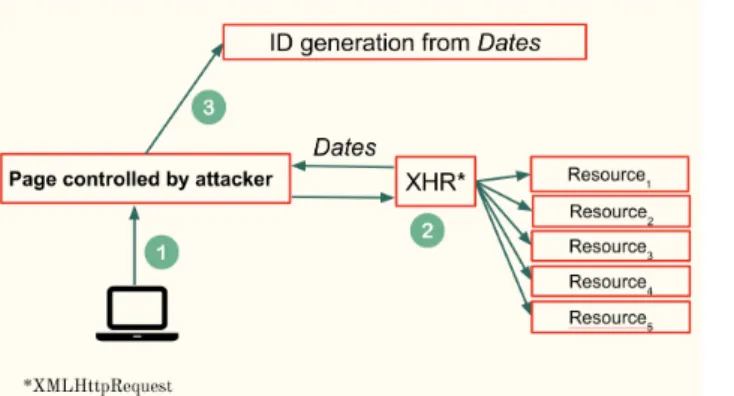
Fig. 1. Overview of the cache-based attack.
other well known tracking techniques [27]. This can be used to show targeted ads to the users based on their interests and previous visits to websites.
3.2 Attack Overview
Summary. Any website can learn the exact time and date up to the second when a vulnerable resource was cached in the browser. This can then be abused to track an online user or reveal a part of her browser history. How does it work? Figure 1 provides an overview of the attack. A victim is led to a controlled webpage (Step 1) that will make requests to one or more on-line resources (Step 2). These resources are hosted ei-ther on the attacker’s domain or an external one. The attacker’s server then collects specific HTTP headers, namely Cache-Control and Expires, from the victim to calculate the times when each resource was cached in the browser (Step 3).
Caching and browser security. There exist many se-curity mechanisms, like SOP [14], CSP [13], or CORS to control with precision what can be loaded and executed in the browser. Yet, despite those being in place, it is still possible to learn the exact time when a resource was cached. Here are the three different insights that make our attack possible:
– Almost all modern browsers have single-keyed caches—i.e., a resource can be shared between mul-tiple domains. On paper, this design is sound as it decreases load time on pages that share the exact same resources. The downside is that an attacker can abuse this to learn what has been cached by the browser from its own controlled domain; – When CORS processes HTTP responses, it filters
headers to only return those that are considered as safe [4]. For example, the header Date is not considered as safe but other cache headers like
Cache-Control and Expires are. Our attack relies on these supposedly "safe" information to infer the cached date of a resource;
– When a resource is put into the cache, the browser also stores the complete set of HTTP response head-ers along with it. As detailed in Section 2, the browser looks at either the Cache-Control or the Expires header to know if a resource must be down-loaded again. The problem is that storing these headers in the cache completely fixes their values in time. At any moment, if a resource is fetched from the cache, it will always be accompanied by these headers with their original values. The browser will never update some of them to reflect how much time has passed since the initial request. Because of this, any website can get access to the safe-listed headers and compute the original caching date of a resource. All in all, as detailed in Section 6.1, countermeasures can be added at both the browser and standard levels to protect against the attack. However, current imple-mentation provided by most browsers make their users vulnerable to it.
3.3 Date Value Extraction
In an initial investigation, we observed that servers use one of two following behaviors to manage the freshness of their resources.
Fixed expiry date. The resource expires at the exact same date for all users who have it in their cache. In this configuration, the server returns a dynamically-calculatedCache-Control:max-age header by subtract-ing the time of request from the fixed expiry date in the future, and returning the result in seconds.
U ser 1 :
Date = Fri, 28 Aug 2020 12:00:00 GMT Expires = Mon, 31 Aug 2020 12:00:00 GMT max-age = 259200
U ser 2 :
Date = Fri, 28 Aug 2020 12:01:00 GMT Expires = Mon, 31 Aug 2020 12:00:00 GMT max-age = 259140
Looking at the above example, the difference of 60 seconds between the two requests is directly reflected in themax-age directive for User 2. Assuming that users do
not all visit the website at the exact same second, it is possible to rely onmax-age to differentiate users. Once the attacker knows about thefixed expiry date of a particular resource, they can calculate the time when a resource was cached by a client following this equation:
Date = fixed expiry date − Cache-Control:max-age Fixed expiry duration. In this scenario, the re-source expires in a fixed amount of seconds for every user. This translates to a unique Expires header for each user.
U ser 1 :
Date = Fri, 21 Aug 2020 04:08:15 GMT Expires = Mon, 24 Aug 2020 04:08:15 GMT max-age = 259200
U ser 2 :
Date = Fri, 21 Aug 2020 16:23:42 GMT Expires = Mon, 24 Aug 2020 16:23:42 GMT max-age = 259200
In the above example, both users have the exact same max-age header and they each have a unique Expires header. For tracking purposes, getting the uniqueExpires header may be sufficient but, if the at-tacker wants to know when the resource was put in the cache to build a behavioral profile of the user, she can use the following formula:
Date = Expires − fixed expiry duration
3.4 Vulnerable Resources Identification
Before conducting the attack, it is necessary to identify online resources that can be fetched—or probed—from any domain and that have either a fixed expiry date or a fixed expiry duration. To identify them, we perform two crawls of the same websites at different times, t1
and t2, and collect the response headers of all images,
CSS and JavaScript files requested on the page. Specific details of the crawl and what we found are reported in Section 4.1. Listing 2 presents the algorithm we used to detect servers with vulnerable configurations, based on the following rules:
– The value of Access-Control-Allow-Origin re-sponse header must be "*". Since we are interested in extracting the time a resource was cached from
#For a resource which was crawled at t1 and t2
#r: dictionary of response headers from both the crawls #Et1: Expiry header at t1
#Et2: Expiry header at t2
#CCM At1: max-age directive from crawl 1
#CCM At2: max-age directive from crawl 2
#ACAOt1: Access-Control-Allow-Origin header at t1
#ACAOt2: Access-Control-Allow-Origin header at t2
def isVulnerable(r):
if (r[ACAOt1] == '*' and r[ACAOt2]== '*' and 'age' not in r): ,→ if ( r[Et2] − r[Et1] = t2− t1 ): return True if ( r[CCMAt1] − r[CCM At2]= t2− t1 ): return True return False
Fig. 2. Pseudo code to identify vulnerable resources.
a cross-origin context, it is necessary for these re-sources to have this header, otherwise the browser will block the request and the probing script will encounter a CORS error;
– The resource should not be cached by any inter-mediary proxy as the response headers would be identical when the resource is requested at different times. We identify such resources by the presence of theage response header. If it is not present, the resource is not cached by any proxy;
– If the resource hasCache-Control:max-age in both the crawls, the difference between values of this di-rective from the two crawls must be equal to the difference between the time of the crawls t1and t2,
thus reflecting afixed expiry date;
– If the resource has theExpires header in both the crawls, the difference between the values of this header must be equal to the difference between the time of the crawls t1 and t2, thus reflecting afixed
expiry duration.
It should be noted that in order to conduct this attack over a long period of time, an attacker must perform reg-ular crawls to maintain a list of vulnerable resources. As the web is very dynamic with servers that keep chang-ing, it should be checked often that each resource is still online and and that they still meet the criteria presented in Listing 2.
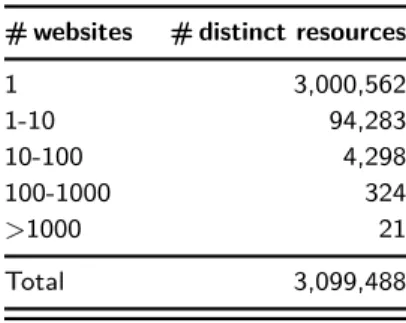
Table 1. Number of resources shared by multiple websites in our dataset of resources common between the two crawls.
# websites # distinct resources
1 3,000,562 1-10 94,283 10-100 4,298 100-1000 324 >1000 21 Total 3,099,488
4 Empirical Evaluation
4.1 Dataset Description
Section 3.4 describes the methodology we follow to iden-tify the resources that are vulnerable and can be used by our probing script. Our methodology requires two crawls at different times hence, we crawled the Top 100K websites from the Tranco list [33] on the 2ndand the 3rdof June, usingHeadless Chrome instrumented with
Puppeteer [10] and recorded response headers of all the
JavaScript, CSS and image resources from the
home-pages and 5 subhome-pages of each of these websites. We were able to collect response headers from 393, 428 web-pages on 78, 532 websites on the 2ndand 391, 806 web-pages on 78, 623 websites on the 3rd. These crawls
re-sulted in us collecting response headers of 12, 606, 963 and 12, 564, 824 resources, respectively. However, we are only interested in those resources and websites that are common in both crawls. After filtering the dataset, we are left with 10, 614, 460 resources representing 382, 774 webpages from 76, 819 websites that are common be-tween both crawls.
Resource sharing. Out of 10, 614, 460 resources found to be common between the two crawls, only 3, 099, 488 of them are distinct as many of them are present in multiple websites and web-pages. Table 1 shows the number of resources along with the number of web-sites where it was seen during our crawls. We can see that 3, 000, 562 of them are only present in one website—i.e. they are unique to a particular web-site. On further investigation of these resources, we found that most of these were served from the same domain as the website while the rest of them were served from various CDNs. We also found several re-sources which were present in many websites. For in-stance, the table shows that about 21 resources were seen in more than 1, 000 websites. All of these 21
resources can be categorized as analytics. These re-sources include fbevents.js, google-analytics.js, addthis_widget.js, adsbygoogle.js, etc. Out of all the resources in our database, google-analytics is the most commonly used resource and is present in 18, 011 websites.
4.2 Crawl Analysis
We use the rules described in Section 3.4 to filter out the resources from the 3, 099, 488 distinct resources ob-tained through our crawls and the results can be found in Table 2. The first rule requires the
Access-Control-Allow-Origin header to be set to * so that they can
be accessed in a third-party domain. Out of 3, 099, 488 resources, 616, 190 have an Access-Control-Allow-Origin header value of *.
The second rule requires that the age header should not be present to exclude resources that are cached by intermediary proxies. In our pool of distinct resources, there are 2, 145, 938 resources which do not have the age header.
Our dataset has 1, 586, 347 resources that have the
Expires header and 2, 277, 277 the Cache-Control:max-age directive. This shows the extent of the usCache-Control:max-age of the Expires header even though it has been deprecated and
replaced by the Cache-Control:max-age directive. Finally, we check the times collected during our crawl on each of these resources to keep all those that are vulnerable to our attack and whose presence in the browser cache can be probed (see pseudo code in Fig-ure 2). In total, there are 91, 755 resources which can be exploited to instrument our attack. These resources are present on 44, 795 webpages from 12, 970 websites and visits to these pages can be detected by our attack.
Table 2. Number of resources satisfying the rules.
Rule # resources
1 Access-Control-Allow-Origin = * 616,190
2 age header not present 2,145,938
3 ’Expires’ header present 1,586,347
4 ’Cache-Control:max-age’ header present 2,277,277
Table 3. Number of distinct resources of type image, CSS and JavaScript common in both crawls.
Resource # resources # vulnerable
Image 1,680,543 63,335 (3.77%)
JavaScript 898,358 18,125 (2.02%)
CSS 520,587 10,295 (1.98%)
Total 3,099,488 91,755 (2.96%)
4.2.1 Types of Vulnerable Resources
As explained in Section 4.1, during our crawls, we only store header information about resources whose
content-type header contains either javascript, image or CSS.
Table 3 shows the distribution of collected resources along with number of them that are found to be vul-nerable. From the table, we can observe that the max-imum number of vulnerable resources identified from our crawls of Tranco Top 100K websites are images, followed by JavaScript and CSS resources. The vulner-ability of a resource depends on the configuration of caching headers provided by the servers, hence it is hard to reason about such results.
4.2.2 Vulnerability Window
We define the vulnerability window (VW) as the du-ration for which a particular resource is cached in the browser. This duration also denotes the amount of time until which our probing script can detect the presence of a cached resource. As explained in Section 2, the server decides the freshness period of the resource and commu-nicates this information to clients using either
Cache-Control:max-age or Expires header. Figure 3 shows a
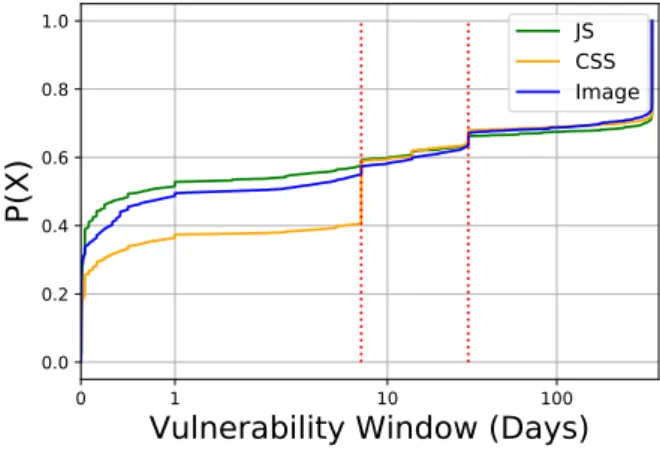
CDF of vulnerability window of all the resources found to be vulnerable to our attack.
We can see from Figure 3 that about 30% of vulner-able images, 35% of vulnervulner-able JavaScripts and 30% of vulnerable CSS resources have a VW greater than 100 days, which means that, if a user visits a website that leads to one of these resources being cached, they might remain cached for at least the next 100 days. We also observe that ~55% of JavaScript resources have a VW less than 7 days, whereas only 40% of CSS resources have a VW as short as 7 days and the images are in be-tween the two with ~55% of them having a VW shorter than 7 days.
0 1 10 100
Vulnerability Window (Days) 0.0 0.2 0.4 0.6 0.8 1.0 P(X) JS CSS Image
Fig. 3. CDF of vulnerability window for images, CSS and JavaScript resources (X-axis has a logarithmic scale).
We also noticed that CSS and JavaScript resources have comparatively higher VW’s as compared to image resources. MDN guide on HTTP-Caching [15], recom-mending the usage of a technique called revving [35] for JavaScripts and CSS, gives us a clue on the reason for such a behavior. It is recommended to set expiration times as far in the future as possible for the best re-sponsiveness and performance. Then, when it is time to update these resources, developers only have to modify the name of the resource so that the change is propa-gated to all clients on future visits. This way, developers do not have to worry about ever serving stale content and hence being able to set long expiration times.
Another interesting observation can be made from Figure 3. We notice that 11,646 websites serve a very high number of resources with an expiry duration of less than 30 days and a smaller—but significant—number of 1,910 websites serve resources with an expiry dura-tion greater than 100 days. 574 of them have resources between 30 days and 100 days. We believe the reason for this behavior is because of the difference in use-case of these resources. For instance, looking at image re-sources, ~65% of them have a VW less than 30 days and ~30% of them have a VW greater than 100 days, which means that there are only about 5% of vulnera-ble images which have a VW between 30 days and 100 days. The reason being, there are some images which are specific to a page or are part of a dynamic page, for example, an image of a politician on news website’s front-page on a given day. Whereas there are some im-ages which are shared by other pim-ages of the website and are expected to remain unchanged for longer duration, for example, the logo of the website. For images that are present on all pages, it makes sense for the server to fix a long expiry date, whereas the website does not
Table 4. 10 most common values of server header with different versions of the same server grouped together. For instance,
Nginx/1.15.3 and Nginx/1.13.7 are grouped as Nginx.
Server # resources # vulnerable
Nginx 760,546 27,058 (3.56%) Cloudflare 577,052 2,747 (0.48%) Apache 552,584 5,712 (1.03%) Microsoft 243,999 3,642 (1.49%) AmazonS3 107,319 1,335 (1.24%) Tengine 74,641 1,245 (1.67%) NetDNA-cache/2.2 37,258 357 (0.96%) Akamai 35,276 5967 (16.91%)
Google Tag Manager 29,355 0 (0%)
ESF 25,565 0 (0%)
want to take up space in the browser cache for too long for resources which are specific to a page or are part of a dynamic page. Thus, we believe that images that have a VW of greater than 30 days (~35% of vulnera-ble images) are those which are mostly site-wide shared resources, such as logo.
4.2.3 Servers Exposing Vulnerable Resources
Out of 3, 099, 488 distinct resources common between the two crawls, 2, 841, 435 of them have a server [12] header, which contains information about the software (CDN’s in some cases) used by the origin server to han-dle the particular request. Table 4 shows the 10 most common values of the server header along with the number of resources which they served in our dataset. The table also shows the number of vulnerable resources with a particular value of the server header. Nginx, Cloudflare, and Apache are the Top 3 values of the
server header observed in our dataset. It is important
to note that Nginx and Apache are what we would nor-mally consider a server, while Cloudflare provides var-ious CDN services that automatically optimize the re-sources for quality and performance.
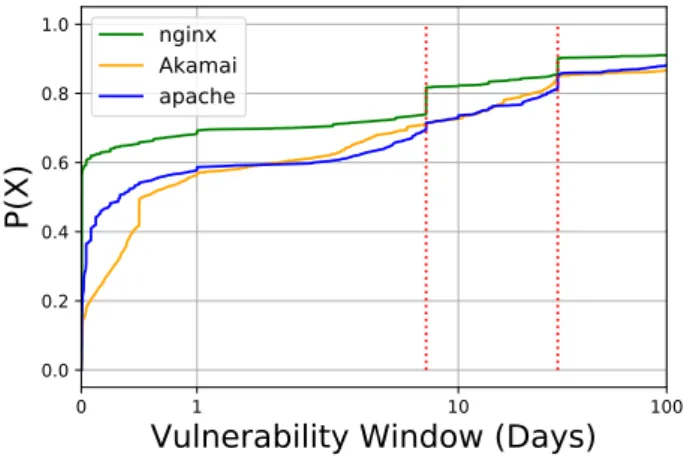
We can see from the table that Nginx has the high-est number of vulnerable resources followed by Akamai and Apache. Figure 4 shows a CDF plot for the vulner-ability windows for these 3 servers. We can see from the figure that Apache has the highest fraction of resources with higher vulnerability windows as compared to Aka-mai and Nginx. For instance, ~28% of resources served by Apache have a vulnerability window greater than 7 days whereas only ~25% of resources served by Akamai
0 1 10 100
Vulnerability Window (Days) 0.0 0.2 0.4 0.6 0.8 1.0 P(X) nginx Akamai apache
Fig. 4. CDF of vulnerability window for Top 3 vulnerable servers (X-axis has a logarithmic scale).
and ~19% of resources served by Nginx show the same vulnerability window.
In the end, we did not find any specific correla-tion between vulnerable resources and affected servers. There are no servers which by default serve a resource with the headers expected for this attack.
4.3 Performance Evaluation of the Attack
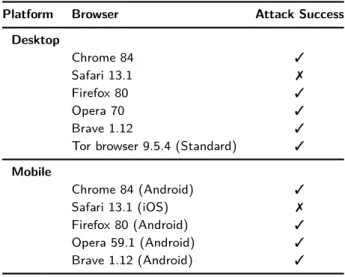
We tested our attack on all the major desktop and mo-bile browsers. Table 5 shows the results of our tests. Our script fails in Safari and every browser on iOS devices because WebKit—Safari’s browser engine—implements cache isolation by default. This means that a resource saved in the cache for domain A will be downloaded again when requested by our probing script embedded in domain B. Our attack also failed in iOS browsers, such as Chrome and Firefox, because Apple enforces every browser on iOS to use WebKit behind the scene. Another important distinction between our attack and other timing-based cache attacks for history sniffing is that we do not need to download the resource, as we are only interested in the response headers and not the response body. Hence, we do not sendGET queries, but instead rely onHEAD queries, which are much faster. This also makes our attack independent of the size of the re-sources being probed, unlike other timing attacks. How-ever, this does not hold true for using our attack when building a tracking identifier since we useGET queries in that case to poison the cache.
Based on our tests with two recent laptop devices on Linux, and a MacBook Pro 2018 running MacOS 10.14, a OnePlus 7T running on Android 10, and various net-work conditions, such as over 4G, WiFi and Ethernet:
Table 5. Browser compatibility
Platform Browser Attack Success
Desktop Chrome 84 3 Safari 13.1 7 Firefox 80 3 Opera 70 3 Brave 1.12 3
Tor browser 9.5.4 (Standard) 3
Mobile Chrome 84 (Android) 3 Safari 13.1 (iOS) 7 Firefox 80 (Android) 3 Opera 59.1 (Android) 3 Brave 1.12 (Android) 3
an attacker can expect to probe over 300 URLs/second when the resources being probed are in the cache, while they can probe over 100 URLs/second when the re-sources are not found in the browser’s cache. In essence, an attacker could feasibly check thousands of resources in under 30 seconds without having any noticeable im-pact on the device—or the webpage—performance.
5 Privacy Implications
In this section, we explore two concrete applications of our attack to understand the privacy implications be-hind it. We use the data collected from our crawl to evaluate their effectiveness and highlight the potential problems of extracting the exact time when a resource was put into the cache.
5.1 History Sniffing.
Illegal access of browser history through probing is com-monly referred to ashistory sniffing. The techniques to access the browser history include using CSS selec-tors and cache-based attacks. However, most of the pre-viously known cache-based attacks are timing attacks that rely on the difference in the time it takes to down-load the resource from the server directly or using a cached copy. All of these attacks are limited to only in-ferring if a resource is in the cache and none of them are able to extract the exact time when it was cached. Thus, contrary to more traditional history sniffing, the attack presented in this paper presents two major differences.
Time of visit. We can not only know if a page was visited, but also when it was visited. Depending on the website, some resources are shared across all pages of the same website like a custom CSS file or a third-party library. Relying on this type of resources provides the time of the initial visit but not more. Other websites have resources that are used on a single page. For exam-ple, news websites and blogs often have unique images at the top of each of their article. This presents some serious privacy implications as this information can be leveraged to build a timeline of the user’s visit. We can learn if a visit to a particular domain was just a one-off or if it is repeated and part of the user daily rou-tine, showing a keen interest to the topics discussed on the visited pages. This information can also be abused to better target the user and understand her preferred time for reading news, watching videos or shopping. Ad companies could then predict when she will be online to deliver an ad at just the right time. All in all, knowing if a page was visited is already concerning, but knowing exactly when adds an additional layer of intrusiveness that has not been seen before in more traditional sniff-ing.
Partial history. As discussed previously, not all pages are vulnerable to the attack as they may not present resources that can be probed on any domain. However, even if the reconstructed browser history is partial, it can still present some sensitive information on the user. Moreover, the presence of a vulnerable resource in a webpage does not necessarily mean that our attack would succeed in detecting if the webpage is present in the user’s browsing history. Vulnerability simply means that our probing script can detect if a resource is in the browser cache or not. To infer a website visit from a cached resource requires us to have the knowledge of whether that resource is present in any other website or not. For instance, if we detect that a resource A is cached after a visit to a particular website X and that resource is not used by any other website then we would be able to infer that the user has visited the website X. Proof of Concept. A PoC of this sniffing tech-nique can be found at https://github.com/mishravikas/ PETS_dejavu where we test if the user has visited one of the 5 websites that are vulnerable in the Tranco Top 100 list.
5.1.1 Resources Unique to a Website
Considering that websites are interconnected with many resources being shared among many websites and
web-pages, not all vulnerable resources can be associated with an individual website. Thus we calculate the num-ber of resources which are only used by one website in our dataset of 100K websites to figure out how many of them could be used to infer visit to a particular website. Out of 91, 755 distinct resources common between the two crawls, 87, 812 of them are only used in one web-site while the remaining are present in more than one website. This translates to 8, 456 websites which have at-least one resource that is used by only that website in our dataset of 100K websites. Thus, visits to these 8, 456 websites can be inferred by probing for a single resource.
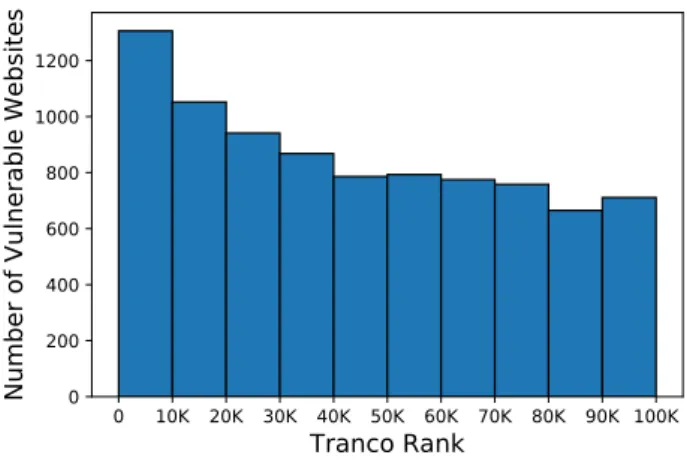
Out of these 8, 456 websites, 26 of them are ranked in the Tranco Top 100, 168 are ranked in Top 1K, while 1, 306 belong to the Tranco Top 10K list. Figure 5 de-picts the distribution of website rankings that are vul-nerable to our attack.
Our results show that the vulnerable websites are somewhat evenly distributed in the Tranco ranking, popular websites are also vulnerable, and the popularity of a website does not appear to have a huge impact on its vulnerability to our attack.
0 10K 20K 30K 40K 50K 60K 70K 80K 90K 100K Tranco Rank 0 200 400 600 800 1000 1200
Number of Vulnerable Websites
Fig. 5. Histogram showing Tranco ranking of websites vulnerable to our attack. X-axis shows the range of Tranco ranks whereas
the Y-axis repors on the number of vulnerable websites.
5.1.2 Resources Unique to a Sub-page
Since we collected in our crawls resources from 5 sub-pages of each of the 100K websites, we can analyse if it is possible to detect specific page visit and not just the website visit. For instance, if a website has a unique resource in each of the sub-page then the presence of
that resource in a user’s browser cache would indicate that the user has visited that specific page. We found that out of 91, 755 distinct vulnerable resources, 58, 496 of them are only used in a single sub-page and are not shared by any other sub-page. This translates to 9, 705 pages crawled which have at-least one resource used in only that specific page. These sub-pages belong to 5, 574 websites, thus some of these sub-pages belong to the same website. On further investigation, we observed that most of these websites and sub-pages are either blogs, news providers or other article based websites.
This has severe privacy concerns as it leads to vari-ous behavioural detection. For instance, in our dataset, we noticed that news websites follow the pattern of hav-ing a unique image in each of the news article, thus it is possible to detect specific news articles read by a user on the vulnerable news provider’s websites. This results in an attacker inferring political leanings of a user, their preferred news provider as well as their daily habits.
5.1.3 Categories of Vulnerable Websites
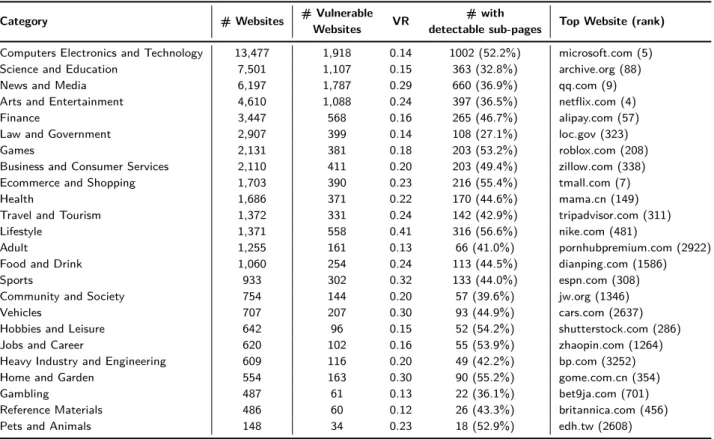
We use the category feature of SimilarWeb [11] to clas-sify the websites in our dataset to 24 possible cate-gories. We were able to classify 56,767 websites from our dataset of 76,819 websites as the remaining websites were unknown to the service. Table 6 shows the list of all 24 categories along with the total number of web-sites along with the ones that are vulnerable. The high-est number of vulnerable websites belongs to the
Com-puter Electronics and Technology category with 1,918
websites, even though they are represented a lot in our dataset compared to other ones. These websites are fol-lowed closely by News and Media at 1,787 websites and
Science and Education at 1,107. On the opposite side,
the Pets and Animals category is the least vulnerable one in our dataset with only 34 of them being vulnera-ble.
Table 6 also shows the Vulnerability Ratio (VR) and the top ranked vulnerable website for that category. Vul-nerability ratio is calculated by dividing the number of vulnerable websites by the total number of websites in each category. The Lifestyle category has the highest vulnerability ratio at 0.4. In other words, 40% of all web-sites categorised as Lifestyle were found to be vulnerable to our attack. Furthermore, websites categorised as
Ref-erence Materials have the lowest VR of 0.12. Finally,
re-garding vulnerable websites with detectable sub-pages, we do not notice any specific trends. Between 35% to
Table 6. Complete list of categories sorted by total number of websites.
Category # Websites # Vulnerable VR # with Top Website (rank)
Websites detectable sub-pages
Computers Electronics and Technology 13,477 1,918 0.14 1002 (52.2%) microsoft.com (5) Science and Education 7,501 1,107 0.15 363 (32.8%) archive.org (88)
News and Media 6,197 1,787 0.29 660 (36.9%) qq.com (9)
Arts and Entertainment 4,610 1,088 0.24 397 (36.5%) netflix.com (4)
Finance 3,447 568 0.16 265 (46.7%) alipay.com (57)
Law and Government 2,907 399 0.14 108 (27.1%) loc.gov (323)
Games 2,131 381 0.18 203 (53.2%) roblox.com (208)
Business and Consumer Services 2,110 411 0.20 203 (49.4%) zillow.com (338) Ecommerce and Shopping 1,703 390 0.23 216 (55.4%) tmall.com (7)
Health 1,686 371 0.22 170 (44.6%) mama.cn (149)
Travel and Tourism 1,372 331 0.24 142 (42.9%) tripadvisor.com (311)
Lifestyle 1,371 558 0.41 316 (56.6%) nike.com (481)
Adult 1,255 161 0.13 66 (41.0%) pornhubpremium.com (2922)
Food and Drink 1,060 254 0.24 113 (44.5%) dianping.com (1586)
Sports 933 302 0.32 133 (44.0%) espn.com (308)
Community and Society 754 144 0.20 57 (39.6%) jw.org (1346)
Vehicles 707 207 0.30 93 (44.9%) cars.com (2637)
Hobbies and Leisure 642 96 0.15 52 (54.2%) shutterstock.com (286)
Jobs and Career 620 102 0.16 55 (53.9%) zhaopin.com (1264)
Heavy Industry and Engineering 609 116 0.20 49 (42.2%) bp.com (3252)
Home and Garden 554 163 0.30 90 (55.2%) gome.com.cn (354)
Gambling 487 61 0.13 22 (36.1%) bet9ja.com (701)
Reference Materials 486 60 0.12 26 (43.3%) britannica.com (456)
Pets and Animals 148 34 0.23 18 (52.9%) edh.tw (2608)
55% of all vulnerable websites are also subject to sub-page detection across almost all categories.
Overall, this analysis of website category shows that no single category can be targeted more than another as it all depends in the end on how a website is structured and configured.
5.1.4 Case Study: News websites
In this subsection, we present a case study demonstrat-ing feasibility of such an attack on news websites. The objective being - extracting the articles read by a user on websites of these news providers. The attack is sim-ple for news websites because almost every news article has a unique image-resource embedded in it. We probe for the presence of this resource in a user’s cache and deduce if they have read the article or not based on the results of our probe.
We manually visited the websites of 5 popular American news providers, namely msn.com (rank 49), cnn.com (rank 63), cnbc.com (rank 182), nbcnews.com (rank 405) and msnbc.com (rank 1439), on Monday, 31 Aug 2020. We found that all of these websites in-cluded an image with a unique URL in most of their
news articles. The images from cnbc.com and cnn.com had a fixed expiry duration where the images were served with a dynamic Expires header and a con-stant Cache-Control:max-age header. On the other hand, images frommsn.com, nbcnews.com, msnbc.com were served with a fixed expiry date and a constant Expires headers.
The vulnerability window of the images from these websites ranges from 1 hour forcnn.com to 90 days for nbcnews.com and msnbc.com. For images from msn.com and cnbc.com, the vulnerability window was found to be 5 days and 30 days respectively. Thus, if the user reads the article on the day of publication, our attack can detect that for as long as 90 days for some cases and as short as 1 hour forcnn.com.
This case study highlights the seriousness of our at-tack as learning a user’s news preferences has serious privacy implications. It could reveal their political lean-ings, sexual orientation or even their financial interests based on the types of articles they read.
5.2 User Tracking
Another application of this attack is about identifying a user on any given web page. It is possible to create an identifier by combining the times when some spe-cific resources were cached in the user’s browser while bypassing any other tracking mechanisms, like cook-ies or browser fingerprinting [31]. Looking at the tab "about:cache" in Firefox, which lists all resources cached in the browser, some elements can stay on disk for as long as ten years (even if the expiration date is set even further in time).
However, as mentioned previously, extraction of timestamps only works for vulnerable resources. Thus, out of 3, 099, 488 distinct resources in our dataset, 91, 755 of them can be used for tracking as they were found to be vulnerable, as shown in Table 2. ~31% (28, 892) of these resource had a vulnerability window greater than 100 days i.e these resources could possibly remain in a browser’s cache for longer than 100 days and any identifier built using these resources can be consid-ered stable for that duration. Still, the biggest weakness of this attack is that it is difficult to scale past a cer-tain number of users. If a website has a high traffic, it would be very difficult to distinguish every single user without a specially crafted algorithm as the precision of the cache headers is bounded to seconds.
Proof of Concept. A PoC of this tracking tech-nique can be found at https://github.com/mishravikas/ PETS_dejavu. It is important to note that our PoC is basic and a more advanced script can be developed to probe different resources for users who would visit the website at the same time. Furthermore, the probing script could be modified with additional complexity by first querying with aHEAD query to ensure that the user’s cache is not poisoned. However, if none of the resources being probed turn out to be in the cache, another probe with aGET query could be performed in order to poison the user’s cache with the desired resources and create an identifier for the user to identify them on their next visit.
6 Discussion
6.1 Defenses
To prevent an attacker from finding the exact date when a resource was cached, we detail several possible defense solutions:
Deploy cache isolation. Using a double-keyed cache by including both the URL of the resource and the domain of the top-level document on which the re-quest was made effectively mitigates the attack. The attacker is then unable to test for resources outside of the domains that she owns. Safari is resistant to our at-tack as it has been using the eTLD+1 of the top-level document as a second key since 2013 [1]. A possibility of using a triple-keyed approach is even being discussed by the WHATWG and browser vendors to protect from attacks inside sub-frames in the same document [3, 5, 7]. However, partitioning of the cache limits the re-usability of third-party resources such as commonly used scripts and fonts. In such a scenario, each website would need to download and store its own copy of a resource even if it was cached earlier for a different origin. Experiments ran by the Google Chrome team [6] show that overall network load increases by around 3% while cache misses increase by about 2%. Third-party fonts seem to be the most affected with an increase of cache misses by 7% while JavaScript and CSS files are at 5% and 3% re-spectively. A more targeted countermeasure would be to partition the cache for only those resources that set
access-control-allow-origin: *. This approach will thwart
the attack while still keeping the performance advan-tages of shared caches for authorized domains.
Refresh the headers of cached resources. An-other approach to protect against the attack is for the browsers to refresh the Cache-Control and Expires head-ers every time the resource is requested, even when the resource is loaded from the cache. This way, if the at-tacker probes for a resource, she will not be able to dis-tinguish between the resource being loaded for the first time and a resource being loaded from the cache. To accompany this change, developers must then adopt a revved naming convention so that new versions of scripts are downloaded as soon as they are released. Introduced by Steve Souders in 2008 [35], revving consists in includ-ing the version number in the scripts’ name. If a script is not updated frequently, developers can put an ex-piry date that is very far in the future to prevent server load and an uptick in version will trigger an automatic change for all clients.
Remove the Cache-Control and Expires head-ers from the CORS-safelisted response headhead-ers. By removing these two HTTP headers from the list of authorised response headers, an attacker would not be able to calculate when a specific resource was cached. Out of the three solutions detailed here, this is likely the simplest one with the least amount of impact, as it would not overload CDNs and it would not require
developers to completely change their naming conven-tions.
6.2 Limitations
In this study, we set out to understand the extent to which HTTP cache headers could be abused for history sniffing. Here, we discuss some limitations inherent to our approach.
6.2.1 Impact of User’s Location
For our evaluation, we performed crawls from a single address in our research lab. While crawling from a differ-ent location could impact the exact numbers of vulner-able resources we detected with the presence of proxies or different expiry dates, we believe this difference to be marginal and does not impact the qualitative aspect of our findings.
6.2.2 Repeatability of the History Sniffing Attack Our attack uses the HTTP HEAD method to avoid vul-nerable resources being downloaded and cached unnec-essarily. This has the important advantage of not pollut-ing the cache, makpollut-ing the attack repeatable. Of course, the attack can only be repeated for resources that have not been modified by the server (as well as the fact the resources must meet the criteria we have specified in Section 3.4). An extensive history attack requires a large list of vulnerable resources to test for. We obtain the list of resources through web crawls, and the list must be regularly updated to obtain new resources, as well as purge old ones. The time between crawls and the natural churn of the web may lead to some discrepancies when probing a large list of resources.
A variant of our attack might use the HTTP GET method. However, this would lead to downloading re-sources and polluting the cache. In some use-cases such as online tracking, this may be desirable since additional information, such as timings, can be calculated in addi-tion to the Date headers. Furthermore, an attacker may be able to filter polluted cached items from those cached through organic processes by using the timestamps to discriminate them.
6.3 Vulnerability Disclosure
We reported our attack on cache headers to the Chrome and Firefox teams. Despite detailed explana-tions, Google triaged the vulnerability as a duplicate, comparing it to timing attacks based on the actual mea-surement of time. Mozilla acknowledged our attack and told us that double-keyed cache was added in 2019 to the Firefox codebase and could be activated by switching the browser.cache.cache_isolation preference to true [2].
6.4 Cache Partitioning Update (November
2020)
While the bulk of this study was conducted in the first half of 2020, some important changes have happened regarding countermeasures in browsers. In Chrome 86 released on October 6th, triple-keyed cache was
de-ployed for all users [8, 30]. Since a lot of browsers are depending on the same code base, we expect Brave, Edge, Opera and Chromium-based browsers to integrate these changes relatively fast. Regarding Firefox, the
cache_isolation preference has still not been switched
on by default as Mozilla developers are working to iso-late not only the cache but also the different stacks of the browser [9].
7 Related Work
Browsing history of end users can reveal a lot of per-sonal and sensitive information about them, such as their age, gender and even their identities [36, 37]. It has been shown to be highly unique and distinct with only a subset of the user’s history needed to perform identifica-tion [22, 32]. History sniffing has been a popular research topic since 2002, when attackers discovered a way to ex-ploit :visited selector to detect the links visited by a user [20, 26]. Since then, several other techniques have been devised and published on this topic [19, 29, 34, 36]. In this section, we present some of the main techniques published over the years for history sniffing, which can be broadly classified into two categories: Visited-link and Cache-timing attacks. Finally, we compare our at-tack presented in this paper and we show that it is fun-damentally different from other published contributions, as we are able to learn not only the fact that a website has been visited, but also the exact time when it was visited, hence the order of websites visited by the user.
Visited-link attacks. In 2002, A. Clover reported a way to detect what pages have been visited by a user using CSS selector:visited [26]. This selector is used to apply different styles, such as color, to previously vis-ited links stored in the browser history. For a long time, attackers could usegetComputedStyle and other simi-lar functions, such asquerySelector, to get the styling of every element in DOM, including elements of the :visited class. The attacker then simply had to query the current style of an element with an uri pointing to a potential link the user might have visited. When the style returned by the selector was consistent with the ones defined for elements of :visited class, the at-tacker would know that the user has previously visited that link. This vulnerability was fixed by major browser vendors by modifying the results of selectors applied on elements of :visited class. For instance, Firefox [21] fixed it by lying ongetComputedStyle and other func-tions, such as selectors, and by limiting various other styling options for visited links.
However, this was not the end of visited-link at-tacks as browser vendors introduced more advanced API’s to manipulate various components of the ren-dering process, such as the Paint API, and exposed them to JavaScript: the attacks became more advanced. Weinberg et al. [36] presented an attack using re-paint events to sniff history and also demonstrated interac-tive ways to trick users into leaking their history, such as CAPTCHAS, and inferring the color of the links us-ing reflections on the webcam. Smith et al. [34] demon-strated new attacks belonging to this category by abus-ing the CSS Paint API, CSS 3D transforms and SVG fill-coloring.
Cache-timing attacks. Timing attacks have been well-known for quite a long time with the initial idea of using them in the context of browsing history and caches being introduced by Felten et al. [28]. They were able to measure the time difference to load resources that are present in a browser’s cache, as compared to the ones which the user’s client sees for the first time. Since then, cache-timing attacks have been re-visited by researchers multiple times, with each iteration demonstrating more severe implications and improving the effectiveness and scale of deployment. Jia et al. [29] demonstrated geo-location inference attack using browser-cache, where they were able to geo-locate a user based on their browsing history on 62 % of Alexa Top 100 websites. C. Bansal et al. [19] demonstrated robust cache-attacks and improved the efficiency of the timing-attacks by utilizing Web Worker API, while also improving the
repeatability of the attack by eliminating cache con-tamination during cache probing.
Although the underlying objective—i.e., history sniffing—of our attack and both these categories of at-tacks remains the same, our attack differs from visited-link attacks since we do not rely on any style probing, while also not relying on time measurements to probe resources present in browser cache, unlike cache-timing attacks. Furthermore, unlike any other history sniffing attack, our method also succeeds in getting the exact time when a user visited a particular website, which is a first for history attacks to the best of our knowledge. The closest class of attacks which can be associated with the one we present in this paper is probably the cache-timing attacks as similar to our attack they also misuse the browser cache as a persistent and shared data store. To the best of our knowledge, abusing
Cache-Control:max-age and Expires headers to get the Date
and time of a website visit has not been reported before. Furthermore, since we do not rely on any time measure-ments for our attack, it is immune to the safe-guards added by browser vendors over the years to mitigate against potential security threats such as, Firefox lim-iting the resolution and precision of the timing API, or Chrome’s solution of disabling re-paints for targets asso-ciated with a link which was released in Chrome 67 [25] to mitigate attacks based on CSS Paint API.
8 Conclusion
In this paper, we presented a novel browser cache attack that does not rely on timing measurements to detect if a resource exists in the cache. We showed how caching headers can be abused to extract the exact date and time a user visited a webpage that included a vulnerable resource. We also show applications of our attack for history sniffing as well as tracking. We found all major browsers, except Safari, to be vulnerable to our attack. Our attack works for third-party scripts because it relies on CORS safe-listed headers.
We analyzed static resources on the Tranco Top 100K websites and show that 12, 970 of them in-clude vulnerable resources and visits to 8, 456 websites can be detected by a single resource probe. We also anal-yse the possibility of detecting visits to not only a web-site but also webpages of a webweb-site. We show that visits to 9, 705 webpages from 5, 574 websites can be detected by a single resource probe with many of them belong-ing to news providers. This presents serious privacy
im-plications as it is possible to infer user behaviour and preferences such as their preferred source of news and their political leanings.
Browsers that implement cache-isolation are resis-tant to this attack, as well as many of the cache-based timing attacks. Currently, only Safari does this by de-fault, but plans to activate this feature in Firefox, or implement it in Chrome, are a step in the right direction and would improve privacy and security at the expense of some loss in caching performance.
Acknowledgments
We thank our shepherd Richard McPherson and the anonymous reviewers for their helpful feedback. This work is funded by the ANR FP-Locker project under grant number ANR-19-CE39-00201.
References
[1] Optionally partition cache to prevent using cache for track-ing – WebKit Bug tracker. https://bugs.webkit.org/show_ bug.cgi?id=110269, 2013.
[2] Add Cache-Isolation behind a pref – Mozilla Central. https: //hg.mozilla.org/mozilla-central/rev/a5e791146ef5, 2019. [3] Double-keyed HTTP cache – WHATWG Fetch GitHub
Repository. https://github.com/whatwg/fetch/issues/904, 2019.
[4] CORS safelisted headers from the Fetch living standard – WHATWG Standards. https://fetch.spec.whatwg.org/ #cors-safelisted-response-header-name, 2020.
[5] Determine the scope to which storage and communications should be scoped in the third-party context – Mozilla Bug tracker. https://bugzilla.mozilla.org/show_bug.cgi?id= 1558932, 2020.
[6] Explainer - Partition the HTTP Cache – GitHub. https: //github.com/shivanigithub/http-cache-partitioning, 2020. [7] HTTP Cache Threat Model - Partitioning the cache.
https://docs.google.com/document/d/1U5zqfaJCFj_ URrAmSxJ0C7z0AilLLJ30lgAqShVWnck/, 2020. [8] Issue 910708: Split Disk Cache Meta Bug – Chrome Bug
tracker. https://bugs.chromium.org/p/chromium/issues/ detail?id=910708, 2020.
[9] [meta] Top-level site partitioning – Mozilla Bug tracker. https://bugzilla.mozilla.org/show_bug.cgi?id=1590107, 2020.
[10] Puppeteer repository – GitHub. https://github.com/ puppeteer/puppeteer, 2020.
[11] SimilarWeb: Website Traffic Statistics & Analytics. https: //www.similarweb.com/, 2020.
[12] Server response header – MDN Web Docs. https:// developer.mozilla.org/en-US/docs/Web/HTTP/Headers/ Server.
[13] Content Security Policy (CSP) – MDN Web Docs. https: //developer.mozilla.org/en-US/docs/Web/HTTP/CSP, 2019.
[14] Same-origin policy (SOP) – MDN Web Docs. https:// developer.mozilla.org/en-US/docs/Web/Security/Same-origin_policy, 2019.
[15] HTTP Caching – MDN Web Docs. https://developer. mozilla.org/en-US/docs/Web/HTTP/Caching, 2020. [16] WebGL: 2D and 3D graphics for the web – MDN Web
Docs. https://developer.mozilla.org/en-US/docs/Web/ API/WebGL_API, 2020.
[17] Gunes Acar, Christian Eubank, Steven Englehardt, Marc Juarez, Arvind Narayanan, and Claudia Diaz. The web never forgets: Persistent tracking mechanisms in the wild. In Pro-ceedings of the 2014 ACM SIGSAC Conference on Computer and Communications Security, pages 674–689, 2014. [18] Mika D Ayenson, Dietrich James Wambach, Ashkan Soltani,
Nathan Good, and Chris Jay Hoofnagle. Flash cookies and privacy ii: Now with html5 and etag respawning. Available at SSRN 1898390, 2011.
[19] Chetan Bansal, Sören Preibusch, and Natasa Milic-Frayling. Cache timing attacks revisited: Efficient and repeatable browser history, os and network sniffing. In Hannes Fed-errath and Dieter Gollmann, editors, ICT Systems Secu-rity and Privacy Protection, pages 97–111, Cham, 2015. Springer International Publishing.
[20] David Baron. :visited support allows queries into global history – Mozilla Bug tracker. https://bugzilla.mozilla.org/ show_bug.cgi?id=147777, 2002.
[21] David Baron. Preventing attacks on a user’s history through CSS :visited selectors – Mozilla Hacks Blog. https://hacks. mozilla.org/2010/03/privacy-related-changes-coming-to-css-vistited/, 2010.
[22] Sarah Bird, Ilana Segall, and Martin Lopatka. Replication: Why We Still Can’t Browse in Peace: On the Uniqueness and Reidentifiability of Web Browsing Histories. In Sixteenth Symposium on Usable Privacy and Security (SOUPS 2020), pages 489–503. USENIX Association, August 2020. [23] Norman E Bowie and Karim Jamal. Privacy rights on the
internet: self-regulation or government regulation? Business Ethics Quarterly, 16(3):323–342, 2006.
[24] Yinzhi Cao, Song Li, and Erik Wijmans. (Cross-)Browser Fingerprinting via OS and Hardware Level Features. In 24th Annual Network and Distributed System Security Sympo-sium, NDSS 2017, San Diego, California, USA, February 26 - March 1, 2017. The Internet Society, 2017.
[25] Chromium. CVE-2018-6137: Leak of visited status of page in Blink. https://chromereleases.googleblog.com/2018/05/ stable-channel-update-for-desktop_58.html, 2018. [26] Andrew Clover. CSS visited pages disclosure – BUGTRAQ
mailing list posting. https://seclists.org/bugtraq/2002/Feb/ 271, 2002.
[27] Steven Englehardt and Arvind Narayanan. Online tracking: A 1-million-site measurement and analysis. In Proceedings of the 2016 ACM SIGSAC Conference on Computer and Com-munications Security, CCS ’16, page 1388–1401, New York, NY, USA, 2016. Association for Computing Machinery. [28] Edward W Felten and Michael A Schneider. Timing attacks
on web privacy. In Proceedings of the 7th ACM conference on Computer and communications security, pages 25–32,
2000.
[29] Yaoqi Jia, Xinshu Dong, Zhenkai Liang, and Prateek Sax-ena. I know where you’ve been: Geo-inference attacks via the browser cache. IEEE Internet Computing, 19(1):44–53, 2014.
[30] Eiji Kitamura. Gaining security and privacy by partitioning the cache. https://developers.google.com/web/updates/ 2020/10/http-cache-partitioning, 2020.
[31] Pierre Laperdrix, Walter Rudametkin, and Benoit Baudry. Beauty and the beast: Diverting modern web browsers to build unique browser fingerprints. In 2016 IEEE Symposium on Security and Privacy (SP), pages 878–894. IEEE, 2016. [32] Lukasz Olejnik, Claude Castelluccia, and Artur Janc. Why Johnny Can’t Browse in Peace: On the Uniqueness of Web Browsing History Patterns. In 5th Workshop on Hot Topics in Privacy Enhancing Technologies (HotPETs 2012), Vigo, Spain, July 2012.
[33] Victor Le Pochat, Tom van Goethem, Samaneh Tajal-izadehkhoob, Maciej Korczynski, and Wouter Joosen. Tranco: A research-oriented top sites ranking hardened against manipulation. In 26th Annual Network and Dis-tributed System Security Symposium, NDSS 2019, San Diego, California, USA, February 24-27, 2019. The Inter-net Society, 2019.
[34] Michael Smith, Craig Disselkoen, Shravan Narayan, Fraser Brown, and Deian Stefan. Browser history re: visited. In 12th USENIX Workshop on Offensive Technologies (WOOT 18), 2018.
[35] Steve Souders. Revving Filenames. https://www. stevesouders.com/blog/2008/08/23/revving-filenames-dont-use-querystring/, 2008.
[36] Zachary Weinberg, Eric Y Chen, Pavithra Ramesh Jayara-man, and Collin Jackson. I still know what you visited last summer: Leaking browsing history via user interaction and side channel attacks. In 2011 IEEE Symposium on Security and Privacy, pages 147–161. IEEE, 2011.
[37] Gilbert Wondracek, Thorsten Holz, Engin Kirda, and Christopher Kruegel. A practical attack to de-anonymize social network users. In 2010 IEEE Symposium on Security and Privacy, pages 223–238. IEEE, 2010.