Content-aware kinetic scrolling for
supporting web page navigation
The MIT Faculty has made this article openly available.
Please share
how this access benefits you. Your story matters.
Citation
Juho Kim, Amy X. Zhang, Jihee Kim, Robert C. Miller, and Krzysztof
Z. Gajos. 2014. Content-aware kinetic scrolling for supporting web
page navigation. In Proceedings of the 27th annual ACM symposium
on User interface software and technology (UIST '14). ACM, New
York, NY, USA, 123-127.
As Published
http://dx.doi.org/10.1145/2642918.2647401
Publisher
Association for Computing Machinery (ACM)
Version
Author's final manuscript
Citable link
http://hdl.handle.net/1721.1/100975
Terms of Use
Creative Commons Attribution-Noncommercial-Share Alike
Content-Aware Kinetic Scrolling for
Supporting Web Page Navigation
Juho Kim
1Amy X. Zhang
1Jihee Kim
2Robert C. Miller
1Krzysztof Z. Gajos
3 1MIT CSAIL
{
juhokim, axz, rcm
}@mit.edu
2
KAIST
[email protected]
3
Harvard SEAS
[email protected]
ABSTRACT
Long documents are abundant on the web today, and are ac-cessed in increasing numbers from touchscreen devices such as mobile phones and tablets. Navigating long documents with small screens can be challenging both physically and cognitively because they compel the user to scroll a great deal and to mentally filter for important content. To support nav-igation of long documents on touchscreen devices, we intro-duce content-aware kinetic scrolling, a novel scrolling tech-nique that dynamically applies pseudo-haptic feedback in the form of friction around points of high interest within the page. This allows users to quickly find interesting content while ex-ploring without further cluttering the limited visual space. To model degrees of interest (DOI) for a variety of existing web pages, we introduce social wear, a method for capturing DOI based on social signals that indicate collective user interest. Our preliminary evaluation shows that users pay attention to items with kinetic scrolling feedback during search, recogni-tion, and skimming tasks.
Author Keywords
Kinetic scrolling; Pseudo-haptic feedback; Read wear; Social wear.
ACM Classification Keywords
H.5.2. User Interfaces: Input devices and strategies
INTRODUCTION
There are many examples of long pages on the web, including long-form articles, multi-level discussion forum threads, and social media and news feeds with infinite scrolling. These long documents raise problems for readers depending on the task at hand. When users are exploring a page and attempting to find relevant or interesting information, they must men-tally engage in order to differentiate between different items. As a result, it takes greater time to sift through the content, and they still miss interesting information because interesting items are difficult to distinguish from less interesting ones. Poor page layout, noise, distraction, and eye fatigue may fur-ther weaken information scent [13] for items of interest.
Permission to make digital or hard copies of all or part of this work for personal or classroom use is granted without fee provided that copies are not made or distributed for profit or commercial advantage and that copies bear this notice and the full citation on the first page. Copyrights for components of this work owned by others than the author(s) must be honored. Abstracting with credit is permitted. To copy otherwise, or republish, to post on servers or to redistribute to lists, requires prior specific permission and/or a fee. Request permissions from [email protected].
UIST’14, October 5–8, 2014, Honolulu, HI, USA.
Copyright is held by the owner/author(s). Publication rights licensed to ACM. ACM 978-1-4503-3069-5/14/10 $15.00.
http://dx.doi.org/10.1145/2642918.2647401
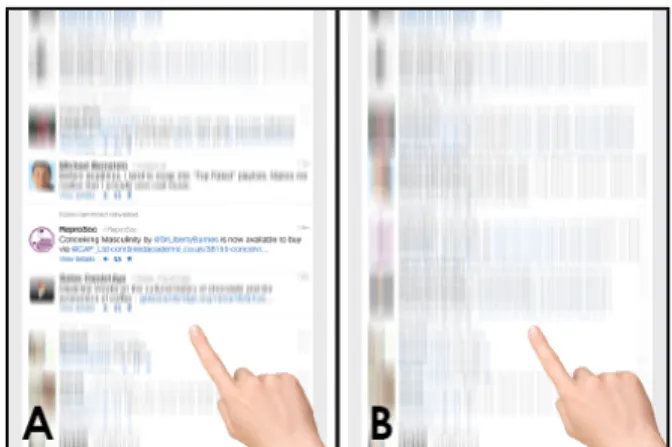
Figure 1. A) Content-aware kinetic scrolling applies friction in scrolling as the user passes over items of high interest. B) The user inadvertently passes over items of interest while scrolling.
Long documents also present problems for users trying to get a general overview of a page. For users without the time or inclination to slowly filter through the content, scrolling is often employed to capture some snapshots of different areas of the page. This type of navigation causes users to miss a great deal of potentially interesting content. Users might also access a skewed selection of the content because navigating to the end is time-consuming and physically demanding. Navigating long documents on touchscreen devices such as mobile phones and tablets magnifies the challenges presented in these tasks. Limited screen real estate in touchscreen de-vices means that items are even smaller and harder to dif-ferentiate and may be competing with more visual cues per unit area for attention. Smaller screens also make scrolling more physically demanding and time-consuming because each scroll flick moves the user through less content. Solutions for improving navigation of long documents should strive to draw people’s attention to items with high degree of interest (DOI) to ease their cognitive load while exploring. At the same time, the solution must also support fluid navigation that maintains the overall context when users are looking to get a general understanding of a page. Drawing attention en-sures that users notice items that are emphasized. Fluid navi-gation maintains the continuous flow and surrounding context of the content. Sometimes these goals conflict, and existing solutions address this challenge by semantically adapting to the content structure, visually manipulating the page layout, and dynamically responding to the user’s scrolling behavior.
To address these challenges, we present content-aware ki-netic scrolling, which applies pseudo-haptic feedback in the form of friction to high DOI items within a page. As the user scrolls on a touchscreen device, the scrolling speed de-celerates around items with high DOI, as if a rubber band is pulling the item with force towards the center of the screen and the user’s line of vision. This technique adds physical in-formation scent to items with high DOI to help users discover interesting items. It is a generalizable technique that works with any DOI model. It is also easy to adapt to existing user interfaces because it is a purely input-based technique that does not require modification of existing content.
RELATED WORK
To estimate and visualize DOI in content, previous ap-proaches captured user behavior on the page and extracted higher-level operations [5, 7]. Read wear [6] visualized usage history in the scrollbar, which has been extended by others who incorporated usage signals into graphical user interface widgets [17], or supported revisitation by capturing personal scrolling history [1]. Most existing approaches, however, rely on adding visual cues to represent DOI inside a document. While visual signals strongly draw users’ attention, they have to compete against existing visual assets on the page for lim-ited screen space. With web contents increasingly embedding visual media and widgets, purely visualizing DOI might dis-tract users away from the main content.
Rather than adding visual signals, other scrolling techniques have focused on enhancing the scrolling behavior itself. Pre-vious research modified non-positional dimensions of screen objects (e.g., transparency) upon scrolling [16], analyzed the document structure to vary scrolling direction, speed, and zoom [9], and applied dynamic zoom based on the scrolling speed [8]. Pseudo-haptic feedback [11] decouples visual feedback and device resistance to create an illusion of fric-tion. Without dedicated hardware, similar effects can be achieved by applying acceleration to a mouse cursor [10], or more generally, altering the Control/Display ratio [3], defined as the ratio of the physical scrolling speed (control) to the dis-play update speed. We extend this approach to touchscreen devices where no mouse cursor exists and natural decelera-tion with kinetic scrolling is already in effect.
Flicking is a throwing gesture that often triggers automatic scrolling with inertia and friction on touch devices. Flick-based interaction techniques include Superflick [15], which supported distant object placement on tabletops, and Flick-and-Brake [2], which supported fine-grained acceleration control with the finger after flicking. Our approach differs in that it automatically applies force to parts of content, based on signals that already exist on the page.
CONTENT-AWARE KINETIC SCROLLING
Kinetic scrolling [12] refers to the gradual deceleration of scrolling after the user lifts the finger from the screen. This technique has been implemented in most modern touchscreen devices. Flicking is a throwing-like gesture that invokes a transfer function [14], which turns kinetic scrolling into auto-matic scrolling with inertia. The inertial effect provides a
nat-ural and physical affordance for scrolling, and enables more precise scrolling control. The rate of deceleration is deter-mined by the initial velocity at the time of finger release: the faster the initial velocity, the farther the scrolling destination is. Each time a function responsible for computing the cur-rent scrolling position is called, it updates the target position as a function of initial velocity, elapsed time since the fin-ger release, and current scrolling offset from the top of the document. A default deceleration model used in our imple-mentation is exponential decay, where the change in scrolling offset is computed as: Ae−t/τ. The amplitude (A) and time constant τ determine how stiff the initial effect is. This model is activated when no high DOI items are nearby.
Figure 2. CAKS applies quadratic deceleration to a high DOI item (“Is-sac Newton”) whose DOI value is k and vertical position of the midpoint is yi. The deceleration is active between a range [ystart, yend].
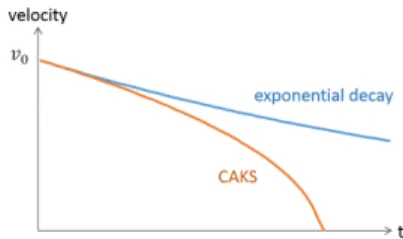
Figure 3. Scrolling velocity change over time (initial velocity: v0),
com-paring exponential decay with normal scrolling against additional decel-eration with CAKS.
Deceleration Model
Content-aware kinetic scrolling (CAKS) applies additional deceleration when there are items with high DOI on the scrolling path. It is analogous to adding a virtual hill that slows down the scroll head, whose deceleration is maximized at the peak of the hill. It creates a kinetic illusion that addi-tional friction is applied, or some force is pulling the scroll. As a result, the user notices the additional deceleration and pays attention to the item that causes the pulling. Prototype testing with pilot users revealed that users are very sensitive when the scrolling speed change is abrupt. They feel that the scrolling is buggy and laggy when the speed model does not smoothly transition from the natural deceleration to addi-tional deceleration. This is different from making the decel-eration noticeable, which should not feel sluggish.
For a smooth transition from normal deceleration to addi-tional deceleration, the deceleration model takes the current velocity and gradually increases deceleration when the cur-rent scroll position enters a DOI range. For an item i whose DOI value is k and offset position of the vertical midpoint is yi, we apply the quadratic deceleration between a range
[ystart, yend], whose midpoint is yi. The range size can be
op-timized for each device and orientation mode. In practice, we find the screen height to be a reasonable choice for the range size (e.g., 1024px for the portrait mode in the iPad). Our de-celeration model for high DOI items is a quadratic model, which computes the DOI in the current scrolling offset y as: DOIy= (yi−ykstart)2∗ (y − ystart)2. Taking the first
deriva-tive of DOIygives the current slope of the virtual hill tan θ,
where θ is the angle of elevation. Therefore, the magnitude of deceleration, modeling the force of gravity on a hill, is pro-portional to cos θ, computed as√ 1
( tan2θ+1).
While all visual items on the page can have DOI values, we apply kinetic scrolling to only select items. One of our pro-totypes applied continuous deceleration to all items on the page, but pilot users found it to be frustrating because it was harder to distinguish high DOI items from low DOI items. After we normalize all DOI values to a range between 10 and 100, we activate kinetic feedback to only the items above a threshold DOI value (default: 70). When multiple items have overlapping DOI ranges, we pick the maximum deceleration.
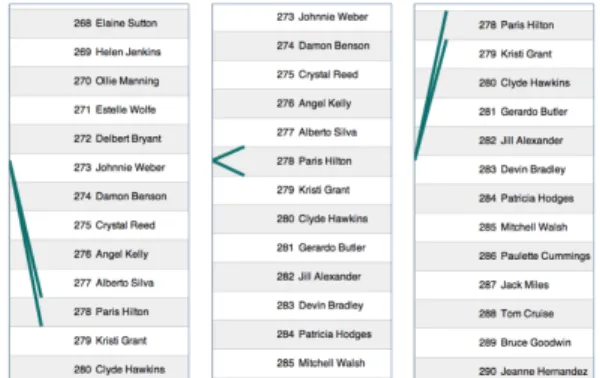
Figure 4. CAKS uses two bands to visually convey the deceleration for the item “Paris Hilton” in this list example. From left to right, the figures show how the rubber band-like visual feedback changes over time as the list scrolls downward when the user flicks their finger upward.
Visual Feedback
Although most pilot users were able to notice the kinetic de-celeration without any visual feedback, visual feedback might be necessary in some cases, especially if the page contains many small items. For these pages, it is extremely difficult to precisely find which item in the current viewport is empha-sized. We tried variants of visual feedback with the goals of 1) minimizing the modification of the content, 2) minimizing the space and time required to display the feedback, and 3) visualizing the deceleration behavior of CAKS.
Our solution emphasizes the target item with two bands con-nected to the left side of the screen (Figure 4). These bands
are attached to the emphasized item, and their length and po-sition are changed as if they were rubber bands pulling the item. This approach visually conveys the sense of deceler-ation. Also, this solution does not require applying styling to the DOM element of the content, and operates on another z-index layer. To minimize visual interruption, the bands dis-appear after 1.5 seconds if no further user interaction takes place.
Purpose-Aware Triggering
There are multiple scrolling patterns people use when using a touchscreen device. Users drag slowly to make small moves within the current viewport, which is useful for looking at nearby content at a slow speed. Finger flicking moves the scroll offset beyond the current viewport. Slow or weak flick-ing is useful when reviewflick-ing all content without missflick-ing any-thing, medium or moderate flicking is useful when skimming to get the general idea or to stumble upon interesting content, and fast or strong flicking is useful when skipping between content rapidly to reach a specific point in the document. We find CAKS to be effective when the user is applying slow and moderate flicking. With fast flicking, users continuously flick to quickly move to a target position, and in-between deceler-ation might not help them with their task.
Because a DOI model might not perfectly reflect a user’s interest, CAKS makes it easy to ignore and cancel kinetic scrolling if the user wants to. A goal of CAKS is to draw at-tention to high DOI items, so if the user had already noticed the item, further deceleration might not be necessary. If the user initiates flick when the high DOI item is already within the viewport, we stop applying kinetic scrolling to that item.
Modeling Degree of Interest with Social Wear
CAKS requires the DOI model of a document as input. The technique is independent of the underlying DOI model or the method for constructing it. CAKS is compatible with any DOI model, as long as the DOI value and offset (y-position) information for each item are provided. Read wear [6] is one example of a DOI model CAKS can accept, which stores scrolling position data of all reading activity on the page. A limitation of relying on scrolling data is that few websites collect this information. To address this issue, we introduce the concept of social wear, an alternative method for mod-eling user interest that does not require collecting DOI data a priori. Social wear reverse-engineers an existing web page to capture signals that may indicate user interest. Many web pages today contain potential DOI data to help users find what they are interested in, such as the number of shares, down-loads, comments, or clicks. Social wear uses these signals to dynamically construct a DOI model that is the input for CAKS. We demonstrate examples of DOI models extracted from popular web services in the implementation section.
IMPLEMENTATION
CAKS is implemented as a Javascript library, which can be easily adopted by any web page by simply calling the ini-tialization function with the DOI model. It is built on top
of an open-source kinetic scrolling library 1. It uses the
requestAnimationFramemethod for manipulating the scroll behavior, which is supported by most modern browsers today. Most settings and scrolling constants are configurable to provide a consistent experience across different form fac-tors, touch sensitivity, and mobile operating systems.
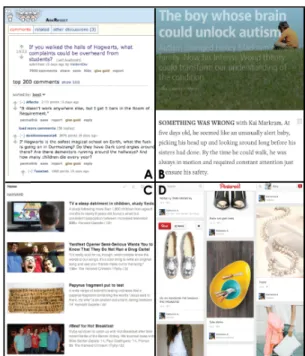
Figure 5. We applied CAKS to four examples above with social wear capturing DOI: A) Reddit discussion page (# of points), B) Medium arti-cle (# of per-paragraph comments), C) Feedly news reader (# of recom-mendations), D) Pinterest feed (# of re-pins).
We applied CAKS to a diverse set of web pages, some of which are shown in Figure 5. There are many types of web-sites that CAKS could potentially enhance and that we can construct a social wear DOI model from:
• Pages containing long lists, for instance a contact list con-taining rows of names or a publications page on a re-searcher’s website, with DOI as the number of calls made or the click-through rate, respectively.
• Discussion forum threads, with comments growing into the thousands, that have a interest signal such as upvotes. • Long-form text, such as long-form articles or online books,
which support sentence or paragraph level annotations. • News readers, such as applications like Feedly that surface
the number of recommendations per article.
• Social media feeds, with infinitely scrolling content. The example shows a Pinterest feed using the number of repins as the DOI function, to highlight the capabilities of CAKS for purely visual content.
EVALUATION
We conducted a preliminary user study to understand how CAKS affects various content navigation tasks. Our goals were two-fold: 1) see if our technique successfully draws a user’s attention when exploring for interesting or relevant
1https://github.com/ariya/kinetic/
content, and 2) see if our technique allows for fluid naviga-tion when attempting to get a general summary of the content.
User Study Design
After a short trial session, participants were asked to perform three tasks: searching, recognition, and summarization. Each task was completed twice, once with CAKS and once with normal scrolling (NS), in a randomized order.
The search task was to find 10 names of famous people from a list of 500 names. In the CAKS condition, we removed vi-sual feedback to see how participants perform only with phys-ical feedback. Out of the 10 names to find, seven names were applied physical feedback while three were not, in order to simulate a content recommendation system with 70% accu-racy. All names with feedback, however, were answers. The pages were 23,000 pixels long when rendered from the device used in the study. Figure 4 shows an example.
In the recognition task, we asked participants to spend three minutes reading comments interesting to them from a discus-sion forum thread on Reddit. We then presented them with 9 sentences and asked them to select the sentences that they re-membered seeing on the discussion page. Each list included 3 sentences that were included in our DOI model, 3 that were not included in our DOI model, and 3 that were not present on the page. The DOI model leveraged the upvotes assigned to each comment on the Reddit platform by readers. The two threads used were 26,000 and 27,000 pixels long. Figure 5A shows an example thread.
The summarization task presented a long article on Medium.com and gave participants three minutes to skim and summarize the main points of the article on a sheet of pa-per. The DOI model was the number of comments attached to each paragraph, which did not reflect the importance of a paragraph. Thus, simply following high DOI items might not be useful for summarization. Our purpose was to see how a user reacts to items with feedback that do not support the task at hand. The pages were 53,000 and 41,000 pixels long. Figure 5B shows an example article.
After each task, participants completed the NASA TLX test [4] for measuring task load, in a 7-point scale. We had a debriefing session at the end, asking participants about their qualitative experience using both scrolling techniques.
Participants
We recruited 13 participants (6 male, 7 female) with ages be-tween 18 and 43 (µ=24.2, σ=6.7) through a university mailing list. All participants self-reported that they used touch devices regularly. In all sessions, we used an iPad 2 in portrait mode, fixing the screen resolution to 768x1024 pixels.
Results
The post-task questionnaires and interviews indicated that CAKS drew attention to high DOI items for a majority of the users. When presented with the statement that the addi-tional feedback affected their browsing in each task, 87% of responses responded with a rating of 4 or above out of 7. One participant commented, “When it stopped me occasionally, I looked around to see if there’s anything interesting going on.”
Task completion times for the search task did not reveal any significant differences between CAKS (287s) and NS (312s), but did reveal a significant difference in the NASA TLX in-dex measuring task load (χ2=7, p < 0.01), with CAKS re-ceiving 2.9 and NS rere-ceiving 3.4. For the recognition task, there was no significant difference in the overall recognition score between CAKS (5.9 correct) and NS (6.2 correct). For summarization tasks, we found evidence that users were able to ignore feedback from CAKS since the DOI model was not helping them. When asked how much the feedback affected their content scrolling, users rated this task 4.6, which is sig-nificantly different using a Friedman test from their rating of 6.4 for the recognition task (χ2=7.4, p < 0.01).
DISCUSSION
Reduced Task Load While Searching
We found no significant difference in task load between CAKS and NS except for the search task. The lower task load may be due to the narrower search space caused by decelera-tion. When participants noticed deceleration, they knew that an answer was in their vicinity. One participant noted, “Phys-ical anchoring forces you to stop and look around. Almost adding physical load. This might unconsciously help people find things, even if they thought they didn’t feel it.” We ob-served many users finding all items containing feedback first before going back for the three items without feedback. The time gained finding the items with feedback may have been offset by time lost in finding items without feedback.
Exploring Farther with Content-Aware Kinetic Scrolling
For the recognition task, users were given freedom to explore what they found interesting while still asked to try to traverse the entire page within 3 minutes. While users were not more likely to recall content with CAKS than NS, we found some indication that users with CAKS were more likely to notice items with DOI nearer to the bottom of the page. For instance, one item located around 70% (19,000 pixels) from the top of the document that contained feedback was recognized by four users with CAKS, compared to only one user with NS. This suggests that participants with CAKS navigated further down the content and were also paying attention to the items farther down the page that had feedback. We noticed that with NS, most users did not get through even half the content.
Ability to Disregard Feedback
In the summarization task, users were required to get a gen-eral understanding of a long text in a short amount of time, causing many to employ moderate scrolling. In this case, when the DOI model did not align with the task at hand, users successfully ignored CAKS without adding to their task load and fluidly navigate to their own points of interest. One par-ticipant noted “[I] [b]arely noticed feedback, can’t remember where I saw it.”during the summarization task.
CONCLUSION AND FUTURE WORK
We introduce content-aware kinetic scrolling, a novel scrolling technique that applies pseudo-haptic feedback to items with high DOI in a long document. To model DOI from a variety of existing web pages, we present the concept
of social wear, which captures previous users’ interest read-ily present on the document. Users noted that our technique drew their attention to high DOI items, even when no visual feedback was available.
For future work, we plan to experiment with more web pages that have new types of social wear signals. Another direc-tion of research is expanding to 2D layouts instead of linear scrolling. For example, on a web-based map, places of inter-est can be applied kinetic feedback. We envision content-aware kinetic scrolling to be deployed publicly as a stan-dalone library, providing a lightweight, versatile method for improving content navigation on touchscreen devices.
ACKNOWLEDGMENTS
The authors thank the members of the UID Group at MIT CSAIL for their feedback. This work was funded in part by Quanta Computer. Juho Kim is supported by the Samsung Fellowship.
REFERENCES
1. Alexander, J., Cockburn, A., Fitchett, S., Gutwin, C., and Greenberg, S. Revisiting read wear: Analysis, design, and evaluation of a footprints scrollbar. In CHI ’09 (2009), 1665–1674.
2. Baglioni, M., Malacria, S., Lecolinet, E., and Guiard, Y.
Flick-and-brake: Finger control over inertial/sustained scroll motion. In CHI EA ’11(2011), 2281–2286.
3. Blanch, R., Guiard, Y., and Beaudouin-Lafon, M. Semantic pointing: Improving target acquisition with control-display ratio adaptation. In CHI ’04, ACM (2004), 519–526.
4. Hart, S. G., and Staveland, L. E. Development of nasa-tlx (task load index): Results of empirical and theoretical research. Advances in psychology 52(1988), 139–183.
5. Hijikata, Y. Estimating a user’s degree of interest in a page during web browsing. In IEEE SMC’99, vol. 4 (1999), 105–110.
6. Hill, W. C., Hollan, J. D., Wroblewski, D., and McCandless, T. Edit wear and read wear. In CHI ’92 (1992), 3–9.
7. Holub, M., and Bielikova, M. Estimation of user interest in visited web page. In WWW ’10 (2010), 1111–1112.
8. Igarashi, T., and Hinckley, K. Speed-dependent automatic zooming for browsing large documents. In UIST ’00 (2000), 139–148.
9. Ishak, E. W., and Feiner, S. K. Content-aware scrolling. In UIST ’06 (2006), 155–158.
10. L´ecuyer, A., Burkhardt, J.-M., and Etienne, L. Feeling bumps and holes without a haptic interface: The perception of pseudo-haptic textures. In CHI ’04(2004), 239–246.
11. L´ecuyer, A., Coquillart, S., Kheddar, A., Richard, P., and Coiffet, P. Pseudo-haptic feedback: can isometric input devices simulate force feedback? In VR 2000. Proceedings. IEEE (2000), 83–90.
12. Nokia. Qt Kinetic scrolling - from idea to implementation. http://
developer.nokia.com/community/wiki/Qt_Kinetic_ scrolling_-_from_idea_to_implementation/, 2010. [Online; accessed April-16-2014].
13. Pirolli, P., and Card, S. Information foraging. Psychological review 106, 4 (1999), 643.
14. Quinn, P., Malacria, S., and Cockburn, A. Touch scrolling transfer functions. In UIST ’13, ACM (2013), 61–70.
15. Reetz, A., Gutwin, C., Stach, T., Nacenta, M., and Subramanian, S. Superflick: A natural and efficient technique for long-distance object placement on digital tables. In GI ’06 (2006), 163–170.
16. Smith, R. B., and Taivalsaari, A. Generalized and stationary scrolling. In UIST ’99 (1999), 1–9.
17. Willett, W., Heer, J., and Agrawala, M. Scented widgets: Improving navigation cues with embedded visualizations. IEEE Transactions on Visualization and Computer Graphics 13, 6 (Nov. 2007), 1129–1136.