HAL Id: tel-03158358
https://tel.archives-ouvertes.fr/tel-03158358
Submitted on 3 Mar 2021HAL is a multi-disciplinary open access archive for the deposit and dissemination of sci-entific research documents, whether they are pub-lished or not. The documents may come from teaching and research institutions in France or abroad, or from public or private research centers.
L’archive ouverte pluridisciplinaire HAL, est destinée au dépôt et à la diffusion de documents scientifiques de niveau recherche, publiés ou non, émanant des établissements d’enseignement et de recherche français ou étrangers, des laboratoires publics ou privés.
An approach to preparing hand gesture maintenance
training based on Virtual Reality
Manoch Numfu
To cite this version:
Manoch Numfu. An approach to preparing hand gesture maintenance training based on Virtual Reality. Human-Computer Interaction [cs.HC]. Université Grenoble Alpes [2020-..], 2020. English. �NNT : 2020GRALI071�. �tel-03158358�
THÈSE
Pour obtenir le grade de
DOCTEUR DE L’UNIVERSITE GRENOBLE ALPES
Spécialité : Génie industrielArrêté ministériel : 25 mai 2016
Présentée par
Manoch NUMFU
Thèse dirigée par Andreas RIEL, Professeur associé HDR, Grenoble INP
et codirigée par Frédéric NOËL, Professeur, Grenoble INP
préparée au sein du Laboratoire G-SCOP dans l'École Doctorale I-MEP2
Une approche pour la préparation de
formations aux gestes de la main en
maintenance basées sur la réalité virtuelle
An approach to preparing hand gesture
maintenance training based on Virtual
Reality
Thèse soutenue publiquement le 18 décembre 2020, devant le jury composé de :
Pr. Lionel ROUCOULES
Professeur à LISPEN, ENSAM Aix-en-Provence, France, President
Pr. Vincent CHEUTET
Professeur à DISP, INSA Lyon, France, Rapporteur
Dr. Florent LAROCHE
Maitre de Conférences HDR à LS2N, ECN, France, Rapporteur
Dr. Siranee NUCHITPRASITCHAI
Professeure assistante à Faculty of IT, KMUTNB, Thaïlande, Membre
Pr. Frédéric NOËL
Professeur à G-SCOP, Grenoble INP, Co-Directeur de thèse
Pr. Andreas RIEL
3
Acknowledgements
I would like to express my deepest gratitude and sincere thanks to my supervisors Prof. Andreas Riel and Prof. Frédéric Noël for the trust in my abilities. They encouraged me from the beginning until the end in a very respectful, sensitive and professional way.
I also wish to thank all my defense committee members for the attention they have kindly given to this work: Dr. Florent Laroche, Prof. Vincent Cheutet, Prof. Lionel Roucoules, Dr. Frédéric Vignat and Dr. Siranee Nuchitprasitchai. Particular thanks goes to Dr. Laroche and Prof. Cheutet for having accepted to be reviewers and therefore studying my thesis in very much detail and giving highly appreciated constructive criticism.
I also thank the G-SCOP laboratory at Université Grenoble Alpes for supporting my research. In addition, I would like to express my sincere gratitude to many friends, colleagues and experts at G-SCOP laboratory who took part in this research.
Additionally, I would like to thank the Thai government who supported the scholarship throughout the course. Furthermore, I would like to thank the Rajamangala University of Technology Lanna where was my agency for giving me a great opportunity to study in France.
Finally, I deeply thank my family. Without their patience and support, this research would not have been possible.
5
Résumé
Au cours de la dernière décennie, la technologie de la réalité virtuelle (RV) a évolué rapidement. Les environnements et appareils de la RV sont de plus en plus puissants et permettent des expériences utilisateur exceptionnelles. De tels environnements et dispositifs ont un potentiel énorme dans une grande variété d'applications industrielles, en particulier dans la formation à la maintenance. L'industrie, cependant, a encore des difficultés à obtenir des résultats de formation satisfaisants, principalement en raison de choix et de configurations inappropriés d'infrastructures de formation basées sur la RV. Afin de soutenir systématiquement le processus de préparation des formations de maintenance basées sur la réalité virtuelle, cette thèse propose un concept holistique pour la préparation de séquences de formation sur la maintenance basée sur la réalité virtuelle en mettant l'accent sur l'expérimentation, l'évaluation et la comparaison de différentes configurations de réalité virtuelle. Ce concept est appelé « Processus de préparation des formations basées sur la technologie de réalité virtuelle » (VR-TPP), et il a été mis en œuvre pour la validation dans des configurations non immersives et entièrement immersives. Parmi celles-ci, trois études de cas différentes montrent comment cette approche systématique aide les apprenants à trouver le processus de travail et les gestes de la main appropriés, ainsi que les formateurs à déterminer l'environnement de formation, la séquence et les instructions de travail les plus appropriés. Afin de tenir compte des spécificités des opérations de formation à la maintenance, un accent particulier a été mis sur la bonne saisie des gestes de la main et leur association avec différents types d'articulations mécaniques et le démontage des pièces mécaniques en fonction de leur adéquation. Ceci est considéré comme une contribution importante à la mise à niveau, au complément ou même au remplacement des instructions de travail traditionnelles sans participation active de l'utilisateur à des instructions de travail virtuelles offrant une expérience utilisateur. De plus, l'utilisation du concept VR-TPP permet également de révéler la cause des erreurs commises par les utilisateurs lorsqu'ils travaillent dans un environnement virtuel. Ces connaissances peuvent être réinjectées dans la conception du processus de formation ainsi que dans l'infrastructure. Outre les formations à la maintenance industrielle (donc au montage et au démontage), le concept peut être facilitateur pour de nombreuses autres applications.
Mots-clés : Réalité virtuelle, formation basée sur la réalité virtuelle, formation à la maintenance, formation au montage et démontage, processus de préparation de la formation basée sur la réalité virtuelle
7
Abstract
Over the last decade, Virtual Reality (VR) technology has been evolving rapidly. VR environments and devices are more and more powerful and enable exceptional user experiences. Such environments and devices have a huge potential in a wide variety of industrial applications, in particular in maintenance training. Industry, however, still has difficulties achieving satisfactory training results, mainly due to inappropriate choices and setups of VR-based training infrastructures. In order to systematically support the preparation process of VR-based maintenance trainings, this thesis proposes a holistic concept for preparing VR-based maintenance training sequences with a focus on experimenting with, and evaluating and comparing different VR setups and configurations. This concept is called “Virtual Reality technology for Training Preparation Process” (VR-TPP), and it has been implemented for validation in both non-immersive and fully-immersive setups. Within those, three different case studies demonstrate how this systematic approach supports trainees in finding out the appropriate working process and hand gestures, as well as trainers in determining the most appropriate training environment, sequence and work instructions. In order to account for specificities in maintenance training operations, a particular focus has been directed on properly capturing hand gestures and associating them with different types of mechanical joints and the disassembly of mechanical parts according to their appropriateness. This is considered an important contribution to upgrading, complementing or even replacing traditional work instructions without active user involvement to virtual work instructions providing user experience. Furthermore, the use of the VR-TPP concept also helps revealing the cause of mistakes that users make when working in a virtual environment. From these insights, the learnings can be fed back into the design of the training process as well as the infrastructure. Apart from industrial maintenance (therefore assembly- and disassembly-) trainings, the concept enables and supports numerous other applications.
Keywords: Virtual Reality, VR-based training, maintenance training, assembly/disassembly training, VR-training preparation process
9
Table of Contents
Acknowledgements ... 3 Résumé ... 5 Abstract ... 7 Table of Contents ... 9 List of Acronyms ... 15 List of Figures ... 17 List of Tables ... 21List of Published Articles ... 23
1 Introduction ... 25 1.1 General Introduction ... 25 1.2 Thesis background ... 26 1.3 Research motivation ... 27 1.4 Research question ... 29 1.5 Methodology ... 29 1.6 Thesis structure ... 30
2 State of The Art ... 33
2.1 Introduction ... 33
2.2 Conventional maintenance training ... 33
2.2.1 Off-site training ... 34
2.2.1.1 Classroom lectures ... 34
2.2.1.2 Offsite lab-work ... 35
10
2.2.3 Summary of conventional maintenance training ... 36
2.2.4 Limitations of conventional maintenance training ... 36
2.3 Virtual Reality technology ... 38
2.3.1 Virtual Reality systems ... 39
2.3.1.1 Non-immersive system ... 39
2.3.1.2 Semi-immersive system ... 39
2.3.1.3 Fully-immersive system ... 39
2.3.2 VR devices and interaction techniques ... 40
2.3.2.1 Input devices ... 40
2.3.2.2 Output devices ... 42
2.3.2.3 Interaction techniques ... 46
2.4 VR technology for maintenance training ... 49
2.5 Virtual reality for Dis/Assembly task ... 49
2.6 VR training effectivity evaluation studies ... 52
2.7 Hand gesture simulation for training in VR environments ... 53
2.8 Summary ... 56
3 A Systematic Approach to Preparing VR Maintenance Training ... 59
3.1 Introduction ... 59
3.2 The concept of VR-TPP ... 59
3.3 Systematic approach of VR-TPP concept ... 61
3.3.1 Preparation Task ... 62
3.3.1.1 Model preparation module ... 62
3.3.1.2 Work instruction (WI) making module ... 70
3.3.2 Execution ... 72
3.3.2.1 Recording module ... 72
3.3.2.2 VR using module ... 73
3.3.2.3 Translation module ... 79
11
3.3.3.1 Assessment ... 82
3.3.3.2 Classification of hands gestures ... 82
3.4 Summary of systematic approach of VR-TPP concept ... 85
4 A VR-TPP Maintenance Training Preparation Environment ... 87
4.1 Introduction ... 87
4.2 Derivation from the VR-TPP concept ... 87
4.3 The VR-TPP platform implementation ... 88
4.3.1 The system preparation ... 89
4.3.1.1 3D Parts ... 90
4.3.1.2 Assembly parts ... 91
4.3.1.3 Scene components ... 93
4.3.2 The design of devices and interaction techniques ... 94
4.3.2.1 Input devices ... 94 4.3.2.2 Output device ... 95 4.3.2.3 Interaction technique ... 96 4.3.3 Recording method ... 98 4.3.3.1 Image sequence ... 98 4.3.3.2 Animation clip ... 99
4.4 Summary of implementation on the VR-TPP platform ... 100
5 Case Studies ... 101
5.1 Introduction ... 101
5.2 Validation of VR-TPP concept by disassembling process ... 101
5.2.1 Recording the disassembling process of the Jigsaw ... 102
5.2.2 Discussion of the sequence of pictures ... 103
5.3 VR-TPP for creating a knowledge base of hand gestures... 105
5.3.1 Building a library of hand gestures ... 105
5.3.1.1 Selecting the section of maintenance task ... 106
12
5.3.1.3 Classifying hand gestures ... 107
5.3.1.4 Executing and recording hand gestures ... 108
5.3.1.5 Specifying hand gestures as patterns ... 108
5.3.1.6 Building a library of hand gestures ... 109
5.3.2 Discussion of building a library of hand gestures ... 110
5.4 Virtual Reality for Training in Maintenance Task ... 114
5.4.1 Maintenance content definition ... 114
5.4.2 System configuration ... 115
5.4.3 Virtual environment ... 116
5.4.4 Discussion of the VR for training in maintenance task ... 118
5.5 Summary ... 120
6 User Experience Evaluation ... 121
6.1 User Experience Study ... 121
6.2 Experiment setup ... 121
6.3 Evaluation and explanation ... 122
6.4 User experience evaluation ... 124
6.4.1 User experience testing in NI-VR ... 124
6.4.1.1 Perception of ease of use of VR device ... 124
6.4.1.2 Perception of realism ... 125
6.4.2 User experience testing in FI-VR ... 127
6.4.2.1 Perception of virtual reality experience ... 128
6.4.2.2 Perception about HMD usage ... 132
6.4.2.3 Side effects from using VR device. ... 133
6.5 Summary ... 136
7 Discussion, Conclusions and Perspectives... 137
7.1 Discussion of the results against the research questions ... 137
7.2 VR-TPP concept and platform and implementation ... 139
13
7.3.1 A generic VR-training preparation concept ... 140
7.3.2 Working instruction preparation ... 141
7.3.3 Hands gesture library for mechanical joints ... 141
7.3.4 VR device performance, realism and side effects ... 141
7.4 Limitations ... 142
7.5 Perspectives ... 143
7.5.1 Full body capture ... 143
7.5.2 Physical perception ... 143
7.5.3 Machine Learning ... 144
7.5.4 Taxonomy of hand gestures and mechanical joints ... 144
7.5.5 Taxonomy of VR-devices and setups ... 144
7.5.6 Future research in VR-based training in Thailand ... 145
7.5.6.1 VR technology for knowledge transfer ... 145
7.5.6.2 Maintenance training for high-speed trains ... 145
15
List of Acronyms
VR VE LMC HMD PC AR IR VR-TPP VR-TMT AIO AP WMR IM IB RB MC MR NI-VR FI-VR Virtual reality Virtual environment Leap Motion Controller Head Mounted Display Personal Computer Augmented Reality Infrared RadiationVirtual Reality technology for Training Preparation Process
Virtual Reality technology for Training in Maintenance Task
Anchor In Object Anchor Position
Windows Mixed Reality Interaction Manager Interaction Behavior Rigid Body Mesh Collider Mesh Render Non-immersive VR level Fully-immersive VR level
17
List of Figures
Figure 1: The Learning Pyramid ... 28
Figure 2: Research methodology ... 30
Figure 3: Thesis structure ... 30
Figure 4: Training with classroom lecture method6 ... 34
Figure 5: Workshop training method7 ... 35
Figure 6: Conventional Training Methods ... 37
Figure 7: The head mounted display (HMD)10 ... 42
Figure 8: The stereoscopic display11 ... 43
Figure 9: The Cave Automatic Virtual Environment (CAVE) ... 43
Figure 10: Assembly simulation using haptic device ... 45
Figure 11: Data glove in a six-sided CAVE ... 45
Figure 12: Go-Go interaction technique: egocentric coordinate system ... 47
Figure 13: Rigid-body fingers ... 48
Figure 14: The “sticky finger” image-plane pointing technique ... 48
Figure 15: Key features of some virtual assembly platforms. ... 51
Figure 16: Grasping patterns ... 54
Figure 17: Gesture with virtual hand related to a basic shape ... 55
Figure 18: GRASP taxonomy ... 55
Figure 19: The process of traditional training and VR training method ... 60
Figure 20: The position of the systematic approach of VR-TPP concept ... 60
Figure 21: The systematic approach of VR-TPP ... 61
18
Figure 23: OBJ file representing a cube13 ... 63
Figure 24: The characteristics of 3D object on STEP file format14 ... 64
Figure 25: Non-permanent joints and permanent joints15 ... 65
Figure 26: Different type of bolts and screws16 ... 66
Figure 27: Different type of nuts17 ... 67
Figure 28: Studs17 ... 67
Figure 29: Typical Press-Fit Male/Female Interconnect18 ... 68
Figure 30: Cotter joint parts19 ... 69
Figure 31: Knuckle joint parts20 ... 69
Figure 32: Type of kinematic joints21 ... 70
Figure 33: UML class diagram for interactions between WI and BOM ... 71
Figure 34: Recording module ... 72
Figure 35: Workflow diagram of grasping record method ... 73
Figure 36: The Unreal Engine25 ... 75
Figure 37: The Scene view in Unity Engine27 ... 76
Figure 38: Amazon Lumberyard Game Engine28 ... 77
Figure 39: CryEngine Game Engine29 ... 77
Figure 40: Interaction activity diagram of VR-TPP system. ... 78
Figure 41: Leap Motion Controller ... 79
Figure 42: Oculus HMD device31 ... 80
Figure 43: Vive HMD device32 ... 80
Figure 44: Acer Windows Mixed Reality HMD device33 ... 81
Figure 45: The components of the VR-TPP system in implementation task ... 81
Figure 46: The process of classification and recording the hands gestures ... 83
Figure 47: The main working gestures ... 84
Figure 48: The position of fingers ... 84
Figure 49: Abstract WI sequence model ... 85
Figure 50: The technical framework of VR-TPP concept ... 88
19
Figure 52: The creation of the virtual environment by Unity 3D ... 90
Figure 53: The physics of 3D part ... 90
Figure 54: A basic XR rig with the Interaction behaviour ... 92
Figure 55: Assembly parts with behaviour setting ... 92
Figure 56: Structure of anchor behaviour ... 93
Figure 57: Scene components in the virtual environment... 94
Figure 58: Virtual hands by Leap Motion module ... 95
Figure 59: 2D system with desktop screen ... 96
Figure 60: 3D system with WMR device ... 96
Figure 61: Virtual camera at a first person perspective ... 98
Figure 62: Unity Recorder package is used to be recording method ... 99
Figure 63: Recording method by image sequence function ... 100
Figure 64: Repairing a saw blade by virtual hands ... 102
Figure 65: The platform and devices for disassembling process of Jigsaw ... 102
Figure 66: The trainees practice in virtual environment ... 103
Figure 67: The picture sequence recorded in the system ... 103
Figure 68: The hands moving method ... 104
Figure 69: Summary of the hand gestures for the jigsaw ... 105
Figure 70: A building process of virtual work instruction ... 106
Figure 71: The process of building a hand gesture library ... 106
Figure 72: The virtual workshop model... 107
Figure 73: Type abstraction of mechanical joints ... 108
Figure 74: Recording an image sequence of hands gestures ... 109
Figure 75: Building a library of hand gestures in VR-TPP... 110
Figure 76: Pattern of hand gestures for screws ... 110
Figure 77: Pattern of hand gesture using with bolts and nuts ... 111
Figure 78: Pattern of hand gestures for the snap fit technique ... 111
Figure 79: Foldable STRIDA bicycle folded (left), and unfolded (right) ... 112
20
Figure 81: STRIDA folding gesture sequence recorded in VR-TMT ... 114
Figure 82: The small virtual factory simulation ... 115
Figure 83: A storyboard displaying the different tasks of working process .... 117
Figure 84: Working environment in VE ... 117
Figure 85: Recording of image sequences by VR-TMT platform ... 118
Figure 86: An inappropriateness of participants’ hand motion ... 119
Figure 87: An inappropriateness of participants’ working position ... 119
Figure 88: An inappropriateness of participants’ working step ... 119
Figure 89: Perception level for using a keyboard ... 125
Figure 90: Perception level for using a mouse ... 126
Figure 91: Perception level for using a leap motion ... 126
Figure 92: Perception level for using all of those tools ... 126
Figure 93: Testing result of the perception level in realism ... 127
Figure 94: The user preference in VR experience ... 128
Figure 95: The user’s attention level from VR experience ... 129
Figure 96: The immersive level from experiencing the virtual environment .. 129
Figure 97: The user’s attention level in the virtual reality ... 130
Figure 98: The level of user’s curiosity ... 130
Figure 99: User’s feedback on the possibility on VR technology ... 131
Figure 100: Users’ beliefs in VR technology for training ... 131
Figure 101: The ease of use of VR technology for training ... 132
Figure 102: The interaction flexibility of HMD device ... 133
Figure 103: The user's feedback on the ease of use of the HMD device ... 133
Figure 104: Users’ headache caused by using VR devices ... 134
Figure 105: Users’ physical tiredness in the virtual environment ... 135
21
List of Tables
Table 1: The quality of image from Unity recorder ... 73 Table 2: The quality of animation from Unity recorder... 73 Table 3: Selection and manipulation technique for 2D and 3D system ... 97 Table 4: Navigation technique for 2D and 3D system ... 98 Table 5: The format used for storing the hand gesture ... 109 Table 6: Questionnaire on the ease of use of VR tools ... 122 Table 7: Questionnaire on the perceptions level in realism ... 123 Table 8: Questionnaire on the virtual reality experiencing ... 123 Table 9: Questionnaire on the perception level from using VR devices ... 123 Table 10: Questionnaire on the side effects from using VR devices ... 124 Table 11: The rating of the ease of use perception ... 124 Table 12: Rated using the scale for perception level in realism ... 127 Table 13: The user ratings in VR experience ... 128 Table 14: The user ratings in perception level from using VR device ... 132 Table 15: The user ratings concerning side effects from using VR devices .... 134
23
List of Published Articles
International Journals:
1. Numfu M., Riel A., Noël F. (2020) Virtual Reality Technology for Maintenance Training. International journal of Applied Science and Engineering Progress, Vol. 13, No. 3, pp. 274-282.
International Conferences:
1. Numfu M., Riel A., Noël F. (2020) A Concept for Virtual Reality Based Industrial Maintenance Training Preparation. In: Yilmaz M., Niemann J., Clarke P., Messnarz R. (eds) Systems, Software and Services Process Improvement. EuroSPI 2020. Communications in Computer and Information Science, Vol. 1251, Springer, Cham, pp. 820-829.
2. Numfu M., Riel A., & Noël F. (2020). Virtual reality based digital chain for creating a knowledge base of hand gestures in maintenance tasks. Procedia CIRP, Vol. 90, pp. 648-653.
3. Numfu M., Riel A., Noël F. (2019). Virtual Reality Based Digital Chain for Maintenance Training. Procedia CIRP, Vol. 84, pp. 1069-1074.
25
1 Introduction
1.1 General Introduction
Virtual Reality (VR) technology has been rapidly evolving over the last decade. Nowadays there are many VR devices and platforms which are applied for training. As an example, maintenance research in nuclear power plants uses virtual technology and demonstrates the advantages of using virtual technology to design and monitor maintenance processes in nuclear power plants compared to conventional methods (Weijun, Xiao, & and Lin, 2016). There are many companies which apply VR technology in place of traditional training. Their employees can learn more quickly, remember the learnings longer and make better decisions1. Also, trainings can be localized, eliminating the need for
trainers and/or trainees to travel, and transport bulky training equipment (if at all possible).
Almost all research studies suggest that VR technology could be applied to the training process and thereby improve learning efficiency and experience. However, studies do not mention the expected effort and difficulties encountered when creating the training session sequence and content. One key point for a good deployment of VR in maintenance is to facilitate the creation of the VR content and behavior with the appropriate tools and systems. Therefore, the following issues shall be addressed in this work:
There are many different immersion levels of VR tools that have effects on user awareness level. How can we determine and select those levels and related tools that are most suitable for a particular training task sequence, taking into account different levels of training task complexity?
How can we render the creation of training content on any VR platform uncomplicated by facilitating the experimentation of the training process using different devices in the same environment?
___________________________________ 1
26
The key contribution of this thesis is a systematic approach to creating a VR training preparation platform addressing exactly the issues listed before. The added value of this work is its focus on the training preparation process, which facilitates huge savings of time and cost required for selecting the appropriate VR devices and training sequence. This is expected to help accelerate the successful adoption of VR for industrial training purposes.
1.2 Thesis background
I am a lecturer at industrial engineering department of Rajamangala University of Technology Lanna Tak, Thailand2. My expertise is in CAD, CAM and CAE technology, including industrial process design. I used to work and research about designing and simulation process in vehicle industry in Thailand. During the past 4-5 years, Thai economy has grown rapidly. The Thai government has planned to develop and expand the transportation system by a high-speed train and rail transportation system. At present, Thailand does not have sufficient technology and know-how for the maintenance of high-speed trains and light-rail transport, so there are plans to train manpower in maintenance technology for rail transportation. In order to train staff to be able to work on maintenance tasks or working on the high-speed rail transport system, the government must invest in machinery and equipment, as well as in installation of these tools and equipment. It is a very high investment budget prospective. In addition, the parts and tools used in rail transportation systems are large and heavy, so if there is no suitable working method and appropriateness of working posture is likely to endanger the operator and trainee. Furthermore, Rajamangala University of Technology Lanna Tak also has a policy to establish a department of a rail transport system to support future development plans of the government. Therefore, they provided the scholarship to lecturers who worked in university in Thailand. I was very interested in this scholarship because I previously worked with Dr. Suthep Butdee who is a professor and researcher in the field of simulation of railway systems at King Mongkut's University of Technology North Bangkok (KMUTNB). KMUTNB has a long-standing scientific collaboration with the G-SCOP laboratory of Université Grenoble Alpes, which is an internationally renowned center of design and manufacturing sciences. Their cutting-edge VR-lab represented the ideal working environment for me. Against this background, I took the challenge to move to France in order to research into the topic of this thesis.
___________________________________ 2
27 1.3 Research motivation
VR technology is increasingly used for training purposes in industry, as VR has shown tremendous potential to revolutionize the way companies leverage knowledge and skill acquisition of their employees3. Virtual reality training
systems are already used in a variety of domains (Ragan., et al., 2015), especially in maintenance tasks. Maintenance is a process that maintains the working condition of devices and machine to work under good conditions and safety. The heart of good maintenance is the knowledge and experience of workers. The knowledge and experience of the workers is achieved from the experiential learning session or from doing by themselves. The more workers can spend time on practically learning how to do their work, the more they will acquire the required practical skills and experience. Traditional methods often neglect this aspect, leading to low training effectiveness and efficiency. These methods also do not address the need to cater to different learning styles: visual, aural, verbal, etc.4. According to the National Training Laboratories, people gain only 10% knowledge from reading and 20% from audio and visual devices, as shown in Figure 1. Hence, workers have to invest huge amounts of time in getting trained, giving a lot of opportunities for improvement. Training can be more effective by learning practice, leading to an improved efficiency by 75%-90%. However, workers do not have a lot of time to train in practice because the situation and environment in the real work does not support them in learning session. The company has to pay and invest all of tools and devices in the training processes. In addition, the increasing density and complexity of mechanical parts and assemblies makes maintenance tasks increasingly difficult and hazardous (Liu X. , Cui, Song, & Xu, 2014).
In order to fix these problems, there is a lot of research applying VR technology to increase efficiency, to reduce costs as well as the risk in the training process maintenance tasks. In fact, there are many research studies about the use of virtual reality technology to improve learning and training processes. The virtual environment is by itself a system that must be designed and developed. Most of them focus on the overall picture of the training process, rather than digging into the previous steps before training. The previous steps are the preparation phase that we have to design and consider before we deploy training. Because we have to consider these steps before using it in training process, if we set something wrong or unsafe, the bad situation will occur with users who operate with such training process.
Currently the training content is defined by experts and its translation into VR environment is a long process made by hand. On the other hand, if we do not have a manual and appropriate content for creating such training process, we cannot
___________________________________ 3
https://learningsolutionsmag.com/articles/vr-training-development-in-four-steps
4
28
train with VR. Moreover, we have no guarantee that a usual physical training session provides what experts require for an appropriate and safe training process. Normally in the traditional training process, many companies prefer using the real product over a physical mock-up training because this method is easy to set up and clearly close to real practice. However, both the availability and accessibility of the real product and equipment is typically a usual problem. Furthermore, training on real system should be avoided when we face high safety risks.
Despite the availability of increasingly mature VR devices, it is still difficult to achieve the level of realism needed for the effective training of particular manipulation gestures that are vital for specific assembly and disassembly procedures. Therefore, there is a need for a concept and an environment allowing to experiment with different devices and setups, and to compare their performance against each other. This thesis seeks to address exactly these shortcomings by focusing on the preparation phase of VR-driven maintenance trainings.
Figure 1: The Learning Pyramid (Er. & Dag., 2009)
29 1.4 Research question
Based on the research motivation outlined above, the initial research questions for this thesis work are:
Research question 1: Can a structured VR-based training preparation process support the determination of appropriate VR-training environments, devices, and approaches?
The key hypothesis contained in this research question is that by taking a particular focus on the preparation phase of VR-based training environments and scenarios, there is the opportunity for increasing the effectivity of VR-based training. My intention is to propose a systematic and structured concept that supports exactly this crucial training preparation phase, both with respect to the VR environment and devices used, as well as the most appropriate training sequence. This concept shall also include a systematic way of evaluating user experience, perception of realism, as well as side effects coming from the use of different VR devices.
Research question 2: How to integrate hand gestures as digital models such that these can leverage the creation of training procedures, work instructions, and training evaluations?
Since maintenance training typically involves manipulating several kinds of mechanical joints with very specific hand gestures, and these are particularly challenging to represent in VR environments, I want to focus my methodical investigations on digitally modelling hand gestures. In order to define the appropriate gestures related to mechanical joint, I want to study and explore how to capture and select such hand gestures through virtual reality technology. Then, I intend to link these gestures and operating processes to mechanical joints to create a standard work instruction that can be used in the training process.
1.5 Methodology
The overall process of this research begins with a literature survey and an analysis of virtual reality technology for maintenance. Then, the key contribution of this thesis, the virtual reality for training preparation process (VR-TPP) concept, will be presented. Subsequently the thesis elaborates on the experimental implementation of this concept with selected VR devices. The validation of the concept using this implementation is the subject of the second part of this thesis.
Figure 2 shows the chosen methodology, which consist of three levels: (i) design and creation, (ii) validation and implementation, (iii) evaluation and conclusion. At the beginning, the VR-TPP conceptual design will be used to build
30
the VR-TPP platform in two steps (designing and execution of the VR-TPP platform). Furthermore, both steps have been permanently improved based on the insights gained from experiments in the selected case studies in the implemented environment. The second level is the experimentation and examination of the VR-TPP concept and VR-VR-TPP platform. Case studies evaluated with trainer and trainees provide the basis for validating the concept and the platform. The third level is the evaluation and conclusion of the use of concept and the platform.
Figure 2: Research methodology
1.6 Thesis structure
The overall structure of this thesis is depicted in Figure 3 below.
31
Chapter 1 describes the research motivations, research context, research question, methodologies and the organization of the thesis in this chapter.
Chapter 2 contains a literature survey and an analysis of virtual reality technology for maintenance looking for maintenance techniques as well as devices and interactions techniques. The research begins with the domain of application of virtual technology in maintenance work. In addition, equipment, tools and interaction techniques will be presented in this chapter.
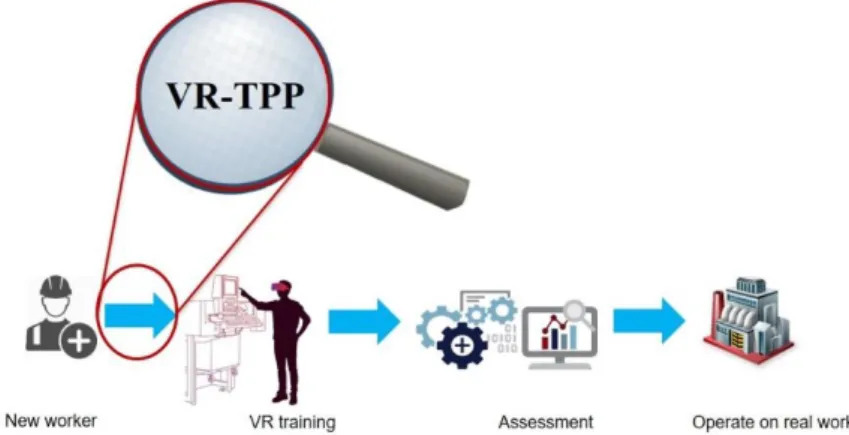
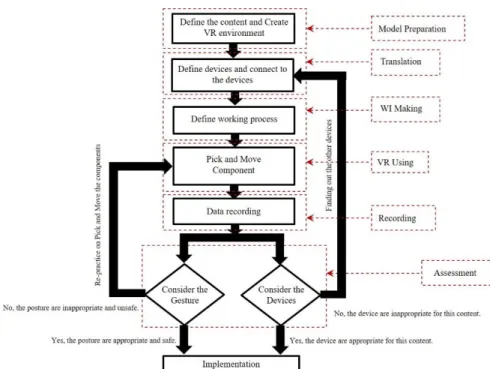
Chapter 3 presents the VR-TPP concept and approach which has been designed to support the training preparation process for maintenance work. The VR-TPP concept is composed of several tasks, namely the preparation task, the execution task, and the implementation task. Such tasks are defined in the preparation training phase which will also be explained in this chapter.
Chapter 4 demonstrates how the VR-TPP concept as a systematic approach can be implemented in the maintenance session and preparation process. This chapter explains creation process of a TPP platform that derives from VR-TPP concept.
Chapter 5 demonstrates case studies to validate our concept and platform. Three different use cases will be implemented in case studies as follows:
Validation of VR-TPP concept by disassembling process
VR-TPP for creating a knowledge base of hand gestures
Virtual Reality for Training in Maintenance Task
These case studies involve the use of both non-immersive and fully-immersive VR levels.
In chapter 6, user experience assessment will be analyzed through the case study 1 and 3. We evaluate and explain about the ease of use of VR devices, the realism perception and the side effects from participant's experience. Several potential directions for future research will also be proposed based on the insights of the case study analysis.
Chapter 7 concludes and gives perspectives based on the limitations of this research.
33
2 State of The Art
2.1 Introduction
This chapter presents the context of the virtual reality technology for training in maintenance task. The aim is to explain the evolution of training from the conventional training method to virtual reality technology for training. The traditional methods such as training manuals, job shadowing, and evaluations and certification processes often lack both efficiency and effectiveness. These methods also do not address the need to cater to different learning styles. However, workers do not have a lot of time to train in practice because the situation and environment in the real work does not support them in learning session.
In order to understand VR technology for trainings, some currently available environments and devices will be presented. Then, the VR technology for maintenance training, the VR for dis/assembling tasks, the VR training effectivity evaluation studies, and the hand gesture simulation for training in VR environments will be discussed and analyzed in terms of the stat of the art.
The final section discusses the results of review issues mentioned to study the problems and gaps for VR technology for maintenance training. It provides keys to assess to create and develop the concepts of integration of virtual reality technology in to the maintenance and operation of public transport systems.
2.2 Conventional maintenance training
Whenever a company recruits new workers, they must train them before letting them work in the real working place. They must acquire expert knowledge and understand the process correctly, otherwise accidents and damage may occur to them. The training process is therefore necessarily the first step also in maintenance operations that shall be taken over by unskilled personnel. The training methods for such maintenance tasks depend in many ways on where the training is performed and the available training infrastructure.
34
This section presents training methods for off-site training and on-site training. Both training method are not only use for maintenance work, they also apply to other jobs as well.
2.2.1 Off-site training
Off-the-job training is conducted in a location specifically designated for training. It may be near the workplace or away from work5. Off-the-job training is conducted in a location specifically designated for training. It may be near the workplace or away from work. Training away from the workplace can reduce distractions and allow the trainees to fully concentrate on the training process. Offsite training has a variety of methods, these are often talk about lecturing, reading, watching visual and audio, etc.
2.2.1.1 Classroom lectures
In this training method, the trainees learn the operations of machines and equipment, as well as all of the working process in a classroom where a trainer instructs them. In the classroom, there are many tools and methods used by trainees. They depend on the techniques of the trainer. For example, learning with diagrams, PowerPoint slides and videos.
Figure 4: Training with classroom lecture method6
An advantage of classroom lectures is the capacity to train large groups. However, the active participation of learners is important for learning and knowledge development, which may be limited if there is too much information.
___________________________________ 5
https://www.ag5.com/training-on-the-job/
6
35
While interacting with an environment that has a lot of information, people can feel confused and irritated (De Koning, Tabbers, Rikers, & Paas, 2007). Another disadvantage is that it remains “theatrical”. We can show and present with video but we cannot let the trainees go to execution for “learning by doing”.
2.2.1.2 Offsite lab-work
This training method is widely used to train the technicians and employees who deal with tools and machines. Employees learn their work with the equipment and machine they will be using on maintenance task, but the training will be conducted away from the actual work area. Tools and equipment are transported to the place where the training takes place, typically a workshop. It can be seen that both methods, classroom lectures and workshop training, are conducted distant from the actual work area relating to safety reasons of the workers. Sometimes the trainers or trainees need to travel to attend the training in the location for training.
Although the tools and equipment are used during the training, there are still limitations with tools and equipment that are large and expensive. Therefore, this off-site training is suitable for tasks that are not too complicated and it could be efficient for training many people per training session.
Figure 5: Workshop training method7
2.2.2 On-site training
On-site training is a technique where the trainees can practice directly on the actual working area. Trainees can learn the skills needed in real working
___________________________________ 7
http://www.poma.net/en/solutions-2/customer-service-performance-and-durable-evolutions-2/customer-service-performance-and-durable-evolutions/
36
conditions and become familiar with the work environment. In addition, the companies do not need to invest any additional costs in setting up classrooms or installing models for training but they use the standard production line which can be shown down. With this method, a person will be teaching the skills needed to work on their job. Trainees learn under the supervision and guidance of workers. On-site training is a technique that based on the principle of “learning by doing” as well.
According to the TJinsite survey8, the on-site training method is voted the most preferred training method for employees by 71%. While the advantage of this training method is that it is directly on the job context. It is the most effective compared with other conventional training method because it is learned from experience and the trainees are highly motivated. Although this training method has many advantage, it is obviously less safe. Insufficient planning and control may be the cause of accidents and damage. Furthermore, some working areas cannot be productive during the training session.
2.2.3 Summary of conventional maintenance training
Conventional maintenance training can be used for both training methods off-site and on-off-site. The use of both of them depends on many factors such as budget, training objective, number of participants, suitability of training institutions, etc. The off-site training is far from the actual workplace. This training method is most likely to be a part of lecture with PowerPoint slide and presentation with visual. Sometimes this method also simulates work situations that are close to the actual work by bringing actual equipment and tools to demonstrate practice to trainees. However, this method still has limitations about moving tools and equipment that are large and expensive. With on-site training, trainees can practice at the actual workplace and real working condition, with actual tools and equipment. The trainees are more familiar with the work than the off-site training. There is also a risk of improper planning. Furthermore, the machine and workplace have to be paused in order for setting up and conducting the training sessions. During this time, the equipment cannot be used for productive purposes.
2.2.4 Limitations of conventional maintenance training
Currently, the conventional training method are not effective to meet the demands of modern factories considering the complexity of mechanical part and operation process9. Moreover, training with traditional method on the complex and dangerous industrial are high risk for worker life. In addition, the continuously rising density and complexity of mechanical parts and assemblies
___________________________________ 8
37
makes maintenance tasks increasingly difficult and hazardous (Liu X. , Cui, Song, & Xu, 2014). The traditional training method such as training manuals, job shadowing, classroom and workshop training appear therefore more and more often not efficient enough anymore.
Figure 6: Conventional Training Methods
The conventional training methods (off-site and on-site training) have been implemented in many industries:
Most industrial processes include dangerous tasks which entrain risk for workers’ lives and health, therefore it is difficult to train the people with the conventional on-site training method by facing without accident and damage.
Off-site training makes a feeling of trainees different from real work, they cannot imagine the real workplaces and the tools they need to use including the lack of understanding of the real work process. They cannot deeply perceive appropriate gesture.
Conventional on-site training may require a long training period, which leads to the absence of workers. In addition, some machinery and department need to be paused for training sessions. In addition, if the equipment is damaged during training sessions, the additional repair costs will increase. Furthermore, if a worker is injured during training, the increased expenses lead to legal problems, a negative company image, plus an unacceptable individual issue.
In addition, maintenance tasks are increasingly complex due to the increasing variety and complexity of the mechanical component design. The procedure and repairing process must be taken care of properly. Most maintenance processes involve disassembly and assembly in order to perform maintenance, repairing, remanufacturing, recycling and disposal. In this research, we focus on the disassembly and assembly processes.
As for the disassembly process, there are two main types of disassembly methods: destructive disassembly and non-destructive disassembly (Wang C. , 2014). The destructive disassembly, the components is removed from the product
___________________________________ 9
38
previously disassembled, by destroying or damaging some other components of the product. By contrast, the non-destructive disassembly, each one of the components can be removed without destroying. The non-destructive disassembly will be our target to apply with training preparation process because it is more common in maintenance, repairing, remanufacturing, recycling and disposal (Wang C. , 2014).
As for the maintenance process, workers have to learn how to disassemble and assemble parts in the correct position. Most of these methods are identified by paper manuals. There are no details about appropriate gestures or methods. In addition, work conditions that may be necessary about safety are not specified including the conditions about damage to mechanical parts such as force using, chemical and electrical factor, and other. The details of these factors cannot be demonstrated to the operator through the traditional training methods. Therefore, the training preparation process is an importance to design and show the detail of the appropriate working process as well as the correct conditions for working. The operators must learn from those steps first before going to work in the real work.
In recent years, many research papers applied AR/VR technology to improve the training of maintenance processes. (Vélaz, Rodríguez Arce, Gutiérrez, Lozano-Rodero, & Suescun, 2014) used virtual reality (VR) systems for teaching industrial assembly tasks and studied the influence of the interaction technology on the learning process. They used four devices for training with the VR system on the assembly task (mouse-based, Phantom OmniVR haptic, MMocap3D and MMocap2D). (Weijun., Xiao., & Lin., 2016) presented a method for constructing a nuclear power plant in service maintenance virtual simulation scene and virtual maintenance process. They demonstrate the advantage of using virtual reality technology to design and verify an in-service maintenance process of nuclear power plants compared to the conventional way. As the result of using VR system training, it could be applied to the training preparation process in order to address and build the right work instruction.
2.3 Virtual Reality technology
Virtual reality is a product of the evolution of the computer from an instrument that merely received input from a user to a machine that can adapt to the user's cues to create an almost lifelike experience. Virtual reality is a term coined in 1989 by Jaron Lanier (Conn., Lanier., Minsky., Fisher., & Druin., 1989). Others describe this idea as "Virtual World". Virtual reality combines state-of-the-art imaging with computer technology to allow users experience a virtual environment. Virtual reality is a digital experience that can be representative or completely different from the real world. Virtual reality technology is used to create immersive experiences that can help educate and entertain people as well
39
as training. Virtual reality technology is used in a variety of industries such as medicine, architecture, military, advertisement, etc.
2.3.1 Virtual Reality systems
It is difficult to categorize all VR systems, most configurations fall into three main categories and each category can be ranked by the sense of immersion (T.S.Mujber., T.Szecsi., & M.S.J.Hashmi., 2004). There are three main types of virtual reality system used today, composing non-immersive (Desktop) system, semi-immersive system, and fully-immersive system.
2.3.1.1 Non-immersive system
Non-Immersive system also called Desktop VR system or Windows on World system (Bamodu., Oluleke., & Ye., 2013). It is the least immersive and it is also very cheap compared to other system, because it requires widdy speed components. Non-immersive system provides users with a computer-generated environment without feeling immersed in the virtual world. The feature of this immersive system allows users perceive virtual world around them with sound, image, and textile integration.
2.3.1.2 Semi-immersive system
The semi-immersive system is developed from the non-immersive system. It also keeps the simplicity of the semi-immersive system, but with a high level of immersion and using physical models (Bamodu., Oluleke., & Ye., 2013). Semi-immersive experiences provide users with a partially virtual environment to interact with. This type of VR is mainly used for educational and training purposes and the experience is made possible with graphical computing and large projector systems. With semi-immersive system, the people can see what is going on around them and interact with the objects they need. Semi-immersive system simulates on high-resolution displays and powerful computers or computer desktop.
2.3.1.3 Fully-immersive system
The fully-immersive system is a technology that allows users to experience virtual environment as the real world. This system allows users to perceive the experience in virtual world as the real world. The purpose of this system is to make users feel that they are in the real world while they are actually in the virtual world. Users can interact with virtual objects with VR tools such as Data glove (Karam., 2006). Fully-immersive systems are not limited to the use of head-mounted displays and controllers. With this hardware, the technology becomes more available for ordinary users. However, there are advanced solutions that offer a more realistic VR experience. One of them is CAVE, a term that stands for CAVE automatic virtual environment. The CAVE fully-immersive virtual
40
reality is a cubic room equipped with a set of stereoscopic display, built-in speakers, and motion capture system.
2.3.2 VR devices and interaction techniques
Virtual reality equipment is constantly evolving and improving as well as software known as the reality engine. This section shows an overview of VR devices and interaction techniques to human perception to understand the working of VR systems. The VR devices are divided into major type: input and output devices. In addition, this section is presenting the interaction techniques in order to interface VR input and output devices.
2.3.2.1 Input devices
An input device is used to capture and interpret user actions in order to interface with the virtual environment. In this section, we focus on a simple connection device called Desktop input devices and the other connection device called tracking devices.
Desktop input devices
This input device is essentially a piece of hardware that sends data to a computer. The most common input devices are mouse and keyboard, as well as touchpad and touch screen, for recent technology.
The keyboard is one of the primary input devices used to input data and commands. It has function keys, control keys, arrow keys, keypad and the key button with the letters, numbers and commands.
The mouse interacts with a computer through a process known as “point and click”. The mouse is used to control the cursor and coordinates. It also includes buttons and possibly a scroll wheel to allow users to interact with the graphic user interface (GUI).
The touchpad is a common substitute for a computer mouse. It is essentially a specialized surface that can detect the movement of a user's finger and use that information to direct a pointer and control a computer.
The touch screen is a touch-sensitive monitor screen that reacts to fingers moving across it (Walker, 2012). Touch screens are particularly common in portable devices, such as tablets, palmtops, laptops, and smartphones. It has
41
the same initial function as touchpad, but 2D rendering is synchronized with finger activity.
Tracking devices
A tracking device is used to observe body movement or some part of body of user. Tracking devices are components in the VR system. Corresponding devices communicate with the VR platform in order to tell the orientation of a user's gage. In systems that allow users to move around within a physical space, trackers detect where the users are, the direction users are moving and users speed. They can capture the full skeleton geometry at a very high frame rate. There are several different kinds of tracking systems used in VR systems. This section focuses on tracking methods including markers tracking and camera tracking.
Marker tracking method uses infrared light to identify markers with optical tracking devices such as infrared camera (IR). In this method, a target is fitted with markers which form a pattern constellation. The visible markers serve as markers for optical tracking. A camera or multiple cameras constantly seek the markers and then use various algorithms to extract the position and orientation of the object from the markers. By synchronizing the camera, it is easier to block out other IR lights in the tracking area and reflect the IR light back towards the source almost without scattering. Then 3D movement of markers are captured. The implementation of this technology was applied by OptiTrack, MotionAnalysis, and etc.
Camera tracking method uses a set of computer vision algorithms and tracking devices such as a camera of visible, a stereo camera and a depth camera. Cameras have to determine the distance to the object and its position in space, so it's necessary to calibrate. Camera tracking are reliable and relatively non-expensive.
Video tracking method uses a set of computer vision algorithms and tracking devices such as a stereo camera and a depth camera. The capture data recovers the pose of an articulate body, which consists of joint and rigid parts using image-based observations. These system track the user to render their position. In addition, the system perform task like gesture recognition to enable the user to interact with the application. These technology is implemented by Leap Motion, Microsoft Kinect, etc.
Magnetic tracking method is based on measuring the intensity of inhomogeneous magnetic fields with electromagnetic sensors. A base station is associated to the system transmitter or a field generator generate an alternating or a static electromagnetic field. The magnetic fields are generated by three coiled wires arranged in a perpendicular orientation to one another.
42
Each small coil becomes an electromagnet, and the system's sensors measure how its magnetic field affects the other coils. This measurement tells the system the direction and orientation of the emitter. A good electromagnetic tracking system is very responsive, with low levels of latency. One disadvantage of this system is that anything that can generate a magnetic field can interfere in the signals sent to the sensors. The magnetic tracking is implemented by Polhemus and in Razor Hydra by Sixense.
2.3.2.2 Output devices
An output device is used to send data from a computer to simulate information to users through the human perception system. In this topic, we focus on a sensorial channel fed back by interfaced devices including displays devices, sound devices and haptic devices.
Display devices
Display devices are electromechanical systems capable of full motion graphic displays in order to display the information from the computer system to the human visual system. The performance of these devices depends on the following parameters: field of view, spatial resolution, screen geometry, light transfer mechanism, refresh rate and comfort of use. Display devices have various system, typical examples include a cathode ray tube (CRT), a liquid crystal display (LCD), a head mounted display (HMD), a projection screen, a stereoscopic display and CAVEs. These display devices are characteristics different perception also.
Figure 7: The head mounted display (HMD)10
___________________________________ 10
43
Figure 8: The stereoscopic display11
Figure 9: The Cave Automatic Virtual Environment (CAVE) (P. Marayong, et al., 2020)
___________________________________ 11
https://www.pressebox.com/pressrelease/schneider-digital-josef-j-schneider-ek/Beam-splitter-technology-New-passive-3D-PluraView-monitor/boxid/871431
44 Sound devices
Sound devices present audio information through the human auditory system in order to generate and display a 3D spatialized sound allowing user to determine the location and direction of the sound. Sound devices also include any device that attaches to a computer for the purpose of playing sound, such as music or speech. There are many formats of audio, among them mono, stereo, surround, and 3D sound.
Mono (meaning one) audio12is single channel audio. With mono, all audio is
sent through one channel for playback. For example, if we are listening to mono audio, we will notice that whatever we hear in the right earbud, we will hear in the left earbud. That is because the speakers are playing back the same single channel audio file into both earbuds. We will not hear the drums in the left ear, or the guitar in the right. Everything will just sound like its right in front of us, evenly dispersed through both earbuds.
Stereo is an upgrade format from mono12, the stereo audio is two channel
audio. With stereo audio user can localize audio sources to the left and right when listening, but not above, behind or below.
Surround sound3
is a mixing process and playback experience. The surround sound is mixed from several mono and stereo audio files by computer program. Once this surround sound mix is created, it can be played back through a surround sound speaker system. Surround systems can be 5.1 (5 speakers, one subwoofer) to 7.1 to 21.1, all depends on the number of speakers to mix for during the mixing process.
3D audio is the newest in the world of audio12
. Virtual Reality has brought about this format as most audiences in VR experiences want the sound to move around them as they explore virtual environments just like the visuals do.
Haptic devices
The haptic devices simulate physical interaction between user and virtual objects within virtual world. Users are able to perceive the physical interaction to 3D objects by tactile and force feedback. Tactile is a perception by the skin. Tactile feedback allows users to feel things such as the texture of surfaces, temperature and vibration. While, force feedback reproduces directional forces that can result from solid boundaries, the weight of grasped virtual objects, mechanical compliance of an object and inertia (Berkley, 2003). Haptic devices
___________________________________ 12
45
are input and output devices, that mean they track a physical manipulation from users (input) and provide the sensations of tactile or force feedback back (output) to the users. Examples of haptic devices for perception of force feedback and tactile feedback such as PHANTOMTM device and Data Gloves device.
Figure 10: Assembly simulation using haptic device (Ladeveze, Fourquet, & Puel, 2010)
Figure 11: Data glove in a six-sided CAVE (S. & Zaldivar-Colado, 2007)
46 2.3.2.3 Interaction techniques
Interacting the input device to the virtual environment system requires interaction technique. There are many differences interaction techniques used in virtual reality technology. Interaction techniques allow people to interact with the technology without the need of intermediate devices for the user interaction; these interactions rather take place directly using hand gestures or body movements (Kharoub, Lataifeh, & Ahmed, 2019). Thus, it is very important to understand how the interaction techniques can be used in virtual reality technology. These interaction techniques should consider the necessary componence for an effective learning which includes input devices and interaction techniques for the purpose of navigation, selection and manipulation in the virtual environment. These three key interaction modes were identified by Bowman (Bowman, Kruijff, LaViola, & Poupyrev, 2001).
Navigation
The computer needs to provide the user with information regarding location and movement. Navigation tasks have two main modalities: travel and wayfinding. The travel is a movement from the current location to target point. The wayfinding is the finding and setting the way to get to a travel goal within the virtual environment.
Travel perception is mainly defined by the control of the user’s viewpoint motion from one location to another in the 3D environment. Furthermore, a good travel techniques allow the user to easily move through the environment. There are several travel techniques: physical movement, manual viewpoint manipulation, steering, target-based travel and route planning.
Wayfinding in virtual space is different and more difficult to do than in the real world because synthetic environments are often missing perceptual cues and movement constraints. It can be defined by cognitive navigation action in a physical space using the users' space knowledge in relation to objects, landmark, road sign, etc. (Khundam C. , 2019).
Selection and manipulation
In the virtual environment, users can interact with a virtual object through selection task and manipulation task (Bowman. D. A., 1998). The selection task refers to the act of specifying or choosing an object for some purpose. Sometime it is called a target acquisition task (Zhai & Milgram, 1994). Manipulation is the task of setting the position, rotation and scaling of a selected object. The positioning is used to change the 3D position of the objects. The positioning in virtual environment is a movement of the objects from a starting location to target location. Then, the rotation is used to change the orientation of the objects.
47
Furthermore, the scaling is used to change the size of the objects. Other techniques include the Go-Go technique, Finger-Based Grasping techniques, Ray-Casting techniques and Image-Plane Pointing techniques.
Go-Go techniques (Poupyrev, Billinghurst, Weghorst, & Ichikawa, 1996) attempt to improve on the simple virtual hand by providing an unobtrusive technique that allows the user to interactively change the length of the virtual arm. Go-Go techniques therefore provide a simple way to interactively change the length of the virtual arm-simply by stretching the real hand out or bringing it closer.
Finger-Based Grasping techniques lets the user interact with and manipulate the objects with more precision. It enables new interactions, such as holding a virtual object between one's virtual fingers. However, this technique is still without haptic feedback, it may be difficult to determine to move the finger to interact with virtual objects in the virtual environment.
Ray-Casting techniques (Jr., Kruijff, McMahan, Bowman, & Poupyrev, 2017) is used to point at objects with a virtual ray that defines the direction of pointing, and a virtual line segment attached to the hand visualizes the pointing direction. The pointing vector in the case of the simple ray-casting technique is estimated from the direction of the virtual ray that is attached to the user's virtual hand.
Figure 12: Go-Go interaction technique: egocentric coordinate system (Poupyrev, Billinghurst, Weghorst, & Ichikawa, 1996)
48
Figure 13: Rigid-body fingers
(Jr., Kruijff, McMahan, Bowman, & Poupyrev, 2017)
Image-Plane Pointing techniques is used to select and manipulate 3D objects by touching and manipulating their 2D projections on a virtual image located in front of the user.
Figure 14: The “sticky finger” image-plane pointing technique (Jr., Kruijff, McMahan, Bowman, & Poupyrev, 2017)