Cilkpride: Always-on Visualizations for Parallel
Programming
by
Genghis Chau
Submitted to the Department of Electrical Engineering and Computer Science
in partial fulfillment of the requirements for the degree of
Master of Engineering in Electrical Engineering and Computer Science
at the
MASSACHUSETTS INSTITUTE OF TECHNOLOGY
February 2017
© Genghis Chau, MMXVII. All rights reserved.
The author hereby grants to MIT permission to reproduce and to distribute
publicly paper and electronic copies of this thesis document in whole or in
part in any medium now known or hereafter created.
Author . . . .
Department of Electrical Engineering and Computer Science
January 30, 2017
Certified by. . . .
Robert C. Miller
Professor of Computer Science and Engineering
Thesis Supervisor
Accepted by . . . .
Christopher J. Terman
Chairman, Masters of Engineering Thesis Committee
Cilkpride: Always-on Visualizations for Parallel Programming
by
Genghis Chau
Submitted to the Department of Electrical Engineering and Computer Science on January 30, 2017, in partial fulfillment of the
requirements for the degree of
Master of Engineering in Electrical Engineering and Computer Science
Abstract
Parallel programming is an increasingly important way for programmers to squeeze more per-formance out of their programs. Parallelization is error-prone, however, and programmers often forget to run error checkers and performance analyzers regularly. This thesis presents Cilkpride, an IDE plug-in that uses always-on visualizations to show programmers informa-tion on on their parallel program directly inside their IDE. Cilkpride runs a race checker and program profiler every time code is changed and immediately displays output to make pro-grammers always aware of parallelization errors and performance bottlenecks. Propro-grammers can then react and fix these issues quickly. To evaluate the system, we asked students who had taken MIT’s 6.172 class, a performance engineering course, to use Cilkpride. Students found Cilkpride useful, helping them find races and bottlenecks.
Thesis Supervisor: Robert C. Miller
Acknowledgments
First, I’d like to thank my parents for giving me the chance to sit here and write this para-graph. Without their hard work and constant prodding, there’s probably no way I could’ve gotten here. It’s been a long ride thus far, but at least I wasn’t alone. Sorry I wasn’t home very often, but I guess that’s college for you.
Speaking of not being alone, I’d like to give some appreciation to my friends. I had some old friends come to MIT with me, and I’ve met many new friends, too. College can be a stressful place — especially MIT — and having people to chill with really makes it all easier. Bouncing some research ideas off you guys also made it all the easier.
Next, thanks to Charles Leiserson, T.B. Schardl, and the folks over at 6.172 for letting me introduce the tool in class, brainstorming ideas with me, and fixing stuff whenever they needed fixing. Special thanks to T.B., who has spent many hours helping me debug various things, and personally implementing bug fixes when I needed them. Hopefully Cilkpride will be of use next year, too.
Lastly, big thanks to my advisor Rob Miller and everyone in the research group formerly known as the User Interface Design. Thanks for all the help and suggestions, and even though it’s become a little bit more quiet recently, keep UP the good work.
Contents
1 Introduction 9
1.1 Motivation and Problem Statement . . . 9
1.2 Cilkpride . . . 11
1.3 Contributions . . . 15
1.4 Outline . . . 16
2 Related Work 17 2.1 Parallel Programming and Cilk . . . 17
2.2 Dynamic Analysis Visualizations . . . 21
2.3 Always-on Visualizations . . . 23
3 Design 25 3.1 General Cilkpride UI . . . 25
3.2 Cilksan UI . . . 29
3.3 Cilkprof UI . . . 31
3.3.1 Pruning Cilkprof Output . . . 31
3.3.2 Interfaces . . . 34
4 Implementation 39 4.1 Overall Structure . . . 39
4.2 SSH and File Sync . . . 40
4.3 Build System . . . 41
4.5 Cilkprof Graphs . . . 45 4.6 Cilkprof Modifications . . . 46 5 Evaluation 47 5.1 Deployment in 6.172 . . . 47 5.2 User Studies . . . 48 5.3 General Feedback . . . 52 5.3.1 Cilksan . . . 52 5.3.2 Cilkprof . . . 53 5.4 Discussion . . . 54 6 Conclusion 57 6.1 Future Work . . . 57
Chapter 1
Introduction
1.1 Motivation and Problem Statement
Over the last few decades, computer processor performance has increased exponentially as predicted by Moore’s Law, due in part to techniques that let manufacturers put more transistors on increasingly smaller chips. Unfortunately, this trend is slowing, as physical limitations prevent makers from producing smaller chips without significant innovations. As a result, multicore processors, or processors with several computing units to allow for parallel processing, are now commonly used to make modern computers quicker. To take advantage of multiple cores, however, programmers must identify parallelizable sections of code and rewrite them to use threading. This presents unique challenges because humans find it diffi-cult to reason about parallel execution. Architecture details and behind-the-scenes compiler modifications like instruction re-ordering and memory caching further complicate writing performant parallel code to the point where poor application of parallelization can result in parallel code slower than its sequential counterpart.
This thesis primarily focuses on two fundamental aspects of parallel programming: correct-ness and performance. Since parallel execution involves multiple pieces of code running at the same time, a common but difficult-to-detect problem is race conditions, which happen when shared memory is simultaneously accessed by multiple threads and at least one of those accesses is a write. Since parallel code is executed in many different ways depending
on instruction interleaving and timing, race conditions can be hard to catch manually. For example, race conditions in the Therac-25 radiation therapy machine that caused patients to receive lethally high amounts of radiation went undetected because they only appeared when users pressed specific buttons with specific timings, which manual testing did not catch [8]. After program correctness comes optimization, which is especially important in parallel programming, as one of the core goals of parallelizing programs is to speed up execution. Determining what to optimize, though, is harder with parallel code. In fully sequential code, optimizing any function will result in a faster program, but the same is not true in parallel code if the function does not lie on the critical path of execution. Furthermore, functions that lie on the critical path if the program is executed on a certain number of cores may not lie on the critical path if the number of cores changes. Adding to the complexity, using parallelism is not cost-free — spawning too many threads incurs overhead and can wipe out any gains made by parallelization.
The traditional solution to these problems is command line tools that instrument and run programs, recording relevant data as execution happens. Race condition checkers keep track of all memory accesses and report when parallel threads access the same memory location without appropriate locking. Performance analyzers instrument function entries and exits and record the amount of time or cycles taken within each function, or use polling tech-niques to estimate how much time is spent in each function. These tools give programmers valuable insight into what their parallel code is doing, but running command line tools re-quires programmers to actively remember to do so. Programmers often only run these tools sporadically, after significant chunks of the code have been changed. If the tools do detect race conditions, time is wasted pinpointing the origin of the problem and rewriting code. Similarly, fixing a performance bottleneck can be much more work when large portions of code are freshly written. Even when programmers do remember, the command line environ-ment generally limits the tool output to text, making it difficult to show visualizations and more advanced user interfaces. Finally, for programmers editing code in an IDE, the CLI is a separate window, making it hard to connect the tool output to the actual code.
To remedy this, this thesis explores utilizing always-on visualizations inside the program-mer’s IDE to constantly provide up-to-date information about race conditions and code performance, showing the information cleanly in context next to the code it is referring to. This work builds on previous research about always-on visualizations, including Theseus, a tool for Javascript programs that displays updated traces and execution counts inside the programmer’s editor as code is modified [9]. It also uses ideas from established examples of always-on visualizations, such as linters and syntax checkers. By making race conditions and performance counters more obvious to programmers, they will be more aware of the quality of their code and be inclined to fix parallelization issues before they grow unmanageable. In order to test the effectiveness of always-on visualizations in parallel coding, we imple-mented a prototype, Cilkpride, in the Atom text editor that runs a race condition checker and performance analyzer and visualizes the results directly within Atom.
1.2 Cilkpride
Cilkpride is an IDE extension prototyped in the Atom text editor that automatically runs program analysis tools in the background and displays the results inside the editor. The Cilkpride prototype is targeted for use in MIT’s 6.172 Performance Engineering course. As a result, it is tightly paired with the Cilk threading library used in 6.172 to introduce par-allelization to C code, and Cilktools, a set of tools developed to analyze Cilk code. Since many students in the class have had little exposure to parallel code, Cilkpride aims to in-crease programmer awareness of race conditions and performance bottlenecks in their code so that they can address them quickly and efficiently. To accomplish this, Cilkpride uses two tools from the Cilktools suite — Cilksan and Cilkprof. Cilksan is a race condition checker for Cilk code, while Cilkprof is a performance analyzer. In order for these tools to work properly, programmers must add several flags during the compiling process and then run the resulting executable.
All programmer interaction with Cilkpride occurs in Atom. Users begin by picking the folder where their Cilk code is located on their file system, and giving appropriate commands to
compile and run executables with the two analysis tools, Cilksan and Cilkprof, enabled. This enables Cilkpride for that directory and its subdirectories so that any time a file within the designated folder is modified, Cilkpride recompiles the code and runs the Cilksan and Cilkprof tools in the background using the user-given commands. Since Cilkpride runs silently in the background, the user is free to continue coding. As soon as each tool finishes and produces output, Cilkpride parses the output and generates the user interfaces for that tool. One of the challenges of designing Cilkpride is choosing what information to display in the user interface. For example, the Cilkprof performance profiler outputs 24 different performance counters for every function. Cilkpride prunes this number to 7 counters per function, making it easier for programmers to digest the information, find performance bottlenecks and optimize them. For each tool, there are two primary user interfaces — the gutter view and the detailed view. The gutter view, shown below in Figures 1-1 and 1-2, appears on the side of the editor in the form of markers and badges, next to the code being edited. This gives programmers a quick summary of the line they are editing, and lets them tell if there are any race conditions associated with the line and what its current multicore performance looks like without any special editor interactions. The gutter view is an example of a zero-click always-on visual-ization, as the markers are constantly visible and silently give updated analysis without the programmer needing to click on anything. The detailed view, shown in Figures 1-3 and 1-4, is a one-click view and must be actively opened by the programmer. This provides additional visualizations and more in-depth detail about race conditions and performance counters, and is intended for use when the programmer is focused on fixing races or optimizing code.
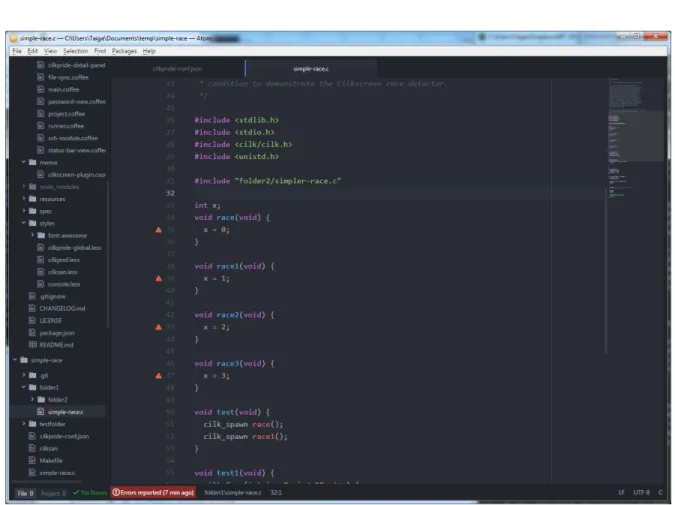
Figure 1-1: An example of Cilksan’s gutter view in Cilkpride. Cilkpride places an alert sign in the gutter if there is a race condition at the associated line. In this example lines 32, 36, 40, and 44 are all involved in race conditions.
Figure 1-2: An example of Cilkprof’s gutter view in Cilkpride. The left visu-alization graphs the amount of time consumed versus number of cores for the function call on line 320, and the right badge indicates that line 320 was executed approximately 922,000 times.
Figure 1-3: Cilksan’s detailed view in Cilkpride. The table summarizes all race conditions on the right, and provides a interactive visualization of the files with race conditions on the left. Users can select a race condition on the right, and the associated markers on the left will light up. Users can also click on file names, file numbers, or highlighted lines on the left visualization to jump to code.
Figure 1-4: Cilkprof’s detailed view in Cilkpride. The table summarizes the Cilkprof output data, provides coloring for easier parsing, and allows the user to sort by column. In this example, the work column is sorted in descending order.
While Cilkpride currently runs only Cilksan and Cilkprof, there are a number of other CLI-only tools that would be helpful if automated and converted into an always-on visualization, such as a memory sanitizer. To account for this, Cilkpride’s backend is designed to be modular, so that additional dynamic analysis tools can be easily added in the future. In ad-dition, Cilkpride provides additional tools for 6.172 students, including the ability to choose whether to run the tools locally or on a remote environment. If users choose to run Cilksan and Cilkprof on a remote server, Cilkpride automatically syncs files as soon as any change is made, and uses a SSH shell instance to compile and run the program.
We released an early version of Cilkpride for use in the Fall 2016 version of 6.172 that only provided file syncing and the Cilksan interface. Later, in order to evaluate Cilkpride with the Cilkprof interface completed, we asked six students who had taken 6.172 to use Cilkpride while coding in Cilk. Students performed four short tasks using Cilkpride, and then were asked for general feedback on the interface in an one-hour session. They generally found that Cilkpride notified them of race conditions promptly, and liked the overall interface, but sometimes struggled with interpreting the information provided by Cilkpride.
1.3 Contributions
Cilkpride presents several contributions:
A novel interface for the Cilksan and Cilkprof tools to show race conditions and per-formance statistics in a code editor.
Methods for identifying bottlenecks in parallel code and appropriate strategies for optimizing them.
Improvements to the Cilkprof performance analysis tool to help it better instrument C functions.
A framework to run dynamic analysis tools from within an IDE as part of an always-on visualization.
1.4 Outline
The rest of this thesis discusses Cilkpride in more depth. In Chapter 2, related work to Cilkpride is discussed, including command line tools, always-on visualizations, and the Cilk threading library. The design of Cilkpride’s user interface is presented in Chapter 3, while the implementation details are provided in Chapter 4. The evaluation process and user studies conducted are covered in Chapter 5. Lastly, the thesis is concluded and future work is proposed in Chapter 6.
Chapter 2
Related Work
2.1 Parallel Programming and Cilk
Previously, programs became faster naturally due to processor speed increases over time. As gains from Moore’s Law come to end, multicore machines have become more popular [4]. Parallelization has become an important optimization tool, but taking advantage of multithreading can be a difficult task. Many programming APIs do not work well with parallel programming, and many programming models need to be reworked to fit parallel applications. Since threads must share resources, it is hard to predict what exactly will happen to program correctness and performance, and modifying code can cause unexpected consequences. Many problems appear in parallel programming that do not have sequential counterparts, such as memory contention, deadlock and race conditions [1].
In order to make parallel programming easier for beginner programmers to grasp, the Cilk-plus programming language, commonly known as Cilk, was developed [5]. CilkCilk-plus, an extension of C, provides a simple interface for programmers to introduce threading. Origi-nally designed to abstract away thread scheduling and simplify the concurrency model, Cilk only requires users to specify which parts of the code to parallelize [3]. It offers two primary ways to parallelize: spawning a new thread using the cilk_spawn keyword, or parallelizing a loop with a divide-and-conquer strategy using the cilk_for keyword. The extension also offers tools like hyperobjects, which allow threads to safely modify shared data structures
without using explicit locks. Since Cilk only requires programmers to identify parallelizable sections and is easy to use, it is a good choice to use as a teaching tool, such as in 6.172 where students use Cilk to parallelize homework assignments and projects.
Like any concurrent programming language, Cilk applications often contain race conditions on memory addresses. There are two main tools to help Cilk programmers find races, Cilkscreen and Cilksan. While Cilkscreen is available from Intel as part of their Cilktools tool suite, Cilksan is an updated, open-source version of Cilkscreen currently developed at CSAIL that improves on some critical bugs in Cilkscreen such as recognition of races in-side cilk_for loops. Both race detectors are examples of dynamic analysis tools and run multithreaded applications serially, keeping track of which instructions would normally be run in parallel. They also instrument and record all memory accesses, and when concurrent instructions access the same memory address, the tools report a race condition. While this strategy is generally successful in catching race conditions, there are a few limitations. One is that they can report benign races as erroneous despite the fact that these races do not affect correctness. Another is that because the tools rely on running the program with specific inputs and examining behavior, they are unable to catch race conditions in code paths that are not executed by those inputs.
Optimizing parallel programs is also a challenge because identifying bottlenecks in concur-rent code involves additional variables compared to sequential code. For a CPU-bound serial program, the amount of time the program takes is dependent on the amount of computa-tion performed, or the program’s work. Since all computacomputa-tion must be done sequentially, optimizing any function in a serial program will reduce the amount of work and make the program finish faster. With parallel programs, computation can be done concurrently on different processors, and simply reducing the program’s work will not necessarily make the program faster. For example, consider a program running concurrently on two processors — one processor is running a function that takes 10 seconds while the other processor is running a function that takes 20 seconds. Optimizing the 10 second function will reduce the work of the program, but will not reduce the completion time, which remains 20 seconds. Therefore
multithreaded optimizations require a different metric called the span, or the length of the longest computation path that must be done sequentially. This is also known as the criti-cal path of the program, and the length of the span determines the application’s wall-clock runtime assuming it is run on enough processors to fully exploit its parallelism. Being able to identify a program’s span allows performance engineers to determine which functions to optimize first.
For Cilk programs, the Cilkprof tool helps programmers get a better picture of their pro-gram’s overall performance. Cilkprof, also currently developed at CSAIL, measures the total work and span for each function. Cilkprof runs Cilk programs serially on a single core, in-strumenting every function entry and exit [10]. Cilkprof also keeps track of which functions are running in parallel, so that it can accurately calculate the span. On exiting a func-tion, Cilkprof determines the amount of computation used for the function and updates the counters for that function. Since Cilkprof offers span measurements to the programmer, it emphasizes that parallel execution differs from sequential execution, and is more descriptive than other common profilers like gprof, which only calculate the work performed for each function [7].
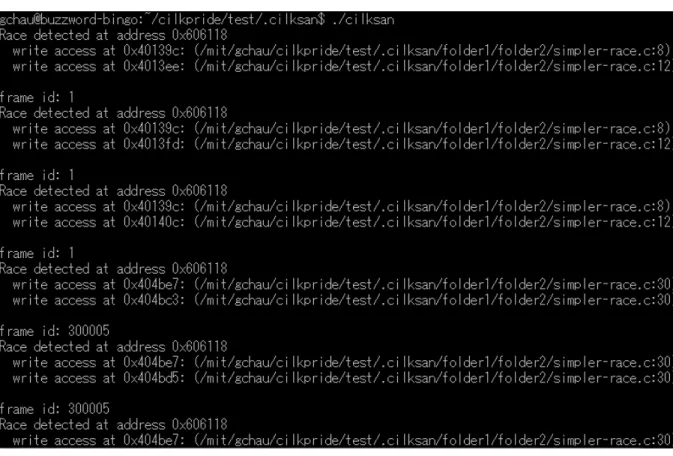
Each of these tools are run from the command line and the output is often difficult to parse on first glance. Cilksan lists all race conditions in the console window using text, as seen in Figure 2-1, which can become difficult to read if there are many race conditions. Cilkprof creates a CSV file, with 24 performance counters for each function. An example of Cilkprof output is seen in Figure 2-2 below. The large amount of information and lack of formatting makes it hard to read the CSV, hindering usability. Cilkpride builds upon Cilksan and Cilkprof by providing a user-facing view directly in the programmer’s code editor, automatically running them so that the programmer does not need to, along with visualizing and parsing the data so that outputs can be interpreted easily.
Figure 2-1: An example of output from the Cilksan race condition checker.
Figure 2-2: An example of part of a CSV output from the Cilkprof profiler, rendered in Microsoft Excel. Note that the screenshot shows fewer than half of the columns available in the output file.
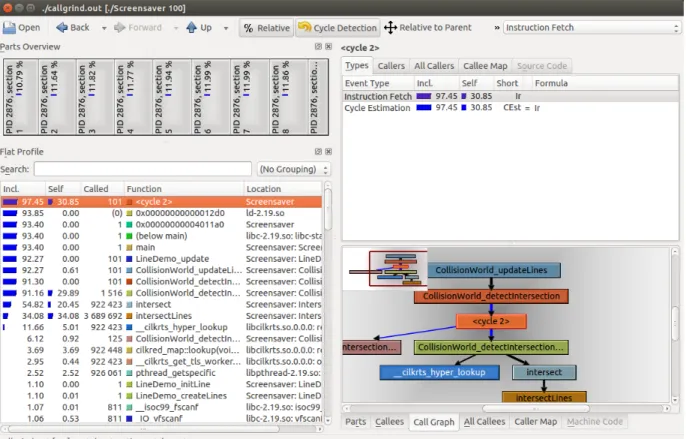
Figure 2-3: The KCachegrind interface.
2.2 Dynamic Analysis Visualizations
Since many CLI-based tools output only text, a common way to make the results more accessible to users is by visualizing them. As the Cilkprof and Cilksan tools are both exam-ples of these CLI tools, Cilkpride borrows from existing interfaces when visualizing output. One such example is KCachegrind, which creates a user interface for the callgrind tool [12]. callgrind, an extension of the popular cachegrind tool and part of the valgrind tool suite, is a performance profiler mainly for C and C++ programs. callgrind runs an executable and outputs an execution callgraph as well as the number of instructions run for each function, but entirely in text format. Since the callgrind output file is written in a specific format and was not designed to be easily understood by humans, callgrind is difficult to use by itself.
visualization for callgrind’s output. In the bottom-right area of the interface, KCachegrind shows a interactive version of the callgraph, with a complete list of functions next to it on the left side, sorted in descending order by number of instructions performed. The list also contains a bar representation of how many instructions each function takes, seen as the blue bars in the leftmost column in the list interface. Users can find more information by navigating to other tabs, such as the callees, callers, and code for a specific function.
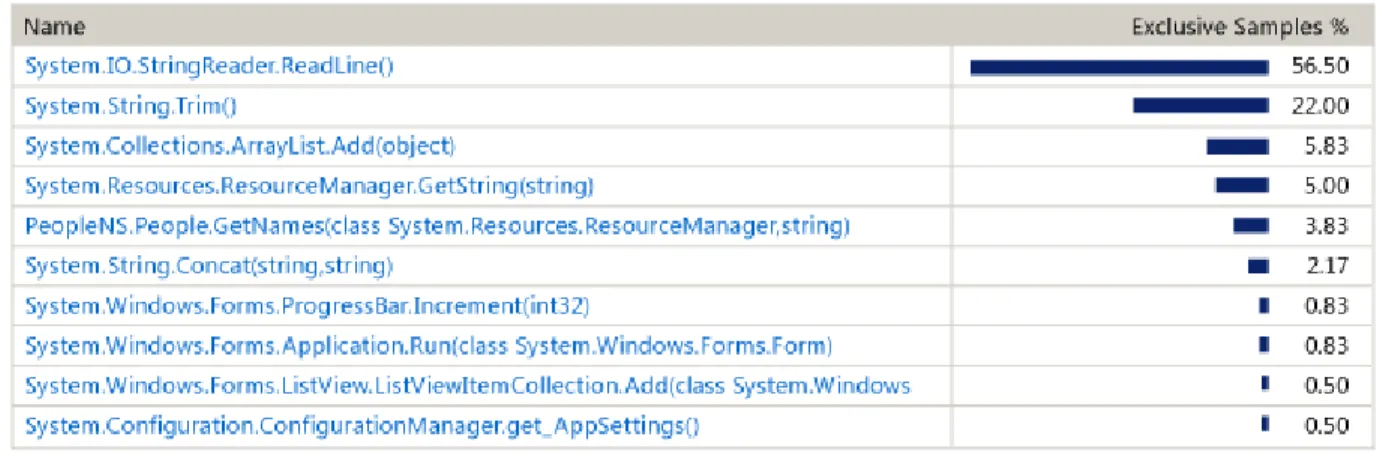
Figure 2-4: The Visual Studio Performance Profiler. Screenshot from Microsoft (https://msdn.microsoft.com/en-us/library/ms182372.aspx).
Another example is the Visual Studio Performance Profiler, which, like Cilkpride, is located within an IDE, Visual Studio. The Performance Profiler runs the program and collects performance data by either sampling during execution or instrumenting functions. When the profiler is finished, Visual Studio shows the user an interface similar to the one seen in 2-4. Like KCachegrind, the Performance Profiler displays the results in sorted order starting from the most expensive function, and also uses bar representations to show how much computation each function uses. Clicking the function name allows users to see a more detailed view, including callers and callees. However, since Visual Studio has direct access to the source code, it also shows the source code in the detailed view and lets users jump to the code by clicking on the source file name.
2.3 Always-on Visualizations
Since programmers spend most of their time in text editors, a logical idea is to integrate developer tools in editors so that programmers have quick access to them, like the Visual Studio Performance Profiler mentioned in Section 2.2. Always-on interfaces are an extension to this idea, taking advantage of being in the editor by updating while the programmer edits code. This lets the programmer discover bugs more quickly and see the direct effects of a change.
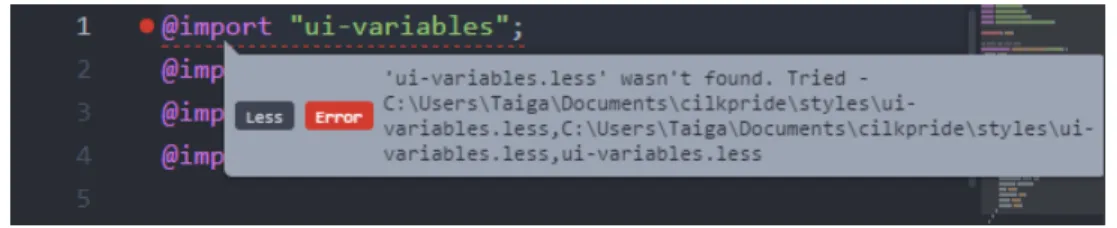
Figure 2-5: AtomLinter showing an lint error in a Less file.
A common example of an always-on interface is error checking, found in many IDEs and text editors. Error checking runs code through tools like compilers and linters and reports back any errors found. For example, the Eclipse Java IDE [6] compiles user code using the Java compiler and reports any compilation errors and warnings by displaying icons next to invalid source code in the editor gutter. AtomLinter [2], for the Atom text editor, runs user code through a language-specific linter and reports syntactic and style issues, also alerting users to potential mistakes like unreachable code or setting variables to invalid values. An example of a lint error is shown above in Figure 2-5. Error checking only requires static analysis of the source code and can be run quickly, allowing it to consistently provide up-to-date results even if edits are happening rapidly. Many programmers are already used to error checking, and race conditions are multithreaded errors, so the interface of Cilkpride borrows heavily from error checking but differs in several ways. Because the race detector cannot be run statically and may take several minutes to complete, Cilkpride must deal with a possible delay in results. The added complexity of race conditions compared to simple syntax issues also requires a more detailed interface.
While error checking is an example of an always-on interface based off static tools, recent research has integrated runtime tools into text editors as well. Several interfaces have been developed to target web developers and Javascript programmers, including Theseus [9] and Tracr [11]. Designed to replace the old debugging techniques of setting breakpoints and in-serting print statements, Theseus and Tracr allow programmers to see a Javascript runtime trace from within the Bracket text editor. By adding hooks to every Javascript function, they track all invocations of functions along with their parameters, including functions asyn-chronously called from events like mouse clicking or typing. The runtime traces update in real-time as test actions are performed, so programmers can see what part of their code is executing at any time and quickly debug if any errors appear. Theseus and Tracr also act as code coverage tools, annotating the code with the number of times that each line was run. Both systems argue that always-on visualizations are useful to programmers by providing a constant source of information. However, user studies on Theseus found that while these types of visualizations could be very helpful, they could also be distracting and overwhelming. Cilkpride builds on the conclusions from these two tools by applying them to multithreaded programs.
Chapter 3
Design
3.1 General Cilkpride UI
In order to evaluate the effectiveness of always-on visualizations with parallel programming, we built Cilkpride using the Atom text editor. We chose to prototype our system with Atom for a number of reasons. First, Atom provides a built-in package manager and package dis-tribution system, allowing users to easily download packages and begin using them without any hassle. Furthermore, all Atom packages are written in HTML5, Coffeescript and Less, enabling quick and easy prototyping. Packages using HTML5 can additionally take advan-tage of canvases and SVGs, resulting in more options and possibilities for user interfaces. They are also compatible with Node.js, allowing package developers to leverage the large repository of third-party Node.js packages and the Node.js API. Lastly, Atom’s user inter-face is designed to look and feel like that of the commonly-used Sublime Text editor. Since Cilkpride is intended to be a tool for 6.172 students, the similarity of Atom’s UI to Sublime’s UI should help tool adoption in the future by making students feel more comfortable when using Cilkpride.
Two goals for the Cilkpride interface were to make the general interface informative but not intrusive, and to make it as easy as possible to get up and running. While the interfaces for Cilksan and Cilkprof, which show race conditions and performance statistics, should be prominent, general Cilkpride UI elements should avoid distracting the user if there aren’t
any urgent issues to fix.
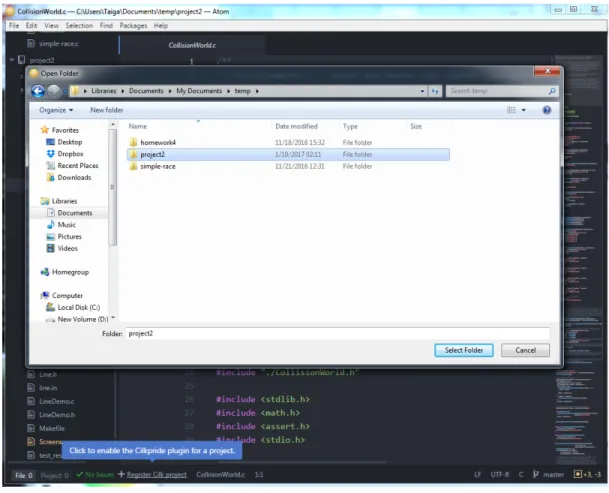
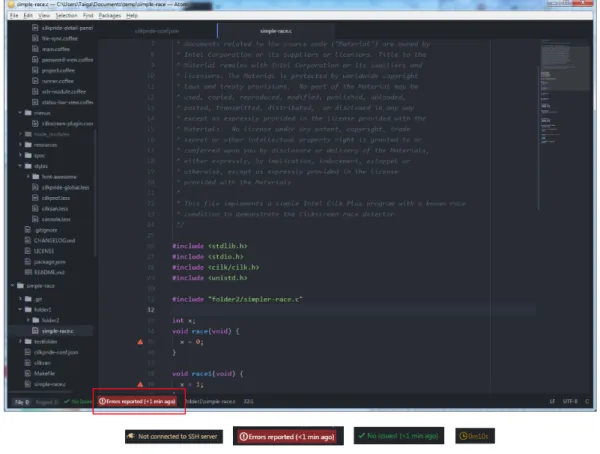
Figure 3-1: Cilkpride interfaces when creating a Cilkpride project. In the top screenshot, the user chooses a folder to register with Cilkpride. Cilkpride then automatically creates a configuration file for the project and opens it, shown in the bottom screenshot.
After installation, the first step required from the user is to register a directory containing Cilk code with Cilkpride. For convenience, we will refer to a Cilkpride-enabled directory as a Cilkpride project. Since Cilkpride requires information from the user for each project, Cilkpride asks for the relevant information at the beginning, asking the user to fill out a configuration file directly after registering the project, as seen above in Figure 3-1. The configuration file is formatted as a JSON file stored in the Cilkpride project. As the target user is a 6.172 student, most fields in the configuration file are pre-populated, but they are asked to input four pieces of information to get Cilkpride up and running:
username — their username to log into the remote server, usually their Athena user-name
remoteBaseDir — the directory on the remote server to store a copy of the Cilkpride project
cilksanCommand — a command to compile and run their executable with the Cilksan race condition checker enabled
cilkprofCommand — a command to compile and run their executable with the Cilkprof performance analyzer enabled
The other fields can be ignored by most students, but can also be used by more advanced users to change the remote server, ignore directories and files, or disable SSH and file sync-ing. By pre-populating as much as possible, Cilkpride tries to make it easy for users to get Cilkpride projects created.
After the configuration file is filled out and saved, Cilkpride tries to log into the remote server if SSH is enabled and a file in the project is open. This is also designed so that all user prompting is done at the beginning of their coding session, so that they are not interrupted while actually writing code. The user’s password is temporarily saved for recon-necting until the text editor is closed, and Cilkpride silently tries to reconnect if the SSH connection is broken for any reason. Whenever a file in a Cilkpride project is modified on disk, Cilkpride will silently start running the command line tools in the background. In
earlier prototypes, Cilkpride waited until the user stopped typing for several seconds before running the CLI tools, but users complained that they did not understand when the tools would start running. Dynamic analysis can take up to a few minutes to run, and the always-on visualizatialways-ons update automatically when the tools finish.
Figure 3-2: The location of the Cilkpride status bar tile in Atom. On the bottom, a few of the possible status bar indicators. From left, a tile for when Cilkpride has not yet connected to the remote server, a tile for when race conditions have been detected, a tile for when no races have been found, and a tile for when tools are still running in the background.
Since Cilkpride does not prompt the user after establishing an SSH connection, users can monitor the status of Cilkpride by looking at its status bar tile, located at the bottom of the text editor as part of Atom’s status bar API, shown above in Figure 3-2. This gives the user a clearly defined area to interact with Cilkpride, and is located to the side of the screen so that status updates, which are color-coded for easier recognition, aren’t a nuisance. The
status bar also provides estimates as to when tools are expected to complete, based off of previous execution times.
3.2 Cilksan UI
Figure 3-3: The always-on visualization for the Cilksan tool, appearing as gutter markers on the side of code.
Compared to the general Cilkpride UI, the interface for Cilksan should be prominent and easy-to-notice, as it informs users of race conditons. As users often forget to run command line tools, Cilksan’s UI should alert users to detected race conditions as soon as they are found, and make it easier for them to find all races and fix them. To do this, Cilkpride has two main views for Cilksan — the always-on visualization and the detailed view. The always-on visualization, shown in Figure 3-3 above, notifies users of races by placing a red alert marker next to any racing line of code. By placing markers in the gutter alongside
the code, the errors are more likely to be noticed and fixed, as the markers are located in the user’s line of vision even if they are concentrating on coding. The Cilkpride status bar tile also turns completely red when races are present, making it stand out if the user is not looking at any racing code. The gutter view borrows from existing always-on visualizations for linters, which also use the gutter to point out style issues.
Figure 3-4: The detailed view for the Cilksan tool, with a graphical view of where racing lines are in the code base on the left, and a complete list of race conditions on the right. The yellow markers in the gutter and graphical view correspond to lines involved in the highlighted race condition on the right side of the detail view.
Race conditions, however, are often between multiple lines of code, and knowing that a single line is involved in a race is not helpful if the user does not know what other lines are also involved in the race. While the always-on visualization is useful for quickly seeing that there are unresolved race conditions, it relies on the detailed view to help connect racing lines
together. The user can access the detailed view by clicking a gutter marker or by clicking the red Cilkpride status bar tile. The detailed view, shown above in Figure 3-4, contains an overview of all Cilksan-detected races, as well as a graphical representation of where the races are in the code base. The left side of the view contains a small visual representation, or minimap, of all files with a race condition. Each racing line is highlighted in red, with a marker next to it. These markers correspond to the gutter markers in the always-on visual-ization. If the user is currently viewing a file that has a race condition, the corresponding minimap will highlight that part of the file in white. The visualization is designed to help the user get a quick sense of the severity of races. Since Cilksan can report pairs of lines multiple times depending on the write and read orders, looking at the number of markers on the minimaps can indicate if, for example, there are several lines all racing with each other, or many unrelated pairs of racing lines.
The right side contains a full list of races, along with the code that caused each race. Clicking on a particular race will highlight it and turn any markers associated with it yellow, also shown in Figure 3-4. This ties together the detail view with the always-on visualization, and lets the user quickly and visually find where the two racing lines are. The interface also takes advantage of being directly in the code editor by providing hotlinks to code. Users can jump to violating code by clicking on the code snippets, line numbers, or a racing line on a minimap. This makes it easier for users to jump from line to line in order to examine issues and fix them.
3.3 Cilkprof UI
3.3.1 Pruning Cilkprof Output
One of the main challenges in designing the Cilkprof user interface is choosing the information to show in each view. Like Cilksan’s interface, the Cilkprof interface has an always-on visualization and a detailed view. Compared to Cilksan, however, the Cilkprof tool outputs a larger amount of data, with 24 performance counters for every function callsite. The high
number of counters is due to double-counting from recursion — Cilkprof provides three sets of 8 counters, with each set handling the double-counting using a different strategy. To choose which counters should be displayed in each of the interfaces, we first developed a list of generic parallel code optimization strategies and their corresponding indicator variables. On a high level, there are two types of optimization strategies:
Work-based Optimizations — These optimizations are focused on reducing the amount of work that a function uses. These are general strategies that are useful for sequential code as well as parallel code, and can be further broken down into two sub-strategies. – Optimize Function Contents — If the amount of work consumed by a callsite is high but the total number of times the callsite is executed is low, work can be reduced by modifying what the function does, such as implementing a better algorithm or cutting extraneous code.
– Optimize Calls to the Function — If the amount of work consumed by a callsite is high and the total number of executions is also high, work can be reduced by lowering the number of calls to the function. This is especially useful if the function is a third party function whose contents cannot be optimized directly, such as malloc.
Span-based Optimizations — These optimizations are focused on reducing the amount of span that a function takes up. Similar to the work-based optimizations, there are two sub-strategies, but these involve finding suitable places to parallelize and are only applicable to parallel code.
– Parallelize Function Contents — If the amount of span consumed by a callsite is high and the number of executions on the span is low, the span could be reduced by parallelizing computation within the function. This will reduce the span by spreading out the computation over multiple threads.
– Parallelize Calls to the Function — If the amount of span consumed by a callsite is high and the number of executions on the span is also high, the span could
be reduced by looking for parent functions that call the function and trying to parallelize those calls.
These four strategies point to several important indicators for performance bottlenecks — total work, total span, total executions, and executions on span. In addition to these four counters, local work and local span are also useful. For example, if a function has high local work, users should optimize the function itself and not any child functions called inside the function. The same holds true for functions with large local span. Lastly, we chose to display the overall parallelism of each callsite, as parallelism indicates how much more speed can be gained from additional parallelization. In general, functions with parallelism of approximately 1 will see more gains when parallelized compared to functions with high parallelism. These seven numbers are the final numbers that the Cilkprof interface directly displays to the user — the rest of the numbers can still be viewed by the user by going to the original Cilkprof output CSV. While these other numbers have meaning for recursive functions and advanced optimization tactics, they can be difficult to use properly and are not needed to identify most bottlenecks.
3.3.2 Interfaces
Figure 3-5: The always-on visualization for the Cilkprof profiler tool. The gutter, seen in the top screenshot, contains a graph visualization of performance and an execution counter. Hovering over the graph will display a more detailed close-up, as shown in the bottom screenshot.
(a) The initial value for the colored curve is high with only 1 execution, so a possible strategy is optimizing the called function’s contents.
(b) The initial value for the colored curve is high, but it is called 10 million times. Work can be optimized by reducing the number of calls to the callsite.
(c) The curve is a straight line, indicating no parallelism for this callsite. Since there aren’t too many executions for this callsite, a strategy could be to parallelize the function contents.
(d) The curve is straight, again suggesting no parallelism. With the high number of ecutions, parents of the callsite should be ex-amined for possible parallelization opportu-nities.
Figure 3-6: Examples of Cilkprof gutter views, and which substrategies each view suggests.
Another challenge for the always-on gutter view is showing the Cilkprof information in a com-pact form. From the discussion on important bottleneck indicators, we chose work, span, total executions, and executions on span to display. To show all of these variables at the same time, the Cilkprof gutter view, seen above in Figure 3-5, displays a graph describing how a function callsite’s performance varies with number of cores. The graph plots the runtime of the callsite versus the number of cores it is run on. Several examples, corresponding to the four strategies outlined in Section 3.3.1, are shown above in Figure 3-6. The gutter view is not shown for callsites that take less than 1% of the program’s overall work to prevent clutter. The colored curve represents the upper bound of time taken by the callsite if the program is run on different numbers of cores. The color of the curve is based off the callsite’s work, with low-work callsites being green, medium-work callsites being gray, and high-work callsites being red. The upper bound curve is calculated using the overall parallelism of the callsite — if the callsite has a high amount of parallelization, the execution time should decrease quickly as the number of cores increases. On the other hand, if the callsite has a low amount
of parallelization, then the execution time is independent of the number of cores. As a re-sult, the shape of the graph indicates if the callsite is a good candidate for parallelization — callsites with graphs that are almost straight lines like in Figures 3-6c and 3-6d are better optimization candidates than those with convex graphs like in Figures 3-6a and 3-6b. The maximum y-value of the graph corresponds to the total time taken to run the applica-tion on a single core. As a result, a callsite curve’s relative starting height, when the number of cores is 1, indicates the percentage of work the callsite takes. This lets users determine which callsites can be optimized for work — if the graph has a high starting height like those in Figures 3-6a and 3-6b, then the callsite is a good candidate for work optimization. Hovering over the graph displays a larger version for easier viewing, also shown in Figure 3-5. The larger graph displays a vertical line at a user-defined number of cores. This number should be set to the number of cores of the target environment, so that the user can see what the performance might look like if actually run in parallel. The graph also contains a black curve, representing the ideal case when the entire callsite is completely parallel. This curve is the lower bound of time taken by a callsite on various numbers of cores. The lower and upper bounds tell users how much parallelism there is left to be gained from a callsite — if the upper bound and lower bound are fairly close to each other, then continuing to parallelize the callsite will likely not see large gains. On the other hand, a callsite with large gaps between the upper and lower bounds at the target number of cores may be a good parallelization target.
These graphs are placed in the gutter, along with a badge that displays the number of total executions of a callsite. This design is based partly off that of Theseus, which also places the number of executions in the gutter next to the appropriate line of code. In order to keep the gutter relatively small, the number of executions is abbreviated, using K to indicate thou-sands, M for millions, and B for billions. The badge also has a hover tooltip that displays the exact number of executions. This information is not only useful for users to identify bottlenecks, it serves also as sanity checks for programs. If a user expects their test code to
run a line a certain number of times, seeing a different number will alert them to the fact that their code is likely not correct.
Figure 3-7: The detailed view for the Cilkprof profiler.
Like the Cilksan detailed view, the Cilkprof detailed view provides a full list of performance numbers. The view contains a cleaned up table version of the important indicator variables from the Cilkprof output CSV. Each row represents a function callsite, and contains the work, span, parallelism, execution counts, and links to the relevant piece of code. The work and span of each function is visualized as a bar, seen in Figure 3-7 above. The bar is color coded with gradients like with the gutter view graphs, so that low numbers are represented by green, middle numbers are represented by grey, and high numbers are represented with red. The bar also contains a percentage out of the corresponding statistic for the entire appli-cation, and can be clicked to show the amount of raw CPU cycles used instead. Percentages are the default as they provide context that raw cycle count does not give. Higher percentage indicates a higher urgency for optimization, and users should be able to quickly make out the expensive functions from the bar’s color coding. Finally, the table is sortable by clicking on the headers, and is by default sorted by work in descending order when opened. This allow users to look for optimizations in a smart way by starting with the most problematic functions and working their way down the list.
Chapter 4
Implementation
4.1 Overall Structure
There are several components to the Cilkpride extension — the SSH and file sync system, the build system and modules for Cilksan and Cilkprof. The interactions between each com-ponent are detailed below in Figure 4-1.
Figure 4-1: The relationships between the various systems for a generic Cilkpride session with SSH enabled.
Cilkpride begins an SSH session by prompting the user for their password. Cilkpride then remains idle until it detects that files in the Cilkpride project are modified on disk. If the user has enabled file syncing, the modified files are then uploaded to the user’s remote environ-ment using the file sync system. Otherwise, the Cilksan and Cilkprof modules are started and run each tool in the background with the help of the build system. When each tool finishes, the output is returned to the modules, parsed, and displayed in the user interface described in Chapter 3. If the tool is already running when another file in the project is modified, the tool is stopped and rerun automatically.
Since Cilksan and Cilkprof are only two of many tools that provide useful information about parallel code, Cilkpride’s backend is designed to be modular and allow for the easy addition of supplementary modules in the future. The two implemented modules — Cilksan and Cilkprof — follow the general module structure and serve as examples for future development.
4.2 SSH and File Sync
One of the difficulties of using command-line tools is that they can be difficult to set up locally. Many tools are limited by operating systems, or take a large amount of memory or disk space to build. For example, 6.172 uses the Tapir compiler, a customized compiler based off the LLVM-Clang toolchain that adds custom instrumentation hooks and optimiza-tion passes. Since Tapir requires over 10 gigabytes of RAM and disk space to properly build and works only on Linux environments, many students are unable to compile and run their Cilk executables from their own computers. As a result, most development in 6.172 is done on Athena machines, where the tools are already set up and ready for use.
This restricts the possible development environments that 6.172 students can use, as they must either physically be at an Athena machine, manually upload their code to Athena via FTP, or be able to use a CLI-based text editor such as vim or emacs. Cilkpride alleviates this issue by providing file syncing from Atom, letting students use a more familiar Sublime-based editor instead of a CLI one, which often requires remembering a sizable number of
keyboard shortcuts. Since Atom is a cross-platform text editor, students can work on a local copy of their code while still being able to compile and run their executables on the remote Athena servers.
After a user starts an SSH instance, the connection is kept open until the editor is closed, and Cilkpride will automatically attempt to reconnect every 30 seconds whenever connection is lost. On SSH login, Cilkpride then creates a SFTP connection for file transferring, as well as multiple shell instances — one for each module. These shell instances are used for the build system, discussed later in the chapter.
Cilkpride syncs files when it detects that Cilkpride-enabled files have been modified. Cilkpride uses recursive directory watches to monitor project files, meaning that file syncing can be initiated from within Atom — for example, when a user saves a file — or from an external source, such as changing Git branches or copying and pasting a file. Users can also specify directories and files in the project configuration file that Cilkpride should ignore and not sync, such as .git metadata or other temporary files. When uploading a file, Cilkpride first checks if all parent directories for the target location exist, and if they do not, Cilkpride creates them. Finally, Cilkpride uploads the modified file, possibly overwriting an existing version of the file. Uploading multiple files is done asynchronously and in parallel.
4.3 Build System
The build system enables Cilkpride to compile and run executables both locally and on re-mote servers. For local instances, Cilkpride creates a shell by using the native Node.js API. This gives Cilkpride access to the stderr and stdout streams, as well as an exit code. For remote instances, however, Cilkpride relies on a shell created by the SSH module, which only provides a single output stream, similar to what a programmer would see in a terminal. As a result, the implementations for running executables locally and remotely are slightly different.
First, the system must be able to compile the executables. Since Cilksan and Cilkprof re-quire different compilation flags to work appropriately, the two executables must be compiled separately. For each tool, Cilkpride makes a copy of the project and places it in a hidden folder named for the tool, prepended by a period. As a result, Cilksan’s copy of code is located in .cilksan and Cilkprof’s copy of code is located in .cilkprof. Each module can then access the appropriate folder and build their executables in parallel. This method does have a limitation in that it will break any relative references in the code, such as an import from ‘..’, but we expect projects to be self-contained and for this problem to be relatively rare. If a user is building and running remotely, Cilkpride does not make copies of code on the user’s local machine.
In order to compile and run properly, Cilkpride must know where Tapir, the Cilk-enabled GCC compiler, Cilksan, and Cilkprof are located. If SSH is enabled, then Cilkpride runs bash and expects the user to have placed the appropriate paths in their .bashrc file. The choice of bash also allows Cilkpride to more easily determine when the shell is ready to ac-cept commands by parsing the output for a $ symbol, and 6.172 students automatically have the paths to 6.172-related tools in their .bashrc configuration files. If SSH is not enabled, then users must provide the appropriate paths in the Cilkpride package settings, and the paths are injected into the local shell when building and running.
After building the executable, the build system will run the user-specified command for each tool, as well as any module-specific commands to help make the output easier to parse. The Cilkprof module adds
echo 'cilkpride:cilkprof_start' && cat 'cilkprof_csv_0.csv' && echo 'cilkpride:cilkprof_end'
to extract the Cilkprof output from the CSV and make the data easier to parse. For remote instances, Cilkpride also automatically appends echo $? to extract the exit code. After the build system detects that the tool has finished running, it reports all output to the appropriate module, which then handles any post-processing. Since remote instances only
have one output stream while local instances have two, Cilkpride appends stderr stream data to the stdout stream data before passing it to the module for local instances.
4.4 Modules
The Cilksan and Cilkprof modules are examples of the general module system that Cilkpride uses. Modules run a specific command line tool and display its results in a tab in Cilkpride’s detail panel. In general, modules has four components — a controller, view, parser, and build system instance. The module structure is summarized below in Figure 4-2.
Figure 4-2: The generic module structure.
The controller is the class that interfaces directly with Cilkpride, and handles all of the general functionality of the module, including initialization of the parser and view, and handling of the module’s build instance. The controller uses its instance of the build system to run the module’s tool, receives the tool output, passes it to the parser, and then relays the parsed output to the view. The controller must have several functions implemented:
startThread - initiates the build process for the module
kill - terminates the current build process, if any, for the module getView - returns the module’s view object
registerEditor - handles setup when a file in a Cilkpride project is opened in Atom destroy - performs cleanup when the editor is closed
The controller is also expected to have the following variables declared:
moduleName - class variable containing the user-facing name of the module id - class variable containing the private name of the module
currentState - a dictionary containing the module’s state information, including: – ready - boolean, true if the module is fully initialized
– state - String denoting the current execution status
– lastUpdated - UNIX time of last completed execution (could have resulted in an execution error)
– startTime - UNIX time of the start time of the current build cycle, if any – lastRuntime - number of milliseconds the last completed execution took – output - String containing the console output of the last completed execution The parser takes in tool output from the main controller and transforms it into a module-specific format for the user interface to use. The format for each module can be freely defined by the programmer. For example, the Cilksan module parser takes in a chunk of console output, steps through each line, and returns an array of objects representing race conditions, with each object containing the line number, filename, access type, and code text for each racing line. An example of the Cilksan parser output is shown below in Figure 4-3. Similarly, the Cilkprof module parser takes in a block of console output and returns a dictionary with the total work, total span and parallelism of the program, as well as a formatted version of Cilkprof’s CSV output file. The parser has no required functions or variables that must be
implemented.
Figure 4-3: Example of the Cilksan parser converting text output to a structured format. The Cilksan parser squashes the 3 race conditions into 1 Object since the 3 race conditions involve the same two lines, and parses out the access type, filenames, and line numbers. It also fetches the racing code, seen in the text field.
Lastly, the view uses the information from the parser and handles all functionality related to the user interface. For Cilksan and Cilkprof, the view objects and their subclasses generate all gutter markers and detailed views and implement all UI event callbacks. The view class must implement two functions:
getElement - returns the DOM element containing the detailed view interface
resetUI - performs cleanup when the detail panel is closed (removing highlights, etc.) Modules that follow this pattern can be easily integrated into Cilkpride by adding the con-troller class to a list of enabled modules. The Cilksan and Cilkprof modules follow this template, and are meant to serve as examples for future addition of dynamic CLI tools.
4.5 Cilkprof Graphs
The Cilkprof interface contains curves that represent the upper and lower bounds of time that a function takes when run on different numbers of cores. The upper bound of time
taken is calculated by using the work-span formula: 𝑇𝑐≤
𝑊 − 𝑆
𝑐 + 𝑆
where 𝑊 is the work, 𝑆 is the span, 𝑐 is the number of cores, and 𝑇𝑐 is the time it takes to
run the function on 𝑐 cores. From the formula, if the function has little parallelization, then 𝑆 will be close to 𝑊 and 𝑇𝑐 will generally not change much as 𝑐 changes. If the function is
well-parallelized, then 𝑆 should be much less than 𝑊 , and 𝑇𝑐will decrease as 𝑐 increases. As
a result, the more convex the curve is, the more well-parallelized the function is, as explained in Section 3.3.
The lower bound for time consumed by a function follows the equation 𝑇𝑐≥
𝑊 𝑐
where 𝑊 is the total work of the function, 𝑐 is the number of cores, and 𝑇𝑐is the time it takes
to run the function on 𝑐 cores. This equation is derived from the case when the function is completely parallelized and thus has a span of 0. Then the work is evenly split between each of 𝑐 cores, and the ideal time taken is 𝑊
𝑐.
4.6 Cilkprof Modifications
Lastly, in order to get Cilkprof working for Cilkpride, some development was done on Cilkprof to make it compatible with the Taper compiler. As Cilkprof had been designed for use with an earlier set of instrumentation hooks that the 6.172 Tapir compiler no longer inserted into executables, the old hooks in Cilkprof needed to be replaced with corresponding new hooks in the Comprehensive Static Instrumentation, known as CSI, set. This work was performed with support of the Tapir and Cilkprof developers at MIT CSAIL, as various bugs were found in the Tapir compiler, and resulted in a usable Cilkprof tool for use in Cilkpride testing.
Chapter 5
Evaluation
5.1 Deployment in 6.172
In order to receive feedback on an earlier version of Cilkpride, the extension was released during the Fall 2016 term for 6.172 students to use. The class had approximately 100 stu-dents at the end of the term, and roughly 15 stustu-dents ended up installing Cilkpride on their personal machines. 6.172 had four large projects during the term, and Cilkpride’s first re-lease was near the end of the second project. From student feedback, the third and fourth projects did not involve much difficult parallelization, so they did not find Cilkpride to be as useful compared to the earlier projects. Instead, they said that they would have preferred to have had it for the second project, which was the first project to introduce parallelization and was the trickiest to implement correctly.
Students found the file sync feature to be one of the most useful features in Cilkpride dur-ing the term, since it allowed them to program from their own computers while leveragdur-ing Athena’s resources, even using the extension to work on projects from other classes. Some students were already using Atom as their default text editor, so they were very comfortable adding Cilkpride and coding from it. For the most part, the Cilksan interface did not see much use from the students who used Cilkpride, as encountering race conditions in the later projects was a rarer occurrence. Instead, some used Cilkpride’s status bar to keep track of if their program was compiling or not, since the status bar appears red if the executable
fails to compile. If the program did not compile, students consulted the console tab in the Cilkpride detail view to see the details, without needing to switch windows.
5.2 User Studies
To evaluate the Cilkpride prototype, we asked 6 students who had previously taken 6.172 to try using Cilkpride while coding a Cilk program. The main goal of the evaluation was to look at the usability and learnability of the Cilkpride interface. Each participant was observed while performing four tasks. At the beginning of the session, participants were given a brief description of what Cilksan, Cilkprof, and Cilkpride were, but they were not shown the interface before starting.
Task #1 — Register a Cilk project with Cilkpride.
Participants received a sample Cilk project along with instructions on how to compile and run the executable, and then attempted to register the project with Cilkpride by using the Atom interface. Participants also received general instructions on how to set up the Cilkpride configuration file, which were identical to instructions given out to 6.172 students when the Cilkpride prototype was released in class. This task tested the ease of use of getting Cilkpride working with Cilk code, and the usefulness of the setup instructions. Afterwards, partici-pants were asked to change the configuration file so that the file syncing and SSH feature was turned off, to test if the advanced settings were accessible.
All of the participants were able to register the Cilk project with Cilkpride, but with varying difficulty. Two of the six participants set up Cilkpride with no problems, while the other four did not enter a working Cilksan execution command on their first try. Three of them forgot to add inputs to the executable to get it running properly, while the last participant did not realize that she needed to run the executable as well as compile it. One participant also ended her commands with a semicolon, which was not valid. Lastly some participants found choosing the Cilk directory from the folder picker to be awkward. After double-clicking the
folder they wanted to register, the Ubuntu folder picker showed the contents of the folder instead of registering it, which was unexpected for them. After a few seconds of confusion, they were able to find the "OK" button that correctly registered the folder.
When attempting to change the configuration file so that Cilkpride built and ran executa-bles locally, five of the six participants correctly identified the sshEnabled setting and changed it to false. The last participant first tried to change the default hostname from athena.dialup.mit.edu to localhost, followed by changing the remote directory path to point to a local directory path. She ultimately was unable to get Cilkpride working locally until helped.
Task #2 — Finish implementing a lock-free 2-thread queue.
Next, participants finished coding an implementation of a simple, lock-free two-worker fixed-length queue with Cilkpride enabled. They were provided skeleton code and test cases to run Cilksan on, as well as pseudocode for a correct implementation to use as reference. This task was primarily focused on seeing if the Cilksan notifications were noticeable while coding. The lock-free queue contained benign races when implemented correctly, and the code file was small enough so that Cilksan markers would be visible on-screen after the participants finished coding. Participants were not told that this implementation would have race condi-tions, nor did they know that they would be interacting with Cilksan during the task. Since they were given pseudocode to look at, participants did not have much trouble finish-ing the implementation aside from C-specific errors, such as improper memory allocation or invalid struct referencing. After finishing the implementation, four participants opened up a terminal to make sure the executable properly compiled and ran. One participant noticed the Cilkpride status bar on the bottom of the screen and used it instead of the terminal, and the last participant did not perform any extra checks to verify program correctness. All four of the participants who opened the terminal noticed the red gutter markers upon switching back to Atom, and clicked on the markers immediately after. The participant who used the status bar instead noticed the status bar turning bright red after Cilksan detected errors,
and opened the Cilksan detail panel from there. The last participant interestingly did not notice the markers at all. When asked about why she did not notice them, she answered that because she was used to vim and other command-line editors, she was not accustomed to looking next to lines for information.
Task #3 — Finish implementing a parallel implementation of breadth-first search.
After seeing the Cilksan interface, participants then performed a similar task, finishing a mostly-complete implementation of breadth-first search. Participants were given a serial version of the algorithm, and asked to turn it into a parallel version that explored nodes in parallel. Since the queue used to store nodes was not thread-safe, Cilksan once again reported race conditions after implementation. These race conditions were not benign, so participants then attempted to investigate the race conditions and fix them. This evaluated the Cilksan detail view, and looked at how Cilkpride users interacted with the information given to them. Since participants were more accustomed to the gutter view interface after completing Task #2, upon finishing the implementation, all six noticed that there were race conditions in the code. After being asked to try to fix the bugs, most participants clicked on the gutter view, with only one participant clicking on the status bar to get to the detail view. Upon opening the detail view, some participants were visibly overwhelmed with the number of race conditions. As one participant put it, “when there are a lot of race conditions, the list can be kinda hard to read". Participants mostly used the detail view to jump back and forth be-tween lines of code by clicking on the code snippets or line numbers. One participant clicked on a code fragment to jump to it, but because her window was already on the line, nothing appeared to happen. As a result, she did not realize that clicking on the code actually did anything, and did not attempt to click on it for the rest of the session. Another participant was confused when he clicked on a race condition and markers turned yellow, and did not understand why some markers had changed color.
Overall, participants were able to determine the problematic variables quickly from looking at the Cilksan detail view.
Task #4 — Examine a program’s Cilkprof interface, and identify possible bottlenecks. For the final task, participants were given a code base with Cilkprof results, and asked to find potential bottlenecks to optimize. Participants had to first find the Cilkprof interface within Cilkpride, and then walk through their thought processes for choosing a callsite to optimize.
All participants, from the previous tasks, knew to open the Cilkpride detail panel and switch to the Cilkprof view. They began by looking at the work column, as it had a number of red bars and was the default sorted column. They then went to the code, with most participants clicking on the provided filename and line to jump directly to the appropriate line. One participant preferred to manually open the file and go to the line. A common confusion was why the work for all callsites did not add up to 100%, as they were unaware of the fact that Cilkprof work differed from local work. In addition, all six participants did not know what "local work" and "local span" were, and either did not see it because the columns were located on the far right, or ignored it because they did not think it was important. After the terms were explained to them, most participants actually began to sort by local work, as they thought that it was the most important factor in determining a bottleneck.
Similar to local work and local span, some participants did not understand why execution numbers were provided. One participant said that she thought execution counts were mean-ingless and extraneous, as it didn’t tell her anything extra about the callsite. This was tied mostly to her optimization process, which focused mostly on looking at work and span. After a later discussion on potential optimization strategies for parallel programs, she said that she saw the usefulness of the execution counts.
The biggest factor that caught participants’ eyes was the color-coding. Participants consis-tently spent more time looking at any callsite that had a red Cilkprof graph, or had a red work bar in the detail view. When looking at the gutter view, roughly half of the participants were able to correctly figure out what the graph displayed, while the other half did not understand
the meaning of the two curves, which pointed out a lack of labeling for the curves. The execu-tion badge, however, was easy to understand as the tooltip provided sufficient context. One participant did briefly think the execution badge indicated time taken, as she read ‘1m’ as 1 minute instead of 1 million. However, a second read of the tooltip cleared up the confusion. While most of the functionality of the Cilkprof interface was discovered by the participants during this task, there were some features that went little-noticed. The ability to switch from percentage of work and span to the number of raw cycles in the detail view was only discovered by 2 people, and interestingly one commented that she preferred raw cycles over percentages.
5.3 General Feedback
Lastly, after the participants finished the four tasks, they were asked for general feedback about Cilkpride, including what they liked, disliked, and thought should be added.
Participants were generally very positive about Cilkpride, with all of them saying that they would be willing to use it again in the future if they ever needed to code in Cilk. They especially liked the concept of not needing to worry about running a race detector or per-formance analyzer by themselves, and they preferred being notified only when there was a problem to fix. One participant said that she wanted a tutorial before using the tool to understand what kind of features were available, but said that once she had figured things out once, using Cilkpride became very easy and natural.
5.3.1 Cilksan
For the Cilksan interface, participants generally liked the look and feel of the interface, and the fact that it showed race conditions without having to switch windows. With the ex-ception of the one vim participant, participants liked the placement of the gutter markers and remarked that they were easy to see. One participant said that he "rarely ran [Cilksan]