Usable error message presentation in the World Wide Web:
Do not show errors right away
Javier A. Bargas-Avila
a,*, Glenn Oberholzer
b, Peter Schmutz
a, Marco de Vito
a,
Klaus Opwis
aaDepartment of Psychology, University of Basel, Switzerland bStimmt AG, Zuerich, Switzerland
Received 16 January 2006; received in revised form 4 January 2007; accepted 18 January 2007 Available online 26 January 2007
Abstract
Online form validation can be performed in several ways. This article discusses two empirical studies with 77 and 90 participants, which have found evidence that the best way of presenting error messages is to provide the erroneous fields after users have completed the whole form. Immediate error feedback recommended by the International Organization for Standardization (ISO) showed the worst performance in these studies. Where presented with immediate feedback, users often simply ignored the messages on the screen and con-tinued completing the form as if nothing happened. These results lead to the postulation of the ‘‘Modal Theory of Form Completion’’: Users are in either ‘‘Completion’’ or ‘‘Revision Mode’’ when filling out online forms. These modes affect the users’ way of interaction with the system: During Completion Mode the users’ disposition to correct mistakes is reduced, therefore error messages are often ignored.
Ó 2007 Elsevier B.V. All rights reserved.
Keywords: Error handling; Error message presentation; Error message communication; User feedback; Form validation; Field validation; Online forms; Validation mechanisms; Interaction design; Interaction processes
1. Introduction
Use of the World Wide Web as a sales and communica-tion channel is based on interaccommunica-tion. This exchange of data between users and servers traditionally occurs through forms used in applications such as registration processes and shopping carts.
Human data entry may sometimes be prone to errors – therefore, validation of data is often a must to ensure data quality and consistency. But when it comes to this valida-tion, several questions arise: At what point should we inform the users of their mistakes? Should we inform them of all the erroneous entries at once, or should we guide them step by step? Should we present the error message as a
dia-logue or place the information directly in the form? These are all questions that probably influence the correction pro-cess of users and thus may be related to the sucpro-cess or failure of transactions on the World Wide Web. There might even be a connection between conversion rate (percentage of vis-itors who take a desired action, e.g. register successfully on a website) and the questions raised above. The studies pre-sented in this paper explore answers to these.
2. Theoretical background
2.1. Existing research
There are many guidelines that try to address questions regarding registration forms and error messages. For example Nielsen (2001) says that error messages should be clearly visible, reduce the work required to fix the prob-lem, educate users along the way and connect to a page
0953-5438/$ - see front matter Ó 2007 Elsevier B.V. All rights reserved. doi:10.1016/j.intcom.2007.01.003
*
Corresponding author. Tel.: +41 61 2673522; fax: +41 61 267 0632. E-mail address:[email protected](J.A. Bargas-Avila).
with additional background information about the prob-lem. These kinds of guidelines can be very useful, but they have two major shortcomings: First, they often consist of vaguely formulated pieces of advice that leave many ques-tions unanswered, and second, they are often based on best practice experiences and seldom on empirical studies.
Considering the importance of this topic, astonishingly little empirical research has been conducted to discover the most effective and understandable error presentation methods on the World Wide Web.
Most studies in the field of error messages address the exact content (the linguistic formulation) of error messages.
Brown (1983)recognised very early that error messages are an important topic in the man–machine interface. He found that little forethought was given to the production of error messages and the potential recovery after errors occur, and often, even misleading error messages were produced.
Wenger (1991)studied the determination and maintenance of social identity in human–computer interactions. Subjects used either a direct manipulation or a command interface that would at an unannounced point in the interaction pres-ent an error message. This could be either consistpres-ent or inconsistent with the interface’s previous pattern of interac-tion. Results indicated that direct manipulation interfaces were more likely to establish social expectations and that users of the direct manipulation interface who experienced an inconsistent error message expressed large negative affec-tive responses.Tzeng (2004)studied the issue of how to make users feel better when they encountered errors. The idea of a computer apologizing to its users triggers a debate about the appropriateness of providing humanized messages to users. In a study with 269 participants Tzeng found that although the computers’ actual performances still dominated users’ assessments of the program, computer apologies in the error messages helped to create more desirable psychological experiences for users, and emotional icons helped to improve the aesthetic quality of the program. We will not pursue these topics because the linguistic formulation of error mes-sages – even though it is of great importance for usable forms in the Web – is not the focus of our studies.
Providing error messages to users during the process of filling out forms raises three main questions:
(1) In which cases should an error message actually be shown?
(2) When and how should this message be presented? (3) How should this message be formulated in order to
assist the correction process?
If we want to understand and optimise the interaction processes with forms, all of these questions are relevant. However, this paper explores only the answers to the sec-ond question: When and how should error messages in the process of filling out forms be presented to the users? To the authors’ knowledge no research has yet been con-ducted to discover the timing of error messages on the World Wide Web.
2.2. Suggested variables
The studies are based on the following assumptions: (1) Users fill out a form on the Internet.
(2) Several of the users’ statements do not fulfil the nec-essary data quality standard imposed by the website owners.
(3) The system needs to communicate these erroneous fields to the users and demand a correction.
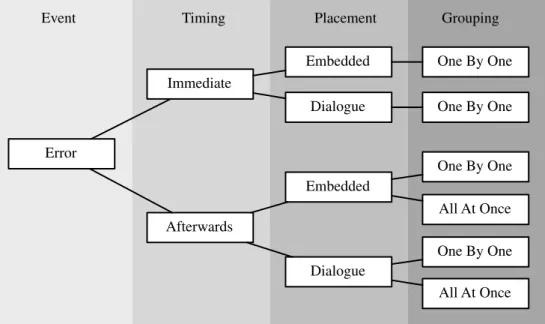
On a real website it is very important that only necessary validations are implemented. Each demanded correction will interrupt users’ workflow and consume additional cog-nitive resources. In this work we do not explore which quality standards are reasonable and which are not. These crucial questions must be addressed in future studies. We will focus on three main dichotomous variables of error message presentation (seeFig. 1), representing the commu-nication of erroneous fields:
2.2.1. Timing
The timing of the error message is controllable. We can tell users immediately after the error occurs that we would like them to correct the input. Right after they leave the entry field (or after a false keystroke was made) we can inform them that e.g. they used the character ‘‘2’’ instead of ‘‘@’’ in the e-mail address. In this case the form-filling process would be interrupted and they would have a direct feedback of the problem, right at the moment when the error occurred. We call this timing ‘‘immediate’’ (referring to ‘‘on field exit’’). The ISO implicitly recommends this way of form validation (ISO-9241, 1996-2002) by demanding immediate correction of erroneous entries. Alternatively, we can ignore the erroneous fields and wait until the whole form is completed. After the users click on the ‘‘send’’ but-ton we start to display the error messages. We call this tim-ing ‘‘afterward’’ (referrtim-ing to ‘‘on form submission’’). 2.2.2. Placement
Currently there are two main modes of displaying an error on the World Wide Web. First, it is possible to dis-play the error message directly in the form. Typically the message is placed on the right or lower side of the entry field in red letters, informing users of the detected problem. There are other common variations, like locating the error message at the top of a form or in a frame accompanying the form. We call these placements ‘‘embedded’’. Alterna-tively, it is possible to generate a dialogue window that pops up and presents the error message. We name this placement ‘‘dialogue’’.
2.2.3. Grouping
If users make several mistakes, there are two alterna-tives. On the one hand, we can present these problems one by one. Only after the successful correction of the mis-take, will the next message appear. This way users are
guid-ed through the error correction process. We call this group-ing ‘‘one by one’’. On the other hand, we can generate and present all the mistakes at once, allowing users to correct all the fields and to submit the correct form with the next click. We name this grouping ‘‘all at once’’.
There are further variables in error message presentation that we cannot explore in these studies. In Section3.2we provide further specifications of these factors.
Some of the variables cannot be combined arbitrarily. If an ‘‘immediate’’ timing is chosen, the errors cannot be grouped ‘‘all at once’’ because it is not possible to inform users of mistakes they have not yet made. This leaves us with exactly six ways of implementing error message pre-sentation (see Table 1). If we have six ways of providing erroneous fields the question arises: What are the differenc-es between thdifferenc-ese methods? Do some methods support the interaction process better, thus inducing a higher rate of successfully completing and submitting the form? To answer these questions we conducted two studies that are presented in the following sections.
2.3. Error categorisation
In these studies we explore whether different ways of implementing error messages lead to differences in the
number of errors. An evaluation of the error rate can only be performed after categorizing the errors into two sub-groups (seeFig. 2).
(1) First time errors. The term ‘‘First Time Error’’ refers to an error made the first time a field is filled out by the participant. They occur due to the obstacles built into the form. In our studies the participant has no way of avoiding them.
(2) Consecutive errors. The term ‘‘Consecutive Error’’ refers to an error made after the form has been vali-dated once. This means that users have been present-ed with error messages and still submit the data incorrectly. Error Immediate Afterwards Embedded Dialogue Embedded Dialogue One By One One By One One By One All At Once One By One All At Once
Event Timing Placement Grouping
Fig. 1. Main variables in error message presentation.
Table 1
Six methods to implement error message presentation on the World Wide Web
Timing Placement Grouping
Method 1 Immediate Embedded One by one
Method 2 Immediate Dialogue One by one
Method 3 Afterward Embedded One by one
Method 4 Afterward Embedded All at once
Method 5 Afterward Dialogue One by one
Method 6 Afterward Dialogue All at once Fig. 2. Error categorization: Allocation of first time and consecutive errors.
3. First study
3.1. Goal of the study
The goal of this study was to compare the efficiencies of commonly used ways of presenting error messages ( Bargas-Avila and Oberholzer, 2003). To reduce the number of test participants, we decided not to test all six methods. We speculated that dialogue boxes would be superior in trans-mitting error messages to users because the higher affor-dance of the dialogues would lead to a better perception. Therefore, we decided not to test two of the six methods: The alternatives ‘‘afterward, embedded, one by one’’ and ‘‘immediate, embedded, one by one’’ were discarded. As we will see later, this decision led to the necessity of con-ducting a second study.
Of the six possible methods (see Table 1) four were tested:
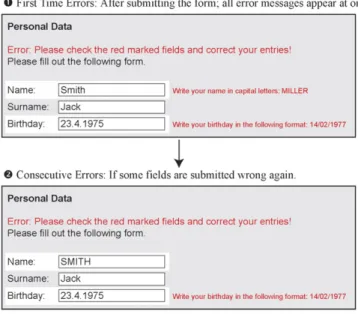
(1) AEA: Afterward, embedded, all at once. Using serv-er-sided validation the form was returned to users with the error messages placed on the right side of the entry field, within the form.
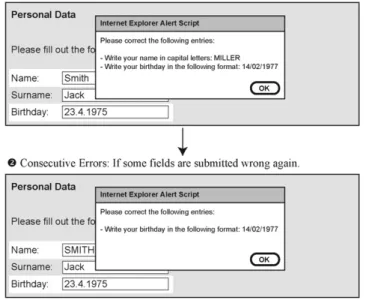
(2) ADA: Afterward, dialogue, all at once. Using Java-Script validation the errors where presented in a dia-logue box after the whole form was transmitted by the users. This dialogue contained all the errors that were made.
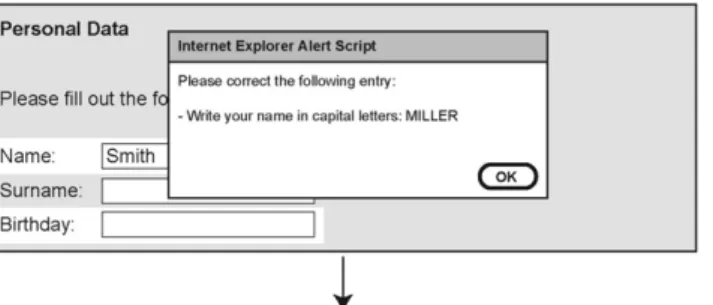
(3) ADO: Afterward, dialogue, one by one. Using Java-Script validation the errors where presented in dia-logue boxes. After each click on the ‘‘send’’ button, users were provided with the next erroneous field. (4) ID: Immediate, dialogue. After leaving a field, users
were provided with an error message that popped up in a dialogue box and informed them of the need to correct the entry. This message was implemented using JavaScript OnBlur Event.
3.2. Implementation details
Here we provide implementation details and illustra-tions of the methods used in this study (seeFigs. 3–6):
(1) Error prevention. If there are restrictions on user input, those restrictions can be communicated in differ-ent ways. There may be an instruction beside the field label or even an example of a correct entry. As we chose to base our studies on obstacles (see Sections3.4.1 and 4.4.1), no error prevention was implemented.
(2) Error message design. Different colour variations and design elements of the error message can influence users’ perception. In these experiments the form background was white or grey, the field labels were black, the embedded error messages were red and the dialogue messages were black (see illustrations below). The font was Arial.
(3) Cursor placement. It is possible either to relocate the cursor to the erroneous field after the error occurs or to leave it where the users placed it. In this study the cursor position was never changed.
(4) Content selection. It is possible to select the errone-ous content or to leave this task to users. In this study the content was not selected.
(5) Embedded error message placement. On the Internet we usually encounter embedded error messages on the top of the form or on the right side of the field (as chosen in this study).
(6) Modality of the dialogue. If the error message is placed in a dialogue box, this message can be mod-al (must be affirmed by pressing the ‘‘OK’’ button) or modeless (does not demand mandatory actions). We chose modal dialogue boxes for our experiment.
(7) Type of immediate feedback. If immediate feedback is chosen we can opt to inform users after they have completed the entry (leave the field by clicking in the next field) or we can ‘‘monitor’’ the keystrokes and present the error message at the moment the first erroneous keystroke is made. A validation made on keystroke level is based on invalid characters. On the Internet it is often necessary to check also for missing keystrokes (e.g. the character ‘‘@’’ is missing in an e-mail address). Therefore we chose immediate feedback after the entry was completed by users.
3.3. Hypotheses
We were interested whether the methods of presenting error messages differ when it comes to efficiency. In this case we defined efficiency by two variables: The number of errors that occurred and the time needed to successfully
complete the form-filling process. This led to two hypotheses:
Error-hypothesis. Methods ‘‘Afterward, Embedded, All At Once’’ (AEA) and ‘‘Immediate, Dialogue’’ (ID) lead to significantly fewer Consecutive Errors than ‘‘Afterward, Dialogue, All At Once’’ (ADA) and ‘‘Afterward, Dialogue, One By One’’ (ADO).
On the one hand, AEA presents users with comprehen-sive feedback on the errors made after the form has been completed. The entire form is displayed again and the erro-neous fields are visually highlighted and commented upon. Users can correct all mistakes without further clicks. ID, on the other hand, provides instant feedback as long as the answer to be revised is still in the locus of attention (Raskin, 2000). When leaving the field, the system reports
errors in a pop-up window. This way the error can be cor-rected immediately and the process can continue. Due to the comprehensive and always visible nature of feedback with AEA and the immediate feedback with ID, we assumed that these methods would provoke fewer errors than ADA and ADO and therefore lead to higher efficiency.
Time-hypothesis. Methods ‘‘Afterward, Embedded, All At Once’’ (AEA) and ‘‘Immediate, Dialogue’’ (ID) lead to significantly shorter completion times than ‘‘Afterward, Dialogue, All At Once’’ (ADA) and ‘‘Afterward, Dialogue, One By One’’ (ADO).
The reasoning for this hypothesis is derived from the first one: A greater number of consecutive errors leads to an additional cognitive load and interaction processes
Fig. 5. ADO: Afterward dialogue one by one (schematic illustration). Fig. 4. ADA: Afterward dialogue all at once (schematic illustration).
(clicks and entries). This should result in longer completion times for ADA and ADO compared to AEA and ID.
3.4. Methodology
3.4.1. Experimental design
An online questionnaire was used for this study. Official-ly it was conducted as an Online-Community Study. OnOfficial-ly the last part of the questionnaire actually dealt with error presentation methods. The experiment consisted of three parts: The Community Questionnaire (37 questions), the Demographic Questionnaire and a Subjective Evaluation Questionnaire (11 questions for subjective ratings). The Demographic Questionnaire included 15 straightforward questions (i.e. name, address, etc.) with five built-in obsta-cles (seeTable 2).
The whole experiment was conducted in German. Sev-enty-seven participants were recruited for the experiment and were randomly placed in one of four groups, each of which was presented with only one validation method.
(1) Afterward, embedded, all at once (AEA): n = 18. (2) Afterward, dialogue, all at once (ADA): n = 17. (3) Afterward, dialogue, one by one (ADO): n = 19. (4) Immediate, dialogue (ID): n = 22.
All participants recruited were undergraduate students from the University of Basel (45% male and 55% female). The average age was 26 years (SD = 6.62; range: 18–59) and the average self-rated computer knowledge on a scale from 1 to 5 (1 meaning no experience and 5 computer expert) was 3.8 (SD = 0.78). The analysis of demographic factors showed no significant differences between the exper-imental groups’ gender distribution, age distribution, or computer knowledge. Effects due to demographic differenc-es are therefore excluded.
3.4.2. Obstacles
Key to the study are the obstacles built into the demo-graphic questionnaire. These validation criteria are not likely to exist on a real website – at least, hopefully not. The unrealistic setting was taken into account because the goal of the study was to research classic error presenta-tion and correcpresenta-tion processes, and not to evaluate good validation criteria.
3.4.3. Experimental procedure
Testing was carried out in a usability laboratory during a two-week period in September 2002. Subjects were first introduced to the setting and given instructions. The error rate was recorded electronically, as were all relevant time
Fig. 6. ID: Immediate dialogue (schematic illustration).
Table 2
Obstacles in the demographic questionnaire of study 1
Field Obstacle Example
Name Had to be entered in capital letters [NAME]
ZIP/City Had to be separated by ‘‘/’’ [9999/City]
Country Had to be the two digit country code in capital letters [CH]
Date of Birth Day-Month-Year separated by ‘‘/’’ Day/Month 2 digits, Year 4 digits [14/02/1977]
measures. All demographic data were obtained directly from the completed forms.
3.5. Results 3.5.1. Error rates
A one-way ANOVA confirmed that the First Time Error rate was not significantly different between the groups, F(3, 72) = 2.274, p = .87. The key question of the study was whether or not Consecutive Errors depended on the error message presentation method used (Error-Hy-pothesis).Table 3displays the results.
We found that there were significant differences in the Consecutive Error rate, F(3, 72) = 18.416, p < .01. LSD post-hoc analysis showed that both AEA and ADO differ significantly from ADA and ID (p < .01). No significant difference was observed between either AEA and ADO (p = .59), or ADA and ID (p = .62).
These surprising results only partially support the Error-Hypothesis. As expected, ‘‘Afterward, Embedded, All At Once’’ (AEA) led to only a few Consecutive Errors and presenting all errors at once in a dialogue (ADA) led to many Consecutive Errors. However, presenting the errors one by one in dialogues while submitting the form (ADO) led to an even lower error rate than AEA (the
dif-ference, however, is not significant). Clicking away the pop-up windows did not interfere with the revision process.
Most surprising are the results for the validation method using immediate feedback in dialogue windows (ID). Despite the fact that immediate error correction was possi-ble, test participants made many Consecutive Errors. A closer inspection of the taped sessions revealed that many participants clicked away the appearing error messages without following the instructions. They continued to fill out the form as if nothing happened and were again pre-sented with all the error messages when trying to submit the form. Participants were often irritated by the presenta-tion of an error message before having submitted the form for validation. It appears that users were not mentally pre-pared for revising their input and therefore ignored error messages when completing the form. Error-Hypothesis can only partially be confirmed. Error message presenta-tion AEA and ADO lead to significantly fewer Consecutive Errors than ADA and ID.
3.5.2. Time to complete
Another important factor to consider when choosing a validation method is the time needed to complete a form (Time-Hypothesis). A faster completion time is economi-cally superior because it takes users less time and the prob-ability of successfully terminating the interaction process is higher. The Time-Hypothesis is not supported (see Table 4). Due to the high variance in time, no significant differ-ence could be observed, F(3, 72) = .533, p = .59. Taking a closer look at the standard deviations shows an interesting phenomenon: Whereas both methods that provide all error messages at once reveal similar and reasonable variances in time, the methods showing the errors one by one seem to induce a higher diversity by dividing the sample into very fast and very slow users, therefore leading to higher vari-ances in time (though these differences are likewise not sig-nificant). We assume that not all users are capable of handling the stepwise presentation method.
3.5.3. Subjective ratings
There were four questions regarding the subjective eval-uation of the error message presentation to evaluate
Table 3
Consecutive Error rate in study 1
Method M SD
Afterward embedded all at once (AEA) 2.00 1.88 Afterward dialogue one by one (ADO) 1.58 1.84 Afterward dialogue all at once (ADA) 6.12 3.12
Immediate dialogue (ID) 5.73 2.64
Table 4
Time to successfully complete the form (in second), study 1
Method M SD
Afterward embedded all at once (AEA) 119 49.9 Afterward dialogue one by one (ADO) 143 104.1 Afterward dialogue all at once (ADA) 141 47.8
Immediate dialogue (ID) 134 72.3
Table 5
Subjective ratings of the error message presentation, study 1
Question Subjective ratingsa
AEA ADO ADA ID
M (SD) M (SD) M (SD) M (SD)
Messages were not disturbing 1.9 (0.99) 1.6 (0.62) 1.9 (0.86) 1.8 (0.87)
Messages were helpful 3.4 (0.92) 3.5 (0.89) 3.1 (0.99) 3.6 (0.60)
Errors were easy to correct** 3.0 (1.08) 3.3 (0.84) 2.5 (0.94) 2.6 (0.90)
Error handling was well solved** 2.8 (0.97) 2.7 (1.11) 2.0 (0.85) 2.1 (0.85)
a Likert scale from 1 to 4 (1 = I strongly disagree; 4 = I fully agree). **p < .05.
whether the methods had an impact on user satisfaction (seeTable 5). Users did not show differences in rating the error messages as being more disturbing, F(3, 70) = .584, p = .63, or helpful, F(3, 69) = .921, p = .44. The error mes-sages were disturbing for all users. It was not a pleasant experience having to overcome the artificial obstacles we built in the form. Once perceived, the text giving the correc-tion instruccorrec-tions was identical for all methods, leading to a similar rating. However, there were significant differences when it came to ease of correction, F(3, 71) = 3.012, p < .04, and quality of error handling, F(3, 71) = 2.528, p < .05. The ratings show that the different error message presentation methods also had an impact on the subjective perception of the interaction processes. AEA and ADO – the methods that also caused fewer consecutive errors – were perceived as providing an easier way to correct mistakes and also as providing good error handling for the users.
3.6. Discussion: theory of mental modes
Choosing the right kind of error presentation can have an impact not only on the success or failure of a data entry process, but also on the subjective perception of it. The results confirm the very common approach of presenting errors embedded in the form and highlighting all erroneous fields to be more efficient.
The poor results for the immediate error messages sug-gest a modal model for the mental states of users filling out online forms. At first, users are in the ‘‘Completion Mode’’. Their goal is to submit the requested information to the system. The main focus is on filling in all the fields, knowing that there might be some mistakes. In this mode error messages are often ignored when they appear and are clicked away. As soon as users have finished complet-ing the form, their mental mode switches. With the appearance of the first error message users enter the ‘‘Re-vision Mode’’. Now, error messages are acknowledged, interpreted, and necessary action is taken to fix errors
(see Fig. 7).
This modal theory is supported by behavior in the real world. The natural process of filling out paper forms is sep-arated from revision by third parties. Habituation might play an important role in this behavior. The advantage of end validation lies in the fact that users are not constantly interrupted. To examine this theory, further studies are needed. The surprising result that users confronted with the method ‘‘Afterward, Dialogue, One By One’’ per-formed similar to those using ‘‘Afterward, Embedded, All At Once’’ can also be explained by this theory. After
com-Start Form Completion Mode Form Revision Mode End
Fig. 7. Modal Theory of Form Completion
pleting the form, attention is explicitly directed to one spe-cific field. This way users are guided through the revision process after they have completed the input and hence they produce fewer mistakes.
As can be seen, this study has raised more questions than it has answered. Are there really two different mental modes at work in form completion? If there are, then immediate error detection and communication on the World Wide Web would not be recommended for imple-menting error message handling. This would contradict the ISO-9241 standard that demands immediate correction of erroneous entries (ISO-9241, 1996-2002). Could the sub-optimal results for the immediate error handling be related to an experimental artifact? Perhaps the immediate error messages would have been better received by users if the labels had been placed within the form in an ‘‘embedded’’ way?
To further investigate the possibility of the theory of mental modes in form completion, we decided to conduct a second study.
4. Second study – evaluation of embedded error message presentation methods
The goal of this study was to investigate whether imme-diate error message presentation is suitable for the World Wide Web. After study 1 showed that immediate presenta-tion using dialogue boxes did not achieve the desired effi-ciency, the second alternative – to present the messages embedded in the form – had to be tested.
4.1. Goals of the study
In this study only the methods that embed the error mes-sage directly within the form were tested. All dialogue methods were discarded because the results of study 1 showed that they did not have the anticipated effect of transmitting error messages in a better way.
The following methods were tested:
(1) AEA: Afterward, embedded, all at once. Analogous to the first study, after the users submit the data, the entire form is returned with error messages placed on the right side of the entry fields.
(2) AEO: Afterward, embedded, one by one. In this method the form is also returned but only one error message at a time is placed on the right side of the erroneous field. After successful correction, the ‘‘send’’ button is clicked, then the next error is pre-sented, until all the fields are revised correctly. (3) IE: Immediate, embedded. Using the JavaScript
OnBlur Event users are provided with an error mes-sage after leaving the entry field. This mesmes-sage appears on the right side of the box and informs them of the need to correct the entry. The message disap-pears after a successful correction.
4.2. Implementation details
The implementation details were not changed (see Sec-tion 3.2). The illustrations for this study are presented below (seeFigs. 8–10):
4.3. Hypotheses
If the modal theory of form completion is adequate, afterward methods should be superior to Immediate meth-ods. Again we defined efficiency by the number of Consec-utive Errors and time needed to successfully complete the form filling process. This led to the following hypotheses:
Error-Hypotheses A. The error presentation methods AEA and AEO lead to significantly less Consecutive Errors than IE.
If the modal theory of form completion is correct, After-ward methods should be superior when compared to Immediate methods.
Error-Hypotheses B. There is no difference between AEA and AEO when it comes to the frequency of Consec-utive Errors.
Error-Hypothesis B reflects the findings of the first study: No differences could be found between showing the error messages all at once or one by one.
Time-Hypothesis A. The error presentation methods AEA and AEO lead to significantly shorter completion times than IE.
In the first study we had to reject the Time-Hypothesis for statistical reasons. The second study took additional measurement methods (a computer literacy test) into account to ensure a better analysis of the time variables.
Time-Hypothesis B. People using AEA require signifi-cantly less time to complete their corrections than people using AEO.
We expect that the stepwise presentation of errors (because of the additional cognitive load and clicks) will lengthen the time needed to successfully complete the cor-rection process.
4.4. Methodology
4.4.1. Experimental design
Again an online questionnaire was used. Officially, it was conducted as a Computer Study. Only the first part of the questionnaire actually dealt with error presentation methods. The experiment consisted of three parts: The Demographic Questionnaire (11 questions), the Subjective
Fig. 8. AEA: Afterward embedded all at once (schematic illustration).
Fig. 9. AEO: Afterward embedded one by one (schematic illustration).
Evaluation Questionnaire (4 questions), and a Computer Proficiency Test (19 questions).
The Demographic Questionnaire included 11 straight-forward questions (i.e. name, address, etc.) with seven built-in obstacles (seeTable 6). The Computer Proficiency Test (Bradlow et al., 2002) was used to enable use of com-puter knowledge as a covariable in the statistical analysis. The whole experiment was conducted in German. Nine-ty participants were recruited and randomly placed in one of three groups, each of which was presented with only one validation method.
(1) Afterward, embedded, all at once (AEA): n = 29. (2) Afterward, embedded, one by one (AEO): n = 29. (3) Immediate, embedded (IE): n = 32.
Once again, all participants recruited were undergrad-uate students from the University of Basel. There were 51% male and 49% female participants. The average age was 23.4 years (SD = 3.94; range: 18–45) and the average self-rated computer knowledge on a scale from 1 to 5 (1 meaning no experience and 5 computer expert) was 3.1 (SD = 1.03). The demographic factors (gender and age) showed no significant differences between the experimental groups. Also, self-rated computer knowl-edge and Bradlow’s Computer Literacy Test revealed no differences. Between-group effects due to demograph-ic factors or computer knowledge are therefore excluded.
4.4.2. Obstacles
Again we used obstacles for the demographic question-naire (seeTable 6).
4.4.3. Experimental procedure
The test setting was analogous to the first study. It took place in a four-week period in the summer of 2004. 4.5. Results
4.5.1. Error rates
Again the First Time Error rate was not significantly different between the three experimental groups, F(2, 87) = 1.629, p = .20. Key question of the study was again whether Consecutive Errors depended on the error message presentation method used.
An ANOVA showed that there were significant differ-ences in the Consecutive Error rate, F(2, 87) = 3.577, p < .03. LSD post-hoc analysis revealed no differences between AEA and AEO (p < .86). Table 7 shows the results: Again the methods that presented the error messag-es after the form-filling procmessag-ess produced fewer Consecu-tive Errors than did those that showed the errors immediately (Error-Hypotheses). The results therefore sup-port the modal theory of form completion. Taking a closer look at the video material revealed again that many partic-ipants ignored the error messages and continued to fill out the form as if nothing happened.
We examined the possibility that this phenomenon could depend on the computer literacy of a person. Perhaps only users with little computer knowledge would see and ignore the error messages, whereas experts would take them seriously. This is not the case: The analysis shows no significant correlation between the Computer Literacy Test and the number of Consecutive Errors in the IE group (r = .21, p = .25).
A further explanation for this phenomenon could be that the lab test was too artificial. In a real-world situation, if users are providing the credit card information and ship-ping address, maybe they would take more care in ensuring that the form was correct and would not just ignore the messages. To answer this question further research is needed.
4.5.2. Time to complete
Table 8 shows that no significant time difference could be observed, F(2, 87) = .450, p = 0.64. Even considering computer literacy as a covariable or logarithmic transfor-mation of the time variable did not reveal any differences between the groups. Again the variances were very high for the time measurement. Therefore, Time-Hypothesis A is not supported: The error presentation methods could
Table 6
Obstacles in the demographic questionnaire of study 2
Field Obstacle Example
Name Had to be entered in capital letters [NAME]
ZIP/City Had to be separated by ‘‘/’’ [9999/City]
Country Had to be the two digit country code in capital letters [CH]
Favorite website Had to end with ‘‘/’’ [www.place.org/]
Date of birth Day-Month-Year separated by ‘‘-’’ Day and Month two digits, Year four digits [14-02-1977]
Gender Had to be abbreviated with one letter and a point [m.]
Mother tongue Abbreviated with three letters and a point [eng.]
Table 7
Consecutive Error rate in study 2
Method M SD
Afterward embedded all at once (AEA) 3.48 4.31 Afterward embedded one by one (AEO) 3.17 3.45
not be shown to have a significant influence on the time needed to complete the input and correction process.
Time-Hypothesis B stated that the afterward method pre-senting all the errors at once (AEA) would be faster than the one-by-one presentation of the cues (AEO). This hypothesis is also not supported (seeTable 9). Even if correction times seem to differ, the variances are so high that no significance can be reported (t(56) = 2.31, p = .14). Again, the standard deviations seem to differ in both groups, suggesting that the method AEO splits users into very slow and very fast users (again this difference is not significant).
4.5.3. Subjective ratings
The questions regarding the subjective evaluation of the error message presentation were similar to those in the first study (seeTable 10). There were no differences in the dis-turbance, F(2, 87) = 2.278, p = .11, or the help of the mes-sage, F(2, 87) = 1.438, p = .24. Again, there were significant differences when it came to the ease of correction, F(2, 87) = 3.923, p < .02, and quality of error handling, F = 4.818(2, 87), p < .01. Even if we could not find signifi-cant differences for all the four measures, it is striking that the method causing the most consecutive errors (IE) also gets the lowest ratings in all four questions.
5. Discussion: Modal Theory of Form Completion
In both studies, the findings suggest that many users ignored error messages presented during the input process.
The results support the Modal Theory of Form Comple-tion. Therefore, future methods of implementing and pre-senting error messages in form completion processes should involve an afterward timing. At a first glance this seems to contradict the ISO-9241 standard of immediate correction (ISO, 1996). Taking a closer look, one can see that the immediate error presentation does not ‘‘harm’’ users. They just overlook the messages during ‘‘Completion Mode’’ and start to consider them as soon as they enter ‘‘Revision Mode’’. Implemented on a running website, users would probably perceive the immediate validation as very similar to the afterward method because the error messages are presented and the correction process starts after sending in the form. Nevertheless, the question remains why one should implement an immediate error message presentation if the warnings are ignored by most users.
In this context it would be interesting to conduct further studies. Did users perceive the immediate error messages and decide willingly to ignore them, or did they simply not see them? It would be also important to explore how the role of error prevention instructions fit into the postu-lated ‘‘Modal Theory of Form Completion’’. Will the instructions be read and interpreted? Can we integrate this process as an additional mode? The lack of instructions in these studies was artificial (instructions should be made available beforehand whenever relevant). Will the presenta-tion of instrucpresenta-tions cause significant deviapresenta-tions in our findings?
It does not matter if all the mistakes are shown at once, or one by one, as long as the messages are provided embed-ded in the form. If one decides to opt for dialogue messag-es, the errors should never be communicated all at once because the need to memorise the problems leads to more consecutive errors (as shown in the first study).
This brings us to the conclusion that nowadays three of the six possible ways to present error messages on the World Wide Web are equally effective and can be recommended:
(1) Present the errors afterward, embedded in the form, all at once.
(2) Present the errors afterward, embedded in the form, one by one.
(3) Present the errors afterward, in dialogues, one by one.
Error message presentation is just one factor in usable form design. Many further aspects must be properly inves-tigated. What is the best graphical form design? Where should the field labels be placed? How should we commu-nicate instructions, restrictions and mandatory fields to users? How should good instructions be formulated? Should we provide short rules or examples, or should we provide both? Can forms be divided into steps, and if yes: How many fields should a good form contain? As can be seen, a great deal of empirical work still remains
Table 10
Subjective ratings of the error message presentation, study 2
Question Subjective ratingsa
AEA AEO IE
M (SD) M (SD) M (SD)
Messages were not disturbing 2.4 (1.27) 2.5 (1.15) 1.9 (1.06) Messages were helpful 3.1 (1.58) 3.4 (1.45) 2.8 (1.36) Errors were easy to correct** 3.1 (1.46) 2.6 (1.59) 2 (1.33)
Error handling was well solved** 3.2 (1.41) 3.5 (1.64) 2.4 (1.34)
a
Likert scale from 1 to 6 (1 = I strongly disagree; 6 = I fully agree).
**
p < .05. Table 8
Time to complete the form successfully (in seconds), study 2
Method M SD
Afterward embedded all at once (AEA) 195 57.86 Afterward embedded one by one (AEO) 211 74.97
Immediate embedded (IE) 204 53.83
Table 9
Time to correct the fields, afterward methods (in seconds)
Method M SD
Afterward embedded all at once (AEA) 105 34.80 Afterward embedded one by one (AEO) 118 60.25
to be done, in order to define usable form design for the World Wide Web.
References
Bargas-Avila, J., Oberholzer, G., 2003. Online form validation: Don’t show errors right away. In: Rauterberg, M., Menozzi, M., Wesson, J. (Eds.), Human–Computer Interaction INTERACT’03. IOS Press, Amsterdam, pp. 848–851.
Bradlow, E.T., Hoch, S.J., Hutchinson, J.W., 2002. An assessment of basic computer proficiency among active internet users: Test construc-tion, calibraconstruc-tion, antecedents and consequences. Journal of Educa-tional and Behavioral Statistics 27 (3), 237–253.
Brown, P.J., 1983. Error messages: The neglected area of the man/machine interface. Communications of the ACM 26 (4), 246–249.
ISO-9241, 1996–2002. Ergonomic requirements for office work with visual display terminals (Parts 1–17). International Organization for Standardization.
Nielsen, J., 2001. Error message guidelines. Jakob Nielsen’s Alertbox. Available from:http://www.useit.com/alertbox/20010624.html. Raskin, J., 2000. The Humane Interface: New Directions for Designing
Interactive Systems. Addison Wesley Longman Incorporated, Reading. Tzeng, J.-Y., 2004. Toward a more civilized design: studying the effects of computers that apologize. International Journal of Human–Computer Studies 61 (3), 319–345.
Wenger, M.J., 1991. On the rhetorical contract in human–computer interaction. Computers in Human Behavior 7, 245–262.