HAL Id: hal-02000015
https://hal-enac.archives-ouvertes.fr/hal-02000015
Submitted on 31 Jan 2019
HAL is a multi-disciplinary open access archive for the deposit and dissemination of sci-entific research documents, whether they are pub-lished or not. The documents may come from teaching and research institutions in France or abroad, or from public or private research centers.
L’archive ouverte pluridisciplinaire HAL, est destinée au dépôt et à la diffusion de documents scientifiques de niveau recherche, publiés ou non, émanant des établissements d’enseignement et de recherche français ou étrangers, des laboratoires publics ou privés.
Multi-plié: a Linear Foldable and Flattenable Interactive
Display to Support Efficiency, Safety and Collaboration
Sylvain Pauchet, Jean-Luc Vinot, Catherine Letondal, Alexandre Lemort,
Claire Lavenir, Timothée Lecomte, Stéphanie Rey, Valentin Becquet,
Guillaume Crouzet
To cite this version:
Sylvain Pauchet, Jean-Luc Vinot, Catherine Letondal, Alexandre Lemort, Claire Lavenir, et al.. Multi-plié: a Linear Foldable and Flattenable Interactive Display to Support Efficiency, Safety and Collab-oration. CHI 2019, ACM CHI Conference on Human Factors in Computing Systems, May 2019, Glasgow, United Kingdom. �10.1145/3290605.3300384�. �hal-02000015�
Multi-plié: a Linear Foldable and Flattenable Interactive
Display to Support Efficiency, Safety and Collaboration
Exploring and Ironing out Design Complexities with Airliner Pilots
Sylvain Pauchet 1,5, Jean-Luc Vinot 1, Catherine Letondal 1, Alexandre Lemort 2,Claire Lavenir 4,
Timothée Lecomte 1, Stéphanie Rey 3, Valentin Becquet 1,Guillaume Crouzet 1 1 University of Toulouse – ENAC, Toulouse, France, <first name>.<last name>@enac.fr
2 Ingenuity i/o, Ramonville Saint-Agne, France, [email protected] 3 Berger-Levrault, Toulouse, France, [email protected]
4 Intactile Design, Montpellier, France, [email protected] 5 Astrolab, Toulouse, France, [email protected]
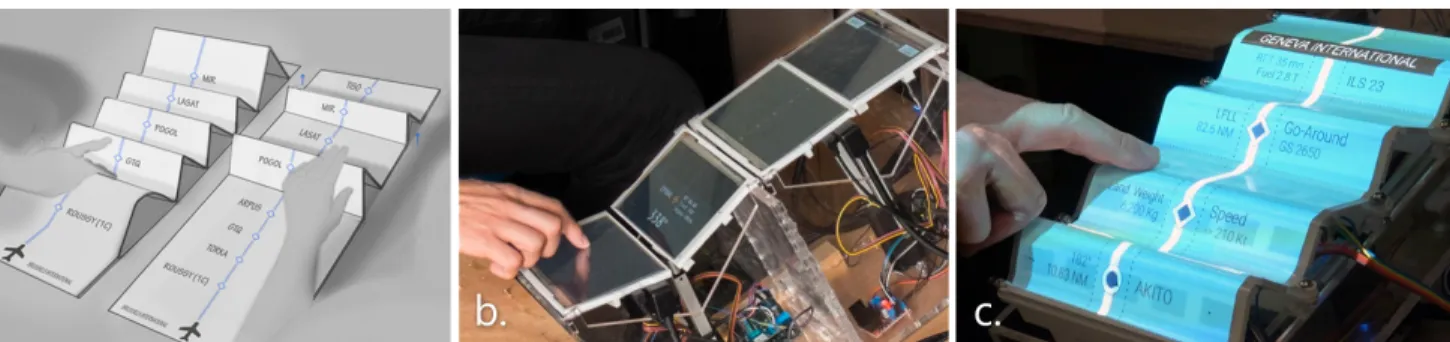
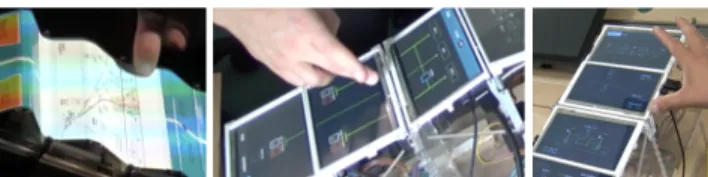
Figure 1 : Designing Multi-plié: a. drawing of the design concept, b. articulated display series prototype, c. pleated touch display surface prototype
ABSTRACT
We present the design concept of an accordion-fold interactive display to address the limits of touch-based interaction in airliner cockpits. Based on an analysis of pilot activity, tangible design principles for this design concept are identified. Two resulting functional prototypes are explored during participatory workshops with pilots, using activity scenarios. This exploration validated the design concept by revealing its ability to match pilot responsibilities in terms of safety, efficiency and collaboration. It provides an efficient visual perception of the system for real-time collaborative operations and tangible interaction to strengthen the perception of action and to manage safety through anticipation and awareness. The design work and insights enabled to specify further our needs regarding flexible screens. They also helped to better characterize the design concept as based on continuity of a developed surface, predictability of aligned folds and pleat face roles, embodied interactive properties, and flexibility through affordable reconfigurations.
CCS CONCEPTS
• Human-centered computing → Human computer interaction (HCI); Interaction devices; HCI design and evaluation methods
KEYWORDS
Tangible interaction; touchscreens; shape-changing interfaces; design; ethnography; safety; aeronautics.
ACM Reference format:
Sylvain Pauchet, Jean-Luc Vinot, Catherine Letondal, Alexandre Lemort, Claire Lavenir, Timothée Lecomte, Stéphanie Rey, Valentin Becquet and Guillaume Crouzet. 2019. Multi-plié: a Linear Foldable and Flattenable Interactive Display to Support Efficiency, Safety and Collaboration. Exploring and Ironing out Design Complexities with Airliner Pilots. In
2019 CHI Conference on Human Factors in Computing Systems Proceedings (CHI 2019), May 4–9, 2019, Glagsow, Scotland, UK. ACM, New York, NY,
USA. https://doi.org/10.1145/3290605.3300384
1 INTRODUCTION
In the “life-critical” context [5] of airliner cockpits, the trend is to replace the current pilot-system interfaces that combine digital display and physical controllers with large touch surfaces. The challenge for industry is to respond to the growing complexity of systems with greater flexibility and lower costs. Touch screens also allow efficient interaction for pilots, thanks to the direct manipulation of objects, interface plasticity or context adaptability.
Although this evolution offers many benefits to both pilots and manufacturers, the use of touchscreens has drawbacks
Permission to make digital or hard copies of all or part of this work for personal or classroom use is granted without fee provided that copies are not made or distributed for profit or commercial advantage and that copies bear this notice and the full citation on the first page. Copyrights for components of this work owned by others than ACM must be honored. Abstracting with credit is permitted. To copy otherwise, or republish, to post on servers or to redistribute to lists, requires prior specific permission and/or a fee. Request permissions from [email protected]. CHI 2019, May 4–9, 2019, Glasgow, Scotland Uk
© 2019 Association for Computing Machinery. ACM ISBN 978-1-4503-5970-2/19/05…$15.00
that might severely limit their operational use in aeronautics and thus present major potential risks to air safety. While safety and performance require interactive systems that maximize pilot perception, action and collaboration, the literature highlights the limits of touch-based interaction such as requiring too much visual focus [30] or being less efficient than physical controls [38] [40]. This is especially true for degraded use contexts in flight [11] [19] (e.g. smoke inside the cockpit, turbulence, pilot stress or cognitive load).
This research seeks to address the limitations of touch-based screens through a tangible approach, that may accommodate pilot sensory motor skills and allow for more effective crew collaboration. However, applying tangible approaches to the cockpit discards some design directions, such as using physical objects to interact with digital systems [39], since they are potentially dangerous projectiles for the cockpit. For this reason, the physical deformation of display surfaces integrated into the dashboard is a very promising direction for cockpit interfaces. Airliner crew activities are characterized by efficient, collaborative parallel and real-time tasks, and the need to anticipate future actions. For this purpose, pilots structure their activity through rhythms and develop skills and spatial knowledge which enable eyes-free kinesthetic interactions. Emerging from these needs and our design reflections, we propose the design concept of an accordion-fold interactive display.
This design hypothesis has been explored over one year during a series of workshops with professional designers, resulting in two working prototypes featuring variants of the concept. A first prototype explores how several combined small re-orientable touch-based screens may embody the concept of accordion-folds; the second prototype develops the same concept based on a continuous tactile surface printed in 3D. These two prototypes have been explored and qualitatively evaluated during participatory sessions with airliner pilots.
The contribution presented in this paper is the design, evaluation and refinement of a concept. To achieve this, we built two shape-changing interactive displays featuring a linear, foldable and flattenable surface. Their exploration with pilots showed that they closely complied with aeronautical activity needs, and provided a validation of the concept. The design work and the ethnographic analysis of the participatory sessions both contributed to a refined characterization of this design concept, and a better specification of our needs regarding flexible screens. The paper is organized as follows. After reviewing the state of the art, we describe the methods we used in our study and provide a few explanations on the relevant dimensions
of the cockpit activity. Following a section explaining the design work, the prototypes are then technically described. The next sections encompass the insights gained during walkthrough sessions with pilots. We end the paper with a synthetic characterization of the design concept, and discuss related open research questions.
2 RELATED WORK
The Multi-plié concept takes inspiration from reconfigurable devices, articulated displays, pleatable or rollable displays, and industrial advances in flexible displays.
2.1 Reconfigurable devices
We use the term reconfigurable interface defined by Kim et al. [20] to refer to interfaces that can have different shapes and can be distorted by the user’s input or by the system. This type of interface is also called malleable, deformable or shape changing. We were particularly interested in touch-based interfaces offering a change of shape to facilitate perception and/or action. The study by Ramaker et al. [32] for instance highlights the positive qualities of physical manipulation in relation to touch-based interaction, or the work of Zhu et al. [41] extends the interaction space by the shape of the touch interface. An exploratory approach mixing physical and tactile control is also present in Emergeables [34] and Gazeform [31], which study the modification of the shape of the tactile interface and the interaction modality according to the context of use. The Multi-plié concept fits into these reconfigurable tactile /physical design spaces, but also makes it possible to focus on the usage requirements of these mixed interfaces such as robustness, performance and collaboration.
In the reconfigurable devices research field, some taxonomies propose a technological approach to better meet the design challenges around actuation [8]. In order to develop our concept without limiting ourselves to a technological approach, we favored the taxonomy of Rasmussen et al. [33] on topological and non-topological characteristics as well as the taxonomy of Roudaut et al. [35] on the notion of shape resolution. This work, and in particular the latter, provided us with relevant shape properties, such as "zero-crossing" and "closure", which have not yet been studied in depth so far [35] and which are central in the transform capacities of our pleatable surface. 2.2 Articulated displays
Many studies have focused on systems that can be folded and reconfigured by the user, such as books [14] [16] [21]. In contrast to this inspiring work, we do not seek to explore two-hand manipulation of catchable devices, but rather a device integrated into a dashboard, that is better adapted to the cockpit context.
Other studies have focused on modifying contiguous screen layouts to promote collaboration. For example, Hinckley et al. [16] explore the design space of a dual screen posture for individual and collaborative use, Grønbæk et al. [15] study the notion of proxemic transitions when modifying a workspace based on two articulated surfaces. In continuity of these two approaches, we explored more precisely the impact of using articulated screens on collaboration and situational awareness in a life critical context.
Finally, the Tilt display study [2] explores the design space around a device composed of 9 small screens articulated on 2 axes. The main objective is to understand the design space of users interacting with tilting screens. In continuity of this work we wish to enrich this design space by exploring the use of larger screens that can be used as a guiding surface for touch action.
2.3 Pleatable and rollable displays
The use of foldable and roll-up screens for display and interaction has been widely studied in HCI. In particular in the context of mobile devices, Paperphone [23] studies interaction gestures to fold a flexible screen, Nagaraju et al. [29] define an interaction design space for roll-up screens. Other studies have focused on methods for tracking surface deformations to adapt the display. For example, the papers of Lee et al. [24] and Gallant et al. [13] use IR deformation tracking to explore the concept of a foldable interactive screen, and Steimle et al. [36] present a new approach for real-time monitoring of the deformation of flexible foldable screens from depth images.
Inspired by these studies, our work on the Multi-plié concept propose 1) a type of pleated deformation that has not yet been studied and 2) a system that tracks deformations using a direct and real-time connection to the physical model. 2.4 Industrial advances in flexible displays
Foldable screens have been mentioned for more than ten years by manufacturers. As specified by Mone et al. [28] prototypes of foldable and roll-up screens were presented by Philips in 2005 and by Nokia in 2011. New technologies, such as electronic paper or organic light-emitting diode (OLED) displays, provide increasingly thinner deformable surfaces with high-resolution displays, as exemplified with Samsung and Lenovo at CES 2018. In this industrial context, even if technical challenges persist devices based on deformable touch surfaces will emerge in the coming years [28]. 3 METHODS
In this section, we specify the methods used to analyze the activity and steps of the Multi-plié study. The analysis of the activity is based on aeronautics literature and above all
on observations, interviews and participatory workshops, organized with airline pilots. The pilots we recruited are experienced pilots, captains or first officers, qualified on Boeing, Airbus or Beechcraft aircraft, and working in airlines such as Air France, Transavia, Twin-Jet or Volotea. We also used previous project data and observations, involving filmed and transcribed sessions with more than 30 pilots. We organized workshops with professional designers and engineers, and participatory workshops with pilots. With the designers, we ran a series of ideation and low-fi prototyping workshops over a one-year period. Including makers and developers, we also ran a dozen sprints to evolve the design concept into working prototypes. Three electronic and mechatronic student internships lasting 3-4 months were dedicated to the building of two advanced functional prototypes. Finally, 5 airline pilots iteratively tested and explored the concept of the accordion fold using these two different prototype versions. This exploration was carried out in two iterations of four participatory workshops of two hours for each: 4 sessions conducted with the first prototype (articulated display series) in June 2018, and 4 sessions in August 2018 with the second prototype (pleated display surface). This second iteration used the inputs of the first one. Both series of sessions involved the same five pilots who were thus able to confront the two approaches and better identify the key aspects of the concept. The 8 sessions were video-taped (16 hours of video) and have been fully transcribed (~200 pages of transcripts). Around 177 quotes were extracted and key characteristics have been analyzed using an ethnographic approach. 4 ACTIVITY ANALYSIS & COCKPIT INTERFACES In airliner cockpit, the pilot crew collaboratively performs five major activities: aircraft piloting (manually or with autopilot), navigation (managing and tracking the flight route), aircraft system monitoring, communication (with air traffic controllers or ground support), and mission management for the company. To conduct these activities, pilots interact with aircraft systems through specialized interfaces, grouped in functional units and displayed on different screens, specifically dedicated to each of the crew's main activities. They currently operate aircraft systems and displays through physical controls: knobs, switches, sticks... [39]. During the flight, pilots are responsible for selectively monitoring, extracting and evaluating relevant information. They perform a multitude of operations and coordinate all these activities within the crew, but also with external entities working on the flight [26]. In order to ensure cockpit task management (CTM) [12], pilots are constantly involved in multiple and simultaneous activities that imply time-sharing of cognitive resources. In addition, a number of various external factors constantly interrupt pilots and
exacerbate the complexity of monitoring multiple tasks, making the flight crew particularly vulnerable to errors [26]. 4.1 Procedures, flows and checklists
With the current two-pilot crew concept, a set of prescribed
Standard Operating Procedures (SOP) are defined to address
identified risks and their dramatic consequences in the life-critical context of aviation [5]. SOPs are based on both a strict segregation of tasks and close collaboration between the two roles of Pilot Flying (PF) and Pilot Monitoring (PM). The intent is to provide guidance to pilots and to ensure a safe, logical, efficient, and predictable means of carrying out crew missions [10]. To help address these constraints and deal with the ever-increasing number of cockpit tasks, pilots are trained in the systematic use of flows and checklists. These tools determine the timing and sequencing of tasks [26]. 4.2 Touch-based cockpit: a challenge for aeronautics The expected replacement of the current cockpit displays with touch-based interfaces offers many potential benefits, for pilots (e.g. usability, dynamic adaptation to the context or flight phase) but also for industry (e.g. costs, flexibility, maintainability). However, the development of touchscreens in the cockpit raises critical research questions for air safety. While safety and performance require cockpit instruments to maximize the perception, action and collaboration spaces offered to pilots, the literature highlights several limitations of touch interaction for these aspects. First, compared to the existing controls, several studies have shown the limitations of touch interaction in terms of performance in the cockpit [6] [1]. Second, touch-based interaction, as opposed to physical controls, places high demands on the visual channel to adjust the action and control the precision of movements [31]. In the case of tasks involving gaze indirection, touch surface performance is greatly degraded while that of physical buttons is constant. In addition, the visual focusing that is needed during touch interaction [38] [31] poses a major safety problem in the event of degraded visibility, such as smoke in the cockpit. Third, another critical aspect for air safety lies in the deteriorated performance of touch interaction during aircraft instability such as turbulence [7] [18]. On these last two points, stress or high cognitive load also induce significant limitations. Finally, compared to tangible interfaces, touch interaction reduces mutual awareness and crew collaboration [9] [39]. It can also alter the situational awareness that, as Casner et al. [6] highlighted, determines the ability of the crew to regain control following the disengagement of the autopilot. 4.3 Tangible design directions for airliner cockpits Previous studies [7] [25] addressed the limitations of touch-based surfaces through an analysis of physicality in cockpit
activity and the framing of implied tangible design dimensions. Some studies [25] underline how pilots experience a dual embodied space, one being the surrounding internal space of the cockpit, the other being the “non-human” space outside the aircraft. This structure has a deep impact on perception and action. To obtain a precise and objective representation of the spatial location of the plane, direct perception is supplemented by the use of instruments. Through constant training of bodily skills, pilots structure their activity through rhythms and develop spatial knowledge which enables eyes-free kinesthetic interaction.
The application of several tangible interaction tools and design themes [17] is thus limited in the cockpit context. Suspicion towards direct perception precludes the use of rich representations and not securely fixed physical objects are prohibited. Furthermore, cognitive externalization through spatialization is limited: it was observed that speech often stands as a compressed means of externalizing and sharing concerns. Next, the necessity of hyper-control in time-critical situations lead to a cautious use of sensor-based interaction and background mode of control [37]. Finally, haptics-based feedback and notifications may be hindered by aircraft vibrations.
5 DESIGN WORK
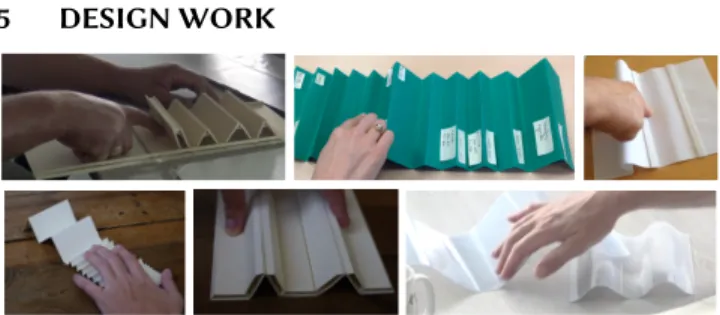
Figure 2. Cardboard or plastic models and low-fi prototypes.
In parallel with the activity analysis, we ran a series of design workshops, including participatory workshops with pilots. We explored more than 150 design ideas to address the limits of touch-based screens for airliner cockpits, using paper, cardboard and low-fi video prototyping (Figure 2). 5.1 First articulations of a foldable display concept We imagined a new tangible concept to deal with the prescriptive sequencing of pilots' tasks, the “step by step” collaborative procedures, the temporal and rhythmic aspects of the activity, the safety constraint of fixed devices and the requirement for one-handed interaction. This concept consists in a series-oriented shape-changing display, located between the 2 pilots. It allows to physically reify flight data components, to manually highlight or “flip through” the items and to collaboratively act on the system. Paper-based accordion-fold artifacts, handled horizontally
or vertically (Figure 2), were early identified as a particularly appropriate solution and resulted in multiple cardboard or plastic model prototypes. Several of these prototypes were still used by the pilots during the walkthrough sessions presented in the Insights section. 5.2 Specifying the accordion-fold device features The design principle of creating pleats on an interactive surface emerged as a way to provide pilots with various tangible interactions, depending on the scale of these folds: notches to adjusts value, mini-displays to organize, share and split information, or soft pleats to stabilized hand interaction and support sequential procedures. Based on these first design steps, we defined some needed features for ergonomic, technical and interactive implementation of functional prototypes. We opted for a touch display surface, vertically embedded into the instrument panel and between the pilots, allowing controlled and continuous deformation of the surface with the possible creation of a limited number of parallel folds. These mid-size folds allow both ergonomic input and sufficient display size. The folds, possibly raised or lowered, are dynamically made by the system (e.g. as warning) or at the operator's request (Figure 1.a). This specification of the device has also been achieved through technical explorations, such as tests of various pneumatic or mechanical technologies to form folds, or technical studies of possible methods to make a touch flexible surface, resulting in the production of two functional prototypes. 6 PROTOTYPES
6.1 Cockpit prototyping and testing platform
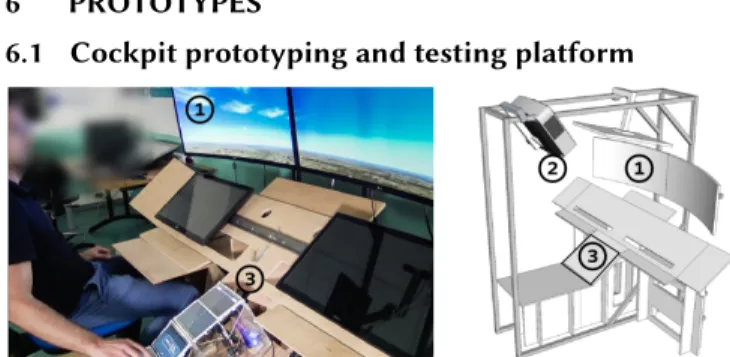
Figure 3. The cockpit platform, (1) 34 inch curved screens, (2) projector, (3) prototype integration area
For prototype design and pilot walkthrough, we used a test platform reproducing an airliner cockpit in a simplified way. This environment had been designed for a previous study [31], and was easily customizable by the design team. The various displays, projectors or sensors can be easily re-arranged, and the wooden dashboard structure allows new prototypes to be quickly integrated and interfaced to the platform (Figure 3). This coherent spatial arrangement of instrument panels and the display of flight data or outside view, from Lockheed Martin Prepar3d flight simulation software, provides an “ecological” context for pilot sessions.
6.2 Prototype 1: articulated display series
The foldable display system is composed of 4 tiltable touch screens, which can be oriented to form positive (Figure 4.a) and negative folds. The modification of the screen inclination is managed by a microcontroller connected to linear actuators. A software component manages the display of the GUI, the touch inputs retrieval and the detection and modification of the motors’ position. Touch-based interactions allow user to dynamically control the inclination of one or more screens (Figure 4.b).
Figure 4: a) articulated display series with two modules (A and B). Each module is composed of two 7” touchscreens (1), an Arduino microcontroller (2) and 2 linear actuators (3); b) articulated display series integrated into our test platform.
6.2.1. Implementation
The system is composed of 2 identical modules, each with 2 screens (Figure 4.a). To guarantee legibility and touch interaction comfort, we selected 7-inch capacitive touch screens with a resolution of 1024×600 pixels. The module structure is made from laser cut PMMA sheets. A 3D printed screen support allows pivoted connections between screens, structure and linear actuators. To ensure a sufficiently fast and wide inclination movement of screens (+20° and -30°) we chose Actuonix® P16-P linear actuators with a stroke of 100mm, a travel speed of 34mm/s and a nominal force of 25N. These performances have been validated during tests by the design team. The linear actuator deployment is controlled by a motor card based on a double H-bridge (L298) connected to an Arduino® Uno card (Figure 4.a). We chose to integrate an electronic control interface for each module in order to make each one independent of the other. This configuration offers greater exploration potential, for example side by side, horizontally or vertically, or separated.
6.2.2. Software architecture
The system is composed of 2 independent software components communicating through the serial port. One controls the tangible device and linear actuators, developed in C, operating on the Arduino® board. The main application, developed in C++ and Qt5 (QML), hosted on a Linux machine, allows to execute pre-defined interaction scenarios for cockpit, to manage the data display, to retrieve touch inputs, and to control the tangible device.
6.2.3. Folding API
To control tilt angle of screens, the set of target angle values are sent via the serial port to the Arduino component. These positive or negative angle values are converted into length for the actuator displacement (Figure 4.a).
6.3 Prototype 2: pleated display surface
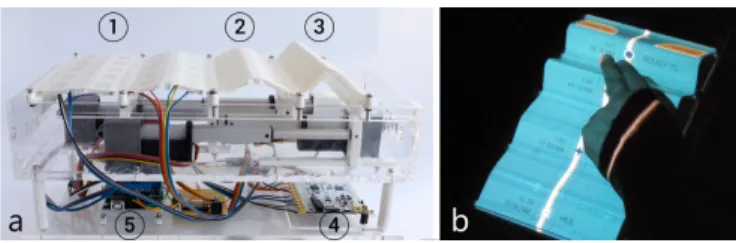
To further explore the "multi-fold" concept we designed a second prototype based on a thin and flexible surface that can be deformed by folding. The pleated display system is composed of a single flexible touch display surface. It retains the advantages of the first prototype such as shape change, positive folds and hand size. It adds continuity of form by deforming a single flexible surface (Figure 5.b).
Figure 5: a) Cross-section view of the different states of the pleated display surface. (1) flat, (2) 1 half-positive fold, (3) 1 positive fold, (4) Touch board, (5) Arduino microcontroller; b) pleated surface with video projection
6.3.1. Implementation
Although flexible touch screens are beginning to appear from different manufacturers for the business to business market, we chose to design our own system in order to keep a design freedom in the types of deformation envisaged. In the first stages of the design phase we defined the size of the surface as well as the different points parameterizing the deformation. As shown in Figure 5.a, some points are fixed to a longitudinal force system while others are left free to create folds. The flexible surface is printed in PLA on an Ultimaker® 3D printer. We printed simultaneously the white PLA structure part and conductive PLA area, allowing us to obtain a grid of capacitive touch points. The integration of structure and touch areas in the same fabrication process provides a thin and flexible surface. Touch data is retrieved and processed by the Bare conductive® touch board. 6.3.2. Deformation mechanism
To deform the surface, we use 4 Actuonix® P16-P linear cylinders with a stroke of 100mm (Figure 5.a), each allowing the precise positioning of one of the four surface "folds". The force transmission as well as the linear displacement of the surface are ensured by two sliding links positioned between the surface support and the structure. Travel information is received and processed by 1 motor card coupled to an Arduino microcontroller. All these elements are assembled in a laser-cut PMMA box.
6.3.3. Software architecture
The system of this second prototype relies on two software programs very similar to those of the first prototype. The main application, developed in the QML environment, allows to execute interaction scenarios for the cockpit, managing the data display, controlling the Arduino® board,
retrieving touch inputs and positions of linear actuators. This allows it, in addition, to perform a real-time projection mapping onto the flexible surface.
6.3.4. Displaying graphical data on a folded surface
The Arduino® board sends real-time positions of linear actuators to the main application. It interprets them to recalculate the projected image such that it appears undistorted on the flexible surface (aligned for multiple projection planes formed by the folded surface). For any new configuration (position and orientation of the device on the testing platform), it only takes a few minutes to calibrate the projection, based on two reference sets of points: the vertices of folds when the surface is flat and the ones when the surface is fully folded.
7 INSIGHTS GAINED THROUGH EXPLORATION WITH PILOTS
In this section, we report together on the two iterations of workshops (see Methods section), run with five airline pilots (anonymized as P1-P5) exploring the models and the two prototypes described in the previous section. These exploratory sessions were conducted using cockpit activity scenarios that we built from previous observations, interviews and projects. Both series of scenarios (Table 1) were chosen to address a set of criteria: relevance of the target systems and activities to the folding surface concept (e.g. time/rhythm aspects, collaborative actions, etc.), ergonomic choice of location and operation of the devices (between pilots, on the lower part of the dashboard). All the graphical interfaces presented to the pilots were based on real flight data: flight plans, checklists, cockpit screens… and tailored to the technical and physical characteristics of each prototype (number and size of folds, display and touch resolution). Implemented scenarios, data and graphics were validated by experts. We also explored a number of scenario variants suggested by the pilots, so some of the scenarios implemented in the second iteration (with the second prototype), were also inspired or changed by the first one. Some insights showed how pilots appropriated the Multi-plié concept, sometimes rephrasing its properties according to the activity. Other insights confirmed the properties we envisioned, but also revealed properties we had not anticipated to the same extent. Additional insights also encompass new design ideas that the pilots suggested. In the following, we classify the insights into three categories:
Table 1. Implemented activity scenarios.
1) shape: analyzing properties of the prototypes associated with the structure, its elements, their transformations and variants, 2) matching activity needs, measuring the extent to which pilots embraced the design concept and 3) challenges for the structure of the collaborative cockpit, related to the integration of the concept and the prototypes. 7.1 Shape
Visual perception. Pilots underlined the striking effect of the
two prototypes which produced a direct and simple visual perception. This was expressed at two levels: one linked to shape and its moves, the other associated with graphical visualizations. Scenario S2 for instance displays a map onto two screens directly upon reception of the data-link message, suggesting a direct trajectory but having meteorological issues (Figure 4.b). Some pilots appreciated the possibility offered by the second prototype of using flattened parts (Figure 6), to display complementary data of the relevant aircraft systems when dealing with a fault checklist (scenario S4). Moreover they found it beneficial to use multiple screens on prototype one to visualize data of various systems (scenario S3) (Figure 6.c). However, their comments related to the graphical aspects were less prominent than those related to shape. Firstly, the pilots underlined the visual effect of a protruding form, a
conformation of the surface where notably only one fold is raised to trigger the attention of the pilots (scenario S5.a) : “It's real 3D... we're really called upon in 3D“ (P4). Generally, the pilots appreciated relief compared to color-based highlights for its visual effectiveness. In addition, they appreciated and considered very visual the shape moves at various paces, as demonstrated through several scenarios. These moves include folding changes (scenarios S2.a, S5.a), together with slight tilting of a screen to notify a message (scenario S1.a). They also suggested that relief, or moves, could be combined with codified aeronautical colors as an efficient way to associate notification with additional information, such as a degree of urgency or a severity level.
Figure 6. a) A complementary map; b) A system diagram crossing two screens; c) System pages on several screens.
Secondly, the pilots valued the orientation of shape changes along a single axis, with parallel folds, that supports information location. Indeed, they opposed this to “static screens, [where] [they] have everything, in every direction [with information] which goes all around, in the middle, at the bottom, on the right, on the left, and it's true that [it’s difficult] to know where to look. “ (P3). This shape characteristic was valuable for eyes-free spatial location, since the prototypes show a regular structure of equally spaced folds, and benefit from the highly trained spatial skills of pilots. This need is particularly pronounced for blinding situations such as
“smoke in the cabin“. Nevertheless, while they considered
positively the simplicity of a linear structure, they also found useful that it could be bent into different patterns. As one pilot said “The shape will create memory“ (P5). Deformation patterns could help perceive a context, such as the phase of the flight, as confirmed by another pilot: “in normal operation
we're always going to have the same deformations“ (P5).
Figure 7. A pilot folding a cardboard model to run checklist.
Two main types of patterns emerged: fully or single folded. Most scenarios fall under the second configuration, but some specific ones involved multiple folds, such as procedures where the pilot had flight constraints to check (scenario S5.b) or when they experimented a cardboard model for checklists in a workshop (Figure 7). Two pilots found the fully folded configuration visually overloaded, or even
complex. It is interesting to note, in this regard, that the
that includes com-plex and multi-ply, and also that, in this group, supple (flexible) comes from sup-plex, and simple and
double respectively mean pleated once, and pleated twice [4]. Continuity. Comparing the two prototypes, all the pilots
except one preferred the continuous surface, saying for instance that “[they] find [it] almost reassuring, even engaging“ (P4). They liked “that wave principle where you have the finger that can
work on the whole surface“ (P5). They all disliked the physical
gaps between the screens in prototype 1, explaining this would attract bread crumbs and dust. However, one pilot preferred the first prototype for its more structured segmentation (this pilot also preferred clear-cut sharp angles over softer ones in the continuous surface).
Tangibility, Haptics. One of the reasons for designing a
non-flat surface for pilots was to enable them to physically rest their hand while interacting with the surface, in particular in unstable conditions. They confirmed this need and, as shown in Figure 8, they explored the distance between two folds in order to check that “you have a hand rest and at the same
time you have an interface“ (P4). In this case, they warned about
unwanted interactions due to touch sensitivity of the resting fold. The hollow between two folds was also appreciated as a possibility for guiding interactions. We noticed that resting the hand was also described as a means of providing a spatial reference for interaction: “you need something where your hand is
the reference point“ (P1). As one pilot said while drawing a
circle around his head: “I put my hands down [on the surface], I keep
my precision... and I also stay in my spatial materialization“ (P5)
(Figure 8.d).
Figure 8. Hand stability and spatial reference
Despite their dislike of gaps in prototype one, the five pilots valued the physical folds as an effective integration of data into physical units composed of “form and image“. This achieves a deep coupling, conveying the illusion of the same digital and physical object [[22]]. Some pilots brainstormed about the tangible expressivity of the folds: they suggested for instance that their height indicated a value, such as an unusual fuel consumption between two waypoints, or a notable heading change. They still generally preferred equal heights, since it was difficult to distinguish the differences both visually and haptically. Haptic feedback in moves, that are suggested in scenarios S1.c and S3, induced less positive reactions than visual perception of moves. As “there is everything that vibrates” in the aircraft, “the little vibrations, you
don't feel them“ (P1). This aspect confirms findings reported in
other studies [25].
Plasticity. Finally, we were struck by their interest in being
able to reshape the pleats at will, often inspired by the “wave“ analogy, as one pilot expressed: “we could really invent to bend
the waves as we please ?! “. One of them spent a significant part
of a session speculating on large moves where he pushed the surface from the pedestal to the top part to express the need of moving the device from an individual area to a more visible and shared one (Figure 9). Some pilots may not have believed at first that they could technically reshape the surface, but one pilot said: “we're in the imagination of hyper-movable stuff, you're still in the process of resizing it, the dynamics of the
interface“ (P4). This affordance to manually reshape the
surface also opens a design space: “You can imagine all kinds of
folds too. It reminds me of the James Bond license plate.“ (P4).
Figure 9. Affording manual shape changes.
Interactions. The interactive design space has been explored
with the pilots during the sessions, with interactions related to shape, such as using two pleats together or selecting a range of pleats to “edit” the item list. They appreciated the scrolling of data along the folds, as expressed in: “for once the
expression of rolling out a checklist would make sense“ (P4).
Interactions to change the shape were tried for both prototypes. In the first prototype, we designed touch-based menus to compare various behaviors. The pilots preferred a relative positioning slider that smoothly followed the change gesture. In the second prototype, a touch-sensitive area at the top of a fold enabled to push it in: the pilots liked it, although they would have preferred pressure sensitive sensors.
7.2 Matching activity needs
During the workshops, we were able to assess how far the pilots embraced the design concept of Multi-plié. The pilots discussed the features with their hands on the prototypes or using the carboard models, running scenarios and variants, often transposing their features into their own words. Lines of adoption included several aspects.
While the general interest of visual saliency for notifications of important information is already mentioned above, it is worth looking at the semantic that they projected into it. Notably, a raised fold was for all the pilots associated with something wrong. This is consistent with a “flat cockpit” concept, similar to the current Airbus “dark
cockpit” concept (when all the lights are off, everything is
fine). This concept of "flat cockpit" can be expressed as follows: when everything is flat, without any protrusion, everything is going as planned and, for the current phase of
flight, nothing needs to be done. So, during the workshops, the pilots declined this notion of saliency as a problem in a series of different cases, where a raised fold could represent: an unexpected event to be dealt with, an anomaly in the aircraft systems, a “constraint“ to manage, a reminder for a forgotten item in a procedure: “For example you start your descent, and you have not filled the landing performance: there is a fold
coming out“ (P4). They described it as something that changes
their level of attention: “it changes configuration in terms of form,
so it pushes us to change configuration in terms of urgency, alert level“
(P5). The point is then just to go back to a flat situation, as one pilot commented: “the point of having a pleat is to... iron! “ (P5). It should be noted that the pilots made a difference with alarms: “It allows you to highlight in a way other than an alarm [the
system] is waiting for an action, but not immediately“ (P1).
Another set of comments pertaining to the design concept relates to the management of safe and efficient actions or tasks. This includes the possibility of following systematic paths along prescribed sequences, as with checklists (scenario S4) and procedures (scenario S5.b). The concept builds for this matter a “rhythmic” structure: as explained by this pilot: “there's the systematic side of repetition, of music“ (P2). More simply, the tangible eye-free property of the folds, also arranged in an easy to follow structure, enables fast, simple and efficient operations to be performed: “I think we could go very fast ‘clac, clac, clac’, as the system is very responsive.” (P4).
Requesting a physical gesture such as pushing in a pleat to perform an action also “increases the solidity of the work“[here speaking about checklists], because, and this is important in routine work, “It increases the feeling and perception of having done
the action“ (P2).
The second prototype also provided a sense of control: “It's very lively, it's really used to pilot the plane“, in the sense of “piloting
the procedure“ (P5), for instance through a more direct control
the Auto-Pilot. Task management involves various complex time management abilities. To deal with frequent task interruptions within procedures, pilots need to “position
themselves“(P2) and to “know where they are“ (P3) in order be
able to resume a step, which is made possible through the physical fold that is not pushed in until the corresponding action is completed. The prototypes also inspired the possibility of “reserving“ an action for later, in a similar way to air traffic controllers who sometimes take a strip in their hand away from the board for further action [27]: “It happens sometimes, a busy frequency, or something more important to do… We
prioritize actions“ (P2). The pleats actually feature a rich
programming space, where manually raising a fold, for instance by pinching it, enables instructions to be described. It enables reactive programming (whenever arriving at a waypoint: <do something>), to schedule an action at a specific time: “at 8.35pm: cabin crew 20 minutes“ (P5) (this is
currently done by one pilot “creating a small spot on the flight plan“), or a sequence of actions. One pilot explained how these possibilities are related to real-time operations: “This [the prototype] is a very good way to materialize the actions that will be required in the near future but not immediately. In fact, all these systems, there is one thing that is essential, and that is time. We do 10km a
minute, time is the thing, everything plays with time“ (P1). Another
pilot explained further that it is about timely information:
“it's a sequencer: it sequences the relevant information for you according
to your flight phase“ (P4). Finally, the prototypes could be used
to bookmark an event for debriefing at the end of the flight. 7.3 Challenges for the structure of the collaborative
cockpit
The design explorations organized with pilots raised a number of questions and discussions related to the structure of their activity and how it is supported by the structure of the cockpit space. The explored prototypes offered several directions for reorganizing displays and instruments, either by allowing systems to be combined, such as the flight control unit (FCU), flight management system (FMS), electronic centralised aircraft monitor (ECAM), and the electronic flight bag (EFB), or by suggesting more connections among devices. This plasticity of the design concept enabled to consider a number of redistributions within the critical dimensions of the cockpit. Regarding the head-up/head-down dimension, pilots sometimes looked at the pleated surface as an eye-free remote control, or explored how to reshape the surface so that it could reach the head-up area. Armrests were also explored as a foldable area for individual simulations, one pilot mentioning a similarity with multi-function armrests of agricultural tractors.
Another important aspect of the cockpit lies in its collaborative structure where individual areas are necessary for reflection, and shared areas are required for all decisions involving the flight path. All the pilots favored a double device, with each pilot having their own. As a result, they considered both an FMS-like version where each pilot may individually consult information regarding the flight plan, and an FCU-style version where every action has to be visually available to both pilots. ECAM-like features, such as checklists, should be shared visually although one pilot commented that the PF role during checklists is more devoted to reflection, which may be disturbed by seeing it. A pilot demonstrated how the design concept would increase mutual awareness: running the entire scenario of the preparation of the briefing, he explained that the first prototype would save verbal communication between pilots because “the shape-changing system explains, or shows, that the other has done his job and that now
gave positive feedback about a low-fi prototype transversally positioned between the pilots. For them, filtering out information according to PF/PM roles (Figure 2.b) was a relevant idea. However, enabling a change of screen inclination towards one pilot or the other in the first prototype has been criticized as threatening crew resource management, as it could promote an autocratic cockpit. 8 SYNTHESIS OF DESIGN CONCEPT
In this section, we summarize the characteristics of our design concept built iteratively through the entire study, including pilot feedback.
8.1 Developing a display surface
A first dimension of the design concept is its being an interactive display surface, enriched and developed while not essentially changed by pleating. Pleating a fold does not create a new element: the fold remains in continuity with the surface. The fold is indeed a salience, yet is still part of the surface itself, an interactive screen constantly accessible in a visual, tactile and tangible way, on both faces of the fold. Additionally, the folds are formed by continuous movements of a seamless structure, without discrete positions. As a result, a fold is like a state of the surface. Key states of the accordion-fold include: 100% flat, 100% closed (compressed), and accordion-folded. In particular, the pilots interpreted the 100% flat state as a system state referring to a “flat cockpit” state where no action is required.
8.2 Intelligibility of the structure
Another important dimension lies in the readability of the concept, which stems from its familiarity but also its regularity. Properties that support this regularity can be described at two levels: the top structure involving several folds as a coherent set, and the single fold.
8.2.1. Top structure of the series of folds
The structure has constraints that make it easier and more predictable than a more flexible foldable surface that could be pleated in any direction. Here, the structure is linear and folded along a single axis, the folds are parallel, and the edges are aligned. This results in a structure that offers a set of similar regularly arranged items, perceptible as a list or a set of repeated elements in an ordered sequence that can be traversed in steps. By forming one or more aligned folds on the flexible surface, the device also provides a set of visual variables similar to those defined by Bertin for graphic semiology [3] Here it is the physical shape, the fold, (associated with its movement) that becomes a new visual variable that can translate information. Using Bertin's characteristics, we can say that this variable is selective and allows pre-attentive vision, as observed when pilots
acknowledged is direct visual effect. It also includes by nature (series of fold) the order characteristic. These characteristics enable predictable interactions; we could confirm during pilots’ walkthroughs that they also support or afford arrangements by the user, such as using a sequence of folds or raising items of interest for programming purposes.
8.2.2. Structure of a single fold
A fold has a straightforward structure: when raised, a fold has only two similar parts: the front and rear faces; when lowered, the two reunified faces form one part, at least if lying between raised folds; when these adjoining folds are lowered, the faces are reintegrated into a single surface. The pleated structure of the fold implies that one face may be occluded given the viewpoint. Due to this occlusion, different status, roles or functions may be assigned to the faces. For instance, the occluded rear face, being graspable and reachable with the hand, may be used for eye-free interaction; the front face may rather have a display role. Restricting a face to a non-interactive output role was deemed critical by pilots to prevent unintended actions and to enable its use for stabilizing the hand. When the structure is used transversally (see Figure 2), the face of a fold could be specialized to each pilot role (PM or PF).
8.3 Flexibility of the design concept.
Due to its genericity, the design concept entails degrees of flexibility, i.e. through shape variants or through possible dynamic changes. This flexibility offers a large design space, without reducing the intelligibility of the concept. Regarding the static shape itself, the variations mainly concern angles, scale, homogeneity of fold heights and lengths. Angles may be either sharp or round, conveying different possibilities. Rounded angles may soften the structure of the folds, providing various levels of surface continuity. A variation in scale produces different properties: tiny folds provide surface states (e.g roughness), while large folds may form a series of screens containing rich data and enabling the composition of touch-based applications. Losing a part of its regularity, but still forming an accordion fold, a given surface may be pleated in folds of different heights or widths, and the faces of a given fold may have different sizes. The surface finally affords dynamic rearrangements through folding and unfolding, either by the system, at various paces, or by the user to, e.g, to express diverse states of the system or to communicate between the pilots.
8.4 Embodiment
The accordion-fold interactive display surface has important characteristics related to embodied interaction, that complement the perception related assets mentioned
earlier. Firstly, it has bodily characteristics: given the size of a fold, it may fit to the size of the hand, that may either grasp it or rest on it. Alternatively, folds may fit the size of the finger tip(s), where a set of very tiny folds can provide a haptic sensation when finger-scanned. A whole structure would fit the size of the arm.
The structure is also aligned with embodied skills that are typical of real-time activities performed in a stressful and demanding context, and that are acquired through training. These skills namely develop spatial knowledge and the use rhythmic structures. In this regard, the regularity of the set of folds both produces spatial location support and a temporal frame for repeated sequenced interactions. These aspects offer a possible bodily synthesis with the aircraft's instrumental environment, already observed elsewhere [25], i.e. a manner to the technical objects dimensions as a part of the perceived body dimensions.
Finally, a fold, being both perceived visually and “physically”, may be considered not only as a tangible version of a data item, but also as able to physically express data exchanges between the pilots and the systems. As the surface is positioned on a central inclined plane oriented towards the pilots (Figure 3.3), raising a fold physically moves the surface towards them. As a result, data carried by a fold generated by the system are thus "pushed" towards the pilots to alert or request an action. In a complementary way, a fold made by a pilot would resemble “pulling” part of the surface towards them to “particularize” or mark the data.
9 DISCUSSION AND FUTURE WORK
After a summary of our findings regarding efficiency, safety and collaboration, we describe how our results could inform future work, either for HCI in aeronautics, flexible screen industry or HCI research, based on the insights and the characterization provided in the previous sections.
9.1 Efficiency, safety and collaboration
The exploratory walkthroughs highlighted that the design concept supports efficiency through shape and physical segmentation in terms of its support of quick sequences of real-time actions, and in terms of efficient and direct visual access to primary and secondary information. Support of safety includes better situational and mutual awareness with efficient shape-based notifications. The prototypes enable safer actions through hand stabilization, increased spatial references, allow eyes-free interaction and solidification of perceived physical actions. Next, physically-enhanced real-time task management ensure safer anticipation and handling of interruptions. Finally, visual shared access [17], reduced oral procedures, and possible cockpit redistribution of instruments provide promising directions to improve collaboration among pilots.
9.2 HCI in Aeronautics
The main limitation of the study is that, at this stage of the project, we did not perform any quantitative analysis of foldable devices. For the next step, we plan to carry out experimental evaluations of the accordion-fold prototypes with a 6-axis cockpit simulator, particularly in degraded contexts. Based on the information provided by this process, future work in the aeronautics field might encompass the design of actual foldable interactive surfaces, to evaluate them in degraded contexts, and possibly to take inspiration from new cockpit architecture aspects presented in the paper. 9.3 Industry: needs for flexible screens
Our design work also led us to specify further an ideal multi-foldable interactive screen whose technical feasibility is yet to achieve. Resembling the drawing in Figure 1.a, this device should first be a soft and thin interactive touch screen, enabling more folds. The material of the surface should enable physical pressure and haptic vibration feedback during interactions. It should provide a compromise between structure and continuity through either round or
sharp angles. A variable fold resolution should enable the
system or the user to pleat the surface in either large or small
and positive or negative folds. Finally, it should be possible
for the system or the user to turn off the face of a fold to enable physical grasping, providing stability.
9.4 HCI research
Insights related to tactile feedback through vibrations were mixed. On the one hand, pilots explained that they cannot feel vibrations on a surface due to the vibration phenomena already present in the cockpit, in particular for notifications, but they find the idea of vibrating armrests interesting. On the other hand, their need of an augmented perception of action advocates for enhanced feedbacks during interaction. Research in HCI could thus be conducted to clarify this aspect, possibly in combination with visual modalities, that proved to be quite efficient. 10 CONCLUSION
In this paper, we have presented an exploration of the design concept of an accordion-fold interactive display. Two functional prototypes tested and discussed with pilots enabled to validate the concept in the context of airliner cockpits. We believe that this concept can be generalized to other contexts, where guiding real-time interaction or orienting users in a complex space is needed, or when providing flexible yet simple structures is crucial for situational and mutual awareness. The aim of this work is to inform further design based on the same concept, both in terms of technical devices and aeronautics requirements.
11 ACKNOWLEDGMENTS
Special thanks to the pilots who contributed greatly to this research work, and to the French National Research Agency (ANR) and the French Research Foundation for Aeronautics and Space (FRAE) who funded the AIRTIUS project. 12 REFERENCES
[1] Alapetite, A., Fogh, R., Zammit-Mangion, D. et al. Direct Tactile Manipulation of the Flight Plan in a Modern Aircraft Cockpit. In Proc. of HCI Aero 2012
[2] Jason Alexander, Andrés Lucero, and Sriram Subramanian. 2012. Tilt displays: designing display surfaces with multi-axis tilting and actuation. In Proceedings of the 14th international conference on
Human-computer interaction with mobile devices and services
(MobileHCI '12). ACM, New York, NY, USA, 161-170. DOI:
https://doi.org/10.1145/2371574.2371600
[3] Jacques Bertin. La graphique et le traitement graphique de l'information. Paris : Flammarion, 1977, 273 p. (translation 1981. Graphics and graphic information-processing by William J. Berg and Paul Scott)
[4] Cécile Bourgaux, Jacques Cellard. 2013. Les racines grecques et latines du vocabulaire français. De Boeck/Duculot, publishers, ISBN-13: 978-2801116944
[5] Guy A., Boy, 2012. What do we mean by Human-Centered Design of Life-Critical Systems? In Proceedings of the 2012 IEA World Congress on Ergonomics, Recife, Brazil.
[6] Stephen M. Casner, S.M., Geven, R.W., Recker, M. P. and Schooler, J.W. 2014. The Retention of Manual Flying Skills in the Automated Cockpit. Human Factors: The Journal of the Human Factors and Ergonomics Society.
[7] Andy Cockburn, Carl Gutwin, Philippe Palanque, Yannick Deleris, Catherine Trask, Ashley Coveney, Marcus Yung, and Karon MacLean. 2017. Turbulent Touch: Touchscreen Input for Cockpit Flight Displays. In Proceedings of the 2017 CHI Conference on Human
Factors in Computing Systems (CHI '17). ACM, New York, NY, USA,
6742-6753. DOI: https://doi.org/10.1145/3025453.3025584
[8] Marcelo Coelho and Jamie Zigelbaum. 2011. Shape-changing interfaces. Personal Ubiquitous Comput. 15, 2 (February 2011), 161-173. DOI=http://dx.doi.org/10.1007/s00779-010-0311-y
[9] Philip R. Cohen and David R. McGee. 2004. Tangible multimodal interfaces for safety-critical applications. Commun. ACM 47, 1 (January 2004), 41-46. DOI: https://doi.org/10.1145/962081.962103
[10] Degani A, Wiener E.L. Cockpit checklists: Concepts, design, and use. Human Factors. 1993;35((2)):28–43.
[11] Sonia Dodd, Jeff Lancaster, Andrew Miranda, et al. 2014. Touch Screens on the Flight Deck: The Impact of Touch Target Size, Spacing, Touch Technology and Turbulence on Pilot Performance.
In Pp. 6–10. SAGE Publications Sage CA: Los Angeles, CA.
https://doi.org/10.1109/DASC.2014.6979570
[12] Ken Funk. 1991. Cockpit task management: Preliminary definitions, normative theory, error taxonomy, and design recommendations.
The International Journal of Aviation Psychology, 1(4), 271-285.
[13] David T. Gallant, Andrew G. Seniuk, and Roel Vertegaal. 2008. Towards more paper-like input: flexible input devices for foldable interaction styles. In Proceedings of the 21st annual ACM symposium
on User interface software and technology (UIST '08). ACM, New
York, NY, USA, 283-286. DOI:
https://doi.org/10.1145/1449715.1449762
[14] Antonio Gomes and Roel Vertegaal. 2014. Paperfold: a shape changing mobile device with multiple reconfigurable electrophoretic magnetic display tiles. In CHI '14 Extended Abstracts on Human Factors in Computing Systems (CHI EA '14).
ACM, New York, NY, USA, 535-538. DOI:
https://doi.org/10.1145/2559206.2574770
[15] Jens Emil Grønbæk, Henrik Korsgaard, Marianne Graves Petersen, Morten Henriksen Birk, and Peter Gall Krogh. 2017. Proxemic Transitions: Designing Shape-Changing Furniture for Informal Meetings. In Proceedings of the 2017 CHI Conference on Human
Factors in Computing Systems (CHI '17). ACM, New York, NY, USA,
7029-7041. DOI: https://doi.org/10.1145/3025453.3025487
[16] Ken Hinckley, Morgan Dixon, Raman Sarin, Francois Guimbretiere, and Ravin Balakrishnan. 2009. Codex: a dual screen tablet computer. In Proceedings of the SIGCHI Conference on Human Factors in
Computing Systems (CHI '09). ACM, New York, NY, USA, 1933-1942.
DOI: https://doi.org/10.1145/1518701.1518996
[17] Eva Hornecker and Jacob Buur. 2006. Getting a grip on tangible interaction: a framework on physical space and social interaction. In Proceedings of the SIGCHI Conference on Human Factors in
Computing Systems (CHI '06), Rebecca Grinter, Thomas Rodden,
Paul Aoki, Ed Cutrell, Robin Jeffries, and Gary Olson (Eds.). ACM, New York, NY, USA, 437-446. DOI=http://dx.doi.org/10.1145/1124772.1124838
[18] Sylvain Hourlier, Sandra Guérard, Jean-Luc Barou and Xavier Servantie, 2015. Testing Touch Screens in Realistic Aeronautic
Turbulent Conditions (Light to Severe). SAE International Journal of
Aerospace 8.
[19] Sridher Kaminani. 2011. Human Computer Interaction Issues with Touch Screen Interfaces in the Flight Deck. In P. 6B4-1. IEEE.
https://doi.org/10.1109/DASC.2011.6096098
[20] Hyunyoung Kim, Celine Coutrix, and Anne Roudaut. 2018. Morphees+: Studying Everyday Reconfigurable Objects for the Design and Taxonomy of Reconfigurable UIs. In Proceedings of the
2018 CHI Conference on Human Factors in Computing Systems (CHI
'18). ACM, New York, NY, USA, Paper 619, 14 pages. DOI:
https://doi.org/10.1145/3173574.3174193
[21] Mohammadreza Khalilbeigi, Roman Lissermann, Wolfgang Kleine, and Jürgen Steimle. 2012. FoldMe: interacting with double-sided foldable displays. In Proceedings of the Sixth International Conference
on Tangible, Embedded and Embodied Interaction (TEI '12), Stephen
N. Spencer (Ed.). ACM, New York, NY, USA, 33-40. DOI:
https://doi.org/10.1145/2148131.2148142
[22] Koleva, B, Benford, S, Kher Hui Ng, Rodden, T. A Framework for Tangible User Interfaces, Physical Interaction (PI03) - Workshop on Real World User Interfaces, Mobile HCI Conference 2003. [23] Byron Lahey, Audrey Girouard, Winslow Burleson, and Roel
Vertegaal. 2011. PaperPhone: understanding the use of bend gestures in mobile devices with flexible electronic paper displays. In
Proceedings of the SIGCHI Conference on Human Factors in Computing Systems (CHI '11). ACM, New York, NY, USA, 1303-1312.
DOI: https://doi.org/10.1145/1978942.1979136
[24] Johnny C. Lee, Scott E. Hudson, and Edward Tse. 2008. Foldable interactive displays. In Proceedings of the 21st annual ACM
symposium on User interface software and technology (UIST '08).
ACM, New York, NY, USA, 287-290. DOI:
https://doi.org/10.1145/1449715.1449763
[25] Catherine Letondal, Jean-Luc Vinot, Sylvain Pauchet, Caroline Boussiron, Stéphanie Rey, Valentin Becquet, and Claire Lavenir. 2018. Being in the Sky: Framing Tangible and Embodied Interaction for Future Airliner Cockpits. In Proceedings of the Twelfth
International Conference on Tangible, Embedded, and Embodied Interaction (TEI '18). ACM, New York, NY, USA, 656-666. DOI:
https://doi.org/10.1145/3173225.3173229
[26] Loukia D. Loukopoulos, R. K. Dismukes, and I. Barshi. 2001. Cockpit interruptions and distractions: A line observation study. Proceedings
of the 11th international symposium on aviation psychology, Ohio
[27] Mackay, W.E., Is paper safer? The role of paper flight strips in air traffic control. ACM Trans. Comput.-Hum. Interact. 6, 4 (December 1999), 311-340.
[28] Gregory Mone. 2013. The future is flexible displays. Commun. ACM 56, 6 (June 2013), 16-17. DOI:
https://doi.org/10.1145/2461256.2461263
[29] Samudrala Nagaraju. 2013. Novel user interaction styles with flexible/rollable screens. In Proceedings of the Biannual Conference of
the Italian Chapter of SIGCHI (CHItaly '13). ACM, New York, NY,
USA, Article 20, 7 pages. DOI:
https://doi.org/10.1145/2499149.2499152
[30] Noyes, J.M. and Starr, A.F. 2007. A Comparison of Speech Input and Touch Screen for Executing Checklists in an Avionics Application. Int. J. Aviation Psychology 17.
[31] Sylvain Pauchet, Catherine Letondal, Jean-Luc Vinot, Mickaël Causse, Mathieu Cousy, Valentin Becquet, and Guillaume Crouzet. 2018. GazeForm: Dynamic Gaze-adaptive Touch Surface for Eyes-free Interaction in Airliner Cockpits. In Proceedings of the 2018
Designing Interactive Systems Conference (DIS '18). ACM, New York,
NY, USA, 1193-1205. DOI: https://doi.org/10.1145/3196709.3196712
[32] Raf Ramakers, Johannes Schöning, and Kris Luyten. 2014. Paddle: highly deformable mobile devices with physical controls. In
Proceedings of the SIGCHI Conference on Human Factors in Computing Systems (CHI '14). ACM, New York, NY, USA, 2569-2578.
https://doi.org/10.1145/2556288.2557340
[33] Majken K. Rasmussen, Esben W. Pedersen, Marianne G. Petersen, and Kasper Hornbæk. 2012. Shape-changing interfaces: a review of the design space and open research questions. In Proceedings of the
SIGCHI Conference on Human Factors in Computing Systems (CHI
'12). ACM, New York, NY, USA, 735-744. DOI:
https://doi.org/10.1145/2207676.2207781
[34] Simon Robinson, Céline Coutrix, Jennifer Pearson, Juan Rosso, Matheus Fernandes Torquato, Laurence Nigay, and Matt Jones. 2016. Emergeables: Deformable Displays for Continuous Eyes-Free Mobile Interaction. In Proceedings of the 2016 CHI Conference on
Human Factors in Computing Systems (CHI '16). ACM, New York, NY, USA, 3793-3805. https://doi.org/10.1145/2858036.2858097
[35] Anne Roudaut, Abhijit Karnik, Markus Löchtefeld, and Sriram Subramanian. 2013. Morphees: toward high "shape resolution" in self-actuated flexible mobile devices. In Proceedings of the SIGCHI
Conference on Human Factors in Computing Systems (CHI '13). ACM,
New York, NY, USA, 593-602. DOI:
https://doi.org/10.1145/2470654.2470738
[36] Jürgen Steimle, Andreas Jordt, and Pattie Maes. 2013. Flexpad: highly flexible bending interactions for projected handheld displays. In Proceedings of the SIGCHI Conference on Human Factors in Computing Systems (CHI '13). ACM, New York, NY, USA, 237-246. DOI: https://doi.org/10.1145/2470654.2470688
[37] Dag Svanæs. 2013. Interaction design for and with the lived body: Some implications of merleau-ponty's phenomenology. ACM Trans.
Comput.-Hum. Interact. 20, 1, Article 8 (April 2013), 30 pages.
https://doi.org/10.1145/2442106.2442114
[38] Melanie Tory and Robert Kincaid. 2013. Comparing physical, overlay, and touch screen parameter controls. ACM Press, 91–100.
https://doi.org/10.1145/2512349.2512812
[39] Jean-Luc Vinot, Catherine Letondal, Sylvain Pauchet, and Stéphane Chatty. 2016. Could tangibility improve the safety of touch-based interaction?: exploring a new physical design space for pilot-system interfaces. In Proceedings of the International Conference on
Human-Computer Interaction in Aerospace (HCI-Aero '16). ACM, New York,
NY, USA, Article 8, 8 pages. https://doi.org/10.1145/2950112.2964581 [40] Simon Voelker, Kjell Ivar Øvergård, Chat Wacharamanotham, and
Jan Borchers. 2015. Knobology Revisited: A Comparison of User Performance between Tangible and Virtual Rotary Knobs. In
Proceedings of the 2015 International Conference on Interactive Tabletops & Surfaces (ITS '15). ACM, New York, NY, USA, 35-38.
DOI: https://doi.org/10.1145/2817721.2817725
[41] Kening Zhu, Morten Fjeld, and Ayça Ünlüer. 2018. WristOrigami: Exploring Foldable Design for Multi-Display Smartwatch. In Proceedings of the 2018 Designing Interactive Systems Conference (DIS '18). ACM, New York, NY, USA, 1207-1218. DOI: