The Design and Evaluation of a Mobile Handheld
Intervention for Providing Context-Sensitive Medication
Reminders
byPallavi Kaushik
B.Arch., Bombay University (1998)
P.G.Dipl.I.T., Indian Institute of Information Technology (2000) Submitted to the Program in Media Arts and Sciences,
School of Architecture and Planning,
in partial fulfillment of the requirements for the degree of Master of Science
at the
MASSACHUSETTS INSTITUTE OF TECHNOLOGY September 2005
@
Massachusetts Institute of Technology 2005. All rights reserved.Author
A rogram in Media Arts and Sciences August 15, 2005
Certified by . -\f.. k...
Kent Larson Principal Research Scientist MIT Department of Architecture Thesis Supervisor
A
Accepted by
Andrew B. Lippman Chair, Department Committee on Graduate Students Program in Media Arts and Sciences
MASSACHUSETTS INS .
OF TECHNOLOGY
ROTCH
SEP 26
2005]
The Design and Evaluation of a Mobile Handheld Intervention for Providing Context-Sensitive Medication Reminders
by
Pallavi Kaushik
Submitted to the Program in Media Arts and Sciences, School of Architecture and Planning,
on August 23, 2005, in partial fulfillment of the requirements for the degree of
Master of Science
Abstract
This work introduces the design and exploratory evaluation of a home reminder system for medication and healthcare that situates the timing and location of reminders based on contextual information about the user. The system consists of three major components: 1) a handheld computing interface for providing reminders, 2) a sensor subsystem integrated into the home environment, and 3) a central server that manages medical tasks and reasons over sensor data in real time. A volunteer participant adhering to a complex regimen of simulated medical tasks is closely observed in a residential research facility. The participant is presented with both context-sensitive reminders and reminders that are scheduled at fixed times during the day. The degree of adherence to the regimen, and the participant's own assessment of the usefulness of each reminder (while blinded to the reminder strategy being used), are evaluated over the course of a 10-day study. Quantitative and qualitative results are provided, comparing the efficacy of context-sensitive reminders over fixed-time reminders with respect to adherence and perceived value.
Thesis Supervisor: Kent Larson
Acknowledgments
To Stephen Intille for your invaluable contributions and support. Your dedication and focus will always be an inspiration. This thesis would not have made it to its present form without your insights.
To Kent Larson for the opportunity, both financially and intellectually to accomplish my goals in my educational endeavors. Thanks also for your encouragement, your hefty dose of critique and help with polishing this thesis.
To Henry Lieberman letting me proceed my own way, and for being right there with the thrusters when needed! Thank you for your confidence in me. To Pattie Maes for your valuable mid-course guidance, and suggestions.
To Linda Peterson and Pat Solakoff for your support and to Will Glesnes for magically showing up with wireless access points and saving the day.
To Jennifer for taking me under your wing two years ago, for your sensitivity, your friend-ship, and your consistently good advice. Without your help and support in times of crisis (in too many ways to mention), this thesis would never have seen the light of day. I owe you my deepest gratitude and I will miss you so very much.
To Jeremy, Jason, Kunal, Lavanya, and Yuanzhen for always having time to share every small and big, happy and sad, existential and extracurricular thought with me.
To Deenie for your your just-in-time hugs, and to Emmanuel, Tyson, and Randy for your friendship, encouragement, and comic relief when things started to get crazy. To Melinda and Levar for your timely help with soldering, drilling, annotating, and sifting through data. To my participant for adding tremendous value to this work.
To Poorvi for loving me thanner the whole world. To Amma and Pappa. I owe you everything.
The Design and Evaluation of a Mobile Handheld Intervention for Providing Context-Sensitive Medication Reminders
by Pallavi Kaushik
The following people served as readers for this thesis:
Thesis Reader.
Dr. Stephen S. Intille Research Scientist MIT Department of Architecture
Thesis Reader
Dr. Pattie Maes Associate Professor of Media Arts and Sciences MIT Media Laboratory
Thesis Reader
Dr. Henry Lieberman Research Scientist MIT Media Laboratory
Contents
Abstract
Acknowledgements 1 Introduction
2 State of the Art in Medication Adherence Aids
3 Design Goals
3.1 Adapting to Everyday Life ...
3.2 Being Convenient . . . .
4 System Design and Implementation
4.1 PlaceLab Sensor Subsystem . . . .
4.2 4.3 4.4 4.5 4.6 Handheld Interface . . . . Communication Modules. Context Modules . . . . . Reasoning Module . . . . EventGraph Framework . 5 Experimental Framework 5.1 Study Design . . . . 5.2 Participant . . . . 5.3 Method . . . . 5.4 Evaluation Plan . . . . 6 Results 6.1 Summary . . . . 6.2 Adherence ...
6.3 Interval between Reminde
6.4 Rated Perceived Value of
6.5 Interview Results . . . . .
... ..
Reception and Task
essages.. . . . ..
. . . . 7 Discussion and Future Work
7.1 EventGraph Framework . . . . 7.2 Evaluation Protocol . . . . 21 . . . . . 21 . . . . . 22 Execution 57 57 59 61 64 67 r M
7.3 Tailoring the System to Individual Patterns and Activities... . . . . . . 75
7.4 Commonsense Reasoning.. . . . . . . . . 76
7.5 Communication and Interface . . . . 77
A Additional EventGraph Details 79
B Participant Instruction Booklet 83
C Participant's Responses to Daily Routine Questionnaire 91
D Annotator Instructions for Adherence 93
E Detailed Results 99
F List of Sensors Used 111
G Prior Relevant Work: Activity Recognition Using Commonsense
List of Figures
3-1 Examples of adaptive messages on a handheld interface used in this work 22
3-2 Concept of a convenience score . . . . 24 4-1 The PlaceLab living room and kitchen area, office, and master bath. The
inset shows a microphone embedded into a cabinet . . . . 26
4-2 Researcher trying on a wireless accelerometer... . . . . . 27
4-3 Block diagram showing the main components of the reminder system . . . . 28
4-4 a) An example reminder b) A notification to change the active device c) A
simulated blood glucose test... .... . . . . . ... 30
4-5 Color-coded floor plans showing convenience scores used for the Health Task
Panel in the bedroom . . . . 32
4-6 Color-coded floor plans showing convenience scores used for the Health Task Panel in the kitchen . . . . 33
4-7 Health Task Panels in the bedroom and kitchen. . . . . . . . . 34
4-8 Hand weight with wireless motion sensor . . . . 34
4-9 Examples of messages simulating the sensing of medication and other
health-care tasks... . . . . . . . ... 35
4-10 Example EventGraph: "Wash hands with disinfectant approximately every 2 hours." . . . . 37
4-11 Example of a single graph that combines three individual graphs used in the experiment, by eliminating the "END" nodes . . . . 40
5-1 Health Task Panel in the kitchen . . . . 44
5-2 Medicine-taking: (top) Press correct button on panel, (bottom) wait for
acknowledgement on PDA... . . . . . . 45
5-3 Disinfecting hands: (top) Press correct button on kitchen panel, (middle)
wait for acknowledgement on PDA, (bottom) wash hands with Purell. . . . 47
5-4 Testing blood glucose: (top) Press correct button on kitchen panel and wait for acknowledgement on PDA, (middle) get result after 2 minutes and record
it, (bottom) scan of blood glucose recording sheet. . . . . . . 48
5-5 Exercise: 15-20 curls with each arm, using a hand weight. . . . . 49 5-6 Wound care: (top) Press correct button on bedroom panel, (middle) wait for
acknowledgement on PDA, (bottom) sit still for 5 minutes until PDA lets
you know wound care has been completed. . . . . . . . . . 50
6-1 Summary Plot: Task execution times, time spent sleeping, and time spent
outside the PlaceLab . . . . 60
6-2 Summary Plot: Fixed-time reminders, time spent sleeping, and time spent
outside the PlaceLab . . . . 60
6-3 Summary Plot: Context-sensitive reminders, time spent sleeping, and time
spent outside the PlaceLab . . . . 61
6-4 Nonadherence summary indicating medication adherence errors and warnings 62
6-5 Adherence scorecard indicating errors and warnings . . . . 63 6-6 Time intervals between reminder reception and task execution (all) . . . . . 65 6-7 Time intervals between reminder reception and task execution (zoomed to
+/-
90 minutes on time axis) . . . . 65 6-8 Time intervals between reminder reception and task execution (zoomed to+/- 15 minutes on time axis) . . . . 66 6-9 Participant's reminder chart . . . . 70 A-1 An EventGraph for a medication dose being constructed using a graph editing
application . . . . 80
A-2 Saving the visual into a standard XML based format . . . . 80 A-3 The 5 graph types used to encode the protocol . . . . 81
List of Tables
2.1 Functional categorization of systems that assist with medication adherence 18
3.1 Factors that impact interruptability -reprinted from [18] . . . . .. . 23
4.1 Rules used by the HomeSensorMonitor for generating activity context events 31 6.1 Distribution of rating of fixed time messages and context-sensitive messages 66 6.2 Distribution of messages rated "Irrelevant or misleading"... . . . . 67
C. 1 Responses to questions asked in the pre-study interview... . ... 92
E.1 Raw Data: Task completion times . . . . 101
E.3 Raw Data: reminder to task intervals for fixed-time reminders . . . . 105
E.4 Raw Data: reminder to task intervals for context-sensitive reminders . . . . 109
E.2 Raw Data: reminder reception times . . . . 110
E.5 t-Test: two sample assuming unequal variance (positive time intervals be-tween reminder reception and task execution). . . . . . . . . 110
Chapter 1
Introduction
Poor adherence to medication and lifestyle guidance is arguably one of the greatest chal-lenges facing the healthcare community in the U.S. [33, 6]. According to the American Heart Association, more than half of all Americans with chronic disease do not follow their physician's medication and lifestyle guidance, and nine out of ten make mistakes taking their medication [5]. The direct and indirect costs of nonadherence are estimated to be over $100 billion annually [16]. Despite extensive research into interventions for assisting with adher-ence (such as providing reminders at fixed times), systematic reviews of such interventions
[17, 32, 24] have found that even the most effective ones have been complex, labor-intensive,
and not consistently effective. Recent literature indicates that rates of adherence have not changed over the past three decades [6].
Many complex factors contribute to poor adherence including forgetfulness, complexity of the regimen, disruption of daily routines, a lack of understanding about the medication, and, in some cases, intentional experimentation motivated by individual concerns or external suggestions (e.g., advertising). Of the various factors, studies have shown that "forgetting" is the most common [23].
Fixed-time reminders compel users to "script out" their domestic routines, even though home life is often unregimented or unpredictable. This typically results in overly rigid
and unworkable reminder schedules. This work explores the idea that the effectiveness of reminders may be improved if their timing and location is sensitive to the day-to-day changes in the user's domestic routines; in other words, if the reminders are context-sensitive and adapt to behavior.
In this work, a context-sensitive reminder system for medication and other healthcare tasks is introduced. Two potential benefits of context-sensitive reminders are evaluated: their impact on overall adherence and their perceived usefulness to the end user. For the scope of this work, context is defined as: a) location of the person inside the home; b) activities of interest inferred from objects used; c) a person's sedentary or mobile state; d) history of medication taken and health tasks completed; and e) time of day.
Conceptually, the reminder system aims to simulate the ability of an astute caregiver to respond with appropriate reminders and information. Therefore, the system should have the ability to sense and adapt to the spontaneity of home life. In addition, it should attempt to gain the user's attention at a time when he or she is likely to find it convenient to act on a reminder. These design goals are realized through the use of simple, unobtrusive sensors,
and a handheld computing interface. The handheld interface is implemented on a PDA - a
familiar device that facilitates the presentation of reminders at any location. Sensors enable the system to reason about a user's actions in real time and to provide messages that are well-situated in time and place.
The key contributions of this work are:
1. Specification of an experimental protocol for evaluating a context-sensitive
interven-tion in a naturalistic, complex environment. A volunteer participant was asked to fol-low a complex regimen of simulated medication and health tasks in an instrumented home (living laboratory) for a 10-day period. The participant received two types of technology-delivered reminders to assist him with these tasks: context-sensitive reminders and fixed-time reminders.
2. Quantitative and qualitative results from the 10-day study comparing the efficacy of context-sensitive reminders over fixed-time reminders with respect to adherence and
perceived value.
3. A description of the guiding principles that helped create an effective system for
delivering context-sensitive reminders.
4. A flexible framework used to describe the constraints pertaining to medication and healthcare prescriptions (e.g., timing constraints, activity constraints, drug interac-tions, missed doses, etc.) in terms of relevant sensor events.
Chapter 2
State of the Art in Medication
Adherence Aids
This chapter looks at work that has recently addressed the problem of medication adherence, and concludes with a summary of future trends in enabling technologies.
Table 2.1 categorizes medication adherence systems - both commercial devices and recent
research prototypes. Pill boxes with compartments that organize daily pill doses are fairly popular because of their low cost. More complex systems with an emphasis on tracking and reporting have been used primarily in clinical trials [19, 2].
The Medication Advisor [12] is a multi-disciplinary effort at the University of Rochester, designed to converse with users in real time, using speech-recognition combined with a knowledge base extracted from an online listing of prescriptions [30]. This work addresses some knowledge representation problems in providing medication reminders; however, the focus of this project is on intelligent dialogue-based interaction, and the recognition of underlying intentions from users' speech. The interaction for an initial "challenge dialogue" has been demonstrated, but it has not been implemented and evaluated in a naturalistic home.
Intervention Strategy Example Project(s) [Sensing and Actuation
Medication organizing Divided pill boxes
Fixed time cues Compumed [10] Beeping alarm, LED display
MedGlider [27] Beeping alarm, LED display
Medication organizing
+
Careousel [9] Beeping alarm, LED displayFixed time cues InforMedix [19] Audio Visual alarm, PDA
inte-grated pill containers
MD2 [25] Button for pill access, beeping
Sensing medication use + alarm, LED display
Context-sensitive cues AARDEX [2] Smart cap with EEPROM
mi-(where context is croelectronics circuit, and LED
medication use and time of display
day). Med-ic Digital Package RFID in packaging
[26]
Wan [38] REID in packaging,
face-_____________________recognition, speech- synthesis
Floerkemeier; Siege- REID in packaging, Bluetooth
mund [14] equipped mobile phone
Fishkin; Wong [22] REID in packaging, tablet
dis-play, sensitive weights
Agarwala et al. [3] RFID in packaging, tablet
dis-play, speech-synthesis
Context- sensitive conversa- Ferguson et al. [12] speech-recognition,
speech-tional agent (where context synthesis, computer generated
is language understanding icon
and intention recognition)
Sensing medication use No prior work imple- Sensor fusion in instrumented
+ Context-sensitive cues, mented. home. (where context is
med-ication use, time of day,
and receptivity of the
user (based on location, activities, and ambulatory
patterns)).
pill dispensers (and optionally provide labor-intensive monitoring services), while research systems frequently use radio frequency identification (RFID) tags.
Although inferring medication use provides a degree of context-awareness, no existing sys-tem uses integrated contextual information such as location, activities, and ambulatory patterns of the user to adjust the timing and location of reminders. The innovative as-pects in prior systems are centered on sensing methods or user interaction. But limiting context-awareness to the awareness of time and medication provides only an incremental improvement over the delivery of reminders based upon a fixed paper schedule and an alarm clock.
This work takes a qualitatively different approach by assuming that cost-effective and re-liable sensing of medication and health information will be readily available to a compu-tational system. Current research in medication dispensing devices and mobile biometric sensing are complementary to this approach, and the focus of this work is on using the information from such systems within an instrumented home. Three key technology trends that support this assumption are summarized below.
RFID in Pharmaceuticals. The U.S. Food and Drug Administration is promoting the
widespread use of RFID technology throughout the pharmaceutical industry by 2007. Companies such as Pfizer and GlaxoSmithKline have announced their intention to begin using RFID tags to authenticate and trace some of their current products [153. Mobile Phones in the (not so distant) Future. Mobile phones continue to grow in popularity as they evolve from accessible communication devices to miniature sensor-enabled computers that are always within reach. On-board pedometers [11, 29] as well as RFID [28] and biometric fingerprint [31] readers are some novel yet commercially available technologies for mobile phones. A 'Diabetes Phone' with a glucose meter embedded into the battery pack [4] is in trial at the Joslin Diabetes Center in Boston and the Indiana University School of Medicine [8].
Context-Aware Living Spaces. There have been notable advances in the creation of
context-aware environments using simple sensors [37, 39]. Security systems and
ical emergency alert reporting systems represent one generation of sensing that is already present in many homes [35]. As sensors satisfy privacy, reliability, cost, and
computational needs, more advanced analysis of sensor data is becoming possible. Ex-isting research systems use machine learning [39], data mining [40], and rule-based [7] techniques to reason over sensor data streams from objects and appliances in homes, in order to infer complex user activities.
Chapter 3
Design Goals
An important challenge when building a reminder device that models the awareness of a caregiver is making it astute and subtle in its interaction with users. Details of the two approaches used to achieve this are presented below.
3.1
Adapting to Everyday Life
While fixed-time reminders can be effective in structured situations (e.g., the office) for many people, everyday domestic life is complex, unregimented, and difficult to predict in advance. Although there are times when life at home can seem structured and predictable, such as when someone gets up in the morning in response to the alarm clock, people are constantly making small adjustments in these typical patterns to accommodate daily events (e.g. a late night watching television, an early meeting, illness, etc.)
In this work, simple low-cost sensors distributed in a home are used to obtain useful in-formation about a user's actions in real time. Heuristics that associate simple patterns of everyday actions with common domestic tasks, and in turn, with potentially optimal times to remind the user about a health task, are employed to trigger reminder delivery. For example, a simple open-closed sensor on the front door and a wearable accelerometer mea-suring body motion communicate over a home sensor network, and in combination, trigger
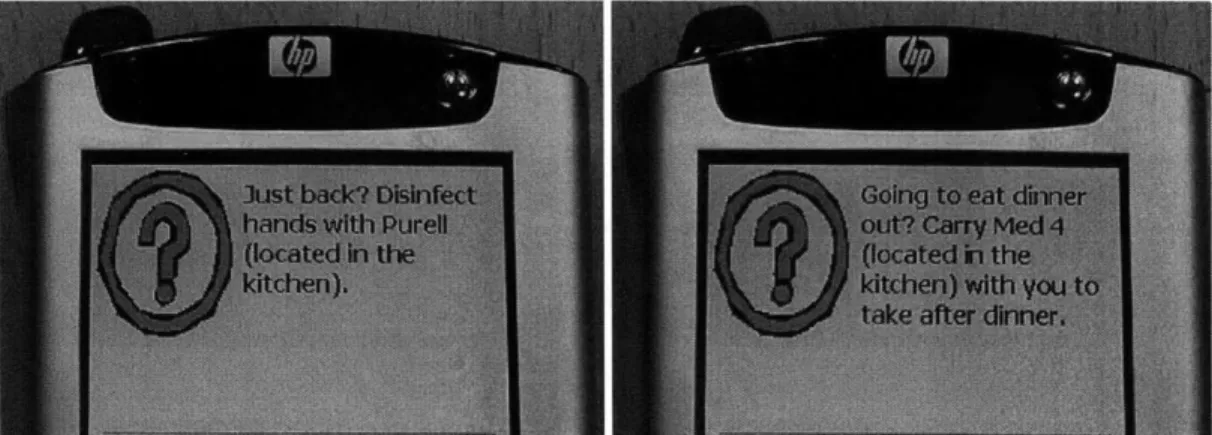
Figure 3-1: Examples of adaptive messages on a handheld interface used in this work
a message relevant for a "leaving the home" or "returned home" context, such as those depicted in Fig. 3-1.
Ideally, an adaptive system should be flexible enough to be trained to recognize new user activities easily and with a minimum of user intervention. Open areas of investigation to achieve this type of adaptive system include elaboration of appropriate contexts for proac-tive reminder delivery for healthcare (e.g., based on commonsense modeling or repeated observations), identification of the information that is needed about the user's state and actions to detect these contexts, and determination of the technological and interaction requirements for a system that accomplishes the necessary activity detection and modeling. Chapter 7 attempts to address some of these questions.
3.2
Being Convenient
Medication and healthcare tasks often do not need to be precisely timed; and it may be safe to complete them during time windows (e.g., "in the morning" or "after dinner") but fixed-time reminders do not take advantage of this permitted flexibility.
In [18], Ho and Intille succinctly characterize the most common factors that might impact the perceived convenience of an interruption (Table 3.1), which could be the presentation
Factor Description of the Factor
Activity of the user The activity the user was engaged in during
the interruption
Utility of message The importance of the message to the user
Emotional state of the user The mindset of the user, the time of
disrup-tion and the reladisrup-tionship the user has with the interrupting interface or device
Modality of interruption The medium of delivery, or choice of interface
Frequency of interruption The rate at which interruptions are occurring
Task efficiency rate The time it takes to comprehend the
inter-ruption task and the expected length of the task
Authority level The perceived control a user has over the
in-terface or device
Previous and future activities The tasks the user was previously involved in
and might engage in during the future
Social engagement of the user The user's role in the current activity
Social expectation of group behavior The surrounding people's perception of
inter-ruptions and their current activity
History and likelihood of response The type of pattern the user follows when an
interruption occurs
Table 3.1: Factors that impact interruptability - reprinted from [18]
of a medication reminder.
This work aims to address the "activity of the user" and the user's "previous and future activities" in order to deliver reminders at convenient but medically acceptable times. In-formation gathered from simple sensors located throughout the apartment is used to model two features: 1) the distance between the user and the location at which the medication is stored or the healthcare task is performed, and 2) the activity that the user is engaged in at the time when the reminder is provided.
The two features are combined to compute a convenience score for every sensor and task. This score can be summarized in equation 3.1, where C(n, i) represents the convenience of providing a reminder for a medication or healthcare task i upon the activation of sensor n. In the equation, Distance(n, i) represents the distance between sensor n and the location where the task i is executed (e.g., a medicine cabinet), ActivityBurden(n, i) is a heuristic representing the burden of interrupting the primary activity of the user at that moment,
iiiiiinYfl/
Figure 3-2: Concept of a convenience score
and a, 3 are normalizing constants for the two features.
C(n, i) = Distance(n, i) * a + ActivityBurden(n, i) * # (3.1)
In this work, medication reminders that can be associated with time windows are adjusted based on the convenience scores of sensors activated by the user and the length of time available in the window. This model for convenience is admittedly a simplified one. Fig.
3-2 illustrates how it might be applied in a case where medication needs to be taken "in
the evening". A fixed-time reminder set at 6:30 p.m. may interrupt the user while she is on the couch, reading. But a reminder triggered by the activation of the study door open-closed sensor with a high convenience score, a few minutes later, would be medically acceptable and possibly more convenient because she is close to the medication, and has already self-interrupted her task. As the time window progresses, a wider distribution of sensors (convenience scores) can trigger the reminder. In Fig. 3-2, the system would initially wait for the user to activate sensors that are close to the medication, i.e., it would try to be as convenient as possible. If it turns out that the user is not activating any sensors with high convenience scores, the system would gradually relax its tolerance to lower convenience scores. As the acceptable time window draws to an end, the reminder might be triggered when she activates a sensor with a lower score, perhaps in the kitchen.
Chapter 4
System Design and
Implementation
This chapter describes the design and implementation of a prototype system built for ex-ploratory evaluation of the ideas in Chapter 3. It differs from a comprehensive system that might be deployed in real homes in two significant ways.
1. The prototype is customized for use in the PlaceLab research facility [20, 21], a 1000
sq. ft. apartment that consists of a living room, dining area, kitchen, small office, bedroom, full bath and half bath. The PlaceLab is an initiative of the House-n group at the Massachusetts Institute of Technology, and TIAX LLC, and is conceived as a "living laboratory" for the study of technologies in home settings. Fig. 4-1 shows interior photos of the PlaceLab, and a plan can be viewed in Fig. 4-5. The PlaceLab offers rich data recording capabilities in a naturalistic home environment. A user of the system in the PlaceLab could be multitasking, experiencing distractions, and engaging in other complex behaviors that are difficult to simulate in a traditional laboratory.
2. The prototype is customized for the experimental framework described in Chapter 5. The central goal of the experiment is to compare a volunteer participant's reaction to
Figure 4-1: The PlaceLab living room and kitchen area, office, and master bath. The inset shows a microphone embedded into a cabinet
context-sensitive reminders against reminders that are scheduled at fixed times during the day. In order to minimize confounds from additional features and to ensure that the participant remains unaware of the two conditions being compared, the prototype system has limited functionality. For instance, help with rescheduling medication doses or summarization of tasks completed during the day are not implemented, be-cause they are extraneous to the core idea being examined, i.e., "how can detection of simple sensor patterns be used to provide -context-sensitive reminders, and how do
such reminders compare with reminders delivered at fixed times?"
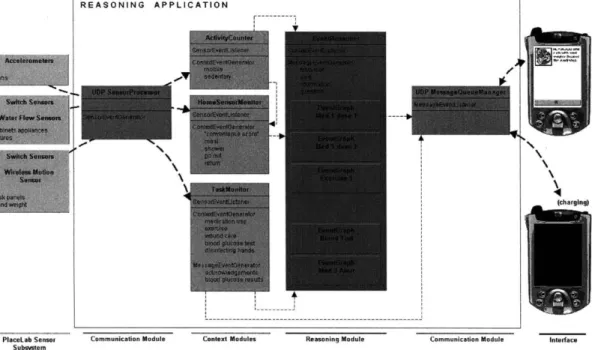
Fig. 4-3 summarizes the interaction between the main components of the system: a subset of PlaceLab sensors, a handheld interface, and a central reasoning application. Each of these is discussed in turn.
4.1
PlaceLab Sensor Subsystem
The following PlaceLab sensors [21, 20] are used:
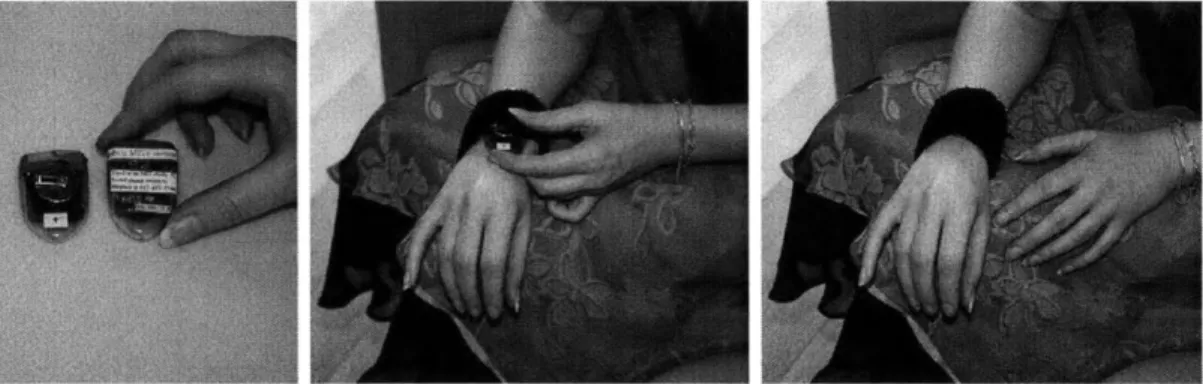
Figure 4-2: Researcher trying on a wireless accelerometer
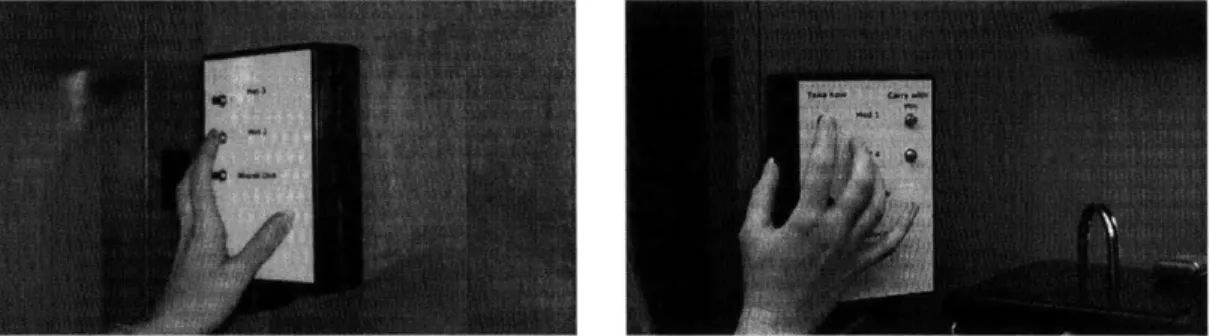
fixtures. These detect on-off and open-closed events, such as the opening of the refrigerator, the shutting of the linen closet, or the lighting of a stovetop burner. In addition, 9 custom push button sensors representing the different medication and other healthcare tasks are enclosed in two "Health Task Panels" located in the kitchen and bedroom.
* 2 flow sensors on the hot and cold water faucets in the shower to detect showering.
* 3 wireless 3-axis, 0-10 G accelerometers (4.5 x 3.5 x 1.5 cm) worn by the participant
on the wrists and dominant ankle, as shown in Fig. 4-2, to measure limb motion.
* 1 small (4.5 x 4.0 x 1.75 cm) wireless motion sensor taped onto a 2-pound hand weight,
to detect its use.
The PlaceLab infrastructure elements that support the system include the cameras and microphones distributed throughout the apartment, and wireless access points for 802.11 and sensor data. In practice, the network and intermediate microcontrollers introduce a latency of 1 to 2 seconds for limb motion sensors and switch sensors, and up to 15 seconds for the water flow sensors.
REASONING APPLICATION
I
---PlaceLab Sensor Communication Module Subsystem
Context Modules Reasoning Module
(charging)
Communication Module Interface
4.2
Handheld Interface
A wireless handheld computing device allows users to receive reminders and informative
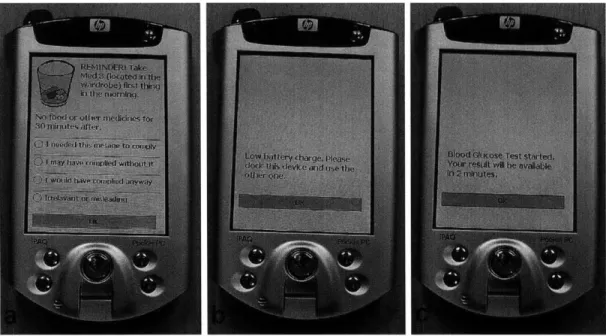
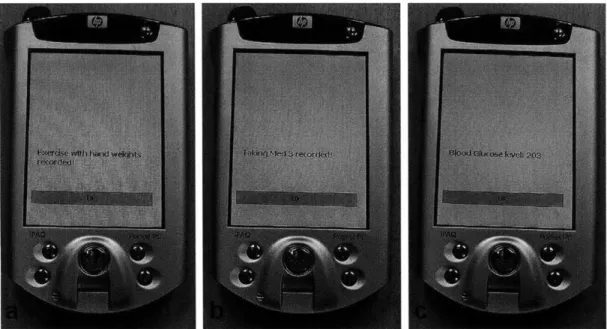
messages while carrying on with their lives as usual. When the device receives an incoming message over the home network, it provides an audible alert indicating that a message is waiting (or puts it in a message queue if a previous one is being viewed). A simple procedure allows the user to view and dismiss the message (Fig. 4-4a).
Since power constraints limit the continuous operation of handheld devices, the prototype interface is implemented on two Compaq iPAQ 3870 personal digital assistants (PDA's) that work in tandem; with either one in active use and the other being charged at all times. Both run identical software, but have different LAN addresses on the home network. A message notifies the user when it is time to exchange the active PDA for the one that is charging (Fig. 4-4b).
In this prototype, PDA's are used for message delivery and for the simulation of health ac-tivities in combination with the "Health Task Panels" (Fig. 4-4c and Fig. 4-9). However, in commercial deployments of a context-sensitive reminder system, mobile phones with health (biometric) and medication (RFID) sensing capabilities could be used for both delivery and collection of information.
4.3
Communication Modules
UDP communication with the sensing infrastructure and the handheld interface are
man-aged by the UDPSensorDataProcessor and UDPMessageQueueManager modules, that present a uniform event based representation of data within the central application. A request-response based protocol is used to maintain reliable communication with the two PDA's. See Appendix E for notes on the challenges overcome in creating a reliable UDP-based com-munication model that adapts to intermittent network breaks, PDA's being taken outside the PlaceLab, and overnight use.
Figure 4-4: a) An example reminder b) A notification to change the active device c) A simulated blood glucose test
4.4
Context Modules
Three context modules process sensor events generated by the UDPSensorDataProcessor and translate them to abstract sensor-agnostic context events. In this prototype, the trans-lations are rule-based and heuristic, however, individual components could be replaced if either the sensor inputs or the translation algorithm changes (for example, if a probabilistic classifier is used instead of the current rule-based algorithm).
ActivityCounter
The ActivityCounter processes sensor events from limb accelerometers and categorizes them, every two seconds, as mobile or sedentary context events, based on the running averages of acceleration in the x, y, and z axes. Variations in the running average accelera-tions that do not cross over heuristic thresholds are filtered as they typically represent short
Heuristic Translation Rule Context
Refrigerator, Stove burners, Oven (open/closed or on/off) meal
Water flow in shower faucets above threshold shower
Front door open + ActivityCounter events present during past go out
5 minutes
Front door open + no ActivityCounter events during past 5 return
minutes
Table 4.1: Rules used by the HomeSensorMonitor for generating activity context events
bursts of activity, like fidgeting. The ActivityCounter also generates transition context events when the wearer's inferred state changes from mobile to sedentary or vice versa.
HomeSensorMonitor
The HomeSensorMonitor processes context events from the ActivityCounter along with sensor events, and categorizes them as context events: meal, shower, go out, and return, as shown in Table 4.1.
The HomeSensorMonitor also generates context events for the convenience scores (intro-duced in Chapter 3) of sensors activated. Each switch sensor is mapped to a convenience score normalized between 0.1 and 1 for every relevant task in the experiment. The score is based on the two factors described in Section 3.2; and encapsulates;
1. The distance between the sensor and the location at which the health task must be
performed.
2. The inferred activity, if any, from Table 4.1, that the user is engaged in when the sensor is activated.
Coded floor plans with the convenience scores for switch sensors used in the experiment are shown in Fig. 4-5 and Fig. 4-6. Since tasks are expected to occur at two locations (refer Chapter 5), two sets of convenience scores are defined for many sensors.
Sensor m convenience score > 0.7
Sensor m convenience score > 0.4 Sensor m convenience score > 0.1
Bedroom "Health Task Panel"
- Med 2, Med 3, Wound Care,
Exercise
BEDROOM
TER
TH
Figure 4-5: Color-coded floor plans showing convenience scores used for the Health Task Panel in the bedroom
Sensor 0 convenience score > 0.7 Sensor u convenience score > 0.4
Sensor m convenience score > 0.1
Kitchen "Health Task Panel"
- Med 1, Med 4, Blood
Glucose Test, Hand Wash
BEDROOM
ERE
Figure 4-6: Color-coded floor plans showing convenience scores used for the Health Task Panel in the kitchen
Figure 4-7: Health Task Panels in the bedroom and kitchen
Figure 4-8: Hand weight with wireless motion sensor
TaskMonitor
The TaskMonitor processes sensor events from buttons on the "Health Task Panels" (Fig. 4-7) and translates them to unique context events for the start of a task when a button is first pressed, and for task completion if a button is released after being held down for 15 seconds. Sensor events from the wireless motion sensor on the hand weights (Fig. 4-8) are translated to the context event exercise after a threshold roughly corresponding to 25 to
30 arm curls. The TaskMonitor also generates messages to the user to simulate the sensing
Figure 4-9: Examples of messages simulating the sensing of medication and other healthcare tasks
4.5
Reasoning Module
The context modules set up streams of context events representing actions that originate from within the home environment or are the result of fired actions from the reminder software. These events may be as simple as turning on a faucet or more complex in the form of a convenience event. The Reasoning Module performs the core function of the system; i.e., reasoning over the context events events to provide timely, situation-appropriate reminders.
To achieve this, a collection of EventGraph structures model the user's prescribed regimen, the conditions for reminder delivery, and some situations indicating that an error (e.g., overmedication) might be about to occur. The EventGraphs are encoded in XML, and are loaded from a database into the EventReasoner module. EventGraphs respond to incoming context events, and on occasion, generate messages, that are directed by the EventReasoner to the UDPMessageQueueManager. The regimen in Chapter 5 is modeled through twenty-five such EventGraph structures. The rest of this chapter provides details of the EventGraph framework along with some significant underlying considerations.
4.6
EventGraph Framework
The delivery of effective medication reminders requires modeling an extended history of relevant events and possible future events pertaining to prescriptions (name, dosage, etc.) timing constraints (e.g., "take before bed"), activity constraints (e.g., "do not take with food"), or drug interactions. Additional conditions come in the form of events that could vary from day to day such as meal times, or the occasional absence of an event such as the patient missing a dose. In related research [12], the challenges of using a rule-based representation for complex medication conditions have been described at length. Gener-ally, conditions such as the ones listed above cannot be specified without introducing a large number of qualifiers and conjunctions in a rule-based grammar. Furthermore, it is often difficult to tell how rules will impact each other, and this could lead to unintended consequences particularly when there are many complex rules.
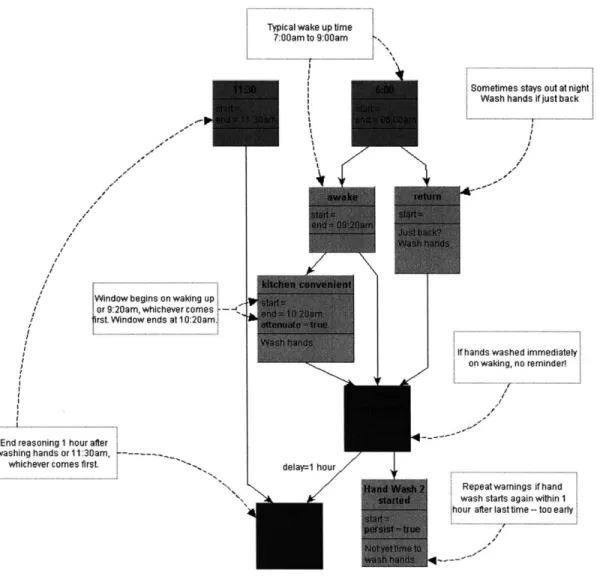
In this work, an alternative graphical representation is explored. The EventGraph frame-work aims to model an optimal, safe, and flexible daily schedule through the specification of precedence relationships between primitive context events. Fig. 4-10 is a visualization of an EventGraph (with dotted arcs leading to added explanatory annotations). Directed Acyclic Graphs (DAGs) have been used to model scheduling problems in various domains, because they make it possible to explicitly model all of the dependencies between conditions that apply to the scheduling problem (in this case, the scheduling of a reminder).
The EventGraph is a DAG with each node representing a context event and each edge representing a temporal precedence constraint: in this example, the directed edge from the parent node 6:00 to the child node awake says that event 6:00 must be detected before waiting for event awake. Every node has a tag denoting the event it represents, and some optional attributes. An active node is one that represents an event that the graph is currently awaiting. Only root nodes (6:00 and 11:30) are initially active.
Fig. 4-10 models the first reminder for the day in the instruction, "Wash hands with disinfectant in the morning and approximately every 2 hours when at home." For a user who might tend to disinfect his hands too frequently, it also models the interaction and
Typical wake up time
7:00am to 9:00am
Window begins on waking up
or 9:20am, whichever comes
-Irst. Window ends at 1 0:20am.
End reasoning 1 hour after washing hands or 11:30am,
---whichever comes first. delay=1 hour
Sometimes stays out at night Wash hands if just back
tf hands washed immediately on waking, no reminder!
Repeatwarnings if hand wash starts again within 1 hour after last time -- too earlyI
Figure 4-10: Example EventGraph: "Wash hands with disinfectant approximately every 2 hours."
display of information each time the disinfectant is accessed within an hour after the first use.
An active node ends if the event denoted in the tag is detected or if an active child node ends. In Fig. 4-10, once the node awake ends, kitchen convenient and Hand Wash 1 completed become active. After this, if the event Hand Wash 1 completed occurs, the kitchen convenient node automatically becomes inactive (ends), since Hand Wash 1 completed is a child node of kitchen convenient.
The edges in the graph may optionally be associated with a delay attribute, indicating the delay for the child node to become active after the parent node has ended. In the example below, the node END will be reached after a delay of 1 hour past the detection of the Hand Wash 1 completed context event.
Node Attributes
The start attribute is an internal default attribute that marks the time when the node
becomes active.
The end attribute, unlike start, is optional. When present, it marks the default time
when the node must become inactive, thus it forces the node to become inactive when the end time occurs. In the example, the node awake has an end attribute, which means that it will become inactive at 9:20am (and kitchen convenient will become active) even if the context event awake has not been detected. Nodes like 11:30 and
6:00 always default to the corresponding end times, because their tags do not map
to any context event generated by the context modules.
The message attribute is also optional, and contains a text message to be sent to the
user when the node becomes inactive. In 4-10, messages are shown below the second horizontal line across nodes that trigger responses.
The persist attribute, when true, overrides the default ending behavior, and keeps the
node active even when the event denoted in the tag is detected. Such nodes end only when an active child node becomes inactive. This attribute is useful for mod-eling persistent actions such as alerts that should be provided more than once if the corresponding event is detected.
The attenuate attribute is a specialized attribute associated with a rule that gradually
relaxes the condition that will end the node. Specifically, the rule is related to the convenience scores of sensors. When true, the end attribute must be specified, either as a fixed time or as an interval in minutes after the start time. The start and end attributes define a window, but like in the case of kitchen convenient, the duration
of the window might vary if the end attribute is fixed and the start attribute depends on a parent node (in this case, awake). The attenuate attribute indicates special handling of convenience score events based upon the time when the event is received, and the length of the window.
When a convenience score (normalized to values between 0.1 and 1) is received by an active attenuating node, the node ends only if the score is greater than or equal to the proportion of time available in the window. When a window has just opened, the proportion of time available is (almost) whole, and only sensors with a convenience score of 1 can end the node. As time progresses, and the proportion of the available window decreases, a wider distribution of sensors can end the node. Refer to the plans in Fig. 4-5 and Fig. 4-6 for visualization.
In the previous example, the "Wash hands" message is initially generated only if a high convenience score is received. As time progresses towards 10:20 a.m., lower convenience scores can generate the same message. In the final tenth of the time window, in addition to convenience scores, the node also allows transition events from the ActivityCounter module to end it. As a result, in the final tenth of a time window, the message is generated when the user transitions from being sedentary to mobile, or vice versa. The end attribute ensures that even if an activity transition has not occurred, the message is finally provided at 10:20 a.m., the end of the window.
The END node has a special meaning, and it does not represent a context event being
awaited. If an END node is reached, all active nodes (including those with persist attribute set to true) are immediately deactivated, and a special context event an-nouncing the end of this EventGraph is generated. This node is used in cases where it is necessary to notify one EventGraph about the end of another. Strictly speaking, this attribute is not necessary, as it is possible to combine two interdependent graphs
Figure 4-11: Example of a single graph that combines three individual graphs used in the experiment, by eliminating the "END" nodes
EventGraph Construction
For the experimental protocol in Chapter 5, the design of EventGraphs for individual doses and alarm conditions, as well as the resolution of dependencies between multiple EventGraphs were done manually and iteratively. First, a simulator was developed to rapidly increment time and test the interaction between the EventGraphs in various sce-narios enacted by the author. Prior to the study described in Chapter 5, two members of the research team and three other friends of the author pilot tested the system independently for periods ranging from 4 to 12 hours. Some iterative improvements to the EventGraphs were made during this process as well. Appendix A describes the 5 basic constructs that were finally used to encode the protocol; the level of detail encoded in these graphs is a product of the granularity of information available through the sensing used (listed in Appendix F). Since the EventGraphs for this prototype were manually constructed, individual graphs were developed for each dose. An expert system for generating graphs from human inputs could efficiently combine such individual graphs and generating a graphical model for an entire day, with all dependencies represented. For example, Fig. 4-11 shows a single graph that combines three individual graphs used in the experiment, by eliminating the END nodes for inter-graph dependency. This is discussed further in Chapter 7.
Chapter 5
Experimental Framework
To test the hypothesis that context-sensitive medication reminders are both effective and perceived as convenient, a 10-day study was conducted at the PlaceLab residential research facility.
5.1
Study Design
A regimen of simulated medication and health tasks was developed with the guidance of
healthcare professionals. The regimen consisted of four medicine-taking tasks, and four other healthcare tasks, i.e., exercise, disinfecting hands, caring for a wound, and testing blood glucose. In all, twenty-four tasks were required to be completed at various times during the day. An instruction booklet (shown in Appendix B) containing the full list of tasks, along with other instructions, was given to the participant.
All tasks except the exercise were simulated through buttons on two Health Task Panels
(Fig. 5-1) located in the kitchen and in a wardrobe near the bedroom. To complete a medicine-taking task, the button corresponding to the medicine name had to be held down for 15 seconds until the handheld device provided a chime and displayed an acknowledge-ment message (Fig 5-2). Two of the medicines that involved doses prescribed during the day had an additional button to allow the participant to "carry" a dose outside the PlaceLab.
Figure 5-2: Medicine-taking: (top) Press correct button on panel, (bottom) wait for ac-knowledgement on PDA.
For non medicine-taking tasks, the participant was required to complete other steps that depended on the type of task. The sequence of steps involved in completing each type of task can be seen through the series of anonymized camera views of the participant in Fig.
5-3 through Fig. 5-6.
The goals of this experimental design were,
1. To mimic the real burden involved in taking medication or completing a non-medication
healthcare activity for someone with normal cognitive and perceptual capabilities; for instance, a normal older person not suffering from amnesia,
2. To be able to unambiguously measure adherence through the use of simple sensors, and video.
Admittedly, there is a fair degree of subjectivity in the design of this regimen and the criteria listed in Appendix C for defining adherence. This was necessary given the lack of generalizable adherence data or standard adherence metrics. For example, adherence data is available for individual drugs, but there is little data regarding overall adherence to a complex medication regimen, even though patients over 70 take an average of 7 prescription medicines and 3 over-the-counter drugs [13].
The iterative pre-study pilot testing mentioned in Chapter 4 was helpful in evaluating the clarity and perceived complexity of the protocol; for instance, the decision to introduce a task acknowledgement screen (instead of just an audible chime) so that the participant would clearly know which task had been recorded was an outcome of one of these tests.
A participant willing to move into the PlaceLab and adhere to the regimen for a period
of 10 days was recruited. A complete audio-visual record of his stay in the PlaceLab and the activation times of all sensors were recorded. In particular, repeated measures of the following aspects of his activities were made: 1) times when the various medical tasks were started and completed.; 2) times when reminders were received; and 3) rated perceived value of all messages received (reminders, alerts, questions) as described in section 5.4.3.
Figure 5-3: Disinfecting hands: (top) Press correct button on kitchen panel, (middle) wait for acknowledgement on PDA, (bottom) wash hands with Purell.
Tuesday, July 19, 2005
First
Second
'26'
.11)
.iThirdWednesday, July 20, 2005
First
Second
T
Thursday, July 2L, 2005First _ Second Third
Friday, July 22, 2005
First
Second
Third
Figure 5-4: Testing blood glucose: (top) Press correct button on kitchen panel and wait for acknowledgement on PDA, (middle) get result after 2 minutes and record it, (bottom) scan of blood glucose recording sheet
Figure 5-5: Exercise: 15-20 curls with each arm, using a hand weight.
The two conditions of the independent variable were:
C1. Reminders scheduled at fixed times during the day, and
C2. Context-sensitive reminders as described in Chapter 4.
Each condition was applied on alternating 24 hour periods of the study, beginning at 5:00 a.m. on the morning after moving in. This strategy was chosen to minimize the order effect; however it had significant effects on results. The implication of this design choice was that the context-sensitive system would start up at 5:00 a.m. on alternate days, and run for 24 hours. Consequently, on each instantiation, it would operate with a 24-hour break in its short-term memory of adherence and sensor data.
The study protocol was approved by the Massachusetts Institute of Technology Committee on the Use of Humans as Experiment Subjects. To avoid bias, the participant was blinded to the reminder strategy being used, and had minimal contact with the investigator prior to the completion of the study. As far as possible, interaction between the author and the participant was kept to a minimum and all communication with the participant was managed through a different member of the research team.
Figure 5-6: Wound care: (top) Press correct button on bedroom panel, (middle) wait for acknowledgement on PDA, (bottom) sit still for 5 minutes until PDA lets you know wound care has been completed.
5.2
Participant
A 50 year-old freelance professional (college graduate with an advanced degree) who was
married and who generally worked at home was selected to be the participant. He fit the desired age range, was active, spent less than 6 hours a day outside the house, and was in good physical and cognitive health. He had been in the PlaceLab volunteer pool since June 2004, after he responded to a poster advertisement that contained lines such as, "Teach Researchers about Your Everyday Life ... help us design better technologies and homes..." He had stayed in the PlaceLab in an unrelated experiment in July 2004, and as a result, was familiar with the PlaceLab sensing capabilities. The researcher who interacted with the participant described his temperament as follows;
"Based on interactions before, during, and after the experiment, I would describe the par-ticipant as conscientious, detail oriented, and deliberate. Given instructions or information about the experiment, he would pause to think and then carefully repeat back his under-standing of the task. He frequently made insightful inferences that suggested high general comprehension of the regimen. He seemed willing to get assistance, adjust his pace, and adjust his method of his actions in order to fully execute a task. For example, he gave me verbal feedback when he needed more time to read provided materials and spent several minutes practicing changing the batteries on the on-body sensors."
5.3
Method
A telephone screening and interview were conducted one week prior to the study. The
participant was told that the general purpose of the study was to evaluate strategies to assist in medication adherence, and that he would be required to complete simulated medical tasks. He was not told about the alternating fixed-time and context-sensitive reminders. He was shown pictures of the buttons representing medical tasks, and was requested to answer questions about his daily routine (questions and responses in Appendix C), which were then used to schedule the timing of the fixed reminders and to adjust some time-dependant nodes
for the EventGraph structures representing context-sensitive reminders.
The participant moved into the PlaceLab on July 18, 2005. He was directed to treat the facility like a temporary home for the duration of the study and to conduct his life as normally as possible. The move-in day was used for a protocol instruction session, and a demonstration of the system. He was given the instruction booklet that can be found in Appendix B. The screening, pre-study interview and protocol information session were conducted by a member of the research team who had been given details about the protocol and trained in operating the handheld interface. Care was taken to ensure the participant recognized his right to withdraw from the study at any time. He was informed of all the sensor locations in the apartment.
The study officially began at 5:00 a.m. on July 19, 2005 and ended at 5:00 a.m. on July
29, 2005. The participant was not interrupted during that period, except for an occasional
scheduled phone call by the researcher he was in contact with to check if he was comfortable, and one short visit by a researcher to deliver supplies. Samples of 348 completed tasks, 233 reminders, and 228 participant rated messages (reminders, alerts, questions) were obtained.
A post-study debriefing occurred on August 3, 2005.
5.4
Evaluation Plan
The activation times of all sensors (in text logs) and a complete audio-visual record of the stay (in 1-hour chunks of video) were recorded. The evaluation of this data covered three metrics listed in the following sections. In particular, the following aspects were logged,
1. Times when the medical tasks were started and completed.
2. Times when reminders were received.
Adherence
Between one to three conditions for nonadherence were defined for each medication or other healthcare task. In addition to missing a task entirely, tasks were assigned other conditions such as, overmedication, incorrect timing, not completing additional instructions, and interaction, (with drugs or food), as applicable. The details of this scheme in the form of annotator instructions are listed in Appendix C. Missing a dose or task, drug interaction, and overmedication were marked as errors and the rest as warning conditions. Completing non medication- taking tasks (exercise, disinfecting hands, testing blood glucose, and caring for a wound) more frequently than prescribed did not count as overmedication errors.
Interval between Reminder Reception and Task Execution
The time interval between the reception of each reminder and the execution of the associated task was measured. Reminders that did not receive a response were not included in the analysis. Since it was not always possible to determine how to measure the time interval between a reminder and a task (for example, in the case of a missed dose, a reminder time may be available, but there is no corresponding task execution time), some simplifying assumptions were made.
" Missed doses, were treated as gaps in the data, and the reminders for any missed doses
were not included in the analysis of this metric.
" Exercise was prescribed four times a day, and the hand disinfecting task was prescribed
eight times a day, when "at home". On both fixed-time and context-sensitive days, four reminders for exercise and eight reminders for hand disinfecting were provided. However, in the protocol information session, the participant had asked if he was allowed to wash hands and exercise more often than prescribed, and had been told that he could.
This made it difficult to match reminders with tasks for these two types of tasks, since the number of times the tasks were executed per day was always greater than the
number of reminders provided. To decide which instances to include, each reminder was matched with the task instance immediately following it. The remaining tasks were excluded from the analysis. For example, on almost all days, the participant completed exercise tasks without a reminder several times before the first reminder for the day was delivered. In such cases, the tasks that occurred before the reminder were excluded from the analysis.
" Because of the permitted flexibility in the exercise and hand disinfecting tasks, it was
necessary to control for the variations in the times when the participant was outside the PlaceLab on different days. Therefore, reminders for such tasks were removed from the dataset for this metric, so as to not contribute an unduly high time interval when there was no urgency to complete the task.
" Negative time intervals were recorded if a reminder occurred after the execution of
the corresponding task, and negative intervals were analyzed separately.
After filtering the data on all days, as described above, the p value of the time intervals across the two reminder conditions for both positive and negative intervals, were calculated using the t-test for two samples assuming unequal variances.
Rated Perceived Value of Messages
A strategy was developed to measure the perceived value of every message at the instant
it was viewed with minimal effort for the participant. The perceived value of a message is a subjective quantity that might be affected by several dependent or independent factors each time. Initially, a Likert scale was considered, but it was dropped because it required narrowing down the scope of the response to describing a single aspect like convenience, usefulness, urgency, etc., rather than reaction to the message as a whole.
Instead, the following options were presented on the PDA as shown in Fig. 5-7: "I needed this message to comply", "I may have complied without it", "I would have complied any-way", and "Irrelevant or misleading". Although these choices were displayed in the same