Open Archive TOULOUSE Archive Ouverte (OATAO)
OATAO is an open access repository that collects the work of Toulouse researchers and
makes it freely available over the web where possible.
This is an author-deposited version published in :
http://oatao.univ-toulouse.fr/
Eprints ID : 12425
The contribution was presented at INTERACT 2013 :
www.interact2013.org/
To cite this version :
Tsandilas, Theophanis and Dubois, Emmanuel and Raynal,
Mathieu Modeless Pointing with Low-Precision Wrist Movements. (2013) In: 14th
IFIP TC 13 International Conference on Human-Computer Interaction (INTERACT
2013), 2 September 2013 - 6 September 2013 (Cap Town, South Africa).
Any correspondance concerning this service should be sent to the repository
administrator: [email protected]
Modeless Pointing with Low-Precision Wrist Movements
Theophanis Tsandilas2,3, Emmanuel Dubois1 and Mathieu Raynal1 1 IRIT – Elipse, University of Toulouse, Toulouse, France
2 INRIA, Orsay, France
3 Univ Paris-Sud (LRI) & CNRS, Orsay, France
[email protected], {Emmanuel.Dubois, Mathieu.Raynal}@irit.fr
Abstract. Wrist movements are physically constrained and take place within a
small range around the hand’s rest position. We explore pointing techniques that deal with the physical constraints of the wrist and extend the range of its input without making use of explicit mode-switching mechanisms. Taking into account elastic properties of the human joints, we investigate designs based on rate control. In addition to pure rate control, we examine a hybrid technique that combines position and rate-control and a technique that applies non-uniform position-control mappings. Our experimental results suggest that rate control is particularly effective under low-precision input and long target distances. Hy-brid and non-uniform position-control mappings, on the other hand, result in higher precision and become more effective as input precision increases.
Keywords: Pointing techniques, constrained wrist movement, elastic devices,
rate control, clutching.
1
Introduction
Technology becomes more and more ubiquitous, and a variety of handheld devices such as Wii Remotes start becoming widely available. Researchers and designers have been envisioning scenarios that move user interaction beyond desktop comput-ers. A user interacts with a public display in a museum to get more information about an exhibit or with a wall display in an airport to learn more about a flight. Driven by such scenarios, research in Human-Computer Interaction has been exploring new pointing techniques that go beyond the use of a mouse. For example, Vogel and Balakrishnan [23] proposed techniques for freehand pointing in front of high-resolution displays. Other work [22] has explored the use of mobile phones as point-ing devices for interaction with public displays. In such scenarios, user interaction does not rely on the presence of specialized input devices and sophisticated motion tracking systems. Pointing precision becomes an important issue. Factors that affect pointing precision include natural hand tremor and limited hand precision [2, 21] or the use of low-resolution input devices.
Several solutions have tried to improve pointing precision by proposing mecha-nisms that balance between absolute and relative pointing. “Clutching” is a common input recalibration mechanism that allows users to reposition the frame of reference of absolute pointing. Despite its simplicity, it requires explicit mode transitions between pointing and clutching. When using a mouse, clutching is activated naturally, by lift-ing the mouse and translatlift-ing it over the table. However, when the input device is positioned in free space, mode switching relies on the use of a button [24] or a special hand gesture [23]. Such mechanisms may not be available in certain situations (e.g., when the user manipulates a physical object with no additional input channels), rely on error-prone hand-gesture recognition mechanisms or compete with the activation of other actions, such as the selection of a target.
This paper explores solutions that achieve pointing precision without requiring the user to switch between modes. We focus on movements of the wrist, which are im-portant for the manipulation of handheld devices and can be easily detected by accel-erometer and gyroscope sensors of common mobile devices. We investigate three solutions. Based on the observation that wrist movements occur within a limited range, beyond which natural self-centering forces develop, we investigate rate (veloc-ity) control as a first solution. Inspired by the work of Casiez et al. [5], we explore a second technique that combines position and rate control to extend the input range of the hand. We claim that the wrist can be viewed as a hybrid device: isotonic when movements take place around its neutral position, and elastic when its position ex-tends beyond a certain range. Finally, we examine a third technique influenced by previous research on multi-scale pointing [12] and non-uniform position-control map-pings [1, 20]. We show that rate control is insensitive to input precision, which means that it is particularly valuable when input precision is low. We measure and control input precision by dividing the input range into discrete units of input. We use input precision as an independent variable to explore the design space and evaluate the three techniques.
2
Related Work
In indirect pointing, the pointing device is decoupled from the display. This separa-tion results in two different spaces: (1) the display space, which is the space of the pointer’s movement, and (2) the motor (or control) space, where the manipulation of the input device takes place. In relative-pointing devices, the mapping between the two spaces can change dynamically, for example, by using recalibration mechanisms that change the frame of reference of pointing on the display space. Clutching is the most common recalibration mechanism [13]. When using a mouse, clutching can be performed by lifting and moving the mouse off the table. When pointing occurs in free space, clutching requires the activation of an explicit mode-switching mecha-nism, for example, by pressing a button [24] or by changing the hand’s posture [23].
The Control-Display (C-D) gain [11] maps the movement of the input device (mo-tor space) to the movement of the display pointer (display space). It can be calculated as the ratio of the pointer velocity to the velocity of the input device. Casiez et al. [6] examined the impact of C-D gains on pointing performance with a high-resolution
mouse. Their results indicate that pointing time follows an L curve as a function of C-D gain. When the gain is low, performance slows down because clutching becomes frequent. When it is high enough, the C-D has no effect on user performance, i.e., increasing its value has no cost. Problems due to the accuracy of hands and fingers appear in tiny movements of about 0.2 mm. When the hand moves in free space, however, problems appear in larger movements in the range of 3 – 5 mm [2]. In this case, the use of high C-D gains is problematic. For example, ray casting, which in-volves high C-D gains when used at a distance, is extremely sensitive to hand tremor and results in high error rates [18, 19, 23].
A pointing device can control either the position (position control) or the velocity (rate control) of the pointer. Position control is most often used with isotonic devices, e.g., a mouse, while rate control is used with isometric and elastic devices, e.g., joy-sticks. Rate control eliminates the need for clutching but relies on a self-centering mechanism, not present in isotonic devices. Zhai [24] compared all the possible map-pings between input types (isotonic and isometric) and types of control (position and rate) and found that isotonic rate-control input was about 50% slower than isometric rate-control input and isotonic position-control input. More recently, Casiez and Vogel [5] examined the effect of the stiffness of elastic devices on the performance of rate control. They found that rate control performed well even for very low stiffness values, as long as a self-centering mechanism was present and velocity-control func-tions were carefully selected. They also found that pointing performance was only 15% slower when stiffness was zero, i.e., when pointer control was purely isotonic.
Research in Virtual Reality has proposed hybrid movement mappings to facilitate the manipulation of virtual objects, avoiding the use of high C-D gains, explicit interaction modes, and clutching mechanisms. The Go-Go technique introduced by Poupyrev et al. [20] extends the reach of a user’s hand in the virtual world by apply-ing non-uniform C-D gains. The technique uses a one-to-one movement mappapply-ing between the real and a virtual hand as long as the hand stays within a fixed area around the user. This ensures that users can manipulate nearby objects with precision. However, when the arm of the user extends beyond the proximity area, the C-D gain grows through a non-linear (parabolic) function. Variable C-D gains can help users reach remote objects without having to “clutch”. A major drawback of the technique is that high gains develop towards extreme input positions, requiring users to bring remote objects closer so that they can effectively interact with them. Bowman and Hodges [3] explored variations of the Go-Go technique, including the stretch go-go technique, which controls the velocity of the virtual arm rather than its absolute posi-tion. Unfortunately, little evidence about the effectiveness of the above techniques exists. More recently, Appert et al. [1] introduced the Ring lens, a high-precision magnification lens that applies position control at two scales. The cursor moves with a low C-D gain within a Ring lens, supporting high-precision control in the magnified area. As the cursor reaches the border (ring) of the lens, the lens follows the move-ment of the cursor. The technique outperformed both speed-depended precision con-trol and mode–switching precision concon-trol.
A few approaches have examined hybrid designs. Dominjon et al. [9] proposed an interaction technique for haptic devices that combines position and rate control. The
technique is based on the visualization of the input space as a three-dimensional bub-ble. Movement is isotonic and position controlled inside the bubble, but it becomes elastic and rate controlled as the cursor crosses the boundaries of the bubble to the outside. Dominjon et al. [9] implemented the bubble technique with a PHANTOM haptic device and evaluated it on 3D-model painting tasks. The technique was more efficient than both absolute positioning and clutching and received higher subjective rankings. RubberEdge [7] is a hybrid device that applies a similar approach to 2D pointing tasks. It resembles to a regular touch pad, but its boundaries are elastic. When the finger of the user moves from the central isotonic zone of the pad to its elastic boundaries, cursor movement becomes rate controlled, allowing the user to traverse long distances without clutching.
3
The Wrist as a Constrained Pointing Device
Wrist movements are constrained by the hand’s joints. Joint constraints decrease the operating range of input, hindering user performance. This is a major problem when users need to interact with large visual spaces without losing in pointing precision. Clutching techniques as well as techniques that let users switch between relative and absolute pointing can increase the range of movement but require an additional input channel. Unfortunately, such mechanisms may not be available in certain situations, for example, when users interact with non-specialized devices or physical objects.
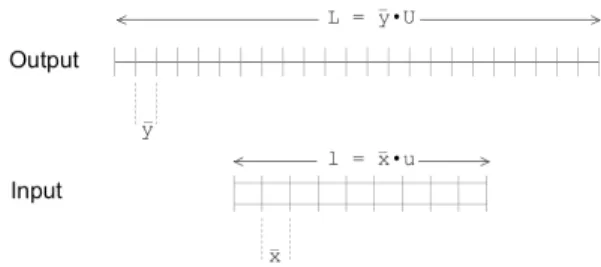
Fig. 1. Input and output unit ranges.
Physical constraints may not pose a problem if movements of the hand are highly accurate, when pointing distances are relatively short or targets are large. Problems arise when hand movements are imprecise, distances are large, and targets are small. To better describe this problem we study user performance in relation to the number of discrete units of movement. Fig. 1 presents how the input and output space can be partitioned into units of movement. U is the range of the display measured in units, andy is the size (in mm, dots or pixels) of the minimum unit of output movement. Clearly, targets on the display have to be larger than y to be selectable. Chapuis and Dragicevic [8] found that the discretization of the output had practically no effect on pointing performance as long as targets were selectable. This implies that perform-ance only depends on motor-space control and not on the visual representation of the cursor. In most real applications, the minimum output movement y is never larger than 1 pixel, which allows for smooth cursor transitions and the selection of tiny
tar-gets. In this case, U represents the display size in pixels. Similarly to output range, we can view input range as a discretized entity, where u is the range of detectable discrete input units, and x is the size of each unit in mm. The minimum input unit x
repre-sents the minimum distance that can be recognized by an input device and controlled by the user. When the number of output units is greater than the number of input units (U > u), the user cannot reach all the output units with an absolute mapping between input and output. Given an input-output configuration (u, U), where U is much greater than u (U >> u), our goal is to examine pointing techniques that maximize pointing performance. The output-to-input ratio:
(1)
determines the minimum number of clutches required to traverse the whole output range. An alternative definition of the C-D gain in terms of input and output units is:
CDU
gain=
U
mu
m(2)
where Um is the number of output units covered when the input device moves um units. Notice that, in contrast to the C-D gain, the above measure is not unit-free.
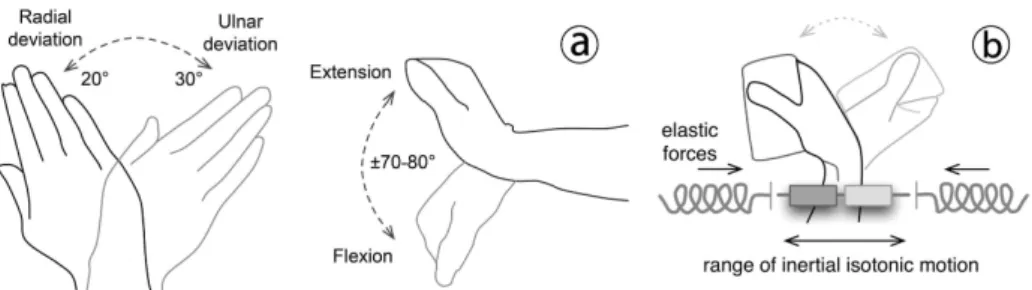
Research in biomechanics has proposed several models to describe the mechanics of joints and muscles. Lemay and Crago [16] used a simple mathematical model to express passive elastic torques M in human limbs, according to which the joint's stiff-ness is composed of both a linear and an exponential component. The exponential component dominates close to the limits of a limb’s operating range, but movement is highly isotonic around the rest position. Lehman and Calhoun [15] studied extensions and flexions of the wrist. They found that wrist movements are isotonic in a range of 40 degrees to the left and the right of the rotational axis. Passive torques were less than 0.1 N⋅m within this movement range. Elastic torques started appearing rapidly as movement extended towards its extreme positions. Fig. 2 presents the angular range of wrist rotations and our hypothetical model of the wrist as a hybrid device.
Fig. 2. The wrist. (a) The range of its angular movements. (b) Modeled as a hybrid of an
iso-tonic and an elastic device.
The precision of such wrist movements can be particularly low. Rahman et al. [21] found that errors inflated considerably as users tried to control more than 12 levels of purely flexion-based tilts when interacting with a mobile phone.
4
Techniques
We examined three techniques that allow the user to point by moving the wrist with-out making use of explicit mode-switching mechanisms. Motivated by previous work on hybrid movement mappings [7, 9, 20], we reconsider the use of rate control in conjunction with wrist movements. Rate control depends on the existence of a self-centering mechanism. Previous results [5] suggest that the stiffness of an elastic de-vice has no effect on the effectiveness of rate control. Rate control can work equally well with low stiffness values provided that a self-centering mechanism is present. Their results also suggest that when movement occurs within a small range, the re-moval of external self-centering mechanisms only slightly affects user performance. Given that the wrist has a natural resting position and movement takes place within a relatively small range around it, we expected that rate control would be a viable solu-tion even if we did not externally reinforce the wrist’s centering mechanism.
4.1 Pure Rate Control
Rate control is based on the application of a transfer function that maps the displacement d from a neutral input position to velocity units. Previous work [5, 24] has made use of linear transfer functions. Our informal tests, however, showed that non-linear transfer functions result in better motor control. This can be explained by the fact that the neutral position of the wrist is not strict but expands within a certain range where self-centering is absent and velocity control is difficult.
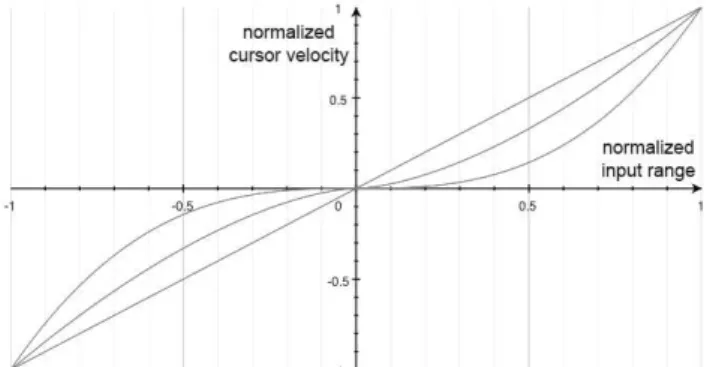
Fig. 3. Three different transfer functions: v(x) = sign(x)·|x|b, where b ≥ 1.
The form of polynomial functions (see Fig. 3) that we tested is the following:
v(x) = sign(x)·|x|b , b ≥ 1 (3) where x = 0 is the hand’s resting position. Both the input range and velocity are nor-malized in [-1, 1]. We observed that transfer functions that grow rapidly around the zero position, i.e., when b is low, are sensitive to input precision. Velocities must be low enough so that small targets can be easily selected. If the width of the smallest target is Wmin, the minimum cursor velocity vmin must be as follows:
(4) where Treact is the delay for the user to react and stop the movement when the cursor enters the area of the target. Based on previous experimental results [17], we esti-mated this delay to be around 150 ms.
4.2 Hybrid Control
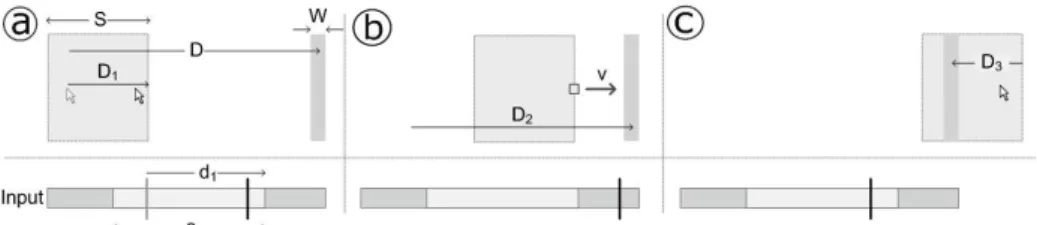
We explored mixed-control designs, balancing between high precision afforded by position control and smooth long-distance movement afforded by rate control. Our approach is based on existing techniques [7, 9] but does not assume the availability of specialized elastic devices. As shown in Fig. 4, we divide the input range into three zones. The central zone is reserved for position control. The portion of the display that corresponds to movements within this zone is communicated to the user as a framed window. The side input zones let the user reposition this window by control-ling its velocity. As a result, pointing takes place at two stages. First, the user turns the hand out of its central zone to bring the window around the target. Then, the hand returns towards the central zone to point to the target within the window’s boundaries.
Fig. 4. Steps of a selection task with the hybrid technique when D > D1. The vertical line in the
input space shows the input position. (a) The cursor travels a distance D1, which corresponds to
a movement d1 along the isotonic range of the input. (b) The window travels towards the target,
which appears in a distance D2 from the initial center of the window. The velocity v of the
window increases as the input position extends towards its extreme sides. (c) The cursor moves to the target by covering a distance D3.
We follow the approach of Dominjon et al. [9], who visually communicate the range of position control, rather than the approach of Casiez et al. [7], who use a sin-gle cursor representation. In our case, there is no haptic feedback to communicate transitions to the user, and hence, visual feedback is essential. We also found that breaking the pointing task into two different scales, i.e., rough pointing with rate con-trol, and precise pointing with position concon-trol, was more appropriate than assuming that rate and position control constitute symmetric ways of pointing.
Clearly, the range of input units determines the maximum size of the window, but how to divide this range is not straightforward. Larger central zones increase the ac-tive width of position-controlled pointing but do not necessarily result in faster movements because (1) a shorter range is reserved for rate control, and (2) transitions from position to rate control, and inversely, require longer hand movements. The model proposed by Casiez et al. [7] assumes that movement has two parts. Movement
first occurs in the isotonic area until the user’s finger reaches the elastic boundary of the device. Then, movement continues in the elastic zone until the target is finally selected. In contrast, our model assumes that movement always returns to the central isotonic zone to complete the pointing task. Our early tests have shown that direct target selection with rate control is particularly hard when a hybrid design is used. When movement takes place in a single side (i.e., elastic) zone of the input, the cursor can only move towards a single direction. If the cursor overshoots the target, move-ment has to return to the isotonic zone. Fig. 4 demonstrates the steps of a selection task based on this model.
4.3 Non-Uniform Position Control
We have designed a window-based technique that applies position control to move the window of high-precision pointing. As shown in Fig. 5, a movement of the hand out of its central zone translates the window to the left or to the right by using a high C-D gain. The position of the window freezes when the wrist starts moving towards its central zone. This mechanism allows the user to recalibrate the movements, keep-ing high-precision pointkeep-ing around the wrist’s rest position. Durkeep-ing recalibration, the user may have to repeat multiple forward and backward movements before bringing a distant target within the window. More precisely, the number of such movements depends on the target’s distance, the input resolution, the size of the central zone, and the selected C-D gains. This recalibration mechanism is analogous to regular clutch-ing mechanisms but does not require the use of additional input channels. Also, it makes use of two distinct gains (CDUlow, CDUhigh), which allows for minimizing the number of recalibration actions. The steps required by the third technique to point to distant targets are similar to the ones required by the hybrid technique except that now position control is used to position the window. The cursor moves to the boundaries of the window. Then, the window moves to the target, following a series of recalibra-tion acrecalibra-tions. Finally, the cursor points to the target.
Fig. 5. Non-uniform position control. (a) Absolute pointing in the central zone of the input
range with a low C-D gain. (b-d) Position recalibration with back and forth movements.
If w units of a total of u input units are reserved for absolute pointing, the maxi-mum output distance d traversed without recalibration can be computed as follows:
d = w⋅ CDU
low+
u − w
2
⋅ CDU
high (5)To maximize this distance and, at the same time, ensure that all the pixels can be vis-ited, we can select CDUlow to be equal to 1 pixel/unit and CDUhigh to be equal to w:
d
max=
−
w
22
+ 1+
u
2
⋅ w
(6)The value wo that maximizes this expression can be calculated as follows:
∂d
∂w
wo= 0
⇔ −w
o+ 1+
u
2
= 0 ⇔ w
o= 1+
u
2
(7)This equation shows that the distance is maximized when the zone of absolute pointing is approximately half of the input range. This estimation has been based on the highest possible value for CDUhigh. As we have already discussed, previous results
[6] show that C-D gains do not impact pointing performance as long as no clutching and input resolution problems arise. Besides, other results [8] show that the discretiza-tion of the cursor’s movement does not hurt user performance. Yet, our own tests showed that high gains could hinder motor control. Our explanation is that non-uniform control requires users to switch from a low to a high gain, adapting accord-ingly their movement strategies. It seems that the higher the difference between the two gains, the higher becomes the cost of such movement adaptations. Therefore, we select CDUhigh to be equal to w/a, where a>1. Then, based again on Equation 5, we find that the value wo that maximizes the distance d is as follows:
w
o= a +
u
2
(8)In practice, the best values for a and w must be empirically selected.
5
Experiment
We conducted an experiment to compare the performance of the three techniques. We focused on low-precision wrist input with up to 241 input units.
5.1 Participants and Apparatus
Twelve volunteers (three women and nine men), 21 to 40 years old (the median age was 27) participated. Two participants used their left hand to perform the tasks. One participant had also participated in the pilot experiments (see below).
We used an Ascension Flock of Birds 6-DOF motion tracker to detect extensions and flexions of the wrist around a vertical axis. Participants were seated and moved a sensor cube (25.4mm × 25.4mm × 20.3mm) within a range of about 50 - 80 cm from the transmitter and a distance of about 70 – 80 cm from the monitor. We attached the sensor cube on a solid pen-like extension (see Fig. 6c), allowing participants to grab it more comfortably. We used a 22-inches monitor with a 1680 × 1050 resolution. We detected only rotations parallel to the ground and used a simple Kalman filter to re-move noise. To control for input precision, we discretized the rotation values meas-ured by the magnetic tracker by diving the effective rotational range into discrete input units. The experimental software was written in Java 1.6.
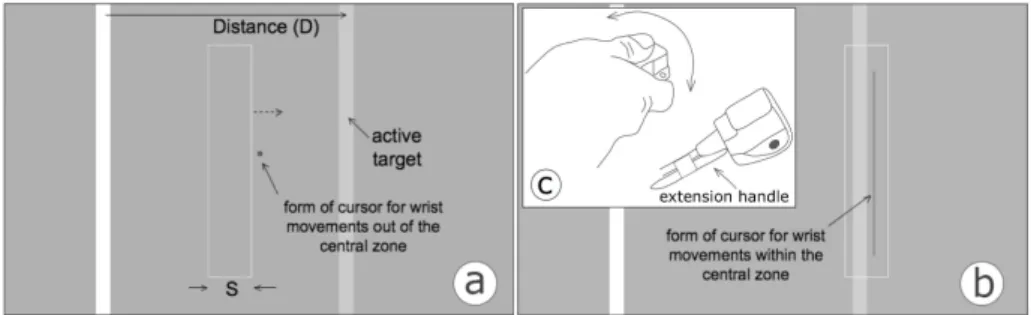
Fig. 6. Experimental task for the hybrid and the non-uniform position-control technique. (a)
When the hand moves out of the central zone, the cursor becomes inactive and takes the form of a small rectangle. The short distance between this rectangle and the boundaries of the win-dow provides feedback about input position out of the central zone. (b) A move of the hand back to the central zone activates the cursor, which takes its regular line form.
5.2 Task and Stimuli
Participants performed a series of reciprocal 1D pointing tasks by selecting two tar-gets forward and then backward in succession. Tartar-gets were rendered as solid vertical bars and were selected by pressing a key with the non-dominant hand. Participants were required to successfully select a target before moving to the next. They were told to perform tasks “as fast as possible, trying to avoid errors”.
For the rate technique, the cursor was rendered as a one-pixel-thick vertical line. For the hybrid and the non-uniform position-control technique, we used two cursor representations to communicate the two different levels of input control, as shown in Fig. 6. When the wrist of the user moved out of the central zone, the cursor turned into a small rectangle and passed control to the window, which started moving. Its position relative to the boundaries of the window slightly changed, providing direct feedback about the position of the wrist with respect to the central zone of input.
5.3 Optimizing the Techniques: Summary of Two Pilot Experiments
For each technique, we had to choose several parameters. What transfer function to use? How to split the input range? What C-D gains to choose? To reduce the design space, we conducted two pilot experiments. Six volunteers participated in each pilot.
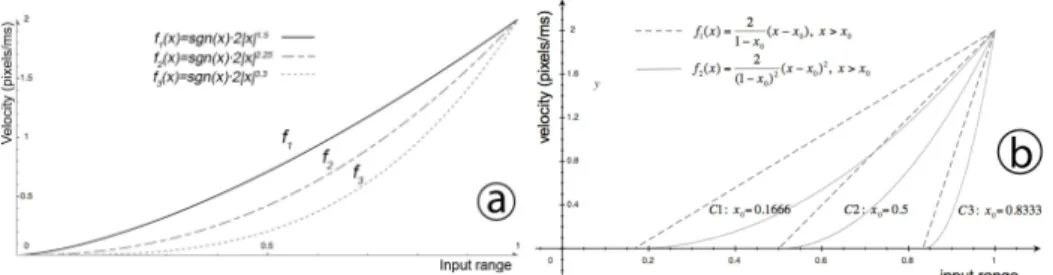
Pilot 1. The first experiment tested pure rate control under three transfer functions
(Fig. 7a) and two levels of low input precision: 21 and 61 input units. We selected the functions f2 and f3 to approximate an optimal transfer function for both levels of preci-sion. We expected that the transfer function f1 would be the slowest one, especially
under the low input precision. Under a range of 21 units, the lowest velocity allowed by f1 is 2⋅0.11.5 pixels/ms or 63 pixels/sec. For targets of 8 pixels and minimum re-sponse times of 150 ms, this value is higher than 53 pixels/sec, which is the velocity limit calculated by Equation 2.
Fig. 7. Transfer functions tested by the two pilot studies, shown for the right half of the input
range: (a) Pure rate control, and (b) Hybrid control.
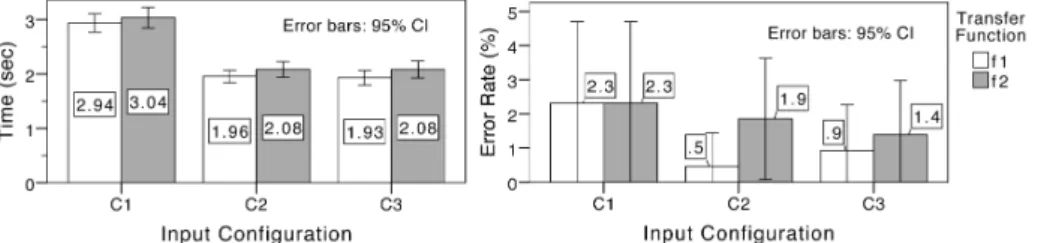
The transfer function has a significant effect on selection time (F1.68, 8.38=15.47, p=0.002) and error (χ2df=2,N=6=10.17, p=0.006). The results are summarized in Fig. 8.
The error rate is considerably high for f1, especially when input precision is low. The best function for errors is f3. The results suggest that as long as an optimal transfer function is selected, there is no clear penalty for reducing the input precision: errors rates are not hurt and the cost in speed is minimal, less than 5%.
Fig. 8. Overall results for Pilot 1
Pilot 2. The second pilot explored issues related to the design of the hybrid technique.
We compared three assignments of input range to isotonic and elastic zones. More specifically, we tested a single level of input precision of 61 input units under the three configurations shown in Table 1. Presentation order was counterbalanced among participants. The CDU gain for cursor’s movement was set to 4 pixels/units. As a result, the size S of the area cursor for the three configurations was 44, 124, and 204 pixels, respectively. For each configuration, we empirically selected two transfer functions (see Fig. 7): a linear function f1, and a parabolic function f2.
Table 1. Input configurations tested by Pilot 2
Config. Left Zone % (units) Right Zone % (units) Central Zone % (units) S (pixels)
C1 40.98% (25) 40.98% (25) 18.03% (11) 44
C2 24.59% (15) 24.59% (15) 50.82% (31) 124
C3 8.20% (5) 8.20% (5) 83.61% (51) 204
Results are summarized in Fig. 9. An ANOVA repeated-measures analysis indi-cates a significant main effect of input configuration on selection time (F1.67,8.33
is significantly slower than both C2 (p=0.001) and C3 (p=0.004). There is no signifi-cant difference between C2 and C3 (p=1.0). The mean error rate is also higher for C1 but with no consistency among participants. The pointing time is not significantly different for the two transfer functions (F1,5=1.4, p=0.29), but the mean error is lower
for f1 under C2 and C3. In conclusion, we can select a configuration with f1 as transfer function, where 50% to 84% of the input range is dedicated to the central zone.
Fig. 9. Overall results for Pilot 2
5.4 Conditions
The experiment tested three pointing techniques: rate control (Rate), hybrid control (Hybrid), and non-uniform position control (Position). For each one, the experiment tested two levels of input precision: 61 (low) and 241 (high) discrete input units. These values are higher than the ones tested by Pilot 1 and 2, but they still correspond to a low input precision. We made sure that participants could visit every pixel on a window of 61 or 241 pixels with our configuration when using a simple position-control technique. We also verified that the Device's Human Resolution [2] was high enough so that participants could comfortably select the smallest 8-pixel targets. For each condition, we tried to optimize user performance by refining input control based on our theoretical analysis and the two pilot studies. Below, we justify how various parameters for each technique were selected.
Rate Control. For the low-precision condition, we used the transfer function
f3(x)=sgn(x)⋅2|x|3.3. Pilot 1 showed that this function provided the best tradeoff be-tween time and errors. However, it was unclear whether this function would be opti-mal under larger numbers of discrete input units. Inforopti-mal tests with 241 units showed optimal results for functions ranging between f2 and f3. We chose f(x) =sgn(x)⋅2|x|2.5.
Hybrid Control. The CDU gain for position-control was set to 1 pixel/unit. This gain
enables the selection of every pixel and makes optimal use of the available input range. Table 2 shows how we divided the input range for the two levels of input pre-cision. For both, we used a linear transfer function (see f1 in Fig. 7b). Notice that we avoided using large central zones, as they would result in longer sub-movements for the final target selection.
Table 2. Input configurations tested by the experiment
Precision (units) Left Zone % (units) Right Zone % (units) Central Zone % (units) S (pixels) 61 19.67% (12) 19.67% (12) 60.66% (37) 37 241 24.90% (60) 24.90% (60) 50.21% (121) 121
Position Control. Equation 8 calculates the size (in input units) of the zone of
abso-lute pointing that minimizes the number of recalibration actions. This zone is ap-proximately half of the input range provided that
a
<< u
. Yet, a minimal number ofrecalibration actions do not necessarily result in optimal performance. We simplified our analysis by keeping the design of the technique as similar as possible to the design of Hybrid. We used the input configuration shown in Table 2 and set CDUlow to 1 pixel/unit. Finally, we empirically selected CDUhigh to 20 pixels/unit for the low input precision (61 units) and to 8 pixels/unit for the high input precision (241 pixels).
5.5 Design and Procedure
A full-factorial repeated-measures within-participants design was used. The presenta-tion order of techniques (Rate, Hybrid, and Posipresenta-tion) and input precision (21 and 241 units) within each technique were counterbalanced among participants. For each combination of technique and input precision, participants completed three blocks of trials. We tested three target distances D (250, 500, and 1000 pixels) and three target widths (8, 16, and 32 pixels). Each block consisted of nine randomly sorted trials, which correspond to the nine combinations of target distances and widths. For each technique, participants also completed a total of nine practice trials. To reduce fatigue, we allowed participants to take brief breaks between blocks and techniques. Experi-mental sessions lasted approximately 40 to 50 minutes.
5.6 Measures and Hypotheses
We measured selection time as the total time spent to complete a reciprocal pointing task divided by two. We also measured error rates. We expected that the performance of Position and Hybrid would improve as input precision increases. Given the results of Pilot 1, however, our hypothesis was that input precision would have no effect on the performance of Rate. We also predicted that Position would be less effective un-der the low-precision condition due to the recalibration problem. We expected that Hybrid would provide the best balance between pointing precision and speed.
5.7 Results
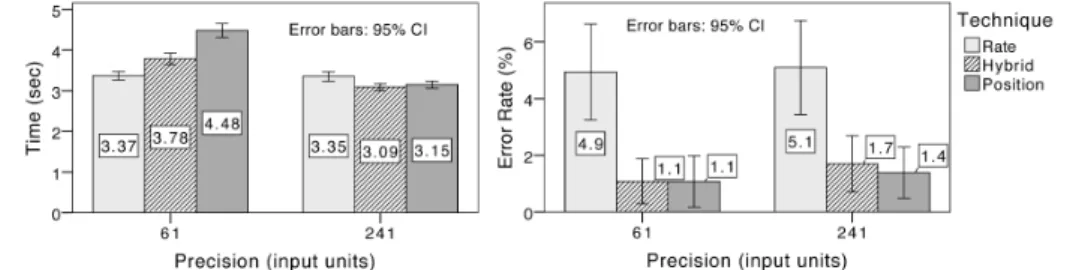
We eliminated a total of 25 outliers (1.2% of total measurements) for values three standard deviations away from the within-cell mean. The main results are presented in Fig. 10. An ANOVA repeated-measures analysis indicates a significant main effect of input precision on time (F1,11=91.23, p=1.2⋅10-6). This effect, however, is different for
each technique. More specifically, there is a significant interaction between input precision and technique (F1.74,19.16=37.42, p=4.8⋅10-7). Pairwise comparisons with
Bonferroni’s adjustment show that its effect is significant for Hybrid (p=2.6⋅10-5), significant for Position (p=6.0⋅10-7), but no significant for Rate (p=0.876). Consistent with our findings from Pilot 1, the results suggest that input resolution has minimal or
practically no effect on the performance of pure rate control as long as an optimal transfer function is selected.
The effect of the technique on time is significant (F1.87,20.55=7.39, p=0.0044). Yet,
pairwise comparisons show that differences between the three techniques are only significant under low precision. Position is significantly slower than both Rate (p=2.2⋅10-4) and Hybrid (p=0.013), but no significant difference is found between the two latter techniques (p=0.11). Although rate control performs well in terms of point-ing time, it results in high error rates. The error rate is approximately 5% for this technique, in contrast to a 1.1 - 1.7% error rate observed for Hybrid and Position. Freedman’s non-parametric test shows that the effect of the technique on errors is statistically significant (χ2df=2,N=12=9.14, p=0.01). Overall, our results indicate an
ad-vantage of Hybrid over Position for 61 input units and an adad-vantage of both these techniques over Rate for 241 input units.
Fig. 10. Overall results of the 3rd experimental study
Typical error rates in Fitts’ law experiments are in the range of 3 - 4%. The error rates that we observe for Hybrid and Position are considerably lower, even though the instructions given to the participants were consistent all over the experimental session and rather neutral towards precision. Our explanation is that the two window-based techniques reduce the likelihood of errors by dividing the pointing task into two se-quential subtasks. Rapid ballistic movement, which is rough and imprecise, takes place during the first subtask. Errors are possible, but the user must correct them be-fore continuing with the final pointing movement. As the participants were given visual feedback about the success of the first movement in the form of an area cursor, errors during this step were eliminated. In addition, the second subtask was relatively slow and precise, as it took place in a limited area around the target.
As expected, the effect on pointing time is significant for both target width (F1.73,19.03=236.77, p=9.1⋅10-14) and distance (F1.90,20.84=460.99, p=8.3⋅10-18). We also
find a significant interaction effect between technique and distance (F3.62,39.87=18.04,
p=3.5⋅10-8). As shown in Fig. 11, the performance of Position degrades considerably in long distances, as the cost of recalibration actions becomes higher. A pairwise analysis using Bonferroni’s adjustment shows that Position is significantly slower than both Rate (p =2.7⋅10-4) and Hybrid (p=4.4⋅10-4) for distances of 1000 pixels and significantly slower than Rate (p =0.006) for distances of 250 pixels.
Fig. 11. Pointing time across distances.
5.8 Predictive Models
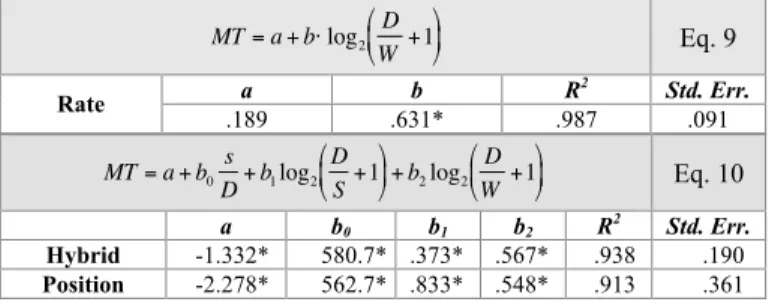
We can attempt to predict user performance for other levels of input precision. For Rate, we use the regular formulation of Fitts' law (see Eq. 9 in Fig. 12), which is inde-pendent of the number of input units. For Hybrid and Position, we use Eq. 10. The parameter s (0≤ s≤1) represents the portion of the input range dedicated to the
move-ment in the central zone. S is the size of the movable window, which can be calcu-lated as S = CDUgain·s·u. To produce Eq. 10, we followed an analysis similar to that of
Cao et al. [4]. Due to limited space, we do not provide the details here. MT= a + b⋅ log 2 D W+1 Eq. 9 a b R2 Std. Err. Rate .189 .631* .987 .091 MT= a + b0 s D+ b1log2 D S+1 + b2log2 D W+1 Eq. 10 a b0 b1 b2 R2 Std. Err. Hybrid -1.332* 580.7* .373* .567* .938 .190 Position -2.278* 562.7* .833* .548* .913 .361
*Coefficients significantly different than zero (p<0.05) Fig. 12. Models tested for the three techniques
Fig. 13. Extrapolated movement times for the three pointing techniques and three levels of
Based on the above models, we have extrapolated movement time with up to 961 input units and distances as high as 1500 pixels. Fig. 13 gives an overview of the trends. Position exhibits a poor performance under low input precision, but outper-forms Rate and Hybrid as precision improves. The performance of Position is particu-larly sensitive to both input precision and target distances. Variations in the perform-ance of Hybrid are less radical. The technique seems to be more appropriate in the range of 61 of 241 units. However, it can be a good alternative for higher levels of precision, particularly when pointing involves large distances. Clearly, prediction results for the position-control and the hybrid technique do not apply to short target distances. As long as movement takes place only within this window, movement will be purely position controlled and faster than the time predicted by the above models.
6
Limitations and Future Directions
We examined levels of input precision from 21 to 241 units and targets distances from 250 to 1000 pixels. Output configurations can vary greatly beyond the range of values reported here. For example, wall displays can support very high resolutions. In such environments, pointing precisely and moving quickly in space are equally important, so future work must verify how our techniques behave in such settings.
Some previous work [10, 14, 23] has made use of pointer acceleration to effec-tively balance between precision and speed. To simplify our analysis, we did not con-sider pointer acceleration here. If used with our techniques, acceleration can be ap-plied at two levels: (1) to the window of precise pointing, and (2) to the cursor within this window. The former solution could increase the range of the window's movement and hence reduce the number of recalibration actions. The latter solution, however, is problematic, as it can cause the de-calibration of the wrist movements away of the joint's neutral position.
Fig. 14. Interaction mixing movements of various joints. A bracelet attached around the wrist
allows for detecting its absolute position and measuring the rotations of the hand relative to the forearm. (a) Slight wrist rotations within a central zone. (b) Wrist rotations out of the central zone. (c) Movements of the whole arm. (d) Rotations of the forearm.
To extend our approach to two-dimensional tasks, we must first consider that hand movements are not perfectly symmetric. Wrist flexions and extensions have a wider angular range than ulnar and radial deviations (Fig. 2). Techniques must be adapted to accommodate these asymmetries. In addition, natural hand movement combines rota-tions of the wrist and movements of other joints (Fig. 14), which could be mapped to different levels of a pointing task, e.g., by using different CD gains. Exploring tech-niques that combine various joints is an interesting future direction. Another future goal is to test non-linear mappings between input and output [21].
7
Conclusions
The paper explored pointing with low-precision input when the input device is con-trolled by movements of the wrist. We examined techniques that achieve pointing precision without making use of explicit mode-switching mechanisms. Wrist move-ments are physically constrained and take place within a small range around the hand’s resting position. Based on this observation, we explored rate control as a pos-sible solution. Our results show that rate control is effective under low levels of input precision. Interestingly, we found that as long as optimal transfer functions are se-lected, the performance of rate control remains practically constant for a range of input precision from 21 to 241 units. This suggests that rate control could be particu-larly valuable for low-precision input devices (e.g., low-fidelity camera-based capture of hand movements) and users with hand-tremor problems.
In addition to rate control, we examined two techniques that split the pointing task into two scales. Pointing at a macro scale is performed with an area cursor, which is visually communicated to the user as a framed window. Pointing at a micro scale is performed with a regular point cursor, which moves within the window. The first technique combines position and rate-control and derives from previous work [7, 9]. The second technique uses position control to move both the area and the point cursor and has been based on previous work on two-scale pointing [12] and early techniques in Virtual Reality that applied non-uniform position-control mappings [20]. Accord-ing to our experimental results, these two techniques are more precise than pure rate control and their performance improves as input precision increases. The hybrid tech-nique was particularly effective in balancing between precision and speed in the range of 61 to 241-input units. It outperformed the non-uniform position-control technique in long target distances over 1000 pixels. Nevertheless, our analysis suggests that the performance of the latter is faster as input precision improves. Based on these results, we derived predictive models of user performance, but future work must compare the techniques on different task scales. We are particularly interested in exploring their application to high-resolution displays where distances can be as high as 10k to 20k pixels. We also plan to study the proposed techniques on the movement of other hu-man joints. For example, the thumb moves within a limited range. Enabling it to pre-cisely point on large output surfaces in isolation of or in combination with hand movements is a challenging problem and certainly worth of future investigation.
References
1. Appert, C., Chapuis, O., and Pietriga, E. High-Precision Magnification Lenses. In Proc. ACM CHI, 273-282. 2010.
2. Bérard, F., Wang, G., and Cooperstock, J.R. On the Limits of the Human Motor Control Precision: The Search for a Device's Human Resolution. In Proc. INTERACT, 107-122. Springer, 2011.
3. Bowman, D.A. and Hodges, L.F. An Evaluation of Techniques for Grabbing and Manipu-lating Remote Objects in Immersive Virtual Environments. In Proc. Symposium on Inter-active 3D Graphics, 35-38. 1997.
4. Cao, X., Li, J.J., and Balakrishnan, R. Peephole Pointing: Modeling Acquisition of Dy-namically Revealed Targets. In Proc. ACM CHI, 1699-1708. 2008.
5. Casiez, G. and Vogel, D. The Effect of Spring Stiffness and Control Gain with an Elastic Rate Control Pointing Device In Proc. ACM CHI, 1709-1718. 2008.
6. Casiez, G., Vogel, D., Balakrishnan, R., and Cockburn, A. The Impact of Control-Display Gain on User Performance in Pointing Tasks. Human-Computer Interaction, 2008. 23(3): p. 215-250.
7. Casiez, G., Vogel, D., Pan, Q., and Chaillou, C. RubberEdge: Reducing Clutching by Combining Position and Rate Control with Elastic Feedback. In Proc. ACM CHI, 129-138. 2007.
8. Chapuis, O. and Dragicevic, P. Effects of Motor Scale, Visual Scale and Quantization on Small Target Acquisition Difficulty. ACM ToCHI, 2011. 18(3): p. 13:1-13:32.
9. Dominjon, L., Lécuyer, A., Burkhardt, J.-M., and Richir, S. A Comparison of Three Tech-niques to Interact in Large Virtual Environments Using Haptic Devices with Limited Workspace. In Proc. Computer Graphics International, 288-299. Springer Verlag, 2006. 10. Frees, S., Kessler, G.D., and Kay, E., Prism Interaction for Enhancing Control in
Immer-sive Virtual Environments ACM TOCHI, 2007. 14(1).
11. Gibbs, C.B. Controller Design: Interactions of Controlling Limbs, Time-Lags and Gain in Positional and Velocity Systems. Ergonomics, 1962. 5(2): p. 385-402.
12. Guiard, Y., Beaudouin-Lafon, M., and Mottet, D. Navigation as Multiscale Pointing: Ex-tending Fitts' Model to Very High Precision Tasks. In Proc. ACM CHI, 450-457. 1999. 13. Hinckley, K., Pausch, R., Goblel, J.C., and Kassell, N. A Survey of Design Issues in
Spa-tial Input. In Proc. ACM UIST, 213-222. 1994.
14. König, W.A., Gerken, J., Dierdorf, S., and Reiterer, H. Adaptive Pointing - Design and Evaluation of a Precision Enhancing Technique for Absolute Pointing Devices. In Proc. INTERACT, 658-671. Springer, 2009.
15. Lehman, S.L. and Calhoun, B.M. An Identified Model for Human Wrist Movements. Ex-perimental Brain Research, 1990. 81(1): p. 199-208.
16. Lemay, M.A. and Crago, P.E. A Dynamic Model for Simulating Movements of the Elbow, Forearm, and Wrist Journal of Biomechanics, 1996. 29(10): p. 1319-1330.
17. Maury, S., Athènes, S., and Chatty, S. Rhythmic Menus: Toward Interaction Based on Rhythm. In Proc. ACM CHI, Extended Absracts, 254-255. 1999.
18. Myers, B.A., Bhatnagar, R., Nichols, J., Peck, C.H., Kong, D., Miller, R., and Long, A.C. Interacting at a Distance: Measuring the Performance of Laser Pointers and Other Devices. In Proc. ACM CHI, 33-40. 2002.
19. Oh, J.-Y. and Stuerzlinger, W. Laser Pointers as Collaborative Pointing Devices. In Proc. Graphics Interface, 141-149. 2002.
20. Poupyrev, I., Billinghurst, M., Weghorst, S., and Ichikawa, T. The Go-Go Interaction Technique: Non-Linear Mapping for Direct Manipulation in VR. In Proc. ACM UIST, 79-80. 1996.
21. Rahman, M., Gustafson, S., Irani, P., and Subramanian, S. Tilt Techniques: Investigating the Dexterity of Wrist-Based Input. In Proc. ACM CHI, 1943-1952. 2009.
22. Raynal, M., Gauffre, G., Bach, C., Schmitt, B., and Dubois, E. Tactile Camera Vs. Tangi-ble Camera: Taking Advantage of Small Physical Artefacts to Navigate into Large Data Collections. In Proc. NordiCHI, 373-382. ACM Press, 2010.
23. Vogel, D. and Balakrishnan, R. Distant Freehand Pointing and Clicking on Very Large, High Resolution Displays. In Proc. ACM CHI, 33-42. 2005.
24. Zhai, S. Human Performance in Six Degree of Freedom Input Control, 1995, Ph.D. Disser-tation, University of Toronto.