DETECTION OF TREND AND NORM VIOLATION
USER'S MANUAL "DETECT" and "EXCEED"
Version 2 by Daniel CLUIS
Mars 1989
INRS-Eau
P.O. Box 7500, Sainte-Foy Quebec, Canada
G1V 4C7
INTRODUCTION ... 1 WARNING ... 2 1. 1.1 1.2 1.3 2. 2.1 2.2 2.3 3. 4. 5. 5.1 General remarks ... . System requirements General information General flow chart ... . Utilities ... . System configuration ... . Data acquisition ... . File manipulation "Batch" files ... . Series preparation (P1.EXE) ... . Graphie analyses (P2.EXE) ... . Graphs available 3 3 3 4 5 5 5 6 8 9 11 14 6. Series evaluation (P3. EXE) ... 15
6.1 Graphs and tables available ... 19
7. Work series, creation and structure (P4.EXE) .•... 22
7.1 Tables available ... 24 8. 8.1 9. 10. Test preparation Graphs available Tests Analysis summary (P6.EXE) 25 28 29 30 10.1 Output of resu1 ts ... 31
Il.2 Choice of norm or threshold .... ... ... 32 Il.3 Analysis . . . 33 APPENDIX: Program flow charts for P1.EXE to P7.EXE
INTRODUCTION
This software package uses non-parametric methods to detect trends in water quality data. Input data may be any compatibly structured temporal series. The program is easy to use due to its interactive and graphic interface.
The principal parts of the program are as follows: Part 1: Part 2: Part 3: Part 4: Part 5: Test: Part 6: Part 7:
Reading of the measured concentrations, mass-Ioadings and discharges.
Graphic representation of the original data.
Analysis of sampling frequency, elimination of periods without data (months and/or years), detection of possible seasonality and a concentration discharge relationship.
Choice of a work interval and method to replace missing data, detection of any persistence.
Display of inertia graphics (Double-Mass and CUSUM function) from which the type of trend (monotonic or step) may be determined, as weIl as the date of any change. Recommendation of the most appropriate non-parame tric test considering the structure of the present series.
Execution of test and diagnostic.
Summary of the data characteristics and the options chosen,. as weIl as parametric interpretation of the results:
- slope of the trend date of the change
- initial and final levels Analysis of norm violation.
WARNING
As with aIl statistical programs of this type, the user is, by his choices, responsible for the validity of the results obtained. Warnings are issued by the program at the various critical steps. Because of changing sampling schemes, the choice of an appropriate work interval requires both that the data collected accurately reflect the phenomenon studied, and that the chosen interval does not create too much fictitious data.
1. General remarks
The program requires an IBM compatible PC, XT or AT model personal computer running DOS 2.0 or higher. It should have:
512 K RAM (at least);
a CGA, EGA or ATT video card;
a monochrome or color monitor capable of displaying graphies;
2 floppy drives, or a hard disk and one disk drive (360 Kb, 5 1/2 in., double sided, double density);
a dot matrix printer capable of producing graphies;
an 8087 or 80287 co-processor is not required, but greatly increases calculation speed.
1.2 General information
Although the program can be used on a system with two floppy drives, it was designed to be used with a hard disk, and is therefore more efficient in this configuration.
1.3 General flow chart
DATA ACQUISITION
DIVISION OF
THE FILES
SERIES
PREPARATION
GRAPHIC
ANALYSES
ANALYSIS OF
THE DATA MEASUREMENT
CREATION OF
A WORK SERIES
PREPARATION FOR TESTS
TEST
SUMMARY
VIOLATION STUDIES
I I I
I I I
TTT TT?
~----~---~---'I~~€--~---~----~
l
P7 +PB
l
CLEAN-UP OF
TEMPORARY FILES.
TM~'cl
2. Utili ties
To allow more efficient use of the program, several utilities are included. The following is a brief description of these companion programs.
CONF.EXE
As the program is designed to work on different systems, CONF.EXE allows the user to adapt the program to his particular system characteristics. This program asks questions about the screen resolution, color modes, graphie symbols to use and the definition of the interfaces. The programs can be used with CGA (640 x 200), EGA (640 x 350) and ATI (640 x 400). They can also function in 320 x 200 mode, but certain titles will be superimposed, as the corresponding 40 x 25 text mode does not leave much room for adding comments to the graphs.
CONF.EXE creates the file SETUP.PC which must be present when the programs are used.
N.B. CONF.EXE must be run first, so that the other programs can operate correctly.
ENTRY.EXE
This program permits a simple acquisition of the data, and creates an output file which is easily readable by the file division program. This program also permits the acquisition of a single series of data, which can then be read by
Pl.
define the presence or absence of dates (the presence of dates is mandatory for the analysis performed by the programs)
- eliminate badly recorded data
append data to an already existing file
DIVISE.EXE
NAQUADAT and industrial files contain data on concentrations and mass-Ioadings pertaining to many parameters. This program divides these files into files containing only one parameter.
To use the program, the user types DIVISE with the disk containing the program DIVISE .EXE in the drive. The user is first asked to give the name of the file to be divided, ego DATA.DAT. The user then is asked to choose one of the three types of files which can be used:
1. Normal NAQUADAT file type
2. NAQUADAT file type with a <CR> after 80 characters 3. Industrial file type
As the two first file types have very spacial uses, the tâst' choice (industrial) will generally be chosen by the user.
This last option allows the treatment of nearly all file types which do not come from NAQUADAT. The user is asked to number the columns in the input file (including the date). He is then guided by menus and explications permitting him to:
- locate the date in the file. Note that if there is no date, the programs can not be used, even if DIVISE.EXE worked. This option is included for the external use of the program when the data are equidistant.
identify the column containing discharges if one exists.
transform the concentrations to mg/l, the charges to Kg/day and the discharges to m3/sec so that results from different parts of the program
permit the inclusion of dates, if desired, in the output files. (The dates are mandatory, however, for analysis with the programs).
Finally, the user is asked for output file names. It is not necessary to create files for aIl the parameters in the input file. For example, only one parameter and one output file may be chosen.
3. Batch files
So that the different parts of the programs can run rapidly and automatically, a series of nested batch files are used. They include: EXCEED.BAT, DETECT.BAT, PPI.BAT, ... , PP5.BAT.
The file EXCEED.BAT permits an analysis of violations, calling successively Pl, P2DEP, P7 and P8. The file DETECT.BAT permits a complete trend analysis: Pl
... P6.
Each of the other programs allows the user to restart at a different spot in the programs (for example, PP2 allow the user to restart at P2). However, the preceeding analysis must have been run up to one level farther along than the new starting point. For example, the program can be restarted at PP3 after a complete run of the program, but it could not be started at that point if the execution had stopped at Pl.
4. Series Preparation (P1.EXE) This program carries out the following operations:
- completely reads the input file
- identification of the discharges if they exist
elimination of dates where the studied parameter in question has not been analyzed
replacement of the sampling date with the number of days since the beginning of the sampling period
- creation of a second quality parameter (concentration or mass-Ioading) from the dis charge series if it exists
- creation of a work file .TMP for later use General remarks
INPUf FILE
The input file can contain mass-Ioadings or concentrations. The data files supplied with the program contain only concentrations. The input file must be in the following FORTRAN format: (12X, I2, IX, I2, IX, I2, l6X, F12.6, F12.6), which means:
- 12 spaces
- a 2 digit integer containing the year - a space
- a 2 digit integer containing the month - a space
- a 2 digit integer containing the day - 16 spaces
- a 12 digit real number with 6 decimal places containing the charge or concentration
- a 12 digit real number with 6 decimal places containing the discharge. As this last number is optional, blank spaces should be used if there are no discharges in the file.
The following are examples of files which will be read correctly: example 1: example 2: 79-04-19 79-05-10 79-06-07 79-06-29 OOQU02MC920279-04-191440EST 805 25 OOQU02MC920279-05-191550EST 805 25 OOQU02MC920279-06-071200EST 805 25 OOQU02MC920279-06-293400EST 805 25 OOQU02MC920279-08-281300EST 805 25 example 3: 79-04-19 79-05-10 79-06-07 79-06-29 1.900000 2.300000 1.900000 2.000000 7.900000 8.400000 8.200000 8.200000 8.100000 1.900000 2.300000 1.900000 2.000000 .212341 .198743 .207432 .198672
From the example it is clear that the spaces can be left blank or not, as the fields are not read. This format was chosen because it conforms with that used by NAQUADAT.
UNITS
So that quantities agree with those used by the programs, concentration should be in mg/l, mass-loadings in kg/day and discharges in m3/sec.
DISCHARGE FILE
If discharges are used, they must be present in the original dis charge file and in the file described above.
5. Graphic analysis
This file reads the previously created work file and carries out a graphic analysis. Initially, it presents the temporal evolution of the parame ter under study and suggests the elimination of maxima and minima, which, if not rejected as outliers, could bias the graphic interpretation. It should be noted that for the trend detection itself, the choice of non-parametric methods limits the impact of these values.
The program then asks the user if he wants the following plotted: Double-Mass curves
CUSUM function
GENERAL REMARKS
OUTLIERS
Outliers are eliminated so as not to bias the results of the graphic analysis as weIl as the different parametric analyses carried out in other parts of the program. For the trend detection, the non-parametric tests used yield stable results even if outliers are present. Once such a value has been eliminated, it is no longer accessible by the rest of the program, and the only way to get it back, is to start again with Pl using the original file.
DOUBLE-MASS CURVES
Double-mass curves show, using accurnulated surns, parameter evolution. For a double-mass curve of the parameter vs. time, we have on the ordinate time t*:
t,'c
L xt ' où x
t where xt is the value of the parameter at time t. On the t=O
abscissa, we have the ranks of time t* expressed as nurnber of days since the first measured observation. In the case of a double-mass curve of parameter vs.
t*
discharge, on the a~scissa we would have at time t*:
L
Qt. The ordinate is t=OAs the observations may not be non-equidistant, the Double-Mass curves should be used here as an exploratory method for detecting trends. Their use in P5 with equidistant data will be more representative of the nature of the phenomenon studied.
What to look for?
A) Double-mass of parameter vs. time
Graphs 2.2 and 2.3 present such Double-Mass curves. The line that starts at (0 t 0) and goes to the upper right-hand corner of the graph is called the
general mean line. Such graph should be regarded as an set of changing slopes. Thus, if a group of points seems to form a straight line with a slope greater than that of the mean line, one can conclude that the mean of these points is greater than that of the mean in general. At the same time, a slope less than that of the mean line means that the mean of these points is less than that of the general mean. These types of curves are therefore very useful for detecting trends in the means.
Other lines, ab ove and below the mean line, can be seen in graphs 2.2 and 2.3. These "rails" represent two standard deviations from the mean line and each is calculated using only the points associated with its side. If these "rails" are far from the mean line, it suggests large variations in the data and-- aHows the detection of large differences between the Double-Mass curve and the mean line. The "rail" is not distinguishable from the mean line if all the points are situated on only one side of it. If there is no trend present, the points of the Double-Mass curve are situated on both sides of the mean line in a random fashion.
B) Double-mass of parameter vs. discharge
The principle of these Double-Mass curves is the same as for parame ter vs. time. However, it allows to see if a detected trend vs. time could not have been introduced by an effect of changes in dis charges . Therefore, the user should look for a different pattern than that of the Double-Mass of parame ter vs. time.
CUSUM FUNCTION
The CUSUM function should be used in the same way as the Double-Mass curves as far as the change of slope of successive points is concerned. The CUSUM function is calculated as follows:
t
CUSUM(X
t)
=
j=1r
x. - j.x J the CUSUM is graphed as a function of time t.What to look for?
Thè CUSUM function (cumulative suros) in effect rotates the mean lines of graphs 2.2 and 2.3 so that they are brought to the horizontal. The deviations from the general mean line are therefore much more visible as they determine the scale of the graph, in opposition to the mean line as in the double-mass curves. This graph reveals:
if the curve intersects the y=O axis very oftenj in that case there is probably no significant trend
- if there are departures on only one side of the curve, indicating a probable trend
if the curve is parabolic, suggesting a monotonie linear trend - if there are discontinuous lines, typical of stepwise trends
The program can produce up to eight different graphs, al though only one is always displayed. It is graph 2.1 which shows the temporal evolution of the parameter and permits the user to see any possible outliers. This graph is displayed after each outlier elimination.
Graphs 2.2 to 2.5 show different Double-Mass curves called by the menu options 1, 2, 3 and 4. These graphs allow the user to detect large deviations on one side of the line representing the general mean (from the lower le ft to the upper right), these deviations being important in the detection of trends. Graphs 2.6 to 2.8, the CUSUM curves, allow the user to see, in the form of a trend, the concentration and mass-Ioadings of the parameter, as weIl as its associated discharge. These graphs are menu options 5, 6 and 7.
It should be noted that when there are no discharge available, many graphs are not available. If, in a series without discharges, the parameter measured was concentrations, graphs 2.3, 2.4, 2.5, 2.6 and 2.8 will not be available, whereas if mass-Ioadings was the measured parameter, graphs 2.2, 2.3, 2.4, 2.5, 2.6 and 2.7 will not be available.
6. Series evaluation This program accomplishes the following tasks:
display of the temporal evolution.
establishment of a monthly sampling frequency table. This permits a preliminary evaluation of the work interval. A subsequent question allows the elimination of entire months where sampling did not take place (eg. winter).
seasonality analysis on a monthly basis (by ANOVA). The resulting graphs of monthly means allow the user to determine a suitable regrouping of the months.
the detection of a significant concentration-discharge relationship which can be used later if the user wishes.
GENERAL REMARKS
IRREGULAR SAMPLING
As shown in table 3.1, certain questions can be asked if there is irregular sampling.
1. If at least two consecutive months were not sampled. The user is allowed to truncate certain consecutive months. It is not possible to eliminate months which are not adjacent.
After months have been eliminated, the only choice of interval which will keep this truncation is one value per month for the non-truncated months. Any other selection will not take into account the previous truncation. N.B. In using this software, it became evident that the criteria should be a
little less restrictive. I t is now possible to truncate months if there are two consecutiye months with two values or less.
2. If at least one year has less than 4 values. It is possible to limit later analysis. The choices are presented in the following menu:
As the number of values for certain year(s) is small, you may limit the analysis:
1) Eliminate certain intermediate years 2) Eliminate certain months at the extremes 3) Return to frequency table before elimination 4) See the complete table up to now
5) Non-representative distribution: exit without test 6) Normal continuation of program
7) Help
A brief description of the different options follows. 1) Eliminate certain intermediate years
The user is allowed to select certain intermediate years with low frequencies for later analysis. The years which are kept for this analysis must be consecutive. The user will have the choice (in P4) to:
a) use the seasonal means in place of the selected intermediate low frequency years.
b) truncate the selected years c) do nothing
When b) is selected, a level study (stepwise) before and after the truncation is automatically chosen by the program, using the most appropriate test.
2) Eliminate certain months at the extremes
The user is allowed to choose a smaller analysis period than that defined by the input file. The values which are not part of the newly defined period will be eliminated from the file created by Pl (.TMP). Therefore, the rest of the program will treat this series as if the values outside the new period did not exist.
3) Return to frequency table before elimination
This option permits the user to return to the original period if he decides not to keep the newly created one.
4) See the complete sampling frequency table up to now
This option allows the user to see the original table. This is useful when defining a new period.
5) Non-representative distribution: exit without test
This option allows the user to exit the rest of the program if the sampling was too little or irregular. The file SYNTHESE. P6 contains the preliminary information about the series, as weIl as the monthly frequencies (table 3.1). Several criteria in the program's output allow the user to detect a sampling that was too low or too irregular.
6) Normal continuation of program
This option allows the user t.o return to the normal execution of the program as soon as the data manipulations are finished. The user may also avoid any treatment of years with low frequencies by choosing this option as soon as the menu appears.
7) Help
ANOVA
The analysis of variance used here is only a preliminary step in the detection of a trend, as it serves only to detect seasonality.
The analyses of variance used in this program use only one value per interval (season) for each year. If the original sample contained more than one observation in the interval, the mean of these values is used.
As li ttle experimental planning was done so as to have optimum resul ts, the analysis of variance must be done with the available data and conclusions validated when they don't seem appropriate. To validate the use of the analysis of variance, a test of the equality of the variances (BARTLETT) is performed before the resul ts are printed, and a warning issued if the equality of the variances is rejected.
SEASONALITY
The analysis of variance is used to construct "seasons" having significantly different means. Firstly, the monthly me ans are tested to see if they are significantly different. If the y are, then there is seasonality. The user is allowed to regroup the data so that larger seasons are analyzed (this option is not possible if months have been truncated). The user can regroup the-data as many times as he wishes, however, only the last one will be used. If the user does not regroup, 12 seasons of one month each will be used.
The use of seasons permi ts the use of tests which take into account the presence of cycles in the data. However, the use of seasonality tests on data with no seasonality, will result in a loss of power as compared to non-seasonality tests.
C-Q RELATIONSHIP
Another way to estima~e the values for empty intervals, is to look for a is a strong relationship between concentration and discharge.
The proposed relationship is of the following form (rating curve):
b
C
=
aQFirstly, the following regression is carried out: ln C
=
a-lr + b~'cln Qo.""
which results in the initial units of a
= ,,-.
and b = b~'c. This model is not the best for the original base, but it is simple and gives a good idea of the strength of the relationship between the concentration and discharge.6.1 Graphs and tables available
The program contains 5 graphs and 6 tables. However, they will not aIl be used in any one session, as in many cases there is a different graph or table for either mass-Ioading or concentration.
A) Graphs
Graphs 3.1 and 3.2 present the temporal evolution of the parame ter in question, although only one will be displayed according to whether mass-Ioading or concentration is being analyzed.
The monthly means for each year for the chosen parame ter are plotted on graphs 3.3 and 3.4. The symbols used (1-9) represent the last digit of the year, while the stars connected by straight lines represent the means of aIl the values for the same month. This graph allows the user to see how the data might possibly be regrouped into homogenous seasons.
Graph 3.5 plots the logs of the concentrations against the logs of the discharges, allowing the user to detect any relationship which might be present between the variables as weIl as completing the regression analysis presented in table 3.4.
B) Tables
Table 3.1 presents the monthly frequencies of the observation for each year. This allows the user to select an appropriate interval for creating an equidistant series (P4.EXE). When there is sufficiently regular sampling, the mean number of observations per year make the choice of a frequency more easy. This selection should not give rise to too many empty intervals.
Table 3.2 presents the results of the analysis of variance on the equality of the monthly means. Each observation of the original series represents one replicate for the month during which it was taken. The results are presented in the usual form of ANOVA tables:
d.f.
=
number of degrees of freedom ss=
ms
=
F=
sum of squares mean square
value of the statistic for the test Ho : ~1
=
~2= .,. =
~12 vs. Hl: the monthly means are not equal, where ~i is the mean of theith month.
For more information on analyses of variance and their associated hypotheses, refer to NETER and WASSERMAN (1974): Applied Linear Statistical Models. Irwin. Homewood. 842 pp. Seasonality is present if the test shows that the. monthly me ans are significantly different. When the equality of the means is rejected, the user has the option of regrouping the months so as to construct seasons which may be more appropriate.
Table 3. 2b presents the resul ts of the analysis of variance of the data regrouped by the user. The table is the same as table 3.2, except that the corresponding test is Ho
=
~1= ... =
~k' where k is the number of seasons defined when the data where regrouped. Tables 3.3 and 3.3b are used if the parameter analyzed was mass-loading instead of concentration.Table 3.4 presents the results of the regression in the form of the relationship C
=
aQb .. The first resul ts, variance and mean, are the natural logs of the concentration and discharge. The parameter estimators a and b areobtained from the result of the regression C
=
a~': + b~': ln Q, transforming a = ea* and b = b*. The percentage of the variance explained gives an estimate of the strength of the relationship. FISHER's test is also used to determine if the relationship is significant and to allow a valid estimate of the concentrations from discharges.7. Work series, creation and structure (P4.EXE) This part of the program carries out the following:
choice of an interval days (1, 3, 7, 15)
month (1, 2, 3, 4, 6, 12)
replace missing values using one of three methods: a) temporal interpolation
b) seasonal mean
c) concentration-discharge relationship
At this stage, a complete series of equidistant values has been generated and saved in files with extensions . TMe or . TML, depending on whether they are concentrations or mass-loadings.
The last part of this program determines if there is persistence, and if there is, whether it is Markovian.
GENERAL REMARKS
GENERATION OF KISSING VALUES
The choice of a work interval which is too small will result in the creation of fictitious data (generation of missing values). It is important not to fill in toomany intervals with the available methods (seasonal me ans , interpolation, concentration- dis charge relationship). In order to make the user aware of this situation, a warning is issued when more than 20% of t-he intervals will be synthetised using other data. The user can then choose another interval so as to reduce the number of intervals without data, or he can continue, knowing that the chosen work series contains a large percentage of fictitious data (in certain cases, the sampling may have been very irregular, making a better choice of interval difficult).
METRODS OF GENERATING DATA FOR EMPTY INTERVALS
The three methods offered for the creation of data are: Temporal interpolation.
Use of the mean value of the parame ter taken in the same period in the other years.
Use of concentration-discharge relationship.
Interpolation is used when there is no seasonality, but there is persistence. It should be noted, however, that the use of this method will increase the persistence.
The use of the mean value for the interval during the other years is done when seasonality is present and when representative means of each of the intervals is used.
The concentration-discharge method is the preferred method, but it is not very often that the relationship is strong enough to allow a valid estimate for the empty interval.
N. B When the number of observation is low, i t may be better to choose the second method (means) so as not to create persistence before it is studied. In fact, there is a difficulty in the analysis: equidistant data should be used for the analysis of persistence lent a preliminary persistence analysis could validate the interpolation as the method for data generation.
7.1 Tables available
The program has two tables. Table 4.1 displays the number of missing values per interval: the number of intervals is the number of complete intervals in a year. Intervals are numbered from the beginning of the calendar year, if there has been no truncation., The number of missing values for an interval is the number of years for which there was no observation available for that interval. If the number of missing values is high for aIl the intervals, it is probably because the interval chosen was too narrow (frequency too high). On the other hand, few missing values may mean that the interval was weIl chosen in the case of. regular sampling, or that the chosen interval was too large (low frequency). It should be noted that this table will not be presented if there were no missing values (no empty intervals).
Table 4.2 displays the resul ts of the analysis of persistence done on the equidistant series. The coefficients of correlation for the first to sixth arder, and their associated standard deviations, are presented. From this, the user can see the coefficients that were significantly different from 0 as weIl as the most probable structure of the persistence (as determined by the program). Three different structures can be identified. In the first, there is no persistence (the first order autocorrelation coefficient (pl) is not significantly different from 0). The second structure is Markovian persistence (pl is significantly different from 0 and the second order partial auto-correlation coefficient is not significantly different from 0). Finally, the third is non-Markovian persistence (pl and the second order partial auto-correlation coefficient are significantly different from 0).
A coefficient is considered significantly different from 0 if its value is at least 2 times greater than its standard deviation.
8. Test preparation (P5.EXE)
This program gathers together aIl the information about the work series that has been determined by the preeeding programs: interval, seasonality, persistenee, length, etc.
It then determines whieh part of the series to analyze, if there is a monotonie or step trend, and suggests the appropriate test aecording to the following deeision tree: TREND Monotonie -+ trend Stepwise -+ trend PERSISTENCE
-Markovian persistenee No persistenee Markovian persistenee No persistenee DECISION TREE
-SEASONALITY APPROPRIATE TEST - - - -
-- no seasons LettenmaierlSpearman - with seasons Hirseh and Slaek
no seasons Spearman/Kendall - with seasons Kendall seasonality - no seasons Lettenmaier/Mann-Whitney - with seasons Hirseh and Slaek
- no seasons Mann-Whitney
- with seasons Kendall seasonality The test ehosen by the user is earried out and the results displayed. GENERAL REMARKS
MONOTONIe OR STEPWISE?
The ehoiee of the deteetion of a monotonie or stepwise trend ean be made aeeording to the knowledge the user has about the series under study. The objective of the analysis also helps in making the choiee. For example, if one wants to study the impact of the opening a treatment plant, it would be best to ehoose detection of stepwise trend with the separation on either side of the
opening date of the plant. For those cases where the changes are more graduaI, such as the acid rain effect or changes of land uses in a watershed, the monotonie trend detection should he used.
When the trend is very strong, eithermethod will work while the criteria for model adjustment at the end of P6 can he used to choose the most appropriate test. The CUSUM functions can he very use fuI from an exploratory point of view when making such a choice. In fact, a stepwise trend results in a CUSUM of the form:
7-.---•
•
..
•
•
•
• •
..
. .
•
• -t. ,. '2 • • t ..while the CUSUM of a monotonie trend looks like:
.,
-
••
••
tY••
••
••
••
1
••
••
••
•
•
•
•
•
..
•
•
•
•
•
•
• •
..
•
•
•
•
•
..
• •..
••
DOUBLE-MASS AND CUSUM
These graphs should be considered in the same way as in P2. The data, however, "are now equidistant permitting a more efficient study of the graphs.
It is important to use the graphs in a complementary fashion: the double-mass graph gives a idea of the amplitude of the possible trend, while the CUSUM graph gives a better idea of the changes in the slope. In fact, the height of the Double-Mass is defined by the extreme right of the cumulated values, and large deviations from that line are a hint for the significance of the trend. The height of the CUSUM graph is defined by the amplitude. Therefore, it will always appear that thereis a significant trend, so the CUSUM must be used to appreciate changes in slopes.
ANOTHER TEST?
In general, the test suggested above is the most appropriate, but in certain cases the user may want to compare the results with those of other tests. When a Markovian persistence is detected, the suggested tests use the LETTENMAIER correction for Markovian persistence. The user may want to compare the results obtained with this adaptation, with those obtained without it, to see if there is a difference in trend detection.
For various reasons, the analysis of seasonality may not be convincing due to the presence of outliers which make the distribution of the data non-normal (the equality of the variances may be rejected). In this case, the user may want to compare the results of seasonal tests with those of non-seasonal tests. The agreement of several tests permits the validation of the conclusions despite factors such as persistence and seasonality. When there is no agreement, the user must use his best judgement to determine the best test to use in the face of the effects of seasonality or persistence.
It may also be advisable to choose another test if the suggested test is seasonal and there are few observations. This is especially important in the case of the MANN-WHITNEY seasonality test as its power is not known and the data used must have been taken before and after a separation.
The program contains four graphs, although only two will be displayed for any analysis according to whether the user has chosen to analyze concentrations or mass-loadings.
Graph 5.1 displays the double-mass curve of the parameter concentration as a function of time. This graph is made from the equidistant series, and it is this difference that distinguishes it from graph 2.2. The trend structures, however, are the same type. Graph 5.2 is displayed when the mass-loading is analyzed instead of the concentration.
Graph 5.3 displays the CUSUM curve of the parameter concentration in function of time. The equidistant series is used for this graph as wel1. This graph allows the user to detect break points, which can serve as separation points in the case of a Mann-Whitney test for the detection of a stepwise trend. Graph 5.4 is displayed when mass-loading is analyzed instead of concentration.
9. Tests
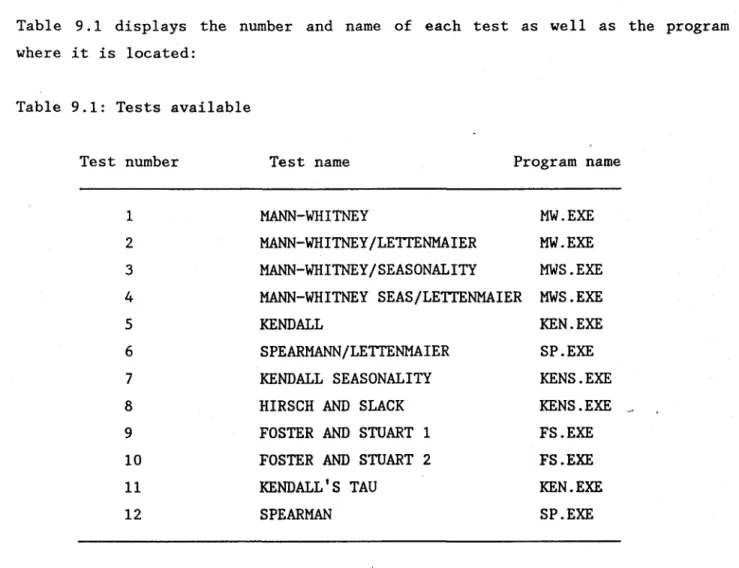
Twelve tests are available to the user. The majority of these tests are classic non-parametric tests modified so that they take into account seasonality and/or persistence. Six programs allow the different tests to be run on regrouped data so that each program runs the test for the case where persistence is present and a corresponding test where persistence is absent.
Table 9.1 displays the number and name of each test as well as the program where it is located:
Table 9.1: Tests available
Test number Test name Program name
1 MANN-WHITNEY MW.EXE
2 MANN-WHITNEY/LETTENMAIER MW.EXE
3 MANN-WHITNEY/SEASONALITY MWS.EXE
4 MANN-WHITNEY SEAS/LETTENMAIER MWS.EXE
5 KENDALL KEN.EXE
6 SPEARMANN/LETTENMAIER SP.EXE
7 KENDALL SEASONALITY KENS.EXE
8 HIRSCH AND SLACK KENS.EXE
-9 FOSTER AND STUART 1 FS.EXE
10 FOSTER AND STUART 2 FS.EXE
11 KENDALL' S TAU KEN.EXE
12 SPEARMAN SP.EXE
AlI the information on the construction and application of these tests is in the detailed methodological report of the programs. Technical specifications are presented for each.
10. Analysis summary (P6.EXE)
This program summarises aIl the results obtained for the series and presents, for the parametric tests, the dates of the changes, the levels of the parameter studied as weIl as the slopes of the trends.
GENERAL REMARKS CRITERIA ADJUSTMENT
Th~ criteria adjustment and the graphie study at the end of P6 allow the user to judge how weIl the trend model used (stepwise or monotonie) was suited to the data. The smaller the root mean square error (RMSE), the better the adjustment. The elimination of extreme values in P2 will generally reduce the RMSE, but should not be used for this purpose.
PARAMETRIC
vs.
NON-PARAMETRICAs the trend detection tests used in this software package are a11 non-parametric and the analyses in P6 are aIl non-parametric, there can occasionally be disagreement between results. In such cases, the presence of extreme values is usually the cause of the contradictory resul ts. The user can restart the program at P2 and eliminate the extreme values if agreement of the~results is desired. Such a phenomenon is possible because of the weak influence of outliers on non-parametric tests compared to parametric tests. It is always preferable to give more weight to the results obtained with the non-parametric results.
Several distinct outputs are available according to the presence of seasonality and the type of trend studied. AlI output in text mode is written to the screen and a file (SYNTHESE.P6) at the same time; each time it is run, results are appended to the end of this file.
The only difference between what is seen on the screen and what is written to the file SYNTHESE.P6 is the screen display of the graphs showing the quality of the adjustment for the type of trend ehosen (none, monotonie or stepwise). In the case where there is no trend, only the general mean is plotted as a straight line.
Il. NORM VIOLATION (P7.EXE AND P8.EXE)
This program studies the frequency, intensity and the duration of those values of a series (concentrations or mass-Ioadings) which exceed an environmental norm or regulation. It also allows the comparison of two sub-populations from the studied series. The definition of the two sub-populations can be determined after completion of the preceding program (DETECT) (before and after the first operation of a treatment plant, for example), or completely arbitrarily (recent data vs. old data, summer months vs. winter months, high-flow data vs. low-flow data). In any case, it is only necessary to run the preparation program Pl. Il.1 Definition of the sub-populations
The sub-populations are divided by boolean intersections according to dates (start-end), specific months or classes of discharge.
Il.2 Choice of a norm or threshold
Once the sub-populations are defined, the user must choose a norm or reference. Three norms are available:
a) A general or individual norm which should never be exceeded. It applies to each value of the populations used.
b) A monthly norm which is applied to the monthly means of the values used. c) An individual norm which can be exceeded once per month. It is applied to
each value of the populations used, the highest value, if exceeding the norm for each month, being eliminated.
11.3 Analysis
Once the form of the analysis has been chosen, the program calculates and prints the results for each sub-population (individual or monthly):
number of values present mean
standard deviation median
number of violations percentage of violations
A table then displays the statistics concerning the duration of the violations in each of the sub-populations:
duration of violation and associated frequency mean duration of the violations
associated standard deviation
A series of graphs is then displayed which compare the distributions and cumulative distributions of the two chosen populations. This is followed by graphs which compare the violations of each sub-population, with values which exceed the norm plotted relative to the chosen norm. Finally, a graph ~howning
the duration of successive violations is displayed.
As with program P6, program P7 writes the results of the analyses to a file. In this case, it writes to SYNTHESE.P7, and as before, each time the program is run, results are appended to the end of the file.
In addition, during the execution of P7, graphs are displayed on the screen, and will be printed if the user has selected this option in Pl.
READING OF C OR L
DO
noDISCHARGES
EXIST ?
ANALYSIS OF
0- CONCENTRATION
1- MASS-LOADING
---GRAPH
ON
PRINTER
no ? yes--
=
lGRAPH OF SERIES
VS.TIME
REJECT OF MAX
yes
AND/OR MIN AS
OUTLIERS ?
LEGEND
C= CONCENTRATIONS
L= MASS-LOADINGS
T= TIME
no 12
3 4 5 6 7 8 9 t. 8 8 1-7 9 -1DOUBLE-MASS
C
vsT
!
2
DOUBLE-MASS
L
vsT
!
3DOUBLE-MASS
C
vs Q!
4DOUBLE-MASS
L
vs Q!
5CUSUM
Q vsT
!
6CUSUM
C
vsT
!
7CUSUM
L
vsT
!
8'"
9 1STOP
1 12
3 4 .-5 6 71
FLOW CHART OF PROGRAM P3
l
- - - -
- - -1.---
- - - -
-..: - - -
- - -
--.
1
?
1 Jmru>OO? ID~
~=?
F
YEAR yes lSAIS=2
'J.RlN".A'.JE)? I---t 0,0,0 t-+ SUBROOT.INE -+ JN:NAB
ISAVE?
l
-mINEW
mERCDPOO:
00 )"eS )"eS ISM~=.l 1,1,12l
00 ISA\S =31
l
L-+I
~I
1rto,I,..,11
---+1--+Q
00 t 1 EXISTS ? f-+ 1Im~I----+
1_
11
1,1,12----+
1~~I~no~
lyes
./.
00 YaJ WANf TIIIS no
1
ŒlERM!N.m!N OF REEROOPOO ? - - + \\ORK INIERVALyes
./. CREATI<N OF a:.mF.SRNJOO INIERVAL 1 TABlE OF MISSOO VALUES PERSISIDΠSIUDY IPERS=1 RlD=plCHOICE OF THE
noTEST TO USE
DOUBLE-MASS
CURVE
1+
CUSUM
CURVE
1+
TREND TYPE?
STEPWISE OR MONOTONIC
1+
SERIES DIVISION ?
1 no+
SUGGESTED TEST
ACCORDING TO TYPE OF
END
TR
,P
ERSISTENCE
AND SEASONALITY
USE OF THE
APPROPRIATE TEST ?
!yeS ,j.WRITING OF
INFORMATION TO
IDENT.TMP FOR USE
BY TEST
1
STOP
yes
ASK FOR RANKS OR
DATES FOR
DIVISION
SEASONALITY
?yes
DISPLAY OF
~T'CTT
x s=1
s
... S
BEFORE AND
AFTER THE STEP
CT
s
5=1
... S
BEFORE AND
AFTER THE STEP
DISPLAY OF GENERAL
INFORHATION ABOUT THE
SERIES
HAS A TREND BEEN
noDETECTED BY THE TEST
? 1---+yes
STEPWISE TREND
HONOTONIC TREND
no
1
DISPLAY OF
~T'CTT
x ]BEFORE
CT
AND A
FTER
TEP
THE S
DISPLAY OF
- HEAN SLOPE
no- INITIAL AND
FINAL LEVELS
DISPLAY OF
~T'CTT
xS,CTs, s=1 ... S
t ouiDISPLAY OF
x
T andCT
TSEASONALITY
yes
DISPLAY OF
- MEAN SLOPE FOR .
THE GLOBAL
SERIES AND EACH
SEASON
- INITIAL AND
FINAL LEVELS
,J.~~---~
-xT = MEAN OF THE' GLOBAL SERIES
~T
= STANDARD DEVIATION
Xs = SEASONAL MEAN
CTs = SEASONAL STANDARD DEVIATION
S
= NUMBER OF SEASONS
CHOICE OF SUB-POPULATIONS
dates months discharges 1.t-CHOICE OF A NORM
individual monthlyonce per month
1