Science Arts & Métiers (SAM)
is an open access repository that collects the work of Arts et Métiers Institute of Technology researchers and makes it freely available over the web where possible.
This is an author-deposited version published in: https://sam.ensam.eu Handle ID: .http://hdl.handle.net/10985/9045
To cite this version :
Emilie LOUP-ESCANDE, Olivier CHRISTMANN, Romain DAMIANO, Franck HERNOUX, Simon RICHIR - Virtual reality learning software for individuals with intellectual disabilities: comparison between touchscreen and mouse interactions - In: International Conference on Disability, Virtual Reality and Associated Technologies (9; 2012; Laval), France, 2012-09-10 - International Conference on Disability, Virtual Reality and Associated Technologies - 2012
Any correspondence concerning this service should be sent to the repository Administrator : [email protected]
Virtual reality learning software for individuals with intellectual
disabilities: comparison between touchscreen and mouse interactions
E Loup-Escande, O Christmann, R Damiano, F Hernoux, S Richir
LAMPA, Arts et Métiers ParisTech,4 rue de l’Ermitage, Laval, FRANCE
{emilie.loup-escande;olivier.christmann;franck.hernoux;simon.richir}@ensam.eu [email protected]
ABSTRACT
The aim of this article is to analyze the impact of two user interfaces - a tactile interface and a computer mouse - on a virtual environment allowing self-learning tasks as dishwashing by workers with mental deficiencies. We carried out an experiment within the context of a design project named “Apticap”. The methods used were an experiment, an identification questionnaire and a post-experimentation interview, with six disabled workers. The results of this study demonstrate the interest of a virtual reality tool associated with a tactile interaction for learning of real tasks by workers with mental deficiencies.
1. INTRODUCTION
For populations with specific needs, it is currently accepted that patients suffering from mental pathologies can present important cognitive disorders which tend to reduce the efficiency of the general learning methods (Barch, 2009; Oppenheim-Gluckman et al, 2003). Nowadays most of practices for learning are built on a sequencing of the task to carry out in elementary sub-tasks (Lancioni and O’ Reilly, 2002): these actions are presented on pictograms (paper or computer) or in videos (for example, AbleLink products). Beyond these traditional tools, the use of virtual environments begins to spread. Their efficiency has been demonstrated on the criteria of an easier acquisition of skills in daily life and on the transfer to the real life (Cromby et al, 1996). Moreover, virtual environments are appreciated by individuals with mental disabilities and by those suffering from cognition disorders, which is likely to increase their motivation and becomes a factor of success (Davies et al, 2003). On the other hand, the current systems focus on the discovery of new environments (i.e. a railway station or a supermarket), but are seldom used to learn simple tasks (i.e. to make the coffee or to lay the table) (Cao et al, 2010). Computer-aided learning does not aim to replace teachers, but to assist them for the learning of “simple” tasks and give them more time for more complex ones, such as coaching. The advantages of such a tool for the learning of people presenting cognitive deficiencies are proved: it avoids the frustration of learners by allowing them to work at their own pace, without the critical look of the others (Standen and Brown, 2006). Moreover, it intensifies the motivation of learners and allows to test several jobs before choosing one, which it would be difficult to perform in real-world in terms of time (Standen et al, 2000).
That is the reason why it seems relevant to develop a tool using the technologies of virtual reality to assist the learning of workers with disabilities. The chosen interaction technique should be optimal in order to make the designed tool usable. A large body of research demonstrates the value of touchscreens for individuals without mental disabilities (Sears and Shneiderman, 1991; MacKenzie and Soukoreff, 2002). So, we assume that a touchscreen seems more adapted for individuals with mental disabilities, considering the progress of this technology. The objective of this study is to refute or validate this assumption.
The scientific objective of this paper is to compare two interaction techniques, a mouse and a touchscreen, for performing a washing dishes task in a virtual environment by individuals with intellectual deficiencies. Related to this objective, we try to assess that the “tactile” interface allows better performances and is better accepted than the “mouse” by individuals with mental disabilities when using a virtual environment dedicated to learning.
The article is organized in this way: in the second section, we describe the context of the experiments in the “Apticap” project. In the third section, we present the assumptions that underpin our research work, the
experimental protocol implemented in order to collect data as well as the method to analyze them. In the fourth section, we present the results obtained. To conclude, we put in perspective our results with our initial hypotheses and we compare them with the literature and we summarize the main elements of the study and highlight their limits before opening on research perspectives.
2. THE APTICAP PROJECT
This design project aims to develop virtual reality tools for vocational guidance and learning of disabled workers in ESAT. We developed virtual reality software which enables individuals with mental disabilities to learn the dishwashing activity in a semi-autonomous way. It would thus replace the common techniques used in ESAT (i.e. learning through oral repetition or videos and pictograms) which have a limited efficiency according to the monitors and the technical educators.
Two kinds of users are concerned with this tool, as they will interact with the software to complete their work (Darses, 2004): disabled workers (i.e., people having limited intellectual abilities) and professionals (i.e., monitors and educators). This explains why the software presents two menus:
• Worker menu. It enables the users to identify themselves via their own pictures and to access the
various activities proposed.
• Educator menu. It is accessible via a password, enables the educators to access all workers profiles
and to follow-up their results for the several activities.
The implemented activity of dishwashing (the washing-up) is broken up into three tasks corresponding to procedures really applied in ESAT.
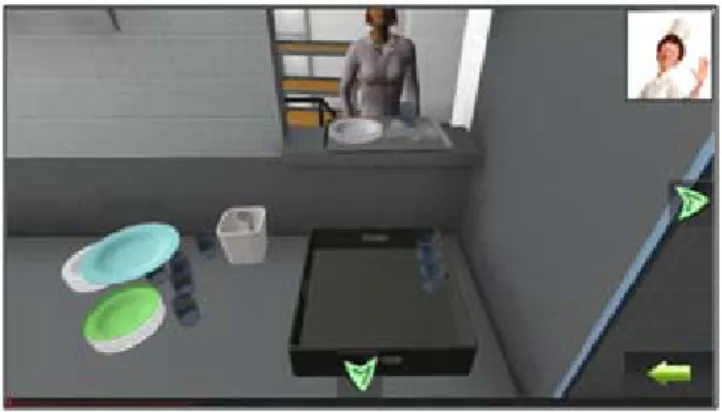
The first task is to receive the dirty dishes (plates, glasses and cutlery). Specifically, the user begins by choosing the correct basket for the task. Then the dishes are brought by an avatar: the user has to pile up the plates, store glasses in the basket, place the cutlery in a small basket and then place this small basket in the large one.
Figure 1. Reception of dirty dishes.
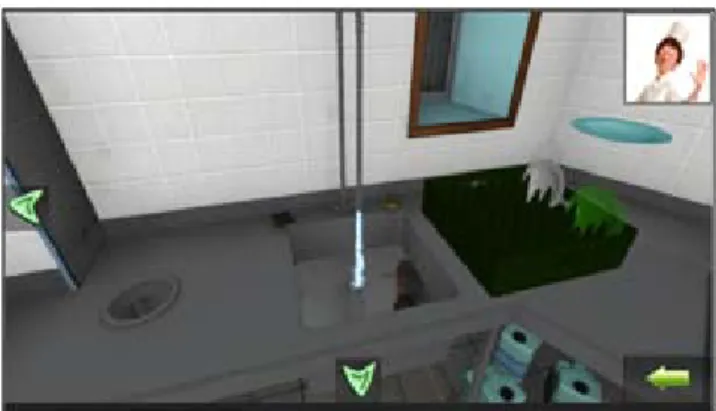
The second task corresponds to the rinsing out of the dirty dishes, especially plates. Concretely, dirty plates are placed on the right of the sink and the user has to open the tap and rinse the plates.
Figure 2. Rinsing out of the dirty dishes.
Figure 3. Putting away of the rinsed dishes into baskets.
Beyond these tasks, the tool enables the user to visit the kitchens in a first person perspective and to watch several educational videos related with the tasks of dishwashing (i.e., to rinse the plates). First person view means that the visual sight angle simulates the vision field of the user.
3. METHODS
3.1 Experimental assumptionsThe scientific objective is to compare two different user interfaces, a mouse and a touchscreen, for performing a washing dishes task in a virtual environment by individuals with intellectual deficiencies. Related to this objective, we make the following hypothesis: “Tactile” interface allows better performances
and is better accepted than the “mouse” by individuals with mental disabilities when using a virtual environment dedicated to learning.
This hypothesis connects an independent variable (i.e. interaction mode) and two dependant variables (i.e. performance and acceptability). The independent variable “interaction mode” has two forms: touchscreen and mouse. The dependant variable “performance” is measured by a temporal indicator (in seconds). The dependant variable “acceptability” is measured by two indicators: feelings about ease of use, feelings about pleasure.
Therefore we make the following operational hypotheses:
• h1. Individuals with mental disabilities have better performances with the touchscreen than with the
mouse.
• h2. The touchscreen is better accepted. It is perceived as easier to use and more convenient by
individuals with mental disabilities than the mouse.
3.2 Experimental protocol
3.2.1 Participants. This study implied six participants (2 women and 4 men) who suffer from a congenital
mental deficiency. The participants were on average 26.3 years old (S.D. = 4.4 years; Min = 21; Max = 32) and have 5.3 years of work experience (S.D. = 4.1 years; Min = 1; Max = 13). We mean by “work experience”, the number of years of practice of the dishwashing activity at the ESAT.
3.2.2 Material. We used the following material:
• a DELL XPS 430 PC (Intel Core 2 Quad 2.83 GHz, 4 Go of RAM, ATI Radeon 3870 X2) with the
APTICAP tool as support of the experiment;
• a mouse with optical technology and a 22’’ touch screen (Iiyama ProLite T2250MTS-B1) which
correspond to the two interaction modes;
• a voice recorder (Olympus VN-5500PC) to record the answers of the interviewees;
• an identification guide containing all questions to characterize the participants (i.e., how old are
you?, how long have you worked with the ESAT?, and so on) and questions linked with the washing tasks (i.e., have you ever performed dishwashing activities?, which task are you doing when you are washing the dishes?, and so on);
• an observation grid centered on temporal performances and participants’ comments during the
• post-experimentation questions to collect all participants’ judgments and preferences for each
interaction mode (i.e., which interaction mode did you prefer?, which one did you find most pleasant? and so on) and to help them to imagine their future use of the tool (i.e., which one would you choose to work during a long time?, would you be ready to use this application alone?, and so on);
• a basket and five plates in order to demonstrate the real task.
3.2.3 Procedure. We carried out an identification interview of each participant before the experiment. The
experiment was composed of several steps. After giving the instructions to the participant (to carry out the task with the two user interfaces) we demonstrated how to put away five plates in a basket firstly in reality and secondly in the virtual environment. Then, we let the participant familiarize himself with the software and the task to perform, during one minute. Finally, the participant performed the task into the virtual environment. The test was repeated twice for each interaction mode. The presentation order was counterbalanced (i.e. we alternate the presentation order after each participant). Then, we interviewed the participant on his perception of each interaction mode and more generally on the APTICAP tool.
3.2.4 Experimental conditions. Interviews and experiments were performed in two rooms of the ESAT; these
rooms were isolated from other workers and parasitical factors (eg., noise). The participants performed the experiments during their work hours. So, we took a particular care to take away the 2 workers simultaneously present.
Three people were simultaneously present in the first room for experiment:
• Experimenter. He presented the “Apticap” tool and explained the instructions to participants.
• Observer. He reported times and comments.
• Disabled worker. He was interviewed.
Three people were simultaneously present in the second room for interviews: • Interviewer. He carried out the interviews.
• Educator. He helped the interviewer to rephrase questions according to the answers and attitudes of
the interviewees.
• Disabled worker. He performed the experiment.
3.2.5 Collected data. Two data types were collected: times and verbalizations. We recorded execution times
for the two attempts with each interaction mode and for the six participants. Comments were the 54 answers to binary type questions (i.e. mouse or touchscreen): each participant gave 9 answers on average; some participants were not able to answer all questions. It also could be justifications and suggestions although these last ones were very rare because of the interviewed population.
3.3 Analysis method
Concerning the performances analysis, we used the traditional descriptive statistics for the execution time (i.e. average, deviation, minimum, maximum) to compare the two interfaces. When it was possible, we also carried out a simple statistical analysis based on the Student t-test for paired samples. More qualitatively, we then verified if the tendency were confirmed for each of the six participants and if there were or not improvement (i.e. time saving) between the two attempts for each interaction mode.
Concerning the analysis of the post-experimentation interviews which was focused on preferences and subjective judgements concerning the two interaction modes, we counted the frequencies for each user interface evoked for each question. The qualitative analysis aimed to find the favourite interface for each participant, to know why, thanks to the answers to the other questions (ease of use, convenience, fidelity compared to the real task) and to analyze how participants would use it in the future (alone or guided by a educator, and so on).
Finally, we confronted the performances and the preferences of each answers of the participants for each of them to establish a qualitative relation between these two criteria.
4. RESULTS
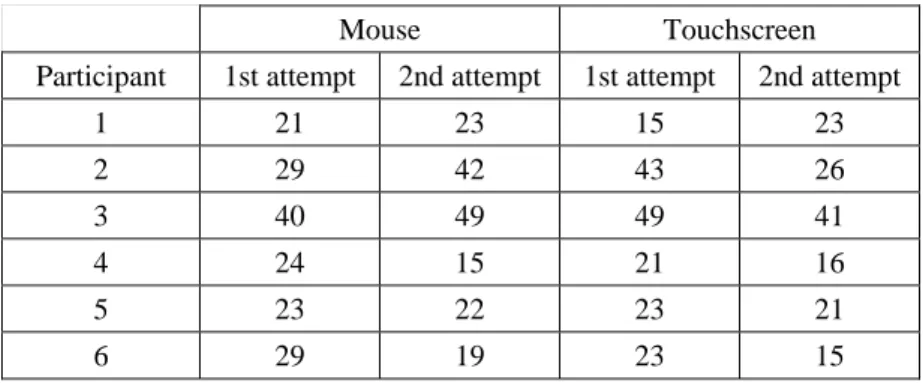
Table 1 presents raw data corresponding to the time required to complete the task, for each interaction mode (touchscreen vs. mouse) and each attempt, for the six participants. These data will be used in the following sections presenting the main results.
Table 1. Execution time (in seconds), for each participant and each attempt.
Mouse Touchscreen
Participant 1st attempt 2nd attempt 1st attempt 2nd attempt
1 21 23 15 23 2 29 42 43 26 3 40 49 49 41 4 24 15 21 16 5 23 22 23 21 6 29 19 23 15
4.1 Participants were faster with the touchscreen than with the mouse
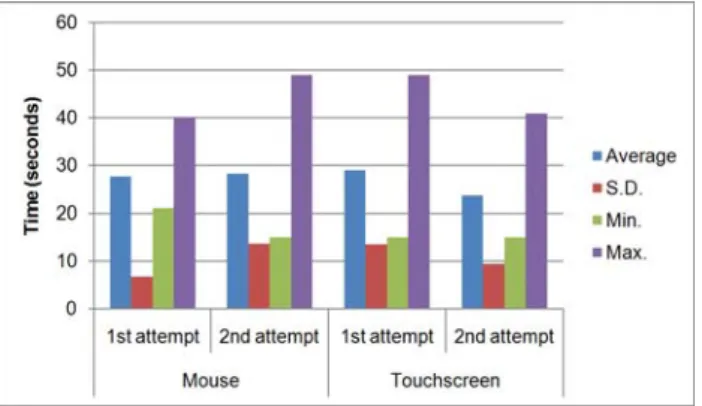
When considering the twelve attempts (two attempts per participant) for each interaction mode (see Figure 4), we observe that participants performed the task slightly more quickly with the touchscreen (mean = 26.3; S.D. = 11.0) than with the mouse (mean = 28, S.D. = 9.8), although extreme data are identical in both cases (min = 15 seconds, max = 49 sec). Averages values (considering the two attempts) for each participant and each interaction mode are presented in Table 2.
Figure 4. Indicators (average time, minimum, maximum and S.D.) for the mouse and the touchscreen. Table 2. Average times of each participant for each interaction mode.
Participant Mouse Touchscreen
1 22 19 2 35,5 34,5 3 44,5 45 4 19,5 18,5 5 22,5 22 6 24 19
Qualitatively, we observe that two participants out of six (participants 1 and 6) were significantly faster with the touchscreen, considering a difference of execution time greater than 15%. For three of the remaining participants, execution times were only slightly lower with the touchscreen (participants 2, 4 and 5). Finally, one participant (participant 3) performed better with the mouse, although the execution time was very close to the one obtained with the mouse (44.5 vs. 45 seconds). A statistical analysis based on a Student t-test for paired data confirms these results: we observe a trend (t = 2.050, p < 0096) which should be confirmed or invalidated with more participants.
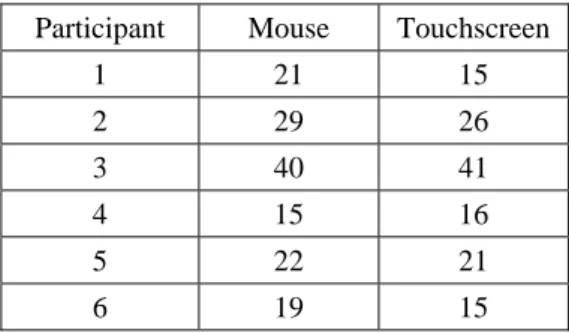
As detailed in the next subsection and illustrated in Table 1, the execution time for each participants vary from the first attempt to the second one. Contrary to our expectations, an improvement is not systematically observed. Consequently, we have completed our performance analysis by considering the best attempt (in terms of execution time) with each interaction mode, for each participant (Table 3).
Table 3. Best execution time (in seconds) with each interaction mode for each participant.
Participant Mouse Touchscreen
1 21 15 2 29 26 3 40 41 4 15 16 5 22 21 6 19 15
The average execution time is equal to 24.3 seconds for the mouse (S.D. = 8.9) against 22.3 seconds for the touchscreen (S.D. = 10.1), which represents a slight gain for the mouse. A Student paired t-test does not give any significant difference between the two interaction modes (t = 1.732, p < 0.144).
4.2 A more important speed gain with the touchscreen than with the mouse
To study the participants’ progresses between the two attempts with the two interaction modes, we compute differences between execution times of each attempt. Results are summarized in Table 4.
Table 4. Differences between execution times of each attempt (2nd attempt – 1st attempt) for
each participant and each interaction mode.
Participant Mouse Touchscreen
1 2 8 2 13 -17 3 9 -8 4 -9 -5 5 -1 -2 6 -10 -8
If we consider the two attempts independently for each interaction mode (Figure 5), we observe a better progress with the touchscreen than with the mouse, regarding execution times. Indeed, the touchscreen allows to save five seconds in average (first attempt: average = 29 s, S.D. = 14 s / second attempt: average = 24 s, S.D. = 9 s) for the first attempt to the second one, when average execution times for the two attempts are similar with the mouse (first attempt: average = 28 s, S.D. = 7 s / second attempt: average = 28 s, S.D. = 14 s).
As presented in Table 4, the trend indicating that the touchscreen allows to reduce the execution time between two attempts is confirmed for five people (participants 2 to 6). Like for the mouse, only three participants are faster during their second attempt (participants 1, 2 and 3). When participants saved time between the two attempts, the difference with the mouse is higher than with the mouse for two participants (participants 4 and 6) and lower for the participant 5.
4.3 The touchscreen is perceived as easier and more pleasant than the mouse
The analysis post-experimentation interviews regarding the perceptions of the two interaction modes shows that four participants (participants 1, 2, 3 and 4) prefer the touchscreen and two like “both of them” (participants 5 and 6).
The participants who preferred the touchscreen gave the following explanations: • It’s easier than the mouse (participant 1);
• It is more pleasant with the touchscreen but easier with the mouse (participants 2 and 3); • It is easier and more pleasant than the mouse (participant 4).
Concerning the participants who had no preference for one interaction mode or the other, one participant said that the handling was easier and more enjoyable with the touchscreen than with the mouse (participant 6);
conversely, another participant said it was not used to “touch the screen” but that the two interaction modes were easy (participant 5).
Figure 5. Progress between two attempts for each interaction mode.
4.4 An anticipation of the future use of “Apticap”: training himself using tactile interaction
Five out of six participants were able to answer to post-experimentations questions concerning the use of “Apticap”.
Four out these five participants said they would choose the touchscreen for a long-term use of the “Apticap” (participants 2, 4, 5 and 6). Questioned about the using conditions (alone or with a monitor), three answered that they would prefer to use the application with the monitor before using it alone (participants 3, 4 and 5); two said they could use the tool alone from the outset (participants 2 and 6). Ultimately, five out of six participants think they can use the software alone.
When asked about their preference for learning tasks in the real kitchen or with “Apticap”, two participants said it was better in real conditions (participants 3 and 5); two participants preferred to learn with the virtual reality software (participants 2 and 4). A person (participant 6) was not able to answer to this question.
4.5 Lack of coherence between performances and subjective judgments
One participant (participant 6), who had no preferences for an interaction mode but who judged the touchscreen easier and more enjoyable than the mouse, performed better with the touchscreen (19 seconds vs. 24).
One participant (participant 1) obtained better performances with the touchscreen (19 seconds vs. 22) and preferred this interaction mode.
Finally, among the four participants who had similar performances between the two interaction modes, three indicated a preference for the touchscreen (participants 2, 3 and 4) and one participant (participant 5) expressed no preference for one or the other interaction mode.
These results highlight an absence of link between the performance obtained with both modes of interaction and the subjective preferences expressed towards them.
5. CONCLUSION
Our results confirm but qualify the h1 hypothesis which stated that “individuals with mental disabilities have better performances (i.e. are faster) with the touchscreen than with the mouse”; these results are in agreement with other research works concluding that the mouse is less efficient than other interaction methods without any “moderator”. We show indeed that h1 hypothesis is true for two participants but is neither confirmed nor invalidated for four participants who got similar executions between the interaction modes. Nevertheless, the statistical analysis indicates a trend in the same lines as h1. Among cases where the hypothesis is confirmed, we observed inter-individual differences of average execution times between the two interaction modes (from 0.5 seconds to 5 seconds). We also noticed intra-individual variability between two attempts for a same interaction mode: for example, a participant performed the task with the touchscreen in 43 seconds in his first attempt, then in 26 seconds in the second one. Beyond the temporal performances, our results show an important inter-individual variability in terms of time saving between two successive attempts: for example,
with the touchscreen, we observed a gain of 2 seconds for a participant and 17 seconds for another. Furthermore, our results show that the gain was higher with the touchscreen. However, it is surprising that the second attempt allowed improved performances for 5 of the 6 participants with the touchscreen, when performances are weaker with the mouse for three participants. It remains difficult to draw a conclusion on these results by considering only 2 attempts, especially as the participants had difficulties to verbalize their actions and explain their behaviour. Nevertheless, it seems that the touchscreen allows better maintenance of the participant’s performances. Thus, we can answer to h1: “on the whole, persons with mental disabilities have better performances, that is to say they are faster and save more time between two attempts than with the touchscreen than with the mouse”.
Our results partly confirm the h2 hypothesis which stated that “the touchscreen is more accepted, i.e. that it is perceived as easier to use and more convenient than the mouse for individuals with mental disabilities”. The results of the literature about the superiority of the touchscreen compared to the mouse shows that touchscreens require little or no learning and they are faster and more accurate than mice (Douglas and Mithal, 1997). In others words, touchscreen seems more acceptable than mouse, if we consider that usability (i.e. artefact is easy to learn and use) has an effect on the system acceptability (Davis, 1989; Brangier, 2009). Thus, four participants preferred the touchscreen and two participants did not express any preference for either interaction modes. However, among the four participants who preferred the touchscreen, the reasons given diverge: one of them found it easier than the mouse, two others consider the touchscreen more enjoyable, and finally a last participant gave both these two reasons. As for h1, we are able to answer to h2: “on the whole, touchscreen is more accepted, that is to say it is perceived easier or more enjoyable to use than the mouse by individuals with mental disabilities”.
Finally, there is a lack of coherence between the performances measures of the participants and their qualitative judgments. Out of the two participants who were faster with the touchscreen, one preferred this mode of interaction when the latter expressed no preference. Out of the four other participants who obtained similar performances between the two interaction modes, three preferred the touchscreen and one expressed no preference.
These elements validate the general hypothesis, with a slight difference; “touchscreen allows better performances and is better accepted than the mouse by individuals with mental disabilities when using a virtual environment dedicated to learning”. Indeed, if we got sometimes very close performances or unmarked preferences for any of the two interaction modes, the mouse is never superior to the touchscreen, either considering performances or acceptability. These results lead us to affirm the interest of a tactile interaction mode for learning tasks in virtual environments by individuals with intellectual deficiencies. They provide further confirmation of the potential of tactile interaction for specific populations. However, it remains to put to these results to the test other kinds of learning tasks.
However, the limitation of the study presented in this article concerns the number of participants with mental disabilities involved in the experiment. The main reason is the number of positives responses to our requests, due to the low availability of workers with mental disabilities. Therefore, the results of this study are tendencies that we have to confirm and to examine further. The low number of participants is a quite recurrent problem in experiments which involved person with disabilities (Klinger et al, 2006; Cardoso et al, 2006; Lee et al, 2003). However, we must emphasize that the results of this study are in line with the literature, which is encouraging. In practical terms, we should include more participants with intellectual disabilities in the experiments. It would also be necessary to widen the profile of the participants by adding individuals with physical disabilities and people with behavioural problems, with the same experimental conditions as workers with intellectual disabilities.
Moreover, a second perspective would be to conduct experiments with the same experimental design, but applied to other tasks of the dishwashing (e.g., receipting the dirty dishes, ...) or to other activities (e.g., room service, laundry).
Acknowledgements: Special thanks to the ESAT who has been partner in this project, and in particular to
the disabled workers and the professionals who contributed to this experimental study.
6. REFERENCES
D M Barch (2009), Cognitive Dysfunction in Psychiatric Disorders, In Encyclopaedia of Neuroscience, pp. 1111-1116.
E Brangier, S Hammes-Adelé and J M C Bastien (2010), Analyse critique des approches de l’acceptation des technologies : de l’utilisabilité à la symbiose humain-technologie-organisation, Revue Européenne de
Psychologie Appliquée, 60, pp. 129-146.
X Cao, A S Douguet, P Fuchs and E Klinger (2010), Designing an ecological virtual task in the context of executive functions: preliminary study, Proc. of 8th Intl. Conf. on Disability, Virtual Reality and Assoc.
Technologies, pp. 71-77.
L S Cardoso, R Da Costa, A Piovesana, M Costa, L Penna, A C Crispin, J Carvalho, H Ferreira, M L Lopes, G Brandao and R Mouta (2006), Using virtual environments for stroke rehabilitation, Proc. 5th Intl
Workshop on Virtual Reality Rehabilitation, pp. 1-5.
J J Cromby, P J Standen and D J Brown (1996), The potentials of virtual environments in the education and training of people with learning disabilities, J. Intell. Disabil. Res., 40, pp. 489-501.
F Darses (2004), La conception participative : vers une théorie de la conception centrée sur l’établissement d’une intelligibilité mutuelle. In Le consommateur au cœur de l’innovation : la conception participative (J Caelen & P Mallein, Eds), Editions du CNRS, Paris, pp. 25-41.
F D Davis (1989), Perceived usefulness, perceived ease of use, and user acceptance of information technology, MIS Quarterly ,13, pp. 319-340.
D K Davies, S E Stock and M L Wehmeyer (2003), Application of computer simulation to teach ATM access to individuals with intellectual disabilities, Educ. Train. Dev. Disabil., 38, pp. 451-456.
S Douglas and A Mithal (1997), The ergonomics of computer pointing devices, Springer-Verlag, New York. J Kjeldskov (2003), Human-computer interaction design for emerging technologies: virtual reality,
augmented reality and mobile computer systems, PhD Thesis, Aalborg University.
E Klinger, I Chemin, S Lebreton and R M Marie (2006), Virtual action planning in Parkinson’s disease: a control study, Cyberpsychol. Behav., 9, pp. 342-347.
G E Lancioni and M F O’Reilly (2002), Teaching food preparation skills to people with intellectual disabilities: a literature overview, J. Appl. Res. Intellect. Disabil., 15, pp. 236-253.
J H Lee, J Ku, W Cho, W Y Hahn, I Y Kim, S M Lee, Y Kang, D Y Kim, T Yu, B K Wiederhold, M D Wiederhold and S I Kim (2003), A virtual reality system for the assessment and rehabilitation of the activities of daily living, Cyberpsychol. Behav., 6, pp. 383-388.
C E Loeffler and T Anderson (1994), The virtual reality casebook, John Wiley & Sons, New York.
S MacKenzie and R Soukoreff (2002), Text entry for mobile computing: models and methods, theory and practice, Int. J. Hum-Comput. Int., 17, pp. 147-198.
H Oppenheim-Gluckman, P Fayol, P Collasson, J J Dumond and P Azouvi (2003), Psychopathologie de la méconnaissance des troubles cognitifs et comportementaux des traumatisés crâniens sévères, Annales de
Réadaptation et de Médecine Physique, 46, pp. 41-48.
J Piaget and N Chomsky (1979), Théories du langage, théories de l’apprentissage, Seuil, Paris.
A Sears and B Shneiderman (1991), High Precision Touchscreens: Design Strategies and Comparison with a Mouse, Int. J. Man-Machine Studies, 43, pp. 593-613.
P Standen, D Brown, R Blake and T Proctor (2000), Effective strategies of tutors teaching adults with learning disabilities to use virtual environments, Proc. Intl. Conf. on Disability, Virtual Reality and Assoc.
Technologies, Reading, UK.
P J Standen and D J Brown (2006), Virtual reality and its role in removing the barriers that turn cognitive impairments into intellectual disability, Virtual Reality, 10, pp. 241-252.
S E Stock, D K Davies, R R Secor and M L Wehmeyer (2003), Self-directed career preference selection for individuals with intellectual disabilities: using computer technology to enhance self-determination, J.